
SOCKS5 vs HTTPS Proxies & Protocols Guide (2026)
You're shopping for proxies. The provider lists HTTP, HTTPS, and SOCKS5 options side by side. Prices look similar. Descriptions sound almost identical. And most wonder if this choice actually matters?
It does more than most people realise.
Pick the wrong protocol and your scraping tool starts returning errors. Your automation script gets flagged within an hour. Your gaming drops packets. Your streaming buffers. Pick the right one and the whole thing just works, quietly, reliably, without you thinking about it again.
This guide is written for everyone: beginners who want a plain-English explanation, practitioners who need help choosing a specific workflow, and developers who want implementation depth.
What's a proxy protocol: The 30-second explanation
A proxy protocol is simply the agreed-upon rulebook for how your device talks to a proxy server, and how that proxy server talks to the internet on your behalf. It determines what kinds of data can travel over the connection, whether that data is inspected or passed through, and how both sides authenticate each other.
Different protocols were built for different jobs. Some were designed specifically for web browsing. Others were built to handle any kind of internet traffic. Understanding that fundamental difference is 80% of what you need to make the right choice.
What about HTTP proxies: Here's where they fit
Most comparisons jump straight to HTTPS vs. SOCKS5, skipping HTTP entirely. That's a problem because many people searching for this topic are actually confused about three protocols rather than two.
HTTP proxies are the original web proxy format. They handle standard, unencrypted web traffic, requests that start with http:// rather than https://. They understand HTTP headers, can read and modify request content, and can cache pages to speed up repeated requests.[MDN's HTTP protocol overview]
The significant limitation: HTTP proxies don't encrypt the connection between you and the proxy server. The traffic travels in plain text. For anything beyond public web browsing where you're not handling sensitive data, this often doesn't matter. But for any task involving credentials, personal data, or private content, it's a real concern.
Here's the simple version of where all three protocols sit:
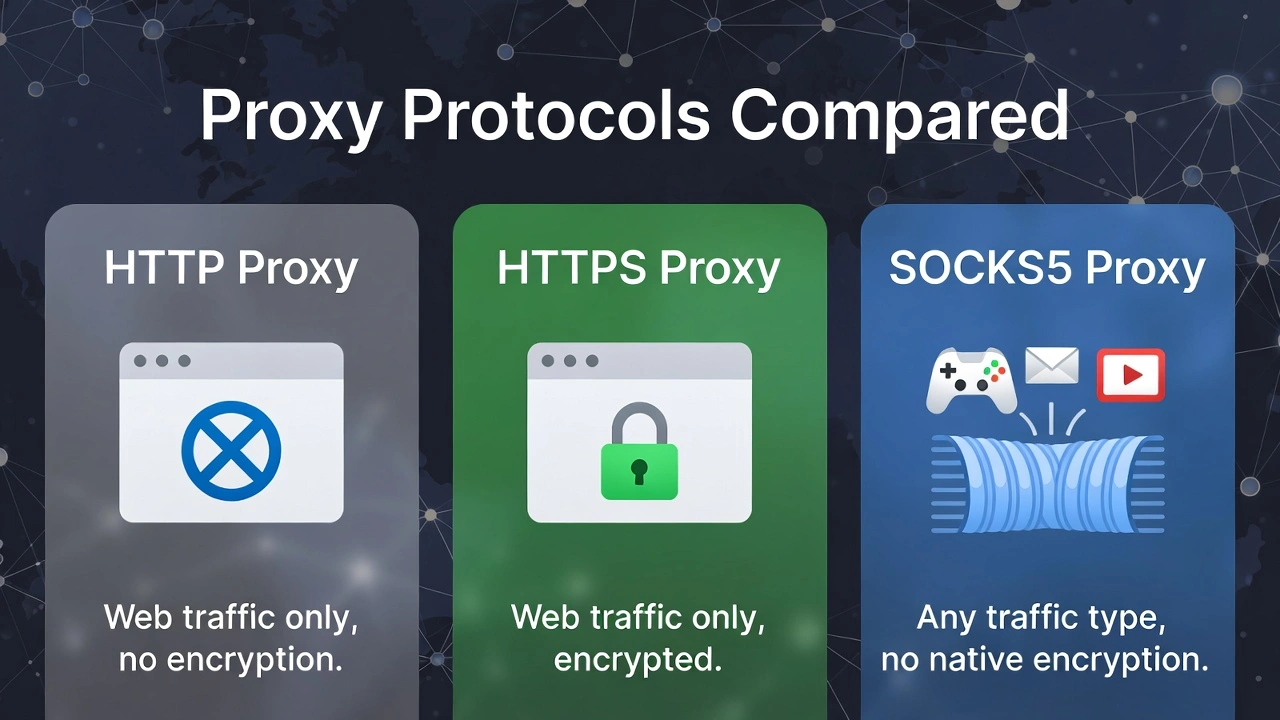
HTTP — web traffic only, no encryption, reads and interprets content
HTTPS — web traffic only, encrypted connection, reads and interprets content
SOCKS5 — any traffic type, no native encryption, pure pass-through
When people say "HTTPS proxy," they almost always mean an HTTP proxy that supports TLS-encrypted connections; the underlying mechanism is the same, the “S” just adds the encryption layer. Keep that in mind as we go deeper.
What is an HTTPS proxy
An HTTPS proxy operates at the application layer of the network stack, meaning it was specifically designed to understand web traffic. It doesn't just move data from A to B. It actually reads the HTTP headers, understands the request structure, and can interact with web content in ways that lower-level protocols can't.
How do HTTPS proxies work
When you send a request through an HTTPS proxy, your browser formats it as an HTTP request, sends it to the proxy, and the proxy forwards it to the destination web server. The destination sees the proxy's IP address, not yours.
For HTTPS connections specifically, the proxy uses a mechanism called CONNECT tunnelling, your browser tells the proxy "open a tunnel to this destination," and the proxy creates that tunnel. At the same time, the actual encrypted content passes through it. This is how modern HTTPS proxies handle secure sites without breaking the encryption.
What does the encryption layer actually give you
The TLS encryption in an HTTPS proxy protects the connection between you and the proxy server. This means anyone monitoring network traffic between your device and the proxy can't read what you're sending. Once data reaches the proxy and is forwarded to the destination, it's subject to that destination's security.[Transport Layer Security (TLS) documentation]
For web scraping, account management, and any task involving login credentials or payment information, that encryption layer matters. For bulk data collection on public pages where sensitivity isn't a concern, it's a nice-to-have rather than a necessity.
What do HTTPS proxies handle best
Web scraping — native HTTP header awareness means better compatibility with sites that inspect request formatting
Social media account management — stable sessions that behave like real browser traffic
Accessing geo-restricted web content — swap apparent location without changing anything system-wide
Secure web transactions — the encryption layer protects credentials in transit
Content filtering and caching — useful for teams managing shared browsing environments
“The honest limitation worth stating clearly: HTTPS proxies are limited to web traffic. The moment your application uses a protocol other than HTTP or HTTPS, an HTTPS proxy can't handle it. This isn't a quality issue; it's an architectural one. The proxy was built specifically for web requests and nothing else.”
What is a SOCKS5 proxy
SOCKS5 is a fundamentally different type of proxy, and understanding why it's different is what makes the protocol choice obvious for most use cases.[SOCKS5 protocol specification (RFC 1928)]
The core difference: It doesn't care what you're sending
SOCKS stands for Socket Secure, and that name reflects how it works. A SOCKS5 proxy operates at the session layer, a level below where application-specific protocols like HTTP live. This means it doesn't know or care what kind of data it's handling. It creates a tunnel, and data flows through that tunnel without the proxy inspecting, interpreting, or modifying any of it.
The analogy that actually works:
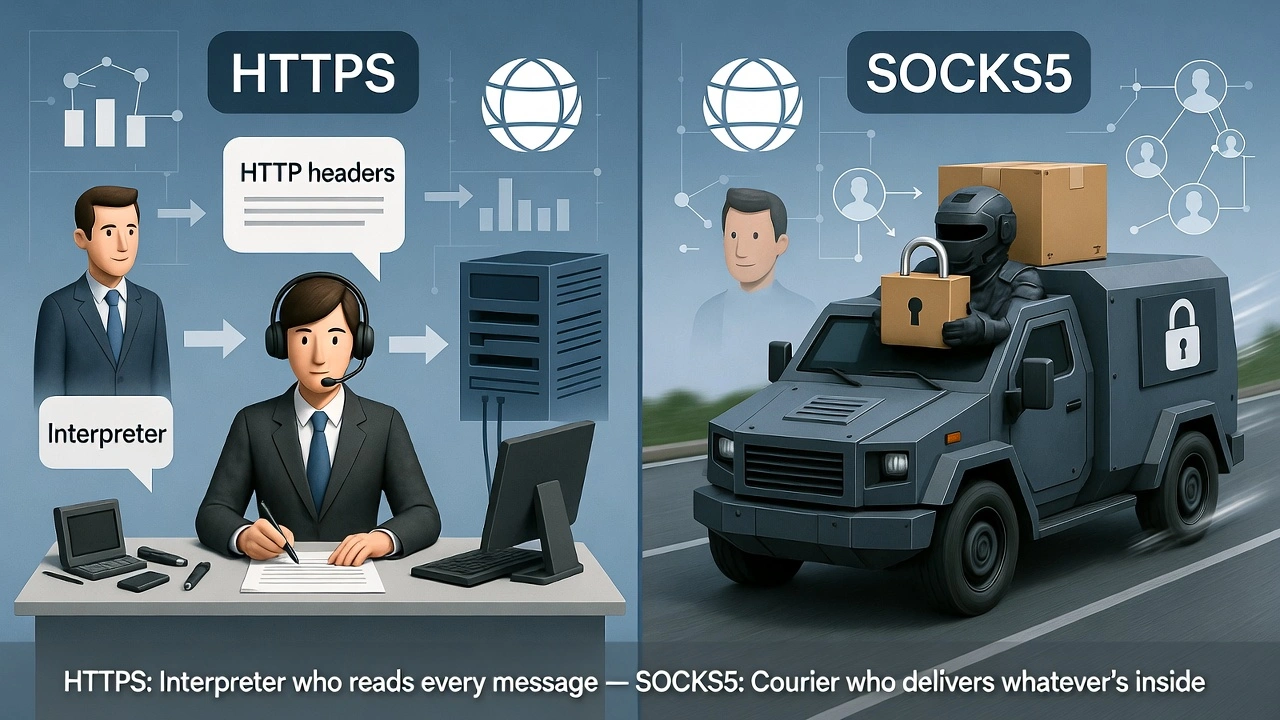
“An HTTPS proxy is like a bilingual interpreter who reads every message, translates it, and forwards it appropriately. A SOCKS5 proxy is like a sealed courier service; it picks up the package, delivers it, and has no idea what's inside. The first approach gives you more control over web content. The second approach works for absolutely any package regardless of what's in it.”
Improvements on SOCKS5 over earlier versions
SOCKS4 was capable but limited. SOCKS5 made several meaningful improvements that explain why it became the standard:
Username and password authentication: connections can require credentials, adding access control
Full UDP support: critical for real-time applications, and something SOCKS4 couldn't do at all
IPv6 compatibility: handles modern IP addressing that SOCKS4 wasn't built for
Remote DNS resolution: via the SOCKS5h variant, DNS queries go through the proxy too, preventing location leaks
What do SOCKS5 proxies handle best
Because SOCKS5 is protocol-agnostic, it works across the full range of internet applications:
Gaming: UDP support and low latency make it the only viable proxy option for competitive play
Video and audio streaming: handles continuous high-volume data flows without the overhead of content inspection
Email clients: SMTP, IMAP, and POP3 all route cleanly through SOCKS5
FTP and file transfers: any data transfer application works without modification
Torrent clients: SOCKS5 is the near-universal recommendation for privacy-conscious torrenting
Bypassing restrictive firewalls: the protocol's versatility makes it harder for network filters to identify and block effectively
Custom application development: anything making non-HTTP network connections
“The honest limitation: SOCKS5 doesn't encrypt traffic on its own. The tunnel passes data through as-is. We'll cover exactly how to handle this in the encryption section below. It's a solvable problem, just not one the protocol handles automatically.”
SOCKS5 vs. HTTPS: The full side-by-side comparison
Here's everything in one place. The sections below unpack the rows that matter most.
Feature | HTTP Proxy | HTTPS Proxy | SOCKS5 Proxy |
Protocol level | Application layer | Application layer | Session layer |
Traffic types | Web (HTTP) only | Web (HTTP/HTTPS) only | Any TCP/UDP traffic |
Data handling | Reads and modifies | Reads, encrypts, modifies | Pure pass-through |
Built-in encryption | None | TLS encryption | None by default |
Speed | Moderate | Slightly slower than HTTP | Fastest, no parsing |
UDP support | No | No | Yes |
Authentication | Basic Auth | Basic Auth | Username/password |
DNS leak protection | Partial | Handled naturally | Via SOCKS5h variant |
Web scraping | Good | Excellent | Good |
Gaming / Streaming | Won't work | Won't work | Excellent |
Email / FTP / Torrents | No | No | Yes |
App-level control | High | High | None |
Setup complexity | Low | Low | Low–Medium |
Best for | Basic web tasks | Secure web tasks | Everything else |
The differences that actually matter in real use
The table tells you what's true. This section tells you what it means for your actual workflow.
Traffic scope: Web only vs. genuinely everything
If your entire workflow is web-based, scraping websites, managing social accounts, checking geo-restricted content, testing web applications, HTTPS proxies are purpose-built for exactly this. Their web-awareness, header handling, content inspection capability, and natural DNS handling are all tuned specifically for HTTP traffic.
But the second you step outside web traffic, HTTPS proxies stop working. Email uses SMTP. Gaming servers use custom UDP-based protocols. FTP has its own connection model. These aren't protocols that an HTTPS proxy can handle; they're simply outside its architectural scope.
“SOCKS5 handles all of them. The reason is that it doesn't need to understand what it's carrying. It just carries it. Any protocol, any application, any traffic type, SOCKS5 routes it without needing to know what it is.”
What encryption does each protocol provide
HTTPS proxies: encrypt the connection between you and the proxy server using TLS. This protects data in transit from your device to the proxy, meaning anyone intercepting your local network traffic can't read what you're sending. This is real, meaningful security that matters for any task involving credentials or sensitive content.
SOCKS5: provides no encryption by default. The tunnel passes data as-is. If you're connecting to an HTTPS website through a SOCKS5 proxy, the connection from the proxy to that website is encrypted by the website's own TLS, but the connection from your device to the proxy is not.
“For bulk scraping of public data, it doesn't matter; the data isn't sensitive regardless. For any task involving login credentials, private communications, or financial information, yes, you should add encryption on top of your SOCKS5 connection. The next section covers exactly how to do that.”
Speed: The real performance picture
Both protocols route your traffic through an intermediate server, which adds some latency compared to a direct connection. That's unavoidable. The question is which protocol adds less overhead.
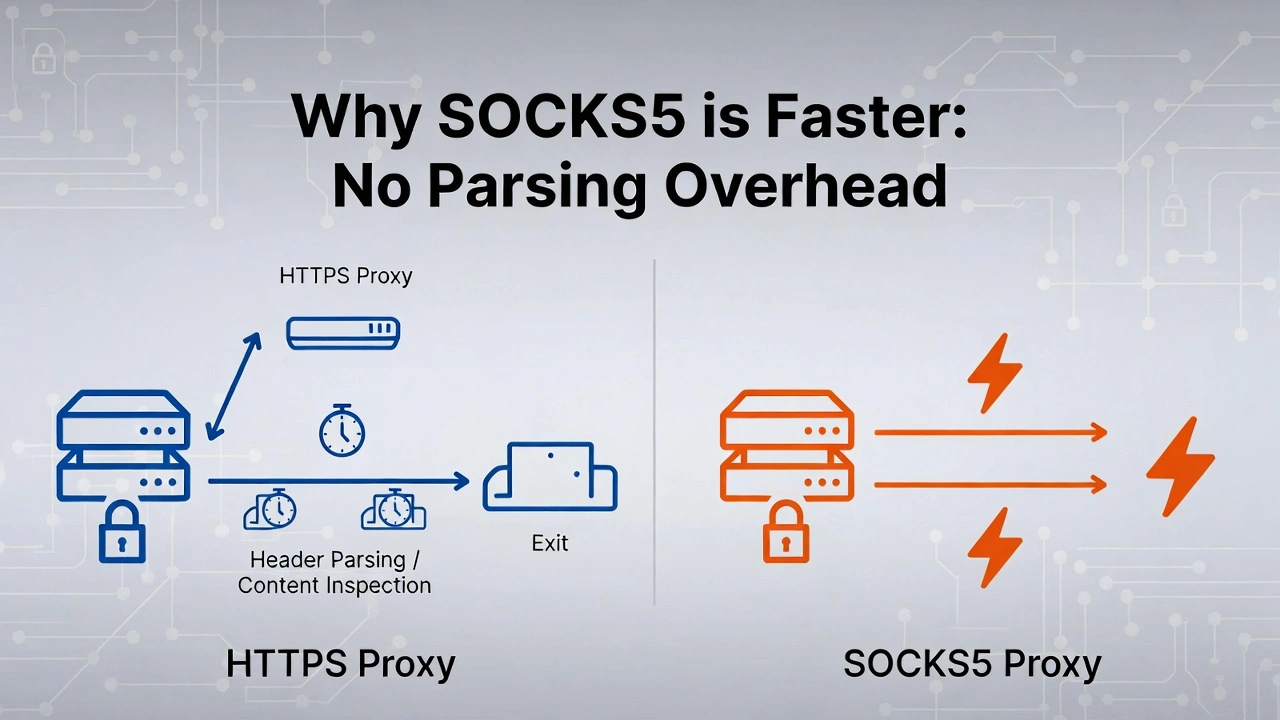
HTTPS proxies have to work. They receive your request, parse the HTTP headers, apply any filtering or modification rules, and forward it. This processing is fast, milliseconds, but at scale it compounds. When you're sending tens of thousands of requests per hour, parsing overhead adds up in measurable ways.
SOCKS5 just passes data through—no parsing, no inspection, no modification. The packet arrives, gets forwarded, and is done. This fundamental simplicity yields lower latency for equivalent connections, which is particularly relevant for gaming, real-time applications, and high-volume data collection.
“NOTE: For casual web browsing, you won't notice the difference. For running large-scale scraping operations or latency-sensitive real-time applications, SOCKS5's lower overhead is consistently measurable. We'll look at this more specifically in the performance section.”
UDP support: The non-negotiable for real-time apps
UDP (User Datagram Protocol) is a communication method that prioritises speed by not waiting for delivery confirmation. It fires packets and moves on. For stable, reliability-critical connections like web page loading or file downloads, you want TCP's confirmation system. For real-time applications where a tiny delay is worse than an occasionally dropped packet, such as gaming, VoIP, and live video, UDP is the right choice.
HTTPS proxies don't support UDP. Full stop. They're built on TCP and have no mechanism for handling UDP traffic.
SOCKS5 supports UDP natively. This was one of the headline improvements over SOCKS4 and its predecessors, and it's the single biggest reason SOCKS5 is the standard proxy recommendation for gaming and real-time applications. If UDP support is relevant to your use case, this isn't a comparison. SOCKS5 is the only protocol that works.
DNS leaks: The hidden privacy risk
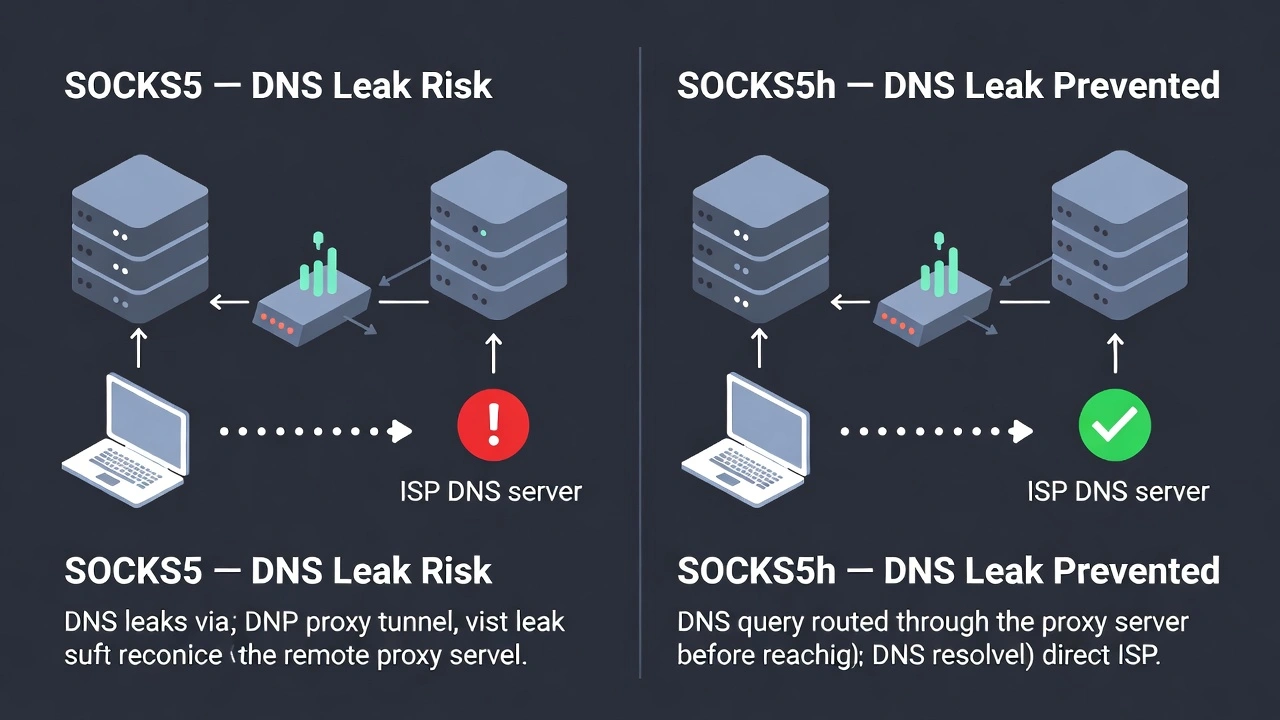
When you use a proxy for privacy, you want your DNS queries, the lookups that translate domain names like "google.com" into IP addresses, to go through the proxy too. If DNS queries go directly from your device to your ISP's DNS server, your real location is revealed even though your traffic is proxied. That's a DNS leak.
HTTPS proxies handle DNS as part of the HTTP request process. DNS resolution typically occurs on the proxy server's side, so leaks aren't a typical concern.
Standard SOCKS5 resolves DNS on your device before routing traffic through the proxy, so that DNS queries can reveal your location even with the proxy active.
“This is addressable: SOCKS5h (the variant where the "h" indicates host resolution happens remotely) sends the domain name to the proxy for resolution rather than resolving it locally. If DNS privacy is relevant to your setup, make sure you're specifically configuring SOCKS5h, not just SOCKS5.”
How to add encryption to a SOCKS5 connection
One of the most common follow-up questions after understanding SOCKS5 security is how actually to fix the encryption gap. Three practical approaches, in order of complexity:
1. Connect to HTTPS destinations. The simplest approach, and the one most people are already using without realising it. When you visit an HTTPS website through a SOCKS5 proxy, the website's TLS handles encryption from the proxy to the destination. Your device-to-proxy leg is unencrypted, but the destination connection is. For standard web browsing and scraping HTTPS sites, this is usually sufficient.
2. Use SSH tunnelling. If you have access to a remote server, you can route your SOCKS5 traffic through an encrypted SSH tunnel. Configure SSH to act as a SOCKS5 proxy with: ssh -D 1080 -f -C -q -N user@yourserver.com. This creates an encrypted local SOCKS5 proxy that routes through your SSH connection; everything transmitted is wrapped in SSH encryption regardless of the underlying protocol.
3. Combine SOCKS5 with a VPN. Run your VPN connection first, then route SOCKS5 traffic through it. The VPN layer encrypts everything at the network level, including your proxy traffic. This is the most comprehensive approach, but it adds the most complexity and latency. Useful for high-sensitivity workflows where both proxy flexibility and full encryption are required simultaneously.
Does SOCKS5 really run faster
The claim that "SOCKS5 is faster than HTTPS" appears in virtually every proxy comparison article. Almost none of them explain it precisely or provide any supporting data. Let's fix that.
The speed difference is due to parsing overhead. An HTTPS proxy receives every request, reads the HTTP headers, applies its processing rules, and forwards the request. This parsing work takes processing time, typically measured in single-digit milliseconds per request.
For a single request, this is imperceptible. For a scraping operation sending 50,000 requests per hour, the cumulative overhead becomes measurable. Independent proxy benchmarking has consistently shown SOCKS5 completing equivalent high-volume request sets approximately 15–25% faster than HTTPS proxies on the same infrastructure, purely because of the elimination of the parsing step.
Which protocol should you choose: A simple decision framework
Let's make this decision as straightforward as possible.
Choose HTTPS if:
All your tasks happen in a browser or involve HTTP/HTTPS requests
You're doing web scraping and need HTTP-native header handling
Encryption matters for the connections you're making
You're managing social media accounts or web-based platforms
You want content caching or filtering functionality
You're accessing HTTPS-enforced websites that require proper TLS handling
Choose SOCKS5 if:
You need UDP support, gaming, VoIP, video streaming, or any real-time application
You're using non-web applications, email clients, FTP software, and torrent clients
You want maximum throughput for high-volume data transfer operations
You need to bypass restrictive firewalls or deep packet inspection
You're proxying custom application traffic that isn't HTTP-based
Speed is the priority, and you're prepared to handle encryption separately if needed
“Note: the choice of protocol matters, but it's the second decision, not the first. The first decision is IP quality. A blocked HTTPS proxy on flagged infrastructure will fail tasks that a clean SOCKS5 proxy on pre-vetted residential IPs handles effortlessly. Get the IP quality right, then optimise the protocol.”
For developers: Implementation notes
If you're implementing proxy support in an application, here's what's worth knowing that general guides don't cover.
Library support
Most major HTTP libraries support HTTPS proxies natively with minimal configuration. Python's requests library handles HTTPS proxies through the proxies parameter without additional dependencies. For SOCKS5, you'll typically need the requests[socks] extension or the PySocks library as a backend.
# HTTPS proxy - works with standard requests
import requests
proxies = {
    'http': 'http://user:pass@proxy.host:port',
    'https': 'https://user:pass@proxy.host:port'
}
response = requests.get('https://example.com', proxies=proxies)
# SOCKS5 proxy - requires pip install requests[socks]
proxies = {
    'http': 'socks5://user:pass@proxy.host:port',
    'https': 'socks5://user:pass@proxy.host:port'
}
response = requests.get('https://example.com', proxies=proxies)
# SOCKS5h for remote DNS resolution (prevents DNS leaks)
proxies = {
    'http': 'socks5h://user:pass@proxy.host:port',
    'https': 'socks5h://user:pass@proxy.host:port'
}
“Note the socks5h scheme for remote DNS resolution; this is the implementation detail that prevents DNS leaks.”
Choosing SOCKS5h vs. SOCKS5 in code
Use socks5h whenever privacy is a concern, and you want DNS queries routed through the proxy rather than resolved locally. Use socks5 when local DNS resolution is acceptable, and you want slightly lower latency (one fewer round trip for DNS). For most privacy-sensitive applications, socks5h is the safer default.
Proxy chaining considerations
SOCKS5 proxies support chaining, routing traffic through multiple proxy servers sequentially for additional anonymity. HTTPS proxies technically support chaining, but it's more complex to implement cleanly and introduces additional latency at each hop. For applications requiring multiple proxy hops, SOCKS5 is the more practical implementation choice.
Error handling patterns
Both proxy types can return connection failures for different reasons. For HTTPS proxies, a 407 status code indicates proxy authentication failure. For SOCKS5, authentication failures are returned at the connection handshake level before any HTTP response can be sent; handle them as connection exceptions rather than HTTP errors in your error-handling logic.
Can we use both protocols: Yes
Here's the practical reality that the protocol debate tends to obscure: most professional proxy users don't pick one protocol and stick with it forever. They use HTTPS for web tasks and SOCKS5 for everything else, often simultaneously across different tools and workflows.
CyberYozh eliminates that problem directly. Their network supports HTTP, HTTPS, SOCKS4, SOCKS5, and UDP across the same 100 million residential and mobile IP pool, so you're not permanently choosing between protocols; you're choosing which one fits each specific task, all managed from a single dashboard.
What makes CyberYozh particularly relevant for this protocol discussion
It is their approach to IP quality. Every IP in their pool is screened against 50+ security databases through their built-in Fraud Score tool before entering rotation. Here are some of Cyberyozh's best features:
Fraud Score tool: every IP is screened against 50+ security databases before use
100 million residential IPs across 100+ countries with city and country targeting
Real 4G/5G mobile proxies on actual carrier networks with unlimited traffic.
Built-in SMS and phone number verification, no third-party service needed
99.9% uptime with automatic IP failover so sessions don't break mid-crawl
Residential, mobile, and datacenter proxies, all in one dashboard
SOCKS5, HTTP, HTTPS, and UDP protocol support for any tool in your stack
Works natively with Multilogin, AdsPower, and Dolphin Anty
Full automation and scraping support, plug straight into your existing workflows
24/7 customer support in 7 languages
Mobile proxies from CyberYozh support both HTTPS and SOCKS5 with unlimited traffic from $1.70/day, no metering, no overage charges.
Static residential proxies start from $5.29/month, making quality protocol-flexible infrastructure accessible without enterprise pricing or custom contract negotiations.
“For anyone who needs the flexibility to run HTTPS for web work and SOCKS5 for application traffic, from the same IP pool, on the same infrastructure, CyberYozh is the practical answer.”
Conclusion about SOCKS5 vs. HTTPS
There's no permanent winner in the SOCKS5 vs. HTTPS comparison. The right answer is the one that matches what you're actually doing. Three things to carry forward from this guide:
First: protocol choice is the second decision. IP quality is the first. Clean, pre-vetted residential or mobile IPs outperform flagged datacenter addresses across all protocols.
Second: SOCKS5h rather than SOCKS5 whenever DNS privacy matters. That one character difference in your configuration prevents a common privacy leak that most guides don't mention.
Third: encryption on SOCKS5 is your responsibility, not the protocol's. Plan for it explicitly if your use case involves sensitive data; it's a solvable problem, just not an automatic one.
Get the protocol right, get the IP quality right, and the technical debate disappears into the background where it belongs.
“Ready to run both protocols on clean, pre-vetted residential and mobile infrastructure? CyberYozh gives you HTTPS and SOCKS5 across 100M+ screened IPs, starting from $1.70/day with unlimited mobile traffic.”
Frequently asked questions about SOCKS5 vs. HTTPS
What is the main difference between SOCKS5 and HTTPS proxies?
HTTPS proxies work only with web traffic (HTTP/HTTPS requests), understand and can modify that traffic, and provide built-in TLS encryption. SOCKS5 proxies work with any type of network traffic, web, gaming, email, FTP, and custom protocols, but don't encrypt by default. HTTPS is the specialist; SOCKS5 is the generalist. Choose based on whether your tasks are web-only or extend beyond the browser.
Is SOCKS5 actually faster than HTTPS?
Generally, yes, and the reason is specific. SOCKS5 passes data through without parsing or inspecting it. HTTPS proxies read HTTP headers and process request content before forwarding, which adds overhead. For casual browsing, this difference is imperceptible. For high-volume operations like large-scale web scraping, independent benchmarking consistently shows SOCKS5 completing equivalent request sets approximately 15–25% faster on the same infrastructure.
Does SOCKS5 encrypt my traffic?
No, SOCKS5 doesn't provide native encryption. It creates a tunnel that passes data through without securing it. You have three practical options for adding encryption: connect to HTTPS destinations (the site's TLS handles that leg), use SSH tunnelling to wrap SOCKS5 traffic in SSH encryption, or combine SOCKS5 with a VPN that encrypts at the network level.
What is the difference between SOCKS5 and SOCKS5h?
SOCKS5 resolves DNS on your device before routing through the proxy, which can leak your real location through DNS queries even when traffic is proxied. SOCKS5h routes DNS resolution through the proxy server itself, so your ISP never sees which domains you're looking up. If privacy is relevant to your use case, configure SOCKS5h specifically. In code, this typically means using socks5h:// as your proxy scheme rather than socks5://.
Can I use SOCKS5 for web scraping?
Yes, SOCKS5 works for web scraping, but HTTPS proxies often perform better for this specific task. Because HTTPS proxies understand HTTP natively, they handle headers more cleanly and are more compatible with sites that inspect request formatting. SOCKS5 passes HTTP requests without that layer of web-awareness, which occasionally causes issues on sites with strict header validation.
Which protocol is better for gaming?
SOCKS5, without question. Gaming requires UDP support for low-latency real-time communication, and HTTPS proxies don't support UDP at all. This isn't a performance comparison; HTTPS proxies are architecturally incapable of handling gaming traffic. SOCKS5 was specifically designed to support UDP, which is why it's the universal recommendation for gaming proxies. If you're setting up a proxy for any real-time application, SOCKS5 is the only choice that actually works.