
WhatsApp Account Banned: Why It Happened & How to Recover Account in 2026
You open WhatsApp and see "This account can no longer use WhatsApp." Your chats, groups, and contacts are locked behind a WhatsApp banned account screen — and you're not even sure what you did. Was it a temporary suspension, or a permanent ban? Did a VPN trigger it, or did someone report you?
Whether you're staring at a ban message or trying to figure out how to recover a WhatsApp account after ban, this guide will explain why bans and suspensions happen, how to tell a block from a real ban, and how to file a WhatsApp ban appeal that gets reviewed.
TL;DR
WhatsApp issues temporary suspensions, permanent bans, and account-under-review holds; the message you see tells you which one you're dealing with.
What you can do: If you think it's a mistake, request a review in the app and file an appeal — but if you used a modded app or sent bulk messages, that ban can be final.
A fresh virtual number for SMS verification lets you register a new WhatsApp account if your old one is permanently banned, without burning your real SIM.
Dedicated WhatsApp proxies keep each account on a separate, consistent IP — which helps prevent IP bans when running multiple accounts for clients or WhatsApp business accounts.
Why is my WhatsApp account banned?
WhatsApp bans accounts when it believes your activity violates its Terms of Service. According to WhatsApp's official Help Center, the company specifically identifies spam, scams, safety risks, unofficial apps, and scraping as grounds for enforcement.
Main WhatsApp ban triggers include:
Spam or unwanted messaging — sending bulk messages to people who haven't saved your number or never opted in.
Scams or prohibited activity — fraud, phishing, or content that puts users at risk.
Excessive reports or blocks — repeated reports from other users flag your number for review.
Unofficial WhatsApp clients — GBWhatsApp, WhatsApp Plus, and similar mods violate WhatsApp's rules and can result in temporary or permanent restrictions.
Scraping or unauthorized data collection — pulling user data without permission.
Unauthorized automation — bots and mass-messaging tools that violate the platform's rules.
If you received a ban on WhatsApp without knowingly breaking these rules, don't do the guesswork. WhatsApp does not disclose the exact reason, so the next step is to use the Request a review option and let WhatsApp assess the account.
Tip: Claims about bans for VPN use, specific IP addresses, or exact report thresholds are largely community speculations, as WhatsApp has never publicly confirmed those details.
For managing multiple WhatsApp accounts, high-trust mobile proxies help minimize blocks, as each account runs on its own real carrier IP, so one flagged number can't drag the others down.
How do you know if your WhatsApp account is blocked
If WhatsApp has blocked or banned your account, the app will usually show a clear restriction message when you try to use it. The most obvious sign is “This account can no longer use WhatsApp.”
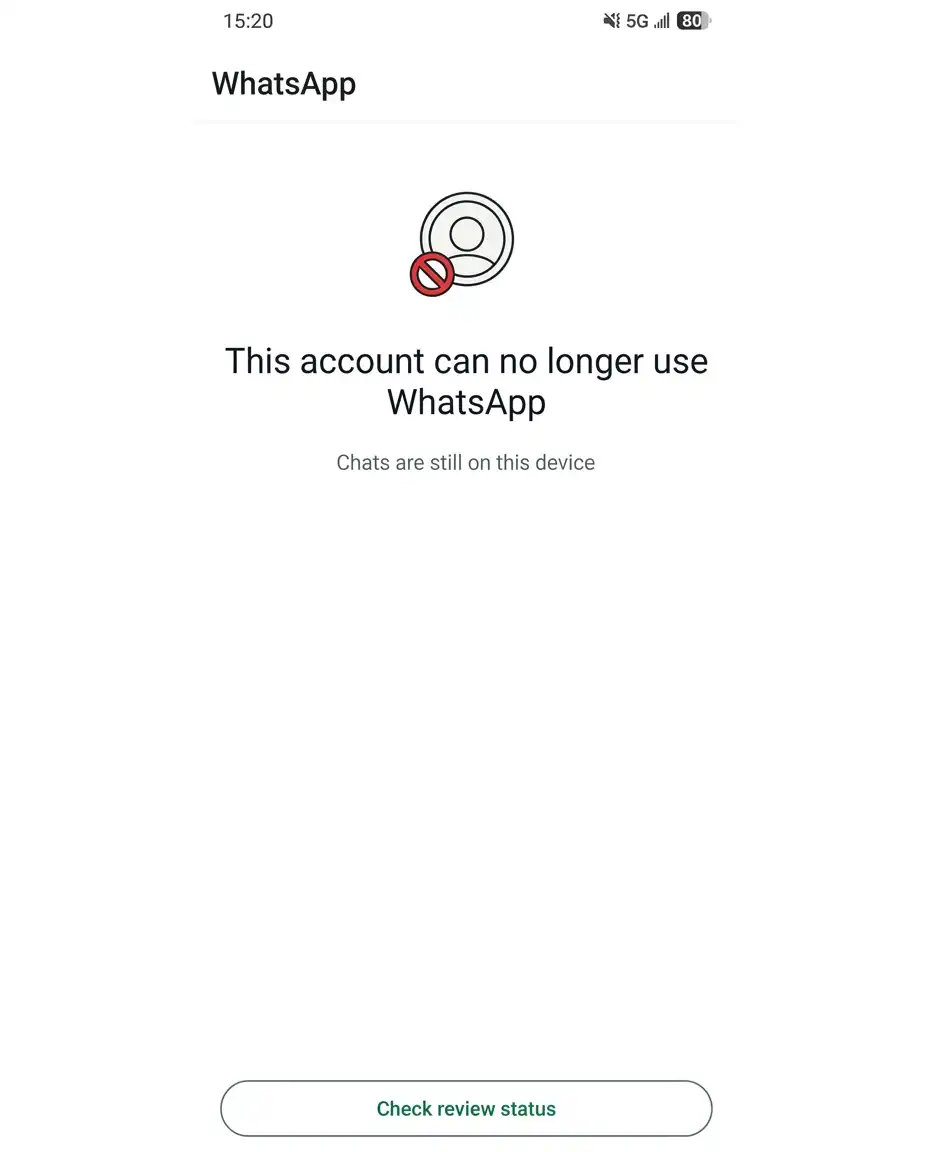
Other messages can indicate a temporary restriction or an account under review. If WhatsApp shows Request a review, the restriction can still be appealed through the app.
If you can open WhatsApp normally, send messages, and use your account without a restriction message, you're probably dealing with something other than an account ban.
How to tell if a contact has blocked you
If someone blocked you, it looks different from when the account is banned. WhatsApp never notifies you when someone blocks you, the signs are that their last seen, online status, and profile photo stop updating, your messages stay on a single check mark, and your calls to them don't connect.
Any one of these can also come from their privacy settings or a poor connection, so treat it as a likely block only when several appear together.
What does every WhatsApp ban message mean
The exact wording you see on screen tells you what type of restriction you're dealing with, and whether an appeal is possible.
Message / Status | What It Means | What to Do |
|---|---|---|
"This account can no longer use WhatsApp" | Account has been banned | Tap Request a review in the app |
"This phone number can't use WhatsApp" | Number is restricted or banned | Tap Request a review |
"Temporarily restricted" | Temporary restriction, often tied to unofficial apps or scraping | Follow the instructions; wait for the restriction to expire |
"Account under review" | WhatsApp is checking your account against its Terms of Service | Wait for the decision — typically within 24 hours |
No review option shown | Ban may be final | Check WhatsApp's support guidance; recovery may not be possible |
If your account is blocked on WhatsApp, don't assume that changing your phone, IP address, or number will remove the ban. Start with WhatsApp's own Request a review process and wait for its decision.
The key distinction: if you see a Request a review button, the ban is not necessarily permanent. If that option is missing, WhatsApp has already determined the ban cannot be appealed.
Why my WhatsApp account got banned for no reason
False positives do happen — WhatsApp's enforcement is largely automated, and users regularly report bans with no obvious trigger. But here's the catch: the ban screen never tells you which internal signal caused it.
The only productive response is to tap Request a review and let WhatsApp's team check the decision. If it was a mistake, that's the path that reverses it.
How to recover a WhatsApp account after a ban
If your account was blocked on WhatsApp from a mistake or an aggressive automated flag, the in-app review process is the only official path back. WhatsApp explicitly states that third-party services cannot remove a ban — only WhatsApp can unban an account.
1. Open WhatsApp and request a review
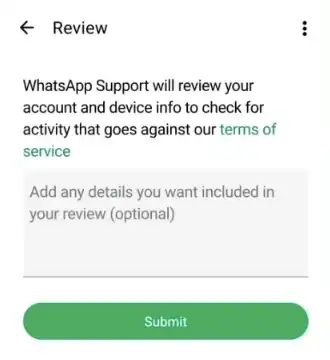
Open the app. When you see the ban message, tap Request review. This option only appears if the ban is appealable. Fill in the requested fields and submit. You can only appeal one phone number per request.
2. Explain why you believe the ban was a mistake
When completing a WhatsApp ban appeal, keep it short and factual. State that you use the official app, that you have not sent spam or used automation, and that you believe the restriction was applied in error. Don't write an essay, and don't believe that any specific wording guarantees success — there is no documented script that works.
3. Wait for WhatsApp's decision
WhatsApp's guidance says most reviews are completed within 24 hours. You'll receive a notification in the app once a decision is made. Don't submit multiple appeals or contact WhatsApp through other accounts — this won't speed up the process or change the outcome.
Can I get my WhatsApp account back after being banned
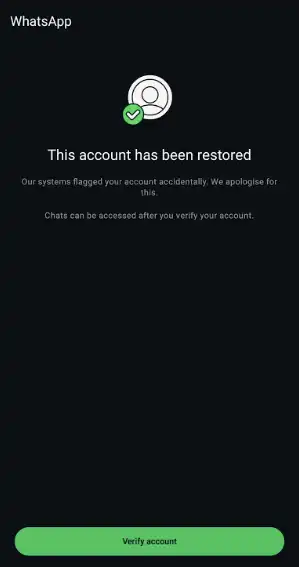
Yes — if WhatsApp restores the account after reviewing your appeal. Once the ban is lifted, WhatsApp may ask you to verify your phone number again before you can access the account. Enter the verification code sent to your number and follow the prompts to reactivate the account.
What if WhatsApp rejects the review
WhatsApp's official position is simple: if you don't see the Request review option, the ban is final and cannot be appealed. Any third-party services promising to reverse a ban are not legitimate.
Tip: There is no way to recover the banned WhatsApp account by using a new phone number. If the ban is permanent, your only real option is registering a new account — and a virtual number lets you do that without burning your primary SIM.
Read our guides for other platforms: How to unblock an account on TikTok, how to fix an Instagram IP ban, and 10 ways to unblock YouTube.
How long does a WhatsApp ban last
It depends on the type of restriction; there's no single duration.
Temporary restriction: WhatsApp shows a countdown timer, ranging from 24 hours up to a few days. Access returns automatically when it ends. Repeated short bans can escalate to longer timers.
Account under review: A verification hold, not a punishment. WhatsApp checks your account for Terms of Service compliance. The in-app notice itself states the result is typically shared within 24 hours.
Permanent ban: No countdown timer, only a Request a review option. It won't lift on its own. If you've already appealed and been denied, WhatsApp treats that as final for that phone number.
WhatsApp doesn't publish a fixed duration table. The 24-hour figure refers to review decisions, not temporary ban length, so don’t expect a guaranteed hour count.
Starting a new WhatsApp account after a ban? Read our WhatsApp SMS activation guide.
Why WhatsApps keep banning my account
A repeat ban is usually an escalation, not a repeat of the same event. WhatsApp's enforcement gets stricter each cycle: a first offense might be a temporary timer, and the next becomes a longer restriction.
What actually drives the escalation:
Behavior didn't change. The signals that triggered the first ban are still present – same volume, same patterns, same tools.
Device-level flags persist. Bans aren't always tied to the number alone. Reinstalling the app or re-registering on the same device can carry the flag forward.
Unofficial apps are still connected. WhatsApp explicitly warns that continuing to use unofficial apps can turn a temporary ban into a permanent one.
The setup keeps changing. Constantly switching devices, IPs, or linked environments while an account is already restricted can add another variable without fixing the original trigger.
Multiple accounts share the same environment. WhatsApp doesn't officially say that multiple accounts using one IP get banned. But if you're running several accounts, with the shared device or browser fingerprint, there’s less separation between them. Community reports describe repeated restrictions after multiple accounts were linked to the same computer or WhatsApp Web environment.
That's why multi-account proxy setups use one proxy per account: to keep accounts on separate IPs and reduce the risk of one account's activity affecting the others.
Can a proxy prevent a WhatsApp account ban
When you run multiple WhatsApp accounts, account linking becomes a real operational risk. WhatsApp looks for signals that several accounts belong to one person, and shared IPs are one of the easiest signals to spot.
That's where a proxy helps. A mobile or residential proxy routes each account through a real IP, so the accounts don't appear to come from the same place. The rule is one proxy per account, without IP switching mid-session or every other day.
Location matching matters too. Your proxy should match where the device physically is, not where the number is registered. A Mexico number used from the US should route through a United States proxy, not a Mexico one.
But a proxy isn't a solution to everything. It only addresses the network layer. If the behavior itself — bulk messaging, automation, modded clients — violates WhatsApp's Terms, no proxy will prevent the ban.
Which proxy type is best for WhatsApp accounts
If you are managing multiple client accounts, WhatsApp Business accounts, or, choosing the right proxy impact the risk of bans:
Mobile (4G/5G): the best fit for WhatsApp, since it's a mobile-first app. Choose this for accounts you depend on long term.
Static residential: a good option for WhatsApp Web setups and larger account counts. You keep the same IP for the whole session instead of changing it mid-use.
Datacenter: not recommended. These IP ranges are shared and easier to flag.
Why use CyberYozh proxies for WhatsApp accounts
CyberYozh is a proxy infrastructure provider, not a reseller, so you get dedicated IPs for each WhatsApp number from a single dashboard. Everything you need to run and protect multiple accounts is in one place:
Mobile proxies with unlimited traffic: real carrier IPs, one per account, with no bandwidth caps on WhatsApp Web sessions.
195+ countries, 100M+ residential IP pool: match the proxy country to each number's registration country.
Virtual numbers for SMS verification: register a fresh WhatsApp account after a permanent ban without using your own SIM.
Dedicated channels: each mobile proxy connection is separate, not shared across random users.
IP Fraud Score checks: check the IP before assigning it to an account or starting a workflow.
Support 24/7 in 7 languages for uninterrupted work.
Why customers trust us
How to avoid a WhatsApp ban when running multiple accounts
Multi-accounting itself isn't prohibited — WhatsApp allows having more than one account on one mobile device with different phone numbers. The problem starts when account management involves repeated device changes, unofficial apps, or behavior that violates WhatsApp's rules.
Here are the ground rules to avoid WhatsApp account bans:
One proxy per account. Don't rotate a single IP across accounts. Each WhatsApp number needs its own dedicated residential or mobile proxy. Mobile proxies (4G/5G) carry the highest trust because most real WhatsApp users connect via mobile networks.
One browser profile per account. If you're managing accounts through WhatsApp Web, use an anti-detect browser (such as Dolphin Anty, Octo Browser, or GoLogin) with isolated profiles or cloud phones. Each profile gets its own cookies, fingerprint, and proxy.
Warm up each account. New numbers can't jump straight to high-volume messaging. A standard warm-up takes 7–14 days: start with a few messages per day to your contacts, gradually increase to 100+ by week two. Cold-blasting a fresh number is the fastest path to a ban.
Don't switch devices or environments. Frequently switching accounts between devices can result in verification blocks and account restrictions. Keep each account tied to a consistent IP, device and network.
The bottom line: proxies help with the network isolation layer, but they don't fix behavioral violations. If the messaging behavior itself triggers spam detection, no proxy setup will prevent the ban.