
Mua tài khoản Facebook cũ an toàn năm 2026: điều không ai khác sẽ nói với bạn

Bạn đã từng thử chạy quảng cáo trên tài khoản Facebook mới và chứng kiến nó bị khóa trong ba ngày, hoặc bạn đã mua một tài khoản Facebook lâu năm, đăng nhập một lần và gặp màn hình xác minh trước cả khi khởi chạy chiến dịch đầu tiên. Không phải thất bại nào trong số đó là do vận rủi. Chúng xảy ra vì những lý do cụ thể và có thể khắc phục được.
Hệ thống của Facebook đã trở nên nghiêm ngặt hơn đáng kể kể từ đợt tăng cường thực thi 2024–2025. Các tài khoản quảng cáo đang bị gắn cờ ngay từ lần đăng nhập đầu tiên nếu địa chỉ IP, dấu vân tay trình duyệt và lịch sử tài khoản không tạo thành một mẫu nhất quán.
Các tài khoản mới gần như không thể sử dụng cho quảng cáo trả phí nếu không có nhiều tháng làm nóng cẩn thận. Ngay cả một số tài khoản lâu năm, những tài khoản được bán hàng loạt bởi các nhà cung cấp chất lượng thấp, đang bị phát hiện ngay từ ngày đầu tiên. Đó là lý do tại sao hướng dẫn này tồn tại.
TL;DR
Mua tài khoản Facebook lâu năm; chúng có thể hoạt động tốt trong năm 2026, nhưng chất lượng tài khoản đơn thuần là chưa đủ.
Môi trường bạn truy cập tài khoản, địa chỉ IP, dấu vân tay trình duyệt và hành vi phiên làm việc cũng quan trọng như chính tài khoản.
Trước khi mua, hãy xác minh ngày tạo với lịch sử hoạt động, bảo toàn cookie, chuyển giao 2FA, tính nhất quán về địa lý và lịch sử chi tiêu quảng cáo nếu bạn định chạy quảng cáo.
Sau khi mua, hãy sử dụng proxy dân cư hoặc di động khớp khu vực, hồ sơ trình duyệt riêng biệt và quá trình làm nóng chậm 24–48 giờ trước bất kỳ hoạt động vận hành nào.
Tại sao hầu hết các blog về «mua tài khoản Facebook lâu năm» đều sai
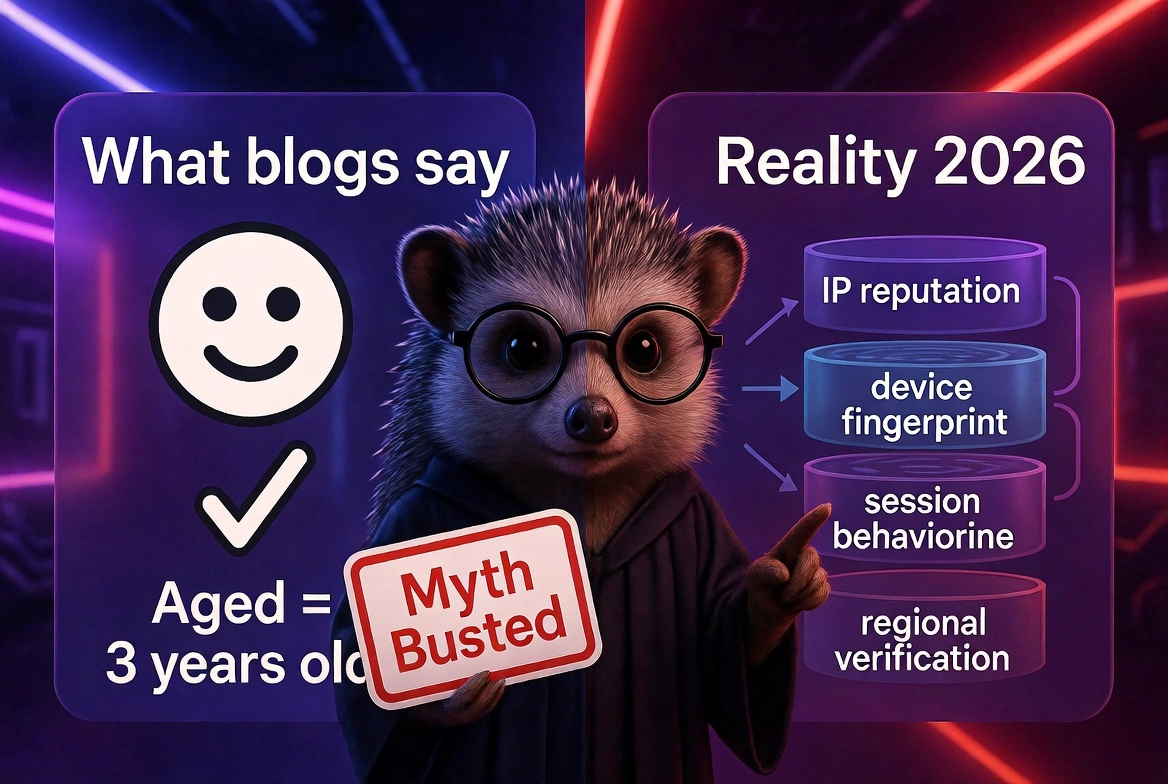
Tôi sẽ nói thẳng: hầu hết nội dung bạn tìm thấy về chủ đề này hoặc được viết bởi những người bán tài khoản muốn tiền của bạn hoặc bởi những người lần cuối kiểm tra quy trình này vào năm 2022. Cả hai đều không hữu ích trong năm 2026. Đây là những gì các blog đó liên tục hiểu sai và điều đó khiến các marketer thực sự phải trả giá:
Họ coi «lâu năm» chỉ là một con số. «Tài khoản 3 năm tuổi» nghe có vẻ an toàn. Nhưng một tài khoản được tạo vào năm 2021 với số lần đăng nhập bằng không từ 2022 đến 2025 về cơ bản là một tài khoản mới trong mắt Facebook. Tuổi tài khoản Facebook đơn thuần không có nghĩa gì nếu không có hoạt động nhất quán.
Họ hoàn toàn bỏ qua lớp cơ sở hạ tầng. Mua một tài khoản tốt và đăng nhập từ địa chỉ IP đáng ngờ giống như mua một chiếc xe sang và lái nó mà không có biển số. Chất lượng tài khoản không quan trọng nếu môi trường hét lên «gian lận» với hệ thống của Meta.
Họ không có lời khuyên nào về khu vực. Nếu bạn ở Nigeria, Philippines, Brazil hoặc Ukraine, trải nghiệm xác minh Facebook của bạn sẽ khác. Chi phí SIM của bạn khác. Cơ sở hạ tầng proxy bạn cần cũng khác. Lời khuyên chung chung «chỉ cần dùng proxy dân cư» là vô dụng nếu không có bối cảnh đó.
Họ không đề cập đến dấu vân tay thiết bị. Vào năm 2025, Meta đã tăng cường khớp dấu vân tay trình duyệt với lịch sử đăng nhập tài khoản. Nếu dấu vân tay thiết bị của bạn không khớp với mẫu lịch sử của tài khoản, bạn sẽ bị gắn cờ, ngay cả với IP đúng.
Họ bỏ qua giai đoạn làm nóng sau khi mua. Ngay cả một tài khoản Facebook lâu năm chất lượng cao cũng cần một quá trình tiếp nhận có đo lường. Chạy quảng cáo vào ngày đầu tiên sở hữu hầu như luôn là một sai lầm.
Họ không cho bạn cách nào để xác minh những gì bạn đang mua. Hầu hết các blog nói «kiểm tra uy tín của người bán» và dừng lại ở đó. Đó không phải là danh sách kiểm tra, đó là sự bỏ mặc.
Tôi đã thấy các marketer mất 300 đô la cho một tài khoản Facebook lâu năm trong 48 giờ, không phải vì tài khoản đó giả, mà vì không ai nói với họ bất kỳ điều nào trong số này.[đọc về điều khoản Facebook]
Những gì các kết quả Google hàng đầu sẽ không nói với bạn về tài khoản Facebook lâu năm
Tôi đã đọc qua nội dung xếp hạng cao nhất cho «mua tài khoản Facebook lâu năm» trước khi viết bài này. Đây là những gì tôi tìm thấy. Hầu hết nội dung không sai, chính xác là vậy. Nó chỉ thiếu sót theo những cách sẽ khiến bạn tốn kém. Đây là những gì họ liên tục bỏ qua:
Sự thay đổi chính sách Meta 2024/2025:
Bắt đầu từ cuối năm 2024, Meta đã mở rộng đáng kể việc thực thi sinh trắc học hành vi, có nghĩa là nó không chỉ kiểm tra IP của bạn nữa.
Nó đang so sánh các mẫu chuyển động chuột, thời gian phiên và tần suất đăng nhập của bạn với đường cơ sở lịch sử của tài khoản.
Nếu bạn đăng nhập từ một bối cảnh hành vi hoàn toàn khác, chỉ riêng sự không khớp đó có thể kích hoạt một cuộc xem xét.
Vấn đề tài khoản «lâu năm ma»:
Rất nhiều tài khoản được bán là «lâu năm» đã được tạo nhiều năm trước, nhưng đã nằm im không hoạt động.
Chúng có ngày tạo nhưng không có dấu vết hoạt động thực sự.
Đây là những tài khoản nguy hiểm nhất để mua vì chúng trông hợp pháp trong ảnh chụp màn hình nhưng kích hoạt cảnh báo ngay lập tức.
Tài khoản lâu năm giả với lịch sử do bot tạo:
Một số người bán tăng hoạt động tài khoản một cách giả tạo bằng bot, lượt thích ảo, bình luận ảo và bạn bè ảo.
Hệ thống của Facebook hiện đã phát hiện được những mô hình này. Khi bạn đăng nhập và mô hình hoạt động bot dừng đột ngột, nó sẽ đánh dấu một sự thay đổi hành vi.
Yêu cầu xác minh theo khu vực:
Nếu bạn mua một tài khoản đăng ký tại Mỹ nhưng đăng nhập từ Đông Nam Á, bạn gần như chắc chắn sẽ gặp phải rào cản xác minh số điện thoại.
Không ai giải thích phải làm gì trong tình huống đó, hoặc làm thế nào để tránh hoàn toàn.
Cạm bẫy thời điểm phương thức thanh toán:
Gắn phương thức thanh toán mới vào ngày đầu tiên của tài khoản đã mua là một trong những cách nhanh nhất để kích hoạt đánh giá tài khoản quảng cáo.
Không có kết quả hàng đầu nào đề cập đến điều này.
7 điều bạn phải kiểm tra trước khi mua tài khoản Facebook lâu năm: Phiên bản 2026
Hãy coi đây là danh sách kiểm tra trước khi mua. Nếu người bán không thể hoặc không muốn xác nhận những điều này, hãy bỏ qua.
1. Ngày tạo + dòng thời gian hoạt động:
Bạn muốn xem tài khoản được tạo khi nào và bằng chứng về hoạt động trong suốt vòng đời của nó.
Một tài khoản năm 2019 ngủ đông từ năm 2020 thực tế không phải 5 tuổi theo quan điểm tin cậy của Facebook.
Hãy yêu cầu ảnh chụp màn hình lịch sử đăng nhập nếu có thể.
2. Lịch sử cookie và dữ liệu phiên:
Người bán chất lượng cao cung cấp tài khoản với cookie gốc còn nguyên vẹn. Điều này có nghĩa là hệ thống của Facebook thấy lịch sử phiên liên tục từ chủ sở hữu ban đầu.
Các tài khoản được bán mà không có cookie đã bị xóa sạch; chúng trông đáng ngờ ngay khi bạn đăng nhập vì không có tính liên tục của phiên.
Nếu bạn muốn mua tài khoản Facebook với cookie được bảo toàn, điều này là không thể thương lượng.
3. Tính nhất quán về địa lý
Lịch sử đăng nhập của tài khoản nên đến từ một khu vực địa lý mạch lạc.
Một tài khoản hiển thị đăng nhập từ Nga, Brazil và Nigeria trong cùng một tháng có lịch sử hỗn loạn mà hệ thống của Facebook sẽ đánh dấu nếu bạn tiếp tục mô hình đó.
Bạn cần biết khu vực chính của tài khoản trước khi mua, sau đó khớp thiết lập proxy của bạn với nó.
4. Trạng thái 2FA và chuyển quyền sở hữu:
Xác thực hai yếu tố có được kích hoạt trên tài khoản không? Nếu có, ai kiểm soát nó?
Trước khi mua, người bán nên vô hiệu hóa 2FA và cung cấp email khôi phục với quyền truy cập đầy đủ.
Nếu họ không làm, bạn không hoàn toàn sở hữu tài khoản và có thể bị khóa bất cứ lúc nào.
5. Bạn bè và hoạt động tự nhiên
Danh sách bạn bè trống trên tài khoản 3 năm tuổi là một dấu hiệu cảnh báo. Các tài khoản thực tích lũy ít nhất một số hoạt động xã hội theo thời gian.
Không có bạn bè, không có bài đăng, không có tương tác, kết hợp với ngày tạo cũ, là hồ sơ của một tài khoản ma, có khả năng là tài khoản đã bị cấm trước đó và đăng ký lại.
6. Lịch sử chi tiêu quảng cáo (nếu bạn mua để chạy quảng cáo)
Để chạy Facebook Ads, bạn phải mua tài khoản Facebook Ads lâu năm đã từng chi tiền trên nền tảng, dù là số tiền nhỏ.
Chúng có giá trị hơn các tài khoản lâu năm tiêu chuẩn.
Một tài khoản có lịch sử chi tiêu trước đó đã vượt qua các kiểm tra tin cậy nhà quảng cáo ban đầu của Facebook.
Nếu bạn đặc biệt muốn mua tài khoản quảng cáo Facebook lâu năm, hãy đảm bảo bạn nhận được lịch sử chi tiêu được xác nhận, không chỉ là tuyên bố về nó.
7. Khớp địa lý với IP hoạt động của bạn
Đây là nơi hầu hết người mua mắc sai lầm nghiêm trọng. Bạn có thể mua một tài khoản hoàn hảo và phá hủy nó trong phiên đầu tiên bằng cách đăng nhập từ ngữ cảnh IP sai.
Lịch sử địa lý của tài khoản cần phải khớp với IP bạn sẽ sử dụng.
Nếu bạn đang quản lý tài khoản đăng ký tại Mỹ, bạn cần IP dân cư hoặc di động sạch của Mỹ.
Nếu bạn ở Ấn Độ điều hành cùng tài khoản đó, bạn cần hạ tầng proxy Mỹ, không phải kết nối nhà riêng của bạn, và cũng không phải IP proxy trung tâm dữ liệu .
Tại sao CyberYozh là lựa chọn thông minh nhất để điều hành tài khoản Facebook lâu năm
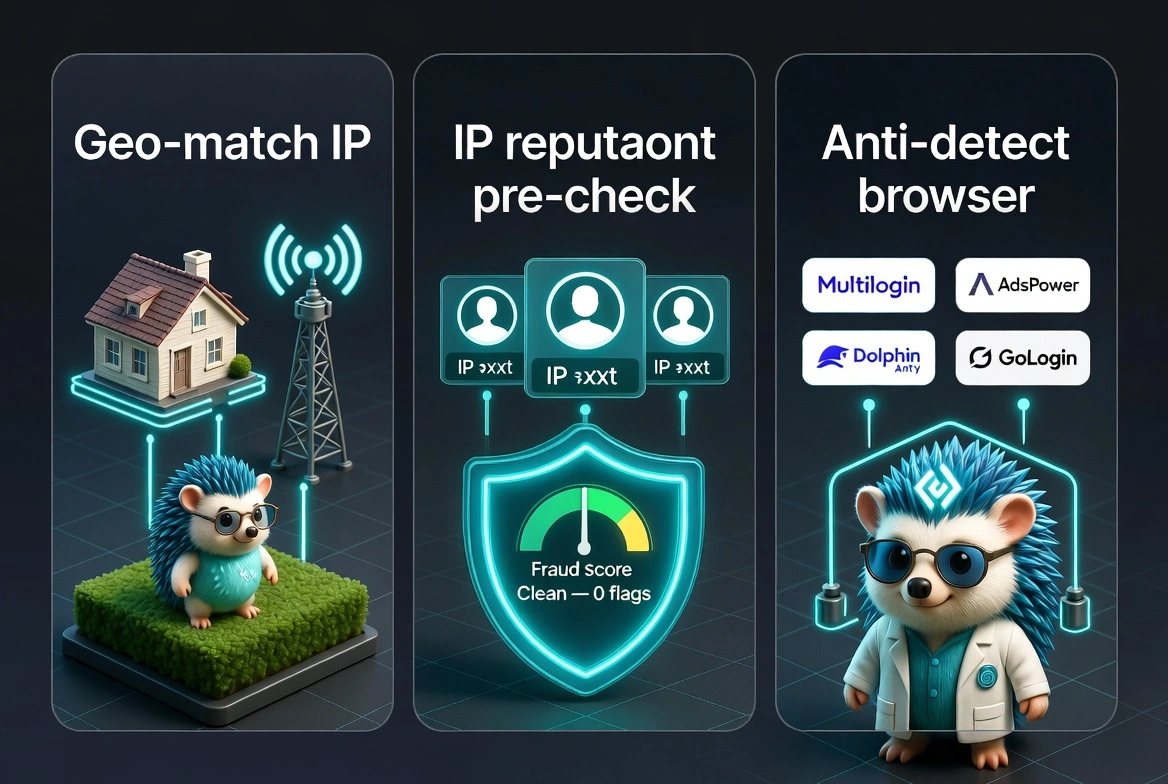
Việc mua tài khoản chỉ là một nửa phương trình, nửa còn lại là môi trường bạn sử dụng để truy cập nó.
CyberYozh không chỉ bán proxy. Nó giải quyết những vấn đề hạ tầng cụ thể khiến tài khoản Facebook lâu năm bị hỏng sau khi mua, và điều đó về cơ bản là khác biệt. Hãy để tôi giải thích điều đó có nghĩa gì trong thực tế.
Vấn đề mà hầu hết người mua gặp phải ngay ngày đầu tiên:
Họ đăng nhập từ IP nhà riêng, IP này bị gắn cờ là khu vực khác với khu vực trong lịch sử của tài khoản.
Hoặc họ đăng nhập từ VPN trung tâm dữ liệu mà Facebook đã chặn.
Trong vòng vài giờ, họ phải nhìn chằm chằm vào màn hình kiểm tra yêu cầu số điện thoại mà chủ tài khoản ban đầu đã dùng để đăng ký.
Lúc đó, hầu hết mọi người đều bị kẹt.
Mạng lưới proxy dân cư và proxy di động của CyberYozh cho bạn quyền truy cập vào các IP thực, không phải địa chỉ trung tâm dữ liệu, tại hơn 100 quốc gia.
Điều đó có nghĩa là khi bạn đăng nhập vào tài khoản lâu năm của Mỹ, bạn đang đăng nhập từ thứ có vẻ như là kết nối internet thực của Mỹ, phù hợp với hành vi lịch sử của tài khoản. Hệ thống của Facebook thấy sự liên tục, không phải bước nhảy địa lý đột ngột.
Vấn đề thứ hai: Liên kết tài khoản
Nếu bạn đang quản lý nhiều tài khoản Facebook lâu năm, điều mà hầu hết các nhà tiếp thị tăng trưởng và người mua phương tiện truyền thông làm, việc đăng nhập vào chúng từ cùng một IP sẽ gắn chúng lại với nhau trong hệ thống phát hiện của Facebook.
Khi một tài khoản bị gắn cờ, tất cả có thể bị sập.
CyberYozh chỉ định một địa chỉ IP duy nhất cho mỗi phiên, vì vậy các tài khoản của bạn không bao giờ chia sẻ dấu vân tay kết nối.
Vấn đề thứ ba: Uy tín IP
Không phải tất cả IP proxy dân cư đều sạch.
Một số đã được sử dụng cho spam, hoạt động bot hoặc gian lận trước đó, và hệ thống của Facebook duy trì điểm uy tín cho các địa chỉ IP.
Công cụ kiểm tra IP của CyberYozh cho phép bạn xác minh uy tín của kết nối trước khi sử dụng nó trên tài khoản bạn quan tâm.
Chúng tôi đã thử nghiệm nội bộ: đăng nhập từ IP có uy tín thấp, ngay cả IP dân cư, đã tăng gấp đôi tỷ lệ kiểm tra so với việc sử dụng IP sạch đã được xác minh.
Những điều thực tế mà CyberYozh xử lý mà đối thủ không làm:
Proxy di động bắt đầu từ 1,70 USD/ngày với lưu lượng không giới hạn, hữu ích để bắt chước các phiên điện thoại thông minh thực, mà hệ thống của Facebook coi là rủi ro thấp hơn so với đăng nhập máy tính để bàn
Tích hợp với trình duyệt chống phát hiện như Multilogin, AdsPower, Dolphin Anty và GoLogin, nghĩa là mỗi tài khoản có dấu vân tay trình duyệt, cookie và bộ nhớ phiên riêng biệt
Hỗ trợ xác minh SMS cho các tài khoản gặp rào cản xác nhận điện thoại, đặc biệt hữu ích cho người dùng ở các khu vực mà việc xác minh lại là phổ biến (Nam Á, Đông Nam Á, Tây Phi)
Kiểm tra uy tín IP trước khi bạn đăng nhập, để bạn không lãng phí một tài khoản tốt vào kết nối kém.
Khách hàng đã nói với chúng tôi rằng thay đổi lớn nhất họ nhận thấy sau khi chuyển cơ sở hạ tầng sang CyberYozh là thông báo «tài khoản bị vô hiệu hóa» vào ngày thứ hai về cơ bản đã ngừng xảy ra. Đó không phải là ngôn ngữ marketing. Đó là những gì quy trình thực sự tạo ra khi bạn loại bỏ các yếu tố rủi ro về môi trường.
Đó là lý do tại sao hàng nghìn nhà tiếp thị sử dụng CyberYozh proxy Facebook, không phải vì đó là lựa chọn rẻ nhất, mà vì nó hoạt động ổn định, và sự ổn định chính là điều mà quy trình này đòi hỏi.
Kết luận cuối cùng: Bạn có nên mua tài khoản Facebook lâu năm vào năm 2026 không
Có, nhưng có điều kiện. Lợi thế cốt lõi là có thật: hệ thống của Facebook đối xử với các tài khoản đã thiết lập khác biệt, và sự khác biệt đó thể hiện qua tốc độ phê duyệt, hạn mức chi tiêu và tính ổn định của tài khoản.
Nhưng thị trường tài khoản Facebook lâu năm đã trở nên lộn xộn hơn. Tài khoản ma, lịch sử được thổi phồng bằng bot và tài khoản tái chế được bán cho nhiều người mua thực sự phổ biến. Danh sách kiểm tra 7 điểm ở phần trước trong hướng dẫn này tồn tại vì bạn cần xác minh trước khi tin tưởng.
Và ngoài bản thân tài khoản: nếu cơ sở hạ tầng, IP, môi trường trình duyệt, hành vi phiên của bạn không khớp với những gì hệ thống Facebook mong đợi từ lịch sử của tài khoản đó, ngay cả một tài khoản lâu năm hoàn hảo cũng sẽ thất bại nhanh chóng.
Đó chính xác là những gì CyberYozh giải quyết. Mạng lưới proxy, công cụ danh tiếng IP, tích hợp trình duyệt chống phát hiện và hỗ trợ SMS cho các rào cản xác minh không phải là phụ kiện. Chúng là sự khác biệt giữa một tài khoản lâu năm tồn tại sáu tháng và một tài khoản chỉ tồn tại sáu giờ.
Nếu bạn nghiêm túc về việc mở rộng quy mô chiến dịch Facebook vào năm 2026, bạn cần cả hai: một tài khoản lâu năm chất lượng và cơ sở hạ tầng giữ cho nó tồn tại. Bắt đầu với CyberYozh tại đây