DICloak Antidetect Browser Review: Unique Features and Usage Cases
DICloak is a Chromium-based antidetect browser that can secure your web surfing with its wide range of digital fingerprint management features. As a result, each of your browsing sessions will look authentic to websites. With CyberYozh proxies assigned to each session, you can manage and deploy various business activities with multiple accounts and data requests without risking bans.
BONUS: Get a 20% discount with promo code CYBERYOZH when placing your order. Valid for any DICloak subscription!
Summary of the DICloak antidetect browser
DICloak is available on Windows and macOS and combines deep fingerprint spoofing with no-code RPA automation, team collaboration tools, and flexible proxy management. It has a free plan that supports 5 browser profiles. Paid plans start at $8/month and scale to enterprise-level configurations with hundreds of profiles and full API access.
What are antidetect browsers?
Antidetect browsers work by spoofing or randomizing the digital identifiers that websites use to track and link users across sessions. To compare:
Incognito modes only hide local browsing history
VPNs only change your IP address
Unlike that, the antidetect browser alters the full stack of signals exposed to anti-fraud systems: canvas and WebGL rendering, OS and hardware parameters, screen resolution, fonts, timezone, audio context, and more.
Each profile stores its own isolated cookies, localStorage, and cache, making every session appear to external platforms as a completely separate real user browsing from a unique device. To complete that, an antidetect browser only needs a proxy that hides the local IP and allows businesses to work at scale.
Read more about antidetection activities in a CyberYozh article.
Distinctive features of DICloak
DICloak stands out in the antidetect browser market with a combination of deep fingerprint coverage, network flexibility, a polished interface, and an accessible free tier. Here is a breakdown:
Comprehensive fingerprint spoofing. DICloak manages canvas, WebGL, WebGPU, AudioContext, ClientRects, SpeechVoices, fonts, CPU cores, RAM, screen resolution, timezone, and geolocation.
IPv6 support. DICloak supports both IPv4 and IPv6 proxy protocols in the profile proxy settings, giving users flexibility to work with a wider range of proxy infrastructure.
No-code RPA automation. Built-in Robotic Process Automation lets users automate repetitive tasks, such as account logins, without writing a single line of code. Pre-made templates for TikTok and Facebook further accelerate campaign setup.
AI Crawler for web scraping. DICloak includes a native AI-powered scraping tool that mimics human browsing behavior and adapts to different website structures, automatically bypassing CAPTCHA and IP blocking.
Team collaboration and security. Profile sharing, role-based permission management, operation logs, and data isolation between users make DICloak suitable for agencies and growing teams.
Generous free plan. The free version supports 5 browser profiles, up to 15 daily session launches, 3 browser extensions, and 5 RPA tasks, giving new users full access to core fingerprint management at no upfront cost.
Cloud sync and cross-device access. Profile data and configurations sync across devices via DICloak's cloud infrastructure, allowing seamless handoffs between team members.
Taken together, these features make DICloak a robust tool for teams that need automation, profile security, and easy onboarding under one roof.
DICloak proxy management
Here is how to manage DICloak profiles with CyberYozh proxies.
Creating a DICloak profile
Once you register and download the DICloak desktop client (Windows or macOS), profile creation is fast and straightforward. From the main dashboard, follow these steps:
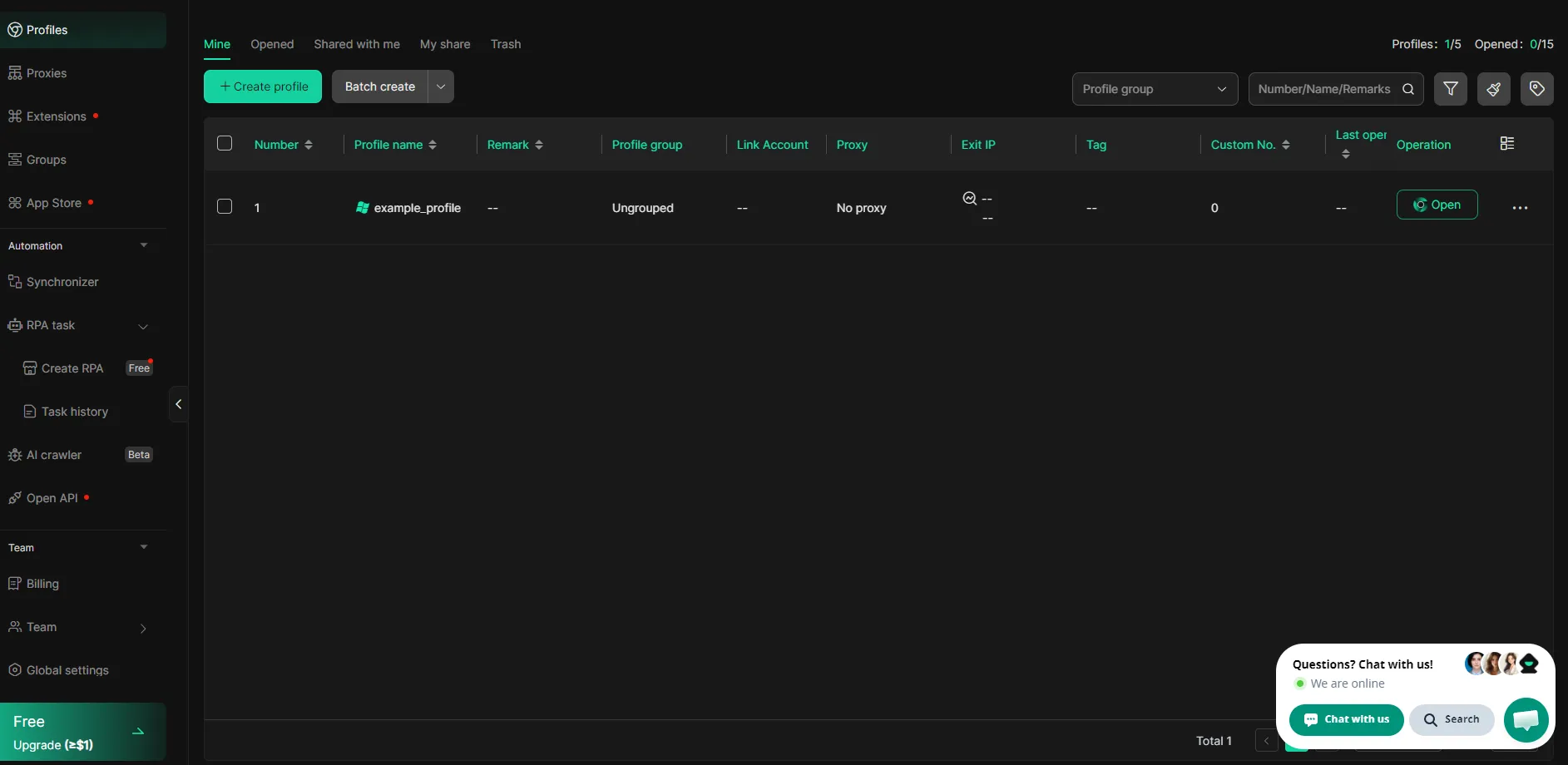
Click Profiles in the left navigation bar, then click the green +Create Profile button
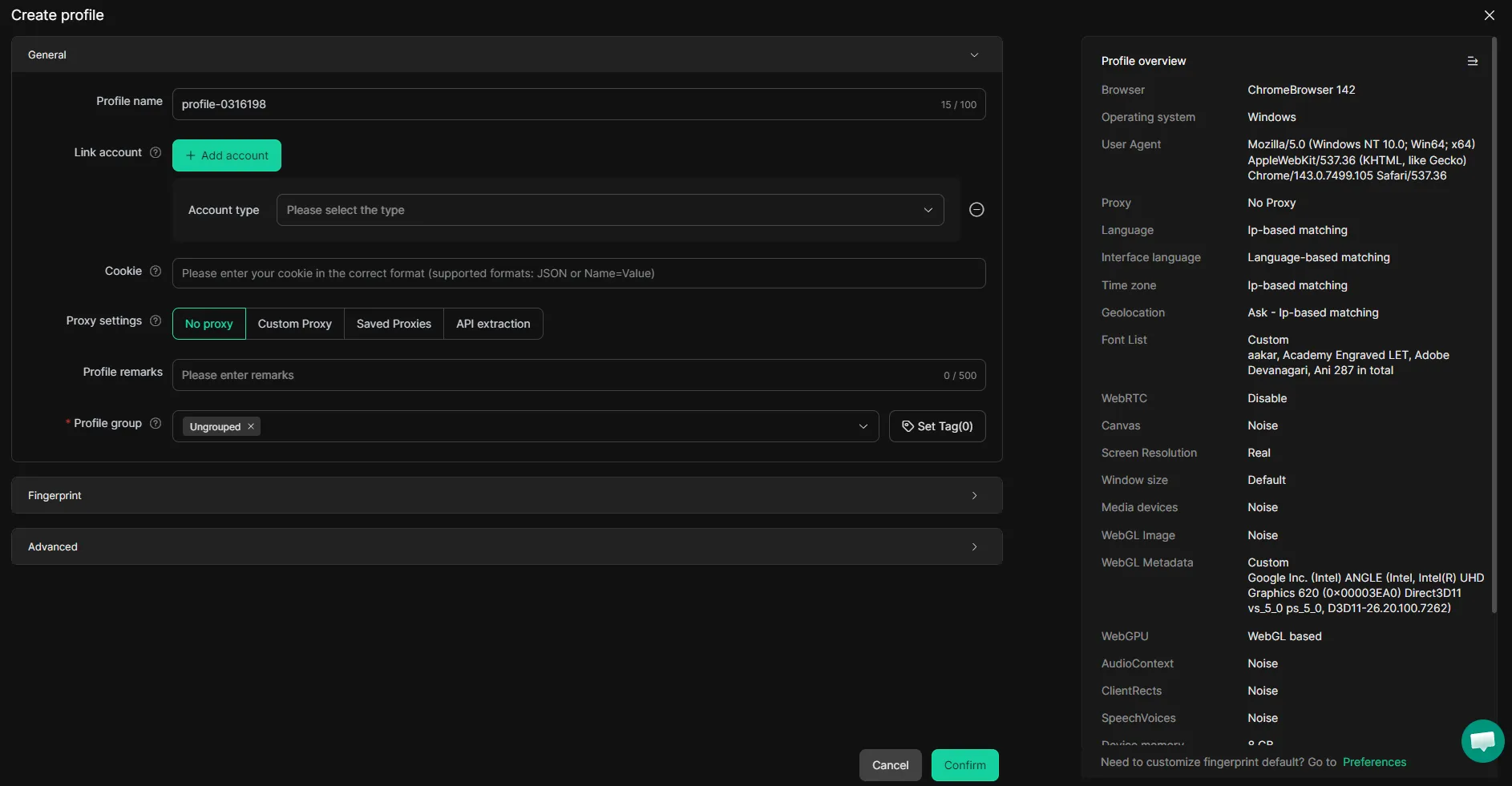
Enter a Profile Name and configure core fingerprint settings in the General section: OS, browser version, timezone, language, screen resolution, canvas, WebGL, WebRTC, and audio fingerprint
Adjust hardware parameters (CPU cores, RAM, GPU). DICloak auto-generates a consistent set by default, so no manual input is required
Locate the Proxy tab within the same window to configure your IP assignment before saving — we’ll continue with that soon.
After clicking Confirm, the profile appears in your dashboard and can be launched, shared with team members, or organized into groups.
Adding a CyberYozh proxy to DICloak
CyberYozh provides mobile, residential static, residential rotating, and datacenter proxies — all compatible with DICloak's HTTP and SOCKS5 input formats. Here is the setup algorithm:
Log in to your CyberYozh account, click Add Proxy, and choose your proxy type
After purchase, navigate to My Proxies and click Generate Credentials to retrieve your Host, Port, Username, and Password
In DICloak's profile creation window, locate the Proxy tab, switch from No Proxy to Custom Proxy, and select HTTP or SOCKS5
Paste the proxy host, port, login, and password into the corresponding fields — or use the Quick Input field with the full IP:Port:Username:Password string for faster entry
Click Checking Proxy to verify the connection; DICloak returns the detected IP, location, and connection status
Click Confirm to save. Alternatively, go to the Proxies section in the left panel to save the proxy globally and reuse it across multiple profiles
Read in detail in our proxy setting in DICloak official guide!
To confirm everything is working, open an IP lookup tool inside the launched session and verify that the displayed address matches your CyberYozh proxy, not your real IP.
What DICloak can be used for
DICloak supports a wide range of business workflows where isolated identities, clean IPs, and automation are essential for scale. Here are the most common applications.
Web scraping
Automated data collection from product catalogs, review platforms, SERP results, or public databases requires sending large volumes of requests without triggering bot detection. DICloak reduces the risk of detection by masking user-agent strings, IP addresses, and hardware fingerprints for every scraping session, and its built-in AI Crawler automatically adapts to different website structures, bypassing CAPTCHA and IP blocks with human-like behavior. Pairing the AI Crawler with CyberYozh's datacenter proxies gives you the coverage and anonymity needed for continuous, high-volume data extraction from open databases.
Multiple account management
Teams managing accounts on social platforms, crypto exchanges, or marketplaces need profiles that are permanently isolated from one another to prevent cross-account linking. DICloak's profile isolation ensures that each account has its own cookies, localStorage, fingerprint, and proxy assignment. Assigning CyberYozh mobile proxies to social media profiles gives each account a carrier-level IP trust score, reducing the risk of suspensions and CAPTCHA challenges during growth activities.
Need virtual numbers for account registration at scale? CyberYozh's SMS activation service covers 700+ platforms across 140 countries.
E-commerce management
Sellers operating multiple e-commerce storefronts on Amazon, eBay, Shopee, or Etsy risk detection and permanent bans if the platform identifies shared device signals or IP addresses across accounts. DICloak creates a completely sandboxed browser environment for each storefront, so that each store appears as a different merchant browsing from a different household device. CyberYozh residential static proxies provide a stable, fixed home IP for each storefront, maintaining consistent login sessions and preventing IP-based account association over time.
Read more about proxy use in e-commerce on CyberYozh.
Online advertising
Advertisers managing multiple ad accounts across Google Ads, Facebook Ads, or TikTok Ads need each account to appear as a separate entity to avoid policy violations and suspension cascades. DICloak's RPA automation and pre-built templates for Facebook and TikTok enable teams to manage campaign setups, perform bulk actions, and monitor performance across dozens of profiles simultaneously. Combining DICloak's profile isolation with CyberYozh shared mobile proxies significantly reduces the risk of ad account bans during high-volume campaign activity, while saving costs.
Affiliate marketing
Affiliate marketers rely on tracking links, geo-targeted campaigns, and split testing across different offers, all of which require clean, isolated browser environments to avoid platform-related challenges. With DICloak, each offer or campaign can run from its own unique browser profile with independent cookies and fingerprints, ensuring accurate conversion attribution and no cross-campaign data leakage. CyberYozh rotating residential proxies are particularly well suited here — their large IP pool and free geo-targeting let you simulate traffic from any target market and test geo-specific offers without manually switching proxies.
DICloak with CyberYozh proxies to secure your web activities
CyberYozh mobile, residential, and datacenter proxies cover every use case DICloak is built for.
Mobile proxies deliver the highest carrier-grade IP trust and include built-in digital fingerprint management.
Residential static proxies provide a fixed real home IP at an affordable price for stable, long-term profiles.
Rotating residential proxies offer a wide pool of IPs that rotate per request for bulk automation workflows
Datacenter proxies remain the fastest and most cost-effective option for non-restricted, public data tasks.
Explore the full CyberYozh proxy catalog to find the right plan for your DICloak workflow — and use promo code CYBERYOZH for 20% off any DICloak subscription when you're ready to start.
F.A.Q about DICloak antidetect browser
What is an antidetect browser and how does it work?
An antidetect browser spoofs your full browser fingerprint — canvas, WebGL, OS, fonts, timezone — so websites cannot link or identify your profiles across sessions, even from the same device.
What is DICloak and which features make it stand out?
DICloak is a Chromium-based antidetect browser for Windows and macOS, offering fingerprint spoofing, IPv6 support, no-code RPA automation, an AI Crawler, team collaboration tools, and a free 5-profile plan.
Is DICloak safe for team use?
Yes. DICloak blocks packet-sniffing tools like Wireshark, disables developer tools inside profiles, and enforces role-based permission management, protecting shared sessions from monitoring and unauthorized modifications.
Does DICloak have a free plan, and what does it include?
DICloak's free plan supports 5 browser profiles, up to 15 daily session launches, 3 extensions, and 5 RPA tasks — including full access to fingerprinting and proxy configuration features.
What is browser fingerprinting and why does it matter?
Fingerprinting identifies users by collecting device signals — GPU, screen resolution, fonts, timezone, and plugins — building a persistent identifier that survives cookie clears and VPN changes.
How is an antidetect browser different from a VPN or incognito mode?
VPNs only change your IP; incognito only clears local history. Antidetect browsers replace your entire fingerprint stack, making each profile appear as a completely separate real user to any platform.
Can websites still detect DICloak browser profiles?
Profiles using reused fingerprint presets or low-reputation proxies can still be flagged. Always use unique fingerprints per profile and verify your proxy IP with CyberYozh's IP Checker before launching.
How do I add a proxy to DICloak?
In the profile creation window, open the Proxy tab, switch from No Proxy to Custom Proxy, select HTTP or SOCKS5, and paste your CyberYozh host, port, login, and password — then click Checking Proxy to verify.
What is the difference between mobile and residential proxies for DICloak?
Mobile proxies route through real carrier networks, offering the highest trust for social media accounts. Residential static proxies provide a fixed home IP — more affordable and ideal for long-term, stable profile maintenance.
Is using an antidetect browser legal?
Yes, antidetect browsers are legal tools widely used for marketing, e-commerce, web scraping, and cybersecurity research. Legality depends on how they are used and each platform's Terms of Service.