
How to Rotate IP Address and Avoid Blocks in 2026
Blocks rarely happen without a pattern behind them. A single IP sends repeated requests, session behavior looks unnatural, and platforms respond with rate limits, CAPTCHA, or full bans. Restarting your router or switching networks might work once, but it does not solve the root issue. To fix it properly, you need to understand how to rotate an IP address in a controlled way, using a proxy infrastructure with a trustworthy IP address pool.
What is IP rotation
IP rotation is the process of changing the IP address used for your requests so platforms do not see repeated activity coming from a single source. Every time you connect to a website, your IP address acts as your identifier. If too many actions come from the same IP, especially in a short time, that pattern gets flagged. This is when blocks, CAPTCHA, or restrictions start to appear.
How to use IP rotation
IP rotation only works when it matches the task. For example:
Scraping large datasets requires frequent changes across a wide range
Account-based workflows rely on stable sessions with minimal switching
Many setups fail because they mix these approaches, rotate too fast, or rely on low-quality IPs that already carry risk signals.
Read more about IP rotation services in a dedicated article.
This guide explains how to rotate IP addresses based on real workflows, not theory. You will see which methods work, when to rotate, and what to adjust when platforms start blocking you. The focus is on practical outcomes: fewer failed requests, stable sessions, and predictable results, rather than trial and error.
How does IP rotation work
Instead of sending all traffic to a single IP address, rotation distributes requests across multiple IPs. From the platform’s perspective, activity appears distributed rather than concentrated, reducing the risk of being limited or blocked. The key is not just switching IPs, but doing it in a way that matches the task.
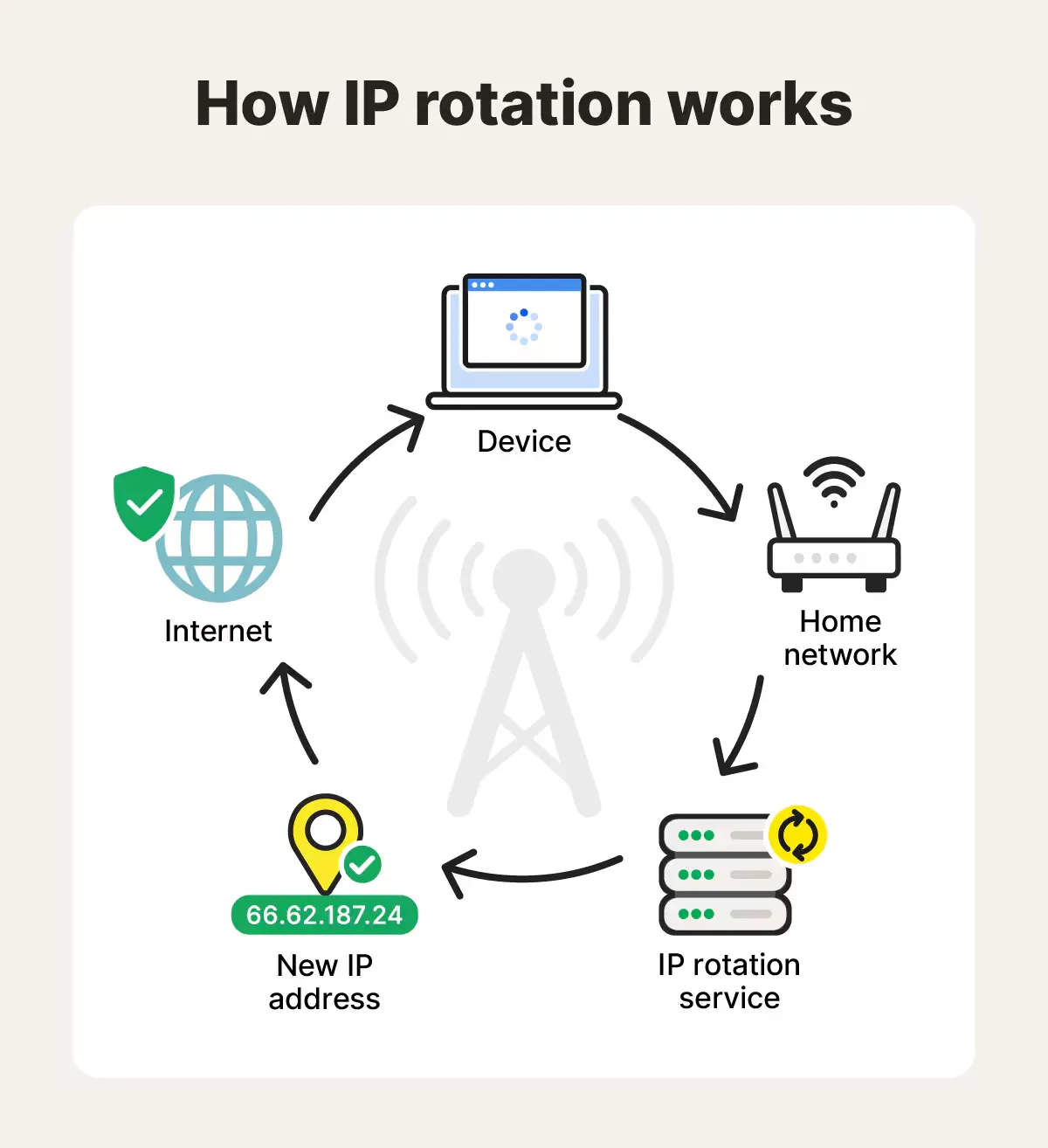
There are two main ways this can be done.
Manual rotation involves reconnecting your network or switching between different connections. It works for basic needs but breaks quickly under load.
Automatic rotation uses proxies and APIs to change IPs based on rules, such as every request, after a set time, or per session. This is what most teams rely on.
To simplify it:
One IP → repeated actions → higher chance of blocks
Multiple IPs → distributed activity → lower detection risk
Controlled rotation → stable workflows instead of constant bans
When running scraping, automation, or multi-account workflows at scale, businesses rely on automated IP rotation; here, we’ll focus on this method.
How to rotate an IP address
Rotating an IP address means sending your traffic through different IP addresses instead of repeating actions from a single source. Platforms track patterns, not just volume. If the same IP keeps hitting the same endpoints, it gets flagged. Rotation works when it spreads activity in a way that looks natural for the platform you are targeting.
When to rotate and when keep a static IP
Rotate when:
You send repeated requests such as scraping or automation
You need to distribute traffic across multiple regions
One IP starts triggering blocks or CAPTCHAs
Don’t forget to run CyberYozh’s IP Checker to check whether the IP is actually “bad” and should be replaced.
Keep stable when:
You manage accounts that expect consistent login behavior
You run long sessions or workflows tied to one identity
The platform tracks session continuity
A wrong rotation decision can be a huge mistake, but not a single one. Read about it in a CyberYozh’s proxy mistake avoidance guide.
IP rotation strategy
The key is control. You are not just changing IPs randomly. You decide when to rotate, how often, and which type of IP fits the task. If rotation is too aggressive, the sessions break, and if it is too slow, the IP gets flagged. For that, you have to select an IP rotation strategy based on which tasks you plan to perform.
Per-request rotation means each request is sent from a new IP address. It’s good for high‑volume scraping and working with search engines.
Sticky sessions provide an approach that supports the same IP for a profile session, which can be customized in length, and then rotates to a new address. Ideal for login flows in SaaS and social media.
Time-based rotation is similar to a previous method, but here the IP changes once per a given period, regardless of the request count. It’s good for the lower-frequency scraping and price monitoring
Random rotation means that the IP rotates randomly after a time period from a pool of options (e.g., after 5–40 mins). It can be used to blend with real‑user traffic patterns.
Additionally, you have to set up the range of the IP address locations: for example, if you do a local business in France or Indonesia, your IP range must be among the French or Indonesian IPs, respectively. Additionally, it’s essential to regularly check the IP reputation to ensure your sessions aren’t flagged as untrustworthy.
Methods of IP rotation
Now, let’s explore how to perform the rotation and what instruments are used.
Rotate IPs using proxies (main method)
Proxies are the standard way to rotate IPs because they give you control over both the IP source and rotation logic.
Residential proxies use real ISP connections and resemble ordinary Internet users. Residential IPs can be linked to corporate profiles and accounts under the “1 IP = 1 account” scheme and switched between when needed. A rotating residential proxy service can be widely customized for various rotation strategies.
Mobile proxies run through carrier networks and are trusted in sensitive environments, as platforms almost never flag them as bots, making them ideal for active social media work. CyberYozh’s mobile IPs support a customizable rotation and fingerprint management, offering a high level of protection.
Datacenter proxies are faster and cheaper, but easier to detect, so they’re better used only for working with open databases and similar platforms that don’t filter real users and don’t block bot traffic aggressively.
Rotation can be configured in different ways, based on your chosen IP strategy. CyberYozh API supports the integration with automation frameworks like Playwright, Puppeteer, and Selenium, while its residential rotating proxies and mobile rotation can be widely customized with sticky sessions and time-based rotation.
Rotate IPs using VPNs
VPNs change your visible IP by routing traffic through another server. This works for basic tasks like accessing content from another region or testing location-based results. In this case, however, control is limited. Most VPNs do not offer precise rotation rules, and their IP pools are smaller than those of proxy networks. This makes them less reliable for automation, scraping, or multi-account workflows.
Manual IP rotation (router/mobile)
Manual rotation involves reconnecting your internet or toggling mobile data to get a new IP. It works for simple cases, such as resetting access after a temporary block. For real workflows, it breaks quickly, as it’s very hard to control timing precisely, scale it across multiple tasks, or ensure IP quality.
Why IP rotation still gets blocked
IP rotation helps, but it does not solve everything on its own. Many setups fail because they focus only on changing the IP while ignoring how platforms actually detect patterns. Modern systems look at behavior, session consistency, and IP quality together. If one of these signals looks wrong, rotation will not prevent blocks.
Read more about these aspects, called digital footprints, and how to work with them.
In practice, most issues come from misconfiguration. Changing IPs too often can look as suspicious as not changing them at all, especially when sessions break or requests lose continuity. On the other hand, using the same IP for too long in high-volume tasks builds a clear pattern that gets flagged quickly.
Common reasons why IP rotation fails:
Using low-quality or overused IPs that already carry risk signals
Rotating too fast and breaking session consistency
Keeping one IP for too long under high request volume
Mixing different IPs within the same session or account
Ignoring how the target platform expects real user behavior
Choosing the wrong geolocation for the task
Choosing the wrong proxy type for the task
Fixing these points usually has a greater impact than increasing the rotation frequency. The goal is not just to rotate, but to match how real traffic behaves on the platform.
For additional protection layers, you might need to rotate not just IPs, but all of your digital fingerprints. Read about antidetect browsers to learn more.
Step by step: How to rotate IPs with CyberYozh without getting blocked
Here is how to set up a CyberYozh proxy for your tasks. Before you begin, make sure that you know your proxy rotation strategy, the proxy type you need, and the range of geolocations.
Go to the CyberYozh account and sign up, or log in if you’re already registered. Top up your account using one of the available payment methods
Select the proxy type you need: mobile, residential static, residential rotating, or datacenter. Make sure to select the appropriate location, too.
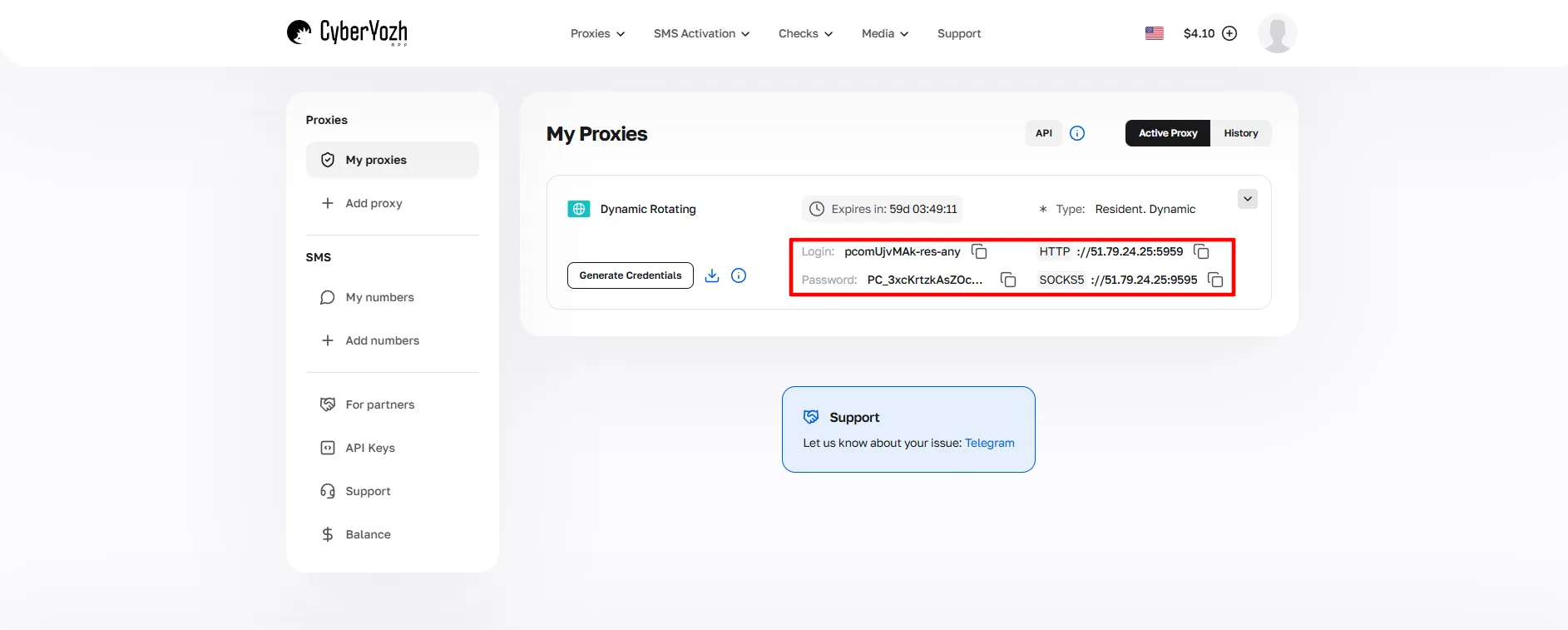
If you choose a rotating residential or mobile proxy, set rotation or session rules in your dashboard. Check your IPs using the IP Checker to ensure they’re clean.
Connect a proxy to your browser using a browser extension, a system-wide proxification tool, or use an antidetect browser (such as DICloak or Vision) for additional features
Start your web activity, check the results, and adjust the rotation to minimize challenges, such as CAPTCHA checks or temporary suspension.
If you work with social media, start with actions associated with ordinary users. In general, start with a small request activity, then increase it gradually.
Summary: Best IP rotation practices
To summarize the article, let’s explore the key components of IP rotation, the problems and mistakes, and how to address them.
Why websites block repeated IP activity
Platforms view repeated IP activity as a threat and respond with rate limits, CAPTCHA challenges, or full bans. Even “once‑in‑a‑while” router resets fail against systems that track patterns over time.
Rate limits enforce per-minute request thresholds; exceeding them triggers errors or blocks.
Pattern detection flags unnatural sequences (same endpoint, same timing) as bot traffic.
Shared IP abuse occurs when prior users tainted the same proxy/VPN IP.
Session inconsistencies appear when the IP changes mid‑login or location mismatches in the account history.
Without controlled rotation and clean IPs, any heavy‑use workflow will eventually hit walls.
When you should rotate IPs and which strategies to use
IP rotation makes sense when behavior from a single IP would be suspicious, but it can harm workflows if applied blindly. Platforms expect certain patterns from real users and react when those expectations are broken.
Scraping and data collection benefit from per‑request or time‑based rotation across a wide pool.
Automation workflows combine modest rotation with realistic delays and randomized paths.
Multi‑account management relies on sticky sessions that keep one IP per profile for a defined period.
Cases where a stable IP is preferable include long‑session accounts, payment flows, or services that require continuity.
Always match the rotation strategy (per‑request, sticky, or time‑based) to the task rather than rotating everything the same way.
How to choose the right IP rotation setup
The optimal setup depends on what you do, at what scale, and how much risk you tolerate. Performing maximum rotation often increases block risk rather than reducing it.
Based on the task: Choose the proxy type (residential, mobile, or datacenter), location, and rotation style.
Based on scale: Decide whether you need a small, tailored pool or a large, automated rotating proxy network.
Based on risk tolerance: Define how aggressively you rotate and how strictly you filter IP reputation.
Tuning rotation and proxy choice to the task and scale is what separates stable production setups from fragile test sketches
Why IP reputation matters before rotation
Rotation into bad IPs guarantees poor results: platforms consult reputation feeds and shared blocklists before your first request lands. Simply rotating more often cannot fix an already‑flagged address.
Bad IP history refers to prior abuse, spam, or fraud-related traces linked to the IP or subnet.
Fraud signals include high‑risk scores, known proxy patterns, or mismatched geolocation.
What rotation alone fails to address is that behavior and fingerprint signals still leak even when the IP changes.
Always verify IP reputation using CyberYozh’s IP Checker before adding an IP to any active workflow.
Common mistakes that cause blocks even with IP rotation
Even with full‑featured rotation, these misconfigurations keep teams blocked. The issue is rarely the rotation logic itself, but how it interacts with sessions and IP quality.
Rotating too fast breaks sessions, resets trust tiers, and mimics abnormal behavior.
Using low‑quality IPs quickly depletes the pool due to shared abuse or poor reputation.
Mixing sessions across IPs confuses session‑based detection and triggers fraud flags.
Using the wrong proxy type for the task (e.g., a datacenter for a heavy‑fraud‑sensitive social network) increases detection.
Ignoring IP reputation can lead you to rotate into risky IPs without realizing it.
Fixing these errors usually reduces blocks more than just increasing rotation frequency ever can.
Why use CyberYozh for IP rotation
Here is how a CyberYozh proxy rotation kit works:
It offers all proxy types with 100+ locations and 50M+ IPs on a single platform, which can be ordered and combined as needed.
It offers an API for automation and control, which can also be integrated with various other services and frameworks
It has built-in risk checkers for IP addresses, which can also be automated, showing your IP pool's trustworthiness in real time.
It has additional verification instruments, such as an SMS service with a virtual number, for increasing service trust
Overall, CyberYozh is a unified proxy infrastructure system designed specifically to solve business problems and can be easily integrated with other services.
FAQ about how to rotate IP address
What is a rotating IP address?
A rotating IP address automatically changes your visible IP either periodically or per request, distributing your online activity to avoid rate limits and blocks.
How to rotate IP address for web scraping?
To rotate IP address for scraping, use automated proxy services and APIs to switch IPs per request, distributing volume across a large proxy pool.
Why should I use a rotating IP address proxy?
A rotating IP address proxy handles the rotation logic automatically on the provider's end, giving you seamless access to a trustworthy pool of residential or mobile IPs.
What is an IP address rotator?
An IP address rotator is a tool or server‑side proxy feature that automatically assigns a new IP address from a pool based on your configured rotation rules.
What is the best strategy for IP address rotation?
The best IP address rotation strategy depends on the task. Use per‑request rotation for scraping, and sticky sessions for multi‑account management to maintain stable logins.
How to rotate IP address Python scripts use?
To rotate IP address Python scripts use, integrate a rotating proxy provider’s API with libraries like Requests or Playwright to automatically route traffic through different proxies.
Do rotating IP addresses prevent all website blocks?
No, rotating IP addresses alone isn't enough. You must also maintain a good IP reputation, natural session behavior, and manage digital footprints to avoid blocks.
Can I manually rotate IP address instead of automating?
You can manually rotate IP address by restarting your router, but this breaks quickly under load and is not practical for real automation workflows.
When exactly should I rotate IP address?
You should rotate IP address when performing repeated requests, scraping large datasets, distributing traffic across regions, or when your current IP triggers CAPTCHAs.
Why do setups fail even with an IP address rotator?
Setups fail when you rotate too quickly, use low‑quality IPs, mix sessions across IPs, or select the wrong proxy type for your specific task.
Helpful?
Share article
