MuLogin Review: Exploring Antidetect Browser’s Features
MuLogin is an antidetect browser designed to let users manage multiple accounts (for e‑commerce, social media, advertising, etc.) on the same device while minimizing the risk of fingerprint‑based detection and account association. For efficient work, it should be paired with a proxy. Let’s explore how it works and how to pair it with CyberYozh proxies for maximum efficiency.
Summary of the MuLogin antidetect browser
The MuLogin browser runs on Windows (including legacy versions) and is built around virtual browser technology that gives each profile a fully independent fingerprint, cookies, cache, and network identity. It offers Chromium-based (Mimic) and Firefox-based (Stealthfox) browser engines per profile, supports team collaboration via sub-accounts, and includes a Local REST API for Selenium- and Puppeteer-based automation.
Plans start at $59/month for up to 100 profiles, and a 3-day trial is available after registration.
Antidetect browser basic definitions
Antidetect browsers work by spoofing or randomizing the digital identifiers that websites use to track and link users across sessions. They alter the full stack of signals exposed to anti-fraud systems:
Canvas and WebGL rendering
OS and hardware parameters
Screen resolution, fonts, and timezone
Audio context
Browser cookies and settings
Each profile stores its own isolated cookies, localStorage, and cache, so every session appears to external platforms as a completely separate real user browsing from a unique device. To complete that picture, an antidetect browser only needs a quality proxy that masks the local IP and allows businesses to scale their operations.
Read more about antidetection activities in a CyberYozh article.
MuLogin proxy management
Here is how to manage MuLogin profiles with CyberYozh proxies.
Adding a CyberYozh proxy to MuLogin
CyberYozh provides mobile, residential static, residential rotating, and datacenter proxies, all compatible with MuLogin's HTTP and SOCKS5 input formats. Here is the setup algorithm based on the CyberYozh guide:
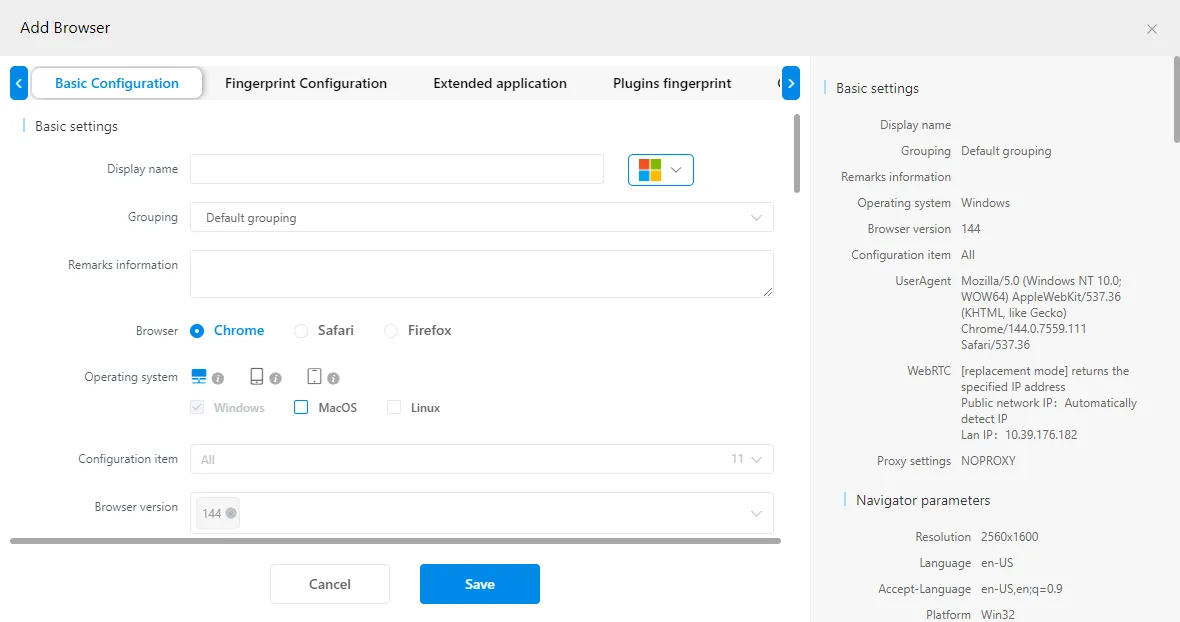
Open the MuLogin desktop application, sign in, go to Browser List in the left-hand menu, and click Add browser to open the profile creation interface.
In the Basic Configuration section, set your browser engine (Mimic or Stealthfox), operating system, language, screen resolution, timezone, WebRTC behavior, canvas, WebGL, and other fingerprint parameters. MuLogin auto-generates a consistent set by default.
Log in to your CyberYozh account, click Add proxy, select your proxy type (mobile, residential, or datacenter), choose a location, and complete the order.
In My Proxies, copy your credentials: IP address (or hostname), HTTP and SOCKS5 ports, username, and password. Paste directly from the dashboard to avoid entry errors.
Back in MuLogin's Basic Configuration tab, scroll down to Proxy Settings at the bottom, switch from noproxy to HTTP or SOCKS5, and fill in the IP address, port, login, and password from your CyberYozh dashboard.
Click Check the network to verify the connection is active, then click Save. Your new profile will appear in the Browser List.
Click Start next to the profile to launch a fully isolated session, with traffic routed through the CyberYozh proxy and the fingerprint decoupled from your host device.
Once profiles are created and saved, MuLogin's cloud synchronization keeps all configurations and credentials accessible across team members without requiring manual reconfiguration. For large-scale operations, MuLogin's Local API accepts proxy credentials in the profile-creation payload, enabling programmatically managed proxy rotation across sessions without touching the interface.
What MuLogin can be used for
MuLogin supports a wide range of business workflows where isolated identities, clean IPs, and scalable profile management are critical. Here are the most common applications.
Affiliate marketing
Affiliate marketers rely on geo-targeted campaigns, tracking links, and split testing across different offers, all of which require clean, isolated browser environments to avoid platform attribution conflicts and cross-campaign data leakage. With MuLogin, each offer or campaign can run in its own unique browser profile, with independent cookies, fingerprints, and session data, ensuring accurate conversion tracking and preventing cross-contamination between accounts. CyberYozh shared mobile proxies are a cost-effective fit here: they deliver real carrier-level IP trust across multiple profiles from a shared pool, keeping costs manageable across large affiliate operations while maintaining platform credibility on traffic-sensitive ad networks.
Brand protection
Monitoring brand mentions, pricing compliance, and unauthorized use of assets across dozens of regional platforms requires accessing those sites from location-accurate, inconspicuous IPs. MuLogin profiles allow brand protection teams to run parallel monitoring sessions from different regional identities without triggering bot-detection systems, and each session appears as a genuine local user. CyberYozh residential proxies are the right tool for this: ISP-assigned home addresses in the relevant target markets ensure that monitoring sessions blend in with organic local traffic, delivering accurate, unfiltered results.
Multiple account management
Teams managing accounts on social platforms, marketplaces, or ad networks need profiles that are permanently isolated from one another to prevent cross-account linking. MuLogin's profile isolation ensures that each account has its own cookies, localStorage, fingerprint, and proxy assignment, so platforms see every profile as a separate real user on a unique device. Assigning CyberYozh mobile proxies to social media profiles gives each account a carrier-grade IP trust score, dramatically reducing the risk of suspensions, CAPTCHA challenges, and ban cascades during multi-account growth operations.
Need virtual numbers for account registration at scale? CyberYozh's SMS activation service covers 700+ platforms across 140 countries.
Web crawling
Automated data collection from product catalogs, public databases, SERP results, or review platforms requires sending large volumes of requests without triggering IP-based rate limits or bot detection. MuLogin's isolated profiles each carry a unique fingerprint and proxy, so crawling sessions are distributed across different apparent users and devices rather than originating from a single source. CyberYozh datacenter proxies offer unlimited traffic, 99.99% uptime, and dedicated IPv4/IPv6 addresses at the lowest cost per request, making them ideal for high-volume, non-restricted public data extraction tasks.
Geo-based research
Price-comparison analysts, market researchers, and competitive intelligence teams need clean, location-accurate data from platforms that serve different content based on region. MuLogin's per-profile timezone, language, and locale settings ensure that each session presents a consistent regional identity, while the proxy's country and city anchor that identity to a specific market. CyberYozh rotating residential proxies cover 100+ countries with free geo-targeting and a pool of 7M+ IPs, so every request arrives from a genuine local address and delivers unbiased, location-specific results without manually rotating configurations.
Read about geotargeting in detail on CyberYozh.
MuLogin and CyberYozh proxies: Securing your web activities
CyberYozh mobile, residential, and datacenter proxies cover every use case MuLogin is built for.
Mobile proxies deliver the highest carrier-grade IP trust for social media and advertising accounts, where detection risk is highest, and platform scrutiny is most aggressive.
Residential static proxies provide a stable, fixed home IP for long-term account maintenance across e-commerce and marketplace platforms, while rotating residential proxies offer a broad, constantly refreshed IP pool for geo research and bulk automation workflows.
Datacenter proxies remain the fastest and most cost-efficient option for open data crawling, brand monitoring, and ad verification, where platform trust requirements are lower.
Explore the full CyberYozh proxy catalog to find the right plan for your MuLogin workflow.
F.A.Q about MuLogin antidetect browser
What is an antidetect browser and how does it work?
An antidetect browser spoofs your full browser fingerprint, so websites cannot link or identify your profiles across sessions, even from the same device.
What is MuLogin and which features make it stand out?
MuLogin is a Windows-based antidetect browser offering dual browser engines (Chromium and Firefox), over 20 spoofed fingerprint parameters, team sub-accounts, cloud sync, and a Local REST API for automation.
Is MuLogin free, and what does the trial include?
MuLogin does not have a permanent free plan. A 3-day trial is available after registration, and paid plans start at $59/month for up to 100 browser profiles and one sub-account.
What is browser fingerprinting and why does it matter?
Fingerprinting identifies users by collecting device signals, such as GPU, screen resolution, fonts, time zone, and plugins, to build a persistent identifier that survives cookie clears and VPN changes.
Why do MuLogin browser proxies matter if fingerprints are already spoofed?
Fingerprint spoofing alone does not hide your IP address. Without a dedicated proxy per profile, all sessions share a single address, allowing platforms to correlate accounts regardless of how well their fingerprints are isolated.
How is MuLogin different from a VPN or incognito mode?
VPNs only change your IP; incognito only clears local history. MuLogin replaces your full fingerprint stack and isolates each profile's cookies and storage, making each account appear as a real, completely separate user.
Can websites still detect the MuLogin browser with proxies enabled?
Detection risk rises when fingerprint presets are reused across profiles or proxies carry a poor trust score. Always verify each IP with the CyberYozh IP Checker before launching any session.
How do I add a proxy to a MuLogin browser profile?
In the Add Browser window, scroll to Proxy Settings in Basic Configuration, switch from noproxy to HTTP or SOCKS5, paste your CyberYozh IP, port, login, and password, and click Check the network to verify.
Which proxy type works best with MuLogin for social media multi-accounting?
Mobile proxies are the safest choice for social platforms — they route traffic through real carrier networks, matching the trust patterns platforms expect from genuine mobile users.
Does MuLogin support automation tools like Selenium or Puppeteer?
Yes. MuLogin's Local REST API integrates with Selenium and Puppeteer, allowing scripts to programmatically create and launch profiles, with proxy credentials passed as part of the API payload.
Helpful?
Share article
