Web Scraping Automation: How to Run Scrapers on a Schedule
Here, we’re going to overview the technical peculiarities of web scraping automation, a process many businesses rely on to get high-quality data, be it market research, SEO/SERP information, or customer sentiments. An important part of the process is that most services quickly flag and limit multiple requests during short time periods, which are inevitable during automated scraping, so it’s essential to distribute the request load among multiple IPs using rotating proxies.
What is a web scraping automation
Web scraping automation is a programmable process of connecting to the web servers and extracting data from them without manual work. All that's needed is to set up a web scraper and create instructions for it. After that, it completes all the work on its own. Usually, the resulting files are tables in .csv or .json formats, or database files that can be processed with SQL queries.
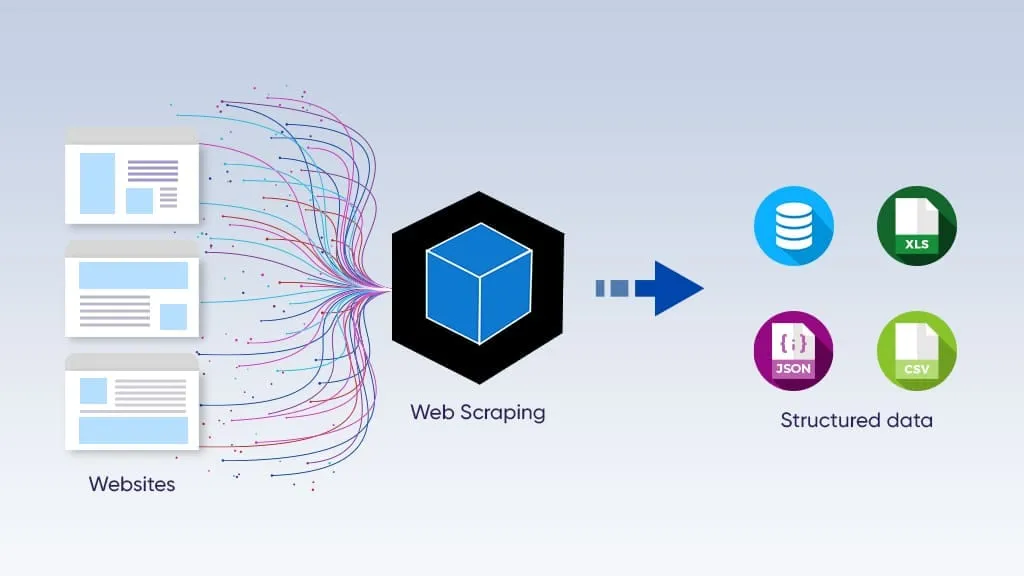
It’s critical to remember that the platform limits bulk, automated request flows, typical for web scraping. That’s why proxies are essential for it. Read more about IP rotation services and how to use them to avoid bans and restrictions
Approaches to automate web scraping
There are two primary approaches to web scraping automation: using low-code platforms for setting it up, or writing Python scripts with specialized libraries and frameworks.
No-code/low-code tools
These instruments offer point-and-click interfaces, often visual, which can be used without coding knowledge. It may help, as some of these platforms allow customization through programming, but it’s not required. Users define scraping rules by clicking on page elements, setting up pagination logic, and configuring output formats like CSV or JSON, all through a GUI.
They’re easy to set up, but also have a lot of limitations:
No-code scrapers break easily when a target website changes its layout.
They struggle with dynamic, JavaScript-heavy pages or custom business logic.
They become expensive at scale, and it’s hard to customize them.
These tools are primarily used by marketers, business analysts, e-commerce managers, and entrepreneurs. Still, programming-based solutions are better for large-scale scraping.
Programming-based solutions
These tools are libraries and frameworks, mostly for Python, the most widely used programming language. Programming-based scraping gives developers full, granular control over every aspect of the extraction process, from how HTTP requests are sent to how data is parsed, stored, and scheduled.
The key limitation is the technical barrier: building, maintaining, and scheduling production-grade scrapers requires coding skill, debugging time, and infrastructure decisions. This approach is used by data engineers, backend developers, data scientists, and growth hackers who need reliability, customization, and programmability.
Web automation proxies and why they’re necessary
Most websites, excluding large open databases (which are usually designed for scraping), limit the number of requests allowed from a single IP. When a user exceeds this limit, the platform limits requests, challenging the user with a CAPTCHA or blocking them. Additionally, platforms monitor all requests, their IPs, and other footprints (such as browser data) to find inconsistencies and bot-like behaviors, and flag suspicious addresses even if they don’t exceed the limit. That’s why proxy IP pool and antidetect browsing are needed here: they mitigate these issues.
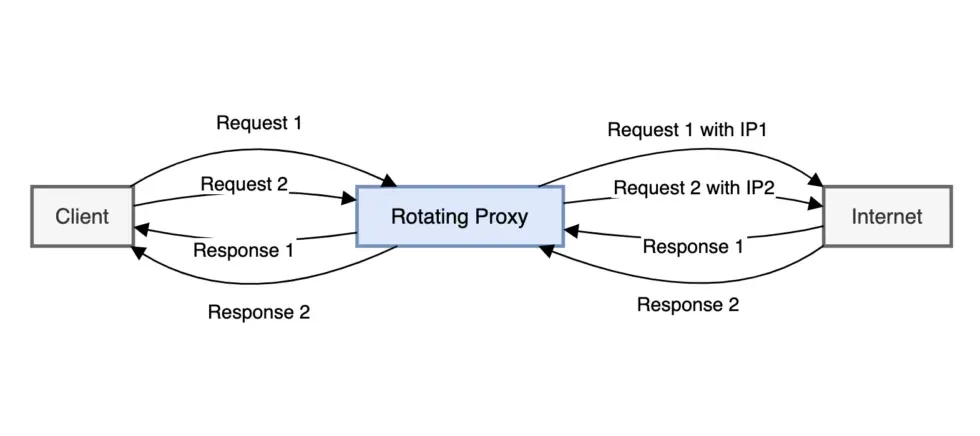
Proxy rotation means that each request (or group of requests) is sent from different IP addresses. Mostly, there are two types:
Mobile proxies use the IP addresses from mobile Internet providers (LTE/5G) and have the highest trust level, since platforms don’t distinguish them from mobile Internet users. They’re best suited for social data scraping.
Residential rotating proxies use a pool of residential IP addresses and rotate among them according to a preset algorithm. Their trust level is lower but still good for most platforms, and they’re a good option for most web scraping tasks.
Before using any IP address, its quality should be evaluated using CyberYozh’s IP Checker, which displays its Fraud Score.
Antidetect browsers further enhance safety by providing a separate set of digital fingerprints for each session. Combined with a clean IP, each session now appears to be an authentic digital identity, and the likelihood of bans and CAPTCHA challenges decreases significantly.
Read more about antidetection and how it works.
What are the most reliable web scraping and automation services
Automating web scraping involves using various tools and techniques to schedule and run extraction tasks without manual intervention. The best method depends on your coding knowledge, the complexity of the target website, and the desired scale of the operation. Regardless of the method, it’s essential to combine your scraper with rotating proxies to ensure your sessions won’t be banned.
Dedicated no-code platforms
Purpose-built scraping platforms combine visual scraper builders with cloud infrastructure, built-in scheduling, proxy rotation, and CAPTCHA handling with no coding needed.
Octoparse is a point-and-click scraper builder with cloud execution, auto-detection of templates, and scheduled runs for e-commerce and lead data.
Apify offers a marketplace of 1,500+ ready-made scraping "Actors" for popular sites, with cloud hosting and API output.
Browse.ai specializes in website monitoring; it detects changes and triggers alerts without manual re-configuration.
Web Scraper extension is a browser-based, beginner-friendly scraper with cloud scheduling for simple structured data extraction.
Best suited for marketers, analysts, and business teams who need recurring data collection without developer resources.
Automation platforms
General-purpose automation tools connect web scraping steps to broader business workflows, routing extracted data into CRMs, spreadsheets, or messaging tools.
Zapier connects scraping triggers to 6,000+ apps; ideal for lightweight data handoffs like new listings → Slack or Google Sheets.
n8n is an open-source, self-hosted workflow builder with HTTP request nodes, offering more control and custom logic than Zapier.
These platforms suit operations and growth teams who want to act on scraped data immediately: automating notifications, lead routing, or reporting pipelines, rather than just storing it.
Python libraries
Python libraries give developers full programmatic control over scraping logic, scheduling, and data handling, from simple HTML parsing to full browser automation.
Scrapy is a production-grade crawling framework with built-in pipelines, middlewares, and scheduling for high-volume data extraction. Install it using pip with the command pip install scrapy
BeautifulSoup + Requests is a lightweight combo for parsing static HTML pages; it is fast to prototype but limited for dynamic sites.
Playwright/Puppeteer/Selenium are all headless browser automation tools that handle JavaScript rendering, user interactions, and complex login flows.
The go-to choice for developers and data engineers building custom, scalable pipelines that require precise control over proxies, error handling, and downstream data processing.
Running a scheduler for automatic scraper management
Once the scraping tool is set up, its activity should also be automated. A scraper automates web data extraction, but another tool, called a scheduler, automates when the scraper should run and when it should be idle. It’s also possible to turn it on and off manually, but schedulers allow more control and precision, which, as we’ve already seen, is crucial. Usually, two types of schedulers are used: system-level and cloud-based.
Read more about IP rotation strategies to select the one you need.
System-level schedulers
Let’s start with the first type. Typical examples are standard scheduling programs for Unix operating systems (including macOS) and Windows.
Cron Jobs: The standard time-based job scheduler for Unix-like operating systems, ideal for running Python scripts on a schedule.
Windows Task Scheduler: The built-in Windows equivalent for scheduling programs or scripts to run at specific times.
Both programs have a very simple interface that allows users to launch and stop other programs within a specific time.
Cloud-based solutions
Cloud-based scheduling platforms deploy and run scraping scripts in their digital environments. Typical examples are GitHub Actions, AWS Lambda, and Apache Airflow.
GitHub Actions is a free CI/CD platform that can run your scraping scripts on GitHub's servers, ensuring they execute even when your local machine is off.
AWS Lambda is a highly scalable and cost-effective option for running scrapers in the cloud, just by posting the code to its runtime environment and launching it.
Apache Airflow is an open-source platform for programmatically authoring, scheduling, and monitoring workflows, suitable for complex data pipelines.
These platforms are especially well-suited for shared access and teamwork, when several developers work on a single project using any of these tools.
Summary table of the web scraping and scheduling platforms
Let’s summarize these scraping and scheduling platforms based on their usage principles, examples, and what they're best for.
Platform Type | Examples | Best For | Coding |
No-code parsing tools | Octoparse, Browse AI, Apify | Non-developers, monitoring | No |
Python libraries | Scrapy, Playwright, BS4 | Full control, custom logic | Yes |
Automation platforms | n8n, Zapier, Airflow | Workflow integration | Low/optional |
Cloud schedulers | GitHub Actions, AWS Lambda | Serverless, always-on runs | Moderate |
OS schedulers | Cron (Unix), Task Scheduler (Windows) | Local script scheduling | Minimal |
Setting up an automated web scraper: Best practices
Now, let’s explore the best practices for running a web scraping tool.
Check robots.txt
Websites usually have a specialized file called robots.txt that specifies which content can and cannot be crawled. Usually, websites protect their login pages, user dashboard, and other pages with sensitive information. To access it, just add its name to the website root (i.e., app.cyberyozh.com/robots.txt), and here you’ll see the website’s scraping rules. Don’t scrape the data that is disallowed from it.
Rotate your IP with proxies
Rotate IP addresses using proxy services to avoid rate limiting and IP bans when scraping at scale. Make sure to check the IP quality before rotating on it. With the CyberYozh checker, this can be automated using the CyberYozh API, so the rotation will occur only if the target IP has a low Fraud Score.
Implement random delays
Add random delays between requests to avoid overloading the target server or getting your IP address blocked. Make sure you don’t breach the website’s Terms of Service by making too many requests, as this can disrupt the website’s operation and lead to conflict with the platform.
Read more about the IP address health in the proxy management cycle article from CyberYozh.
Handle errors automatically
Implement try-catch blocks or similar error-handling mechanisms to handle potential issues such as network errors or website structure changes. It will ensure that potential errors are counted and reported before scraping starts, so you can respond appropriately, save your traffic, and prevent issues.
Use headless browsing
To save traffic, which is crucial in web scraping, you can use a headless browsing method, when your scraper accesses only the data you need (prices, costs, search results, listings, user comments, and so on) without UI. As rotating proxies usually charge for the amount of traffic, it will be cost-efficient, too.
Best web scraping practices: Summary
Web scraping automation combines the right scraping tool, a reliable scheduler, and rotating proxies into a single, hands-free data pipeline. Whether you're a marketer using Octoparse or a developer building Scrapy pipelines, the fundamentals remain the same: distribute your requests across clean IPs, respect platform rules, and handle errors proactively. CyberYozh's residential and mobile proxies, combined with its IP Checker API, give you the infrastructure to run scrapers at scale without bans or disruptions.
FAQ about web scraping automation
What is web scraping automation?
A programmable process that extracts web data automatically on a schedule, without manual work, outputting results to CSV, JSON, or a database.
Do I need coding skills to automate web scraping?
No-code platforms like Octoparse and Browse.ai handle everything visually. Coding unlocks more power and flexibility at scale.
Why do scrapers get blocked?
Websites detect repeated requests from a single IP and flag bot-like behavior. Rate limits, CAPTCHA, and IP bans follow.
What is IP rotation and why does it matter?
IP rotation sends each request from a different IP address, preventing rate limiting and making scraping sessions look like real users.
What's the difference between residential and mobile proxies for scraping?
Mobile proxies carry the highest trust level and rarely get blocked; residential proxies offer a larger pool and suit most general scraping tasks.
What is a cron job in web scraping?
A Unix-based system scheduler that triggers a scraping script automatically at defined time intervals, like daily or hourly.
Can I run scrapers in the cloud for free?
Yes. GitHub Actions offers free cloud execution of scraping scripts on a schedule, even when your local machine is off.
What is robots.txt and should I follow it?
A file declaring which pages a site allows to be crawled. Respecting it keeps your scraper ethical and reduces legal risk.
What is a headless browser and when should I use it?
A browser that runs without a UI, usd to scrape JavaScript-rendered pages efficiently while consuming less bandwidth and proxy traffic.
How do I check if my proxy IP is clean before using it?
Use CyberYozh's IP Checker to retrieve a Fraud Score for any IP; this can be automated via the CyberYozh API.
Helpful?
Share article
