
反检测浏览器:使用场景、代理集成和顶级示例

每次访问网站时,互联网都会识别您的会话。即使您不输入用户名或密码,系统也会分析您使用的设备和浏览器、已安装的字体、屏幕分辨率、IP地址,甚至鼠标移动方式。所有这些被称为数字指纹,并且可以进行管理。 反检测浏览器 正是为此目的而设计的,对于多账户管理、网页抓取和高隐私项目等任务来说不可或缺。配合 合适的代理,它们可以确保快速的工作流程而不会有被封禁的风险。
核心要点
反检测浏览器 会掩盖您真实的数字指纹,例如GPU、IP、字体、时区、浏览器标识,并用模拟数据替换它们,使每个配置文件在任何网站看来都像是完全不同的设备。
为每个隔离配置文件伪造50多个浏览器和硬件参数
通过会话、Cookie和缓存隔离防止账户关联
与代理配合,为每个配置文件对齐IP、地理位置和语言
用于多账户管理、联盟营销、SEO、Web3和匿名研究
顶级工具包括Dolphin Anty、GoLogin、AdsPower和Multilogin
什么是反检测浏览器,为什么要发明它?
Chrome或Firefox等标准浏览器无法提供完整的数据隔离。恰恰相反:它们会保存会话历史并向网站传递参数。这对于个性化来说很方便,但如果您有以下需求则不方便:
管理多个商业账户(在LinkedIn、Facebook等平台上)
在不同地理位置和账户上运行广告活动
从不同位置跟踪SEO和SERP结果
在GitHub和其他服务上从不同类型的设备测试应用程序
收集公开数据用于AI训练和商业分析
希望保持数据隐私并保护其免受跟踪。
反检测浏览器、云手机和代理是用于定制和保护您的 数字指纹的工具,确保您的流量不会被平台标记或限制。为了确保一切都能被充分理解,让我们快速回顾一下技术细节。下面是 DICloak反检测浏览器 指纹管理面板的示例。
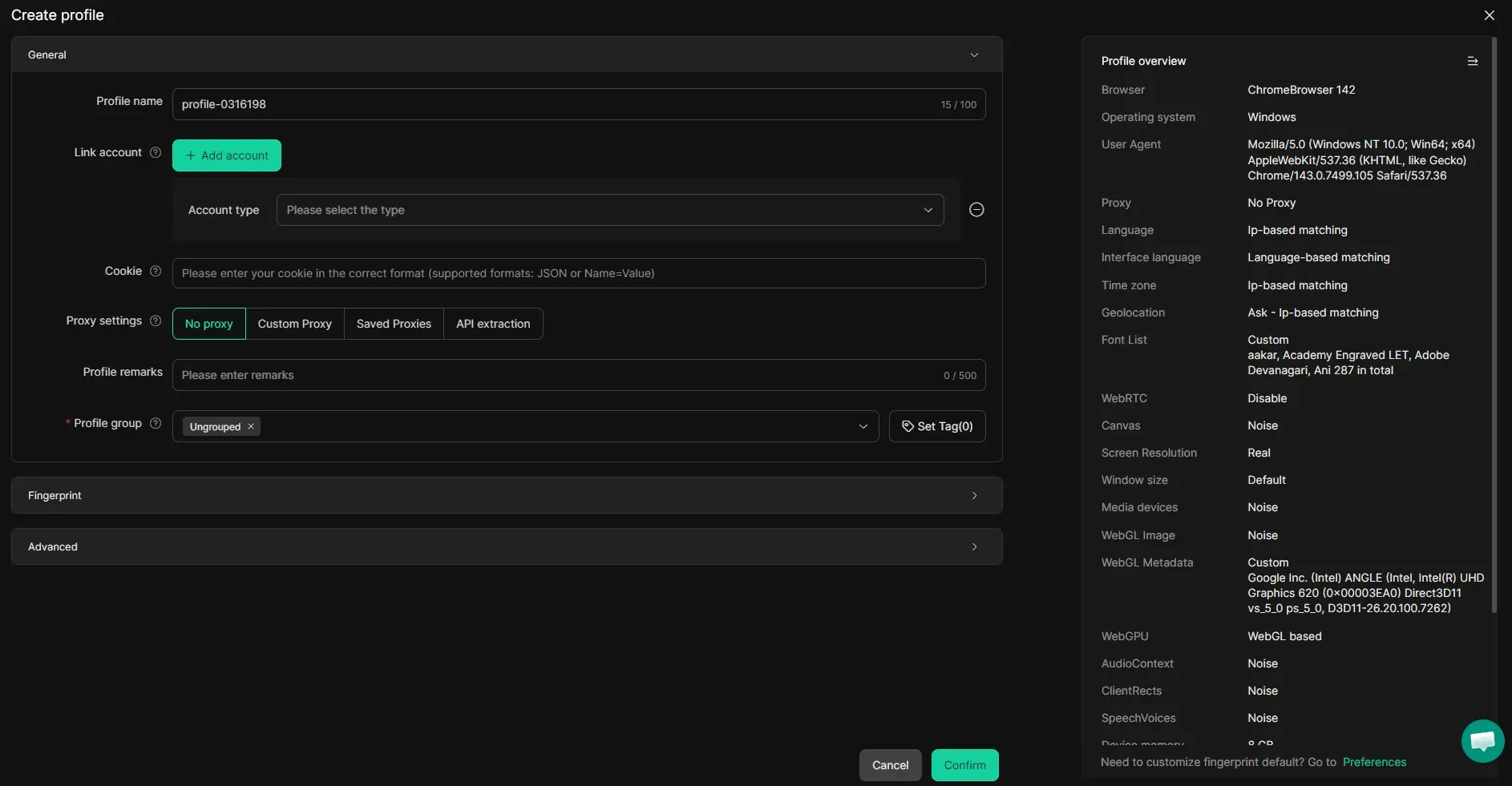
欲了解更多信息,请探索 代理数字指纹 ,并了解如何确保平台不会因使用代理而限制您。
数字指纹及其重要性
虽然代理为您提供了干净的IP地址,但您的设备仍然以与之前相同的方式被识别。因此,即使您从不同的IP发送请求, 社交媒体 和 电子商务服务 等平台仍然可以识别您的数字参数,例如:
浏览器标识:User-Agent字符串、HTTP标头、navigator属性和插件列表,用于识别浏览器和版本。
图形与GPU:Canvas和WebGL渲染输出,会暴露独特的GPU硬件、驱动程序和渲染签名。
屏幕与显示:屏幕分辨率、色彩深度和像素比率,这些参数揭示了设备的物理显示特性。
系统与硬件:操作系统平台、CPU核心数和设备内存值,这些参数对底层机器进行指纹识别。
网络与IP:真实IP地址、WebRTC泄漏、TLS握手模式以及与连接相关的ISP/ASN数据。
地理与时间:时区、浏览器语言和区域设置,这些必须与分配的代理位置保持一致。
音频与媒体:AudioContext输出、支持的编解码器以及由硬件和操作系统差异塑造的媒体API响应。
字体与行为:已安装的字体集、触摸支持标志以及鼠标移动和打字节奏等行为信号。
所有这些参数都会揭示关于您和您活动的重要信息:您来自哪里、您使用的是哪种设备以及您访问网站时的行为方式。虽然您的私人信息仍然是私密的,但这些行为元数据足以让人了解您正在使用代理/VPN或发现您行为中的不一致之处。反检测浏览器可以防止这种情况。
使用反检测浏览器进行匿名浏览
当我想做一些日常事务时,我会使用普通浏览器。但当我需要处理敏感信息时,无论是大额资金还是个人用户数据,我更喜欢使用反检测浏览器的隔离配置文件。它们让追踪器正常运行,但向其提供模拟数据,使每个配置文件在任何网站看来都像是一个完全不同的合法用户。它们不与您的真实设备相连,并且结合CyberYozh代理,您的数字身份得到了全面保护。例如,下面是 Vision反检测浏览器 的配置文件创建面板。
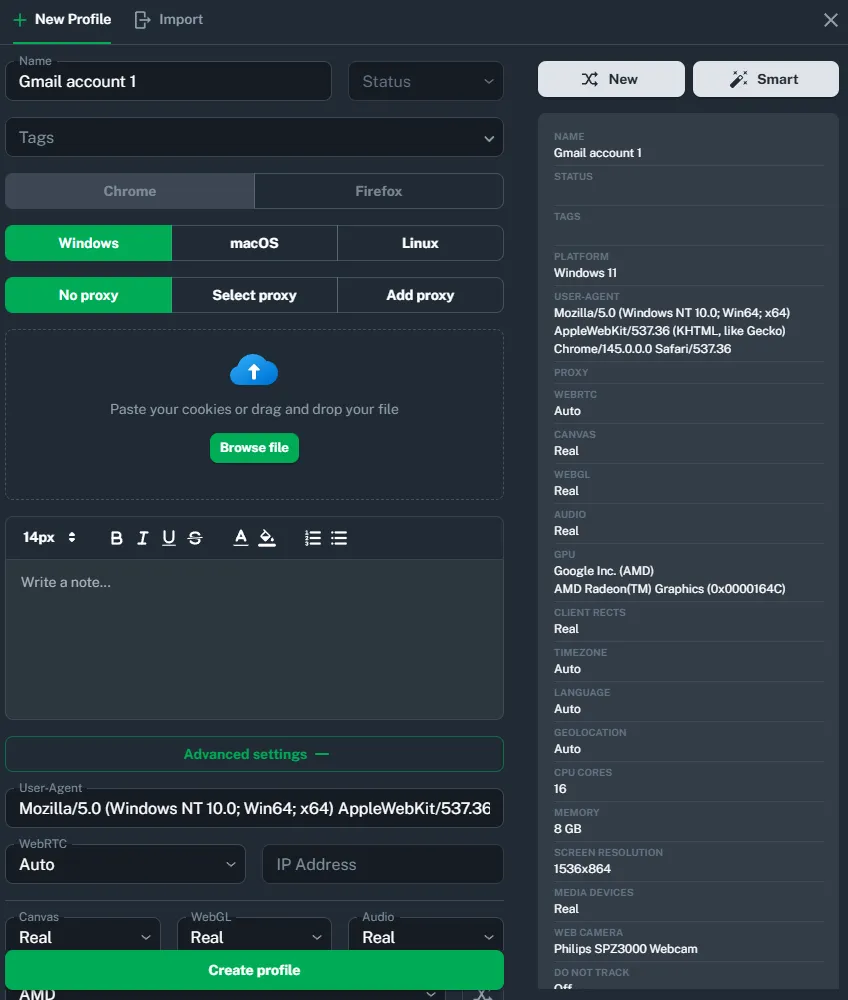
在这里,您可以创建独立工作的配置文件,没有cookie冲突、数据重叠或不必要的安全检查。云手机的运作方式类似:它们创建隔离的配置文件,每个配置文件都类似于一部具有高度可定制的真实Android设备指纹的Android手机。它们主要用于社交媒体管理,特别是在Instagram和TikTok等移动优先平台上。探索 顶级Android云手机服务 以了解更多关于这些反检测工具的信息。
反检测浏览器合法吗?
总的来说,是合法的。反检测浏览器本身是一种数据管理工具,就像 VPN或代理一样。然而,重要的是 了解您如何以及为何使用它们。
合法场景:广告管理、软件测试和个人数据保护。它们不违反任何法律,只是利用反检测功能来保障安全并简化业务流程。
非法场景:违反平台规则、欺诈、DDoS攻击和其他恶意活动。它们要么直接违法,要么违反用户协议,这可能导致诉讼和罚款。
简而言之,如果您的业务任务是合法的,那么使用工具来执行这些任务也是合法的。在CyberYozh上了解更多关于 使用代理的法律方面 的信息,以理解反检测活动的这些特殊性。
最佳反检测浏览器:8大服务
市面上有许多反检测浏览器,您可以浏览 CyberYozh指南 以获取有关设置它们的更多信息。在这里,我们将根据各种指标和特性探讨几个最受欢迎和最可靠的选项:
让我们逐一探讨这些选项。
Dolphin Anty
Dolphin Anty是一款功能强大、专注于联盟营销的反检测浏览器,专为在Facebook、TikTok和Google Ads等广告平台上进行大规模多账户管理而设计。它面向需要管理数百个配置文件并保持一致指纹控制的专业流量套利团队和联盟营销人员,包括Canvas、WebGL、WebRTC以及启动时的自动设备名称欺骗。CyberYozh建议将其与使用静态IP的SOCKS5代理配合用于账户管理,使用轮换住宅代理用于爬取任务。其内置的代理管理器、Cookie机器人、批量配置文件创建和团队工作流工具使其成为安全扩展广告运营的良好平台。
GoLogin
GoLogin是一款基于云的反检测浏览器,由其专有的Orbita引擎驱动,该引擎基于Chromium构建,可为每个配置文件管理50多个指纹参数,包括WebGL、字体、地理位置和时区。它面向需要从任何设备访问可靠多账户操作的SMM机构、电商卖家和加密货币交易者,因为配置文件会同步到云端。主要优势包括Android应用、双因素认证以及通过Selenium和Puppeteer实现自动化的完整API支持。
AdsPower
AdsPower提供双引擎架构,包括SunBrowser(基于Chromium)和FlowerBrowser(基于Firefox)。它专为需要管理大量配置文件的电商专业人士、社交媒体管理者和营销机构设计,支持通过Excel或TXT批量导入每批最多1,000个配置文件。其突出的差异化特点是内置的无代码机器人流程自动化(RPA)和多窗口同步器,让团队无需编码即可在多个账户间同时复制操作。AdsPower还持有SOC 2 Type II和ISO 27001安全认证。
Multilogin
Multilogin是企业级反检测浏览器,提供两个修补的浏览器内核,Mimic(Chromium)和Stealthfox(Firefox),具有深度内核级指纹修改功能。它面向需要最大浏览器配置文件隔离的大型企业、开发团队和机构,配置文件存储在加密的AWS云基础设施上并自动跨设备同步。其严格的会话锁定功能可防止同一配置文件从两台设备同时启动,这是团队环境中账户安全的关键保障。Multilogin被全球大型企业使用,尽管其价格高于大多数竞争对手。
Incogniton
Incogniton是一款多功能反检测浏览器,专为需要在单一平台上实现配置文件隔离和团队协作的营销机构、电商运营商和流量套利专业人士量身定制。每个配置文件维护完全分离的Cookie、本地存储和缓存,同时支持HTTP、HTTPS、SOCKS4和SOCKS5代理。其无代码同步器工具可记录浏览器操作并自动在多个配置文件中重放,而高级用户可以访问Selenium和REST API集成以实现复杂的自动化工作流。Incogniton提供慷慨的免费套餐,对小型团队或个人特别有吸引力。
MoreLogin
MoreLogin是一款对初学者友好的反检测浏览器,使用AI生成的指纹创建完全隔离的浏览器环境,只需最少的手动配置,支持Chromium和Firefox引擎。它最适合电商、社交媒体营销和加密货币领域的中小型团队,这些团队优先考虑设置的便捷性和基于云的配置文件访问,而非精细的指纹自定义。配置文件存储在云端,支持无缝的跨设备访问和内置角色管理的直接团队协作。其同步器功能允许用户在多个配置文件窗口间同时镜像操作,使重复的多账户任务高效完成,无需自动化专业知识。
Kameleo
Kameleo是一款技术先进的反检测浏览器,提供对每个指纹参数无与伦比的精细控制,以及用于真实移动配置文件行为的原生Android设备模拟。它专为运行移动优先活动、空投挖矿或复杂爬取操作的高级用户、开发人员和大规模自动化工程师设计。配置文件存储在用户本地机器上,提供完全的数据主权,无需依赖第三方云服务器。Kameleo与Selenium、Playwright和Puppeteer的完整API兼容性使其成为构建自定义自动化管道的技术团队的首选,尽管其较陡的学习曲线使非技术用户较难上手。
Hidemyacc
Hidemyacc旨在帮助团队和个人运营者 管理多个账户 而不会使其面临平台封禁风险,其定价保持在实惠的中端水平,而非进入高端领域。初学者可以快速上手,因为从基础计划开始就包含免费代理,而不是作为单独的附加项出售。自动化通过拖放式脚本构建器处理,因此不需要编码知识,同步器功能允许单个操作一次性在多个配置文件中复制。值得注意的一个权衡是:Hidemyacc的移动配置文件模拟移动浏览环境,而不是完全模拟物理设备,这使其保持轻量级,但可能无法通过探测更深层硬件级信号的检查。对于较大的团队,Hidemyacc还提供内置的子账户管理和REST API(配置文件API、用户API)用于程序化配置文件控制。
顶级反检测浏览器对比
以下是总结前8大反检测服务的对比表。在选择满足您需求的项目时可以参考它。
名称 | 套餐与定价 | 主要功能 | 最适合 |
Dolphin Anty | 免费:5个配置文件;10个配置文件起价10美元/月 | 50+指纹、Cookie机器人、批量配置文件、团队角色 | 联盟营销人员和流量套利团队 |
GoLogin | 免费:3个配置文件;100个配置文件起价49美元/月 | Orbita引擎、云同步、内置代理、移动应用 | 个人营销者、SMM机构、加密货币交易者 |
AdsPower | 免费:5个配置文件;10个配置文件起价9美元/月 | 双引擎、无代码RPA、多窗口同步、批量导入 | 需要大规模无代码自动化的电商团队 |
Multilogin | 无免费计划;10个配置文件起价€9/月 | Mimic + Stealthfox引擎,内核级伪装,加密云存储 | 需要最高匿名深度的企业团队 |
Incogniton | 免费版:10个配置文件;50个配置文件起价$29.99/月 | 配置文件隔离,无代码同步器,内置代理市场 | 管理客户社交账户的代理机构和自由职业者 |
MoreLogin | 免费版:2个配置文件;10个配置文件起价$9/月 | AI指纹,云配置文件,同步器,团队角色 | 电商和社交媒体领域的初学者和中小企业 |
Kameleo | 无免费计划;无限配置文件起价€59/月 | 精细指纹控制,安卓模拟,完整自动化API | 运行复杂自动化流程的开发者和高级用户 |
Hidemyacc | 无免费计划,5个配置文件起价$10/月 | 指纹隔离,免费代理(基础计划起),拖放式自动化,同步器(多配置文件操作镜像),团队/子账户管理,REST API(配置文件API,用户API) | 预算有限的团队和个人运营者管理多个账户 |
设置反检测浏览器配置文件
以下是在Windows、Linux或macOS上设置反检测浏览器的方法。许多浏览器仅支持其中部分平台,因此在选择浏览器之前请先了解这一点。以下是操作步骤。
创建配置文件:这就像打开一个与主系统隔离的独立工作空间。操作很简单,通常只需点击一个按钮。
配置参数: 通常,反检测浏览器支持广泛的指纹自定义选项,不过选择高效的预定义设置往往更好。
保存所有内容: Cookie、登录信息、缓存和指纹严格存储在配置文件内,账户之间不会混合数据。
这样,您可以在一个平台上使用10个不同的账户,分析系统不会将它们关联起来。请参考CyberYozh关于反检测浏览器代理设置的指南,了解如何为 Vision、 Hidemium、 Octo Browser、 DICloak、 AndBrowser等等。
谁可能需要反检测浏览器?
虽然我将反检测浏览器用于敏感的个人任务并向他人推荐,但它们首先是专业工具。让我们探讨一下反检测浏览器被证明是不可或缺工具的具体行业。
社交媒体专家的反检测浏览器
作为 社交媒体管理员、 账户管理员或 电商运营者,您可以从单个设备管理5个、10个或20个客户账户,避免因可疑的多账户活动而触发的授权错误和封禁。每个配置文件都维护自己独立的cookie和会话数据。将它们与 移动代理 配对使用,也可以隔离它们的IP和网络特征。
SEO和SERP分析的反检测浏览器
SEO专业人士 使用反检测浏览器模拟来自不同地理位置、设备和浏览器的搜索,以获得干净、无偏见的SERP结果,不受个性化或浏览历史的影响。使用 住宅代理 查看真实本地用户看到的内容,从而获得精确的排名跟踪和竞争对手分析。
匿名浏览的反检测浏览器
无论是进行 品牌情报、开展 市场研究还是 监控评论,反检测浏览器都能确保稳定、不被追踪地访问网络资源,而不会留下可识别的数字痕迹。在隔离的模拟环境中运行每个会话,防止网站建立行为档案或根据先前活动限制访问。
联盟营销的反检测浏览器
在 测试广告创意 和跨多个流量源启动营销活动时,干净的隔离环境至关重要。反检测浏览器为 联盟营销人员 和套利团队提供客观、可靠的统计数据,确保没有会话数据、cookie或行为信号在配置文件之间泄露。
Web3活动的反检测浏览器
加密货币爱好者 和Web3开发者使用反检测浏览器来操作多个钱包和交易所账户,而不会被平台通过共享的设备指纹或IP地址将它们关联起来。这最大限度地降低了账户封禁、资产冻结和身份暴露的风险,使您的活动看起来是独立的,您的真实数据也得到保护。继续阅读以了解 加密货币工作的最佳实践 在CyberYozh上。
选择反检测浏览器时需要考虑什么?
以下是几个清单,以确保您选择了正确的反检测浏览器。让我们从选择前必须询问的几个关键问题开始,并根据您的项目需求进行回答。
它是否支持所需的连接类型?查看 HTTP和SOCKS5 的区别。
如何配置指纹参数?
这些参数是否与真实世界的设备相似?
您能否方便地管理多个配置文件?
是本地存储还是云端数据存储?
是否有免费版本或良好的试用期?
是否支持API集成以实现日常自动化?
内核更新频率如何?
此外,重要的是要记住:
反检测需要正确配置的配置文件才能正常工作。
安全第一:即使在受保护的浏览器中也要使用强密码和双因素认证。
如果使用付费代理,请选择可信赖的提供商,否则连接可能不稳定。
使用带免费代理的反检测浏览器时要小心:它们通常质量较低
如果您刚刚起步:
从Dolphin Anty或Incogniton开始,因为它们提供慷慨的免费计划
学习有关配置设置的文档
先进行测试,不要立即使用您的主要业务账户
明确界定反检测浏览器在您的情况下解决哪些任务。
带代理的反检测浏览器:优化网络活动
反检测浏览器是处理信息的专业软件。当我需要访问互联网进行专业或敏感活动时,我更喜欢使用它们,我可以向任何有兴趣保护个人自由的人推荐它们。它们是数字灵活性和业务安全的工具。在数据量不断增长的世界中,明智地管理您的数字存在非常重要。探索 CyberYozh指南 以了解更多关于反检测工具的信息,或 立即注册 选择代理来补充您的浏览器。