
Top 9 điện thoại Android đám mây: Tính năng và cách sử dụng
Công nghệ điện thoại đám mây cho phép người dùng mô phỏng không chỉ các phiên bản Android khác nhau như máy ảo và trình giả lập, mà còn toàn bộ dấu vân tay thiết bị mà không cần thiết bị thực tế. Các dấu vân tay này bao gồm IMEI, MAC và Android ID, giúp giảm nguy cơ phát hiện từ nền tảng và bảo mật người dùng điện thoại đám mây. Ở đây, chúng tôi sẽ cung cấp tổng quan về các điện thoại đám mây Android tốt nhất, khám phá các tính năng cốt lõi và trường hợp sử dụng của chúng, đồng thời thảo luận về cách chúng có thể giúp tối ưu hóa quy trình kinh doanh.
Điện thoại đám mây Android là các thiết bị Android ảo được lưu trữ trên máy chủ từ xa, mô phỏng điện thoại thông minh thực với dấu vân tay phần cứng độc nhất. Các điểm chính:
Tính chân thực của phần cứng ảo: Điện thoại đám mây mô phỏng IMEI, địa chỉ MAC, Android ID và GPS để xuất hiện như thiết bị thực trên mọi nền tảng
Chín nhà cung cấp được đánh giá: VMOS Cloud, DuoPlus, BitCloudPhone, RedFinger, MyAndroid, GoLogin, GeeLark, MoreLogin và Multilogin, mỗi nhà phục vụ các trường hợp sử dụng riêng biệt
Tiêu chí đánh giá chính: Quản lý đa phiên bản, chất lượng dấu vân tay thiết bị, tối ưu hóa độ trễ, tích hợp proxy và hỗ trợ tự động hóa
Ghép nối proxy: Gán proxy CyberYozh chuyên dụng cho từng phiên bản điện thoại đám mây bổ sung IP và vị trí địa lý độc nhất, giảm nguy cơ cấm từ nền tảng
Các trường hợp sử dụng đa dạng: Quản lý tài khoản, vận hành mạng xã hội, thương mại điện tử, kiểm thử ứng dụng và chơi game đều được hưởng lợi từ công nghệ điện thoại đám mây
Giá linh hoạt: Các tùy chọn từ miễn phí (MyAndroid) đến cấp doanh nghiệp (Multilogin khoảng $99/tháng)
Điện thoại đám mây trên Android là gì?
Điện thoại đám mây Android là các thiết bị ảo mô phỏng hoàn toàn hệ điều hành Android trong khi chạy trên thiết bị máy tính để bàn. Chúng có điểm tương đồng với máy ảo chạy môi trường Android, nhưng chúng mô phỏng hệ điều hành thực với dấu vân tay độc nhất, xuất hiện như một thiết bị Android thực đối với các nền tảng và ứng dụng.
Đọc thêm về dấu vân tay kỹ thuật số trong bài viết chuyên biệt.
Kết quả:
Các nền tảng nhìn nhận điện thoại đám mây như một điện thoại Android thực, không giống như máy ảo thường bị phát hiện nhanh chóng
Mỗi điện thoại đám mây có số nhận dạng điện thoại độc nhất (IMEI), cho phép người dùng bảo vệ IMEI thực của họ
Điện thoại đám mây có thể được sử dụng chung cho quản lý mạng xã hội và các hoạt động kinh doanh khác với kết nối 24/7
Điện thoại đám mây cũng hỗ trợ định tuyến cuộc gọi và có thể được sử dụng cho hỗ trợ khách hàng, bán hàng và các giao tiếp khác một cách hiệu quả
Điện thoại đám mây Android có thể được ghép nối với proxy để mở rộng quy mô hoạt động kinh doanh và giảm thiểu rủi ro, chẳng hạn như khi quản lý nhiều tài khoản TikTok hoặc Instagram. Chúng được sử dụng bởi các nhà quản lý mạng xã hội, nhà phát triển và doanh nhân để quản lý nhiều tài khoản, kiểm thử ứng dụng và tối ưu hóa quy trình kinh doanh hàng loạt mà không cần thiết bị vật lý.
Nếu bạn cần số điện thoại ảo, hãy xem dịch vụ SMS của CyberYozh và thuê một số ở hơn 140 quốc gia.
Điện thoại đám mây Android tốt nhất năm 2026
Hãy xem các nhà cung cấp điện thoại đám mây Android khác nhau và so sánh các tính năng họ cung cấp.
VMOS Cloud
VMOS Cloud là dịch vụ điện thoại đám mây Android có nguồn gốc Trung Quốc được xây dựng chủ yếu xung quanh tự động hóa TikTok được hỗ trợ bởi AI, cung cấp môi trường Android ảo đầy đủ với quyền truy cập root được kích hoạt mặc định trên máy chủ từ xa. Nó nhắm đến các nhà sáng tạo cá nhân đang tìm kiếm lối vào giá cả phải chăng cho các hoạt động di động dựa trên đám mây.
AI Agent cho TikTok: tự động thích, bình luận, đăng bài và phát sóng trực tiếp
Được chứng nhận GMS cho khả năng tương thích Google Play ổn định, hỗ trợ Android lên đến phiên bản 15
Truy cập qua Windows, Android, iOS và trình duyệt với mô hình freemium bắt đầu từ ~$4.99/tháng
Hỗ trợ nhiều phiên bản với môi trường ứng dụng độc lập
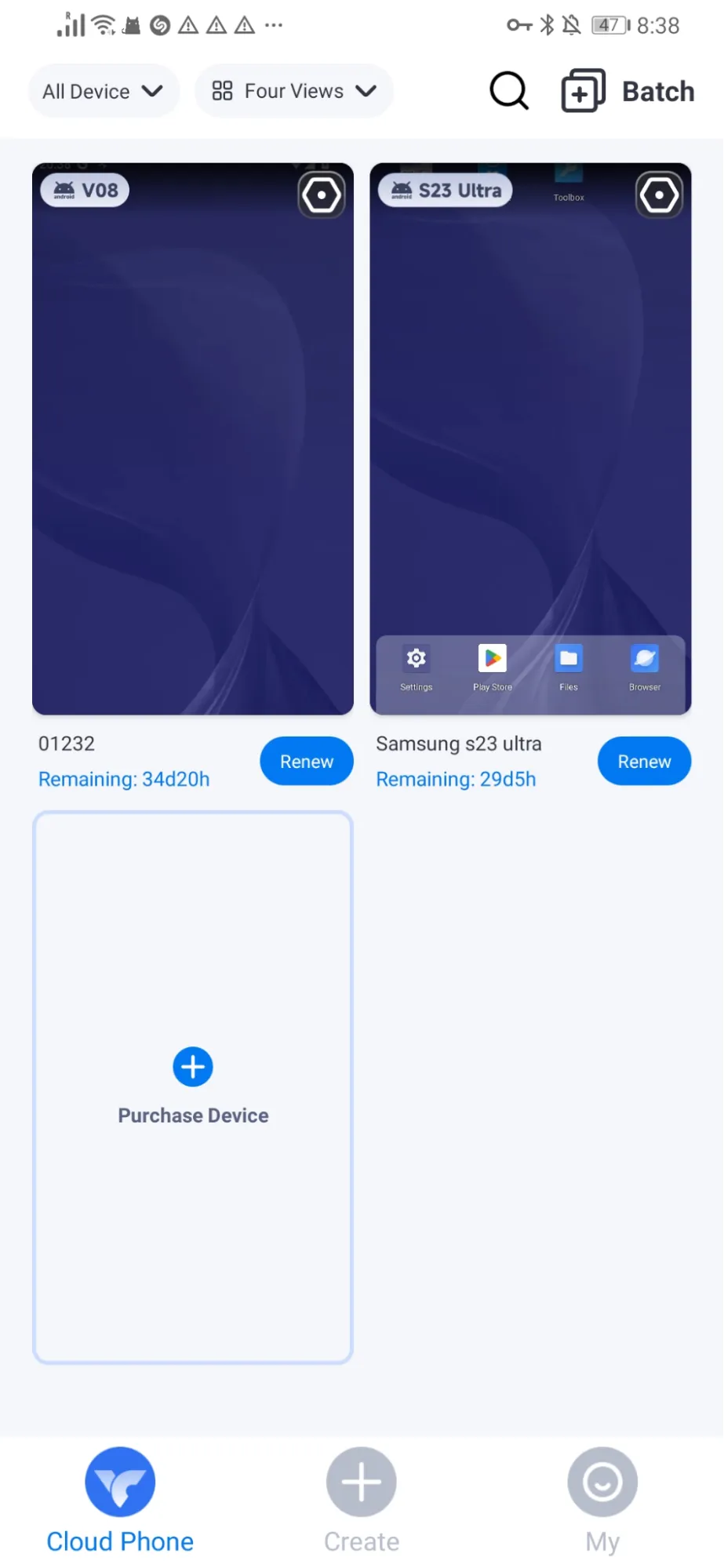
VMOS Cloud phù hợp với các nhà sáng tạo nội dung cá nhân và người vận hành TikTok đơn lẻ ưu tiên chi phí thấp hơn độ tin cậy cấp doanh nghiệp. Nó ít phù hợp với các nhóm do các tính năng cộng tác hạn chế và tuân thủ GDPR hạn chế.
Khám phá cách sử dụng proxy trong SMM để hiểu rõ hơn cách kết nối proxy với điện thoại đám mây
DuoPlus
DuoPlus là nền tảng điện thoại đám mây có trụ sở tại Singapore chạy trên chip ARM thực thay vì mô phỏng phần mềm, làm cho các thiết bị ảo hoạt động chân thực hơn so với trình giả lập tiêu chuẩn. Nó được xây dựng cho thương mại điện tử xuyên biên giới và các hoạt động ma trận TikTok quy mô lớn, không cần tải xuống ứng dụng khách.
Phần cứng ARM thực được triển khai trên 150+ quốc gia với mô phỏng GPS và SIM
Công cụ tự động hóa RPA được cung cấp miễn phí cho tất cả người dùng
Quản lý ứng dụng hàng loạt: cài đặt, gỡ cài đặt và khởi chạy trên nhiều thiết bị đồng thời
Truy cập qua trình duyệt với hỗ trợ Android 15
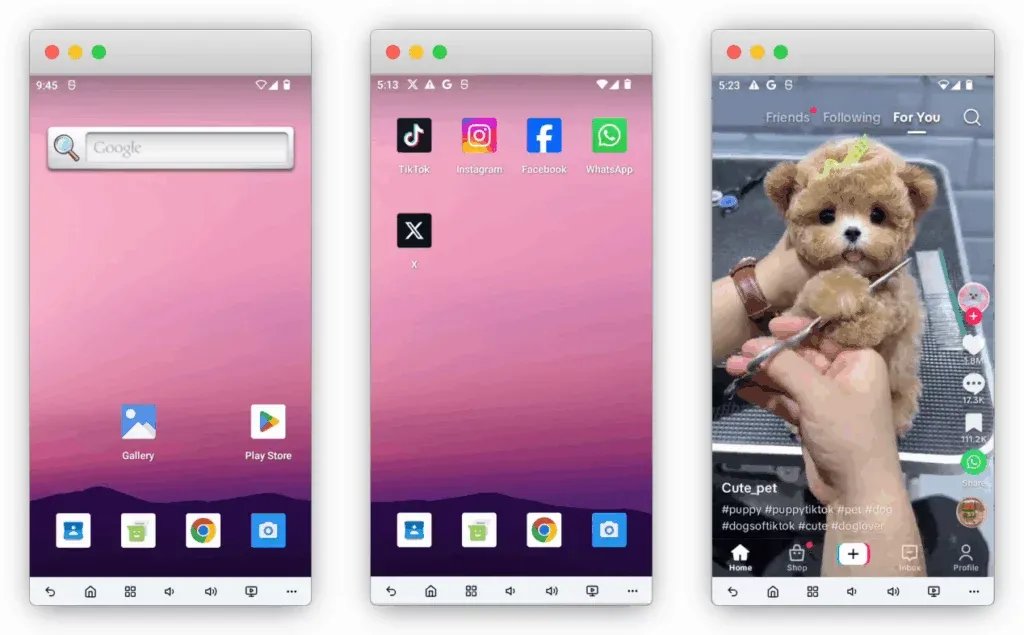
Duolus phù hợp nhất cho các đội ngũ thương mại điện tử xuyên biên giới và vận hành phát trực tiếp chạy các chiến dịch đa tài khoản hàng loạt. Người dùng cũng quản lý tài khoản dựa trên web sẽ cần thêm công cụ trình duyệt antidetect bổ sung kèm theo.
Đối với tiếp thị truyền thông xã hội quy mô lớn, bạn có thể cần nhiều tài khoản có độ tin cậy cao, vì vậy hãy khám phá cách mua tài khoản Facebook và cách mua tài khoản Instagram mà không gặp rủi ro bổ sung
BitCloudPhone
BitCloudPhone là sản phẩm điện thoại đám mây từ BitBrowser, một công ty có trụ sở tại Hồng Kông, cung cấp các thiết bị Android ảo với khả năng mô phỏng tham số thiết bị mở rộng bao gồm nhà mạng, IMEI, SIM, GPS và dữ liệu cảm biến. Đây là sản phẩm riêng biệt với trình duyệt antidetect của BitBrowser, mặc dù cả hai đều xuất phát từ cùng một nhà cung cấp.
Mô phỏng 600+ nhà mạng di động toàn cầu với giả mạo tham số phần cứng hoàn toàn
Gắn proxy theo từng thiết bị qua SOCKS5 và HTTPS
Tài khoản phụ và chia sẻ thiết bị cho cộng tác nhóm nhẹ
Định giá theo ngày phù hợp cho việc sử dụng thỉnh thoảng hoặc ngắn hạn
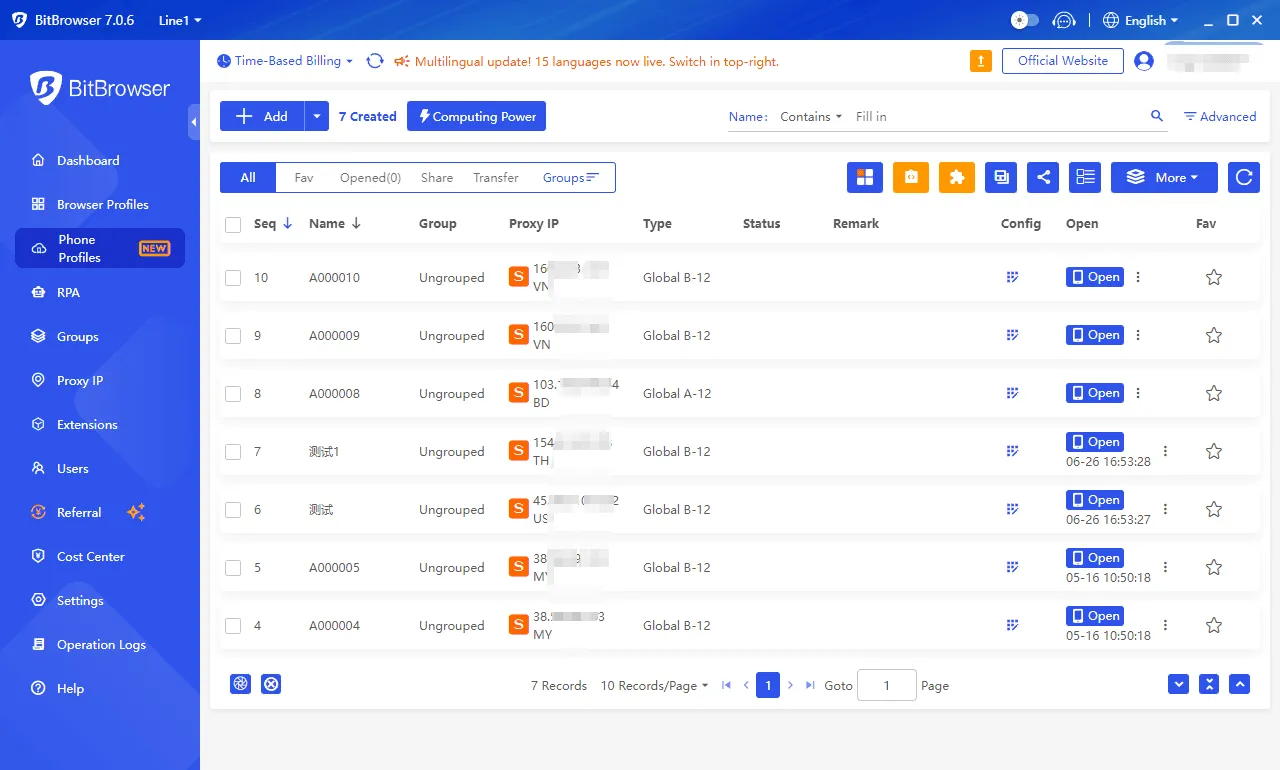
BitCloudPhone hoạt động tốt cho người dùng quan tâm ngân sách và nhà phát triển ứng dụng di động cần môi trường ảo cô lập mà không tốn phí hàng tháng cao. Các đội ngũ yêu cầu tích hợp proxy liền mạch, sẵn sàng sử dụng có thể thấy cấu hình thủ công khá khó khăn.
RedFinger
RedFinger là dịch vụ điện thoại đám mây Android được xây dựng xung quanh hoạt động liên tục, luôn bật, cho phép ứng dụng và script tự động chạy liên tục 24/7 trên máy chủ từ xa mà không phụ thuộc vào bất kỳ thiết bị cục bộ nào. Nó đặc biệt phổ biến trong cộng đồng game di động và người dùng tự động hóa quy trình lặp đi lặp lại.
Hoạt động liên tục 24/7 với tự động khởi động lại ứng dụng khi gặp sự cố
Truy cập đa nền tảng qua Windows, macOS, Android, iOS và trình duyệt
Nhiều hồ sơ điện thoại đám mây cô lập với môi trường ứng dụng độc lập
Các gói đăng ký có thể mở rộng từ cấp độ cơ bản đến hiệu suất cao cấp
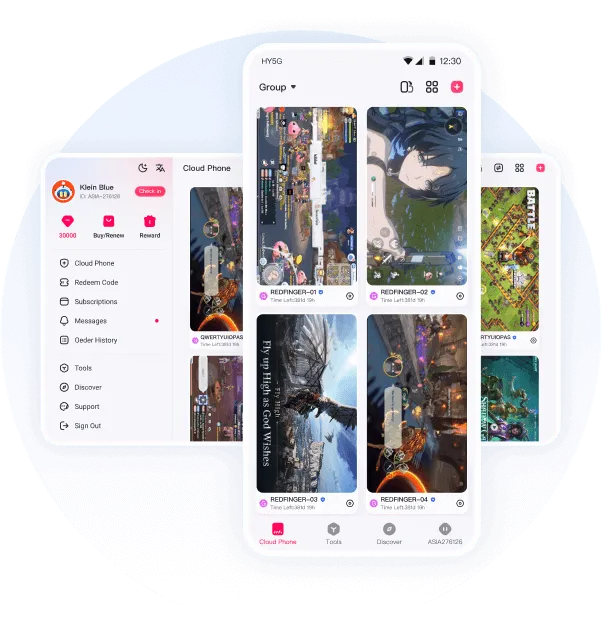
RedFinger phù hợp với người dùng cần quy trình làm việc chạy lâu dài như farming AFK, hoạt động truyền thông xã hội liên tục hoặc vận hành tài khoản bền vững. Nó cung cấp ít tính năng chống phát hiện chuyên dụng hơn so với các nền tảng đa tài khoản chuyên nghiệp.
Khám phá lý do game thủ có thể cần proxy và cách sử dụng để giảm ping và vượt qua hạn chế
MyAndroid
MyAndroid là trình giả lập Android miễn phí, dựa trên trình duyệt, chạy trực tiếp trong trình duyệt web mà không cần cài đặt hoặc đăng ký tài khoản. Không giống như các dịch vụ điện thoại đám mây thương mại, nó được thiết kế nghiêm ngặt cho việc kiểm thử và phát triển ứng dụng cá nhân thay vì hoạt động kinh doanh đa tài khoản.
Hoàn toàn dựa trên trình duyệt mà không cần tạo tài khoản và hoàn toàn miễn phí
Hỗ trợ tải lên APK và Google Play Store để kiểm thử bất kỳ ứng dụng Android nào
Mô phỏng tốc độ mạng, GPS, cảm biến thiết bị và xoay màn hình
Tương thích với nhiều phiên bản hệ điều hành Android lên đến Android 12
MyAndroid hướng đến các nhà phát triển cá nhân, sinh viên và kiểm thử viên QA cần cách nhanh chóng, không tốn phí để xem trước ứng dụng Android mà không cần thiết bị vật lý. Nó không có tích hợp proxy, khả năng chống phát hiện hoặc chức năng quản lý tài khoản.
Gologin Cloud Android
Gologin Cloud Android là nền tảng dựa trên đám mây cho phép người dùng chạy các thiết bị Android đầy đủ tính năng trực tiếp trong trình duyệt mà không phụ thuộc vào điện thoại thông minh vật lý. Mỗi thiết bị ảo đi kèm với dấu vân tay Android duy nhất, hỗ trợ tích hợp proxy và được thiết kế cho quản lý đa tài khoản an toàn, kiểm thử ứng dụng di động và tự động hóa quy trình làm việc.
Khởi chạy các thiết bị Android đầy đủ chức năng trên đám mây mà không cần cài đặt phần mềm
Dấu vân tay thiết bị Android độc nhất cho mỗi thiết bị ảo
Cài đặt ứng dụng từ Google Play hoặc tệp APK, với hỗ trợ proxy tích hợp và quản lý thiết bị tập trung
Mở rộng quy mô từ vài thiết bị lên hàng trăm thiết bị để cộng tác nhóm và tự động hóa
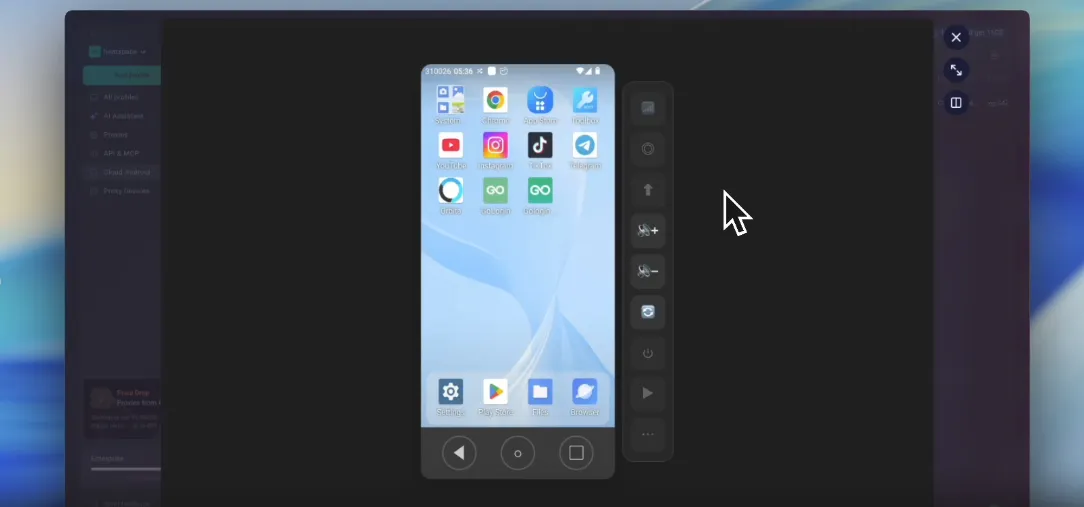
Gologin Cloud Android phù hợp nhất cho các chuyên gia SMM, nhà tiếp thị liên kết, đội ngũ thương mại điện tử và nhà phát triển ứng dụng di động cần quản lý nhiều tài khoản di động một cách an toàn mà không cần duy trì các thiết bị vật lý.
MoreLogin
MoreLogin ban đầu là một trình duyệt antidetect và sau đó mở rộng để bao gồm chức năng điện thoại đám mây Android, trở thành một trong những nền tảng dễ tiếp cận nhất để kết hợp hồ sơ trình duyệt và thiết bị di động ảo trong một giao diện duy nhất. Thành phần điện thoại đám mây của nó cung cấp môi trường cô lập dấu vân tay với tính năng tự động căn chỉnh múi giờ IP.
Trình duyệt antidetect và điện thoại đám mây kết hợp có thể truy cập từ một bảng điều khiển
Dấu vân tay thiết bị độc nhất với tự động khớp múi giờ theo proxy được chỉ định
Gói miễn phí bao gồm 2 hồ sơ và 100 phút thời gian sử dụng điện thoại đám mây hàng tháng
Có sẵn trên Windows, macOS và Linux với gói Pro bắt đầu từ $9/tháng
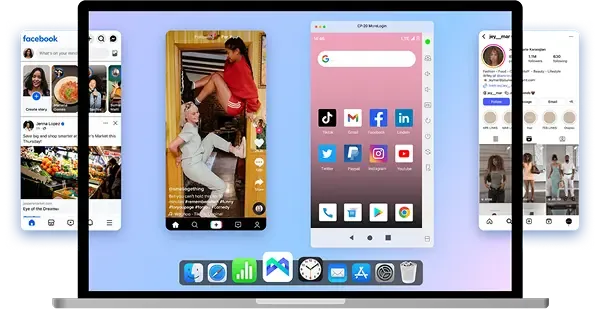
Khám phá cách thêm proxy vào MoreLogin trên CyberYozh.
MoreLogin cung cấp điểm khởi đầu thực tế cho người dùng đơn lẻ và các nhóm nhỏ khám phá quản lý đa tài khoản với ngân sách hạn chế. Các nhóm yêu cầu tùy chỉnh proxy sâu hoặc kiểm soát dấu vân tay mạnh mẽ hơn có thể sẽ vượt qua bộ tính năng của nó khi hoạt động mở rộng quy mô. Nó có thể được thêm vào như một không gian làm việc hồ sơ trình duyệt cho người dùng đã dựa vào proxy.
Khám phá cách tích hợp MoreLogin với CyberYozh để đảm bảo hiệu suất tốt nhất.
Geelark
GeeLark tự định vị là trợ lý AI cho mạng xã hội, cung cấp các thiết bị đám mây Android thực với số nhận dạng phần cứng chính hãng. Nó được xây dựng đặc biệt xung quanh quy trình làm việc tập trung vào TikTok, kết hợp ảo hóa di động với các công cụ tạo nội dung dựa trên AI.
Dấu vân tay phần cứng độc nhất cho mỗi thiết bị bao gồm IMEI, MAC và Android ID chính hãng
Bộ đồng bộ hóa hành động phản chiếu các thao tác trên nhiều điện thoại đám mây đồng thời
Công cụ tạo nội dung AI tích hợp với các mô hình như Sora
Mẫu tự động hóa TikTok có sẵn ngay; hỗ trợ proxy qua HTTP/SOCKS5
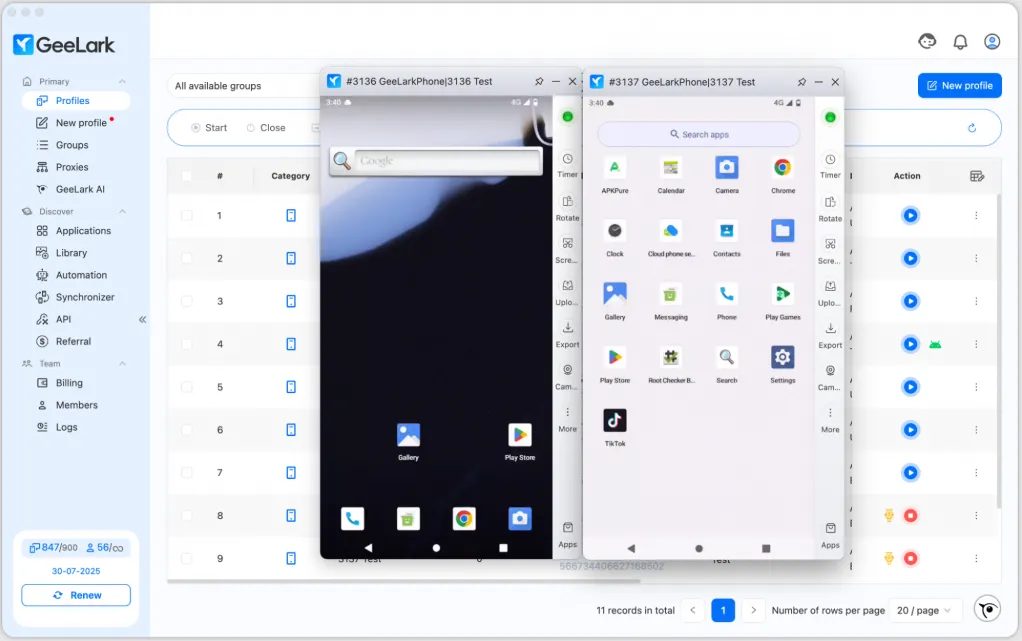
GeeLark phù hợp nhất cho các nhà vận hành TikTok, quản lý mạng xã hội và nhà tiếp thị liên kết làm việc chủ yếu trong các ứng dụng di động. Người dùng cũng quản lý tài khoản dựa trên web sẽ cần một trình duyệt antidetect riêng bổ sung.
Nếu bạn muốn đảm bảo hoạt động trơn tru của quy trình làm việc TikTok, hãy khám phá bài viết của CyberYozh về TikTok shadowban và tìm hiểu cách ngăn chặn nó.
Kết nối proxy CyberYozh với GeeLark và đảm bảo các phiên điện thoại đám mây ổn định với quản lý dấu vân tay mạng
Multilogin
Multilogin là nền tảng đa tài khoản hoạt động từ năm 2015, kết hợp điện thoại đám mây Android với trình duyệt antidetect đầy đủ trong một bảng điều khiển thống nhất duy nhất, trở thành một trong số ít dịch vụ tích hợp nguyên bản quản lý tài khoản di động và web. Sản phẩm điện thoại đám mây của nó ra mắt vào tháng 12 năm 2025. Đây là tùy chọn mới, vẫn còn kém phát triển hơn so với các nhà cung cấp đã thành lập như GeeLark.
Điện thoại đám mây Android thực với IMEI, MAC và Android ID chính hãng cho mỗi phiên bản
Proxy dân cư tích hợp sẵn (30M+ IP trên 150+ quốc gia) được bao gồm trong tất cả các gói
Hỗ trợ tự động hóa đầy đủ qua Selenium, Puppeteer, Playwright và Postman
Phân quyền theo vai trò nhóm, quản lý hồ sơ hàng loạt và phiên làm việc liên tục
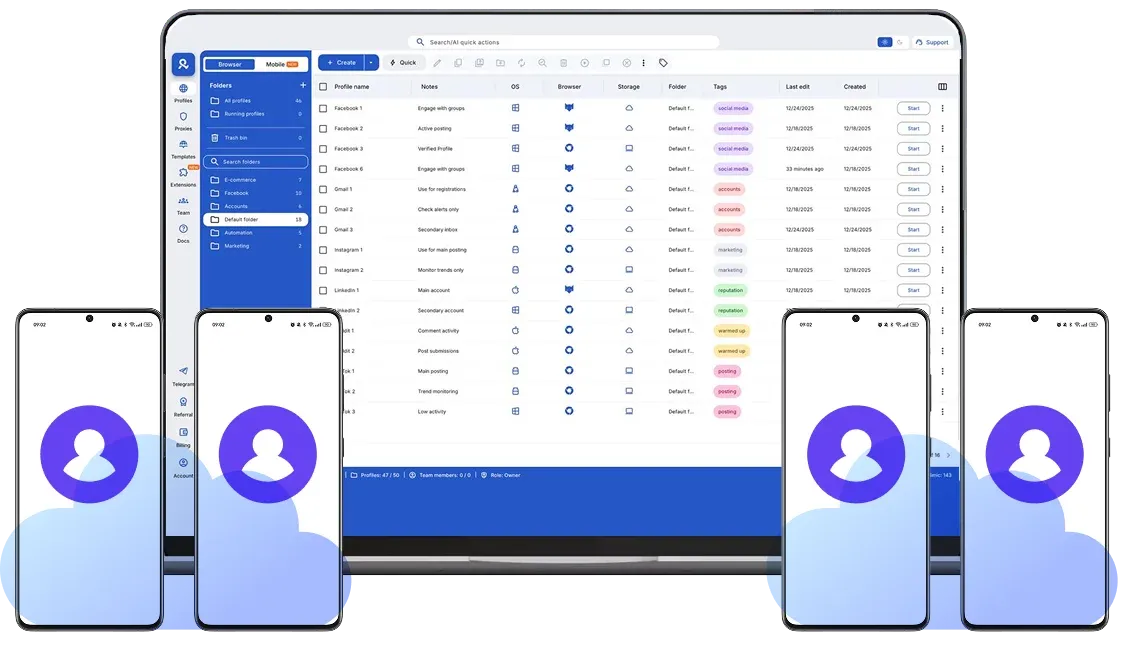
Tìm hiểu cách thêm proxy vào Multilogin trong hướng dẫn của CyberYozh.
Multilogin nhắm đến các quản lý mạng xã hội chuyên nghiệp, nhà tiếp thị liên kết và các đại lý quản lý tài khoản quy mô lớn trên cả ứng dụng di động và nền tảng web. Tuy nhiên, mức giá và độ phức tạp của nó khiến nó ít phù hợp hơn với các nhóm nhỏ và cá nhân.
Tổng kết về điện thoại đám mây Android
Hãy tổng kết các tính năng chính, đặc điểm và trường hợp sử dụng của các nhà cung cấp điện thoại đám mây trong bảng dưới đây.
Nhà cung cấp điện thoại đám mây | Tính năng chính | Giá và mô hình định giá | Hỗ trợ proxy và tự động hóa | Phù hợp nhất cho |
VMOS Cloud | Tự động hóa TikTok bằng AI, quyền root, được chứng nhận GMS | Từ ~$4.99/tháng; có gói miễn phí | Hỗ trợ proxy cơ bản; tự động hóa hạn chế | Nhà sáng tạo TikTok, người vận hành cá nhân |
DuoPlus | Chip ARM thực, tự động hóa RPA miễn phí, mô phỏng GPS & SIM | Từ ~$15/tháng mỗi thiết bị | Hỗ trợ proxy tốt; luồng RPA tích hợp sẵn | Thương mại điện tử xuyên biên giới, ma trận TikTok |
BitCloudPhone | Mô phỏng 600+ nhà mạng, giả mạo phần cứng đầy đủ, tài khoản phụ | Trả theo ngày; định giá linh hoạt | SOCKS5/HTTPS; chỉ cấu hình thủ công | Người dùng có ngân sách hạn chế, kiểm thử di động ngắn hạn |
RedFinger | Độ trễ thấp, tốc độ streaming cao, hoạt động liên tục 24/7 | Từ ~$6/tháng mỗi thiết bị | Chỉ cấu hình thủ công | Chơi game, kiểm thử, hoạt động liên tục |
MyAndroid | Dựa trên trình duyệt, không cần cài đặt, tải lên APK, nhiều phiên bản hệ điều hành | Miễn phí | Không có | Kiểm thử ứng dụng nhanh cho cá nhân |
GeeLark | Dấu vân tay phần cứng thực, công cụ nội dung AI, bộ đồng bộ hóa thao tác | Từ ~$15/tháng; các gói theo thiết bị | HTTP/SOCKS5 tích hợp; tự động hóa API | Người vận hành TikTok, quản lý mạng xã hội |
MoreLogin | Trình duyệt antidetect + điện thoại đám mây kết hợp, tự động căn chỉnh múi giờ | Miễn phí (2 hồ sơ); từ $9/tháng gói Pro | Quản lý proxy tốt; tự động hóa ở mức trung bình | Người dùng cá nhân, nhóm nhỏ quản lý nhiều tài khoản |
Multilogin | Điện thoại đám mây Android thực + trình duyệt antidetect | Từ ~$99/tháng; các gói nhóm | Tích hợp sâu; Selenium/Puppeteer/Playwright | Các agency, hoạt động quản lý nhiều tài khoản chuyên nghiệp |
Tiêu chí chúng tôi sử dụng
Bây giờ, hãy cùng khám phá các tiêu chí chính về cách chúng tôi đánh giá các nhà cung cấp điện thoại đám mây Android tốt nhất.
Quản lý đa phiên bản: Mức độ dễ dàng mà một dịch vụ điện thoại ảo cho phép người dùng quản lý nhiều phiên bản điện thoại đám mây đồng thời.
Dấu vân tay thiết bị độc nhất: Mức độ mà một dịch vụ mô phỏng dấu vân tay thiết bị thực, mà các nền tảng sẽ không gắn cờ là giả mạo.
Tối ưu hóa độ trễ thấp: Khả năng của điện thoại đám mây trong việc truyền dữ liệu, bao gồm video, với độ trễ tối thiểu, điều này rất quan trọng cho gaming và phát trực tuyến video
Tích hợp proxy: Nếu một phiên bản điện thoại đám mây có thể dễ dàng liên kết với proxy, nó sẽ tăng cường an toàn và độ tin cậy, cho phép lựa chọn vị trí địa lý cần thiết
Tích hợp tự động hóa: Đối với các quy trình làm việc lớn và hoạt động hàng loạt, chẳng hạn như quản lý hàng chục tài khoản cùng lúc, các framework tự động hóa đơn giản và hiệu quả rất hữu ích
Mỗi dịch vụ này phù hợp nhất cho các tác vụ cụ thể, dựa trên những tính năng nào được yêu cầu nhiều nhất. Ví dụ, RedFinger xuất sắc trong các hoạt động không gián đoạn, độ trễ thấp quan trọng cho gaming và quy trình tự động hóa, trong khi GeeLark cung cấp nhiều tính năng hơn cho quản lý mạng xã hội. Mặt khác, MyAndroid hoàn toàn miễn phí và có thể được sử dụng để kiểm tra ứng dụng, nhưng hoàn toàn không phù hợp cho các hoạt động kinh doanh.
Để chỉ chọn các proxy đáng tin cậy, hãy sử dụng IP Checker của CyberYozh để đánh giá độ tin cậy của proxy.
Cách sử dụng điện thoại đám mây Android
Đây là thuật toán nhanh về cách thiết lập
Chọn nhà cung cấp điện thoại đám mây dựa trên các tác vụ bạn cần giải quyết
Tạo tài khoản và đặt mua điện thoại đám mây với dấu vân tay cụ thể, chọn mô hình thanh toán phù hợp nhất với bạn
Điều chỉnh dấu vân tay nếu cần. Hầu hết các nhà cung cấp đã có sẵn các thiết lập được xác định trước mô phỏng thiết bị thực, vì vậy bạn chỉ cần chọn trong số đó
Gán một CyberYozh proxy cho điện thoại đám mây, nếu có thể, để bảo vệ tốt hơn và giảm rủi ro khi chạy nhiều tài khoản
Sau đó, thiết lập của bạn đã sẵn sàng và bạn có thể khởi chạy các quy trình làm việc của mình.
Ai cần điện thoại đám mây trên Android
Các thiết bị đám mây được sử dụng rộng rãi bởi các chuyên gia kinh doanh và người dùng cá nhân cần một môi trường an toàn, biệt lập cho công việc của họ, với dấu vân tay tùy chỉnh và tích hợp proxy.
Quản lý tài khoản
Quản lý tài khoản sử dụng điện thoại đám mây một cách rộng rãi để vận hành nhiều tài khoản khách hàng đồng thời trên các nền tảng như WhatsApp, Telegram, và LinkedIn, mỗi tài khoản chạy trong một môi trường hoàn toàn cô lập với dấu vân tay thiết bị duy nhất và proxy chuyên dụng. Điều này ngăn chặn sự nhiễm chéo giữa các tài khoản, giữ dữ liệu khách hàng riêng biệt và cho phép chuyển đổi giữa các hồ sơ ngay lập tức mà không cần đăng nhập và đăng xuất liên tục.
Quản lý mạng xã hội
Quản lý mạng xã hội dựa vào điện thoại đám mây để chạy hàng chục hồ sơ TikTok, Instagram, và Snapchat song song, mỗi hồ sơ xuất hiện như một thiết bị vật lý riêng biệt đối với hệ thống phát hiện của nền tảng. Điều này ngăn chặn lệnh cấm liên kết, hỗ trợ lên lịch nội dung suốt ngày đêm mà không cần giữ thiết bị cục bộ chạy, và cho phép các nhóm gán từng hồ sơ cho các nhà vận hành cụ thể.
Doanh nghiệp thương mại điện tử
Nhà vận hành thương mại điện tử sử dụng điện thoại đám mây để quản lý nhiều tài khoản người bán trên các nền tảng như Amazon, eBay, hoặc Shopify, nơi vận hành nhiều cửa hàng từ một thiết bị có nguy cơ bị đình chỉ vĩnh viễn. Mỗi điện thoại ảo mang một dấu vân tay, địa chỉ IP và vị trí GPS duy nhất, khiến mỗi cửa hàng dường như xuất phát từ một người bán độc lập, riêng biệt.
Người kiểm thử ứng dụng
Người kiểm thử ứng dụng di động và các nhóm QA sử dụng điện thoại đám mây để mô phỏng nhiều thiết bị Android thực với các phiên bản hệ điều hành, độ phân giải màn hình, cấu hình phần cứng và điều kiện mạng khác nhau. Điều này cho phép kiểm thử kỹ lưỡng trước khi ra mắt trên các hồ sơ thiết bị và khu vực, phát hiện các vấn đề tương thích trước khi chúng đến tay người dùng cuối.
Chơi game
Người chơi game Android sử dụng điện thoại đám mây để chạy các phiên farming AFK liên tục mà không làm hao pin hoặc tài nguyên của thiết bị vật lý, trong khi các nhà phát triển game sử dụng các instance đám mây riêng biệt để kiểm thử các bản build trên các hồ sơ phần cứng và phiên bản cửa hàng ứng dụng theo khu vực khác nhau đồng thời. Cả hai đều được hưởng lợi từ hoạt động liên tục 24/7 và khả năng chạy nhiều tài khoản song song.
Kết luận: Tương lai của điện thoại đám mây Android
Điện thoại đám mây Android giúp các chuyên gia trong nhiều ngành, từ quản lý mạng xã hội đến nhà vận hành thương mại điện tử và người kiểm thử ứng dụng, làm việc an toàn và hiệu quả từ bất kỳ đâu trên thế giới. Khi kết hợp với proxy như CyberYozh, chúng tạo ra các môi trường di động cô lập hoàn toàn và xác thực, cho phép các nhóm toàn cầu mở rộng quy mô hoạt động mà không cần phần cứng vật lý.