
10 Best OnlyFans Proxies in 2026
TL;DR
An OnlyFans proxy routes your connection through a different IP, keeping account activity stable, private, and location-consistent
Location inconsistency is the primary reason OnlyFans accounts get flagged, not just IP type
Residential and mobile proxies are the only reliable options for creator and agency workflows in 2026
Sticky sessions are non-negotiable for account management; rotating IPs mid-session triggers security flags
CyberYozh is the top-rated OnlyFans proxy for individuals, creators, and agencies managing multiple accounts
What is an OnlyFans proxy
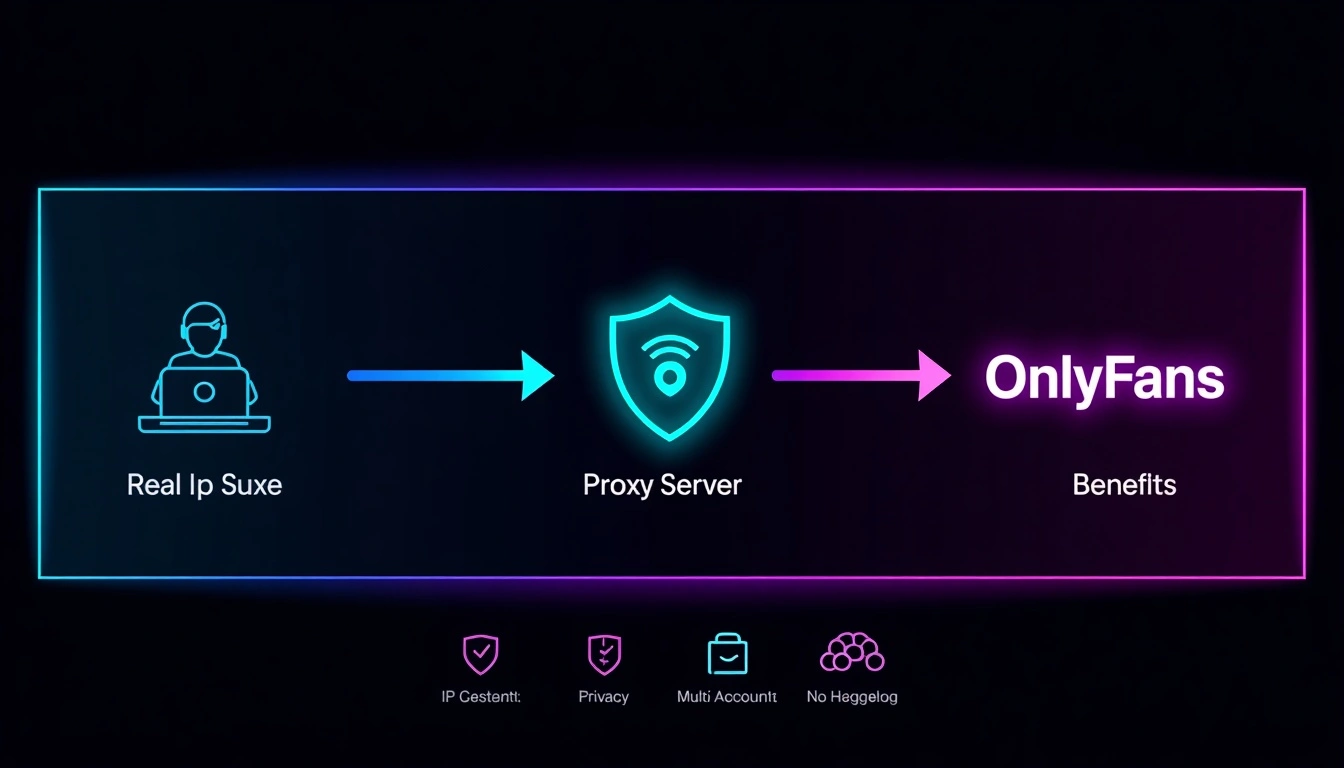
An OnlyFans proxy is a server that routes your internet connection through a different IP address before it reaches the platform. On OnlyFans, your activity appears to come from that IP address rather than your real device or location.
The best OnlyFans proxies in 2026 are residential and mobile IPs with sticky sessions and city-level geo-targeting, not fast datacenter addresses that get flagged before a session even loads.
People use proxies with OnlyFans for a range of legitimate reasons:
Creators managing accounts while traveling who need login activity to appear location-consistent regardless of where they physically are
Agencies managing multiple creator accounts who need each account to have a distinct, isolated IP address that doesn't share a network block with the others
Privacy-conscious users who don't want their real IP address tied to their OnlyFans activity
Researchers and marketing teams monitoring content trends across different regional markets
Users in restricted regions who need geo-access to platform features or content
The core problem without a proxy is straightforward. OnlyFans tracks IP addresses as a security signal. If your account regularly logs in from a home IP address in London and then suddenly connects from a hotel IP address in Dubai, the platform flags the access as suspicious.
Agencies face the same problem from a different angle: ten accounts connecting from the same IP looks like one person running ten profiles, which triggers platform security reviews regardless of how clean each individual account is.
A quality proxy solves both problems. It gives each account a stable, consistent IP that matches its established location history and sits on its own independent network block, separate from every other account in your operation.
Why most OnlyFans proxy setups fail
Most proxy problems on OnlyFans aren't about the proxy type. They're about IP history and session configuration, two things most providers never explain clearly before you sign up.
The most common support issue we see from OnlyFans managers isn't a blocked proxy. It's an account flagged after switching providers. Location consistency matters far more than people realise until it costs them an account.
Here's what actually goes wrong in practice:
Shared IPs with poor history. Cheap proxy pools recycle IPs across hundreds of users simultaneously. If the IP assigned to your account was previously associated with terms violations or suspicious activity, you're inheriting that history. OnlyFans doesn't evaluate your account's clean record in isolation; it evaluates the IP's record, which you have no visibility into before connecting.
Rotating IPs inside an active session. Some providers rotate your IP on a short automatic timer. For web scraping, that's fine. For an OnlyFans creator session, mid-session IP rotation looks identical to an account takeover attempt; the platform sees the same account accessing from two different locations within minutes, and security protocols respond accordingly.
Location inconsistency across logins. An account set up with a US IP that logs in three days later from a European IP, even a perfectly clean one, creates a geographic anomaly that flags a security review. Platform fraud detection isn't only checking IP quality. It's checking whether your location history makes sense for a single real person using the platform normally.
Shared subnets across multiple accounts. Agencies running five accounts through five different IPs from the same /24 subnet are flagging themselves at the network level. OnlyFans sees five accounts originating from the same network neighborhood, and the coordinated pattern is detectable even when no individual IP has done anything wrong.
What makes a good OnlyFans proxy in 2026
Not every proxy type works for creator and agency workflows. The requirements here are specific and non-negotiable.
Residential IPs over datacenter IPs
Residential proxies use addresses assigned by real ISPs to real home users.
They look identical to the traffic from OnlyFans' genuine user base because they share the same IP ranges.
Datacenter IPs come from server farms; most major datacenter ASN ranges are flagged across platform security systems.
According to Akamai's proxy detection documentation, detection systems categorise incoming connections against known proxy categories including hosting providers and VPN datacenters, with specific actions assigned to each.
A datacenter proxy might work today and fail without warning when its range gets added to an updated blocklist.
Mobile proxies for the highest trust baseline
Mobile carrier IPs are shared by thousands of real users simultaneously through Carrier-Grade NAT (CGNAT).
Platforms rarely block mobile IP ranges because doing so locks out too many legitimate customers.
For high-stakes account management where long-term stability matters, mobile proxies provide the most reliable foundation.
Sticky sessions without exception
For any workflow that involves logging in, managing a dashboard, handling messages, or uploading content, your IP address must remain consistent throughout the session.
A sticky session keeps the same IP address for a defined duration, making your activity appear like a real person browsing normally rather than an automated system cycling through addresses.
City-level location matching
The IP location needs to match each account's geographic history precisely.
A UK-registered account should consistently connect via a UK IP address.
City-level targeting makes this accurate; a London account using a Manchester IP every session is less consistent than one connecting through a London IP each time.
Active pool management
The best providers monitor their IP pools continuously and remove addresses with elevated fraud scores or platform-specific flags before they affect your accounts.
This is what separates a pool that runs cleanly for months from one that degrades progressively as IPs accumulate negative history from other users.
10 best OnlyFans proxies in 2026
Here are the 10 best OnlyFans proxy providers in 2026, ranked by user satisfaction and quality.
CyberYozh
CyberYozh earns the top position because its infrastructure addresses the specific failure modes that bring OnlyFans accounts down. This isn't a general-purpose proxy service repurposed for creators; it's built from the ground up to meet the requirements of account management, multi-profile operations, and automation workflows.
For individual creators, the 100M+ residential proxy pool provides a stable, 100+ country-consistent IP pool that matches a real user's browsing profile. Same city every session, clean sticky session management, no mid-session rotation surprises.
For agencies, CyberYozh's subnet diversity means each account draws from a genuinely independent network origin, not neighboring IP blocks that pattern-match as a single coordinated operator across multiple profiles.
What the platform provides for OnlyFans workflows:
Premium LTE/ 5G mobile proxies: carrier-grade IPs with the highest trust baseline for long-term account stability
Residential proxies: real ISP-assigned IPs from actively managed, clean pools
Datacenter proxies: available for lower-sensitivity research and monitoring tasks
Sticky sessions: configurable duration to hold the same IP through full account sessions
Rotating sessions: for research and monitoring workflows where IP consistency isn't the priority
City and country-level geo-targeting: match proxy location precisely to each account's established geographic history
Full API access: integrate proxy management into automation workflows and agency dashboards programmatically
Antidetect browser compatibility: native integration with any antidetect browser with inbuilt fingerprinting options, including AdsPower and Dolphin Anty, for complete session isolation on top of IP-level separation
UDP, HTTPS, SOCKS5 protocol support
Seamless integration with Selenium, Puppeteer, Scrapy, Postman, Playwright, and custom scripts.
Multi-account support: one isolated IP per account, each from a distinct network origin
99.99% uptime: connection drops during account sessions create the same security flags as IP switches; infrastructure stability is a genuine operational requirement
Flexible pricing from $0.9/GB: accessible for solo creators, scalable to full agency infrastructure without minimum spend traps
CyberYozh holds a strong verified rating on Trustpilot from users across creator management and agency workflows, worth checking directly before committing to any plan.
→ Set up your OnlyFans proxy with CyberYozh: Sign up for free
Bright Data
The largest residential proxy network available. 72M+ IPs across 195 countries, with pool management sophisticated enough to stay fresh during peak demand, a real advantage when smaller providers run dry mid-operation.
Residential, mobile, ISP, and datacenter proxy types
Sticky sessions up to 30 minutes
Granular targeting down to city, ISP, and ASN level
Detailed usage analytics dashboard
Extensive API and SDK documentation
Pricing: Residential from ~$8.40/GB.
Best for: Large agencies with high account volumes that need maximum pool diversity and can justify enterprise pricing.
Limitation: Built and priced for enterprise operations. Solo creators or small agencies managing a handful of accounts will find the cost structure hard to justify compared with alternatives that deliver comparable residential quality at significantly lower rates.
Oxylabs
102M+ IP pool with strong residential infrastructure and documented support for account management use cases. Oxylabs is particularly well-suited for agencies that want both volume and a managed service layer.
Residential, mobile, ISP, and datacenter options
City-level targeting across 195+ countries
99.9% uptime SLA
Solid documentation and developer tooling
Dedicated account management for enterprise clients
Pricing: Residential from ~$2.50/GB.
Best for: Mid-to-large agencies that need volume, location precision, and enterprise-grade support alongside their proxy access.
Limitation: Platform is oriented toward enterprise workflows. Smaller operators tend to find the onboarding process and minimum commitment expectations more than their use case requires.
Decodo
Decodo is worth mentioning specifically for agencies building their first structured setup; the onboarding takes minutes rather than days, and the dashboard makes proxy management approachable without a technical background.
65M+ residential IPs across 195+ locations
Sticky sessions up to 30 minutes
Intuitive dashboard with real-time usage analytics
100MB free trial, no credit card required
Working credentials within minutes of signup
Pricing: Residential from ~$4/GB
Best for: Small agencies and individual creators who want a clean, straightforward setup without the complexity of enterprise systems.
Limitation: Smaller IP pool than Bright Data or Oxylabs. During major demand periods, IP freshness can be less consistent on the most popular location targets.
NodeMaven
NodeMaven has built a specific reputation in creator management circles for its long sticky session durations, 24 hours as standard, which is notably longer than most providers offer.
Residential proxies with city and ISP targeting
24-hour sticky sessions, the longest standard duration in this comparison
Active pool quality management
Dashboard tools designed around per-account proxy assignment
Strong community reputation in OnlyFans agency workflows specifically
Pricing: Mid-tier; available on platform.
Best for: OnlyFans agency managers who need long, stable session windows and a provider with documented experience in creator account workflows
Limitation: Coverage outside North America and Western Europe is less consistent. Not the right choice for operations that require reliable performance in Asian or South American markets.
[Read about best Europe proxies]
IPRoyal
IPRoyal keeps things simple: competitive residential pricing, no-expiry pay-as-you-go bandwidth, and a clean API for straightforward integration.
Residential, mobile, datacenter, and ISP proxy types
Pay-as-you-go with no bandwidth expiry date
HTTP, HTTPS, and SOCKS5 protocol support
Simple API integration
Pricing: Residential from ~$2.40/GB.
Best for: Individual creators who need a clean residential IP for personal account management without agency-scale requirements
Limitation: Basic feature set compared to more fully-featured providers. No native multi-account management tooling or advanced session control interface; requires more manual configuration for anything beyond single-account use.
SOAX
SOAX compliance-first residential network with a verified IP sourcing approach and strong geo-targeting precision. A considered choice for agencies operating in regulated environments.
155M+ IPs including residential, ISP, and mobile
Country, region, city, ISP, and carrier-level targeting
Compliance-first network with ethically verified IP sourcing
Rotating and sticky session modes
Pricing: Residential from ~$3.30/GB.
Best for: Agencies in regulated industries or with strict compliance requirements around IP sourcing ethics.
Limitation: Targeting filters, city-level, ISP, carrier, apply usage multipliers that can push the effective cost significantly above the advertised base rate. Calculate total cost at your required precision level before committing at scale.
DataImpulse
DataImpulse attracts budget-conscious operators with its no-expiry pay-as-you-go model and a large pool at one of the lowest advertised per-GB rates in this comparison.
90M+ residential IPs across 195+ countries
Traffic never expires on pay-as-you-go plans
HTTP, HTTPS, and SOCKS5 support
Low entry cost per GB
Pricing: Residential from ~$1/GB.
Best for: Technically confident individual creators on tight budgets who manage their own session configuration.
Limitation: No built-in account management tooling or session control interface. Requires more manual setup than most creator-facing providers. Better suited to users who already understand proxy configuration than to those who need a guided workflow.
Proxy-Seller
Proxy-Seller has grown a solid reputation for location accuracy, an underrated factor for OnlyFans workflows where geographic consistency matters more than raw IP count.
Residential and ISP proxy options
Flexible sticky session duration settings
Location accuracy verified through independent tools
Reliable support response times
Pricing: Mid-tier; residential pricing available on platform.
Best for: Creators and small agencies who prioritise reliable location accuracy and don't need the full feature set of enterprise-tier providers.
Limitation: Less documented performance data compared to established providers. Worth testing on a small allocation before committing at volume.
Webshare
Webshare is the most accessible entry point on this list; a free tier is available, and paid residential plans start at a low monthly cost. It's useful for testing proxy access before committing to a paid provider.
Residential and datacenter proxy options
Free tier available with limited IPs
Simple dashboard and quick setup
HTTP and SOCKS5 support
Pricing: Free tier available; residential paid plans starting at ~$2.99/month.
Best for: Individual users who want to test proxy access for OnlyFans workflows before committing to a full paid plan.
Limitation: The free-tier IPs are shared among many users and are not suitable for real account management. The paid residential pool is smaller than dedicated providers. Works for light individual use, not agency-scale operations.
Comparison Table
Provider | Proxy Types | Sticky Sessions | Best For | Limitation |
CyberYozh | ResidentialMobile datacenter | Yes, configurable | Creators, agencies, multi-account | — |
Bright Data | Residential, Mobile, ISP, DC | Up to 30 min | Large enterprise agencies | Premium pricing |
Oxylabs | Residential, Mobile, ISP, DC | Yes | Mid-large agencies | Enterprise-oriented |
Decodo | Residential, DC, ISP, Mobile | Up to 30 min | Small agencies, individuals | Smaller pool |
NodeMaven | Residential | Up to 24 hours | OF-specific agency managers | Limited global coverage |
IPRoyal | Residential, Mobile, DC, ISP | Yes | Solo creators | Basic tooling |
SOAX | Residential, ISP, Mobile | Yes | Compliance-sensitive ops | Filter cost multipliers |
DataImpulse | Residential, DC | Yes | Budget individual use | No management tooling |
Proxy-Seller | Residential, ISP | Flexible | Small agencies | Less documented |
Webshare | Residential, DC | Limited | Testing, light individual use | Small pool |
Why users switch proxy providers
The most common reason is predictable once you've seen it happen: the proxy worked fine for a few weeks, then account flags started appearing, and nobody could explain why. Usually it comes down to one of four things:
Oversold IP pools. A provider signs up thousands of users and routes them through a pool that can't maintain freshness at that volume. IPs that were clean when you signed up accumulate flags over time as other users on the same pool cause problems, and your accounts inherit those problems without warning.
Hidden cost multipliers. Providers advertise a base rate and apply multipliers for targeting filters, city-level targeting, ISP selection, sticky session duration. The effective cost at the precision level you actually need for OnlyFans workflows can run two to four times the headline rate.
No real session control. Basic providers offer rotation or static IPs with nothing in between. For OnlyFans management, you need configurable sticky session duration, long enough to complete a full account session cleanly, with the ability to release and refresh between sessions. Providers without this force you into configurations that create security flags.
Slow support when accounts are at risk. Account flags create time pressure. A 48-hour support ticket response window while your account is under review is an infrastructure relationship that isn't working for the use case.
Infrastructure quality compounds over time. A provider with actively managed pools, transparent pricing, and responsive support costs more per GB than a budget alternative, and significantly less per stable account-month when you calculate the real operational cost.
How to choose the right OnlyFans proxy
Before committing to any provider, run through this checklist:
✓ Residential or mobile IPs only: datacenter proxies are too easily flagged for creator account work in 2026
✓ Sticky sessions with configurable duration: minimum 10–15 minutes; 30 minutes or longer is better for full creator sessions
✓ City-level geo-targeting: match the IP location to each account's geographic history, not just the country
✓ One subnet per account: confirm that each account's proxy comes from a genuinely independent network block, not neighboring subnets
✓ Active pool management: ask the provider directly how they monitor and refresh their IP pool; vague answers are a signal
✓ Antidetect browser compatibility: if you manage multiple accounts on one device, you need session isolation at the browser level as well as the IP level
✓ Transparent pricing: calculate the effective cost at the targeting precision you'll actually use, not the advertised base rate
The infrastructure argument plainly stated
Proxies for OnlyFans aren't a niche technical concern. For creators managing accounts while traveling, agencies handling dozens of profiles, researchers monitoring platform trends, or privacy-conscious users who simply want their browsing kept separate from their real IP, they're day-to-day operational infrastructure.
The difference between a $1/GB provider and a $3/GB provider rarely shows up in a feature comparison table. It shows up in account stability over a three-month period. Clean IP pools, proper subnet distribution, sticky session reliability, transparent pricing, and responsive support- these compound into either a workflow that runs smoothly or one that generates a constant background of account flags, interrupted sessions, and avoidable operational cost.
Getting the infrastructure right once is simpler and cheaper than troubleshooting it repeatedly after accounts are already under review.
→ Start with CyberYozh's residential and mobile proxy plans