
Best Proxy Server for YouTube in 2026: What Keeps Channels Safe

Quick answer: there's no single best proxy server for YouTube; there's a best proxy for your specific YouTube task. Managing multiple channels needs one dedicated, sticky residential or mobile IP per channel. Bulk data collection needs a rotating residential pool. Fast, low-trust scraping of public metadata can tolerate datacenter IPs; anything logged in cannot.
If you're trying to buy YouTube proxies today, CyberYozh covers all four types on one account starting at $2/GB for rotating residential, which is why it tops this list, but the right pick genuinely depends on what you're doing, and this guide is built to help you figure that out first.
TL;DR
Best overall proxy server for YouTube: CyberYozh, residential, mobile, ISP, and datacenter proxies in one account, with built-in IP reputation checks
Best for IP freshness over raw pool size: NodeMaven, which screens IPs in real time rather than reselling a static pool
Best budget option among YouTube proxies: DataImpulse, from roughly $1/GB residential and $2/GB mobile
Best for large-scale enterprise scraping: Bright Data or Oxylabs
The one rule that matters most for any good YouTube proxy setup: one dedicated, sticky IP per channel; sharing an IP across accounts is the fastest way to get them linked and flagged together
Free proxies are the one category to avoid entirely for anything beyond casual, logged-out viewing
Why people use a YouTube proxy
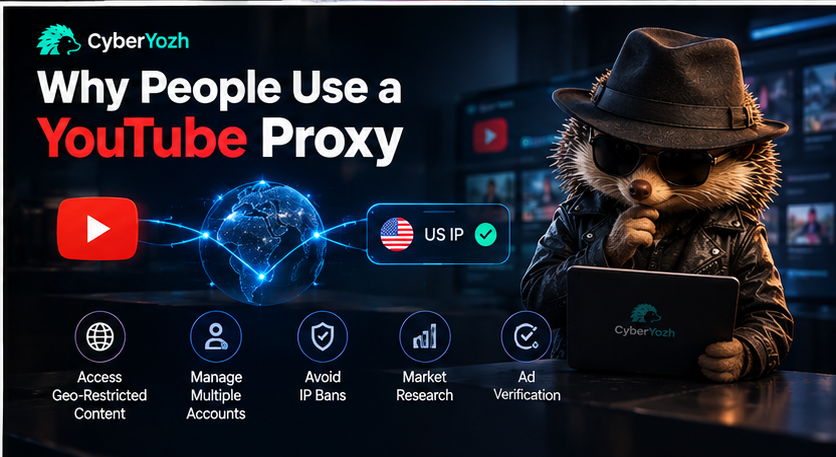
A YouTube proxy routes your connection through a different IP address so YouTube sees that address instead of yours.
People searching for the best proxy for YouTube usually have one of four fairly distinct reasons: unblocking geo-restricted videos, running multiple channels without YouTube linking them by IP, collecting publicly available video or channel data at scale, and checking how content, ads, or search results actually look in a specific country.
These are legitimate, common workflows for creators, agencies, marketers, and researchers.
This guide doesn't cover or recommend using proxies to fake views, engagement, or watch time, which YouTube's systems are built to catch regardless of IP quality.
What makes a proxy the best proxy server for YouTube
YouTube's detection systems weigh IP reputation and session consistency more heavily than most other platforms, because Google runs the same anti-abuse infrastructure across its entire ecosystem. A residential or mobile IP that's been flagged on ten other accounts already carries that history.
A datacenter IP is recognizable as a datacenter IP the moment it connects. And an IP that changes mid-session on a logged-in channel looks like exactly the kind of behavior YouTube's systems are designed to catch.
The practical rule that matters more than any provider feature: one dedicated, sticky IP per channel. Sharing an IP across multiple channels, even a good one, is the fastest way to link accounts and get them restricted together. Rotating IPs are for scraping public data, not for logging into anything. Explore the IP reputation checker with CyberYozh
Residential vs. mobile vs. datacenter vs. ISP proxies for YouTube
Residential proxies use real home-ISP IPs and are the standard choice for channel management and geo-testing; they look natural but are priced per GB, which adds up fast on anything involving actual video playback.
LTE Mobile proxies (4G/5G) run on real carrier networks and carry the highest trust signal, since carrier-grade NAT means thousands of genuine phone users already share the same address pools, ideal for account-sensitive work, though generally the priciest option.
Datacenter proxies are fast and cheap but easy for YouTube's systems to detect; fine for scraping public, non-logged-in data, but a poor choice for anything tied to an account.
ISP/static proxies combine datacenter-level speed with one persistent IP, useful for long sessions that need consistency without full mobile pricing.
Before you buy: if you only need YouTube data, view counts, metadata, comments, public statistics, check whether the official YouTube Data API covers your use case first.
It's built for exactly this, has documented rate limits instead of a cat-and-mouse detection problem, and for pure data collection it's often the more reliable and compliant route than scraping through proxies. Explore CyberYozh proxy catalog
Comparison table
Provider | Best for | Proxy types | US coverage | Starting price | Key limitation |
CyberYozh | All-round channel + data work | Residential, mobile, ISP, datacenter | Yes | $2/GB residential | No published non-expiring traffic option |
NodeMaven | IP freshness for account work | Residential | Yes | Premium per-GB | Smaller pool, not built for bulk scraping |
Decodo | Price-to-quality balance | Residential, mobile, datacenter | Yes | ~$2/GB | Mid-market pricing, not the cheapest |
DataImpulse | Budget data collection | Residential, mobile | Yes | ~$1/GB residential | Thinner enterprise support/track record |
SOAX | Geo-targeting depth | Residential, mobile, ISP, datacenter | Yes | Premium, credit-based | Shared pool at scale means some IP-history overlap risk |
Bright Data | Enterprise-scale scraping | Residential, mobile, datacenter | Yes | Premium | Complex setup, priced above individual-creator budgets |
Oxylabs | Corporate data intelligence | Residential, mobile, datacenter | Yes | Premium | Enterprise pricing, overkill for single creators |
ProxyEmpire | Fast rotation, broad coverage | Residential, mobile | Yes, dedicated US cities | Flexible, no long commitment | Prioritizes rotation speed over long-term single-IP consistency |
Pricing changes frequently across this market; verify current rates before buying.
CyberYozh
CyberYozh bundles residential, mobile (4G/LTE/5G), ISP, and datacenter proxies in one account, which matters because most real YouTube operations need more than one type: a sticky residential or mobile IP per channel, plus rotating residential for research or metadata collection.
Best for: creators and agencies who need more than one proxy type without managing separate vendors for each.
Key features:
Rotating residential proxies from $2/GB
Dedicated LTE/5G mobile proxies from $3.50/day, genuine carrier connections
100M+ IP pool across 195+ countries
Built-in IP reputation and fraud-score checks across 50+ databases
Native compatibility with Multilogin, AdsPower, Dolphin Anty, GoLogin, Kameleo, and Octo Browser
SMS and phone verification support for account setup
Limitations: no publicly advertised non-expiring traffic tier, and a smaller total pool than the largest enterprise players like SOAX or Bright Data.
Verdict: the strongest overall proxy server for YouTube for creators and agencies who need more than one proxy type without managing separate vendors for each.
Need a proxy that fits your actual channel setup? Compare CyberYozh's YouTube-ready proxy plans against residential, mobile, and datacenter options in one place.
NodeMaven
NodeMaven is built specifically around IP freshness rather than raw pool size; it screens IPs in real time before assigning them to a session, instead of reselling a static pool where a meaningful share is already flagged elsewhere. Compare NodeMaven vs CyberYozh
Best for: account-sensitive channel management where IP history matters more than raw scale.
Key features:
Real-time IP screening before assignment, not a static resold pool
Residential proxies purpose-built for account persistence
Long sticky sessions designed to hold one identity per channel
City-level geo-targeting
API access for account-management pipelines
Positioned specifically around YouTube and social account health, not general-purpose scraping
Limitations: smaller overall pool than the largest enterprise providers, and pricing sits at a premium relative to volume-focused competitors, not built for high-volume bulk scraping.
Decodo
Decodo (formerly Smartproxy) runs residential, mobile, and datacenter proxies and positions itself as the price-to-quality middle ground in this market. Compare Decodo vs CyberYozh.
Best for: buyers who want a dependable general-purpose option without enterprise pricing.
Key features:
Residential proxies around $2/GB
115M+ IPs across 195+ locations
Independently reported 99.86% connection success rate
Pay-as-you-go billing alongside subscription tiers
Browser extension and API access
24/7 support with detailed self-service documentation
Limitations: not the cheapest option here for pure high-volume scraping, and self-reported "best of" claims should be checked against current, dated sources rather than taken at face value.
DataImpulse
DataImpulse is the budget pick on this list, built around low per-GB pricing without sacrificing proxy-type variety. Compare DataImpulse vs CyberYozh
Best for: cost-conscious data collection and multi-channel management at real volume.
Key features:
Residential proxies from around $1/GB
Mobile proxies from around $2/GB
90M+ IP pool across 195 countries
Country and city-level location targeting
Sticky sessions for account work, rotation for scraping
High concurrency support for parallel requests
Limitations: thinner enterprise-grade support and a shorter market track record than the larger names on this list.
SOAX
SOAX runs a large, credit-based residential, mobile, ISP, and datacenter network with deep geo-targeting. Compare CyberYozh vs SOAX
Best for: research and scraping that needs precise, city-level location control.
Key features:
190M+ IPs across 195+ countries
Residential, mobile, ISP, and datacenter proxy types in one plan
Advanced city- and ISP-level geo-targeting tools
Fast response speeds
Built-in proxy testing feature before deployment
Credit-based billing across proxy types
Limitations: as a shared pool at scale, some IP-history overlap between users is a known trade-off, and the system prioritizes breadth over single-identity persistence, so test it before committing to long-term channel management.
Bright Data
Bright Data is an enterprise-grade proxy network built for corporate-scale scraping and data intelligence. Compare CyberYozh vs Bright Data
Best for: corporate-scale data operations that need extensive tooling more than simplicity.
Key features:
70M+ residential IPs worldwide
Residential, mobile, and datacenter proxy types
Granular geo-targeting down to city level
API-driven proxy management system
Enterprise-level scaling infrastructure
Full scraping and web-unblocking tooling suite
Limitations: setup complexity requires real technical expertise, and pricing sits well above what an individual creator or small team typically needs.
Oxylabs
Oxylabs offers fast residential, datacenter, and mobile proxies aimed squarely at large organizations running data operations at scale. Compare CyberYozh vs Oxylabs
Best for: large organizations running YouTube data intelligence and market analysis at scale.
Key features:
100M+ IPs across 195 countries
Residential, datacenter, and mobile proxy options
SOCKS5 protocol support
Sticky session capability
Adjustable IP rotation controls
Dedicated account support for larger contracts
Limitations: premium pricing that's hard to justify for smaller channel operations, and dedicated support/technical resources are typically required to get full value from the platform.
ProxyEmpire
ProxyEmpire focuses on rotating residential and mobile proxies with dedicated private IPs across numerous US cities, built for fast rotation and broad coverage. Compare CyberYozh vs ProxyEmpire
Best for: US-focused research and automation that benefits from quick IP cycling.
Key features:
Dedicated private IPs hosted across numerous US cities
Rotating and static residential IP options
Mobile and datacenter proxy availability
API integration for automation
Detailed location targeting down to city/ISP
Adjustable rotation periods (five, ten, or thirty minutes) on select plans
Limitations: the emphasis on rotation speed and broad coverage can work against the single-IP consistency that long-running channel management needs, and it's built more for coverage than for account-specific stability.
US proxies for YouTube: When they matter
Anyone specifically searching for a US proxy for YouTube usually needs one of three things: checking what US viewers actually see (search rankings, recommended content, and region-locked videos all differ by country), verifying how ads render specifically for US audiences, or managing channels or accounts that need to look like they're operating from inside the US.
A US residential or mobile IP handles all three convincingly; a generic "US-labelled" datacenter IP often doesn't hold up once YouTube checks the connection more closely.
Worth knowing too: even a genuine US IP won't perfectly replicate what a specific real US viewer sees; YouTube personalizes results based on watch history and account signals that a fresh proxy connection doesn't carry.
Common mistakes people make with YouTube proxies
Sharing one IP across several channels instead of giving each its own dedicated connection. Using a datacenter proxy for anything logged in, then being surprised when the account gets flagged. Rotating IPs mid-session on account work looks exactly like the inconsistency YouTube's systems watch for.
Assuming a bigger advertised IP pool automatically means better results, a smaller, actively-screened pool can outperform a huge one full of already-flagged addresses. For anything beyond casual, logged-out browsing, free proxies are recycled, widely blocklisted, and carry real data-leak risk.
Why CyberYozh stands out
Most YouTube workflows need more than one proxy type over time, so a single best proxy server for YouTube rarely exists in isolation: a dedicated mobile or residential IP for channel management, rotating residential for research, and occasional datacenter speed for bulk public-data pulls.
CyberYozh covers all four from one account rather than requiring a separate vendor for each, with built-in IP reputation and fraud-score checking so you can verify an address before it costs you a real channel. Native compatibility with the major antidetect browsers means multi-channel setups don't need extra integration work.
This isn't the right fit for every case: teams running enterprise-scale data operations may still want Bright Data or Oxylabs' deeper tooling, and anyone who only needs YouTube's own metadata should check the official API before paying for any proxy.
Final verdict
Choosing the best proxy server for YouTube is less about finding the cheapest IP and more about matching the proxy type to the actual task: one dedicated IP per channel for account work, rotating residential for research, and datacenter only for public, logged-out scraping.
CyberYozh's combination of all four proxy types, built-in IP verification tools, and antidetect-browser compatibility makes it the strongest all-round choice for creators and agencies managing more than one kind of YouTube workflow; NodeMaven and DataImpulse are worth a look for IP-freshness-first or pure-budget priorities, and Bright Data or Oxylabs for genuine enterprise scale.
Ready to match a proxy to your actual channel setup? See CyberYozh's current YouTube proxy options across residential, mobile, and datacenter.