
Error Code 521: What “Web Server Is Down” Means and How to Fix It

You open a website and see a grey Cloudflare page: “Web server is down. Error code 521.” Your browser shows “Working”, Cloudflare shows “Working”, and the host shows “Error”. If it’s your site, every minute it stays like this costs visitors, sales and trust.
The good news: a 521 error almost always has one of a handful of causes, and most take minutes to fix once you know which one you’re facing. This guide shows you how to find the exact cause fast, fix it with copy-and-paste commands, and stop it coming back, including the two causes most guides miss.
Quick answer
Error code 521 means Cloudflare tried to connect to the website’s origin server, and the server refused the connection. The most common causes are a web server that has stopped running, a firewall blocking Cloudflare’s IP addresses, or an SSL setting that sends Cloudflare to a port nothing is listening on. If you’re a visitor, the problem is on the website’s side, not yours. If you own the site, start by checking that your web server is running and that Cloudflare’s IP ranges are allowed.
Does your site fail only in some countries? Test it the way real visitors see it with CyberYozh rotating residential proxies in 195+ countries, from $2/GB. We show you exactly how below.
Are you a visitor or site owner: Start here
If you’re visiting the site:
The 521 error isn’t caused by your device, browser or internet connection
Wait a few minutes and refresh. Many 521 errors clear once the server restarts
If it lasts longer, the site owner needs to fix it. Let them know if you can
A VPN or proxy usually won’t help, because the server is refusing Cloudflare itself. The exception is a regional block, covered below
If you own the site:
Is your web server running? → Step 1
Does the site load when you bypass Cloudflare? If yes → Steps 3–5. If no → Steps 1, 2 and 6
Does the error keep returning every few days? → “Why error 521 keeps coming back”
Does it happen only in some countries? → “Error 521 only in some countries?”
What does error code 521 mean
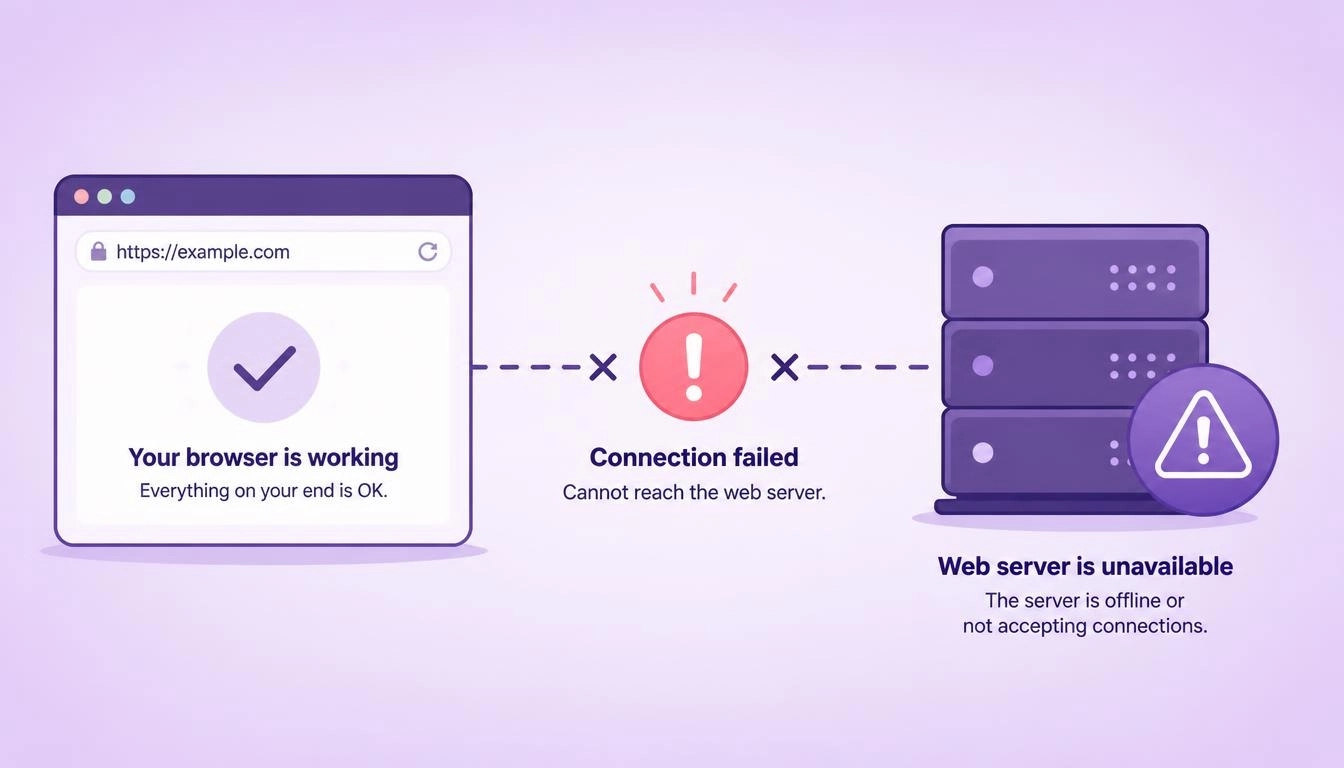
Error code 521 is Cloudflare’s way of saying “I reached your server, but it refused to talk to me.” It isn’t an official HTTP status code. It’s one of Cloudflare’s own 5xx codes, which is why you’ll also see it written as HTTP error 521 or status code 521.
On Cloudflare’s error page, the diagram shows exactly where things broke: the browser and Cloudflare are fine, and the third box, labelled “Host”, shows Error. That “Cloudflare host error” means the problem sits on the origin server, the machine that actually runs the website.
How it differs from its neighbours:
520: the server answered, but with an empty or invalid response. See our guide to error code 520
521: the server refused the connection
522: the server didn’t answer in time
What is error code 521 in Cloudflare
When someone visits a site that uses Cloudflare, the request goes to a Cloudflare data center first. Cloudflare then opens a connection to your origin server to fetch the page. Error code 521 in Cloudflare appears when that connection is actively refused.
According to Cloudflare’s documentation, there are two main reasons:
The web server application is offline, for example Nginx or Apache has crashed or stopped
Cloudflare’s requests are blocked at the origin, usually by a firewall, a security plugin or a rate limiter
Every fix below targets one of those two causes.
How to fix error code 521 in Cloudflare (7 steps)
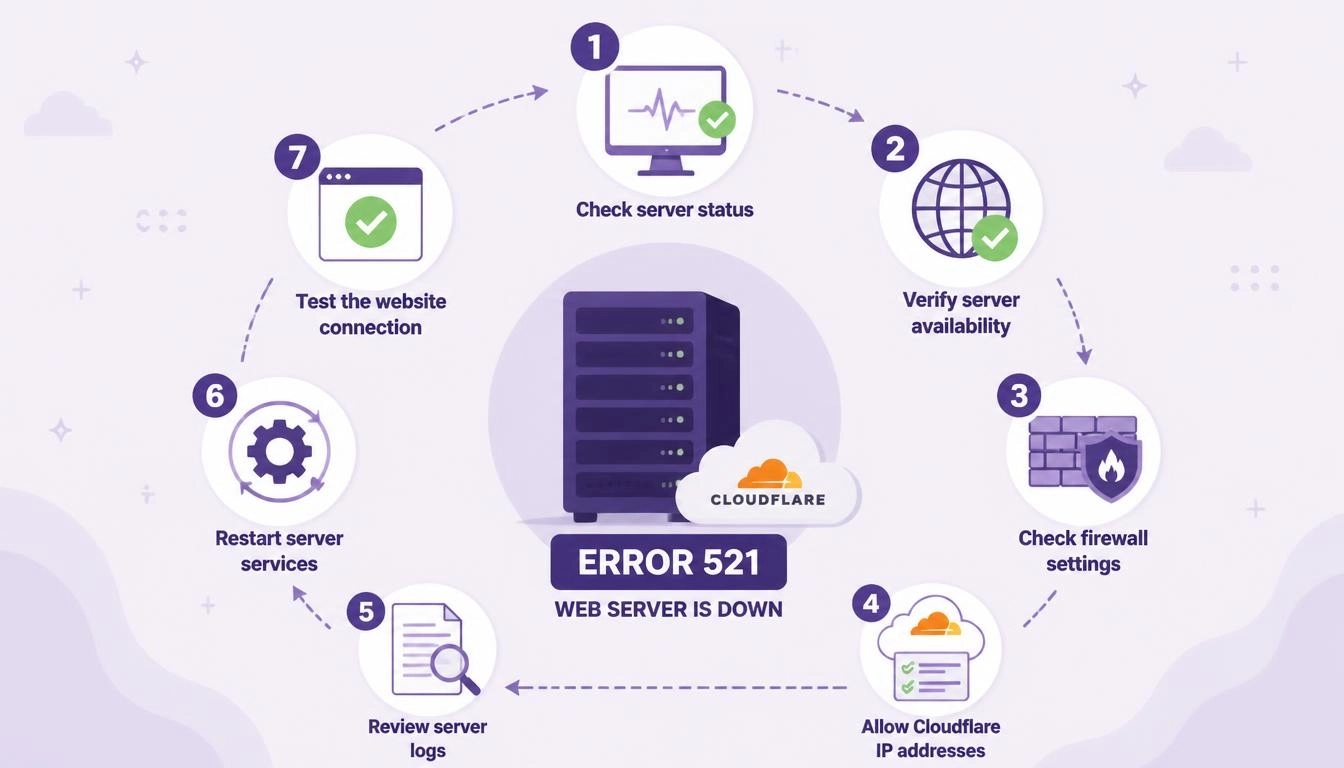
Work through these in order. Most 521 errors are solved by step 3.
Step 1: Check that your web server is running
Connect to your server and check the web server’s status:
sudo systemctl status nginx      # or: apache2 / httpd

sudo systemctl restart nginx     # restart it if it's stopped

If it keeps stopping, check why. A common cause is the server running out of memory:

bash

sudo journalctl -u nginx --since "1 hour ago"

sudo dmesg | grep -i "killed process"
Step 2: Test the server directly, bypassing Cloudflare
This tells you whether the server itself works. Replace ORIGIN_IP with your server’s real IP address:
curl -I --resolve example.com:443:ORIGIN_IP https://example.com

sudo ss -tlnp | grep -E ':80|:443'
The first command loads your site straight from the server. The second shows whether anything is listening on ports 80 and 443. If nothing is listening, Cloudflare has nothing to connect to.
Step 3: Allow Cloudflare’s IP addresses in your firewall
This is the most common fix. Cloudflare publishes its full list of IP ranges at cloudflare.com/ips. Allow all of them on ports 80 and 443. With ufw:
for ip in $(curl -s https://www.cloudflare.com/ips-v4) $(curl -s https://www.cloudflare.com/ips-v6); do

  sudo ufw allow from "$ip" to any port 80,443 proto tcp
done
Also check:
Security plugins such as Wordfence, and server tools like Imunify360 or CSF
Your hosting control panel’s IP blocker, for example in cPanel
Your host’s network firewall or DDoS protection, which you may not control directly
Common mistake: pasting an .htaccess rule that “denies all, allows Cloudflare”. It can lock out your own monitoring and admin tools. Allow Cloudflare’s ranges without blocking everything else, unless you’ve planned for it.
Step 4: Match your SSL/TLS mode to the right port
Cloudflare connects on different ports depending on your SSL/TLS setting:
Cloudflare SSL/TLS mode | Port Cloudflare connects to | What your server needs |
Flexible | 80 | A web server listening on port 80 |
Full | 443 | A web server listening on port 443 with any certificate |
Full (strict) | 443 | Port 443 with a valid certificate, such as a free Cloudflare Origin Certificate |
If you switched to Full and got an instant 521 error, your server probably isn’t listening on port 443.
Step 5: Check your DNS records, including IPv6
In your Cloudflare DNS settings, make sure the A record points to your server’s current IP address. Then look for an AAAA (IPv6) record. If one exists but your server doesn’t accept IPv6 connections, Cloudflare may try IPv6 and get refused, while the site works perfectly when you test it over IPv4. Either remove the AAAA record or make your web server listen on IPv6.
Step 6: Check Docker or reverse-proxy setups
If your site runs in Docker or behind a tool like Nginx Proxy Manager, make sure the container’s port is published, for example -p 80:80 -p 443:443. Also check that the app listens on 0.0.0.0, not only on 127.0.0.1. An app that only listens on localhost refuses every outside connection, including Cloudflare’s.
Step 7: Contact your hosting provider
If nothing above works, your host may be blocking Cloudflare at the network level. Send them the Ray ID shown at the bottom of the Cloudflare error page, plus the time the error happened. That lets them find the exact blocked request.
Why error 521 keeps coming back
This is the question that fills hosting forums, and most guides never answer it. Your site works, then shows 521 for a while, then fixes itself.
The usual cause: behind Cloudflare, every visitor reaches your server from a Cloudflare IP address. Security tools like fail2ban, CSF or mod_evasive, or your server’s own rate limiter, see thousands of requests from a few IPs, decide it’s an attack, and temporarily ban them. Those “attackers” are Cloudflare, so the site returns a 521 error until the ban expires.
The real fix has two parts:
1. Show your server each visitor’s real IP address. Cloudflare sends it in the CF-Connecting-IP header.
For Nginx:
nginx

# Repeat set_real_ip_from for every range listed at cloudflare.com/ips

set_real_ip_from 173.245.48.0/20;

real_ip_header CF-Connecting-IP;

For Apache, using mod_remoteip:

apache

RemoteIPHeader CF-Connecting-IP

# Repeat for every range listed at cloudflare.com/ips

RemoteIPTrustedProxy 173.245.48.0/20
2. Add Cloudflare’s ranges to your security tools’ ignore lists, for example ignoreip in fail2ban or csf.ignore in CSF. Your tools then ban real abusive visitors, never Cloudflare itself.
Quick check: if your firewall logs show bans on IPs starting with 173.245., 104.16. or 172.64., you’ve found your cause. Those are Cloudflare ranges.
Error 521 only in some countries: Test from multiple locations
Sometimes a site works perfectly for you but shows a 521 error to visitors elsewhere. Each Cloudflare data center connects to your server from its own IP ranges. If your firewall, or a country-blocking rule in a tool like CSF, blocks some of those ranges, only visitors routed through those data centers see the error.
Every Cloudflare site has a built-in diagnostic page at /cdn-cgi/trace. Its colo= line shows which Cloudflare data center handled your request. To see what visitors in different countries get, run the check through residential proxies located in those countries:
import requests


SITE = "https://example.com"

PROXIES = {  # one proxy per country you want to test

    "US": "http://USERNAME:PASSWORD@GATEWAY_HOST:PORT",

    "DE": "http://USERNAME:PASSWORD@GATEWAY_HOST:PORT",

    "SG": "http://USERNAME:PASSWORD@GATEWAY_HOST:PORT",

}


for country, proxy in PROXIES.items():

    p = {"http": proxy, "https": proxy}

    trace = requests.get(f"{SITE}/cdn-cgi/trace", proxies=p, timeout=15).text

    colo = next((line[5:] for line in trace.splitlines() if line.startswith("colo=")), "?")

    status = requests.get(SITE, proxies=p, timeout=15).status_code

    print(f"{country}: Cloudflare data center {colo}, status {status}")
If one country returns 521 while others return 200, you’ve found a regional block. Check your firewall and country rules for the Cloudflare ranges serving that region.
Test your site from 195+ countries: use CyberYozh rotating residential proxies with country targeting, from $2/GB, with unused traffic rolling over. Need to see what mobile visitors get? Try CyberYozh LTE/5G mobile proxies. Confirm each proxy’s location first with the free CyberYozh IP checker.
Seeing a 521 error while scraping: Don’t waste proxy traffic
If your scraper or SEO tool hits a 521 error, the target site’s server is down or refusing Cloudflare. It isn’t blocking you. Rotating to a new IP won’t help, and every retry costs traffic.
What to do instead:
Back off, waiting longer between each retry, and stop after three or four attempts
Test once from another region. If only one region fails, it’s a regional block on the target’s side
Move the URL to a retry queue and keep the rest of the job running
Track 521 errors separately from blocks such as 403 or Cloudflare’s 1020, so your success-rate numbers stay honest
For large jobs, a backconnect rotating proxy handles IP rotation for real blocks, while your code handles 521 errors with backoff. Our web scraping use case shows how teams set this up.
How to prevent error 521

Monitor uptime from several locations, so you hear about a 521 error before your visitors do
Keep Cloudflare’s IP list current in your firewall. Cloudflare updates its ranges occasionally
Make your web server restart itself after a crash, for example with Restart=always in its systemd service
Restore real visitor IPs so security tools never ban Cloudflare
Test SSL and DNS changes on a staging domain before you change your live site
Watch memory and CPU, since a server that runs out of memory stops accepting connections
Conclusion
Error code 521 looks alarming, but it’s one of the more fixable Cloudflare errors because the cause is always on your own server. Check that the web server is running, allow Cloudflare’s IP ranges, match your SSL mode to the right port, and look for a stray AAAA record. If the error keeps coming back, stop your security tools from banning Cloudflare. If it only appears in some countries, test from those countries before you change anything.
See your site the way the world sees it: browse every plan in the CyberYozh catalog, with rotating residential proxies in 195+ countries from $2/GB and LTE/5G mobile proxies from $1.70 a day.