GenLogin Review: Antidetect Features and Usage
GenLogin is a dual-engine antidetect browser (Titan + Nightly) that uses real-device fingerprint regeneration and no-code automation to keep multi-account operations undetectable. Paired with CyberYozh proxies, it covers virtually every online business workflow.
Key points include:
Conceals the full browser fingerprint stack per isolated profile
Supports mobile, residential static and rotating, and datacenter proxies via HTTP/SOCKS5
Batch-imports up to 100 proxies at once via the Proxy Manager
Free plan includes 5 profiles with full automation and sync features
Start with GenLogin's free plan, match each profile to the right CyberYozh proxy type, and align fingerprint geo settings with your proxy location. This combination makes every session indistinguishable from a real user.
GenLogin is an antidetect browser designed for managing multiple accounts, automating tasks, and staying undetectable online. It's built on a custom Chromium core called Titan Browser and uses real-device fingerprinting technology to simulate authentic human behavior. The application updates fingerprints regularly based on device usage to reinforce this. Paired with CyberYozh proxies, it becomes an ultimate web protection tool.
Summary of GenLogin and its features
GenLogin is available on Windows and macOS and combines real-device fingerprint spoofing with no-code automation, profile synchronization, and flexible proxy support.
What are antidetect browsers?
Antidetect browsers work by spoofing or randomizing the digital identifiers that websites use to track and link users across sessions. To compare:
Incognito modes only hide local browsing history
VPNs only change your IP address.
Unlike both, antidetect browsers alter the full stack of signals exposed to anti-fraud systems: canvas and WebGL rendering, OS and hardware parameters, screen resolution, fonts, timezone, audio context, and more. Each profile stores its own isolated cookies, localStorage, and cache, making every session appear as a completely separate real user browsing from a unique device.
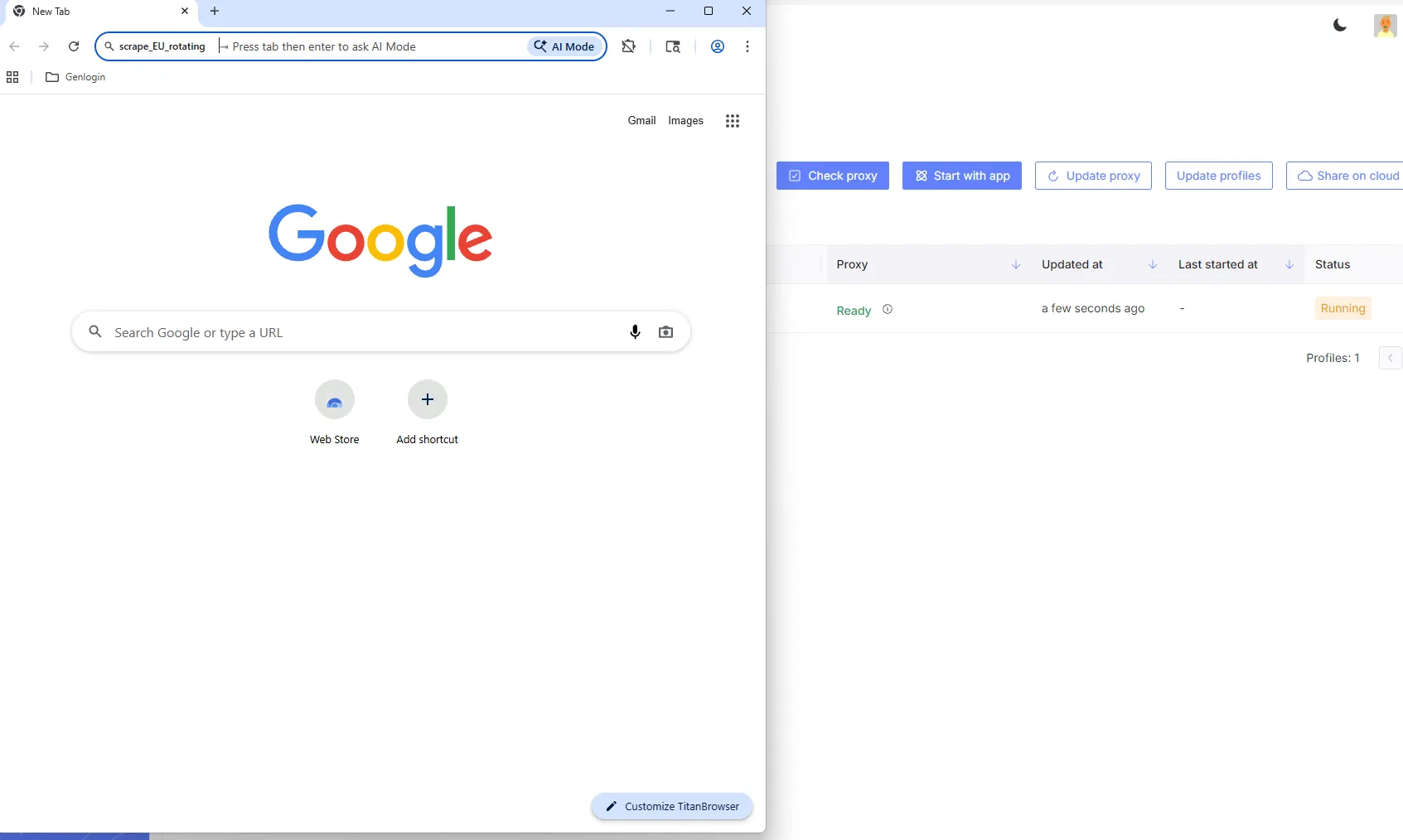
To complete the antidetection picture, an antidetect browser only needs a quality proxy that masks the real local IP.
Read more about antidetection activities in a CyberYozh article.
Distinctive features of GenLogin
GenLogin differentiates itself in the antidetect browser market through its real-device fingerprint engine, dual browser core architecture, and accessible automation tools. Here is a full breakdown:
Exclusive Titan Browser. GenLogin's custom Chromium-based engine simulates human browsing behavior, boosting authenticity and security for managed accounts. Unlike standard Chromium forks, it regenerates fingerprints from real device datasets rather than emulating them.
Nightly Browser (Firefox engine). The second available engine runs on Firefox and is useful for platforms that apply Chrome-specific fingerprint detection, giving users the flexibility to match the right engine to the right platform.
Real-device fingerprint regeneration. Fingerprints are continuously updated from real device data 24/7, covering WebGL, Canvas, Timezone, Geolocation, Language, Screen resolution, and User-agent strings.
No-code automation. A drag-and-drop automation interface and a library of ready-to-use templates let users automate logins, form submissions, posting, and bulk account actions without writing code.
Synchronizer Action. A unique feature that synchronizes actions across multiple browser profiles in real time, enabling simultaneous multi-account operations without performance stagnation.
Browser Control API. Developers can use the API to automate tasks such as logins, form filling, content posting, and multi-account management, enabling bots that make GenLogin compatible with custom automation scripts.
Its free tier supports 5 browser profiles with full automation and sync features, making it easy for new users to evaluate the full feature set before committing to a paid plan.
GenLogin management and CyberYozh proxy support
Here is how to create and manage GenLogin profiles with CyberYozh proxies assigned at the profile level. With the CyberYozh API, automated connection becomes possible, too.
Creating a GenLogin profile
Once registered and with the GenLogin antidetect browser downloaded and installed, profile creation is fast and straightforward.
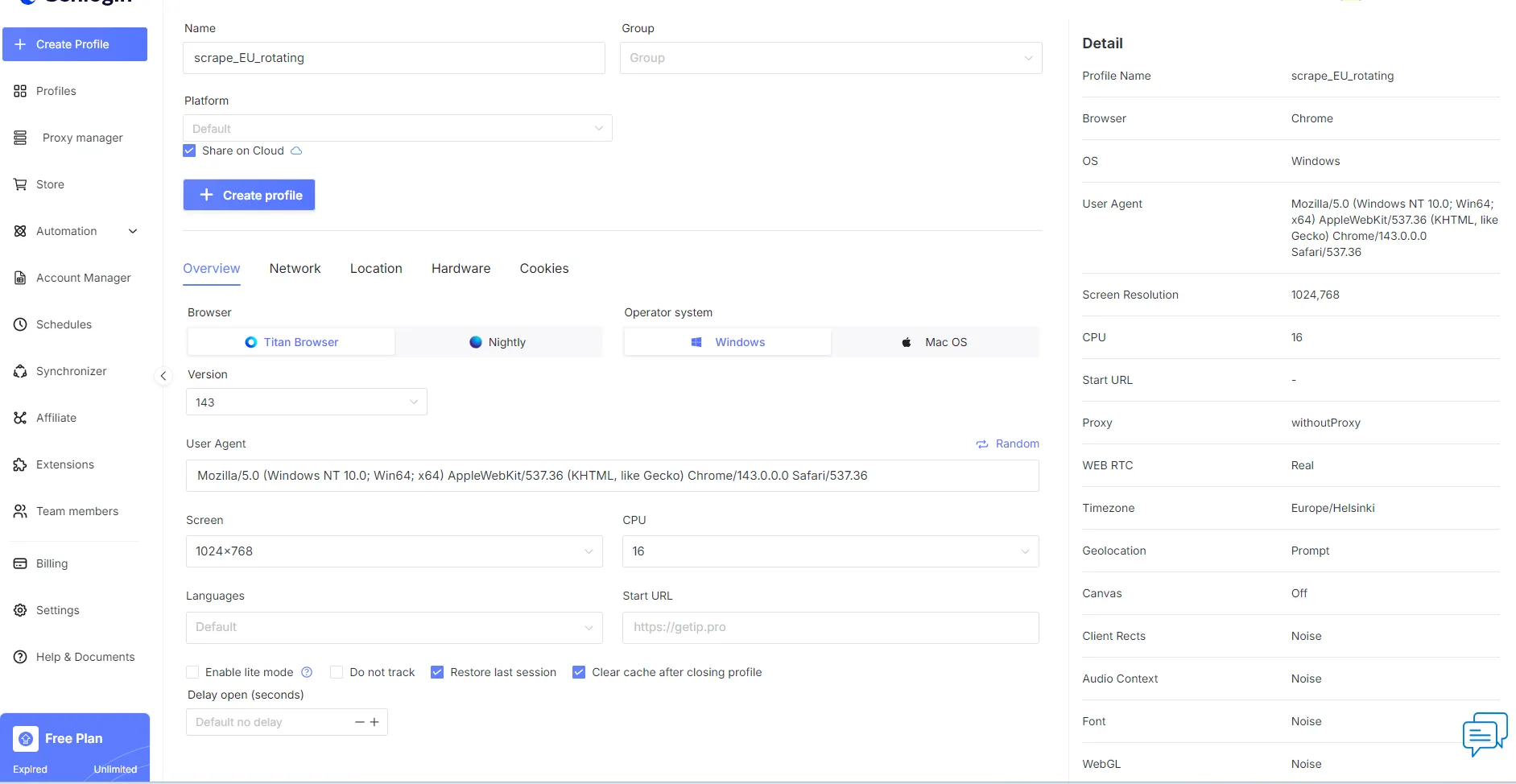
From the main dashboard, follow these steps:
Register and download GenLogin. Head to genlogin.com, create an account with your email, phone number, and password, then download and install the desktop client for Windows or macOS.
Purchase a CyberYozh proxy. Log in to your CyberYozh account, click Add Proxy, select your proxy type (mobile, residential static, rotating, or datacenter), and retrieve your Host, Port, Username, and Password from the My Proxies section.
Create a profile and configure fingerprints. In the GenLogin dashboard, click Create Profile, name it, select Titan Browser or Nightly Browser, and configure fingerprint parameters: OS, browser version, timezone, language, screen resolution, Canvas, WebGL, WebGPU, AudioContext, and hardware settings (CPU, RAM, GPU).
Add the CyberYozh proxy. Navigate to the Network tab inside the profile editor, click Your Proxy, select HTTP/HTTPS or SOCKS5, and enter your CyberYozh Host, Port, Username, and Password. Click Check Proxy to verify the connection — GenLogin returns the detected IP, location, and status.
Launch the session. Click Create Profile to save, then click Start to open an isolated Titan Browser session. Verify the active IP using an IP lookup tool inside the session — the displayed address should match your CyberYozh proxy, not your real IP.
After saving, profiles appear in the Profiles tab (typically under the Local subtab) and can be launched, edited, or shared with team members at any time.
Adding multiple proxies to GenLogin
For operations involving dozens or hundreds of profiles, GenLogin's Proxy Manager centralizes proxy management and eliminates the need to re-enter credentials for each profile.
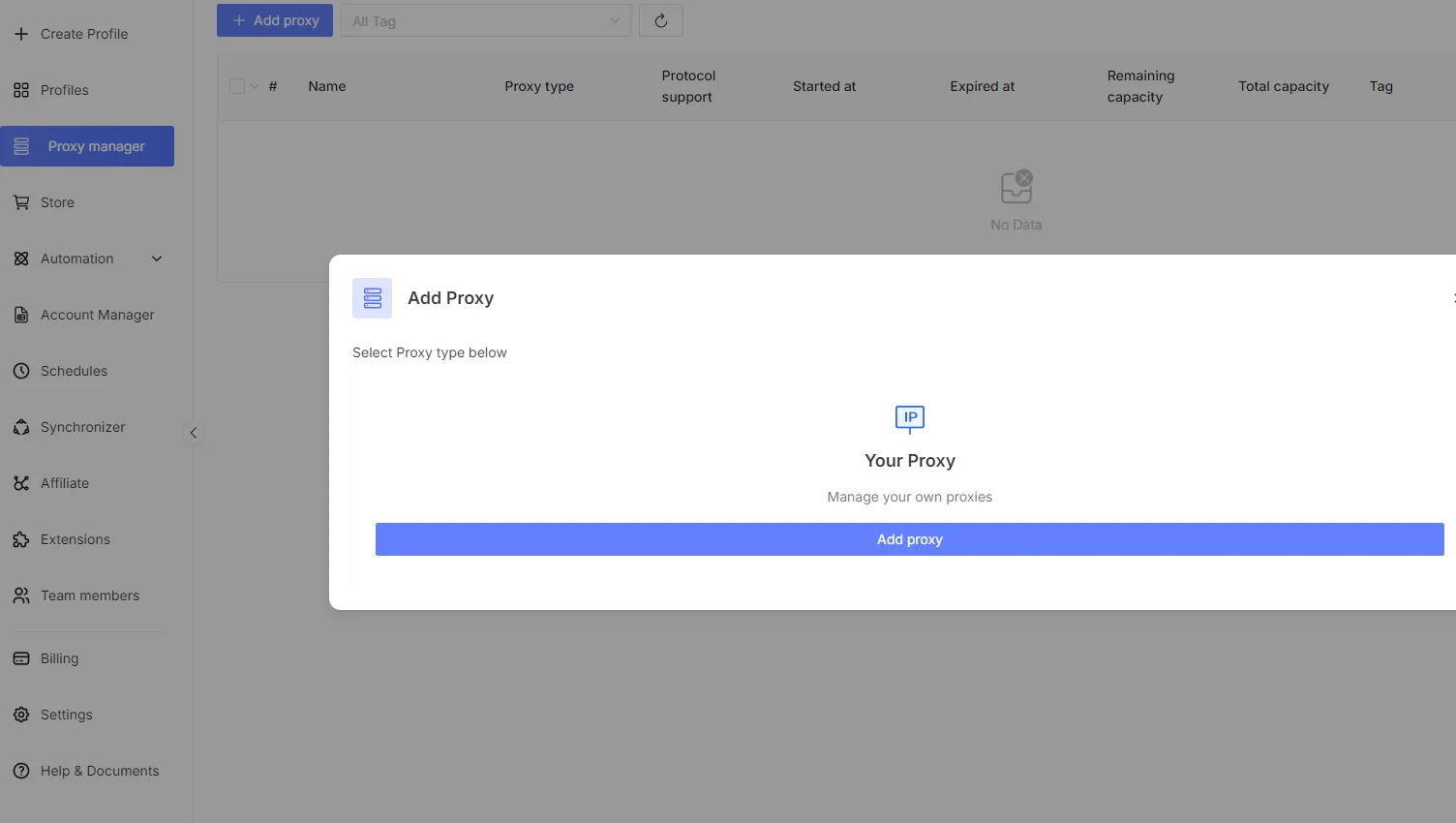
Here is how to set the Proxy Manager up:
In the GenLogin dashboard, click Proxy Manager in the left sidebar, then click Add Proxy to open the import panel.
Paste up to 100 proxies at once, one per line, using the format http:host:port:username:password or socks5:host:port:username:password. GenLogin parses, tests, and stores each proxy in sequence.
Once saved in the Proxy Manager, any proxy can be selected directly in the profile editor. This makes it easy to reassign, rotate, or swap proxies across multiple profiles without re-entering credentials.
Use the Proxy Manager as the single point of control for your entire team's proxy pool. All members can access and assign proxies from the shared list, which simplifies rotation and replacement at scale.
Read more about proxy setup in GenLogin in a full-scale guide.
GenLogin usage cases and specific tools
GenLogin supports a wide range of business workflows in which isolated identities, clean IPs, and automation are essential to operating at scale. Here are the most common applications.
Web data scraping
Automated data collection from product catalogs, SERP results, review platforms, or public databases requires sending large volumes of requests without triggering anti-bot detection. GenLogin isolates each scraping session behind a unique fingerprint and proxy, preventing platforms from correlating requests to a single operator. CyberYozh's residential rotating proxies are the natural pairing here: their pool of 50M+ real IPs rotating per request distributes traffic across a vast range of addresses, making any single source invisible to detection systems.
Bulk e-commerce price monitoring and catalog extraction
SERP tracking and keyword rank monitoring across multiple geos
Public database scraping and open directory collection
Ad intelligence and competitor content aggregation
For non-restricted public data tasks where speed outweighs stealth concerns, CyberYozh datacenter proxies offer the highest throughput at the lowest cost per request.
Multiple account management
Teams managing accounts on social platforms, crypto exchanges, or marketplaces need profiles that are permanently and verifiably isolated from one another to prevent cross-account linking. GenLogin's profile system ensures each account has its own cookies, localStorage, fingerprint, and proxy assignment — making them appear as separate users to any anti-fraud system. Pairing each profile with a CyberYozh mobile proxy gives it a carrier-level IP trust score, which is essential for platforms that scrutinize traffic origin and flag data center IPs by default.
Specific multi-account implementations:
Multi-account social media management and growth automation
Crypto exchange and trading platform account separation
Market research and competitor analysis from multiple geo perspectives
Agency-level client account management with team sub-accounts
Need phone numbers for account registration at scale? CyberYozh's SMS activation service covers 700+ platforms across 140 countries.
E-commerce scaling
Sellers operating multiple e-commerce storefronts on Amazon, eBay, Shopee, or Etsy risk platform detection and permanent bans if shared device signals or IP addresses link their accounts. GenLogin creates a completely sandboxed environment for each storefront — every store appears as a different merchant browsing from a different household device. CyberYozh’s residential static proxies provide a stable, fixed home IP for each storefront, maintaining consistent login sessions and preventing IP-based account association over time.
Specific e-commerce implementations:
Multi-storefront management on Amazon, eBay, Etsy, and Shopee
Price intelligence and catalog monitoring across competitor stores
Business process automation for order management, listing updates, and inventory tracking
Geo-specific pricing research and regional market entry testing
Read more about proxy use in e-commerce on CyberYozh.
Social media marketing
Social media marketers and agencies managing campaigns across multiple platforms need each account to appear as an independent user to avoid policy violations and suspension cascades. GenLogin's Synchronizer Action feature enables simultaneous multi-profile actions across dozens of accounts in real time, combined with no-code automation templates, dramatically accelerating campaign execution. Mobile proxies are the recommended pairing for social media profiles, as mobile carrier IPs carry the highest platform trust score and are least likely to trigger CAPTCHA or account review triggers.
Specific social media implementations:
Multi-account management and growth automation on Instagram, TikTok, and Facebook
Influencer campaign scheduling, monitoring, and performance tracking
Lead generation and audience research across multiple geo-targeted profiles
Social data scraping for audience analysis and trend research
Affiliate marketing
Affiliate marketers rely on tracking links, geo-targeted landing pages, and split-testing across multiple offers — all of which require clean, isolated browser environments to ensure accurate conversion attribution and prevent cross-campaign data leakage. With GenLogin, each offer or campaign runs from its own unique profile with independent cookies and fingerprints, ensuring that platform attribution systems see genuinely separate users. Specific affiliate marketing implementations:
Geo-targeted offer testing and landing page split-testing from multiple locations
Advertising account management on Google Ads, Facebook Ads, and TikTok Ads with isolated profiles
Ad verification and competitor tracking across multiple geos
Traffic quality validation and conversion funnel auditing from clean IP sources
GenLogin profiles with CyberYozh proxies for efficient online business
CyberYozh mobile, residential, and datacenter proxies cover every workflow GenLogin is built for. The right proxy type depends entirely on the platform's trust requirements and the scale of activity:
Mobile proxies deliver the highest carrier-grade IP trust, include built-in digital fingerprint management, and are the first choice for social media, ad accounts, and any high-scrutiny platform.
Residential static proxies provide a fixed, real home IP address from 100+ countries at an affordable price — best for stable, long-running single-account profiles and e-commerce storefront management.
Rotating residential proxies draw from a 50M+ IP pool with extensive geo-targeting, ideal for bulk automation, web scraping, and multi-account workflows driven by GenLogin's API.
Datacenter proxies are the fastest and most cost-effective option for open, non-restricted data tasks where detection risk is low and request volume is high.
To make the most of this combination, follow these proxy practices for GenLogin:
Assign one unique CyberYozh proxy per profile. Sharing a single IP across multiple profiles is the fastest way to trigger cross-account linking flags.
Match the proxy type to the platform's trust level. Mobile and residential static for social media and e-commerce; rotating residential for scraping and automation; datacenter for public, low-scrutiny tasks.
Always verify with Check Proxy before launching. If the check fails, re-copy credentials exactly from the CyberYozh dashboard and confirm the correct protocol (HTTP or SOCKS5) is selected.
Align proxy geo with the profile's fingerprint settings. Timezone, language, and geolocation in the GenLogin profile editor should match the country and city of the assigned CyberYozh proxy.
Keep sessions warm and avoid mid-session proxy changes. Rotate or replace proxies only at the start of new sessions, especially on established accounts that platforms monitor for session-level IP consistency.
Use the Proxy Manager for team-scale operations. Centralizing proxy management there reduces duplication, speeds up rotation, and ensures that all team members are always working from up-to-date, verified credentials.
Explore the full CyberYozh proxy catalog to find the right plan and proxy type for your GenLogin workflow.