
The Ultimate Guide to Telegram Proxies in 2026: Stay Connected, Secure, and Unblocked
I still remember the exact moment I realized I needed a Telegram proxy. I was sitting in a hotel lobby in a country I will not name, trying to send a critical contract to a client who was waiting on the other side of the world. The file was three pages. It should have taken five seconds. Instead, Telegram sat there spinning its little loading circle for four full minutes before throwing up a connection error.
I switched to WhatsApp. Blocked. I tried email. The attachment bounced. I ended up walking to the hotel business center and paying an absurd per-minute rate to use their desktop, which, it turned out, had access to a VPN the hotel staff used quietly. One click, and Telegram loaded instantly.
That was my introduction to the reality that internet access is not uniform across the world. Some networks block Telegram outright. Others throttle it so severely that it is effectively unusable. And even on fast, unrestricted connections, privacy-conscious users have good reasons to want a layer between their IP address and the Telegram servers.
I have spent a lot of time in that hotel lobby since then, learning what actually works and what looks like it works until it gets you in trouble. This guide is everything I know, laid out in plain language.
What Is a Telegram Proxy
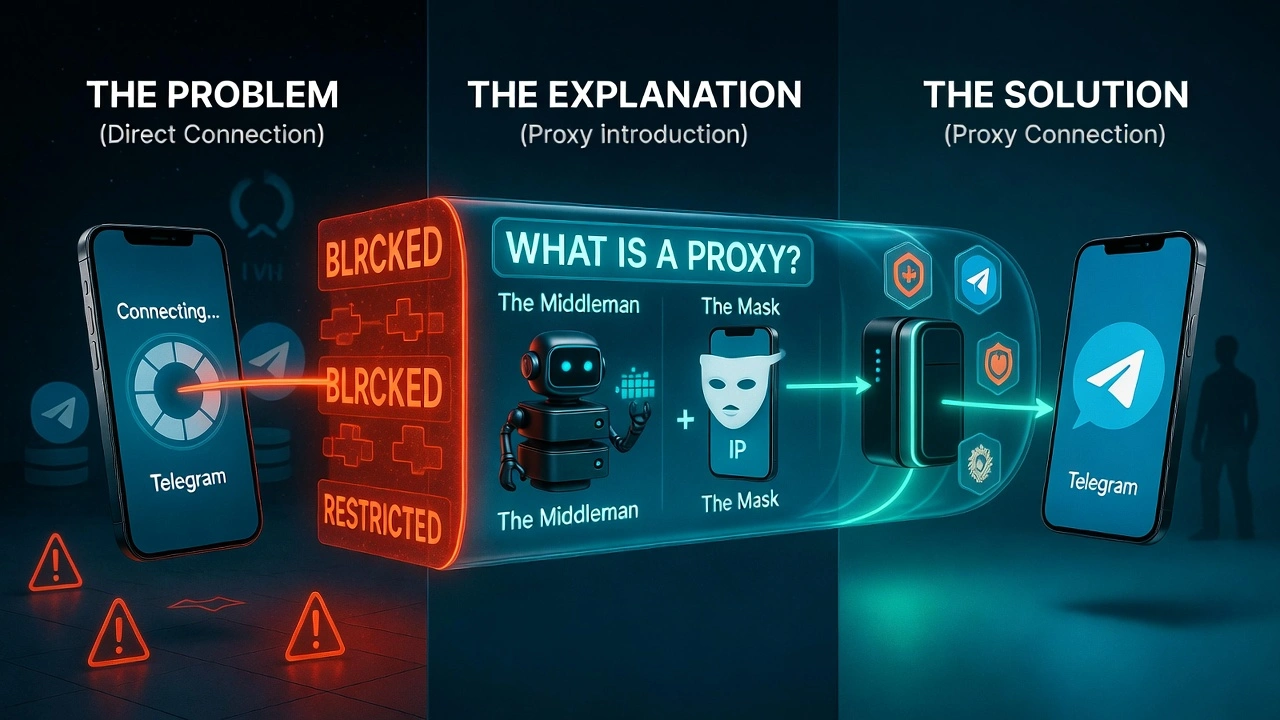
A proxy server is an intermediary between your device and the internet. When you connect through a proxy, your traffic goes to the proxy server first, which then forwards it to its destination. In this case, the receiving server, Telegram, sees the proxy's IP address rather than yours.
“For example, it's like having a trusted friend pick up your mail for you. Nobody at the post office knows where you actually live. They just know your friend's address. Your correspondence still gets delivered, but your home address stays private.”
For Telegram specifically, a proxy server solves three distinct problems. First, it can route your connection around government or ISP-level blocks. If Telegram's servers are unreachable from your network, a proxy in an unrestricted country can reach them on your behalf. Second, it masks your real IP address, adding a layer of privacy.
Third, for anyone managing multiple Telegram accounts, marketers, community managers, and businesses, a proxy ensures each account has its own unique IP, preventing platforms from linking them.
“Quick definition: A telegram proxy is a server that routes your Telegram traffic through a different IP address and geographic location. It can bypass blocks, improve connection stability, and protect your privacy.”
The 3 Biggest Problems a Telegram Proxy Solves
Pay attention to these common issues; knowing them might save you a lot of time.
1. Bypassing geo-restrictions
Telegram is blocked or heavily restricted in dozens of countries. Russia blocked it for two years. Iran restricts it periodically. China blocks it entirely. Even in countries where it is nominally accessible, some corporate networks or school systems block it to control bandwidth usage.
A telegram proxy with servers in an unrestricted country routes your connection through that country instead. From Telegram's perspective, you are connecting from France, Germany, or Singapore,e wherever your proxy server happens to be. The block that your local ISP has applied becomes irrelevant because your traffic never hits it directly.
This is the most common reason people search for a telegram proxy, and it is also where the quality of your proxy matters most. A free proxy may route your connection, but if the IP is already flagged, used, or the server is overloaded, your connection will be slower than the one it replaced.
2. Stable and Fast connection
This one surprises people. How can adding a proxy server between you and Telegram make things faster? In some network configurations, it genuinely can. ISPs sometimes route traffic inefficiently to certain destinations. They also actively throttle known Telegram connections on certain networks.
A proxy server for Telegram with a direct, high-bandwidth connection to Telegram's infrastructure can sidestep both of these issues. The routing becomes more direct, and because the ISP sees encrypted traffic going to a proxy rather than identifiable Telegram packets, the throttling does not apply.
“I tested three different proxies against a direct connection last month. On my home network, the difference was negligible. On a corporate network that actively throttled video streaming, the best proxy for Telegram I tested cut file transfer times by more than half.”
3. Managing multiple Telegram accounts safely
This is the use case that experienced marketers and community managers know about but rarely discuss openly. Telegram allows multiple accounts on the same device, but if those accounts are all connecting from the same IP address, Telegram can and does link them. If one account gets reported or banned, the others become vulnerable.
The solution is simple in principle: each account gets its own dedicated proxy with a unique IP address. Combined with separate phone numbers for registration, this keeps accounts genuinely isolated from each other. It is worth pairing this setup with an anti-detect browser if you are managing accounts at real scale, but that is a topic for another guide.
What is the right protocol for Telegram: SOCKS5 vs. MTProto vs. HTTP
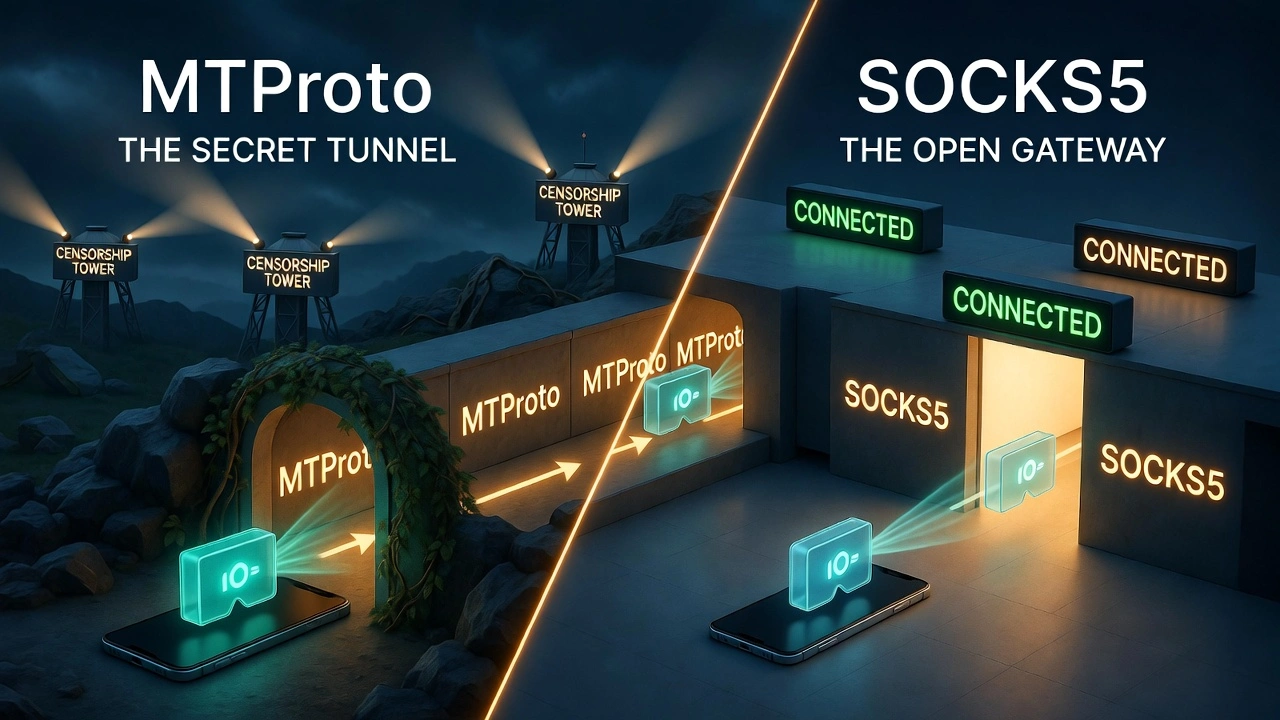
The protocol you choose matters more than most guides admit. I have seen people set up what looked like a perfect proxy configuration, only to get intermittent disconnects or slow speeds because they picked the wrong protocol for their situation. Here is the honest breakdown.
Protocol | Built Into Telegram? | Security Level | Speed | Best Use Case |
SOCKS5 | Yes (via settings) | High | Very Fast | Multi-accounting, privacy, and everyday use |
MTProto | Yes (native support) | Very High | Fast | Bypassing heavy government censorship |
HTTP/HTTPS | Yes (limited) | Moderate | Moderate | Basic browsing, low-stakes tasks only |
SOCKS4 | Partial | Low–Moderate | Moderate | Legacy setups; avoid for new configurations |
My recommendation for most users: use SOCKS5. It is built into Telegram's native settings, handles the full range of Telegram traffic, including media and calls, and is fast. Quality SOCKS5 proxies from a reputable provider are genuinely stable.
MTProto has its place, specifically in countries with deep packet inspection that can detect and block SOCKS5 traffic. The MTProto proxy for Telegram was designed precisely to look like ordinary HTTPS traffic, making it much harder for censorship systems to identify and block. If SOCKS5 is not working in your location, MTProto is the next thing to try.
“HTTP proxies work for basic webpage loading, but Telegram's real-time messaging architecture is not really built around standard HTTP. You'll likely get timeouts, missed messages, and dropped calls. Stick with SOCKS5 unless you have a specific reason not to.”
Why you should not use free Telegram proxy lists
Free telegram proxy lists are, almost without exception, a bad idea. Not mildly suboptimal, but actively dangerous. Let me explain why it is not.
“There is no such thing as a free lunch when it comes to proxies. If you are not paying for the service, you are the product. The question is only how your data is being used.”
Running a proxy server costs real money, bandwidth, hardware, and maintenance. When someone offers you a free proxy, they are covering those costs somehow. The most common methods:
• Data logging and selling. Everything you send through the proxy can be read, recorded, and sold to data brokers, advertisers, or worse. Your Telegram messages are not end-to-end encrypted in transit through a proxy; the proxy sees them in plain text if they are not additionally encrypted.
• Malware injection. I once recommended a free proxy to a colleague who was having connection issues while traveling. Two days later, his device was showing browser redirects and unwanted software. The proxy had injected a script into his traffic. I felt genuinely terrible about that recommendation, and it is why I stopped suggesting free options entirely.
• IP blocklisting. Thousands of people use free proxy IPs simultaneously. Telegram and other platforms actively flag and block these IP ranges. The proxy "works" for a day or two, then suddenly your account is restricted because the IP was flagged for spam by someone else using the same server.
• Man-in-the-middle risk. A proxy sits exactly in the position needed to conduct a man-in-the-middle attack on your traffic. Free providers have every incentive and every technical capability to do this. Most do not, but some do, and you have no way to tell the difference.
• Useless speeds. I tested a highly rated free proxy last week, specifically for this guide. It took 31 seconds to load a single text message thread. That is not a usable tool; it is a false sense of security with the inconvenience of a broken connection thrown in.
The security research community has extensively documented these risks. A widely cited study found that a significant percentage of free proxy services actively modified traffic passing through them.
The solution is not to avoid proxies; it is to use a paid provider whose business model is selling reliable service, not selling your data.
How to Choose a Reliable Telegram Proxy
After years of testing proxies for various use cases, I have narrowed down the evaluation to five things that actually matter. If a provider checks all five, it is worth trusting. If it fails even one, keep looking.
Non-Negotiable | What to Look For |
1. Clean IP Reputation | Check the IP against fraud databases before use. CyberYozh's Fraud Score tool does this for you at $0.15 per check. |
2. True SOCKS5 Support | Must handle Telegram's connection style without dropping packets. HTTP proxies often fail silently. |
3. Reliable Speed & Uptime | Look for 99.9%+ uptime guarantees. Real mobile or residential IPs are far more stable than datacenter ones. |
4. Wide Location Coverage | At minimum: the country your account is registered in, plus any countries you communicate with frequently. |
5. Trustworthy Provider (No Logging) | Read the privacy policy. If it says "we may share data with third parties," run. Fast. |
Let me expand briefly on the first one, because it is the most commonly overlooked.
IP reputation checking is the difference between a proxy that works for months and one that gets your account restricted within a week. Every IP address has a history. Some have been used for spam campaigns. Some have appeared on blocklists. Some have been associated with bot activity. When you connect Telegram to a proxy with a dirty IP, you inherit that history.
A Fraud Score check before assigning an IP to any account costs almost nothing and takes thirty seconds. It is the single highest-value due diligence step most people skip.
Why CyberYozh is the professional's choice for Telegram
Let me be transparent: Cyberyozh is the top pick for 2026, a provider that does it all under one roof. Complete toolkit for Telegram with their 50M high-quality IP pool with 99.8% task completion rate.
Fraud Score: Know Your IP Before You Use It
This is the feature that first made me take CyberYozh seriously. Before you assign any IP to a Telegram account, you can run it through the Fraud Score tool, which cross-checks it against eight major anti-fraud and reputation databases, including MaxMind, IPQualityScore, GeoComply, and Stripe. Cyberyozh has 50 security databases that check IP reputation. You get a clean risk rating before you ever connect. Apart from IP checks, they also have bank card checks for ad verification.
At $0.15 per check, this is genuinely cheap insurance. I have seen people lose weeks of account-warming work because they skipped this step and used an IP that was already flagged.
Unlimited mobile traffic
Mobile proxies IPs from real 4G and 5G carrier networks, carry the highest natural trust score on platforms,s including Telegram, because they look exactly like a normal phone user connecting from a cellular network. CyberYozh's mobile proxies use actual SIM cards on live carrier networks, not emulations.
The unlimited traffic element matters if you are doing anything beyond lightweight messaging, such as sending large files, participating in high-volume group chats, or running Telegram bots. Many providers cap you at a few gigabytes per day. Apart from mobile proxies, they also have residential and datacenter proxies for different workflows.
Seamless integration
Cyberyozh integrates with Postman, Selenium, Puppeteer, and Playwright, and is compatible with external anti-detector tools such as Multilogin, AdsPower, Geelark, Dolphin Anty, Kameleo, Octobrowser, Gologin, and more. Support for HTTP, HTTPS, SOCKS5, and UDP protocols for compatibility with various tools.
Crypto payments
If you are using a proxy precisely because you value your privacy, paying for it with a traceable credit card is a contradiction. CyberYozh accepts BTC, USDT, and ETH with no KYC requirement. Standard card payments are available too for users where privacy is not the primary concern.
“The combination of a clean residential or mobile IP, a verified Fraud Score, and SOCKS5 support covers every one of the five non-negotiables I outlined earlier. That's the honest reason it's my recommendation.”
Step-by-Step: How to set up a Telegram proxy
Telegram makes this genuinely straightforward once you have your proxy credentials, a host address, a port number, and a username/password. Here is the process for every major platform.
Android
1. Open Telegram and tap the three-line menu (☰) in the top-left corner.
2. Go to Settings, then to Data and Storage, and then to Proxy Settings.
3. Tap Add Proxy at the bottom of the screen.
4. Select your proxy type (SOCKS5 is recommended for most users).
5. Enter your credentials: Host, Port, Username, and Password.
6. Tap the checkmark to save, then tap the proxy to enable it.
7. You'll see a small icon in the top bar confirming the proxy is active. Tap it to verify the connected location.
“Telegram shows a shield or dot icon in the status bar when a proxy is active. If the dot is green, you're connected. If it's red, the proxy credentials are wrong, or the server is down.n”
iPhone (iOS)
1. Open Telegram and go to Settings (bottom-right tab).
2. Scroll down to Data and Storage, then tap Proxy.
3. Tap Add Proxy.
4. Choose SOCKS5 or MTProto depending on your use case.
5. Enter the Host, Port, Username, and Password from your provider.
6. Tap Save, then tap the proxy entry to make it active.
7. Return to your chat list. If messages load quickly, the proxy is working.
PC: Telegram desktop
Setting up a proxy on Telegram desktop follows the same logic but is located in a slightly different place. This targets users searching for a Telegram proxy desktop or a Telegram proxy for pc.
1. Open Telegram Desktop on Windows or macOS.
2. Click the three-line menu icon (☰) in the top-left.
3. Go to Settings, then to “Advanced”.
4. Scroll down to the Connection Type section and click Use Custom Proxy.
5. Click Add Proxy, select SOCKS5, and enter your credentials.
6. Click Save. Telegram will test the connection and show a green checkmark if it succeeds.
7. Close setting. Your proxy is now active for all Telegram traffic on that device.
“Telegram Desktop lets you have multiple proxy profiles saved and switch between them. If you manage accounts across different regions, save one proxy per region and switch with a single click.”
Telegram web
Telegram Web has two versions: Web A (webk.telegram.org) and Web Z (web.telegram.org). Neither version has a native proxy setting built into the interface; they both rely on your browser's network settings or any proxy configured at the OS level.
For true per-session proxy control in Telegram Web, the most reliable approach is to use a browser with built-in proxy routing or a browser extension that routes specific tabs through different proxies. This is especially useful if you use Telegram Web alongside other tools in a multi-account workflow.
Top 5 Telegram proxy providers in 2026
For users in China, Russia, Iran, and many other restricted countries, these are some of the best proxyproviders for Telegram.
CyberYozh
CyberYozh takes a different all-in-one approach than most proxy companies. Instead of just handing out IP addresses, they built their entire system around one reality: “platforms like Telegram don't just block IPs, they study them”.
Cyberyozh provides residential, mobile, and datacenter proxies that support SOCKS and HTTP protocols, with an IP pool of 50M and 99.9% uptime. Every IP in their pool gets checked against more than 50 security databases before anyone ever uses it. CyberYozh's Fraud Score tool catches that before you connect. You literally check the IP first, see its reputation score, and only use it if it's clean.
For Telegram, where a single flag can permanently shadowban an account, this is the difference between setting it up once and repeatedly. Telegram trusts mobile traffic more than almost anything else. When you connect through a 4G or 5G IP, you look like a normal person on their phone, not a bot in a data center.
CyberYozh runs on real mobile carrier networks, actual SIM cards, and actual cellular routes. And unlike most mobile proxy providers, they don't meter your traffic. It's unlimited.
Then there's the SMS piece. Registering Telegram accounts requires phone numbers. CyberYozh has built-in SMS verification. You're not bouncing between five different services trying to piece together a workflow. It's all in one place: proxies, clean IP, clean phone number, done.
Key features:
Fraud Score checks IPs against 50+ security databases before use
Real 4G/5G mobile proxies with unlimited traffic
Integrated SMS and phone number verification
50 million residential IPs across 100 countries
99.9% uptime with automatic IP failover
Static residential proxies from $5.29/month
Mobile proxies from $1.70/day with unlimited traffic
Works with Multilogin, AdsPower, Dolphin Anty, and more
User-friendly dashboard
Automation and webscraping
Affortable
Rayobyte
Rayobyte has been around long enough to build a solid reputation. They offer four different proxy types: datacenter, residential, mobile, and ISP, which gives you flexibility depending on what you're doing with Telegram. Their residential proxy network spans more than 150 countries, with approximately 100,000 IP addresses. The mobile proxies cover over 100 countries, and their ISP proxies are available in four countries (the US, UK, Canada, Germany), with pricing starting at around $5 per IP.
Key features:
Four proxy types: datacenter, residential, mobile, ISP
Residential IPs in 150+ countries
ISP proxies from $5/IP (US, UK, Canada, Germany)
Supports HTTP/S and SOCKS5
User-friendly interface for proxy generation
Free trial available
No refund policy
Proxy-Cheap
Proxy-Cheap launched in 2018 specifically to break the "proxies are expensive" mold, and they've succeeded. With over 7 million IPs across 195 countries, their coverage is genuinely global. They support HTTP(S) and SOCKS5, offer IP authentication and username/password login, and their datacenter proxies can reach 4 Gbit/s with 99.9% uptime. Proxy-Cheap focuses on affordability; their residential proxies are shared. During peak hours, you might experience slowdowns as other users compete for bandwidth.
Key features:
7+ million IPs across 195 countries
Residential proxies from $2.99/GB
Mobile proxies from $11.61 (7-day trial)
Datacenter proxies from $1.18/proxy
IPv6 proxies as low as $0.15/proxy
Unused traffic rolls over—doesn't expire
Supports HTTP(S) and SOCKS5
4 Gbit/s speed on datacenter proxies
NodeMaven
NodeMaven positions itself around quality rather than raw IP volume, and that focus shows in how their proxies perform. Their residential and mobile networks cover over 30 million IPs across 150+ countries. But the real story is their IP Quality Filter, which screens out flagged or unreliable addresses in real time. They claim 95% of requests go through clean, usable IPs .
Key features:
30M+ IPs across residential and mobile networks
IP Quality Filter blocks flagged addresses (95% clean rate)
Sticky sessions up to 24 hours
Custom rotation rules (per request or timed intervals)
Supports HTTP(S) and SOCKS5
Geo-targeting by country, city, region, or ASN
Pricing from $3.99/GB
Decodo

Decodo has a residential network with over 55 million IPs across 195+ locations, including US states and major cities worldwide. Response times average under 0.5 seconds, making Telegram feel snappy even when routing through a proxy. They offer both rotating and sticky sessions, with sticky sessions configurable up to 24 hours. Prices are not ointhe cheap zone. Residential proxies start at $8.50 per GB, mobile at $50 per GB, and datacenter at $50/month for 100 proxies. No free trial, but they offer a 3-day money-back guarantee.
Key features:
55M+ residential IPs across 195+ locations
Sub-0.5 second response times
Chrome extension for one-click proxy switching
Sticky sessions up to 24 hours
Rotating and static proxy options
Supports HTTP(S) and SOCKS5
Residential from $8.50/GB, mobile from $50/GB
3-day money-back guarantee
Conclusion
If you have read this far, you now know more about telegram proxies than the vast majority of people who use them. You understand the difference between protocols and when each one applies. You know why free proxy lists are a false economy. You have a checklist for evaluating any provider. And you have a step-by-step setup guide for every device you own.
The thing I want to leave you with is this: a proxy is not a complicated technical tool. It is just a smarter way to connect. When you pick the right one from a trustworthy provider, it fades into the background. Telegram just works faster, more privately, without the frustrating disconnects or the anxiety about who might be watching.
Frequently Asked Questions About Telegram Proxies
Is using a proxy for Telegram legal?
In most countries, yes, using a proxy is entirely legal. The legality depends on why you are using it, not the act of using it. Accessing blocked services in a country where those services are legally banned is a more complex question that depends on local laws. If you are in a restrictive country and concerned about this, consulting local legal resources is worth doing.
What's the difference between a Telegram proxy and a VPN?
A VPN routes all of your device's internet traffic through an encrypted tunnel, changing your IP across every app and browser. A Telegram proxy routes only Telegram's traffic through the proxy server. For most Telegram use cases, a proxy is simpler, faster, and more targeted. A VPN makes sense if you want comprehensive privacy across your whole device. A proxy makes sense if Telegram is your specific concern and you want minimal impact on the rest of the system. [External link: Privacy Guides understanding proxies vs. VPNs]
My proxy is connected, but Telegram is still slow. What's wrong?
There are three likely causes. First, the proxy server itself may be overloaded. This is extremely common with free proxies and cheaper shared options. Second, the proxy's geographic location may add latency rather than reduce it; a proxy server farther from both you and Telegram's servers will be slower than a direct connection. Third, the IP may be partially throttled by Telegram due to a dirty reputation history. Run a Fraud Score check on the IP, and if it is clean, try a proxy server physically closer to you.
Can I use the same proxy for Telegram on my phone and computer?
Technically, a SOCKS5 proxy credential works on any device that supports the protocol. However, if you are managing Telegram accounts and trying to keep them isolated, using the same IP on multiple devices defeats the purpose. For personal privacy use, when you have only one account, sharing a proxy across devices is fine.
I got an error saying "Proxy connection failed." How do I fix it?
This error almost always comes down to one of four things: a typo in the credentials (the most common cause is copying and pasting directly from your provider), the wrong protocol selected (make sure you are choosing SOCKS5 if that is what your provider issued), the proxy server being temporarily down, or a firewall on your local network blocking the proxy port. Try each in order. If credentials are correct and the server is up, but you still cannot connect, ask your network administrator whether outbound SOCKS5 connections are blocked.
Will a proxy help me recover a banned Telegram account?
No. A proxy changes your IP address going forward, but Telegram's ban is applied to your account, not just your IP. If your account was banned for violating Telegram's terms of service, changing your IP will not lift the ban. A proxy can help you avoid triggering further restrictions when creating a new account by providing a fresh, clean IP with no ban history.
Helpful?
Share article
