
Hidemium Review: Exploring Unique Features and Use Cases
Hidemium is a Chromium-based antidetect browser designed to create and manage isolated browser profiles, each with a unique fingerprint and IP address. It’s very universal, offers a free plan, and can be used by individuals and organizations. For efficient work, it should be paired with a proxy.
Summary of the Hidemium antidetect browser
Hidemium is a capable, beginner-friendly antidetect browser that runs on Windows and macOS, with paid plans starting at $15/month and a permanently free tier for up to five profiles. It offers AI-powered, no-code automation through its built-in Prompt Script engine, allowing users to automate browser tasks using plain-language commands without writing a single line of code. For teams and developers who need deeper control, Hidemium provides a scripting API with native support for Puppeteer, Playwright, and n8n workflow integration. Paired with CyberYozh proxies, it can be used for virtually any online business activity, eliminating the risks of bans and detection.
What are antidetect browsers?
Antidetect browsers work by spoofing or randomizing the digital identifiers websites use to track and link users across sessions. Each profile maintains completely isolated cookies, localStorage, cache, and a separately assigned proxy IP, so every session appears to platforms as an independent, real user.
Read more about antidetection activities in a CyberYozh article.
How to use Hidemium for web browsing
Hidemium covers a broad range of use cases that require anonymity, profile separation, or scalable automation. Its profile creation window offers granular control over every fingerprint parameter, and profiles can be launched, paused, and monitored directly from the main dashboard without technical expertise.
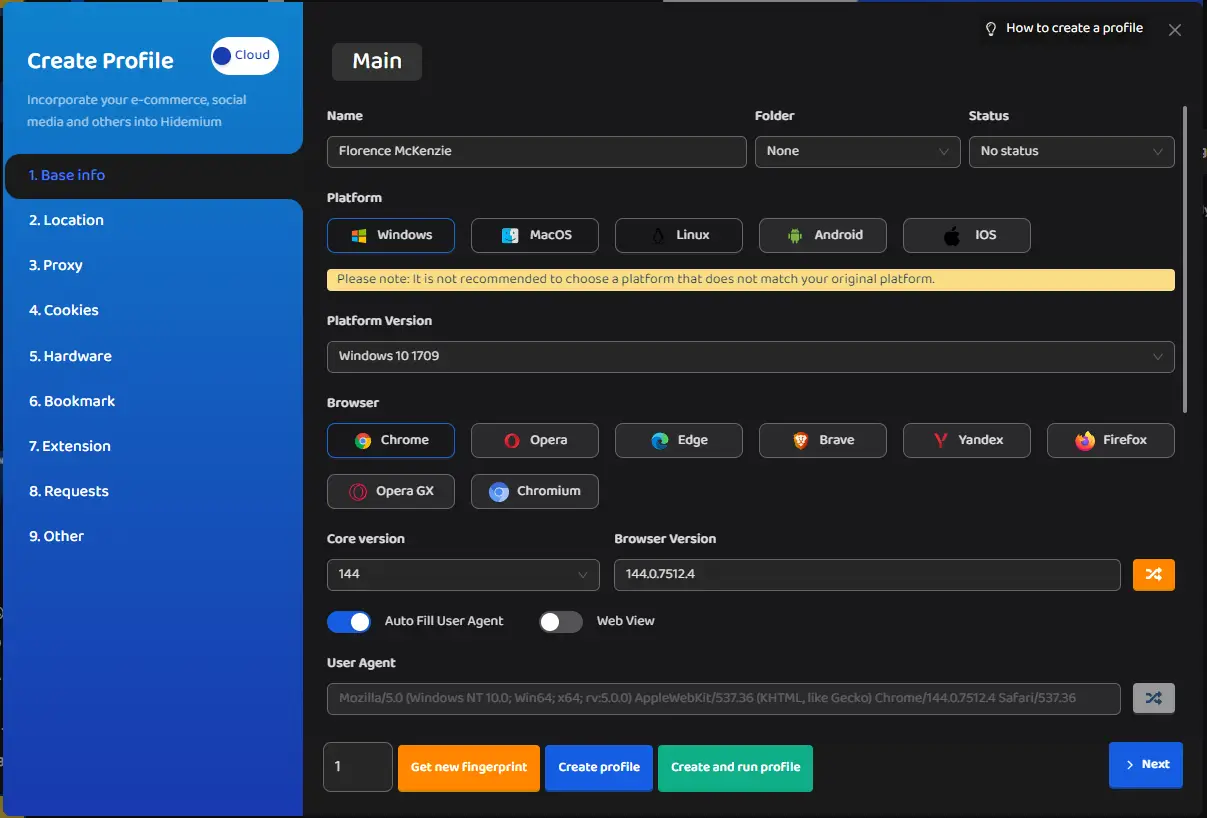
Key Hidemium features include:
Profile isolation: separate cookies, cache, localStorage, and extensions per profile, preventing session leaks between accounts
Fingerprint customization: OS type, browser version, canvas, WebGL, audio randomization, CPU cores, RAM, screen resolution, and timezone per profile
Platform-specific presets: fingerprint configurations tuned for Facebook, TikTok, Google, Amazon, and other platforms
AI-powered Prompt Script: no-code browser automation using natural language; integrates with ChatGPT, Claude, and Gemini on Premium and Business plans
Developer API: full scripting support for Puppeteer, Playwright, and Selenium for programmatic profile control
n8n workflow integration: Hidemium connects to n8n as a browser execution layer, enabling multi-step automated pipelines with human-like behavior
Team collaboration: multi-seat management with role-based access, additional seats available at $5/month
Free tier: five permanent profiles with no time limit, plus a 3-day trial with 1,000 profiles
Together, these capabilities make Hidemium a scalable tool for both individual users managing a handful of accounts and business teams running thousands of profiles in parallel.
Hidemium proxy and profile management
The Hidemium browser is built around one core principle: one proxy per profile. Every profile has its own fingerprint and IP address, making each session appear to be an entirely separate user to any platform or anti-fraud system.
Adding a CyberYozh proxy to Hidemium
CyberYozh offers mobile, residential static, residential rotating, and datacenter proxies: all compatible with Hidemium's HTTP and SOCKS5 input formats. Here is the quick setup algorithm based on the CyberYozh guide:
Go to hidemium.io, sign up, and download the desktop app for Windows or macOS
Log in to your CyberYozh account, click Add proxy, and select your proxy type (mobile, residential, or datacenter)
After purchase, open the proxy details, click Generate Credentials, and copy the host, port, username, and password
In Hidemium, click Add Profile and navigate to the Proxy section (tab #3 in the profile creation window)
Select Your Proxy, choose the protocol (HTTP for standard use, SOCKS5 for automation workflows), and paste your CyberYozh credentials
Click Check Proxy. Hidemium will return the detected IP, country, and city to confirm the connection is live
Click Create Profile (or Create and Run) to launch your isolated session
Once your profiles are running, Hidemium's dashboard lets you manage them all in one place: start, stop, rename, duplicate, or delete profiles without losing their fingerprint or proxy configuration. For teams, profiles can be shared across seats with defined access roles, while automation users can trigger profile launches and actions via the Hidemium API directly from their Puppeteer scripts or n8n flows.
Using Hidemium for business web operations
Hidemium's combination of profile isolation, fingerprint control, and workflow automation makes it a versatile antidetect browser for business-scale operations. The right proxy type from CyberYozh follows from the platforms you’re working with. Let’s look closer
Hidemium usage cases
Each use case below benefits from a specific proxy type to balance trust level, speed, and cost. Here is how Hidemium and CyberYozh work together across the most common business scenarios.
E-commerce price management
Online retailers and price-intelligence analysts need to monitor competitor listings, track pricing changes, and verify product availability across multiple marketplaces simultaneously, often from different regional perspectives. With Hidemium, each profile can be configured with a unique fingerprint and geo-specific timezone settings to simulate a local shopper, while CyberYozh’s residential static proxies provide a stable, trusted home IP for each profile. Residential static proxies are the right fit here because e-commerce platforms like Amazon and eBay associate repeat visitors with fixed IPs, making a consistent, clean residential IP the most natural match for long-running monitoring sessions that return to the same pages daily.
App testing and evaluation
Developers and QA teams testing web applications, ad creatives, or geo-targeted landing pages need to simulate requests from different device types, operating systems, and network environments without deploying physical infrastructure. Hidemium lets testers create profiles with specific hardware parameters, browser versions, and OS configurations on demand, while CyberYozh datacenter proxies provide the fastest available IP ranges at the lowest cost per request. For testing scenarios where trust level is irrelevant, datacenter proxies deliver the speed and IP volume needed without the cost of residential traffic.
Web advertisement and ad review
Advertising teams running campaigns across multiple accounts, niches, or client brands need to verify that ads are displayed correctly across regions, that creatives are not suppressed, and that competitor ads are visible without raising fraud flags. Hidemium profiles can each carry a distinct advertiser identity, while CyberYozh mobile shared proxies provide carrier-grade IP addresses that ad platforms treat with high trust, at a lower price point than private mobile proxies, making them practical for campaigns that require many simultaneous regional views. Mobile shared proxies are particularly well-suited for ad verification workflows where authenticity matters, but each profile doesn't require a fully exclusive IP.
Social media management
Managing multiple brand accounts, creator profiles, or client pages across Instagram, TikTok, Facebook, and LinkedIn requires keeping each identity completely separate, with different IPs, different device signals, and different behavioral patterns. Hidemium profiles deliver the fingerprint isolation, while CyberYozh private mobile proxies provide carrier-assigned IPs that social platforms treat with the highest level of trust, minimizing CAPTCHA triggers and account challenges even during heavy activity. Combined with Hidemium's Prompt Script automation, social media workflows can be scripted and run across dozens of profiles simultaneously, without manual input or risk of bans.
Need phone numbers for account registration? CyberYozh's SMS service provides virtual numbers starting at just $0.15.
Web scraping
Large-scale data collection from product catalogs, SERP results, public directories, or review platforms requires sending continuous requests across many sessions without triggering bot-detection systems or IP bans. Hidemium profiles can be automated via its Puppeteer API or n8n integration to run parallel scraping tasks, each with an isolated fingerprint, while CyberYozh residential rotating proxies draw from a pool of real home IPs that rotate with each request or at a configured interval, making each request appear to come from a different genuine user. Since rotating proxies are billed based on traffic volume, pairing them with Hidemium's profile-level request control helps prevent redundant data transfers that inflate costs.
Hidemium with CyberYozh proxies: Best practices
Matching the right proxy type to each task is the foundation of effective Hidemium usage. Here are the best practices that apply across all use cases:
Assign one unique proxy per Hidemium profile, as sharing an IP across profiles is the fastest way to trigger cross-account detection on any platform
Always use Check Proxy before launching a new session. Hidemium returns the live IP, location, and connection status; a failed check should be diagnosed at the credential level first
Match fingerprint geo-settings to the proxy's location, timezone, language, and locale, which should align with the proxy's assigned country to avoid inconsistency flags
Verify IP reputation before assigning proxies to valuable accounts. Use CyberYozh's IP Checker to confirm the proxy IP is clean before connecting it to a high-value profile
Use SOCKS5 for automation workflows. When running Hidemium with Puppeteer, Playwright, or n8n, SOCKS5 provides full UDP support and more reliable connections for scripted sessions
Rotate proxies proactively. If an IP comes back flagged, replace it immediately from your CyberYozh account rather than attempting to recover its trust score
Check the CyberYozh proxy catalog to find the right proxy plan for your Hidemium workflow.
F.A.Q about Hidemium antidetect browser
What is an antidetect browser and how does it work?
An antidetect browser replaces your real fingerprint — OS, fonts, canvas, hardware — with a unique spoofed identity per profile, isolating sessions with separate cookies, cache, and proxy-assigned IPs.
What is Hidemium and what makes it different?
Hidemium is a Chromium-based antidetect browser for Windows and macOS with AI-powered no-code automation (Prompt Script), Puppeteer/n8n API support, and a permanently free five-profile tier.
Is Hidemium free, and what are its pricing plans?
Hidemium offers a free plan with five profiles and limited features. Paid plans start at $15/month (Basic, 30 profiles/day), scaling to $420/month (Business, 26,000 profiles/day).
What is browser fingerprinting and why does it matter?
Browser fingerprinting collects device signals — GPU, screen resolution, fonts, WebGL, timezone — to build a persistent identifier that survives cookie deletion and links sessions across accounts.
Why does an antidetect browser need a proxy?
Without a proxy, all Hidemium profiles share the same real IP, immediately exposing them as the same user. One unique proxy per profile makes each session appear as a separate, independent person.
How do I add a proxy to a Hidemium profile?
In the profile creation window, navigate to the Proxy section, select Your Proxy, choose HTTP or SOCKS5, enter your CyberYozh host, port, username, and password, then click Check Proxy.
What is the difference between mobile and residential proxies for antidetection?
Mobile proxies use real carrier IPs with the highest platform trust — best for social media. Residential static proxies offer a stable fixed home IP at a lower cost, ideal for long-term account maintenance.
Does Hidemium support automation tools like Puppeteer or n8n?
Yes. Hidemium's API integrates with Puppeteer, Playwright, and n8n, enabling automated multi-profile workflows with human-like browser behavior and isolated fingerprints per session.
Can websites still detect Hidemium profiles?
Yes, if fingerprint parameters are inconsistent with the proxy's geo-location or the assigned IP carries a poor reputation score. Running CyberYozh's IP Checker before use significantly reduces this risk.
Is using an antidetect browser legal?
Antidetect browsers are legal tools widely used for marketing, e-commerce, research, and cybersecurity. Legality depends on your specific activity and the target platform's Terms of Service.
Helpful?
Share article
