Vision Review: Exploring Antidetect Browser’s Unique Features
Vision is one of the most capable antidetect browsers on the market in 2026, combining deep fingerprint management with a clean multi-platform interface. Paired with high-trust proxies like those from CyberYozh, it allows individuals and teams to run entirely isolated browser identities at scale.
Use promo code CYBERYOZHAPP and 20% off your first Vision subscription purchase, regardless of the plan you chose!
What is Vision: A quick intro
Vision is a Chromium-based antidetect browser available to download for Windows, macOS, and Linux. It stands out among antidetection browser tools with its Smart Fingerprint system, which manages over 1,000 fingerprint parameters, many of which are dynamically adjusted to mimic genuine user behavior rather than presenting static spoofed values. It also supports full UDP via SOCKS5, a rare capability in the antidetect browser space, ensuring more reliable connections for latency-sensitive tasks.
What are antidetect browsers?
Antidetect browsers work by spoofing or randomizing the digital identifiers websites use to track and link users across sessions. Unlike incognito mode — which only hides local browsing history — or VPNs — which only change your IP — an antidetect browser web tool alters the full stack of data exposed to anti-fraud systems.
Read more about antidetection activities in a CyberYozh article.
Their core capabilities include:
Canvas and WebGL spoofing to prevent rendering-based device identification
Profile isolation with separate cookies, localStorage, and cache per session
Proxy integration, assigning a unique IP to each profile
OS and hardware parameter masking, including screen resolution, fonts, and timezone
Audio context and behavioral simulation to replicate genuine human activity patterns
Extension management, ensuring installed add-ons don't introduce fingerprint leaks
Together, these features make each profile appear to platforms and anti-fraud systems as a separate, real user. It’s the defining purpose of any good antidetect browser.
How Vision secures digital fingerprints
What distinguishes Vision is its use of real fingerprints rather than artificially generated ones. Synthetic fingerprints often contain technically impossible parameter combinations, such as:
non-existent GPU models,
mismatched browser extension versions
Websites can flag them and limit their accounts, but Vision's fingerprints reflect the actual device configurations. This approach passed Pixelscan checks without anomalies in independent testing, making profiles significantly harder to identify as automated or synthetic.
Read more about the risks of digital footprint detection on CyberYozh.
Vision further strengthens anonymity through additional behavioral tools:
The Human Type module simulates realistic typing patterns
Per-profile Autofill data maintains a consistent identity across sessions
Сurated Extensions Library is verified as fingerprint-safe
These layers work together so that Vision profiles don't just look different from one another — they look genuinely human.
Vision customization: Proxy and profile management
The Vision antidetect browser is built around the concept of fully isolated, independently configurable profiles, each capable of carrying its own fingerprint, cookies, and proxy assignment. This makes it one of the most flexible antidetect browsers with proxy management, suitable for multi-accounting on social media, web scraping, cybersecurity operations, and e-commerce management.
Adding a CyberYozh proxy to Vision
CyberYozh offers mobile, residential static, residential rotating, and datacenter proxies — all compatible with Vision's HTTP and SOCKS5 input formats. Here is the quick setup algorithm based on the CyberYozh proxy setup in Vision guide:
Log in to CyberYozh, click Add proxy, and select your proxy type (mobile, residential, or datacenter)
After purchase, open the proxy details and click Generate Credentials
Download the credentials (host, port, username, password) for HTTP or SOCKS5
In Vision, navigate to the Proxies menu and click Create first proxy
Paste the credentials and assign a recognizable proxy name
Mobile proxies are best for large-scale social media management, residential static proxies suit long-term profile maintenance with a fixed IP, and rotating residential proxies are optimal for bulk scraping tasks where traffic volume needs to be managed carefully.
Creating and managing a Vision profile
Once proxies are configured, creating a profile in Vision is straightforward:
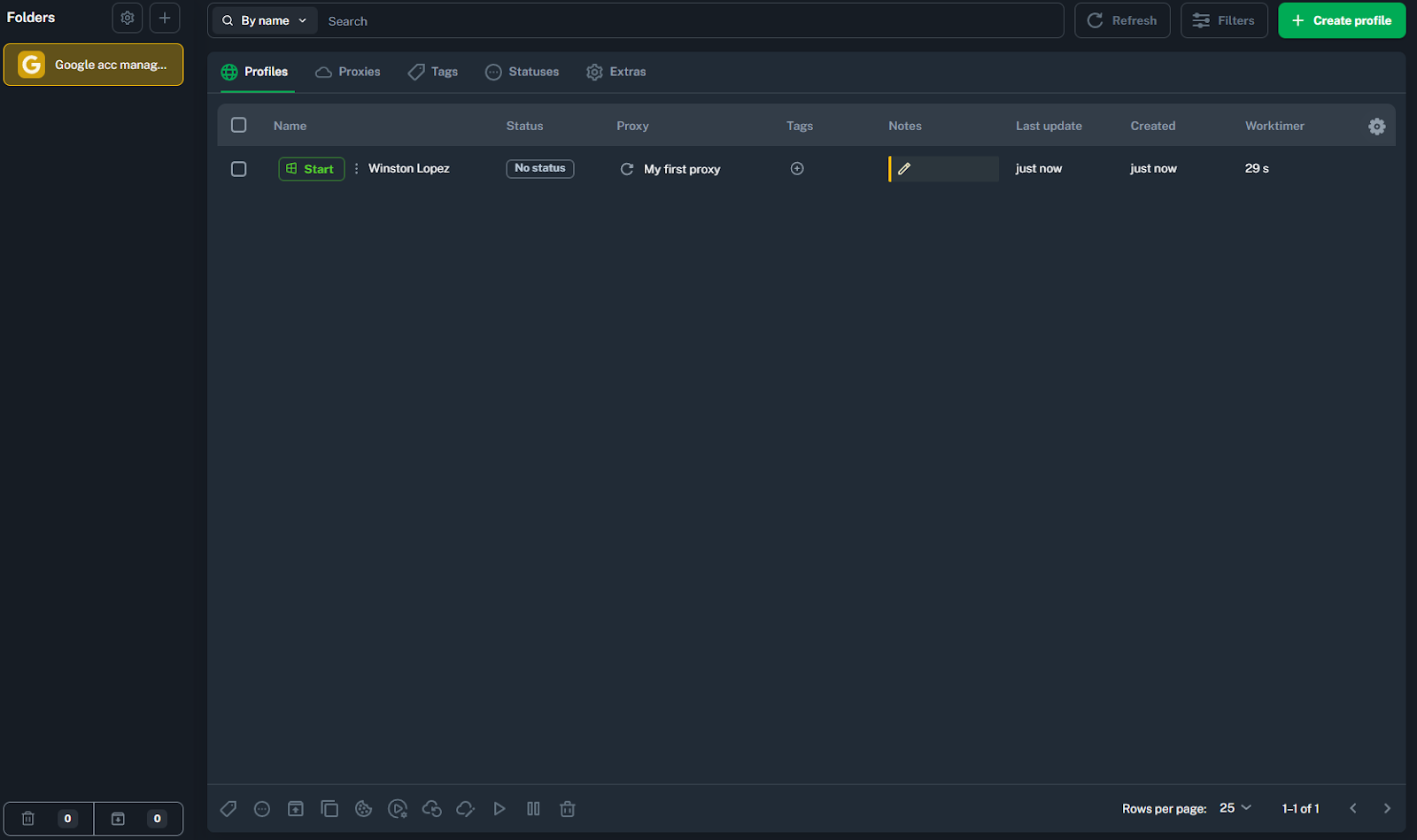
Go to the Profiles menu
Click Create first profile
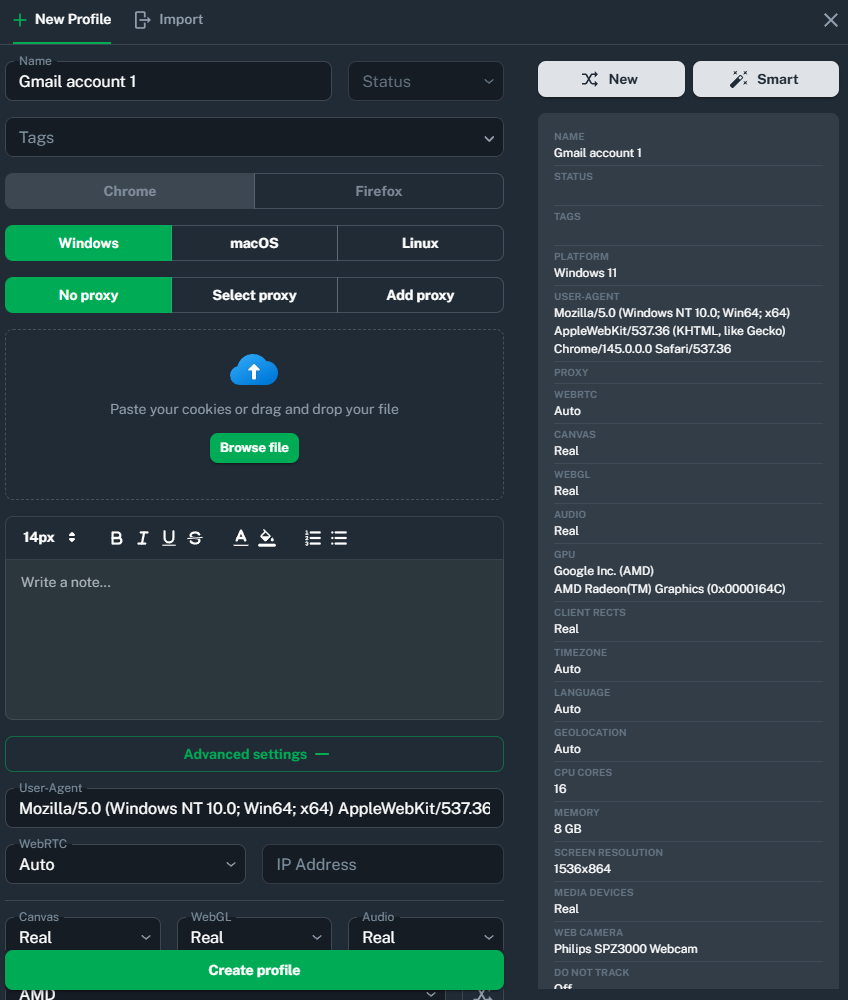
Customize it to define system fingerprints
Assign a previously added proxy to the profile
Vision lets you customize operating system type, screen resolution, hardware parameters, cookies, and extensions per profile, all independently from every other profile in your account.
Here are the best practices for profile management:
Assign one unique proxy per profile to eliminate cross-account linking risk
Use tags to organize profiles by workflow, campaign, or client for easier bulk management
Enable Vision's Smart Fingerprint system to ensure consistency across 1,000+ attributes
Add per-profile Autofill data so forms are completed with identity-consistent information
Use the Extensions Library to avoid third-party extensions that could leak fingerprint data
After saving the profile, click Start to launch an isolated Chrome session with all assigned configurations and the linked proxy active. You can run multiple profiles simultaneously and manage them directly from the dashboard, making Vision a universal antidetect browser.
Vision use cases: How antidetect browsers are used
Let’s wrap it up with several real-world business applications where CyberYozh proxies, combined with the Vision browser, can help greatly.
Web scraping
Automated data collection from product catalogs, reviews, ratings, or public databases requires sending many requests without triggering bot-detection systems. CyberYozh's rotating proxies offer a pool of 50M+ IPs across 100+ countries with free geo-targeting, while Vision's built-in proxy traffic caching saves up to 80% of bandwidth, reducing costs, and its multi-profile automation lets you run parallel scraping sessions.
Security-sensitive research
OSINT analysts and cybersecurity researchers must investigate malicious sites, dark web services, or fraud networks without exposing their real identity or device. CyberYozh's mobile/residential proxies can be checked with IP Checker, while its virtual number service is identical to real carrier connections. Vision substitutes 1000+ browser parameters, including webcam spoofing and dynamic fingerprint changes, ensuring no traceable link back to the researcher.
Multiple account management
Teams managing multiple accounts on social platforms, crypto exchanges, or marketplaces need a reliable way to keep profiles isolated and prevent cross-contamination. Vision lets you organize profiles into folders, assign team permissions across dozens of sub-teams, and store 2FA codes per profile, while CyberYozh's SMS activation service covers 700+ services across 140 countries for clean account registration.
E-commerce multi-store management
Sellers running multiple storefronts on e-commerce platforms like Amazon, eBay, and Ozon risk being banned if the platform detects shared device signals or IP addresses across accounts. Vision's sandboxed profiles give each store a completely independent fingerprint, and CyberYozh's mobile proxies with built-in fingerprint management make each storefront appearas unique.
Learn more about the proxy's use in e-commerce on CyberYozh.
Geo-based research
Price-comparison analysts, brand monitors, and market researchers need clean, location-accurate data from platforms that serve different content by region. CyberYozh's residential rotating proxies cover 100+ countries with free geo-targeting, and when combined with Vision's per-profile timezone and locale spoofing, every session delivers unbiased, location-specific results.
Reveal the geotargeting use case in detail on CyberYozh.
Vision with CyberYozh proxies: Securing your web activities
CyberYozh mobile, residential, and datacenter proxies cover every use case Vision is built for, from stealthy multi-accounting to large-scale scraping. The antidetect browser supports full UDP over SOCKS5, making it especially reliable for tasks that require stable, latency-sensitive connections.
Check the CyberYozh proxy catalog and use promo code CYBERYOZHAPP for 20% off your first Vision subscription purchase.
F.A.Q about Vision antidetect browser
What is an antidetect browser and how does it work?
An antidetect browser spoofs your digital fingerprint — including IP, canvas, fonts, and hardware data — so websites cannot link or identify your profiles across sessions.
What is browser fingerprinting and why does it matter?
Browser fingerprinting is how websites identify users via device parameters like GPU, screen resolution, and timezone. Antidetect browsers replace these with unique, realistic values per profile.
Is using an antidetect browser legal?
Yes, antidetect browsers are legal tools widely used for marketing, e-commerce, research, and cybersecurity. Legality depends on how you use them, not the software itself.
How is an antidetect browser different from a VPN or incognito mode?
VPNs only change your IP; incognito only clears local history. Antidetect browsers replace your full fingerprint stack, making each profile appear as a separate real user.
Can websites still detect antidetect browsers?
Low-quality antidetect browsers with synthetic fingerprints and low-trust proxies can be flagged. Vision uses real-device fingerprints that pass tools like Pixelscan, making detection significantly harder.
How do I add a proxy to an antidetect browser?
In Vision, go to the Proxies menu, click Create first proxy, and paste your CyberYozh credentials — host, port, username, and password — in HTTP or SOCKS5 format.
What is the difference between residential and mobile proxies for antidetection?
Residential proxies offer fixed, high-trust IPs ideal for long-term profiles. Mobile proxies use carrier IPs with the highest trust level, best for social media multi-accounting.
Do antidetect browsers support automation tools like Puppeteer or Selenium?
Yes, Vision and most modern antidetect browsers support Puppeteer, Selenium, and Playwright, enabling automated workflows across isolated profiles with separate fingerprints and proxies.