
YouTube Bots: What They Are, How YouTube Catches Them, and What to Do

Most people searching for YouTube bots want one of three things: to understand the fake views and spam comments showing up on their channel, to find out whether buying views is worth the risk, or to know why YouTube suddenly treats them like a bot. This guide answers all three, in that order.
Quick answer
YouTube bots are automated programs that watch, like, subscribe, or comment on YouTube without a real person behind each action. Some are abusive (view bots, subscriber bots, spam-comment bots) and violate YouTube's Fake Engagement Policy. Others are legitimate (the official YouTube Data API, scheduling and analytics tools). YouTube validates every view, like, and subscriber before counting it, so bot activity is usually discarded, frozen, or removed. Channels that buy it risk strikes and termination.
TL;DR
YouTube bots fall into four groups: view bots, engagement bots (likes and subscribers), comment spam bots, and legitimate automation
YouTube filters out views and engagement it considers low-quality, so bought metrics often freeze or disappear
Buying views or subscribers breaks YouTube policy: a first violation usually means a warning, and three strikes within 90 days can end a channel
If bots hit your channel without your involvement, moderate, document, and report rather than deleting your videos
"Sign in to confirm you're not a bot" is an IP and session check, not an accusation, and it has a separate fix
What are YouTube bots
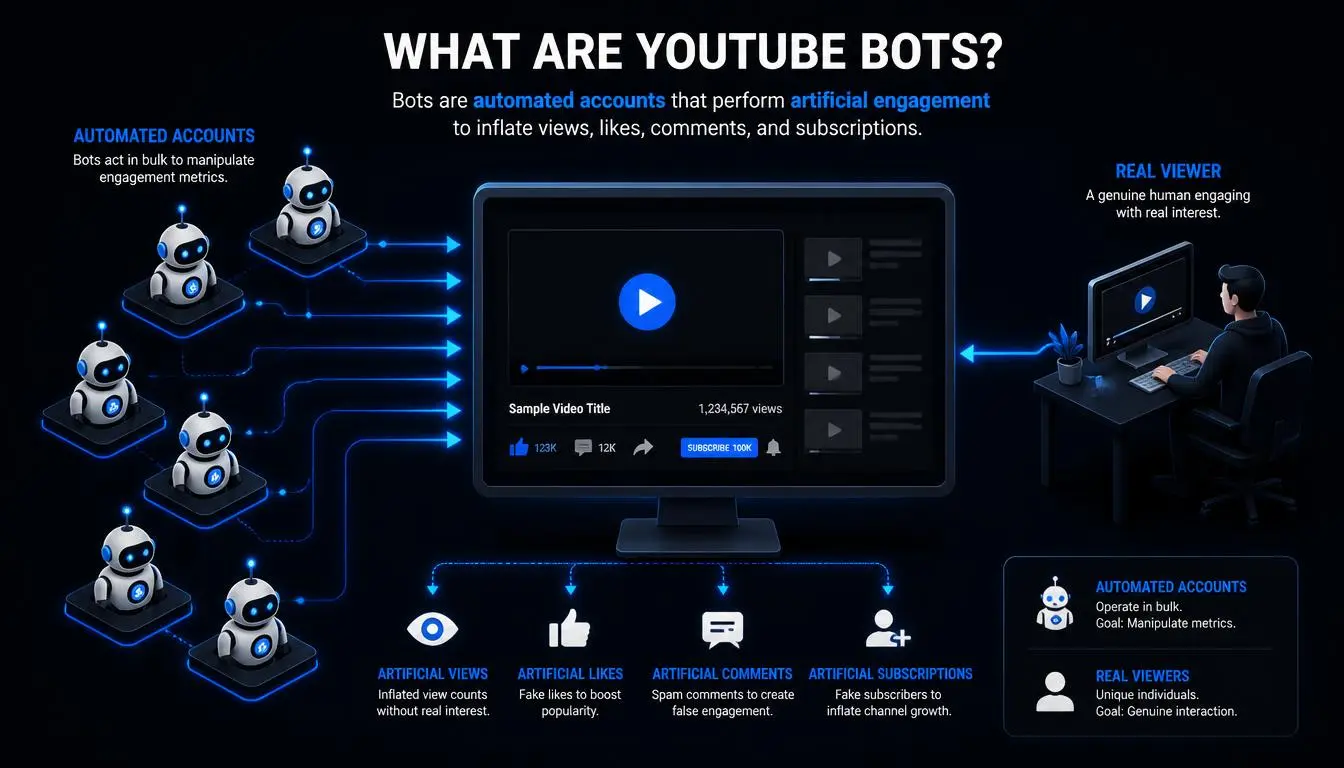
The term covers very different tools, and mixing them up is where most confusion starts.
Type | What it does | Allowed? |
View bots | Replay videos from scripts, emulators, or hijacked devices to inflate view counts | No |
Engagement bots | Add likes, subscribers, or watch time from fake or farmed accounts | No |
Comment spam bots | Post scam links, "check my profile" bait, or copied comments at scale | No |
Legitimate automation | Uses the official YouTube Data API to upload, schedule, pull analytics, or moderate | Yes, within API terms |
Discord music bots sit in a grey zone that shows how seriously YouTube treats unauthorized automation. Groovy and Rythm, two of the biggest, streamed audio pulled from YouTube until Google sent cease-and-desist letters in 2021. Rythm shut down on September 15, 2021, and returned in 2024 as a separately licensed service that shares revenue with labels and publishers.
A practical note for teams running legitimate YouTube work
Not every automated workflow is abused. Agencies managing client channels, marketers checking how a video or ad appears in another country, and developers testing API integrations all generate traffic that can look automated if it comes from the wrong IP. Datacenter ranges attract the most verification friction because that's where bot traffic usually runs.
CyberYozh's rotating residential proxies start from 2/GB across a 100M+ IP pool in 195+ countries, and static residential (ISP) proxies start from $5.29/month for teams that need one consistent address per account. Proxies don't make fake engagement counts, since YouTube validates engagement regardless of IP, but they do give legitimate work a normal, residential connection.
Compare CyberYozh proxy plans if IP reputation is slowing your team down.
How does YouTube detect bot activity
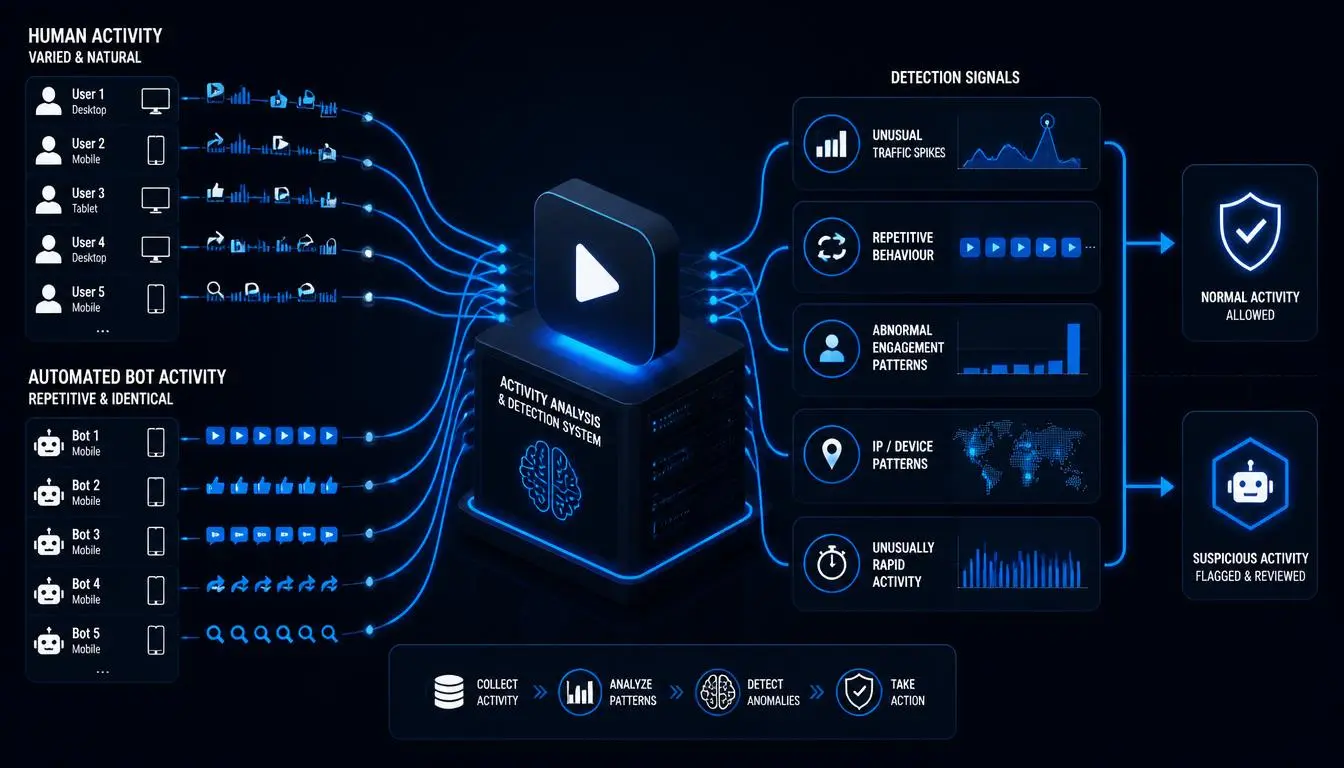
YouTube doesn't count a view the moment it happens. According to YouTube's own page on how engagement metrics are counted, its systems "figure out which views, likes, dislikes, and subscriptions are legitimate" first, and YouTube "may temporarily slow down, freeze, or change your metric count, and discard low-quality playbacks." It even gives an example of a low-quality playback: the same video streamed across several devices, windows, or tabs.
In practice, detection draws on signals such as:
Traffic source: views arriving from datacenter IP ranges, unusual referrers, or no traffic source at all
Behavior: identical watch durations, zero interaction, or bursts of activity at machine-like intervals
Account quality: new or empty accounts subscribing in large batches
Retention mismatch: thousands of views with retention far below the channel's normal pattern
YouTube doesn't publish the full model, and no outside source can. The takeaway is simpler: bot engagement is checked before it counts, which is why "cheap views" so often disappear.
Identify: signs bots are hitting your channel
Bots in YouTube comments and analytics tend to leave the same fingerprints, and these patterns come up again and again in creator forums and YouTube's community threads:
A sudden view spike from an unexpected country or traffic source, with no share, mention, or upload to explain it
Views climbing while likes, comments, and retention stay flat
Bursts of near-identical comments: scam links, "DM me on Telegram," or copied praise from accounts with no uploads
A sharp subscriber drop overnight, often after YouTube removes spam accounts that had subscribed
A view count that freezes or goes down, meaning YouTube is re-checking or discarding traffic
Impersonator accounts using your name and avatar in replies to push viewers toward scams
Diagnose: did you cause it or did someone else
Before blaming YouTube bots, ask three questions:
Did you, a freelancer, or a "promotion" service buy anything? Many promotion packages sold as "real views" are bots or incentivized traffic. If yes, stop it immediately. That's the part that creates policy risk.
Is the traffic tied to a real event? A spike from a Reddit post, a creator mention, or an embed on a busy site will show a traffic source in YouTube Analytics. Bots usually don't.
Is it comments only? Comment spam is extremely common, even on small channels. It targets your audience, not your metrics.
Solve: what to do when bots hit your channel
For comment bots, YouTube gives you real tools. Its help page on managing spam in comments explains that comments YouTube flags are held in a "Held for review" tab for up to 60 days, where you can approve, remove, or report them. You can also hide specific users from your channel and restrict who can comment. Turn on stricter moderation, add a trusted moderator, and remove scam comments quickly. Your audience is the target.
For view or subscriber bots you didn't buy:
Screenshot the traffic sources, dates, and geography in YouTube Analytics
Don't delete the affected video in a panic. YouTube's own systems are designed to discard invalid traffic
Contact YouTube Creator Support with your documentation if the activity continues or affects monetization
Don't respond by buying "counter" engagement, which only adds a real violation to a fake one
Why buying YouTube views is a bad trade
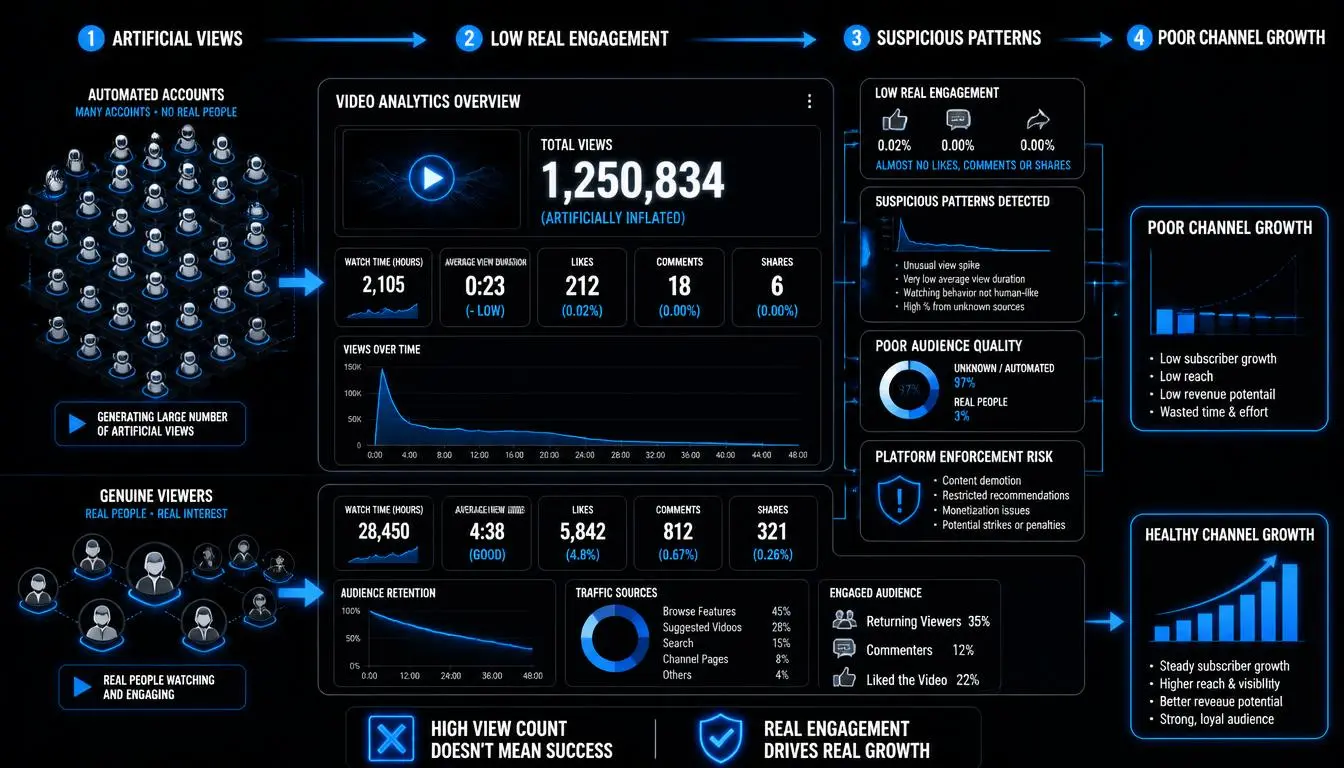
Searches like "YouTube view bot" and "how to view bot on YouTube" usually come from creators hoping to jump-start a slow channel. YouTube's Fake Engagement Policy is direct about this: it doesn't allow "anything that artificially increases the number of views, likes, comments, or other metrics either by using automatic systems or serving up videos to unsuspecting viewers," and it names viewbotting, purchased traffic, and "sub4sub" exchanges explicitly.
The cost is concrete. A first violation usually brings a warning, and three strikes within 90 days can lead to termination. Content can also be removed. Even without enforcement, bought views hurt the channel quietly: the recommendation system sees thousands of "viewers" who never engage, and that weak signal follows the video. Growth from real viewers is slower, but it's the only kind that compounds.
Why does YouTube ask you to confirm you're not a bot
Real people see this too. The prompt "Sign in to confirm you're not a bot" usually appears because the IP address or session looks automated: a VPN or datacenter IP, a shared network with a poor reputation, rapid requests, or a download tool like yt-dlp running without a signed-in session.
Signing in, clearing cookies, or switching to a clean residential connection usually resolves it. We cover the full troubleshooting process in our guide to fixing YouTube's VPN/proxy detected error.
Which proxy setup fits legitimate YouTube work
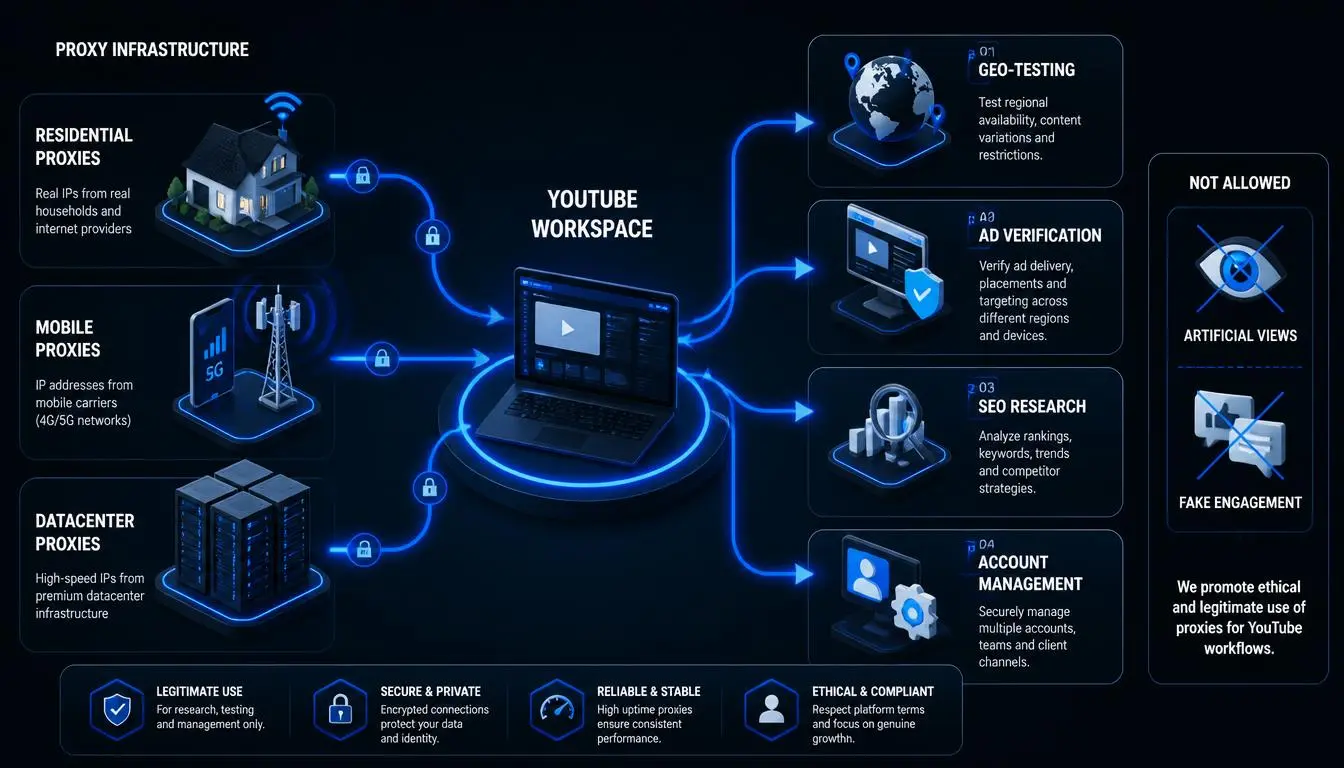
Option | Trust level | Best for | Limitation |
CyberYozh rotating residential | High: real ISP-assigned IPs | Regional checks, research, multi-location testing | Each rotation starts a new session history |
CyberYozh static residential (ISP) | High and consistent | One account or client channel per IP, daily logins | One fixed IP per proxy |
CyberYozh dedicated mobile (LTE/5G) | Very high: carrier IPs | Mobile-specific testing and account-sensitive work | From $3.50/day, so best for fewer, high-value accounts |
Datacenter proxy or VPN | Low for YouTube | Non-YouTube tasks | Most likely to trigger verification |
Free public proxy | Very low | Nothing account-related | Shared, often already flagged |
For a deeper comparison of providers see our best YouTube proxies roundup.
Prevent: habits that keep bots from becoming a problem
Vet every promotion service. If it promises guaranteed views or subscribers, it's almost certainly bot traffic
Never hand your login to a "YouTube account bot" service that promises automated growth. It risks both policy strikes and account takeover
Keep comment moderation on, and check "Held for review" weekly
Use the official API for automation instead of scripts that imitate a browser
Give each managed channel a consistent login location and device
Check your traffic sources monthly so unusual spikes stand out early
Common mistakes
Deleting a video because bots found it, when YouTube is already filtering the traffic. Assuming every subscriber drop is an attack, when it's often YouTube removing spam accounts. Treating "real view" services as safe because they use real devices. Incentivized or farmed views still break policy. And confusing the bot-verification prompt with an account penalty.
Final thought
YouTube bots are easier to deal with once you know which kind you're facing. Spam bots are a moderation problem. Bought views are a policy problem that YouTube mostly cleans up for you, minus the risk. The verification prompt is a network problem. None of them is solved by gaming the system. They're solved by clean infrastructure, real audiences, and moderation.
If your team runs legitimate YouTube workflows at scale, see CyberYozh's residential and mobile proxy options.