
Configuring proxies in Crawl4AI
Crawl4AI — is a powerful open-source web scraping tool designed to extract clean data from web pages suitable for training AI and LLM models. It is fast, flexible, and capable of bypassing basic website protections, such as simple anti-bot systems. For more complex protections, including CAPTCHA, integration with third-party services is recommended (see Part 4).
However, when scraping at scale (e.g., 10,000 pages), your local IP address will quickly be blocked. To avoid this and ensure a continuous flow of data for your AI models, a reliable proxy infrastructure is necessary. In this guide, we will look at how to choose the right proxy type from CyberYozh App for your task and integrate them into Crawl4AI.
🛑 Critically important information on protocols (HTTP vs SOCKS5): The Playwright library (which powers Crawl4AI) does not support SOCKS5 proxies with authentication (login:password). Since all proxies in CyberYozh App operate only with authentication for security reasons, you must use the HTTP protocol to work with Crawl4AI. It fully supports authentication and ensures stable operation.
Key integration features: Proxy is a separate module (proxy_module.py) for modularity. Data is stored in text files (by type: residential, mobile, datacenter). Switching the type/protocol is done in one or two lines in the main script.
Part 1. Choosing a Proxy: Which type is right for your dataset?
Crawl4AI is versatile, but its effectiveness depends on the "fuel" — the IP address pool. CyberYozh App offers various types of proxies, each optimized for specific scraping scenarios. The choice depends on the site's protection level, data volume, and the need for rotation. All types support both HTTP and SOCKS5.
- Residential Rotating — Choice #1 for mass scraping
- Core: A pool of millions of real home IP addresses. Rotation is automatic: a new IP via link or API request.
- Ideal for Crawl4AI: Large datasets from marketplaces (Amazon, Wildberries), search engines (Google, Yandex).
- Why: High trust, minimizes blocks. Supports 3 types of sessions (Random IP, Short, Long up to 6 hours).
- Residential Static / ISP
- Core: Fixed home IPs for the rental period.
- Ideal for Crawl4AI: Sites with authorization (personal accounts).
- Why: Session stability.
- Mobile Dedicated Ports
- Core: A private modem with a real SIM card, dedicated personally to you.
- Ideal for Crawl4AI: Complex tasks, sites with tough anti-bot protection, emulating the behavior of a real mobile device user.
- Why: Maximum trust from websites. Recommended for the toughest cases.
- Mobile Shared Proxies
- Core: IPs from 4G/5G, shared channel in private mode.
- Ideal for Crawl4AI: Social networks (Instagram, TikTok) or sites with protection (Cloudflare).
- Why: High trust for mobile traffic.
- Datacenter Dedicated Proxies
- Core: Server IPs, fast and cheap.
- Ideal for Crawl4AI: Open sources without protection.
- Why: Maximum speed.
Integration Tip: For a mixed approach, combine types.
Part 2. Data Preparation and Installation
Prepare data from CyberYozh App:
After purchasing a proxy, copy the data:
- Host (IP): 51.77.190.247
- Port: 5959
- Login: user123
- Password: pass123
Connection string format: Crawl4AI (like the Playwright library it is built on) accepts proxies in a single string format: http://login:password@ip:port
Example: http://user123:pass123@51.77.190.247:5959
Managing Residential Rotating Proxies
For Residential Rotating proxies in CyberYozh App, flexible session configuration is available directly via the login (username). This is critical for your scraper's logic.
Credentials can be generated in your personal account by clicking the “Generate credentials” button in the package card. Available output formats: IP:PORT:USERNAME:PASSWORD or a cURL link.
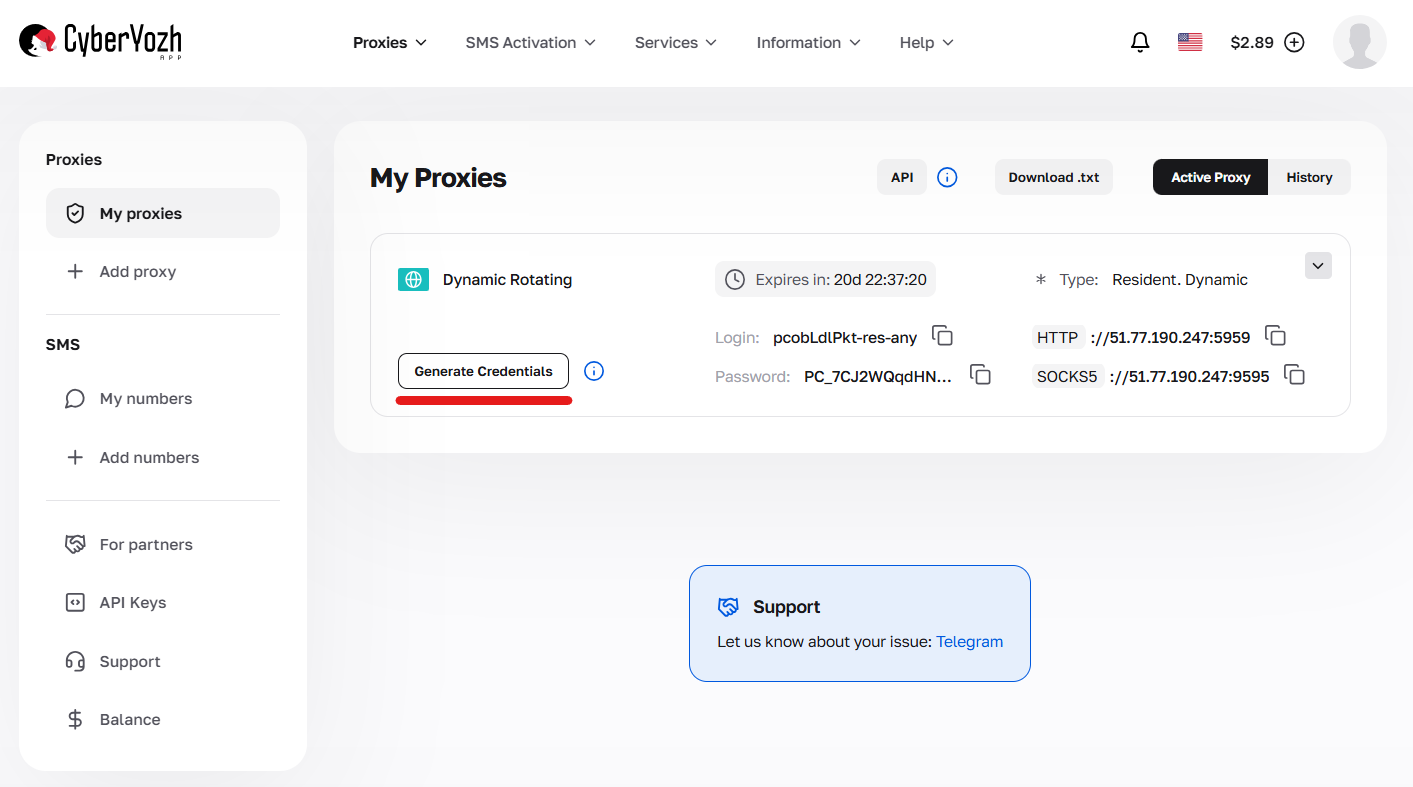
Fig. 1. Navigating to the interface for creating configurations and connection parameters (credential generator).
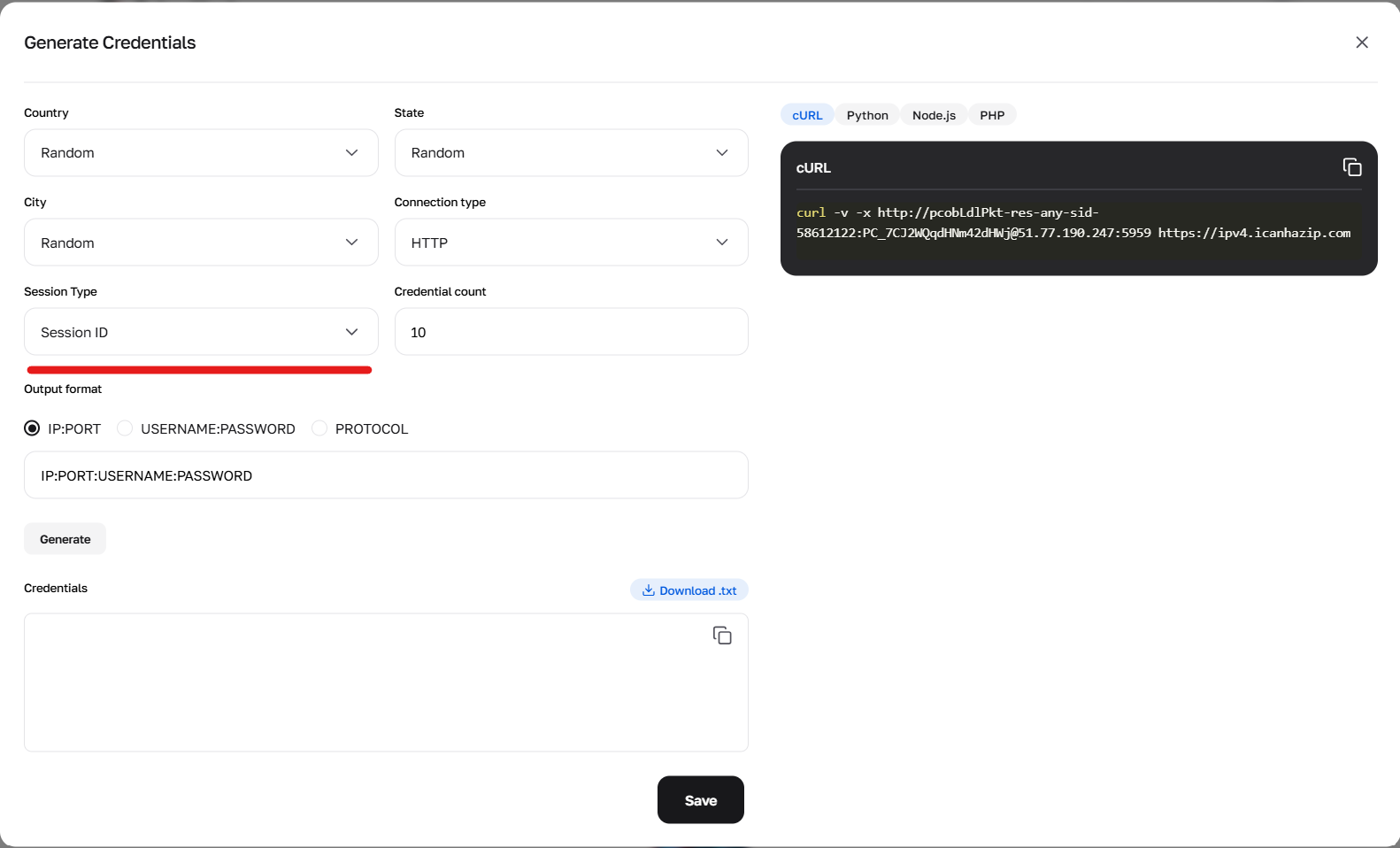
Fig. 2. Using the generator to configure the sid parameter, responsible for creating new unique sessions.
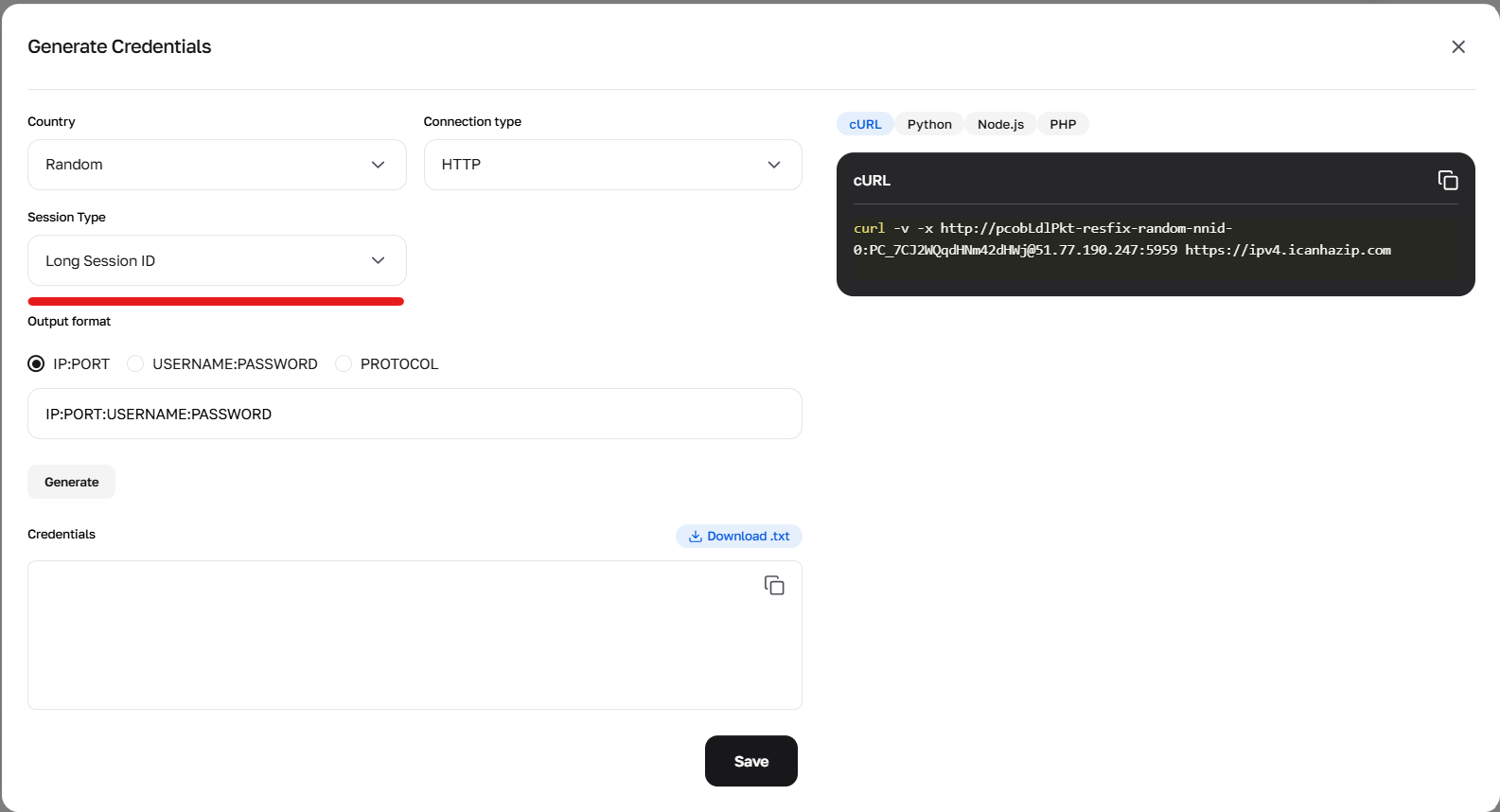
Fig. 3. Configuring parameters to form credentials using long (Sticky) sessions.
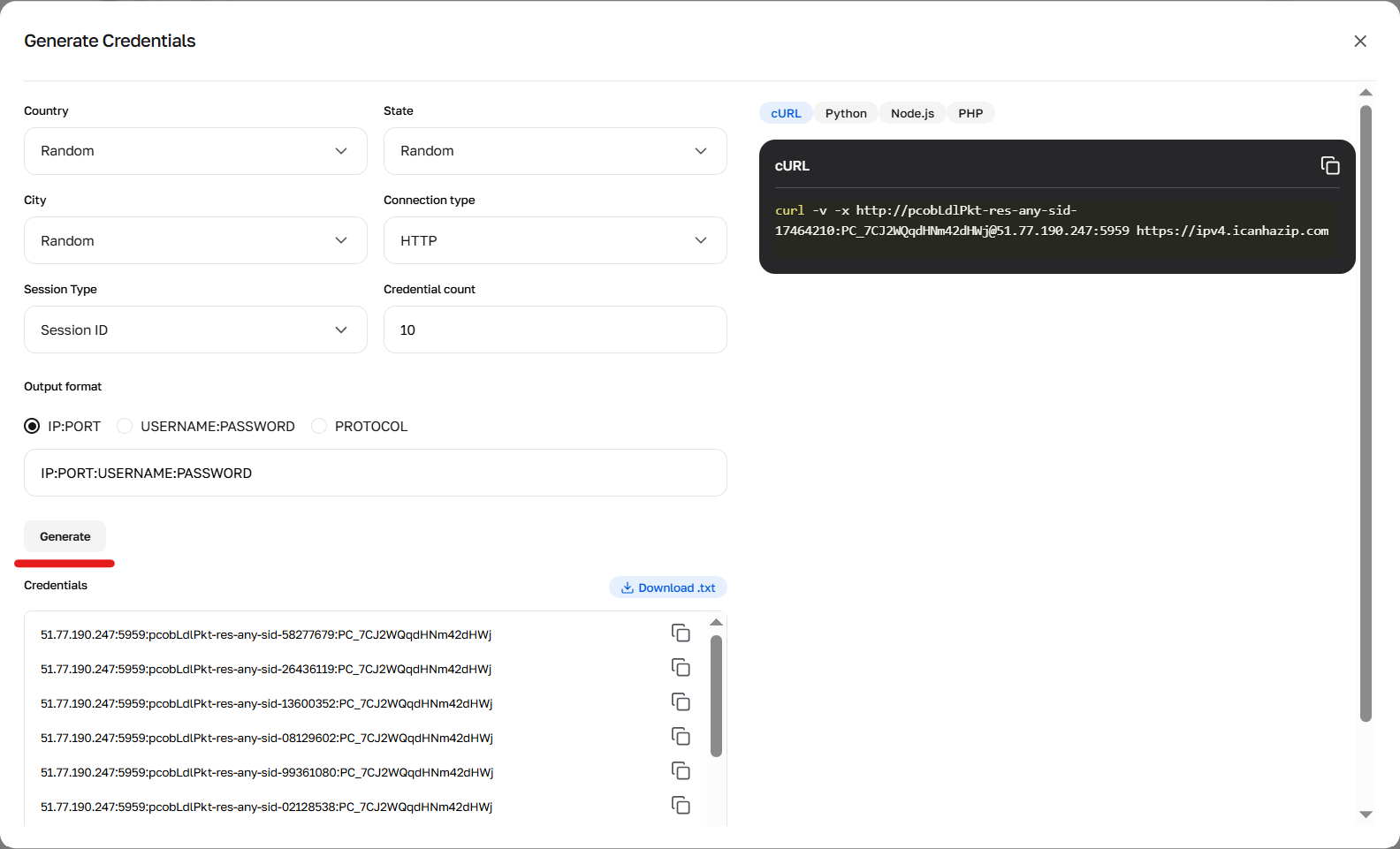
Fig. 4. Result of the credential generator's work.
Session types and how to specify them:
1. Random IP — a new IP for every request Use the prefix -res-any. Example login: user-res-any When needed: Regular scraping where state doesn't need to be maintained between pages.
2. Short session (up to 1 minute) Allows you to keep an IP for a short time (e.g., to pass a captcha and load the page). Use the prefix -sid-RANDOMNUMBER.
Format: user-res-any-sid-47551677 (where 47551677 — any random number generated by you).
Geo: In short sessions, you can select Country, Region, and City (example: -res_sc-us_georgia_macon-sid-54683597).
3. Long sticky session (up to 6 hours) This is a Sticky session, which holds one IP for up to 6 hours. Ideal for deep parsing of a single site.
How to get: Option A (Simple): Generate a ready-made string with a "Long session" in the credential generator in your account. Option B (Advanced/API): Requires 2 steps. Make a cURL request with the prefix -resfix- (e.g., user-resfix-us-nnid-0). In the response header X-NN-LLS, obtain a token (e.g., 9d016e26...). Substitute this token instead of 0 in the login: user-resfix-us-nnid-9d016e26....
Managing mobile proxies in your personal account
Working with mobile proxies has an important feature: an API link is used to change the IP. Be sure to find it in the card of the purchased package — this is the URL you need to insert into your software or script to set up automatic rotation.
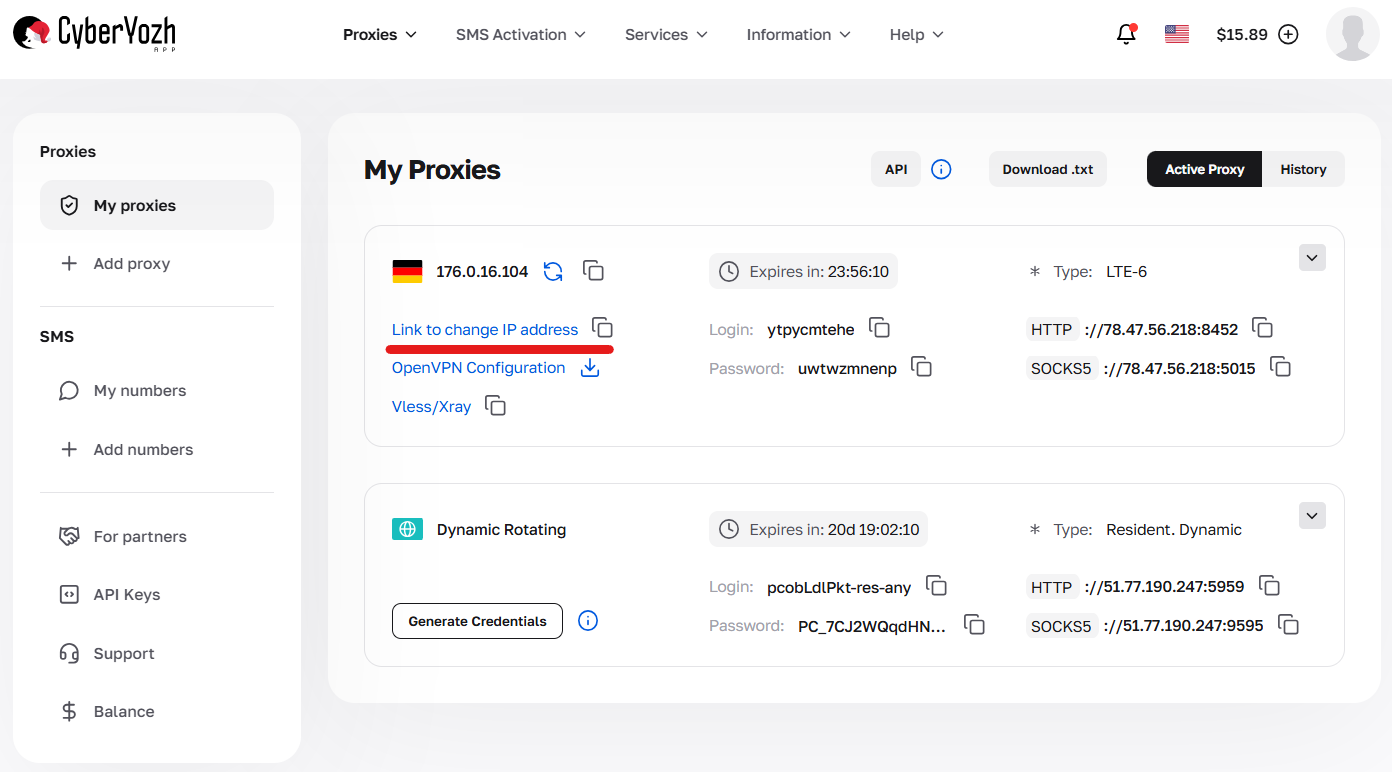
Fig. 5. Location of the link for automatic rotation.
Additionally, CyberYozh App provides a manual mode. If you need to change the IP address right now without resorting to scripts, simply press the IP change button in the control panel — the address will update instantly.
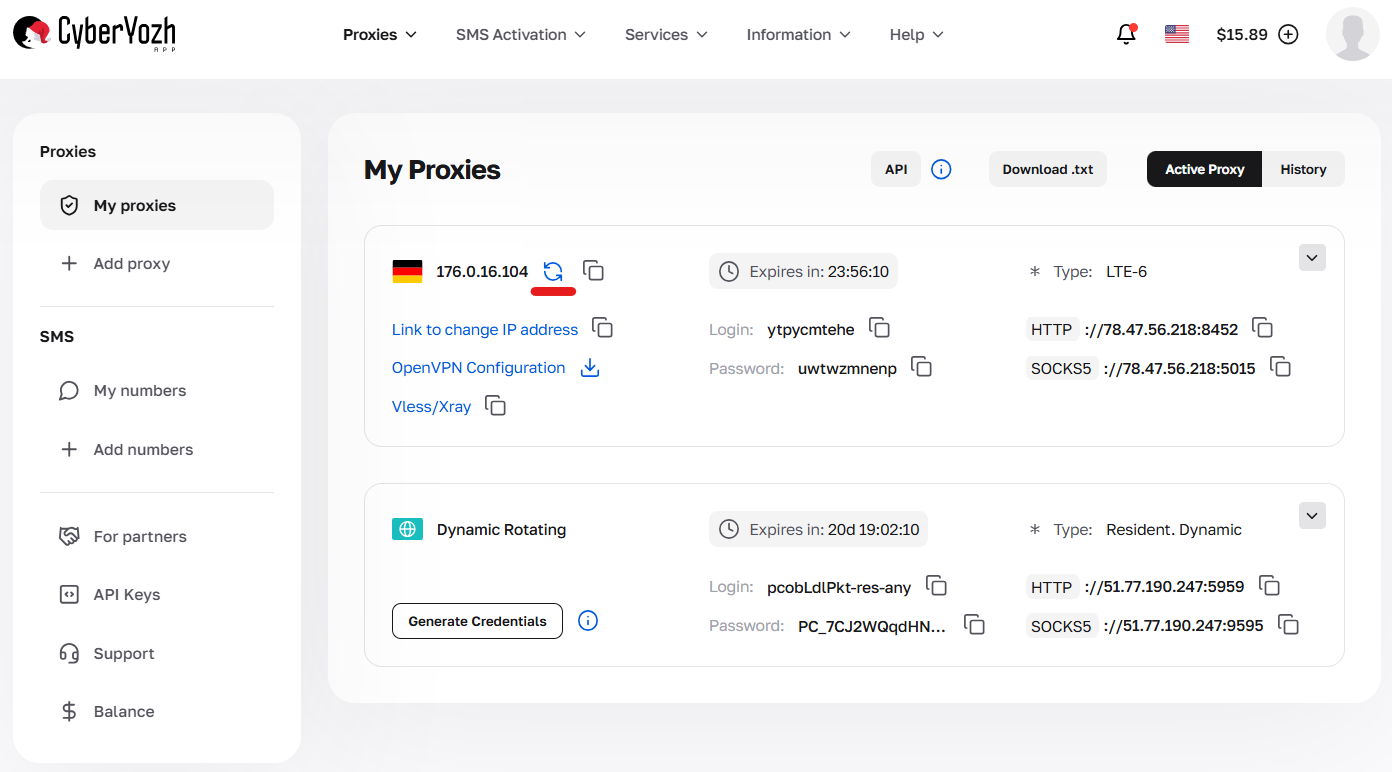
Fig. 6. Button for forced manual change.
Create files in the project directory:
proxies_residential.txt:
user123:pass123@51.77.190.247:5959 Add more proxies for rotation.
proxies_mobile.txt and proxies_datacenter.txt similarly. * Format: login:password@host:port for auth (HTTP only).
Installation:
pip install crawl4ai playwright
playwright install
Verify installation: python -m crawl4ai --version. Use venv if necessary.
Part 3. Integrating Proxies into Crawl4AI (Python) as a Separate Module
The proxy_module.py module loads proxies from files, adds the protocol ("http" or "socks5"), and supports rotation.
Step 1. Proxy Module (proxy_module.py):
import random
import os

class ProxyManager:
    def __init__(self, proxy_type="residential", protocol="http", rotate=True):
        """
        Initialize Proxy Manager.
        :param proxy_type: Type ('residential', 'mobile', 'datacenter')
        :param protocol: Protocol ('http' or 'socks5') — socks5 without auth only!
        :param rotate: Enable/disable rotation
        """
        self.proxy_type = proxy_type.lower()
        self.protocol = protocol.lower()
        self.rotate = rotate
        self.proxies = self._load_proxies()  # Load from file
        if self.protocol == "socks5" and self.proxies and '@' in self.proxies[0]:  # Check for auth
            raise ValueError("SOCKS5 does not support authentication in Playwright! Remove login:password from file.")
        self.current_proxy = None

    def _load_proxies(self):
        """Loads proxies from file."""
        file_map = {
            "residential": "proxies_residential.txt",
            "mobile": "proxies_mobile.txt",
            "datacenter": "proxies_datacenter.txt"
        }
        file_name = file_map.get(self.proxy_type)
        if not file_name:
            raise ValueError(f"Unknown type: {self.proxy_type}.")

        file_path = os.path.join(os.path.dirname(__file__), file_name)
        if not os.path.exists(file_path):
            raise FileNotFoundError(f"File {file_name} not found.")

        with open(file_path, 'r') as f:
            lines = f.read().strip().splitlines()
            # Add protocol: protocol://line (line = user:pass@host:port or host:port)
            proxies = [f"{self.protocol}://{line.strip()}" for line in lines if line.strip()]

        if not proxies:
            raise ValueError(f"File {file_name} is empty.")

        return proxies

    def get_proxy(self):
        """Returns a proxy."""
        if not self.proxies:
            raise ValueError("No proxies available!")
        if self.rotate:
            self.current_proxy = random.choice(self.proxies)
        else:
            self.current_proxy = self.proxies[0]
        return self.current_proxy

    def get_proxy_config(self):
        """Returns ProxyConfig for Crawl4AI."""
        if not self.current_proxy:
            self.get_proxy()
        # Split: protocol://user:pass@host:port or protocol://host:port
        if '@' in self.current_proxy:
            parts = self.current_proxy.split('@')
            auth = parts[0].split('//')[1]  # user:pass
            host_port = parts[1]  # host:port
            user, password = auth.split(':')
        else:
            host_port = self.current_proxy.split('//')[1]  # host:port for no-auth
            user, password = None, None
        from crawl4ai.async_configs import ProxyConfig
        return ProxyConfig(
            server=f"{self.protocol}://{host_port}",
            username=user,
            password=password
        )

    def add_proxy(self, proxy_url):
        self.proxies.append(proxy_url)
Step 2. Scraper Script (scraper.py):
import asyncio
from crawl4ai import AsyncWebCrawler
from crawl4ai.async_configs import BrowserConfig
from proxy_module import ProxyManager

# Switching type (residential, mobile, datacenter)
PROXY_TYPE = "residential"
# Switching protocol (http or socks5 — socks5 only without auth!)
PROXY_PROTOCOL = "http"  # Recommended for auth; for SOCKS5 remove login:password from file

# Initialize manager
proxy_manager = ProxyManager(proxy_type=PROXY_TYPE, protocol=PROXY_PROTOCOL, rotate=True)

async def main():
    try:
        proxy_config = proxy_manager.get_proxy_config()
        browser_config = BrowserConfig(proxy_config=proxy_config)
        async with AsyncWebCrawler(verbose=True, config=browser_config) as crawler:
            current_proxy = proxy_manager.get_proxy()
            print(f"🚀 Launching via {PROXY_PROTOCOL.upper()} proxy...")
            print(f"Proxy: {current_proxy}")

            result = await crawler.arun(
                url="https://ipinfo.io/json",
                bypass_cache=True
            )

            if result.success:
                print("\n✅ Success! Response:")
                print(result.markdown)
            else:
                print(f"\n❌ Error: {result.error_message}")
    except Exception as e:
        print(f"❌ Error: {str(e)}")

if __name__ == "__main__":
    asyncio.run(main())
Step 3. Launching:
python scraper.py
- For SOCKS5: Set PROXY_PROTOCOL = "socks5" and remove auth from files (host:port only). If auth is required — use "http".
Part 4. Advanced Scenarios and Troubleshooting
Automatic Rotation (for Residential Rotating and Mobile):
No need for code — the CyberYozh App gateway rotates the IP itself. Simply call crawler.arun in a loop:
for url in urls_list:
    proxy_config = proxy_manager.get_proxy_config()  # New config for rotation
    browser_config = BrowserConfig(proxy_config=proxy_config)
    # Re-initialize crawler with new config if necessary
    result = await crawler.arun(url=url, bypass_cache=True)
Manual Rotation for Statics (Residential/Datacenter):
Add multiple lines to your proxies_residential.txt or proxies_datacenter.txt file and use rotate=True. Or use the IP change link or API request.
Mass Scraping with Pauses:
Add delays to mimic human behavior:
import time
time.sleep(random.uniform(1, 5))  # Pause 1-5 sec before request
💡 Tip: some websites may use CAPTCHA-based verification mechanisms to prevent automated access. If you encounter such issues in your workflow, you can integrate a third-party CAPTCHA solving service such as CapSolver. It supports reCAPTCHA v2/v3, Cloudflare Turnstile, Challenge, AWS WAF, and others. Ensure your use complies with the target website's terms of service and applicable laws.
Troubleshooting:
- Connection Error: Check the format in files (login:password@host:port). Test the proxy in a browser.
- Blocked despite proxy: Increase pauses or switch type (to mobile for tough sites). Add stealth mode in Crawl4AI: browser_type="undetected" in BrowserConfig.
- Playwright errors: Ensure playwright install was executed. If headless=False, the browser will open visibly for debugging.
- SOCKS5 auth error: Playwright doesn't support it — use HTTP proxies.
- Asyncio exceptions: Ignore; this is Windows-specific and does not affect operation.
- Logging: Enable verbose=True in Crawl4AI for detailed logs.
Conclusion
Crawl4AI + proxies from CyberYozh App — the perfect duo for gathering data without blocks. Choose:
- Residential Rotating for mass datasets (Amazon/Google).
- Mobile Shared for social networks and protected sites.
- Residential Static for session-based tasks.
- Datacenter Static for simple and fast data collection.
Go to the CyberYozh App catalog, choose suitable proxies, configure Crawl4AI, and scale your AI scraping.
Additional documentation: Crawl4AI GitHub