How to Unblock YouTube with a Proxy Server (2026 Guide)
💡Quick answer: The fastest way to unblock YouTube anywhere is a residential SOCKS5 proxy; it bypasses school filters, geo-blocks, and workplace firewalls without installing a VPN. Jump to setup steps for Chrome, Windows, Mac, Android, or iPhone below.
YouTube is the most-blocked website on earth. School Wi-Fi cuts it off to save bandwidth. Employers filter it for productivity. Governments in China, Russia, and Iran restrict it at a national level. And YouTube itself geo-locks thousands of videos by country; a music video available in Germany may not load in Brazil.
A proxy server solves all of these problems by rerouting your request through a server in a location where YouTube is freely accessible. This guide covers every scenario: what causes each type of block, which proxy to use, how to set it up on any device, and how to verify it's actually working, including the mistakes that cause most setups to fail silently.
Why YouTube gets blocked and why fixing it is important
The reason YouTube is blocked determines which solution actually works. Using the wrong fix for the wrong block type is the number-one reason people give up. Here are the four distinct block types you'll encounter in 2026:
1. School and workplace network filters
The most common block. Network admins use DNS-level or firewall-level filtering tools to prevent traffic to Google Video servers. Your device never even connects to YouTube; the request is intercepted and dropped at the router. A proxy bypasses this because the filter only sees a connection to the proxy's IP, which isn't on its blocklist.
2. Government-level censorship
China, North Korea, Turkmenistan, and portions of Iran and Russia maintain active ISP-level blocks on YouTube. These are more sophisticated; they often use deep packet inspection (DPI) to detect and block proxy traffic. For these environments, residential proxies (IPs that appear to be real home users) are essential; datacenter proxy IPs are often blocked outright.
3. YouTube geo-restrictions
YouTube itself restricts specific videos by region based on licensing agreements. A sports highlight may only be viewable in the UK. A music video may be licensed for Germany only. This is not YouTube being blocked; it's YouTube doing the blocking based on your detected location. The fix is a proxy with a residential IP located in the country where the content is licensed.
4. ISP throttling
Rarer, but some internet service providers deliberately slow or block YouTube traffic during peak hours to manage network congestion. A proxy bypasses this because your ISP can only see a connection to the proxy, not to YouTube directly.
💡Note: For school/work blocks, almost any proxy works. For government censorship, you need residential IPs. For geo-locked content, you need a proxy IP in the specific target country. For ISP throttling, any proxy with sufficient bandwidth will help.
How does a YouTube proxy server work
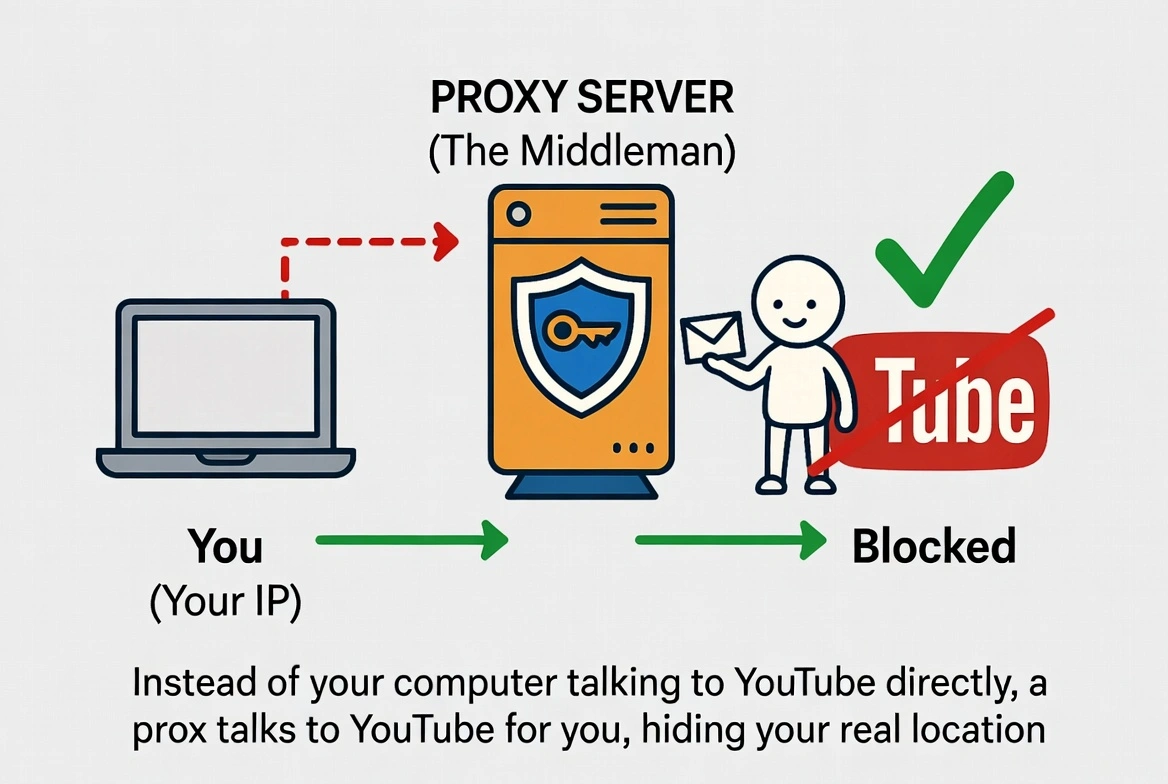
When you visit YouTube normally, your device sends a request directly to Google's servers. That request carries your IP address, which reveals your physical location and your network (your school's IP range, your country's ISP block, etc.). YouTube, or the firewall in front of it, uses that IP to decide whether to let you through.
A proxy server sits between you and YouTube. Your browser connects to the proxy, which then forwards your request to YouTube on your behalf. YouTube sees the proxy's IP address, not yours. If the proxy's IP is in a location where YouTube is accessible and unlocked, you get through.
💡“Example: Think of it like using a trusted friend's address to receive mail when you're in a location where deliveries are blocked. The mail goes to your friend (the proxy), who receives it and forwards it to you. The sender only knows your friend's address.”
This also works in reverse: when YouTube responds with video data, it sends it to the proxy, which passes it back to you. The whole exchange is invisible to whatever is blocking your connection.
Proxy vs. VPN vs. Smart DNS: Which one do you actually need
These three tools all unblock YouTube, but they work differently and suit different situations. Here is a side-by-side comparison to help you decide:
Feature | Proxy | VPN | Smart DNS |
Unblocks YouTube | Yes | Yes | Yes (geo-blocks only) |
Encrypts traffic | Rarely (HTTPS optional) | Yes, full encryption | No |
Streaming speed | Fast (no encryption overhead) | Slight slowdown | Fast |
Works device-wide | No (app/browser specific) | Yes, all traffic | Yes, all traffic |
Bypasses DPI censorship | With residential IPs | Yes (with obfuscation) | No |
Multi-account management | Yes (one IP per account) | Limited | No |
Price | Low to moderate | Moderate | Low |
Setup complexity | Low (no software needed) | Moderate (app required) | Low (DNS change only) |
Use a proxy if you want to unblock YouTube specifically (not your entire device), need speed for 4K streaming, or are managing multiple YouTube accounts.
Use a VPN if: You need your entire internet traffic protected, you are on public Wi-Fi, or you are dealing with heavy government-level censorship that detects proxy traffic.
Use Smart DNS if: You only need to bypass geographic content restrictions and do not need any privacy or encryption.
💡“Note: For the use cases in this guide, unblocking YouTube at school, work, or in a restricted country, a residential SOCKS5 proxy is the fastest, most cost-effective choice. The rest of this guide focuses on proxy setup.”
Choosing the right proxy type for YouTube in 2026
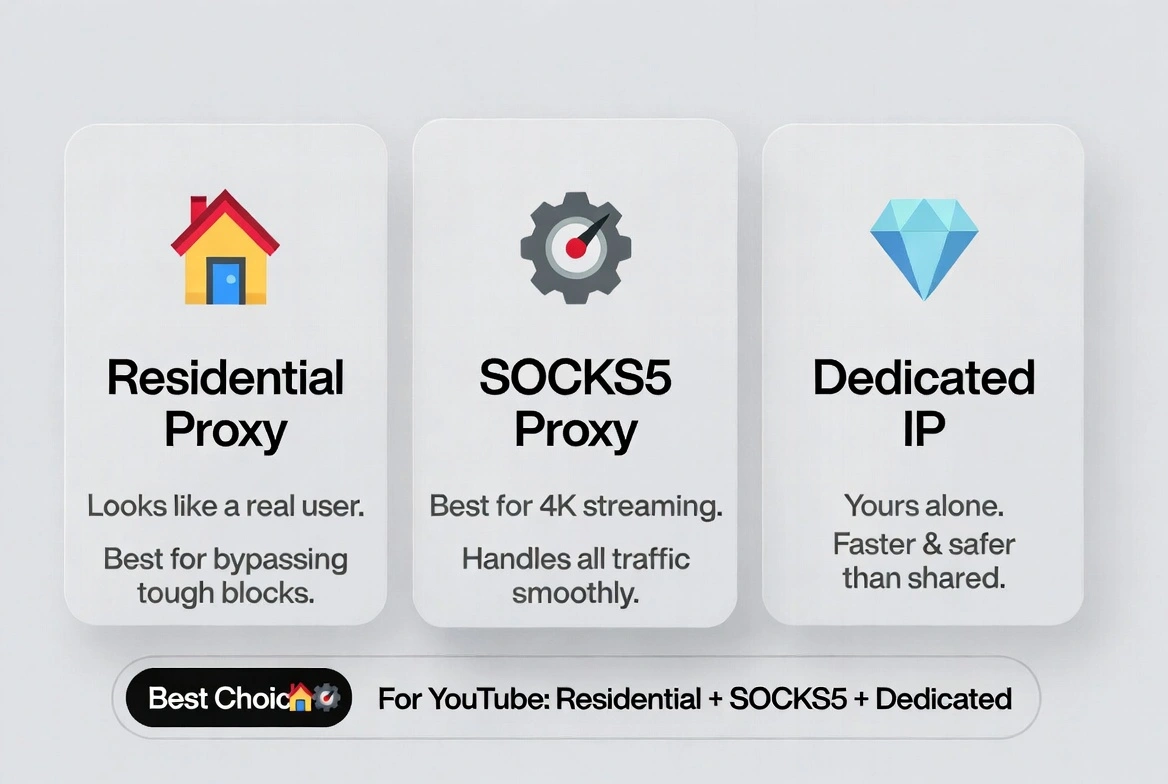
Not all proxies work equally well with YouTube. In 2026, YouTube's detection systems have become significantly more sophisticated; they cross-reference IP reputation databases, ASN (autonomous system number) data, and behavioral signals to identify and throttle proxy traffic. Here is what you need to know:
Residential proxies: Best for reliability
Residential proxies use IP addresses assigned to real homes by ISPs. To YouTube's detection systems, they look like ordinary users. They are significantly harder to detect and block than datacenter IPs. If you are dealing with geo-restrictions or a network that actively tries to block proxy access, residential IPs are the only category that works consistently.
Mobile proxies: Best for trust score
Mobile proxies use IP addresses assigned to real 4G and 5G carrier networks. YouTube treats mobile carrier IPs as among the highest-trust traffic it receives; this traffic is indistinguishable from that of someone watching on their phone. Mobile proxies are the top choice for YouTube channel management, automation, and any task where account trust is critical. They tend to be more expensive but have the highest success rate against detection.
Datacenter proxies: Avoid for YouTube
Datacenter proxies come from cloud server ranges (AWS, Azure, Google Cloud, etc.). YouTube maintains up-to-date blocklists of known datacenter IP ranges and either outright blocks them or serves degraded experiences. For casual school/work unblocking, they occasionally work, but they frequently fail for geo-restricted content and multi-account work. Do not use datacenter IPs for YouTube if reliability matters.
HTTP vs. SOCKS5 protocol
HTTP proxies handle standard web traffic and are sufficient for basic YouTube browsing. SOCKS5 proxies handle any type of traffic, including video streams and UDP connections. For smooth 4K streaming, SOCKS5 is the better protocol; it does not interfere with the data packets the way HTTP proxies sometimes do, resulting in less buffering and better playback quality.[MDN's HTTP protocol overview]
Shared vs. Dedicated proxies
Shared proxies are used by multiple people simultaneously. They're cheaper but more likely to be flagged if another user triggers YouTube's detection. Dedicated proxies are assigned to you alone, significantly reducing the risk of flags. For regular YouTube use, dedicated proxies are worth the small price premium.
Your Use Case | Recommended Proxy Type |
Unblock YouTube at school or work | Residential HTTP or SOCKS5 (shared is fine) |
4K streaming with no buffering | Residential SOCKS5, dedicated |
Watch geo-locked content (e.g., UK-only) | Residential proxy in that specific country |
Managing multiple YouTube channels | Dedicated residential or mobile, one IP per account |
YouTube automation/data scraping | Rotating residential or mobile proxies |
Heavy censorship bypass (China, Iran) | Residential SOCKS5 with obfuscation support |
Step-by-step: How to set up a proxy for YouTube
Before you begin: obtain your proxy credentials from your provider. You will need an IP address (or hostname), a port number, and, typically, a username and password. Have these ready before following any of the steps below. For example, this is how Cyberyozh credentials look:

Method 1: Google chrome (windows)
Chrome on Windows uses your system proxy settings. Here is how to configure them:
1. Press Windows + I to open Settings.
2. Navigate to Network and Internet > Proxy.
3. Under Manual proxy setup, click Set up.
4. Toggle “Use a proxy server” to On.
5. Enter the proxy IP address and port number from your provider.
6. Click Save, then open Chrome and navigate to YouTube.
7. If prompted for credentials, enter the username and password from your provider.
💡“Tip: If you want to route only specific browsing through a proxy without changing system-wide settings, use the FoxyProxy browser extension instead. It lets you switch proxies instantly and apply them per-site.”
Method 2: Mozilla Firefox
Firefox has its own proxy settings, separate from your system settings, which is actually useful. You can route Firefox through a proxy without affecting anything else on your device.
1. Open Firefox > Settings > scroll to Network Settings > click Settings.
2. Select Manual proxy configuration.
3. Enter your proxy's IP address and port.
4. If using SOCKS5, select SOCKS v5 and check Proxy DNS over SOCKS v5 (prevents DNS leaks).[SOCKS5 protocol specification (RFC 1928)]
5. Click OK and test YouTube.
Method 3: macOS system-wide
1. Click Apple menu > System Settings.
2. Select Network from the sidebar.
3. Choose your active connection (Wi-Fi or Ethernet) and click Details.
4. Click the Proxies tab.
5. Check the box for Web Proxy (HTTP) or SOCKS Proxy, depending on your proxy type.
6. Enter your proxy server IP and port.
7. If required, check the Proxy server requires a password and enter credentials.
8. Click OK, then Apply. Test YouTube in any browser.
Method 4: Android
1. Go to Settings > Wi-Fi.
2. Long-press your network name and tap Modify network (or the gear icon).
3. Expand Advanced options.
4. Change Proxy from None to Manual.
5. Enter the proxy hostname and port, then tap Save.
💡“Important: Android's system proxy only applies to Wi-Fi traffic and is bypassed by many apps. If the YouTube app ignores it, access YouTube through Chrome mobile instead.”
Method 5: iPhone / iOS
1. Go to Settings > Wi-Fi.
2. Tap the i icon next to your current network.
3. Scroll to HTTP Proxy and tap Configure Proxy.
4. Select Manual.
5. Enter the server address, port, and credentials if required.
6. Tap Save.
How to manage multiple YouTube accounts with Proxies for power users
If you are managing multiple YouTube channels, running automation, or doing any work where account separation is critical, a standard browser proxy setup is not enough. YouTube does not just track your IP address; it also builds a browser fingerprint from your screen resolution, installed fonts, time zone, installed plugins, and WebGL renderer. Two accounts sharing the same fingerprint can be linked even if they use different IPs.
💡“The professional solution: always combine dedicated proxies with an anti-detect browser. CyberYozh proxies integrate seamlessly with tools like Multilogin, GoLogin, and AdsPower, letting you create isolated browser profiles, each with a unique fingerprint and assigned proxy. Each profile appears to YouTube as a completely different device in a completely different location.”
Key rules for multi-account YouTube proxy management in 2026:
• One dedicated IP per YouTube account; never share an IP across accounts.
• Use sticky sessions (same IP for the duration of your session) to avoid triggering re-authentication prompts from mid-session IP changes.
• Mobile proxies outperform residential proxies for account trust. YouTube treats carrier IPs as higher-trust traffic.
• Match the proxy's country to the account's registered location and language settings for maximum authenticity.
How to verify your proxy is actually working
Never assume a proxy is working correctly; always test it. A misconfigured proxy can appear to work while still leaking your real IP or DNS queries.
Step 1: Check your IP address
Visit WhatIsMyIP before and after enabling the proxy. The IP address and listed location should change to reflect your proxy server's location. If your real IP still appears, the proxy is not correctly configured.
Step 2: Test YouTube directly
Navigate to a YouTube video that was previously blocked or geo-restricted. If it loads, the proxy is working as intended. If not, double-check your credentials and server address.
Step 3: Run a DNS leak test
Even with a proxy active, your DNS queries may still go through your regular ISP, revealing your real location. Visit DNSLeakTest to check. If leaks appear, ensure you have enabled Proxy DNS over SOCKS v5 in Firefox, or use a provider that automatically routes DNS through the proxy.
Step 4: Speed test
Run a speed test at Speedtest with and without the proxy. A good residential proxy should reduce your speed by no more than 15-20%. Larger drops usually indicate the proxy server is geographically far from you or overloaded. Try a server location closer to your physical location.
Why is your YouTube proxy not working and how to troubleshoot by error type
Symptom | Most Likely Cause | Fix |
YouTube loads but shows 'Video not available.' | Datacenter IP detected by YouTube | Switch to a residential proxy in the target country |
YouTube doesn't load at all | Proxy is misconfigured or has the wrong port | Re-enter credentials; verify host: port format |
Proxy work,s but YouTube asks to verify the account | IP changed mid-session | Enable sticky sessions in your proxy settings |
Everything works in the browser, but not in the YouTube app | App bypasses system proxy | Access YouTube via mobile browser instead, or use an app-level SOCKS5 client |
DNS leak detected | DNS is not routed through a proxy | In Firefox: enable 'Proxy DNS over SOCKS v5'. Or switch to a provider that handles DNS automatically |
Speed is very slow | The server is too far away or overloaded | Select a proxy server geographically closer to you |
Free proxy stopped working | Free proxies have very high failure rates | Switch to a paid residential proxy service |
Is using a YouTube proxy legal in 2026
In the vast majority of countries, using a proxy server to access YouTube is completely legal. Routing traffic through an intermediary server is a standard network practice used by businesses, schools, and security researchers worldwide.
There are nuances worth knowing:
• Countries with anti-circumvention laws: China, Russia, Iran, and a small number of other countries have laws that technically prohibit using tools to bypass government-mandated censorship. Enforcement against individual users is rare, but the legal risk exists.
• YouTube's Terms of Service: YouTube prohibits using proxies to circumvent geographic licensing restrictions in some contexts. This is a ToS issue, not a criminal one; the consequence, if any, would be account-level action, not legal prosecution.
• School and workplace policies: Using a proxy to bypass a network filter may violate your school's or employer's acceptable use policy. This is a disciplinary matter, not a legal one.
For the overwhelming majority of users in Western countries, using a proxy to watch YouTube is legally equivalent to using a private browsing window, completely ordinary behavior.
What makes CyberYozh stand out among the rest of the proxy providers
Among the many YouTube proxy providers in this industry, CyberYozh stands out for its approach to IP quality and affordability. Every IP in their pool is screened against 50+ security databases through their built-in Fraud Score tool before entering rotation. Here are some of Cyberyozh's best features:
Provides residential, mobile, and datacenter proxies
IP fraud Score tool: is screened against 50+ security databases before use
50M+ residential IPs across 100+ countries with city and country targeting
Real unlimited traffic 4G/5G mobile proxies on actual carrier networks.
Built-in SMS and phone number verification, no third-party service needed
99.9% uptime with automatic IP failover.
SOCKS5, HTTP, HTTPS, and UDP protocol support.
Works seamlessly with Multilogin, AdsPower, and Dolphin Anty
Full automation and scraping support.
24/7 customer support in 7 languages
Most affordable in the proxy market: Mobile proxies with unlimited traffic from $1.70/day, and Static residential proxies start from $5.29/month.
Conclusion on getting YouTube unblocked
The difference between proxy setups that work and ones that don't comes down to one variable: IP quality. Free proxies and datacenter IPs get caught by YouTube's detection systems within seconds. Residential and mobile proxies that appear to be real users consistently get through.
💡“Note: CyberYozh's 50M+ residential and mobile IP pool in 100+ countries is built for exactly this use case, real device IPs that YouTube sees as regular viewers, SOCKS5, HTTP, HTTPS, UDP protocol support for smooth 4K streaming with 99.9% uptime. Sticky sessions to prevent mid-session IP changes that trigger verification loops, and no bandwidth throttling that plagues cheaper services.”
You now have the full picture: why YouTube gets blocked, how proxies solve it, which type to choose for your specific situation, how to set it up on any device, and how to verify it's working. The only remaining step is to use that knowledge.
Frequently asked questions about how to unblock YouTube with proxies
Can a proxy really unblock YouTube at school or work?
Yes. School and workplace blocks operate at the DNS or firewall level by preventing connections to YouTube's servers. A proxy server routes your request through a third-party IP that is not on the blocklist, bypassing the filter entirely. Residential proxies are the most reliable option because their IPs do not appear on commercial blocklists.
What is the best proxy type for YouTube in 2026?
For unblocking YouTube at school or work, residential HTTP or SOCKS5 proxies work well. For geo-restricted content, you need a residential proxy in the specific country where the content is licensed. For managing multiple YouTube channels or automation, mobile proxies with sticky sessions are the gold standard; they carry the highest trust score with YouTube's detection systems.
Will a proxy slow down my YouTube streaming?
A well-configured residential proxy with a SOCKS5 connection and a server close to your location should add minimal overhead, typically under 15-20% speed reduction. Free proxies almost always cause significant slowdowns and buffering. If you experience major speed drops, try selecting a proxy server geographically closer to you.
Can I use a free proxy to unblock YouTube?
Free web proxies can work for occasional, low-stakes viewing. However, they come with significant drawbacks: many log your traffic, inject ads, fail frequently, and are quickly blocked by YouTube's detection systems. Research from 2024 found that only around a third of free proxy endpoints remained active during testing periods. For anything beyond a quick one-time test, a paid residential proxy service provides far better reliability and privacy.
What is a YouTube geo-proxy and how does it work?
A YouTube geo-proxy is a residential proxy with an IP address located in a specific country. When you connect through it, YouTube detects your location as that country and serves you content licensed for that region. For example, a UK-based residential proxy lets you access content only available in the United Kingdom.
Why does YouTube still block me even with a proxy?
The most common reason is using datacenter IPs, which YouTube identifies and blocks. Switch to residential or mobile proxies. Other causes include DNS leaks revealing your real location, IP changes mid-session that trigger account verification, or browser fingerprint mismatches. Run through the verification steps in the testing section above to diagnose which issue you have.
Is it safe to use a proxy for YouTube?
Using a reputable paid proxy service is safe. The risks come from free proxies, which may log your traffic, inject malicious scripts, or expose your browsing data. Always use a proxy provider with a clear privacy policy and no-logging commitment. For the highest security, use HTTPS with your proxy.
Can I unblock YouTube on my phone with a proxy?
Yes, but with a limitation: system-level proxy settings on Android and iOS apply only to Wi-Fi HTTP traffic. The YouTube app may bypass them. The most reliable approach on mobile is to access YouTube through your phone's browser (Chrome or Safari) with the proxy configured, rather than using the native YouTube app. For app-level proxy support, you need a dedicated proxy client app.
Helpful?
Share article
