
Virtual Phone Number for Gmail: When You Need One and 5 Best Providers
A virtual phone number for Gmail gives you a separate number for account verification without using your personal phone. It is useful when you want to keep your main number private, are looking for a phone number for Gmail verification, or need virtual numbers to manage multiple client Gmail accounts.
But not every virtual number for Gmail verification works the same way. Some numbers are for one SMS only, some can be kept longer, and Google may reject certain number types. Below, we explain when you need a virtual phone number for Gmail, what to look for, and the 5 best providers to consider.
TL;DR
Gmail may ask for phone verification during account creation or sign-in to confirm you're a legitimate user and help prevent abuse.
A virtual number can receive the SMS verification code without requiring another physical SIM.
Not every virtual number is suitable for Google, and some may be rejected based on their type, history, or provider.
CyberYozh lets you select Google and Gmail as the verification service and choose a country and number for SMS activation.
What is a virtual phone number for Gmail
A virtual phone number is a telephone number that lets you receive SMS online without using your personal SIM card. When Gmail asks for a phone verification, a virtual number can receive the SMS code to complete the sign-up or verification. You don't need a physical phone or a local SIM card for that; everything happens online.
Virtual phone numbers can be temporary, for one-time verification, or long-term, when you need continued access to the same number.
When you need a virtual phone number for Gmail
Account creation at scale requires numbers that pass Google's checks. Here's when you need one.
Keep your personal number private
A virtual number for rent gives you a layer of privacy, allowing you to verify your Gmail account without compromising your personal contact details.
Privacy risks of using your personal number for account registration:
Spam and unwanted advertisements from services that have your number
Data leaks if a service's customer database is compromised
Unwanted contact if your number becomes visible to other users or third parties.
Manage multiple client accounts
Google restricts how many accounts a single phone number can verify. For agencies running multiple client accounts or affiliate marketers, this cap becomes a bottleneck. A separate number can help agencies keep client accounts independent.
Test registration flows
QA teams and developers sometimes need to run through Gmail sign-up processes multiple times to test product integrations, login flows, or user onboarding. Virtual numbers let you run through these flows without burning through your own number's quota.
Run multiple ad accounts
Marketing teams running campaigns on Facebook Ads Manager or Google Ads need separate Gmail accounts for different clients to separate billing, reporting, and access controls. Virtual numbers for Gmail SMS verification allow agencies to create Google accounts without a phone number – without mixing client data.
Use a number from a particular country
Some businesses and online services require a phone number from a specific country for registration or verification. A virtual number is useful for setting up a local Google Workspace account, or managing operations across different regions.
Google's verification is risk-based. A phone prompt is one of the signals Google uses to distinguish legitimate account creation from automated or abusive activity. The verification decision can also take your IP address into account. A shared, frequently changing, or flagged IP can trigger additional verification, or contribute to the number being rejected.
Check your IP for fraud score across 50+ databases before you run accounts.
Virtual number types: Which one to choose for Google
Not all virtual numbers verify the same way with Google — the type behind the number determines whether it gets accepted, flagged, or rejected.
Mobile numbers
Numbers associated with a mobile network and typically capable of receiving SMS via a physical SIM infrastructure. Virtual mobile numbers are the best choice for Google verification, especially when they are associated with a mobile carrier.
VoIP numbers
Numbers delivered through internet-based telephony, such as Google Voice or Skype. You can find a free VoIP number for Gmail verification online. However, Google may not accept them because it sometimes flags VoIP numbers as "internet-based" as an anti-fraud measure.
Temporary numbers
Numbers rented for a short period to receive an SMS verification code. They're suitable for one-time Gmail verification, but shouldn't be used as a long-term number for permanent access.
Long-term virtual numbers
Numbers you can keep for an extended period and continue using for SMS. These are better when you need the number for future verification, account recovery, or ongoing two-factor authentication. The trade-off is price: these numbers are more costly than temporary ones.
Which virtual phone number is best for Google
For Gmail, Google, or YouTube verification, a private mobile number with SMS support is the safest option. If you only need one verification code, a temporary number is more than enough.
A virtual number doesn't guarantee acceptance. Google can reject numbers based on the number type, reputation, provider quality, and Google's internal verification checks.
CyberYozh offers you to check the virtual number fraud score before using it to reduce the risk of rejection.
How to choose a virtual phone number for Gmail
Here’s what to look for when choosing a provider for a temporary phone number for Gmail:
Gmail availability: The provider should explicitly offer numbers for Google/Gmail verification, not generic ‘numbers for SMS’.
Mobile number: Prefer mobile or SIM-backed numbers over generic VoIP.
Country: Make sure the provider offers the country you need.
Private inbox: Verification SMS should be visible only to you.
Fraud score checker: The possibility to check a virtual number for fraud before use it for an important account.
Replacement policy: Check whether rejected numbers can be replaced or refunded.
Rental period: Choose temporary access for one-time verification or long-term rental for recovery.
Real cost: Compare the price of a successfully verified number.
5 Best Gmail virtual number providers
A Gmail verification number is only useful if it survives Google's checks and delivers the SMS when you need it. The providers below differ in number sourcing, reputation controls, and what happens when a number fails verification.
1. CyberYozh: Best for scaling multi-account and verification
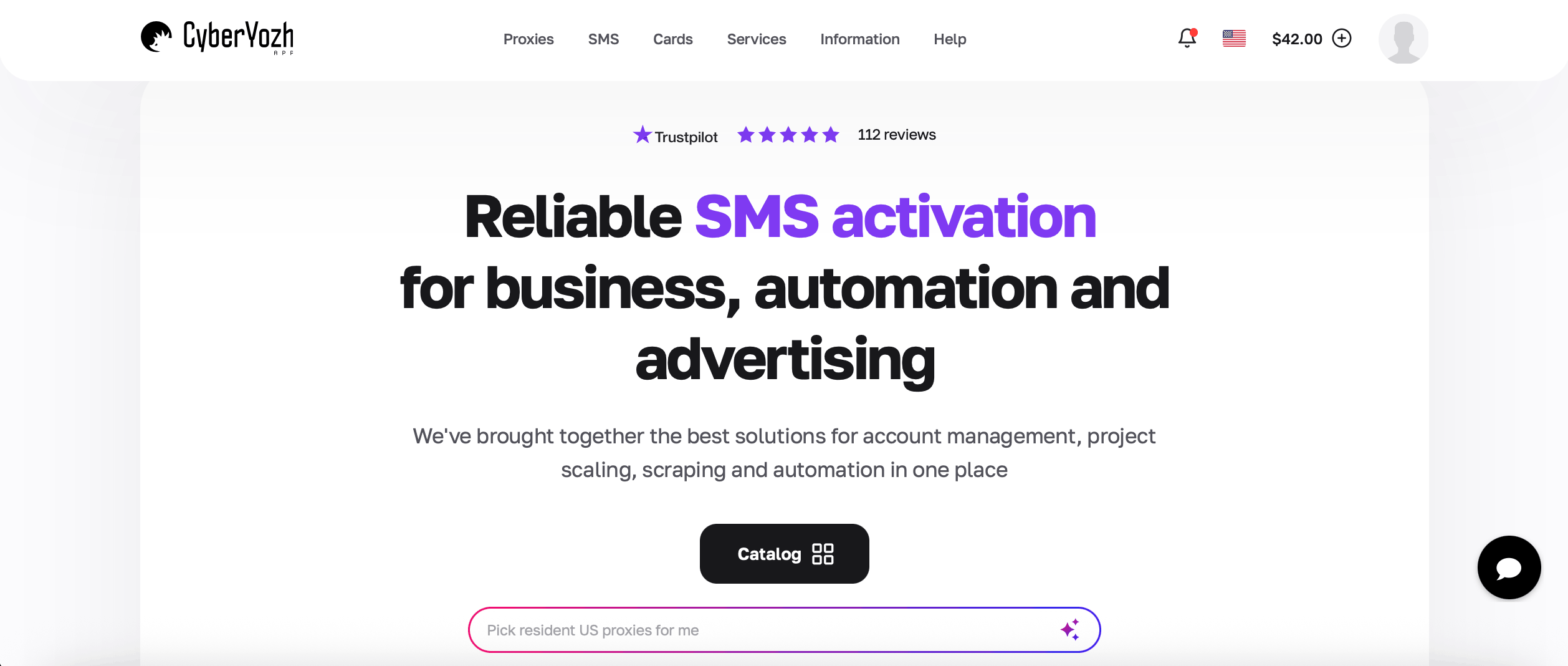
CyberYozh is a platform combining virtual phone numbers from real carriers, mobile and residential proxies, and fraud checkers so verification and account setup happen inside one infrastructure stack. Its SMS activation service lets you choose a country and a mobile carrier like T-Mobile and Vodafone. The number infrastructure includes short-term activation and longer rental periods
Virtual phone numbers for Gmail verification and 700+ other services
Virtual and residential numbers available
From $0.02 per SMS activation
140+ country targeting
Fraud Score and phone-number checks
Rent a number for one SMS (15 min) or hold it up to 7 days
Refund if you don’t get an SMS
Support 24/7 in 7 languages
Infrastructure platform with real mobile 5G proxies, residential proxies, and virtual cards for payments
API access — automated SMS reception and number management via REST API.
2. TextVerified: for US numbers
TextVerified is a good option if you need a US phone number for Gmail verification. The provider says its numbers are non-VoIP and associated with physical SIMs, and it lists Gmail among the supported services.
US-focused coverage with numbers from US carriers
Pay-per-verification — prices from $0.25
Non-VoIP numbers with physical SIM cards
Temporary verification for one-time SMS codes
Less suitable if you need broad international coverage.
If you're scaling US operations and multi-account work, you'll also need USA proxies. They route traffic through real American IPs, preventing ads and social media platforms from linking multiple accounts to the same location or flagging datacenter traffic as suspicious
3. SMS-MAN: for broad service selection
SMS-MAN is an SMS activation service offering virtual numbers for a one-time activation. On the platform, you can buy a virtual number for Gmail and also get instructions for the Google verification process.
Gmail verification support
Multiple services for different registration workflows
From $0.05 for Google/Gmail verification; depends on the country
Numbers available across multiple regions including US, UK, and Europe
Designed for one-time SMS activations, not long-term virtual number rental.
4. 5SIM: For inexpensive one-time activations
5SIM is a long-established SMS activation service offering temporary numbers for Google and other online services. It is suitable for teams and individuals who are looking for a number to get one SMS code for Gmail.
Cheap options for one-time SMS receipt – from $0.0675 per activation
Google/Gmail verification available
Large selection of countries and services
Service-specific number ordering
Availability and acceptance vary by number and service.
5. OnlineSIM: Alternative for temporary numbers
OnlineSIM provides temporary virtual numbers for receiving SMS verification codes for platforms like Google, Telegram, and WhatsApp. It is useful when you need short-term access to a number.
Temporary numbers for SMS verification, multiple countries available
Large selection of supported services
Some users complain about receiving previously used numbers
Prices starting from $0.01/SMS
Short-term activation options.
What provider is best for Gmail verification
Provider | Best for | Number types | Key advantage |
|---|---|---|---|
CyberYozh | Multi-account and verification workflows at scale | Mobile, residential | 140+ countries, number + proxy pairing, fraud pre-check |
TextVerified | US numbers | SIM-backed | Non-VoIP US numbers |
SMS-MAN | Service selection | Virtual | Broad service coverage |
5SIM | One-time verification | Virtual | Low-cost activations |
OnlineSIM | Temporary numbers | Virtual | Broad temporary SMS coverage |
Key takeaway: For occasional signups, any cheap activation service works fine — but at any real volume, mismatched numbers and IPs are what get accounts flagged. CyberYozh's combined number + proxy + fraud-check setup holds up better for recurring or multi-account work than a standalone SMS service.
Need a SMS verification for another platform than Gmail? Read our guides on virtual phone numbers for business, virtual numbers for Telegram, and SMS verification for Doordash.
How to get a virtual phone number for Gmail
Step 1. Open CyberYozh SMS activation
Sign in to CyberYozh and open the SMS activation service.
Step 2. Select country, then Google (YouTube, Gmail)
Choose Google as the service you need to verify and click on the price to get your number. Toggle on Check IP reputation to get a fraud score.
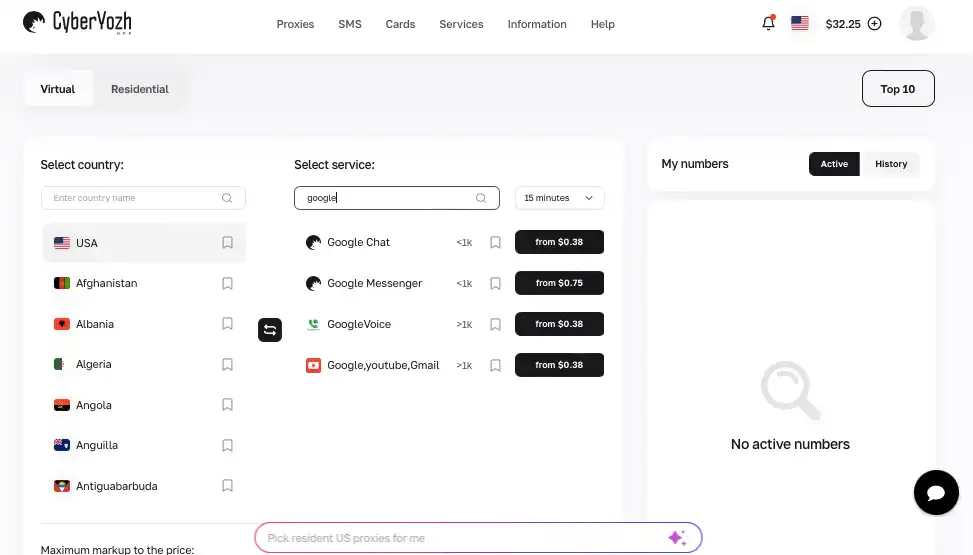
Choose a mobile carrier, or leave Default.
Step 3. Enter the number in Gmail
Add the CyberYozh number when Gmail asks for phone verification and request the SMS code.
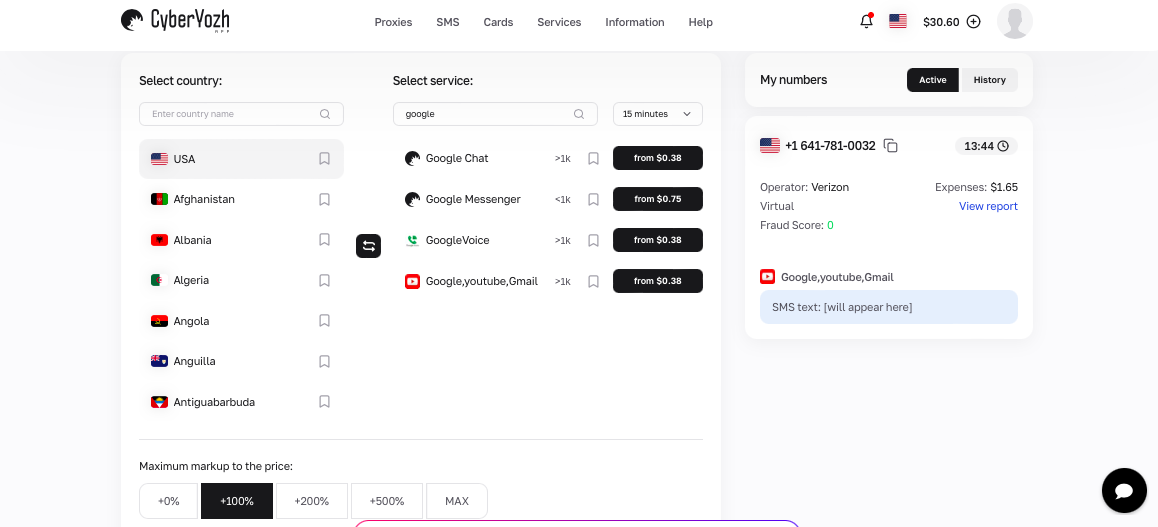
Step 4. Receive the verification code
Return to CyberYozh and wait for the SMS in your activation inbox. Enter the code in Gmail to complete verification.
Why Google rejects a virtual phone number
Google's verification system is designed to prevent abuse, and it uses multiple layers of detection to identify numbers that shouldn't be used for account creation or verification. Here are the most common reasons your virtual number might get rejected.
"This phone number cannot be used for verification"
This is Google's rejection message when a number fails its internal checks. It means the number is flagged as VoIP, belongs to a provider Google has identified as disposable, or has been associated with suspicious activity.
"This phone number has been used too many times"
Google limits how many accounts a single phone number can verify. According to user reports, a number typically maxes out at around four to five verifications before you hit this error. Once a number reaches this cap, it's locked for future Google verifications.
Unsupported number or provider
Google maintains a blacklist of virtual number providers and number ranges associated with abuse. If you're using a number from a provider that Google has identified, the verification will fail with a generic error.
Temporary or public numbers
Numbers from public websites offering a virtual phone number for gmail verification free are nearly always blocked. Since these numbers are visible to anyone and receive codes publicly, Google has long identified and blacklisted them. Private virtual numbers have a much higher success rate.
Delayed SMS arrival
Sometimes the number works fine, but the SMS simply doesn't arrive. This can happen due to carrier routing issues, provider API delays, or the number being temporarily unable to receive SMS.
When you see either of these errors, Google explicitly recommends using a different number. The only practical solution is to try a fresh number or a different provider.
Final thoughts
A virtual phone number for Gmail is useful when you need a separate number for verification, client accounts, or continued account access without using your personal SIM. Before you buy, make sure the provider actually supports Gmail, offers fresh numbers with clean history, and gives you a replacement if the code never arrives.
If you're managing multiple accounts or running client work at scale, CyberYozh is worth a serious look. It bundles SMS, reliable proxies, and fraud checks together, so you're not juggling a bunch of different tools just to get a number that actually works.