
Crunchbase API: pricing, access, and company data enrichment
Crunchbase API: pricing, access, and company data enrichment
A list of recently funded companies gives your team somewhere to start. To use it for lead generation or market research, you need to know what each record contains, how to bring it into your systems, and which questions still need a visit to the company’s website. Funding history can help you shortlist a business; its careers page or latest product announcement may explain why it matters to your research today.
The Crunchbase API can supply structured company data, but planning an integration involves more than getting an API key. You need to confirm access to the fields you need, establish a budget, and decide how to collect and maintain supplementary information.
This guide covers pricing, access, documentation, and implementation, then shows how to combine company records with website research, including where CyberYozh App’s proxy infrastructure can support that additional collection.
TL;DR
The Crunchbase API provides read-only access to structured company and funding data, depending on your license.
Pricing requires a sales quote. Confirm current Basic API eligibility or evaluation access before assuming a free option exists.
Use Search to find matching records and Entity Lookup to retrieve a known company’s details.
Enrich records with company-website observations, retaining source URLs, timestamps, and uncertainty.
CyberYozh App can support supplementary website checks that need geographic selection or sticky sessions. Proxies are not required for ordinary Crunchbase API requests and do not expand licensed access.
Visit CyberYozh applications for API access.
Does Crunchbase have an API, and what can you use it for?
Yes, Crunchbase offers a read-only REST API for retrieving structured data about companies, people, funding rounds, and acquisitions, with available records and fields depending on your licensed access. Read-only means you can retrieve information, but cannot use the API to create or edit Crunchbase profiles.
For company research, two operations matter most. Search helps you find records that match specified criteria, such as companies in a particular category or funding rounds announced within a date range. Entity Lookup retrieves details about a known company, person, or funding round using its identifier. Crunchbase’s official API overview explains these options and the access requirements.
Teams can use this data to build research lists, enrich CRM records, or analyze funding activity. The right access method depends on how often you need the information and where you plan to use it.
Access method | What it supports | What to check |
Crunchbase website | Manual research through profiles and search tools | Features and viewing limits for your subscription |
Subscription exports | Moving available results into spreadsheets or other tools | Export eligibility, row limits, and permitted uses |
Licensed API access | Programmatic retrieval for recurring research and integrations | Included datasets, fields, request limits, and licensing terms |
Third-party data services | Access through a separate provider advertising Crunchbase-related data | Provider identity, data provenance, freshness, and permission to supply the data |
Request throttling or concurrency limits | Response status and API error code. Crunchbase’s legacy v4 reference lists HTTP 429 for concurrency limits and HTTP 409/LA409 for rate limiting. | Reduce concurrency and request frequency, queue requests, and retry with backoff, following any server-provided retry guidance. |
Some research questions require checking a company’s own website, such as which roles it currently advertises or how its offering varies by market. For those supplementary checks, CyberYozh App’s rotating residential proxies provide geotargeting and sticky sessions when location or session consistency matters. They support the website-collection step; ordinary authenticated Crunchbase API requests do not require residential proxies.
How much does Crunchbase API cost?
Crunchbase does not publish a standard API price on its official product page. It directs prospective customers to contact sales for pricing. To establish your budget, request a quote that covers the data and usage your project requires.
Before comparing offers or committing to a contract, ask these questions:
What to clarify | Questions to ask |
Fields and datasets | Does the quote include the company, funding, investor, or prediction data we need? Can we inspect sample records? |
Intended use | Does the license cover internal research, customer-facing features, or both? |
Volume and freshness | Does the proposed access support our expected number of records and refresh schedule? |
Limits and delivery | Which request limits apply? What delivery options are included? |
Data permissions | What can we store, how long can we retain it, and what may we display or redistribute? |
Support and contract | What support is included? What are the contract length, renewal terms, and cancellation conditions? |
These are questions for evaluating a proposal, not a confirmed list of Crunchbase’s billing factors. When reviewing Crunchbase API pricing, compare the scope and permissions alongside the quoted amount.
The Crunchbase API price is also only one part of the implementation budget. Allow for engineering time to build the integration, storage for permitted records, and maintenance when your requirements or the API change. If your research includes collecting information from company websites, budget separately for that collection, validation, and any proxy infrastructure it requires.
Keeping these costs separate makes the total easier to assess: the API license covers agreed data access, while your implementation budget covers turning that data into something your team can use.
Is Crunchbase API free?
Full Crunchbase API access is a paid offering. A free website account does not, by itself, establish that you have API access.
Crunchbase’s Basic API documentation describes limited access to organization data, but the existence of that documentation does not confirm that new users can currently obtain a free Basic key. Before planning an integration around it, ask Crunchbase whether you qualify, which fields are available, and what restrictions apply.
If you need to evaluate the full API, confirm whether evaluation access is available and what it includes. Do not assume that a website subscription trial also provides API access.
How do you get an API key and make your first request?
Once Crunchbase confirms your API access, retrieve your key, store it securely, and start with a single organization lookup. This gives you a manageable response to inspect before building larger searches.
Confirm the access your project requires
Check that your license includes the endpoints and fields you intend to use. Having an API key does not mean every dataset is available to your account.
Retrieve your API key
Crunchbase directs API customers to their account’s Integrations settings. For team accounts, the team owner can generate and view the key associated with the API plan. Follow the API key instructions for the relevant account.
Store the key outside your source code
Use a secret manager or a local environment variable such as CRUNCHBASE_API_KEY. Keep the value out of repositories, screenshots, and request logs. Run authenticated requests from your backend rather than exposing the key in browser code.
Request one organization
The example below uses the organization permalink crunchbase and passes the key through the X-cb-user-key header. Set the environment variable securely before running it.
curl --request GET \

  'https://api.crunchbase.com/v4/data/entities/organizations/crunchbase?field_ids=short_description' \

  --header "X-cb-user-key: ${CRUNCHBASE_API_KEY}" \

  --header 'Accept: application/json'
This is an example request, not a verified live test. A simplified response might have the following structure; the description below is illustrative.
{

  "properties": {

    "identifier": {

      "value": "Crunchbase",

      "permalink": "crunchbase",

      "entity_def_id": "organization"

    },

    "short_description": "Illustrative company description."

  }

}
Inspect the response before saving it
Check the HTTP status, confirm that the returned identifier matches the intended company, and inspect which requested fields are present. Your application should handle missing or null values without treating them as zero, false, or evidence that an event never happened. If an expected field is absent, check its availability and your access permissions before changing the request.
Which parts of the Crunchbase API documentation do you need?
Start with the operation your application needs to perform. The Crunchbase API documentation separates finding matching records from retrieving details about a known entity, with additional instructions for selecting fields and fetching more results.
Search requests use POST with filters and requested fields in a JSON body. Entity Lookup uses GET to retrieve a known record. The API remains read-only: using POST for a search does not create or modify company data.
Your task | Documentation to consult | What to check |
Find companies matching criteria | Search API | Supported filters, operators, sorting, and requested fields |
Retrieve one company’s details | Entity Lookup API | The organization’s UUID or permalink and available properties |
Request specific properties and relationships | field_ids and card_ids | Endpoint-supported fields and related records, subject to your access |
Continue through a result set | Pagination | How to request subsequent search pages or additional relationship records |
Understand absent values | Response schemas and access requirements | Which values are optional and which require different permissions |
Three details deserve attention before you build a larger collection process.
Search filters use AND logic
Separate filters must all match. Within a field that supports includes, you can supply multiple values to match any of them, such as the location identifiers for the United States or Canada. For OR conditions across different fields, make separate requests, combine all result pages, and remove duplicates by identifier.
Pagination needs explicit handling
A successful response does not necessarily contain every matching record. Search pagination uses after_id with the last entity’s UUID to request the next page. Related records returned through cards have separate pagination instructions, so do not assume the same approach applies everywhere.
Missing data should remain unknown
An absent funding value does not mean a company raised nothing. Check the response schema, requested fields, and access permissions, then preserve missing values as unknown in your database. This prevents incomplete records from becoming misleading research conclusions.
How can you enrich Crunchbase records with company website data?
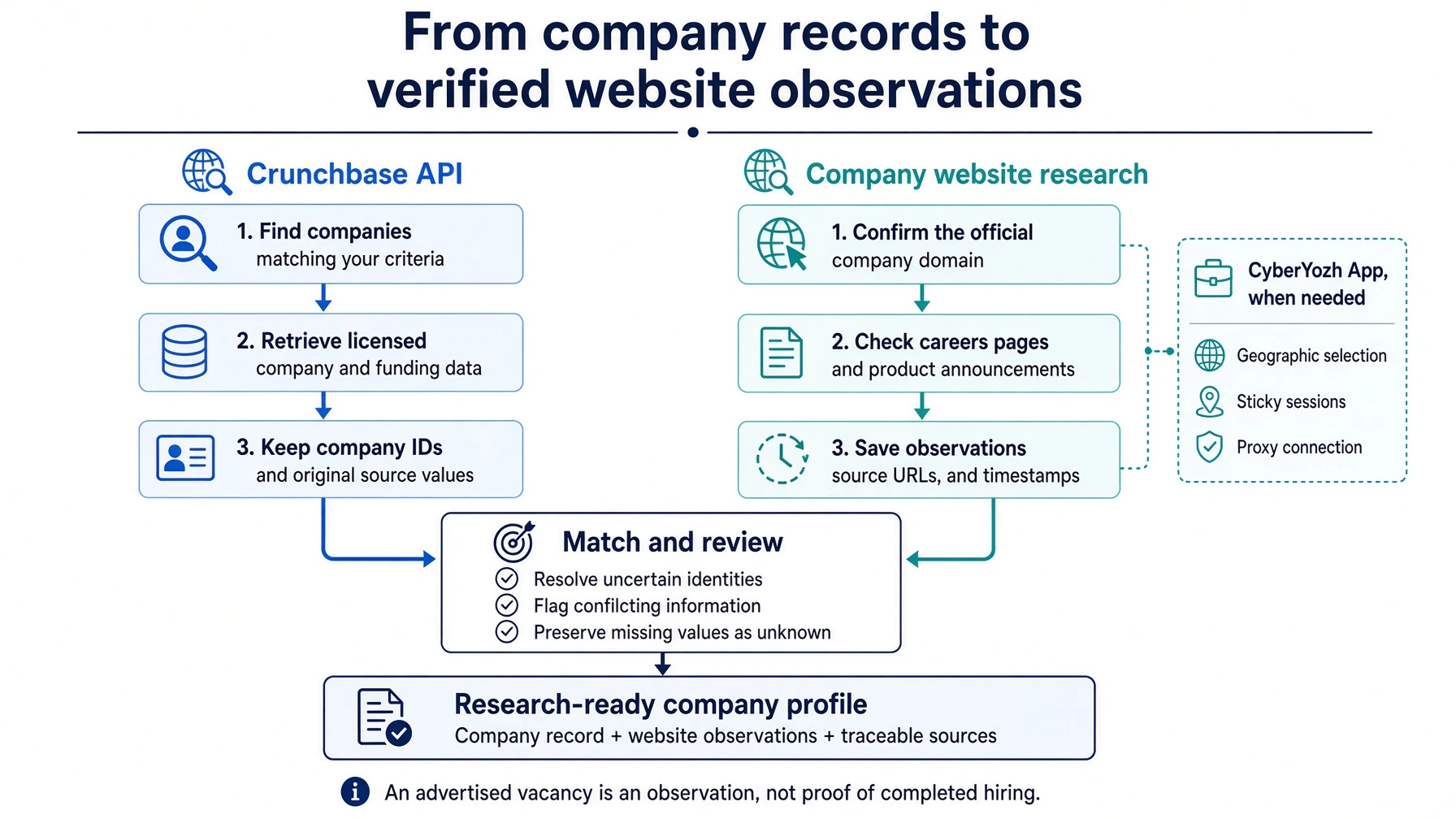
Use licensed Crunchbase records to identify relevant companies, then collect specific observations from their official websites. Keep each observation attached to its source and date so your team can distinguish reported company data from what a website currently shows.
Suppose you want to research software companies that recently raised funding and now advertise engineering roles or announce new products. Funding information gives you the initial selection; website evidence helps you decide which companies deserve closer review.
1. Define what makes a company relevant
Set the criteria before collecting records. For this example, select software companies in your target market with a funding announcement in the past 90 days. Specify which funding types qualify and how you will handle records with missing dates or amounts.
Define the website questions just as narrowly: does the company advertise engineering vacancies, and has it published a dated product announcement within the same period? These questions produce observations your team can check.
2. Retrieve the licensed records you need
Request the identifiers, company names, website addresses, and relevant funding information available under your license. Retain the funding announcement date separately from the date you retrieved the record.
Keep an unchanged source copy where your license permits storage. This gives you a reference when subsequent research reveals a different name, domain, or description.
3. Match each company to its official domain
Start with the website address associated with the record, then check that the destination represents the same organization. Compare the company name, product description, and identifying details on its About or contact page.
Different names may refer to one organization following a rebrand, while similar names may belong to unrelated businesses. Record confirmed aliases and domain redirects. If the match remains uncertain, flag it for review before attaching website observations to the company ID.
4. Select pages that answer the research question
For this example, focus on careers pages, individual job listings, product announcements, and release notes. Use permitted data collection methods and check the site’s access conditions before automating requests.
A small, relevant page set makes the results easier to validate. There is little reason to collect an entire website when the question concerns advertised engineering roles and recent product releases.
5. Extract observations with their limits intact
Record the job title, advertised location, listing URL, and posting date where available. For product news, capture the announcement title, publication date, and the specific change described.
Keep the interpretation separate. A live vacancy indicates that a role is advertised; it does not prove that someone has been hired or that total headcount is growing. Likewise, a product announcement may describe a preview or waitlist rather than a generally available release.
6. Save the evidence and collection time
Store the source URL and a collection timestamp alongside every observation. Capture publication dates separately when the page provides them: a page checked today can still contain an announcement from several years ago.
The simplified table below shows how the output could look. All companies, identifiers, funding details, and observations are fictional. An implementation should retain full timestamps rather than dates alone.
Company ID | Official domain | Funding information | Observed website signal | Source | Checked date |
demo-001 | northstar.example | Series A; $12M; announced Sep 10, 2026 | Two engineering vacancies advertised; posting dates absent | northstar.example/careers | Oct 7, 2026 |
demo-002 | fieldnote.example | Seed; amount undisclosed; announced Aug 21, 2026 | Product beta announced Sep 28, 2026 | fieldnote.example/news/product-beta | Oct 7, 2026 |
7. Review uncertainty before updating the dataset
Send ambiguous domain matches, conflicting dates, and unclear announcements to a review queue. A missing careers page should be recorded as unavailable at the time of checking, not as evidence that the company stopped hiring or operating.
Preserve the original values when sources disagree. For example, retain the company name supplied by Crunchbase and add the website’s current trading name as a separate observation until the relationship is confirmed.
The resulting dataset should let a researcher trace every conclusion back to evidence. “Recently funded and advertising two engineering vacancies” is a defensible description. “Rapidly expanding after funding” requires further support.
When can CyberYozh App help with company website research?
CyberYozh App can support supplementary website research when your collector needs a selected geographic location or a consistent proxy session. Start with direct access if it meets your requirements. Add proxy infrastructure when a specific research question or connection requirement justifies it.
For the recently funded software companies in our example, three capabilities are relevant:
Geographic selection
Check how a company presents its products, pricing, or availability to visitors connecting from a relevant market. Record the selected location with your observations. IP location is only one influence on the page: cookies, language settings, and account preferences can also affect what appears.
Sticky sessions
Maintain the selected proxy session while checking related pages, such as a careers index and its individual job listings. This helps keep the network context consistent across the sequence. Your collector still needs to manage its own cookies and browser state; a sticky proxy session does not preserve those automatically.
Proxy configuration
Connect your collector through a supported protocol, such as HTTP, HTTPS, or SOCKS5. Confirm the endpoint, port, credentials, and client support, then test a small set of pages before expanding collection. Keep proxy credentials separate from your Crunchbase API key.
For recurring research, CyberYozh App also provides API access for proxy management, such as Checking IP address, proxy management, SMS activation, virtual bank cards and more. This can help your application manage the proxy resources used by its website collector. Crunchbase supplies the licensed company records, while CyberYozh App supports the infrastructure for supplementary website checks.
Evaluate the setup against the research task: are you reaching the intended regional pages, maintaining the required session, and extracting accurate observations? CyberYozh App provides connection control for those website checks. The Crunchbase API remains the source of the licensed records, with its own authentication and access limits.
What should you check when requests fail or records look incomplete?
First, identify where the problem occurs: the Crunchbase API request, the company-domain match, or the supplementary website collection. Each requires a different fix. Keep enough diagnostic information to trace the failure, including the response status, error message, and collection time, without logging credentials.
Problem | What to check | Next action |
Authentication or access failure | Whether the key is loaded, the authentication header is correct, and your license covers the requested endpoint. | Correct the key configuration or confirm access with Crunchbase before retrying |
Request throttling | The response’s error details, applicable request limits, and combined request volume across workers | Reduce concurrency, queue requests, and retry with backoff, following any server-provided retry guidance |
Missing API fields | Requested field_ids or card_ids, the endpoint schema, and your access permissions | Correct unsupported requests; preserve genuinely unavailable values as unknown |
Incomplete pagination | Whether you processed subsequent search pages and additional card results | Resume using the documented pagination method and deduplicate records by identifier |
Wrong company-domain match | Redirects, rebrands, similar company names, and identifying website details | Pause enrichment for that record and verify the domain before attaching observations |
Website extraction failure | The returned page, changed HTML structure, JavaScript rendering, or an access-error page | Inspect the response and update the parser or rendering method; review access restrictions before further collection |
Pro-tip: Prefer header authentication over putting the key in the URL, where it can be captured in request logs or browser history if opened in a browser. Configure logging to redact the authentication header as well.
Treat an empty result as something to investigate. It may reflect restrictive search criteria, an unavailable field, or a collection failure. It does not automatically mean that a company has no funding, vacancies, or recent announcements.
After correcting the issue, rerun a small affected sample and inspect the output before restarting the full collection.
How do you choose the right setup for your research?
Choose the setup around how often you need the data and which questions it must answer.
For occasional manual research
assess the Crunchbase website and exports available under the relevant subscription. These may cover your needs without an integration to maintain.
For recurring structured enrichment
assess licensed Crunchbase API access. Confirm that the available fields, permissions, and request limits support your intended refresh schedule.
For structured records plus website observations
combine API retrieval with a separate collector. Keep source values and website findings distinguishable, and configure the collector’s network connection around any geographic or session requirements.
Before expanding the website-research portion, test a small, representative set of company domains. Check extracted observations against the source pages, confirm session behavior across related requests, and measure traffic consumption.
If those checks require proxy infrastructure, select a suitable connection from the CyberYozh App proxy catalog and use the pilot results to size your next collection.