
Разблокировать Discord: как получить доступ к Discord и обойти блокировки

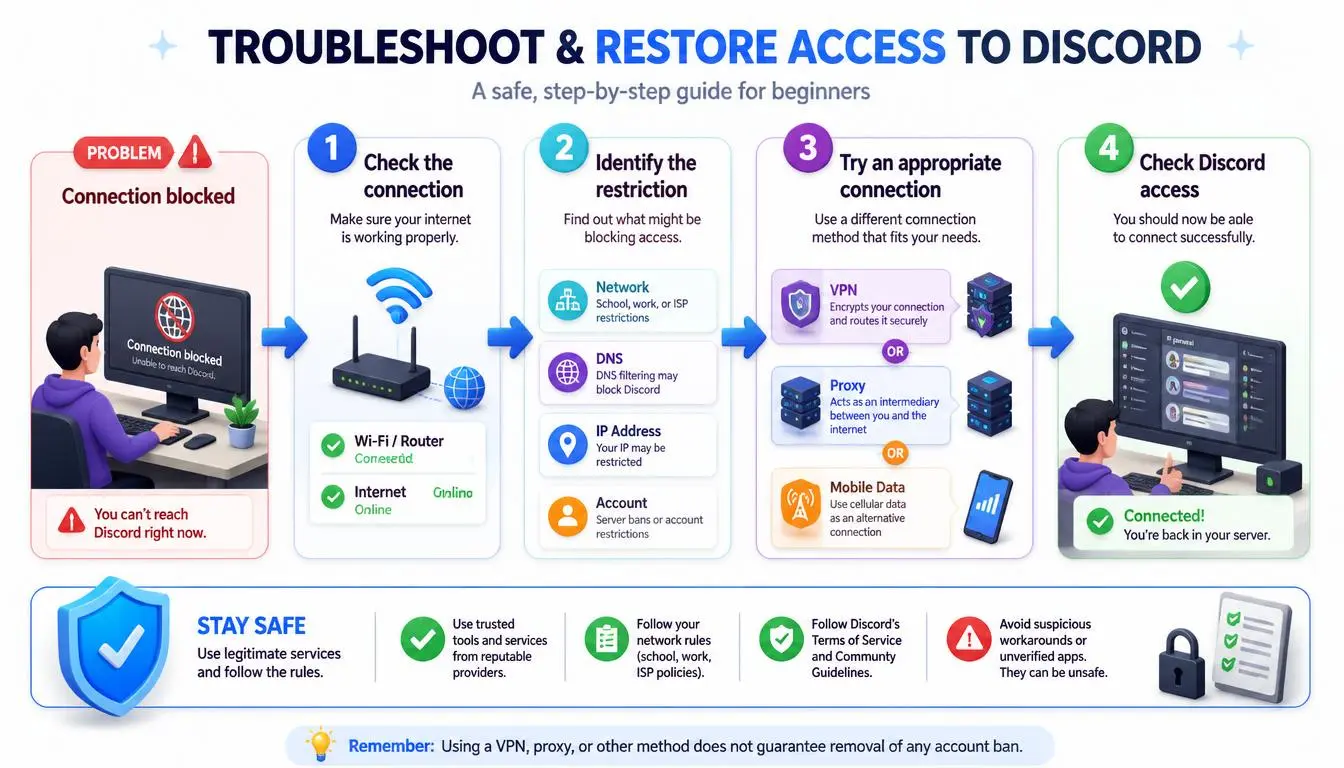
Discord перестаёт загружаться, и первым делом хочется включить VPN. Иногда это помогает. Но часто нет, потому что «заблокирован» может означать четыре разные вещи, и каждая требует своего решения.
Прокси не снимет блокировку аккаунта. Обращение в Discord не поможет, если ваш провайдер фильтрует домен. И никакой сетевой инструмент не изменит того факта, что друг заблокировал вас. Этот гайд покажет, как надёжно разблокировать Discord. Сначала выясните, что именно его блокирует, а затем примените подходящее решение.
Быстрый ответ: Разблокировка Discord начинается с определения причины блокировки. Если Discord работает через мобильный интернет, но не через Wi-Fi, сеть его ограничивает: смените DNS, переключитесь на другое подключение или используйте прокси с поддержкой UDP либо VPN, где это разрешено. Если видите уведомление о блокировке, обратитесь в Discord. Если недоступен только один человек, скорее всего, он вас заблокировал.
Коротко
«Разблокировка Discord» может означать четыре проблемы: сетевое ограничение, блокировку аккаунта, блокировку другим пользователем или обычный сбой подключения.
Двухминутная проверка поможет их различить: проверьте статус Discord, попробуйте мобильный интернет, сравните текстовые и голосовые функции и откройте страницу состояния аккаунта.
Сетевые блокировки устраняются сменой DNS, другим подключением или прокси/VPN. Блокировки аккаунта — только через процедуру обжалования Discord.
Прокси помогает, когда проблема в вашем сетевом маршруте или репутации IP. Он никогда не снимет бан.
Для голосовой связи нужна поддержка UDP. Для работы в аккаунте нужен стабильный IP, а не постоянная ротация. Мобильные прокси CyberYozh и статичные резидентские прокси покрывают обе потребности.
Что означает «Discord заблокирован»: 4 разные проблемы
«Discord заблокирован» описывает четыре несвязанные ситуации: ваша сеть блокирует трафик к Discord. Discord ограничивает ваш аккаунт, другой пользователь блокирует вас или что-то между вами и Discord просто ломается. У каждой ситуации свой источник и своё решение.
Тип | Что вы видите | Кто контролирует | Что помогает |
Сетевое ограничение | Discord не работает в одной сети Wi-Fi или у провайдера, но работает в другой; страница «сайт заблокирован»; голосовая связь зависает при подключении | Владелец сети, провайдер или регулятор | Другая сеть, смена DNS, прокси/VPN, где это разрешено |
Ограничение аккаунта | Discord загружается, но вы видите уведомление о блокировке или ограниченные функции | Discord Trust & Safety | Обжалование или ожидание окончания временной блокировки |
Блокировка пользователем | Всё работает, кроме одного человека: личные сообщения не доходят, заявки в друзья не отправляются | Этот пользователь | Ничего технического |
Проблема сервиса/подключения | Бесконечная загрузка, пропадающие изображения, обрывы голосовой связи | Discord, ваш провайдер или ваше устройство | Подождать, перезапустить, очистить кеш, переустановить |
Экспертное мнение: В конце сентября 2026 года Discord перестал работать в некоторых филиппинских сетях, включая Globe и DITO, но продолжал работать в Smart. Блокировка последовала за правительственным распоряжением, которое было отменено примерно через день. Одна страна, одно приложение, но разный результат в зависимости от оператора — это признак блокировки на уровне сети. Местные издания, включая Rappler и Gadget Pilipinas, сообщили, что блокировка была применена через DNS операторов связи.
Как определить, что блокирует Discord
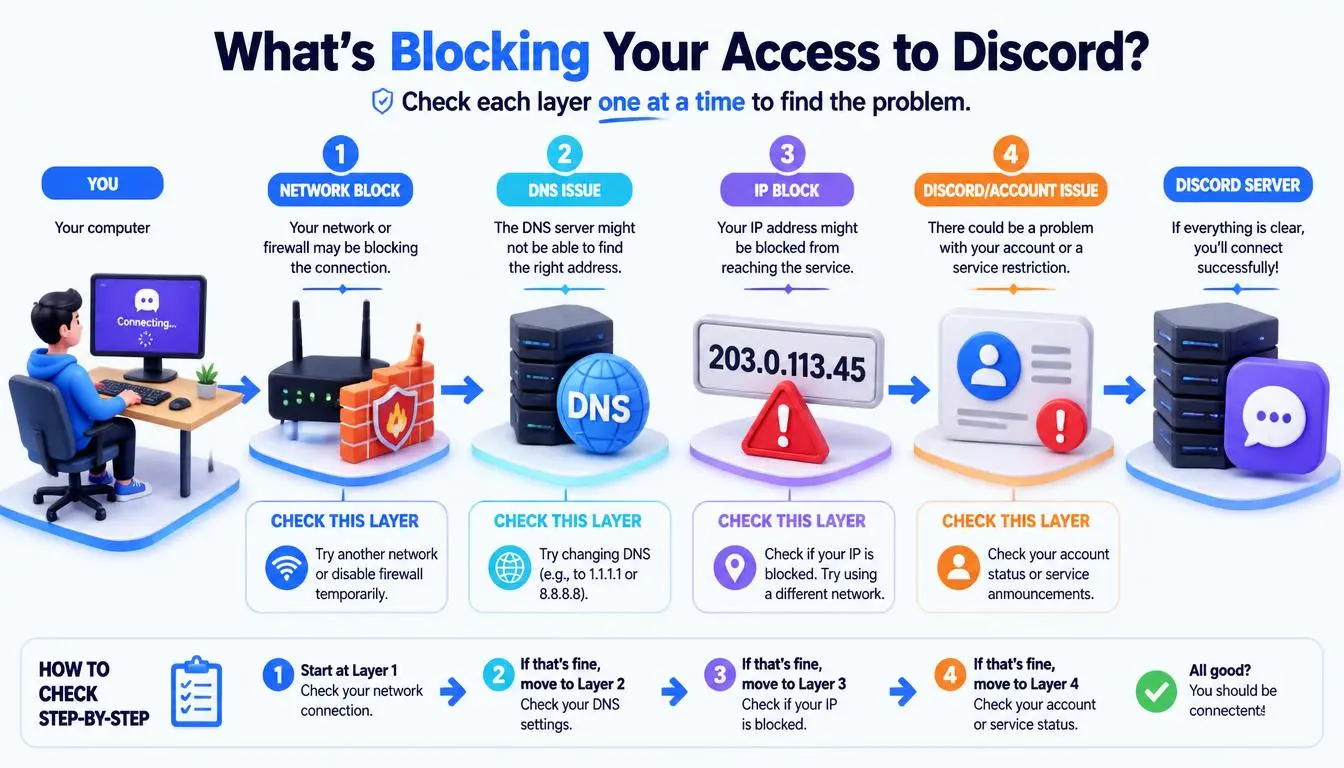
Самая быстрая диагностика — менять по одной переменной: сначала сеть, потом клиент, потом функцию. Каждый тест исключает один из четырёх типов блокировки. Большинство находят ответ за пять минут.
Проверьте официальную страницу статуса Discord (discordstatus). Если там указан активный инцидент, ничто с вашей стороны не поможет. Просто подождите.
Переключитесь на мобильный интернет. Если Discord там загружается, а через Wi-Fi нет, проблема в Wi-Fi-сети.
Сравните приложение с браузером. Откройте discord/app. Если веб-клиент работает, а десктопное приложение нет, проверьте брандмауэр, антивирус или установку приложения.
Сравните текст с голосом. Если текст работает, а голос зависает на «RTC Connecting» или «No Route», что-то блокирует голосовой трафик. Собственный гайд по устранению проблем с голосовым подключением Discord говорит, что рабочие и школьные сети могут блокировать Discord, и что он работает только через VPN с поддержкой UDP.
Откройте «Настройки пользователя» → «Моя учётная запись» → «Репутация». Любые нарушения или приостановки будут перечислены там.
Проверьте, затронут ли только один человек. Если да, это почти наверняка блокировка пользователем или настройка приватности, а не техническая проблема.
Почему Discord работает через мобильный интернет, но не через Wi-Fi
Когда Discord работает через мобильный интернет, но не работает через Wi-Fi, почти всегда причина в Wi-Fi-сети. Частые виновники — брандмауэр роутера, DNS-фильтрация, ошибка маршрутизации провайдера или намеренная политика школы или работодателя. Ваш аккаунт и устройство в порядке, потому что изменился только сетевой путь.
Как безопасно разблокировать Discord
Теперь подберите решение под диагноз. Начните с наименее инвазивного варианта и двигайтесь дальше.
Проблемы с подключением и устройством
Полностью закройте Discord из системного трея или диспетчера задач, затем откройте снова.
Перезагрузите роутер и устройство.
Добавьте Discord в белый список брандмауэра и антивируса.
Очистите кеш Discord или переустановите приложение.
Очистите DNS-кеш. В Windows выполните команду ipconfig /flushdns.
Проблемы на уровне провайдера или DNS
DNS-серверы некоторых провайдеров не могут разрешить Discord или делают это плохо. Переключение устройства на публичный резолвер часто устраняет бесконечную загрузку и пропадающие медиафайлы. Обычно выбирают Cloudflare (1.1.1.1) и Google (8.8.8.8).
Ограничение: если сеть фильтрует IP-адреса Discord, а не доменное имя, смена DNS не поможет.
Школьные и рабочие сети
Внимание: Блокировки в школах и на работе — это намеренная политика, а не ошибка. На управляемом ноутбуке или Chromebook обход фильтра может нарушить правила допустимого использования, и программное обеспечение для мониторинга обычно это записывает. Зеркальные сайты «разблокированного Discord» и веб-прокси в результатах поиска — также распространённый способ кражи вашего логина. Вводите пароль только на discord.
Легитимные пути просты:
Спросите IT-отдел, можно ли разрешить Discord. Многие школы разрешают его для клубов, занятий или в определённое время.
В противном случае используйте свой телефон с собственным мобильным интернетом вне уроков или рабочих часов.
Ограничения на уровне страны
Некоторые правительства ограничивают Discord на уровне провайдера. Россия и Турция заблокировали его в октябре 2024 года; турецкие власти обсуждали возможность восстановления доступа в 2026 году, тогда как блокировка в России остаётся в силе. Использование VPN и прокси регулируется или запрещено в некоторых из этих стран, поэтому прежде чем полагаться на них, проверьте местное законодательство.
Блокировка аккаунта
Если Discord сам заблокировал ваш аккаунт, никакие изменения сети не помогут его восстановить. Официальный способ — подать апелляцию:
Откройте User Settings → My Account → Standing.
Выберите нарушение.
Нажмите «Let us know».
Если вы не можете войти в систему, используйте портал поддержки Discord. Discord объясняет оба способа на странице How to Appeal Our Actions. Временные блокировки истекают сами по себе; Discord заявляет, что постоянные блокировки не снимаются.
Распространённая ошибка: использование прокси для создания нового аккаунта после блокировки. Прокси меняет сетевой путь, который вы используете для подключения к Discord, но не снимает блокировку аккаунта Discord. Обход бана также нарушает правила Discord. Если вы хотите понять, как платформы связывают аккаунты с сетями, прочитайте нашу статью о том, что означает бан по IP.
Если кто-то заблокировал вас в Discord
Два признака указывают на то, что вас заблокировали:
Ваши личные сообщения этому человеку не доставляются и выдают ошибку.
Ваш запрос на добавление в друзья не отправляется.
Ни один из этих признаков не является окончательным, поскольку те же ошибки появляются, когда человек принимает личные сообщения только от друзей или когда вы больше не состоите с ним на одном сервере. Технического решения нет, и не должно быть.
VPN, прокси или мобильный интернет: что выбрать
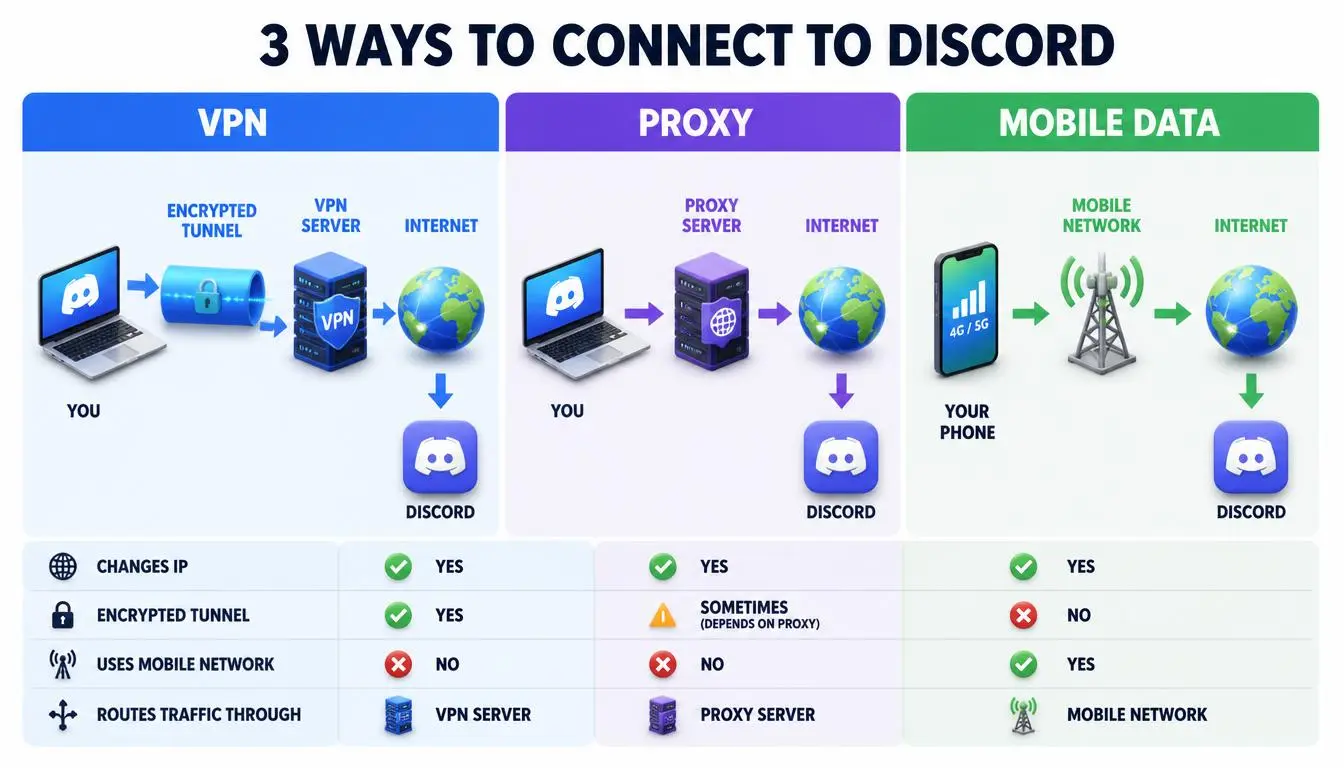
Для быстрой разовой проверки проще всего использовать мобильный интернет. Для шифрования всего устройства в публичной сети Wi-Fi используйте надёжный VPN с поддержкой UDP. Для стабильного постоянного подключения одного аккаунта Discord обычно лучше подходят статичные резидентские или мобильные прокси.
Вариант | Для чего подходит | Голос (UDP) | Стабильность для залогиненного аккаунта | На что обратить внимание |
Мобильный интернет / точка доступа | Быстрые проверки, эпизодическое использование | Да | Хорошая | Расходы на трафик; не подходит для управляемых устройств |
Потребительский VPN | Шифрование всего трафика в публичных Wi-Fi | Только если VPN поддерживает UDP | Смешанная; общие серверные IP часто попадают под фильтры | Бесплатные VPN, частая смена серверов |
Датацентровые прокси | Боты, тестирование | Зависит от провайдера | Самая слабая; диапазоны датацентров попадают под усиленную проверку | Капчи, запросы на верификацию |
Статичные резидентские прокси (ISP) | Один постоянный IP для одного аккаунта | Только с SOCKS5 + UDP | Высокая | Стоимость за IP; одна фиксированная локация |
Мобильные прокси | IP с высоким уровнем доверия для критичных сессий | Да, если провайдер поддерживает UDP | Высокая | Более высокая дневная стоимость |
Когда прокси для Discord имеет смысл
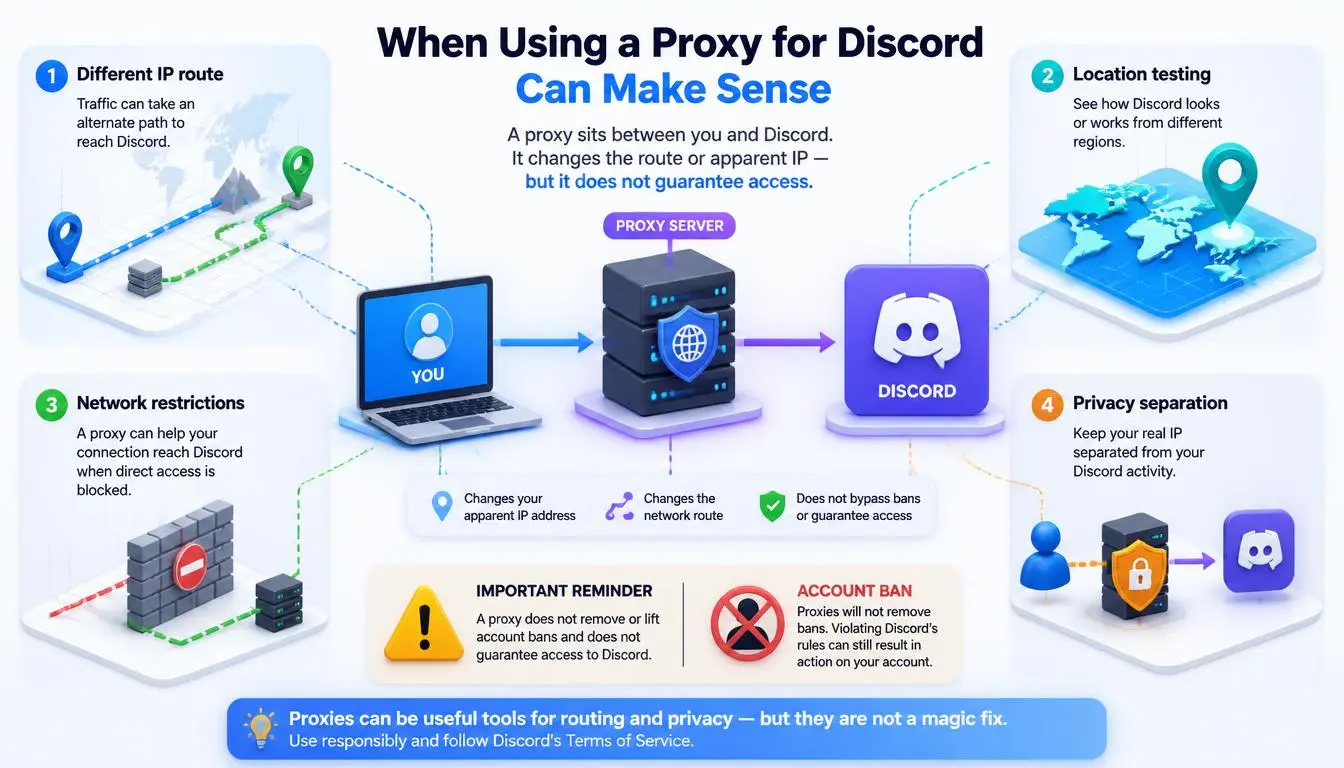
Прокси для Discord перенаправляет ваше подключение через другой IP-адрес, прежде чем оно достигнет Discord. Это помогает, когда проблема в вашем сетевом маршруте или репутации IP. Это не даст результата, если проблема в вашем аккаунте.
Прокси может помочь, когда:
Ваш общий IP вызывает капчи или ограничения по количеству запросов. Типичные примеры — общежития, коворкинги, carrier-grade NAT и публичные Wi-Fi.
Ваш провайдер плохо маршрутизирует трафик к серверам Discord, что вызывает обрывы, которые исчезают при использовании других сетей.
Вы управляете сообществом или брендовым аккаунтом и вам нужна постоянная локация во время путешествий.
Команда управляет несколькими бизнес-серверами с одного офисного подключения.
Прокси не помогут, если:
Ваш аккаунт заблокирован.
Другой пользователь заблокировал вас.
Discord недоступен из-за сбоя.
Ваша установка Discord повреждена.
Вы работаете на устройстве школы или работодателя, где попытки обойти фильтр в принципе неуместны.
Совет профи: Постоянство местоположения важнее, чем признают большинство гайдов. Discord может запросить подтверждение входа с незнакомых локаций, а IP-адрес, который постоянно меняется, вызывает эти проверки снова и снова. Для личного аккаунта используйте один IP: статичные резидентские прокси или sticky-сессию, которая длится часами, а не минутами.
Настройка. В Discord нет встроенного меню прокси, несмотря на то что утверждают некоторые гайды. У вас есть три варианта:
Десктопное приложение: направьте его через инструмент вроде Proxifier.
Веб-клиент: настройте прокси в браузере.
Всё устройство: настройте системный прокси.
Для голосовой связи выбирайте SOCKS5 с поддержкой UDP, потому что HTTP-прокси не могут передавать голосовой трафик Discord. Наш гайд по настройке прокси для Discord подробно описывает каждый метод.
Статичные резидентские прокси: оптимальный выбор для одного аккаунта
Статичные резидентские (ISP) прокси дают вам один выделенный IP-адрес, который не меняется. Этот IP зарегистрирован на настоящего интернет-провайдера.
Почему это полезно: Discord видит одну и ту же локацию входа каждый день, что позволяет избежать повторных проверок.
Когда они лучше ротационных IP: это лучший выбор для любой сессии с авторизацией. Ротационные IP подходят для парсинга, а не для работы с аккаунтами.
Ограничения: вы получаете одну фиксированную локацию. Если этот IP когда-либо попадёт в чёрный список, вам потребуется замена.
Конфиденциальность: ваш провайдер может видеть метаданные подключения, поэтому выбирайте того, у кого есть чёткая политика.
Стоимость: вы платите за IP в месяц, а не за ГБ, что обычно дешевле для повседневного общения и голосовой связи.
Лучшие прокси для Discord в 2026 году
Мы сравнили провайдеров по факторам, которые важны именно для Discord:
Поддержка UDP для голосовой связи
Управление сессиями
Доступность статичных IP
Покрытие
Прозрачное ценообразование
Все данные взяты с официальных страниц тарифов провайдеров и проверены в сентябре 2026 года.
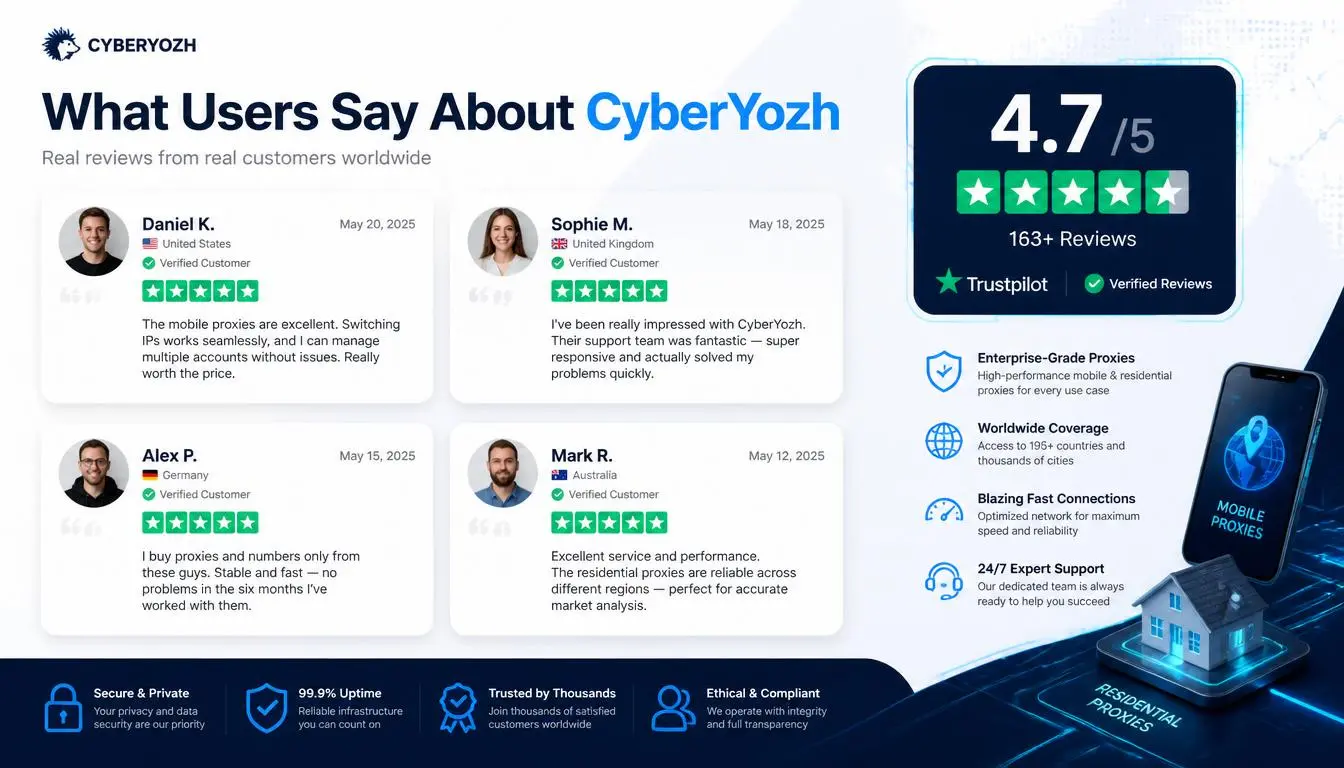
CyberYozh: практичное решение для стабильного подключения к Discord с поддержкой голоса
CyberYozh занимает первое место в этом списке, потому что в его каталоге указаны две самые важные характеристики для подключения к Discord: поддержка UDP для голосовой связи и выбор между длительными или фиксированными сессиями. Кроме того, сервис предлагает их по дневным и месячным тарифам, которые подходят как частным лицам, так и командам.
Почему CyberYozh может быть удачным выбором для подключения к Discord:
Типы прокси: выделенные и совместные мобильные LTE/5G, статичные резидентские от интернет-провайдеров, ротационные резидентскиеи датацентровые.
Голосовая связь: мобильные прокси поддерживают HTTP, SOCKS5 и UDP, что обеспечивает работу голосовой связи в Discord.
Сессии: ротационные резидентские прокси предлагают sticky-сессии длительностью до 24 часов. Тарифы ISP дают вам один выделенный статичный IP.
Покрытие: более 100 млн резидентских IP-адресов в более чем 195 странах с бесплатным геотаргетингом.
Трафик: безлимитный трафик на тарифах ISP и мобильных. Неиспользованный резидентский трафик переносится на следующий месяц.
Цены:
Ротационные резидентские от $2/ГБ
Статичные ISP от $5,29/месяц
Выделенные мобильные от $3,5/день
Совместные мобильные от $1,7/день
Перед входом в аккаунт: чекер репутации IP позволяет заранее проверить репутацию IP-адреса.
Поддержка: 08:00–22:00 GMT+0, каждый день.
Подходит для: менеджеров сообществ, модераторов и небольших команд, которым нужен стабильный доступ с поддержкой голосовой связи. Также подойдёт частным лицам, которым нужен один чистый IP для своего аккаунта.
Если прокси подходит для вашей ситуации, сравните варианты, готовые для Discord, на странице прокси для Discord от CyberYozh.
Как выбрать подходящий прокси для Discord
Нужна голосовая связь? Убедитесь в поддержке SOCKS5 с UDP перед покупкой.
Один аккаунт? Выбирайте статичный IP или длительную sticky-сессию. Никогда не используйте ротацию по запросу.
Совпадение локации. Выбирайте IP-адрес в той стране, где вы обычно пользуетесь Discord.
Сначала проверьте репутацию IP. IP с плохой репутацией вызывает капчи и циклы верификации.
Откажитесь от бесплатных прокси. Они могут перехватить ваш токен входа.
Начните с малого. Купите один IP или один день, протестируйте текст и голос, а затем масштабируйтесь.
Независимое исследование прокси-индустрии от Proxyway может дать вам дополнительную точку отсчёта при оценке провайдеров.
Распространённые ошибки
Вход через зеркала «разблокированного Discord» или случайные веб-прокси.
Оставлять включённым VPN без поддержки UDP, а затем обвинять Discord в «RTC Connecting».
Ротация IP на личном аккаунте, что вызывает повторную верификацию входа.
Использовать HTTP-прокси и ожидать, что голосовая связь заработает.
Воспринимать блокировку аккаунта как проблему сети и тратить деньги на прокси.
Устранение неполадок
Симптом | Вероятная причина | Решение |
Зависает на «RTC Connecting» | UDP заблокирован или VPN без UDP | Отключите VPN или используйте VPN с поддержкой UDP; добавьте Discord в белый список в вашем файрволе |
«No Route» | Локальный файрвол или ограничение сети | Перезагрузите роутер; проверьте файрвол; обратитесь к администратору сети |
Бесконечная загрузка | Сбой, DNS или кеш | Проверьте страницу статуса; очистите DNS; очистите кеш |
Изображения и медиа не загружаются | DNS или фильтрация контента | Смените DNS; протестируйте в другой сети |
Постоянные капчи | Плохая репутация IP | Откажитесь от совместного VPN; используйте чистый резидентский или мобильный IP |
Повторная верификация нового местоположения | IP постоянно меняется | Используйте один статичный IP или длительную sticky-сессию |
Веб работает, приложение — нет | Установка приложения или файрвол | Переустановите; добавьте Discord в белый список |
Заключение
Разблокировка Discord — это в первую очередь задача диагностики:
Блокировка на уровне сети: переключите сеть, смените DNS или используйте прокси там, где это разрешено.
Блокировка аккаунта: подайте апелляцию в Discord.
Блокировка пользователем: примите это.
Проблемы с подключением: перезапустите приложение, очистите кеш или дождитесь окончания сбоя.
Если вам нужно стабильное подключение с поддержкой голосовой связи, статичные резидентские или мобильные прокси — это оптимальный выбор. Вы можете сравнить прокси-решения CyberYozh в каталоге и начать с одного IP-адреса.