
Instagram Automation for Multiple Client Accounts
Managing one Instagram account isn't such a faff. Nevertheless, managing 20, 50, or 100 accounts for different clients is where things get complicated. The repetitive work adds up, whether you're figuring out how to automate Instagram posts, how to set up an automated reply on Instagram, or choosing between the growing number of Instagram automation tools. But so does the infrastructure behind it.
This is where CyberYozh App plays a major part, providing the network infrastructure behind multi-account Instagram operations, with mobile LTE/5G proxies for account management, residential proxies for research and regional work, plus IP reputation checks and SMS services for account verification.
While a proxy is one major part of the setup, to understand what makes Instagram automation reliable at agency scale, you need to look at the device, network, and automation layers together.
TL;DR
Instagram automation can save SMM agencies significant manual work, from scheduled publishing and automated replies to multi-account workflows and campaign management.
Scaling automation requires more than an Instagram automation tool. Device environments, session data, network connections, and locations all need to be considered when managing multiple client accounts.
CyberYozh App provides the network infrastructure behind multi-account operations, including LTE/5G mobile proxies for account management, residential proxies for research and regional checks, IP reputation checks, and SMS services.
Account isolation is broader than using a different IP. Keeping each client's device, session, network, and location appropriately separated helps prevent unrelated client operations from becoming unnecessarily connected.
Mobile proxies are the main choice for Instagram account operations, while residential proxies are better suited to research and regional workflows, and datacenter proxies to high-volume tasks that do not involve account login.
Cloud phones and proxies solve different parts of the setup. A cloud phone provides the device environment, while a proxy provides the network connection. Used together, they give agencies greater control over each client environment.
The right automation method depends on the task. Official scheduling and messaging tools are appropriate for supported workflows, while broader automation may require third-party tools, cloud phones, antidetect browsers, or API-connected infrastructure.
No proxy or automation setup makes an account exempt from Instagram's rules. The goal is to build a consistent, well-separated infrastructure that can support an agency's workflows as its client portfolio grows.
How CyberYozh App supports Instagram automation
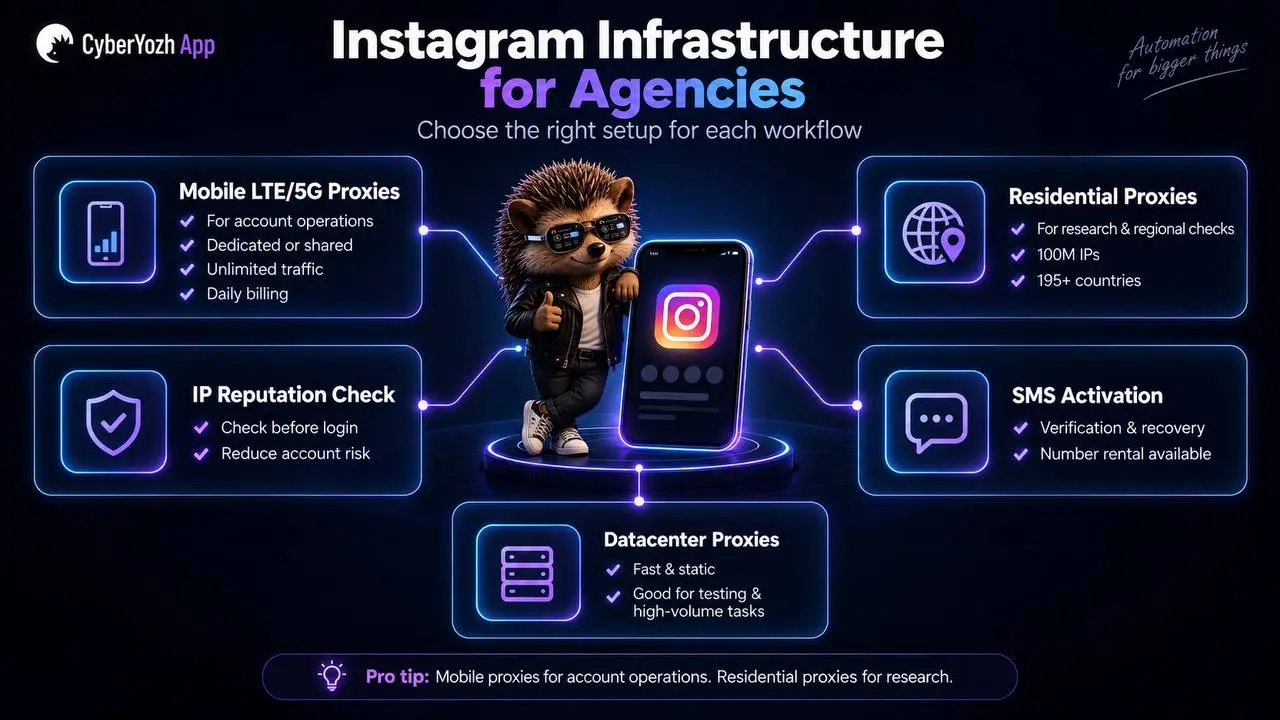
For an SMM agency, Instagram automation starts with keeping client accounts operationally separate. Different workflows need different infrastructure, and matching the two is most of the work.
Workflow | What it needs | Why |
Managing a client account day to day | Mobile LTE/5G proxy, dedicated, stable location | Instagram is mobile-first, and a logged-in account should appear from one consistent place |
Onboarding or recovering an account | SMS activation or residential number rental | Verification is where onboarding usually stalls |
Competitor and hashtag research | Residential proxy, rotating | Volume and geographic reach matter more than session persistence |
Checking how content appears in a market | Residential proxy in that market | Regional results differ from what the agency sees locally |
Speed-sensitive or high-volume tasks with no login | Datacenter proxy | Fast and static, and no client account is exposed |
Before any IP touches a live account | IP reputation check | A flagged IP fails on first login, not later |
Pro-tip: one platform for the infrastructure layer
For an SMM agency, managing Instagram at scale can quickly turn into a collection of separate services: one provider for proxies, another for phone numbers, another for IP checks, and yet another for payments. CyberYozh App can retool social media manager’s career when it comes down to proxy for social media.
You can manage mobile, residential, and datacenter proxies, check IP reputation before assigning an IP to an account, and use SMS activation and residential numbers for verification and account-related workflows. Virtual cards can also help keep payments and subscriptions organized across clients and campaigns.
Mobile LTE/5G proxies for Instagram account operations
Instagram is a mobile-first platform, and the network connection behind an account is part of the environment in which it operates. CyberYozh App's LTE/5G unlimited mobile proxy route traffic through mobile network IPs, giving SMM agencies a network layer that fits mobile-based Instagram workflows.
Agencies can choose dedicated or shared mobile proxies depending on how they manage their accounts. Dedicated proxies provide an individual IP for a specific account or workflow, while shared options can make sense when strict one-to-one allocation is not required.
For agencies running Instagram through cloud phones or other bandwidth-heavy workflows, unlimited traffic is particularly useful. CyberYozh App also uses daily billing, so you can scale proxy capacity around your campaigns and account requirements rather than paying for traffic by the gigabyte.
Location matters too. With mobile proxy locations across different markets, agencies can choose a network location that fits the account and audience they are managing, instead of constantly switching between unrelated locations.
How to manage multiple Instagram accounts for your client
Not every Instagram workflow involves logging into an account. SMM agencies also need to research competitors, check regional content, monitor markets, and collect public data at scale. This is where CyberYozh App's residential proxies become useful.
The residential network includes 100M IPs across 195+ countries, giving agencies access to IPs from a wide range of locations. That can be useful when checking how content, search results, ads, or public-facing pages appear in different markets without sending every request through the same connection.
For example, an agency managing a US brand can use residential IPs to research competitors or check regional results from different US locations. The same approach can be applied when expanding into new markets and comparing what users see across countries.
Quick rule: mobile proxies are primarily for account operations, while residential proxies give your research and monitoring workflows a broader geographic reach.
IP reputation checks
Before assigning an IP to an important client account, it makes sense to check its reputation first. An IP with a history of suspicious activity or poor reputation can introduce unnecessary risk into an otherwise well-managed Instagram setup.
IP reputation checks let agencies assess an IP before putting it behind a live account. This gives teams another checkpoint when building or scaling their infrastructure, particularly when they are managing multiple client accounts and cannot afford to treat every new IP as an unknown.
How to get SMS verification for social media and ads accounts
Proxies are only one part of managing Instagram accounts. CyberYozh App's SMS services can support account onboarding, verification, and recovery when a phone number is required.
For longer-term needs, residential numbers can be rented for receiving SMS from popular online services, giving agencies another option when setting up or maintaining accounts. This is particularly useful when managing multiple client accounts and keeping their operational resources organized in one place.
Keeping proxies, IP checks, and SMS services under one platform also means fewer separate vendors to manage as your client portfolio grows.
Expert insight: For SMM agencies, keeping these services alongside the proxy infrastructure means fewer separate providers to manage when setting up or maintaining client accounts. Learn more about CyberYozh App's virtual cards to create separate cards for different services or projects, set spending limits, and track transactions from one interface.
Datacenter proxies for speed and static connections
In some SMM agency workflows speed and a static connection are the priority, datacenter proxies provide dedicated IPv4/IPv6 addresses with exclusive IP ownership, unlimited bandwidth, and locations across multiple markets.
They can be useful for supporting tasks such as research, testing, and other high-volume workflows where a fast, stable connection matters more than having a residential or mobile IP for Instagram account.
What SMM agencies can automate on Instagram
For an SMM agency, Instagram automation can cover much more than simply publishing posts on a schedule. It can take repetitive work off the team's plate, from content publishing and customer replies to campaign workflows and multi-account management.
The right approach depends on what you're trying to automate. Some tasks can be handled through Instagram's official tools and APIs, while broader account workflows may require third-party automation tools and supporting infrastructure such as proxies, cloud phones, or antidetect browsers.
The most common automation workflows for SMM agencies include:
Multi-account Instagram management
For an SMM agency, the real value of Instagram automation often appears when there are multiple client accounts to manage. Instead of treating every account as a separate manual workload, teams can build repeatable workflows for publishing, engagement, monitoring, and other routine operations.
The challenge is keeping those accounts properly separated. Each client has a different account, audience, content strategy, and operating environment, so putting everything into one shared setup can create unnecessary connections between accounts that have nothing to do with each other.
As the number of accounts grows, agencies need to think beyond the Instagram automation tool itself. Account separation, device environments, and network connections all become part of the setup. What works comfortably for three accounts can become a very different proposition when you're managing twenty or more.
That is where the infrastructure behind Instagram automation starts to matter.
Read more about best Instagram proxies for agencies and media buyers in 2026.
Automated Instagram replies and DMs
Instagram automation can also take care of parts of an agency's messaging workflow. Instead of answering the same questions manually, teams can set up automated replies for common FAQs, acknowledge incoming messages, or use predefined responses to move a conversation toward the next step.
For example, an agency managing a restaurant account could automatically respond to questions about opening hours, while a campaign could use comment-to-DM workflows to send a relevant message when someone interacts with a post. These workflows can help with lead capture without requiring a team member to respond to every interaction manually.
Most agencies start with a no-code tool for this. The tool connects to the client's account, the workflows are built in a visual editor, and the setup is running the same day. That is the right choice when the requirement is straightforward and the volume is manageable.
Instagram messaging API vs automation for events organization
For an events organization, the Instagram Messaging API is better suited to structured workflows such as answering attendee questions, capturing leads, and sending responses based on defined interactions. Broader Instagram automation tools can cover additional account workflows, but they may require more infrastructure and account management. The better option depends on whether the organization primarily needs messaging automation or broader account automation.
The counterintuitive alternative: the API route
There is a second option that gets less attention because it looks harder at the start. Instagram Graph API business account DM automation gives agencies another way to build messaging workflows directly through Meta's official interface, rather than relying on a third-party layer.
The client account has to be a Business or Creator account connected to a Facebook Page, the agency needs a registered Meta developer app with the right permission scopes, and production access requires going through Meta's app review. Someone on the team, or a contractor, has to be comfortable working with webhooks and authentication tokens.
What the agency gets back is worth the setup for the right kind of work. The workflows are built on an officially supported interface, so they are not dependent on a third-party tool's continued access. Behaviour is predictable, rate limits are documented rather than guessed at, and the same logic can be applied consistently across a portfolio of client accounts instead of rebuilt account by account. For an agency running similar messaging flows for twenty restaurant clients, that consistency compounds.
Get the application for API access.
Automate Instagram posts
One of the simplest ways to automate Instagram posts is to schedule them in advance. Instead of publishing every Reel, image, or carousel manually, an SMM team can build a content calendar, prepare approved content, and schedule posts for each client's account.
This works particularly well for recurring campaigns. An agency can plan a week's or month's content around a product launch, promotion, or seasonal campaign, then let the scheduled posts go out at the planned times. It also gives clients an opportunity to review and approve content before anything is published.
If an agency only needs scheduled publishing, Instagram's official scheduling tools may be all it needs. There is no reason to introduce a more complex Instagram automation tool when the workflow is simply planning, approving, and publishing content.
The infrastructure becomes more relevant when automation extends beyond scheduled publishing into multi-account management, repetitive account actions, or larger campaign workflows. That's where the device and network environment need to be considered alongside the automation tool.
When Instagram automation becomes an infrastructure problem
Three client accounts can run from the same office connection without causing much trouble. Then the agency wins new business, scales to twenty accounts, and starts seeing login loops, verification prompts, and CAPTCHAs across accounts that have nothing to do with each other.
That's when a setup that worked for three accounts can start showing its weaknesses. Three accounts can hide infrastructure problems. Twenty accounts expose them.
Shared IPs can connect unrelated accounts
When multiple client accounts operate through the same public IP, they share part of the same network identity. This can create an unnecessary connection between accounts belonging to completely different clients, particularly if that IP develops a poor reputation or triggers additional checks.
CyberYozh App can help agencies separate these network environments by assigning appropriate proxies to different accounts and workflows. Instead of routing an entire client portfolio through one office connection, an agency can build a more structured network setup around the accounts it manages.
If an IP has already been restricted, see our guide to Instagram IP bans.
Device and IP inconsistencies
An account can have a separate device environment and still encounter problems if its network connection keeps changing. The reverse is also true. Instagram is used on phones, so an account operating from a desktop browser on a shared office connection presents an environment that does not match how the platform is normally used.
This is why many agencies pair cloud phones with dedicated proxies. A cloud phone gives each client account its own mobile phone environment with its own device identifiers, which solves the device half. On its own that is not enough. Without a dedicated proxy, every cloud phone leaves through the same exit IP and the profiles are tied back to one operator anyway. Pairing each device environment with its own proxy completes the separation, so the profile has both a unique identity and a unique network address.
An Instagram account that repeatedly appears from different IPs or locations ends up with an inconsistent operating environment, whatever device it runs on. CyberYozh App helps keep the network side of that environment consistent. Agencies can choose proxy locations that fit their account setup and maintain a stable network connection rather than constantly switching between unrelated IPs.
High-volume activity and rate limits
The more accounts an agency manages, the more activity happens at the same time. Repetitive actions across a large portfolio can increase the chance of hitting rate limits, verification prompts, or CAPTCHA challenges, particularly when activity is concentrated through the same connection.
CyberYozh App cannot remove Instagram's limits or make automation risk-free, but it can help agencies distribute their network infrastructure across their workflows. With mobile proxies, residential proxies, and API access, teams can build an infrastructure that is better suited to the scale and type of automation they are running.
In order to avoid creating unnecessary connections and infrastructure bottlenecks as your agency grows, read more about how CyberYozh App can help bypass CAPTCHA.
How Instagram detects and reacts to automated behavior
Instagram automation sits within a set of rules that agencies need to understand before scaling their workflows. Instagram's Terms of Use restrict unauthorized automated access and data collection, as well as activity that interferes with or improperly accesses the service. That does not mean every automated task is treated the same way. Scheduling a post through an approved tool is a different activity from running large volumes of repetitive actions across dozens of accounts.
Instagram also responds to patterns of behavior rather than to individual actions in isolation. This can include repetitive or high-volume activity, sudden changes in location, network signals, and device signals. The exact systems and thresholds are not publicly documented, so no setup can guarantee an account will never face a restriction.
For SMM agencies, the practical takeaway is that automation should be considered as a complete environment rather than just a tool performing actions. Instagram does not only see what an account does. Its surrounding device and network environment also matter.
Account isolation is worth getting right for reasons that go beyond this. Agencies are already expected to keep client work separate, from access permissions to billing to offboarding, and running every account through one shared environment turns any single problem into a shared one. Separating client accounts gives teams more control over the infrastructure behind their automation. It does not change what Instagram permits, and the account activity itself still has to follow the platform's rules.
Why account isolation is important for SMM agencies
Agencies are already expected to keep client work separate. Access permissions, billing, reporting, and offboarding are all handled per client, and nobody would suggest running three clients' ad accounts through one login. The Instagram accounts themselves deserve the same treatment.
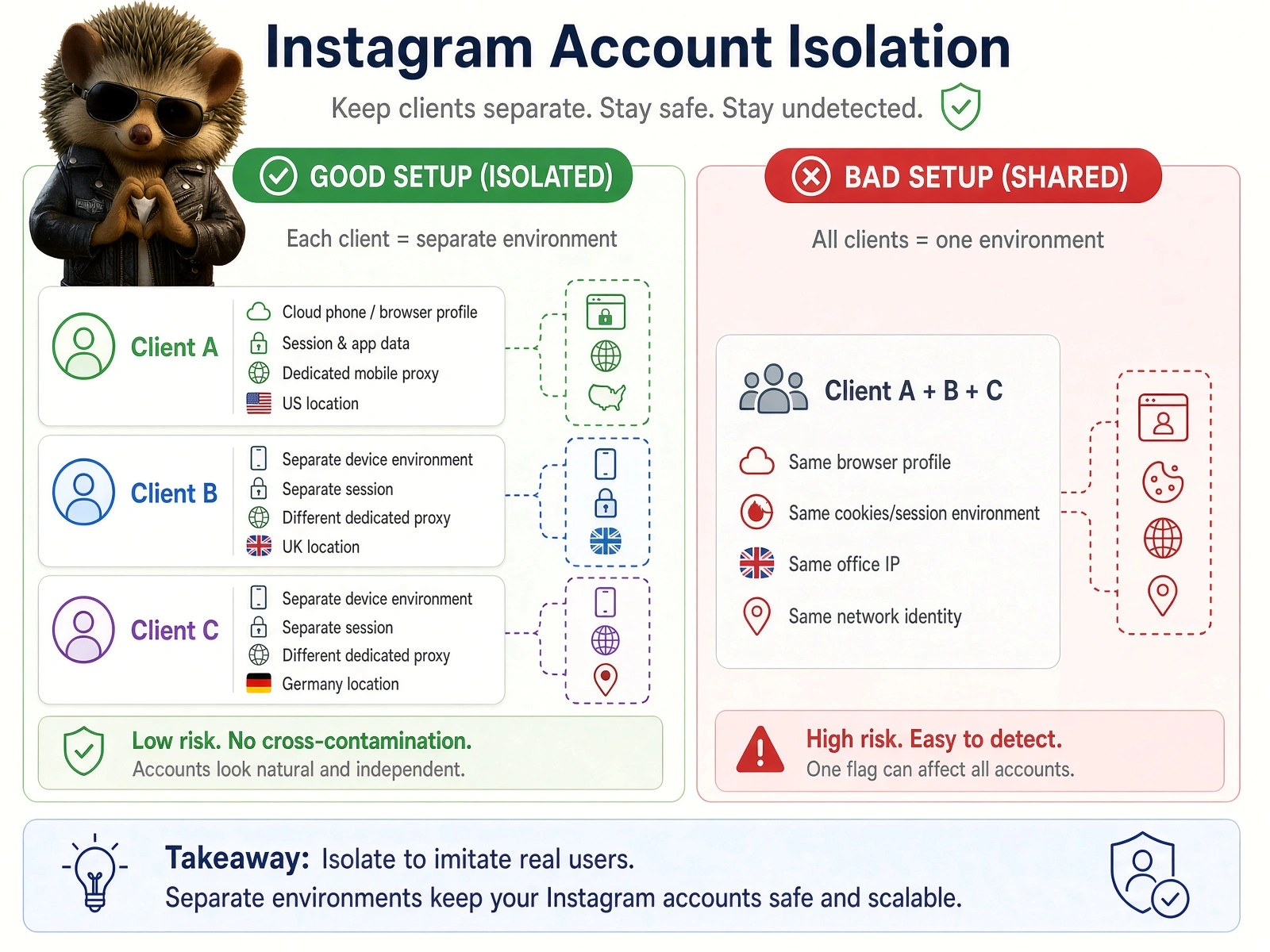
Isolation means separating more than the IP address. A properly separated setup gives each client account its own:
Device environment. A dedicated environment for that account, not a shared profile. In practice this means an antidetect browser profile for desktop workflows, or a cloud phone for mobile-app workflows.
Session and app data. Its own cookies, login sessions, and application data.
Network connection. A dedicated proxy rather than the shared office IP.
Location. An IP in the client's market that stays consistent over time.
These four layers work together. Assigning a different IP to each account while running them all from one browser profile solves a quarter of the problem.
The operational case is simpler than the technical one. When every client runs through the same connection, any single issue becomes everyone's issue. When a new client comes on board, the team creates a defined environment for that account rather than adding another login to a growing pile. When a client leaves, that environment is handed over or closed cleanly, with nothing entangled in another client's setup.
The larger the portfolio, the more that structure pays for itself. Account isolation does not make an account exempt from Instagram's rules, and it is not meant to. It keeps unrelated client operations separate and gives the team real control over the infrastructure underneath them.
Instagram automation best practices for SMM agencies
Most of what determines whether an agency's Instagram automation holds up is decided before any automation runs. The rest comes down to how activity is paced once it does.
Setting up the environment
Separate unrelated client accounts. Client A's account should share nothing with Client B's, for the same reason their ad accounts and billing are already separate. When accounts share an environment, a problem with one becomes a problem for all of them.
Keep device environments separated. A dedicated antidetect browser profile for desktop workflows, or a cloud phone for mobile-app workflows. Running twenty accounts through one browser profile undoes most of the benefit of giving them separate IPs.
Check IP reputation before assigning it to a live account. A flagged IP fails on first login, not weeks later. Checking takes seconds, and diagnosing the problem afterwards costs a great deal more.
Keep network locations consistent with the account's market. An account managed for a US brand should operate from a US IP, and stay there. A location that matches the audience and does not move is one less inconsistency in the account's environment.
Avoid putting large numbers of accounts behind one shared IP. A shared office connection is the most common single point of failure in agency setups. It works at three accounts and stops working somewhere on the way to twenty.
Running activity sensibly
Avoid unnecessary IP changes. A logged-in account should appear to operate from one place over time. Rotation belongs in research workflows, not in account management.
Scale activity gradually on newly onboarded accounts. Running a new account at full automation speed on day one is the most common self-inflicted problem an agency creates. Let the account settle first, then build up.
Avoid identical actions at unnatural speeds. Instagram responds to patterns rather than to individual actions. Repetition at machine pace is the pattern most likely to be picked up.
Match the automation method to the task. Official scheduling tools are enough for publishing. The Messaging API suits repeatable messaging workflows across a portfolio of clients. Third-party Instagram automation tools are worth the added infrastructure only where the task genuinely requires them.
Already dealing with an action block? See our guide on how to fix an Instagram action block.