Proxy Chaining: How to Chain Proxies and Test Your Setup

Your team needs to test its website from another country, but company policy requires traffic to pass through an existing gateway. Proxy chaining can accommodate both requirements: connect through the approved gateway, then use a CyberYozh App proxy as the exit to the destination. Getting that route right depends on compatible protocols, the correct hop order, and application routing rules.
This guide explains what adding a proxy changes, how to configure a simple two-hop connection, and how to verify it. You’ll check the exit IP, confirm that both required hops participate, and test what happens when either becomes unavailable.
TL;DR
Proxy chaining routes a connection through two or more proxies in sequence. The final proxy supplies the exit IP used to connect to the destination.
Each hop should serve a purpose, such as keeping an approved gateway while adding a regional exit. More hops introduce additional delays and failure points.
Chaining differs from rotation: it adds stages to the route, while rotation changes exit IPs between connections or sessions.
To chain proxies successfully, check protocol compatibility, authentication, hop order, and application routing.
Verify more than the exit IP. Confirm that required hops participate, review DNS behavior, and test whether a failed hop causes an unintended fallback.
CyberYozh App can provide the exit proxy, with the network type, location, and session behavior selected for your task.
Chaining alone does not encrypt traffic or guarantee anonymity. Those properties depend on the protocols, configuration, and applications involved.
What is proxy chaining?
Proxy chaining is a technique that routes a connection through two or more proxy servers in sequence before it reaches its destination. Each proxy establishes or forwards the connection toward the next stage, with the final proxy connecting to the target server.
The proxies have different roles according to their position:
Entry proxy: The first proxy your application connects to.
Exit proxy: The final proxy, which connects to the destination using its exit IP.
Intermediate proxy: Any additional proxy between the entry and exit. A two-proxy chain has no intermediate hop.
You may also encounter “chain proxy” as wording for a proxy-chain configuration. Proxy chaining names the technique; ProxyChains is a software tool that can implement it.
Pro-tip: The upshot is that adding several proxy addresses to a list does not automatically create a chain. Your client must use them sequentially for the same connection, rather than select one, rotate between them, or treat them as backups.
How does proxy chaining work? Follow one request
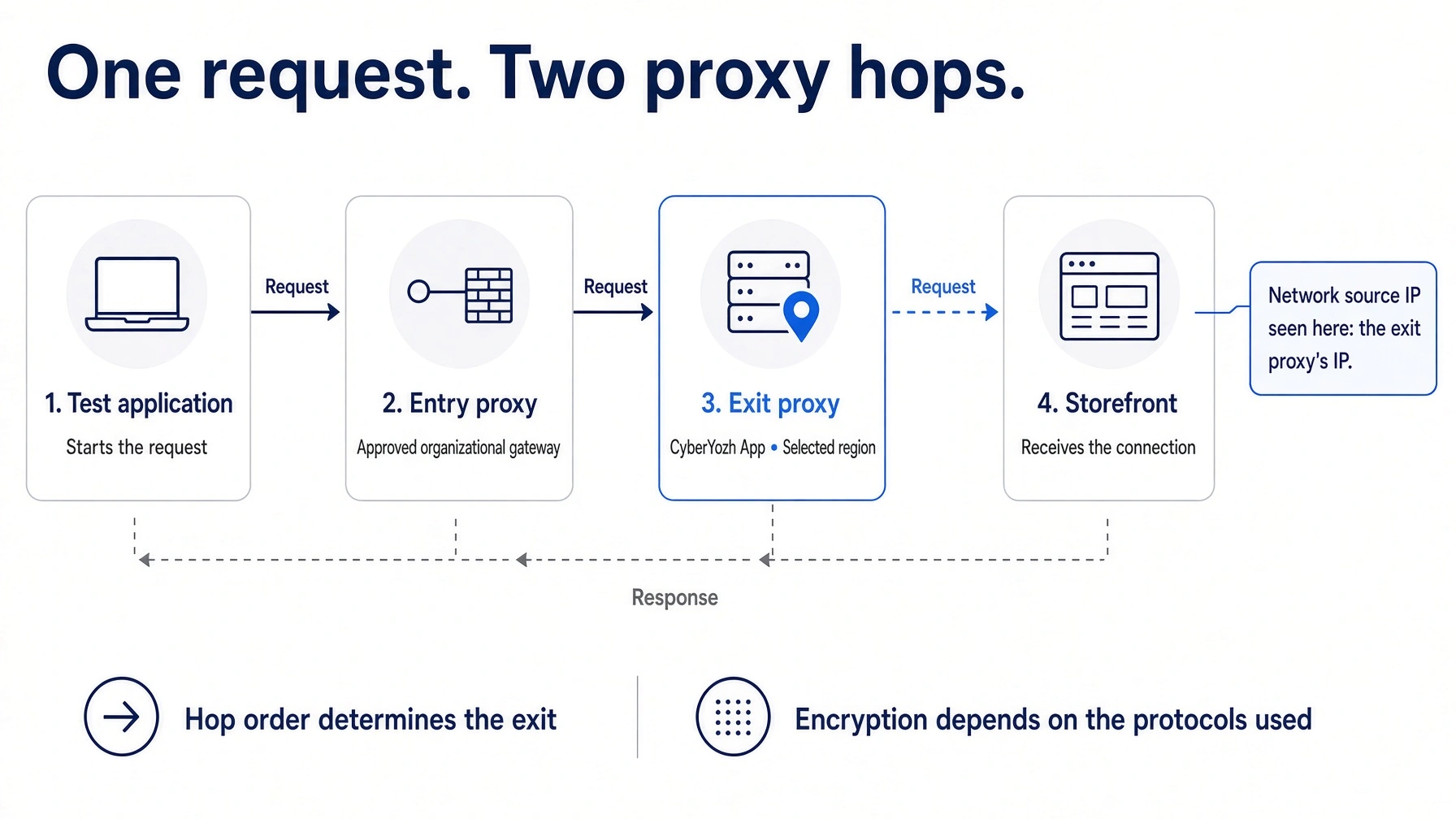
Suppose your team needs to check a storefront’s regional pricing while keeping traffic routed through its approved gateway. With proxy chaining configured in the test client, a request follows four stages:
The test application connects to the approved gateway, which serves as the entry proxy.
The gateway carries the connection to the selected CyberYozh App proxy, following the configured protocol and authentication requirements.
The exit proxy connects to the storefront. At the network connection level, the storefront sees that proxy’s exit IP as the source.
The response travels back through the established connections to the test application.
Order does have a bearing. Reversing these proxies would make the approved gateway the exit, changing the network the storefront sees. The reversed route might also fail if either proxy cannot reach the next endpoint or its required port.
The hostname entered in your proxy settings identifies the endpoint you connect to. It does not necessarily identify the IP the storefront sees. A rotating service can accept connections through one gateway hostname while assigning different exit addresses according to its session settings.
Changing that source IP does not remove cookies, account logins, browser fingerprints, or identifying headers. Encryption is also a separate property, determined by the protocols and connections involved.
Proxy chaining vs. rotation, failover, and load balancing
A list of proxy endpoints can support several configurations. The distinction is how the client uses those endpoints for each connection.
Configuration | What happens to a connection | Main purpose |
Proxy chaining | Passes through multiple proxies sequentially | Combine required routing stages |
Proxy rotation | Selects an exit IP according to rotation or session rules | Change the destination-facing IP |
Proxy failover | Uses an alternative after a route fails, often requiring reconnection | Maintain availability |
Load balancing | Assigns connections across available proxies | Distribute traffic and capacity |
These approaches can work together. A chain can end at a rotating residential service, allowing new connections to use different exit IPs while retaining the same entry gateway. Chaining itself does not cause rotation, and failover does not necessarily preserve an interrupted session.
Choose the configuration around the requirement. If you need regional exit IPs for market research or localized website checks, CyberYozh App’s rotating residential proxies may meet that need directly. Add an entry hop when it serves a separate routing requirement, such as passing through your organization’s approved gateway.
When does adding a second proxy make sense?
A second proxy is useful when it fulfills a requirement that the exit proxy alone cannot meet.
Keep an approved gateway while changing the exit network
Your organization may require test traffic to pass through its gateway, while a storefront check needs an exit IP in another country. Proxy chaining can combine those requirements: retain the approved gateway as the entry point and configure a compatible CyberYozh App proxy as the regional exit.
Pro-tip: Confirm that the gateway can reach the exit endpoint and that your organization permits the onward proxy connection. The configuration must also preserve any required inspection or logging.
Connect an application through a local forwarding proxy
Some applications accept a proxy address but cannot handle the authentication required by an upstream provider. A compatible local forwarding proxy can accept the application’s connection and authenticate to the upstream service on its behalf.
That local hop runs on your device or nearby infrastructure. It does not automatically add another remote location or change the exit IP.
Reproduce a specific network path during testing
A controlled chain can help reproduce connection failures, authentication issues, or timeout behavior encountered when an application passes through multiple intermediaries. Keep the hop order and settings consistent so repeated tests are comparable.
Give each hop a named purpose. If your task only requires one suitable exit IP, a single proxy may already meet the requirement.
Choose the exit proxy before building the chain
The exit proxy determines the source IP your destination sees. Choose it around the task, then configure the preceding hops to reach it.
Use a static ISP exit when the same IP needs to persist
CyberYozh App’s static ISP proxies suit repeated regional checks, services that allowlist an approved source IP, and applications that benefit from a consistent address across sessions. Confirm the assignment period and replacement conditions before relying on that IP for ongoing access.
Use rotating residential exits when the task needs IP variety
CyberYozh App’s rotating residential proxies fit research or testing that requires multiple residential exit IPs. Rotation changes addresses according to the service’s connection and session rules; it does not necessarily change the IP for every HTTP request.
A sticky session retains an address for a limited window, helping related requests share an exit. It is not a permanent static assignment, so choose session settings around how long each task needs continuity.
Use a mobile exit when the required network is mobile
Choose a CyberYozh App mobile proxy when your test specifically requires an LTE/4G/5G network exit. That changes the network source, but does not reproduce a phone’s browser, operating system, or hardware characteristics.
Datacenter proxies are also suitable where a hosting-network IP meets the destination’s requirements.
Before purchasing, confirm location, protocol, authentication, session behavior, traffic allowance, and destination compatibility. Test the selected exit independently before adding it to your chain.
How to chain proxies: build a two-hop setup
This example uses ProxyChains-NG on Linux to route a compatible command-line application through an entry proxy, then a CyberYozh App exit proxy. Both endpoints use SOCKS5 for TCP connections.
Step 1. Confirm both endpoints work independently
Collect each proxy’s address, port, protocol, and authentication details. Test each endpoint separately using a compatible client, confirming that it can reach an HTTPS destination.
A successful individual test does not prove that the entry proxy can reach the exit proxy. Network restrictions, blocked ports, or authentication rules may prevent that onward connection.
If the exit proxy uses source-IP allowlisting, it normally receives the connection from the entry proxy’s egress IP, with the caveat that allowlisting only your device’s public IP may therefore be insufficient.
Step 2. Put the proxies in the required order
In this two-SOCKS5 example, the entry proxy carries the authentication exchange with the exit proxy. Without an additional encrypted transport protecting that exchange, the entry operator can inspect the exit’s username and password. HTTP Basic authentication has a similar exposure over an unencrypted proxy connection because Base64 encoding is not encryption. HTTPS to the destination does not protect these earlier proxy-authentication exchanges. Use an entry proxy you trust.
Keep the approved gateway as the entry and the selected CyberYozh App endpoint as the exit.
Confirm that the entry permits connections to the exit’s address and port. Check the protocol for each endpoint rather than assuming that HTTP and SOCKS5 use interchangeable ports.
If you are testing with rotating residential proxies, enable a sticky session to keep the exit IP consistent across test connections. For example, the exit entry in proxychains.conf could look like this:
socks5 198.51.100.20 1080 u12ab_worker1-us-s-Ab3xK9pQ-ttl-10m EXIT_PASSWORD Here, -s-Ab3xK9pQ identifies the session, while -ttl-10m sets a 10-minute session duration. Reuse the same session ID throughout the test to request the same exit IP during that window. This helps you verify the chain without routine rotation changing the address between connections.
Step 3. Create an explicit chain configuration
Follow the CyberYozh App ProxyChains installation guide to install the client. Then save a separate configuration as $HOME/proxy-chain.conf:
strict_chain
proxy_dns
remote_dns_subnet 224

tcp_read_time_out 15000
tcp_connect_time_out 8000

[ProxyList]
# ENTRY: approved gateway
socks5 192.0.2.10 1080 ENTRY_USER ENTRY_PASSWORD

# EXIT: CyberYozh App endpoint
socks5 198.51.100.20 1080 EXIT_USER EXIT_PASSWORD
The addresses are documentation placeholders, not working proxies. Replace both addresses, ports, and credentials with your actual endpoint details. This example uses numeric proxy endpoint addresses for compatibility. Hostname support depends on your ProxyChains-NG version, chain mode, DNS settings, and the endpoint’s position in the list. If your provider supplies a gateway hostname, confirm the supported configuration before replacing it with a resolved IP. Pinning one address can stop working when the provider changes its gateway infrastructure.
Strict mode requires every listed proxy, in order. Dynamic mode can skip unavailable proxies, which would change this required route. Enable only one chain mode. These rules apply to connections handled by ProxyChains-NG; they do not block traffic from other applications, unsupported networking paths, or configured bypasses. Strict mode is not a device-wide kill switch.
The proxy_dns setting enables ProxyChains-NG’s DNS handling for compatible applications. Verify its behavior with your application rather than assuming the setting covers every lookup.
Because the file contains credentials, restrict access:
chmod 600 "$HOME/proxy-chain.conf"Step 4. Send one HTTPS test request
Record the ProxyChains-NG version shown in its startup diagnostics, along with the output of curl --version. If startup diagnostics are suppressed, check the installed package version using your distribution’s package manager. Then launch a compatible, dynamically linked curl build through the explicit configuration:
curl --version

proxychains4 -f "$HOME/proxy-chain.conf" \
  curl --disable --noproxy '*' --max-time 30 https://api.ipify.org
Here, --disable prevents curl from loading its default configuration file, while --noproxy '*' disables curl’s own proxy selection. ProxyChains-NG handles the intercepted connection using the configuration file specified above.
The expected response is the exit proxy’s public IP, which may differ from its gateway address. Review the chain log as well. That IP alone does not prove both required hops participated.
ProxyChains-NG intercepts networking calls in compatible dynamically linked applications and supports TCP. It does not tunnel every application or all device traffic.
Other ways to create a chain
Proxifier: Create a chain, arrange the entry and exit in order, and assign it to the intended application rule. Use the CyberYozh App Proxifier guide for initial setup.
curl: For a SOCKS entry followed by an HTTP or HTTPS proxy, combine --preproxy with --proxy. This supports that specific arrangement, rather than arbitrary sequences of proxy protocols.
Verify the route, not just the final IP
A successful request confirms connectivity. To verify proxy chaining, check the application’s exit address, required hops, DNS behavior, and response to failure separately.
Check the destination-facing IP
Run an HTTPS IP check through the exact application and configuration you intend to use. Compare the returned address with the expected exit IP. For a rotating service, check whether the address matches the selected country and network requirements.
An IP-only response confirms the address, not its country or network classification. Check those separately, then test the storefront itself: language, cookies, account settings, and delivery location can also affect regional content.
Checking an unrelated browser does not verify a command-line application’s route. Each may use different proxy settings.
Confirm the required hops participated
Review client logs for connections through the configured entry and exit. Where you control the infrastructure, corroborate those records with proxy logs. Destination logs can confirm the source address received, but generally cannot reveal the preceding path.
Pro-tip: Seeing the correct exit IP does not prove that every required hop was used.
Check DNS and traffic outside the chain
Check how the actual application resolves destination names and whether it generates traffic the chaining client cannot handle. For a TCP-only client, investigate UDP traffic, including QUIC, separately.
A configured DNS option is not proof that every lookup follows the intended route. Use application diagnostics or a controlled packet capture to investigate unexpected direct connections.
Test what happens when a required hop fails
Temporarily make one required endpoint unavailable in an isolated test configuration, then start a fresh request. Confirm that it fails rather than connecting directly or skipping the required hop.
Finally, use CyberYozh App’s IP checker to assess the exit address’s reputation and blacklist signals. That is an additional quality check, not verification of the complete chain.
Troubleshoot a proxy chain one hop at a time
When proxy chaining fails, identify the stage that breaks before changing settings. A proxy that works independently may still be unreachable from the preceding hop.
Symptom | What to investigate first | Next check |
Each proxy works alone, but the chain fails | Entry-to-exit reachability | Port restrictions and authentication |
The destination sees an unexpected IP | Application routing and chain order | Bypass rules and alternate routes |
Authentication fails at the second hop | Credentials and source-IP restrictions | Whether the preceding hop’s egress IP is allowed |
A session changes unexpectedly | Exit rotation or session settings | Session identifier and assignment duration |
TCP requests work, but other traffic fails | Client and protocol support | Whether the application uses UDP or QUIC |
Requests become much slower | Added route distance and slow hops | Compare direct, single-proxy, and chained requests |
Change one variable at a time and repeat the same request. Keep the destination, application, and exit session consistent where possible, so differences are easier to trace.
Longer timeouts can accommodate a slow connection, but they cannot fix incorrect credentials, blocked ports, or unsupported traffic. Check logs to distinguish a connection timeout from an authentication rejection or a delayed destination response.
Pro-tip: Test each endpoint independently, test the combined path, then test the actual application. If the chain works with a command-line client but fails in your application, investigate that application’s routing, DNS, and protocol behavior next.
Does proxy chaining improve privacy or performance?
Proxy chaining does not automatically improve privacy, and additional hops usually add overhead. Each stage introduces connection setup, processing, and a potentially longer network route. A slow hop can constrain throughput; failures and retries can extend completion time further.
For privacy, distinguish what changes from what remains visible. The destination receives a connection from the exit IP, but that does not remove identification through account logins, cookies, or browser state.
HTTPS generally protects application content between the client and destination, provided TLS is not intercepted. Encryption between proxy hops is a separate consideration: adding a SOCKS5 or HTTP proxy does not automatically encrypt that connection.
Proxy operators’ visibility depends on the protocols, tunneling, encryption, and logging arrangements. Do not assume each operator can see only its immediate neighbors, or that using different providers prevents them from correlating activity.
There is also a billing consequence: the same traffic may consume allowances at multiple metered providers, increasing the cost of a completed task.
To assess performance, compare the same request directly, through the exit proxy alone, and through the complete chain. Repeat the measurements under comparable conditions, recording the application, endpoint locations, response size, failures, and timings. Use those observations to decide whether the additional hop earns its place.
Build your chain around the exit IP your task needs
For the storefront test, success means a verified connection through your approved gateway and the regional exit you selected. Every hop should contribute to that requirement.
Start by choosing an exit proxy from CyberYozh App’s catalog with the network type and location your test needs. Confirm protocol compatibility and how long the exit IP must remain consistent, then configure the smallest chain that satisfies the task. Check the route, storefront results, and failure behavior before expanding usage. A working configuration becomes useful when it delivers repeatable results.