
Can my data be stolen through a proxy
You route your traffic through a proxy. You hand over your data to an intermediary. But should you trust them?
Data interception is a real risk. The actual danger depends entirely on two things. The specific website you visit. The provider you choose.
Here is how network protection actually works in transit. We will show you the exact difference between exposed and secure traffic. And you will learn how to spot an unsafe service.
How a proxy server works: The courier analogy
Think of network requests as physical mail. You want to send a letter to a website like google.com.
Instead of walking it there yourself, you hand it to a Courier. The Courier is your proxy server. They take your letter, drop it at the destination, and wait. The website writes a reply. Then the Courier brings that exact response back to your device.
But this introduces a major vulnerability.
You face two direct risks when you add this middleman. The Courier will read your message if you send it without a sealed envelope. They can also alter the contents before the recipient ever sees them.
This is exactly how data interception happens on the web. And in network routing, HTTPS encryption acts as your sealed armored envelope. Without it, your traffic is just exposed plain text.
HTTP vs HTTPS: Security in a modern proxy network
Internet users constantly mistake proxy types for website protocols. This confusion can ruin your data safety.
Our CyberYozh App proxy network provides a wide range of infrastructure. The proxy offer includes datacenter proxies, residential ips, and high-trust mobile ips. But remember a simple rule. Proxy protocols like HTTP or SOCKS5 are merely transport channels to a web server. They handle packet delivery. Website protocols like HTTP or HTTPS handle data packaging.
Whether you manage automated ad verification from mobile devices with frequent IP rotation, or conduct heavy web scraping, the rule stays identical. Open a secure site using a standard HTTP proxy, and your traffic remains safe. Your browser executes the encryption before the data packets ever hit the network proxy.
Let's break down exactly what happens across different web environments.
Scenario A: Unprotected HTTP traffic (no padlock 🔓)
This is a postcard sent without an envelope. If you run automated data collection on an unprotected site (http://example.com), the proxy owner captures everything.

The proxy operator views:
Account logins and cleartext passwords.
Private chats and form data.
Uploaded files. Session tokens.
Your sensitive information faces immediate exposure.
Scenario B: Protected HTTPS traffic (with padlock 🔒)
Encryption changes everything. Your browser secures the connection directly with the destination server before transmitting packets.

The proxy operator only sees basic routing metrics:
The root domain (e.g., facebook.com).
Exact timestamps of your requests.
Total bandwidth consumed in megabytes.
What stays completely hidden:
Specific subpages and full URL paths.
Chat history and profile details.
Payment forms and actual message payloads.
Everything looks like a chaotic string of characters. Your session remains secure. The only exception involves deliberate certificate manipulation, which we will break down later.
The hidden cost of free proxies for internet users
Millions of people hunt for free IP lists every day. But running a reliable web server costs real money. Bandwidth is never free. Who pays for the hardware and electricity?
You do. Your personal information becomes the actual currency.
Cybercriminals intentionally deploy these open nodes as honeypots. They offer a free service simply to capture your traffic. Here is exactly how bad actors weaponize free networks against you:
Ad injection: Operators overlay invasive banners directly onto your active browser tabs.
Phishing redirects: Operators intercept requests and route clicks to malicious pages to steal credentials.
History harvesting: They scrape your browsing habits to build commercial profiles for ad brokers.
Cookie hijacking: Rogue nodes grab active session tokens to access your accounts without passwords.
Script injections: Bad actors inject malicious code into HTTP pages, compromising your devices directly.
Stop trusting random IP addresses with your sensitive information. Building a secure proxy network requires capital. If a provider actually wants to protect users, they have to charge for the infrastructure. Never type a credit card number or login credential while connected to a public node.
Advanced threat: MITM attacks and certificate substitution
Attackers can intercept encrypted HTTPS traffic. They use a Man-in-the-Middle (MITM) attack.
Here is the exact technical mechanism. A legitimate web server presents a digital certificate verified by a trusted authority during the initial handshake. This file proves ownership of the domain.
A malicious proxy interrupts this process. It generates a fake certificate on the fly. It tells your browser it is the actual destination. Accept that fake certificate, and you hand over control. The rogue proxy decrypts your traffic instantly. They read your sensitive information. Then they re-encrypt the data and forward it to the real site. You never even notice the interception.
But modern browsers aggressively protect users. They constantly verify digital signatures. If a node inside a proxy network offers an invalid certificate, the browser kills the connection immediately. You will see a massive warning screen. "Your connection is not secure." Or "Certificate error."
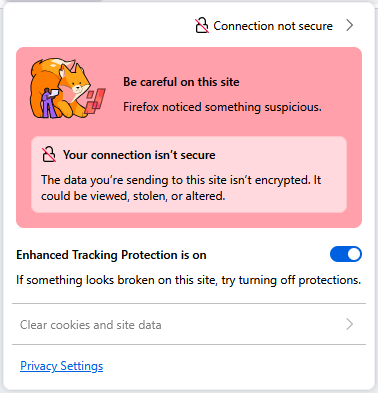
Never click past this alert. Close the tab immediately.
Corporate environments are the only exception here. System administrators routinely install custom root certificates on company devices to monitor internal traffic. Outside of a strict corporate policy, never install a random .crt file just to use a proxy.
The administrator's view: What your proxy logs actually record
Every time you connect, you leave a network footprint. Server administrators have direct access to their routing logs. And encryption completely changes what those files actually capture.
Do not guess what your provider knows about you. Here are the exact data points a proxy operator extracts from your active session.
Data Type | Unprotected (HTTP) | Encrypted (HTTPS) |
Target Destination | Logs full URL path (e.g., site.com/login) | Logs root domain only (e.g., site.com) |
Account Credentials | Captures plain text passwords | Hidden (Scrambled cipher) |
Private Messages | Reads entire chat history | Hidden (Scrambled cipher) |
Financial Data | Captures credit card numbers | Hidden (Scrambled cipher) |
Session Cookies | Intercepts active login tokens | Hidden (Blocked by Secure Flag) |
Original IP Address | Logs your real hardware IP | Logs your real hardware IP |
Action plan: Protect your network footprint
Stop leaving your data exposed. You need a strict operational security setup. Here is exactly how you lock down your traffic and protect your infrastructure.
Buy strict no-logs proxies. Free networks monitor everything you do. Paid infrastructure guarantees your privacy. A secure platform like CyberYozh App operates on a strict no-logs policy. We do not record your traffic history. We do not force invasive KYC procedures to collect your personal identity documents. You get a secure connection backed by private payment methods.
Isolate your tasks. Never use the same IP for automated data scraping and online banking. Compartmentalize your work. Route main accounts through static ISP residential proxies. They replicate organic user behavior perfectly. For social networks, deploy mobile proxies with mobile passive OS fingerprints to protect your network footprint. Deploy high-speed datacenter proxy servers for heavy parsing.
Deploy advanced routing protocols. Standard connections often trigger deep packet inspection. You need stronger tunneling. Switch to OpenVPN for maximum cryptographic security. Or deploy VLESS. This structures your proxy traffic exactly like normal web browsing. It maintains stable access and protects your network footprint anywhere.
Verify the HTTPS padlock. Look at your browser address bar before typing any password. No padlock means zero encryption. Leave the site immediately.
Reject third-party certificates. Some providers will ask you to install a custom .crt file or root certificate. This is a trap. It grants them direct access to decrypt your private session.
Shield your real phone number. Enable Two-Factor Authentication (2FA) on every account. But do not tie your primary physical device to hundreds of platforms. Rent virtual or residential numbers for SMS verification. This keeps your physical identity off massive corporate databases.
Tokenize your payments. Stop giving your primary bank card to random platforms. Issue localized virtual bank cards instead. Assign one card to one specific service. Set strict limits. If a website suffers a data breach, you simply freeze that single virtual card.
Audit your digital footprint. Corporations use aggressive anti-fraud systems to track you. Check your own setup before they do. Run your IP and browser data through a Fraud Score checker. Know exactly how major platforms evaluate your connection risk.
Can a proxy steal your data?
You now know the exact answer. Yes, they absolutely can. But you also know exactly how to prevent it.
Data interception requires a vulnerability. Data exposure happens for two reasons: running traffic through sketchy public nodes or browsing unencrypted HTTP sites. You control your digital footprint. Stop trusting random servers with your sensitive information.
Secure your connection today. CyberYozh App provides a strict no-logs infrastructure. Deploy our Datacenter, Residential, and Mobile proxies to scale your operations safely.
👉 Need infrastructure you can trust? Clean proxy pools built for secure operational workflows.
FAQs about proxy infrastructure & data safety
Can my data be stolen through a proxy?
Yes. It happens constantly on public networks. If you send unencrypted HTTP traffic through a free node, the operator captures everything. You prevent this by forcing HTTPS connections and buying access to a reliable, strict no-logs proxy network.
Do free proxies steal passwords and session cookies?
Absolutely. Malicious operators run free nodes specifically for aggressive data collection. They intercept your session cookies and plain text passwords. Never trust a free service with your personal information. If you do not pay for the hardware, you are the product.
How do I stop platforms from blocking my accounts on a proxy network?
Account bans happen when anti-fraud systems flag a suspicious IP address. You need natural traffic patterns. Stop using heavily abused shared IPs. Switch to clean residential IPs or high-trust mobile IPs from real internet service providers. Before registering any account, run your setup through a Fraud Score checker. Know exactly what corporate algorithms see when they scan your connection.
Does an HTTP proxy expose my secure web server traffic?
No. The proxy protocol just moves the data packets. If the target web server uses HTTPS, your browser executes the encryption before the payload leaves your device. The proxy operator only sees the domain name and encrypted cipher text.
Can websites detect my real location when using datacenter proxies?
Not if you use properly configured, dedicated infrastructure. A premium proxy hides your origin IP entirely. This allows you to protect your network footprint and overcome regional limits safely. Just avoid cheap, badly configured public servers that leak your DNS requests.
Should I use my personal phone number for verification while connected?
Never. Tying your physical identity to hundreds of platforms creates a massive security flaw. Add a layer of separation. Rent virtual residential numbers for SMS verification instead. You get the necessary high Trust Rate for complex registrations without exposing your real identity to corporate databases.
Is it safe to process credit cards over a proxy connection?
It is safe over HTTPS on a trusted network. But you should stop typing your main bank card details online entirely. Issue localized virtual cards instead. Assign one tokenized card to one specific service. If a target website suffers a data breach, your primary bank account remains completely safe. You simply freeze that single virtual card.
What is a no-logs policy, and why does it protect users?
A strict no-logs policy means the operator records zero traffic data. They do not log your browsing history, timestamps, or target destinations. CyberYozh App operates on this exact standard. We do not store your digital footprint.
What if my local network blocks standard proxy connections?
Deep packet inspection often flags basic HTTP or SOCKS5 protocols. You need advanced routing. Switch to OpenVPN for maximum encryption. Or deploy VLESS to structure your proxy connection exactly like standard web traffic. CyberYozh App fully supports both protocols. This allows you to overcome strict network limits and maintain stable access to your infrastructure anywhere.