
Proxy vs VPN: Choose the right instrument for your tasks
You may wonder how proxies and VPNs differ: at first sight, they’re nearly identical. But in reality, they aren’t. They both route your traffic through a remote IP, but they operate on different principles and serve different purposes. If you need to know what is a proxy vs. a VPN, you’re in the right place.
To be short, use a VPN when you need to encrypt your traffic and stay anonymous on the web, and use a proxy for business-related network tasks.
Here, we’re going to explore the difference between proxy and VPN in detail, learn how both VPN and proxy services solve personal and business tasks, and, more importantly, how CyberYozh allows you to make an efficient, fast, and high-quality VPN based on your proxy.
Actually, turning your CyberYozh proxy into a high-quality VPN is easier than you think. Keep reading to learn in detail, but basically you need a proxy and a free VPN proxy client with advanced traffic encryption.
Explore the guide to v2rayN proxy setup, which is a robust example of such a client.
What is a VPN and how it secures your traffic
Virtual Private Network is a tool that routes your traffic through a remote IP in a specific location, so it appears to come from that location; more importantly, it creates a secure, encrypted tunnel for your traffic.
As a result, you get a secure connection where your traffic cannot be intercepted or restricted, which determines the primary use cases of VPNs for restriction avoidance and corporate networks.
Traffic encryption: VPNs are good for web security
A conventional VPN changes the operating system’s routing table and wraps packets before they leave the device.
Encrypts the path from your device to the VPN server, so a public Wi-Fi operator cannot read the payload.
Routes browsers, messengers, system updates, and background apps through one tunnel.
Resolves DNS inside the tunnel, which reduces DNS leaks compared with a poorly configured browser proxy.
Uses protocols such as OpenVPN. They are secure, but their packet signatures are easy for filters to recognize.
Protects the first hop only. HTTPS still has to protect the path from the VPN exit to the destination website.
VLESS/Xray encryption is a robust traffic encryption tool that makes your traffic almost impossible to track and block using internet censorship.
In short, a VPN is the right tool when the job is to encrypt a whole device and keep local observers out of the first hop. It is the wrong default when the job is a clean, local, high-trust exit IP.
Shared server and low IP quality: A main issue of most VPNs
Most consumer VPNs, including paid ones, route thousands of users on the same datacenter subnet. But platforms do not judge the tunnel. They judge the exit IP. As a result:
Shared VPN ranges often carry a fraud score of 50 or more and are already marked as VPN/proxy.
Local ads, storefronts, and payment flows reject or CAPTCHA those ranges because they do not look like household or carrier users.
Ethical scraping and automation hit rate limits faster on overused VPN exits.
Multi-account and QA work collapses when every profile shares one flagged IP.
Internet speed drops because encryption overhead is stacked on congested shared nodes.
The common failure is low IP quality, not missing encryption. A clean residential or mobile exit with a checked reputation is what keeps sessions stable.
CyberYozh’s IP Checker is a tool that helps you ensure the quality of your proxy or VPN exit, and it’s highly recommended to use it before any deployment.
You can select proxy IPs by source, city, and sharing model, then verify them before traffic starts. That is why they outperform generic VPNs wherever IP quality is the actual constraint.
And even more: you can make a VPN from your proxy, and we’ll show you how.
What is a proxy and how it routes the traffic with high precision
Unlike VPNs, proxies focus on the IP quality, connection speed, routing optimization, and geo-location precision. While VPN connection is usually slower compared to direct, proxy may often be faster due to the optimized routing and high IP quality. Additionally, they allow precise operations in a given region due to geo-targeting.
As we’ll see, proxies are mostly designed for business tasks, but can be used similarly to VPNs, while keeping their high speeds and proxy quality.
Read more about the CyberYozh proxy Chrome extension and how it can be used as a simple VPN.
A simple IP server with a host
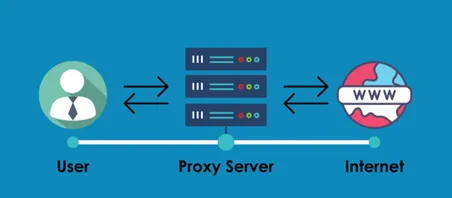
A proxy is an intermediate host that accepts requests from a chosen app, browser, or script and forwards them from its own IP. You assign HTTP or SOCKS5 credentials per session, keep other apps on the local network, and match the IP source to the task.
Shared or dedicated controlled access
Match trust to the platform, then match rotation to the volume. Here is a summary of proxy types.
Dedicated mobile: real LTE/5G carrier IP, highest trust, from $1.70/day.
Shared mobile: same carrier look, lower cost to ~$1/day, some reuse.
Residential ISP: static home-ISP IP, from $5.29/month, long sessions.
Rotating residential: 50M+ pool, from $2/GB, scale and rotation.
Dedicated datacenter: fastest corporate IPv4/IPv6, from $1.90/month.
Shared datacenter: lowest cost and trust, speed-first bulk jobs, less than $1/month.
Quality management and geo-targeting
Geo-targeting proxies let operators pick country, state, and even city, so ads, SERPs, and storefronts return the same view a local user would see.
CyberYozh also filters exits by speed and reputation before assignment, supports sticky sessions for account work, and exposes HTTP, SOCKS5, UDP, and VLESS/Xray on the same infrastructure.
Check the IP, then run the workflow. That is the operational difference from a shared VPN node.
The next question is not proxy or VPN, but which workflow needs a precise, high-quality exit, and how you can organize it.
Before going further, you can learn more about IP quality and how to check it.
How to make a VPN using a proxy IP
Proxy and VPN can be interconnected, and here’s a good point: you can set up a proxy in a proxy client with VLESS/Xray support and extensive DNS and routing settings. Basically, you’ll get a VPN: an encrypted tunnel that routes your traffic via clean and fast proxy server IP.
This connection will be much faster and more efficient than an ordinary VPN. Go to CyberYozh catalog and make your high-quality VPN for just $5.30/month.
Get a proxy client with VLESS/Xray encryption
Download v2rayN or NekoRay, only from their official GitHub releases.
Keep the client updated from the app’s own updater after the first launch.
Buy a static residential proxy with the location you need
Create a CyberYozh account and open the proxy catalog.
Choose a static residential ISP IP in the target city when you need one stable identity.
Use a mobile LTE/5G IP when the platform is trust-sensitive.
Generate credentials and copy the host (IP), port, login, and password. SOCKS5 is usually the better pair for a client-level tunnel.
Deploy a proxy in a client and set DNS and routing
Add an HTTP or SOCKS5 server with the CyberYozh credentials and set it as active.
Enable system proxy for browser-level routing, or TUN mode when games and UDP apps must follow the tunnel.
Send work domains through the proxy and keep local banking or office resources on a direct rule.
Set DNS to 1.1.1.1 or 8.8.8.8 and enable remote DNS so queries leave through the proxy, not the ISP.
Confirm the exit on an IP check page, then run CyberYozh IP Checker before production traffic.
Compare VPN, proxy, and a proxy-based VPN
Below, you can compare the proxy IP, the VPN connection, and the proxy-based VPN service which we’ve described above.
Aspect | Proxy | Regular VPN | Proxy-based VPN (VLESS/Xray) |
Operating Level | Application / Browser (setup separately). | Entire system (one button). | Entire system or selective routing based on the client. |
Encryption | Depends on the protocol (HTTPS encrypts the payload). | Full tunnel encryption. | Full encryption + masking as regular traffic. |
Network Trust Level | High (if mobile proxy), Medium (if residential), Regular (if datacenter). | Low (VPN IPs are often public and flagged). | Maximum (you look like a regular mobile subscriber). |
Best For | Scraping, automation software, working in professional browsers. | Changing country for YouTube, protection on public Wi-Fi, simple websites. | Online gaming, access to international platforms, advertising, working with resources with strict geo-restrictions. |
FAQ about proxies and VPNs
What is the difference between a proxy and a VPN?
A proxy forwards selected app traffic from another IP. A VPN creates a device-level encrypted tunnel. The practical difference is routing scope plus exit-IP quality, not the marketing label.
Is a VPN just an encrypted proxy?
No. A VPN usually installs a virtual adapter and encrypts the first hop. A proxy is configured per app. VLESS/Xray can add encryption to proxy routing, but the trust of the exit IP still decides platform access.
When should I use a proxy instead of a VPN?
Use a proxy for ads, SEO, scraping, QA, and multi-account work that needs a clean local IP. Use a conventional VPN for public Wi-Fi protection and whole-device encryption.
Can I use a VPN and a proxy together?
Yes, but stacking them often adds latency and leak risk. The cleaner pattern is one high-quality CyberYozh proxy inside v2rayN, with explicit routing and remote DNS.
Why do websites block VPN IPs?
Shared VPN subnets are easy to fingerprint and often have high fraud scores. Residential and mobile exits from real ISPs or carriers look closer to ordinary users.
What is VLESS/Xray used for?
VLESS runs inside TLS so DPI sees HTTPS-like traffic. Combined with a checked CyberYozh IP, it gives VPN-like encryption without forcing you onto a flagged shared VPN node.
How do I turn a CyberYozh proxy into a VPN?
Buy a static residential or mobile proxy, import it into v2rayN or NekoRay, enable system proxy or TUN, set remote DNS, and verify the exit. That is a controlled, high-quality tunnel rather than a shared commercial VPN.