
Mobile Proxies: Choosing 4G/5G Ports and Changing IPs
Mobile proxies are internet access points using real SIM cards from cellular operators. They support 4G, 5G, and LTE networks. The main technical feature lies in CGNAT technology. A single operator IP address is used by thousands of regular people simultaneously. Platform algorithms see this connection as a real user session from a smartphone. You get the maximum Trust Rate. Zero suspicion.
Plus, CyberYozh App keeps no logs (no-logs policy) and provides completely unlimited traffic. We offer two port types in our service. Our mobile proxies start at $1.7 per day. Choose the format for your specific task:
Shared (Shared Ports):
Multiple clients share one device.
Rotation happens automatically. You cannot change the IP using a button or link. Doing so would break the sessions for your modem neighbors.
We take this option for stable surfing. Or for testing without strict requirements for manual address changes.
Private (Dedicated Ports):
A personal 4G/5G modem in your hands. It runs on real operator hardware like 5G California AT&T.
You fully control the IP change via an API link. Change the address manually or through your software.
We choose this for digital marketing and managing professional profiles. Protecting your network footprint is highly important there.
Step 1. Getting access
Unlike residential proxies, you do not generate address lists here. You buy access to a specific modem.
Open the "My Proxies" section in your dashboard.
Find the card for your purchased port.
Copy the ready-made data: IP, Port, Login, and Password.
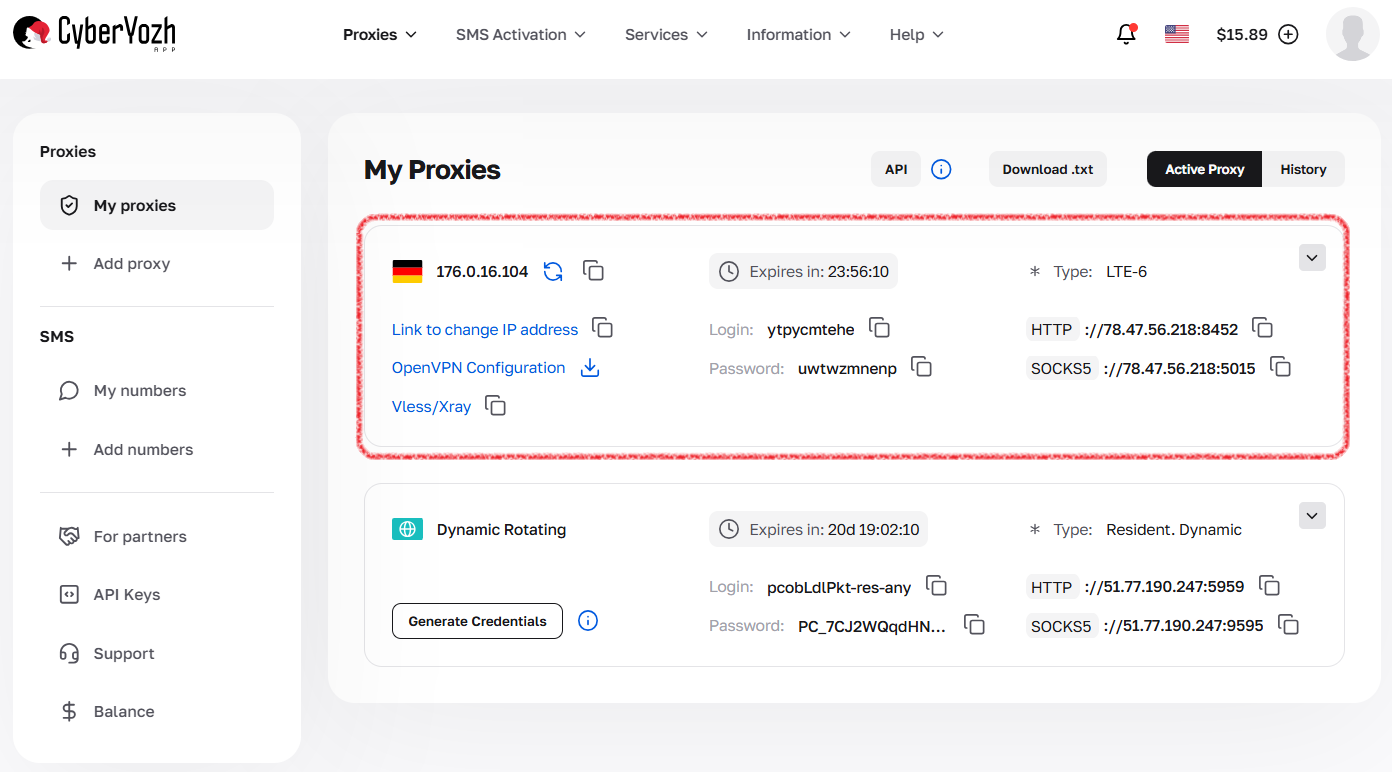
Fig. 1. Mobile proxy card with connection data.
Step 2. Setting up IP rotation
Settings depend on which mobile proxies you chose during purchase.
🅰️ For private ports:
You have full control. You change the IP via a special link. There is no dashboard timer.
Find the "IP Address Change Link" item.
Copy this string.
How to apply it:
In a browser: Paste the link into the address bar and press Enter. The modem will reboot. The system will issue a new IP.
In anti-detect browsers: Just paste the string into the IP change URL field. They handle everything automatically.
In software: Configure your script to call this link at any desired frequency. Even once a minute.
🅱️ For shared ports:
The system updates the address automatically. There is no change button.
Keep the internal service timer in mind. It switches the IP every 5 or 30 minutes.
Account for this timing. The address sometimes changes right while a heavy page is loading.
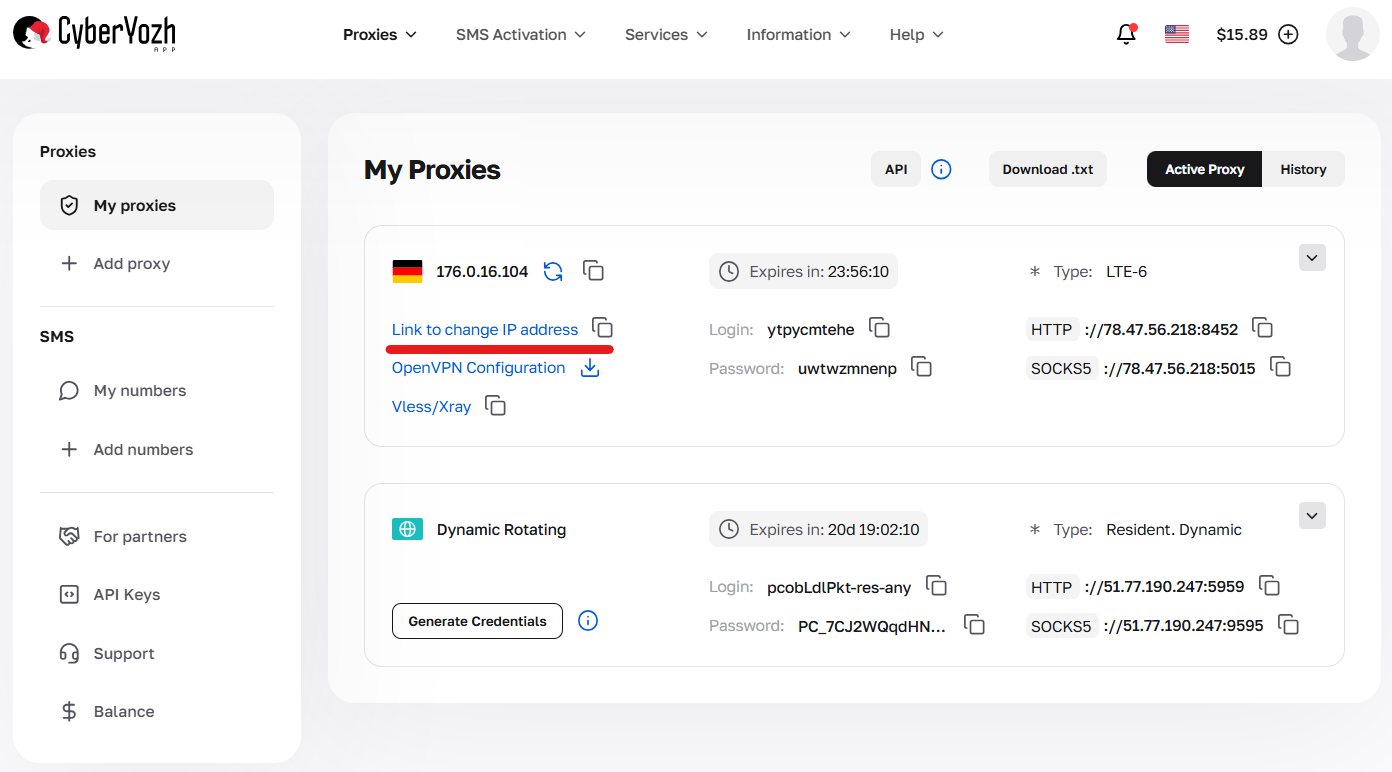
Fig. 2. IP address change link in the Private mobile proxy card.
Step 3. Advanced features
Private port owners receive professional tools. You will find them in the control panel.
Passive OS fingerprint (TCP/IP):
Configure OS fingerprint matching at the provider level.
Suppose you are on Windows. But your browser profile imitates an iPhone. Enable the iOS fingerprint. The infrastructure aligns the parameters so the network sees exactly an Apple device. This protects your digital profile from extra checks.
🛡️ VLESS-Reality (Xray) protection protocol:
Where to find: Look for the Vless/Xray badge on premium plans.
What it is: A modern traffic handling protocol. It masks your connection as standard website browsing. You restore stable network access even under strict corporate restrictions.
How to connect: You will find a link for v2rayNG or Streisand apps in the card.
Reboot (Full Restart):
A button for a manual modem reboot. Press it if your internet speed drops.
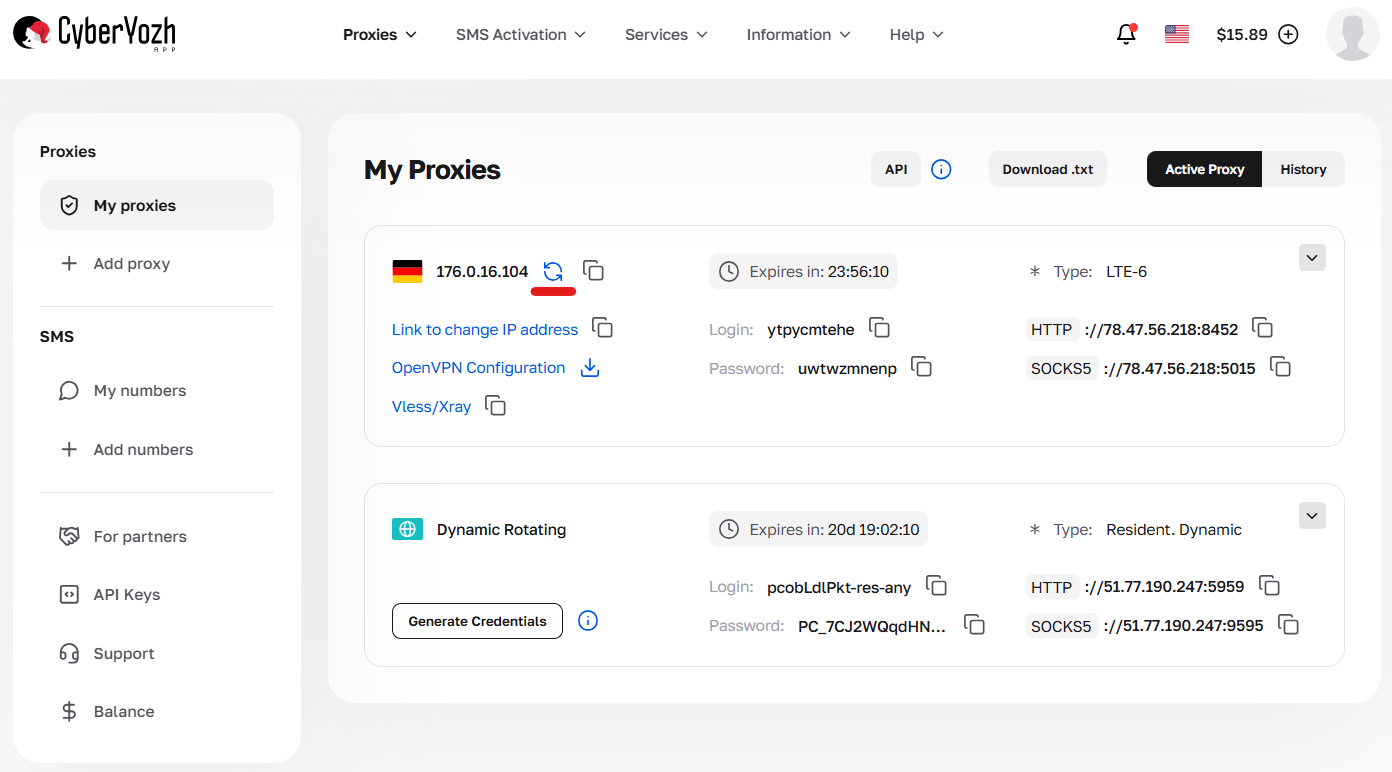
Fig. 3. Manual IP change button (modem restart) in the Private mobile proxy card.
Step 4. Verifying the connection
Let's check the mobile proxies before working. We need to confirm the address change.
1. Check current IP. Enter the command in your terminal:
curl -x http://LOGIN:PASSWORD@IP:PORT https://ifconfig.meWrite down the response digits.
2. Perform rotation.
Navigate to the IP change link.
Wait 15 seconds while the hardware restarts.
Run the check again. The address will change.
Step 5. Where to enter the data?
The IP:PORT:LOGIN:PASS format is universal for any software.
1. Multi-login browsers (Dolphin, AdsPower, GoLogin):
Create a new profile. Open the "Proxy" section.
Paste the access string.
For Private ports, always add the API link to the special profile settings field.
2. Proxifiers (Proxifier, ProxyCap):
We take these for desktop software. Perfect for Telegram bots or programs lacking built-in network settings.
3. Regular browsers (via FoxyProxy extension):
Enter the data manually right into the plugin fields.
Common errors
I cannot change the IP: This is standard for the Shared plan. Rotation runs on a timer. Need manual control? Get Private mobile proxies.
No connection (Timeout):
Check if the rotation process is running. The modem drops off the network for 20 seconds during a reboot. Just wait.
For Private plans experiencing long hangs, press the Reboot button in your dashboard.
Authorization error: Carefully check your Login and Password. Delete any accidental spaces. They often attach during text copying.
👉 Proxy troubleshooting checklist.
Still need help?
Do not waste hours on manual setups. We are online 24/7.
Message our Technical Support via the chat widget on the site or Telegram. Attach a screenshot of your browser settings or the curl check result. We will quickly find the cause and help you start working. You can always pay for all platform services using a convenient and fully private method.
FAQs about mobile proxies
How do mobile proxies differ from residential ones?
The whole essence lies in CGNAT technology. Cellular operators issue a single IP address to thousands of subscribers at once. Platforms see you as a regular person with a smartphone. Banning such an address is unprofitable for platform businesses. Doing so would hurt real users. Residential IPs tie to a single home router, making them easier to track.
What speed do 4G/5G mobile proxies provide?
Speed depends entirely on the modem location and cell tower load. Standard 4G ports hold 15-30 Mbps steadily. 5G modems accelerate to 50-100 Mbps. This provides plenty of headroom for video, parsing, and heavy software. Remember the peak hours. Operators face heavier loads in the evening, causing temporary speed drops.
How often should I rotate the IP address?
Base this on your specific task. Change the address before opening every new window when managing hundreds of profiles. Scripts and parsers work perfectly with automatic rotation every 5-10 minutes. Frequent IP rotation only harms regular surfing. The connection drops for 15-20 seconds during hardware reboots.
Why should I configure the OS Fingerprint?
You need this during a conflict between your browser profile and real hardware. You sit on Windows, but imitate working from an iPhone. Algorithms easily spot this mismatch without network-level alignment (TCP/IP). Enabling the iOS fingerprint in the mobile proxy panel solves this problem. The network sees the correct device.
Why do mobile proxies provide the maximum Trust Rate?
Your network footprint blends with the crowd. Corporate systems know cellular operator address ranges perfectly. A request from a real SIM card gets the highest trust score. Algorithms have no reason to check mobile subscriber sessions.
How do mobile proxies work with anti-detect browsers?
This forms the most reliable setup for profile protection. Software like Dolphin, AdsPower, and GoLogin pulls the API link automatically. You just paste the address change URL into the profile settings. The browser restarts the modem itself before starting work.
Can I buy Shared mobile proxies and change the IP manually?
No. Multiple clients share one modem on the shared plan. Picture this scenario. You download a database, and your neighbor hits the restart button. Your internet crashes. Rotation on Shared ports runs exclusively on the internal timer. Get the Private plan for manual control.
What is the VLESS (Xray) protocol in mobile proxies used for?
It saves you in regions with strict network control. Local providers easily analyze regular traffic. The VLESS protocol encrypts data packets. It masks your activity as a standard visit to a permitted website. This restores stable access to your required resources.