
Deploying IP Checker: How to Check Your IP with CyberYozh
If you wonder how to check your IP, you’re in the right place. CyberYozh offers robust proxy infrastructure, plus tools like virtual cards and numbers. We also let you check everything before deployment with our checker tools for every IP, card, and number. Here, you’ll learn everything about IP quality, why it matters so much, and how CyberYozh guarantees the superior quality of its proxies by filtering out the low-quality ones.
CyberYozh’s IP Checker is the primary tool you should use before deploying any proxy to actual work. Keep reading to learn how to check your IP address in detail.
Read about checkers and automation tools and learn more about how IP quality tools are deployed.
What is IP quality score and why it matters
IP quality score is a crucial metric that determines how platforms will react to your IP. It’s assigned based on numerous data points about how the IP is used and where it comes from. Let’s learn how it works, what it includes, and which services are responsible for IP quality scoring.
Read about the proxy IP lifecycle to understand how IP quality changes over time due to user activity and how it can be restored
Trust score and fraud score
Fraud score is a 0–100 risk value: higher means more abuse, anonymization, or bot history. Trust score is the inverse of that. Use fraud score as the gate: below 25 is generally clean, 25–50 is borderline, and 50+ should be rejected for trust-sensitive work.
Never use IPs with a fraud score above 75.
IP quality features and flags
IP quality starts with ASN category, then flags. Match the category to the job.
Mobile: Carrier LTE/5G IPs, often CGNAT. Best for social, ads, and high-trust sessions.
Residential: Home-ISP addresses. Best for long sessions, marketplace QA, and localized scraping.
ISP / static residential: Persistent ISP IPs. Best for one-profile-one-IP account work.
Datacenter: Hosting or cloud ranges. Fast, but often challenged on strict platforms.
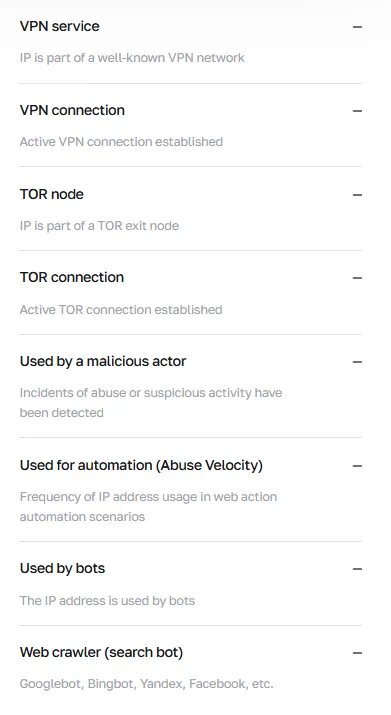
Typical flags that raise risk:
VPN service or active VPN, proxy network
Tor exit (usually adds a lot to the fraud score)
abuse or attack history
abuse velocity
bots or crawlers
datacenter
A clean mobile or residential IP can be deployable; the same fraud score on a Tor- or abuse-tagged address is not
Blacklist and abuse status
When quality drops, platforms act. A blacklist hit, a 48-hour abuse penalty, or heavy IP/subnet lookups can produce CAPTCHAs, throttling, 403s, or account checkpoints.
Temporary rate limits and HTTP 429
Extra verification on login or checkout
Feature blocks on ads, payouts, or messaging
Shared IPs inherit history. Treat a listing as a reason to rotate or cool the address.
Who assigns the IP quality scores
Before you know how to check your IP address, you must know who assigns it and who uses it. IP check platforms, like that of CyberYozh, use exactly the same metrics, allowing you to filter out low-quality proxy IPs before web platforms’ own IP checkers can do that.
IP databases and quality scoring
Reputation lives in specialized IPv4 databases. They store history, flags, geolocation, and blacklist feeds; anti-fraud vendors query several of them at once.
IPQualityScore (IPQS): fraud score, proxy/VPN/Tor, abuse velocity
AbuseIPDB: reported attacks and abuse incidents
Spamhaus and MXToolbox: spam and mail-abuse listings
OSINT blocklists: open feeds (CyberYozh surfaces 118 lists)
CyberYozh’s IP Checker compiles those responses into one report: fraud rating, geo, provider, proxy detection, recent checks, and blacklist status.
Platform checks based on IP quality
Ad networks, marketplaces, social apps, banks, and search engines score the connecting IP on signup, login, checkout, and request bursts.
They typically:
Compare geo and ASN with the account’s expected region
Raise friction on VPN, proxy, Tor, or datacenter flags
Throttle or block IPs with abuse history
Challenge sudden subnet reuse or automation velocity
A pre-flight check lets a scraper confirm a Berlin residential exit before a DE price crawl, or a QA team reject a VPN-tagged IP before payment testing.
You see the risk while checking an IP costs $0.15 with the IP Checker, not a failed campaign.
How to check IP and determine the IP quality
Here is the algorithm for how to check the IP address using CyberYozh’s checker. It takes no more than several minutes.
Identify the IP you need to check: usually, the proxy host
Use the exit IP the destination will see, not the office Wi-Fi. Copy the proxy host or confirm the current exit after connecting.
For rotating pools, sample several exits.
Visit CyberYozh checkers and select the IP Checker
Go to CyberYozh checkers and open the IP Checker.
The same fraud-rating stack used for cards and numbers is also available, scoped to network risk.
Paste your proxy IP into the field
Paste the IPv4 address and run the check.
A lookup costs $0.15; CyberYozh proxy users also get included checks.
The report returns fraud rating, IP type, geo, provider, and flags.
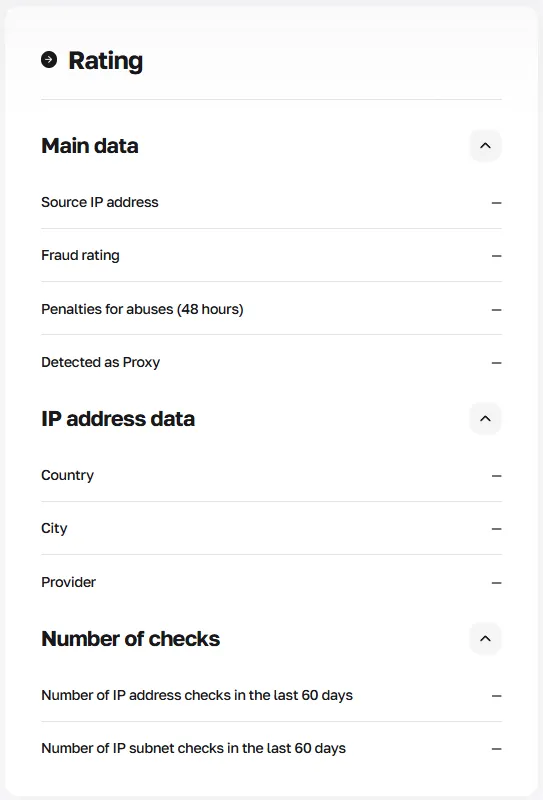
Check the fraud score, geo, blacklist, and flag status
Read the fields together:
Fraud rating and 48-hour abuse penalties
Country, city, and provider versus the intended target
VPN, proxy, Tor, datacenter, bot, crawler, and abuse flags
OSINT blacklist hits and 60-day IP or subnet lookup counts
Example: a US ISP IP at score 12, no blacklist, correct city: deploy for a static ad session. A “residential” label with VPN, abuse velocity, and score 80: rotate before login.
Deploy automated IP checks via the API or the IP rotation dashboard
Do not check one IP and stop. Use the CyberYozh API to reject high-risk exits in Playwright, Scrapy, or Selenium jobs, or deploy rotating residential proxies and filter weak IPs before assignment.
Read the API documentation to learn everything about CyberYozh’s automation tools
Conclusion: Check IP for your work
IP quality is the reputation a platform assigns before it trusts your session. Check the exit IP, read the fraud score with flags and blacklists, and deploy only addresses that match the task. Use CyberYozh’s IP Checker as the last control before ads, scraping, QA, or account work.
FAQ about how to check IP and IP quality
What is an IP quality score?
An IP quality score is a risk estimate of how likely traffic from an IP looks abusive, automated, or fraudulent. It combines fraud score, trust score, network type, and flags. Platforms use it to decide whether to allow, challenge, or block a session. It is not a speed or uptime metric.
How do I check my IP address?
To check your IP address, look up the exit IP the destination will see, then run it in CyberYozh’s IP Checker. For proxy work, check the proxy host or the current exit after connecting, not office Wi-Fi. The report returns the address, fraud rating, geo, provider, and flags.
What is a good IP fraud score?
A good fraud score is generally below 25. Scores of 25–50 are borderline and need flags, geo, and blacklist review. Reject 50+ for ads, account work, and other trust-sensitive tasks. Always read the score with ASN type and flags, not as a single pass/fail number.
Who should use an IP checker?
Anyone who assigns an IP to production work should check it first. That includes scrapers and data teams, media buyers, agencies isolating client sessions, e-commerce operators, and QA or fraud teams. Casual “what is my IP” lookups are useful, but the checker is built for pre-deployment risk control.
Why check a proxy IP before deployment?
You check a proxy before deployment so a destination anti-fraud stack is not the first system to score it. A flagged or blacklisted exit can waste budget, trigger CAPTCHAs, throttle requests, or link client accounts. A $0.15 check is cheaper than a failed crawl or an ad-account checkpoint.
How do I use CyberYozh’s IP Checker?
Open CyberYozh checkers, select the IP Checker, and paste the IPv4 exit. Review fraud rating, 48-hour abuse penalties, geo, provider, VPN/proxy/Tor flags, bots, datacenter status, OSINT blacklists, and 60-day lookup counts. Deploy only if the score, category, and location match the task.
What do VPN, proxy, and Tor flags mean?
Those flags mean reputation databases classify the IP as anonymized or relayed traffic. A VPN or proxy flag does not automatically make an IP unusable, but it raises friction on ads, banking, and social platforms. A Tor exit is almost always high-risk. Match the flag to the job.
Does a clean score guarantee the proxy will work?
No. A clean checker result lowers avoidable risk; it does not guarantee acceptance. Destinations also score device signals, cookies, request rate, and account history. If the report is dirty, do not deploy. If it is clean, still use the right proxy type and a stable session.
How often should I check proxy IP quality?
Check every new or rotated exit before first use, then recheck sticky IPs after abuse events, geo drift, or a rise in CAPTCHAs and 429s. For rotating pools, sample exits on a schedule or automate checks in the job queue. Shared and CGNAT addresses inherit other users’ history.
Why is my IP on a blacklist?
An IP lands on a blacklist when abuse databases record spam, attacks, or other incidents from that address or subnet. Shared residential, mobile CGNAT, and recycled datacenter IPs often inherit that history. A listing is a reason to rotate or cool the IP, not proof that your current session caused it.
Is a datacenter IP always low quality?
No. Datacenter means the ASN is hosting or cloud, not that the IP is broken. Those exits are fast and cost-efficient for infrastructure tests and some bulk collection. They are a poor default for social, ads, and marketplace logins, where platforms expect mobile or residential origin.
How do I check IP geolocation, and why does it matter?
The IP Checker reports country, city, and provider for the exit you submit. Confirm those fields match the target region before localized scraping, ad verification, or account work. A “US residential” proxy that exits in another country or on a VPN ASN is a geo mismatch and a common fraud signal.
Can I automate IP quality checks with the API?
Yes. Use the CyberYozh API to score exits inside Playwright, Scrapy, Selenium, or custom jobs, then reject high-risk IPs before requests start. You can also deploy rotating residential proxies and filter weak addresses in the dashboard.
What should I do if the fraud score is high?
Do not assign that IP to logins, ads, or long sessions. Rotate to another exit, recheck score, geo, and blacklists, and prefer mobile or residential inventory for trust-sensitive work. If a dedicated IP stays dirty, escalate it to support with the report.