
Mobile Proxy Rotation: Scheduled vs. API-Triggered Resets
Mobile proxy rotation keeps your active sessions secure. You must master dynamic IP switching to protect your digital footprint. Picking the wrong reset algorithm will instantly kill your connection. We will compare scheduled vs on-demand mobile proxy rotation to highlight the exact technical difference between shared and dedicated nodes.
TL;DR:
Rely on scheduled rotation for basic data extraction using shared ports.
Trigger an IP reset via API to control sessions precisely on dedicated hardware.
Paste your endpoint URL directly into Dolphin Anty or AdsPower settings.
Add programmatic delays to your Python scripts to survive hardware reconnect pauses.
Hardware physics: How mobile proxy rotation works
Changing a network address relies entirely on physical hardware. It uses zero software emulation. You send a command. The 4G/5G modem forces a physical reboot. Or the system executes a brief Airplane mode toggle on the connected device.
The modem physically disconnects from the cell tower during this exact moment. Then it re-establishes the connection. The carrier processes this network request through its CGNAT architecture. It assigns the device a completely new IP address from its massive pool.
Real smartphone users move around the city constantly. Their devices naturally hand off connections between different cellular base stations. Carrier networks update subscriber addresses constantly. Target platforms expect to see this exact behavior. Such mobile proxy rotation within the same carrier pool preserves the highest possible trust level for your profile.
Scheduled mobile proxy rotation on shared ports
The network address changes automatically at predefined intervals. You do not choose this timer. The shared proxy architecture strictly dictates the scheduled proxy rotation.
Strict limits. Timings are hardcoded into the tariff plans. Usually, it runs on an exact 5 or 30-minute loop. The provider blocks manual overrides. Otherwise, your random IP reset would instantly break active sessions for other users sharing that exact hardware node.
Zero setup friction. The "set and forget" approach is perfect for basic web scraping. Your software extracts information steadily. It easily resumes the parsing loop when the connection returns with a new IP.
Mid-session drops. The address might switch exactly as you log into a platform. Security algorithms often flag these sudden session drops as suspicious activity.
You must use precise technical terminology here. The term "sticky session" strictly describes residential proxies. Only true residential proxies lock a static IP for up to 24 hours. Cellular networks operate differently. They depend entirely on the physical radio environment.
👉 Master residential proxy rotation
👉 Launch shared mobile proxies
API-triggered proxy reset for dedicated nodes
Let's cover how to rotate mobile proxies via API. Manual mobile proxy rotation is exclusively available on dedicated ports. You execute an API-triggered proxy reset exactly when your logic demands it. The provider dashboard generates a unique link for you. This is the safest way to change mobile IP addresses dynamically.
Absolute control. You decide the exact microsecond the network goes offline.
Secure management. The perfect method for managing multiple profiles securely. You close the first session. You ping the API link. You wait for the new address. Only then do you open the second profile.
Session separation. An address change physically breaks the connection link. You get a clean network environment before every single login. This provides the fundamental baseline for managing profiles securely inside antidetect browsers.
👉 Deploy dedicated mobile proxies
Integrating mobile proxy rotation into scripts and browsers
Connecting this reset logic to your workflow takes seconds. Antidetect browsers like Dolphin Anty and AdsPower support this feature natively.
Open your browser profile settings. Locate the "Change IP URL" field. Paste your CyberYozh link directly into the box.
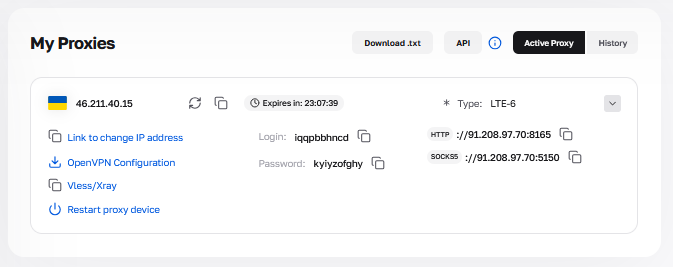
You can now rotate your IP with a single click right from the profile list. You will never need to open an external dashboard again.
👉 Read our step-by-step antidetect browser setup guides
Python developers can use our ready-made Python script for proxy rotation. The requests library executes the task in just a few lines of clean code. The CyberYozh /refresh-ip/ endpoint URL processes rotation requests exactly 1 time per minute.
import requests

import time

def rotate_mobile_ip(api_key, proxy_uuid):

    url = "https://app.cyberyozh.com/api/v1/proxies/user-proxy-server/refresh-ip/"

    headers = {

        "accept": "application/json",

        "X-Api-Key": api_key,

        "Content-Type": "application/json"

    }

    payload = {"id": proxy_uuid}

    response = requests.post(url, headers=headers, json=payload)

    if response.status_code == 200:

        print("Rotation command sent successfully.")

        return True

    return False
Handling connection timeouts during IP changes
Re-registering a physical 4G/5G modem takes time. The hardware needs 2 to 5 seconds to negotiate a new session.
The node goes completely offline during this brief window. Any HTTP request your script sends will fail instantly, causing a connection timeout error. Your code must catch this hardware gap. Add a programmatic delay interval right after your API call.
Better yet, implement exponential backoff algorithms. Give the hardware time to talk to the cell tower. Your scraper will grab the new IP and resume the data stream flawlessly.
Premium stealth: VLESS connectivity
Deep Packet Inspection (DPI) systems actively track legacy protocols. A standard SOCKS5 tunnel sometimes draws unwanted algorithmic attention. We eliminated this bottleneck entirely.
Premium dedicated mobile proxy tiers include native VLESS support powered by the Xray core. This technology camouflages your entire traffic stream as standard HTTPS browsing. Network filters see nothing but legitimate visits to major websites. You gain absolute stealth out of the box without manual server configuration.
👉 Discover how VLESS and XTLS-Reality protect your traffic
FAQs about mobile proxy rotation and session management
How long does it take to change mobile IP addresses?
Reconnecting the physical 4G/5G modem to the cell tower takes 2 to 5 seconds. Expect a complete network drop during this exact delay interval.
How often can I trigger an API-triggered proxy reset?
Server-side rate limits protect the hardware. The CyberYozh /refresh-ip/ endpoint URL allows exactly one call per minute. Full hardware reboots are limited to once every 5 minutes.
Can I force an IP change on a port with scheduled proxy rotation?
No. Shared ports rely strictly on automated timers. A manual reset changes the external IP for the actual hardware. This would instantly drop active connections for all other users on that specific node.
How should my Python script for proxy rotation handle socket errors?
The node goes completely offline during the rotation window. Your code must explicitly catch ConnectTimeout and ReadTimeout exceptions from the requests library. Apply an exponential backoff algorithm before retrying the connection.
Does my internal port change during dynamic IP switching?
No. Your internal proxy credentials (IP and port) remain completely static. The API command only replaces the external IP address assigned by the carrier to the modem.
Why do I get flagged after mobile proxy rotation if my new IP is clean?
A fresh IP cannot fix a dirty browser footprint. If your HTTP headers reveal a Linux OS while your browser claims it runs Windows, DPI systems will flag the mismatch. Pair your dedicated nodes with professional antidetect browsers to secure the entire stack.