
Cách sử dụng Dolphin Anty để quản lý nhiều tài khoản mạng xã hội
Dolphin Anty là một trình duyệt antidetect được thiết kế cho nhiều tác vụ khác nhau, nhưng đặc biệt phù hợp để quản lý nhiều tài khoản từ một thiết bị duy nhất. Để làm được điều đó, bạn phải tạo nhiều profile Dolphin, gán các bộ fingerprint trông tự nhiên khác nhau cho chúng và gán một IP proxy di động hoặc dân cư riêng biệt cho mỗi profile.
Đọc thêm về dấu vân tay kỹ thuật số thuộc nhiều loại khác nhau, và xem cách trình duyệt antidetect, kết nối với proxy, giúp bạn quản lý chúng.
TL;DR
Nó cho phép các traffic manager chạy nhiều tài khoản mạng xã hội và quảng cáo được cách ly từ một thiết bị mà không kích hoạt lệnh cấm từ nền tảng.
Mỗi profile Dolphin Anty nhận được một fingerprint kỹ thuật số duy nhất (User-Agent, Canvas, WebGL, WebRTC, múi giờ, vị trí địa lý) để các tài khoản không bị liên kết và bị cấm cùng nhau.
Proxy CyberYozh có thể được thêm vào từng profile riêng lẻ, hàng loạt hoặc tự động khi tạo, khớp vị trí địa lý, ngôn ngữ và múi giờ với IP được gán.
Proxy di động LTE/5G phù hợp với các nền tảng nhạy cảm về độ tin cậy như quảng cáo Facebook và TikTok; proxy dân cư phù hợp với các phiên dài hơn như quản lý thương mại điện tử.
Việc sử dụng nhiều tài khoản tự nó không vi phạm quy tắc nền tảng. Vấn đề bắt đầu khi thiếu sự cách ly hoặc fingerprint trùng lặp giữa các profile.
Một profile bị cấm/hạn chế không ảnh hưởng đến các profile khác, vì mỗi profile chạy trong một môi trường trình duyệt và mạng hoàn toàn riêng biệt.
Tại sao traffic manager cần nhiều tài khoản mạng xã hội
Trong tiếp thị liên kết, một tài khoản quảng cáo hiếm khi đủ để đáp ứng tất cả các tác vụ cần thiết. Các traffic manager khởi chạy chiến dịch ở các vùng địa lý khác nhau, thử nghiệm nhiều offer, creative và kết hợp, và thường làm việc với nhiều tài khoản quảng cáo trên cùng một nền tảng. Trong những trường hợp này, việc phân phối quy trình làm việc trên các profile riêng biệt thuận tiện hơn, vì việc sử dụng nhiều tài khoản tự nó không nhằm vi phạm quy tắc nền tảng.
Proxy nhắm mục tiêu địa lý cũng hữu ích trong nhiều trường hợp khác. Khám phá chúng trên CyberYozh ngay bây giờ.
Tuy nhiên, chỉ đơn giản tạo nhiều trang để chạy quảng cáo, ví dụ trên Facebook Ads, là chưa đủ. Các nền tảng quảng cáo nhìn xa hơn tên người dùng và mật khẩu và phân tích các đặc điểm của trình duyệt, thiết bị và kết nối.
Nếu nhiều tài khoản chia sẻ cùng một fingerprint kỹ thuật số, nền tảng có thể liên kết chúng. Kết quả thường là lệnh cấm hoặc hạn chế khác, vì hành vi như vậy thường được coi là nguy hiểm đối với nền tảng, ngay cả khi nó có mục đích hợp pháp. Đó là lý do tại sao quản lý nhiều tài khoản là một quy trình làm việc riêng biệt, điều cần thiết phải thành thạo đối với hầu hết các doanh nghiệp kỹ thuật số.
Vấn đề phát sinh khi nhiều tài khoản được sử dụng để đạt được lợi thế không công bằng, vượt qua hạn chế hoặc thực hiện các hành động khác bị cấm bởi quy tắc của một nền tảng cụ thể. Facebook, TikTok và các nền tảng khác có thể hạn chế hoặc đình chỉ tài khoản vì những vi phạm như vậy.
Đó là lý do tại sao làm việc với nhiều tài khoản không chỉ đơn giản là tạo chúng. Bạn cũng cần giữ môi trường của chúng được cách ly với nhau.
Sử dụng nhiều tài khoản trên mạng xã hội với Dolphin Anty
Dolphin Anty cho phép bạn tạo các profile trình duyệt riêng biệt, mỗi profile có fingerprint kỹ thuật số riêng. Bạn có thể sử dụng các profile này cho mạng xã hội, tài khoản quảng cáo, quản lý thương mại điện tửvà các dịch vụ trực tuyến khác.
Sự cách ly này dựa trên việc cấu hình dấu vân tay kỹ thuật số của trình duyệt. Nó bao gồm các đặc điểm của trình duyệt và thiết bị.
Ví dụ như:
User-Agent
Canvas
WebGL
WebRTC
ngôn ngữ
múi giờ
vị trí địa lý
cài đặt màn hình
Dấu vân tay mạng là một phần khác của câu chuyện: các đặc điểm của kết nối của bạn, cũng được theo dõi. Proxy di động của CyberYozh cho phép bạn quản lý chúng.
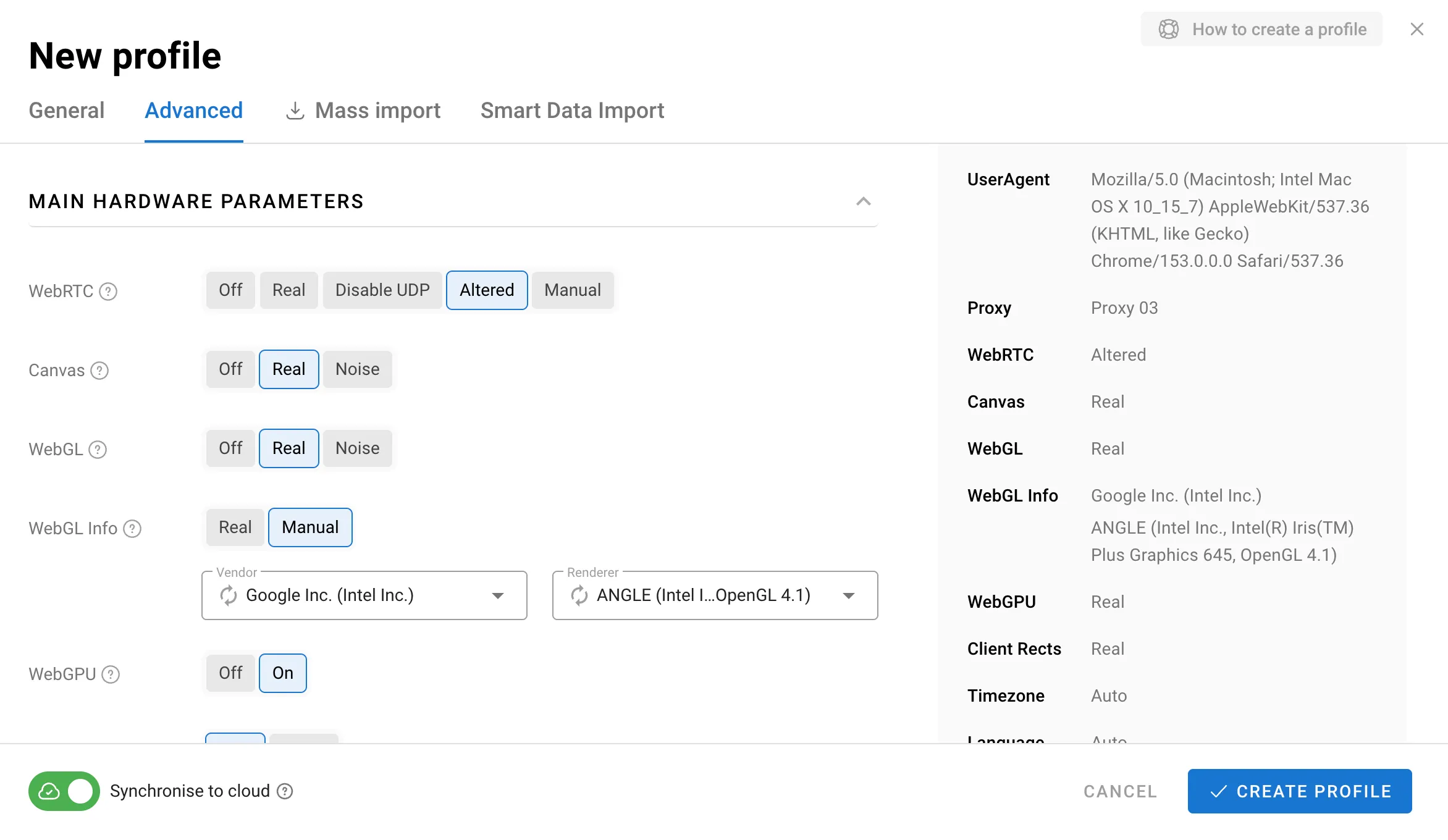
Dolphin Anty cho phép bạn cấu hình các thông số này riêng biệt cho từng hồ sơ, khiến hồ sơ trông như đang chạy trên thiết bị thuộc về một người dùng riêng biệt, trong khi tất cả các hồ sơ vẫn có thể được quản lý từ một giao diện duy nhất.
Hãy cùng xem cách thiết lập một hồ sơ như vậy trong thực tế. Xem hướng dẫn của CyberYozh về Dolphin Anty để biết thêm thông tin.
Cách tạo hồ sơ cho tài khoản mạng xã hội
Bắt đầu bằng cách tạo một hồ sơ mới trong Dolphin Anty. Nhấp vào Create Profile và cấu hình các cài đặt cơ bản.
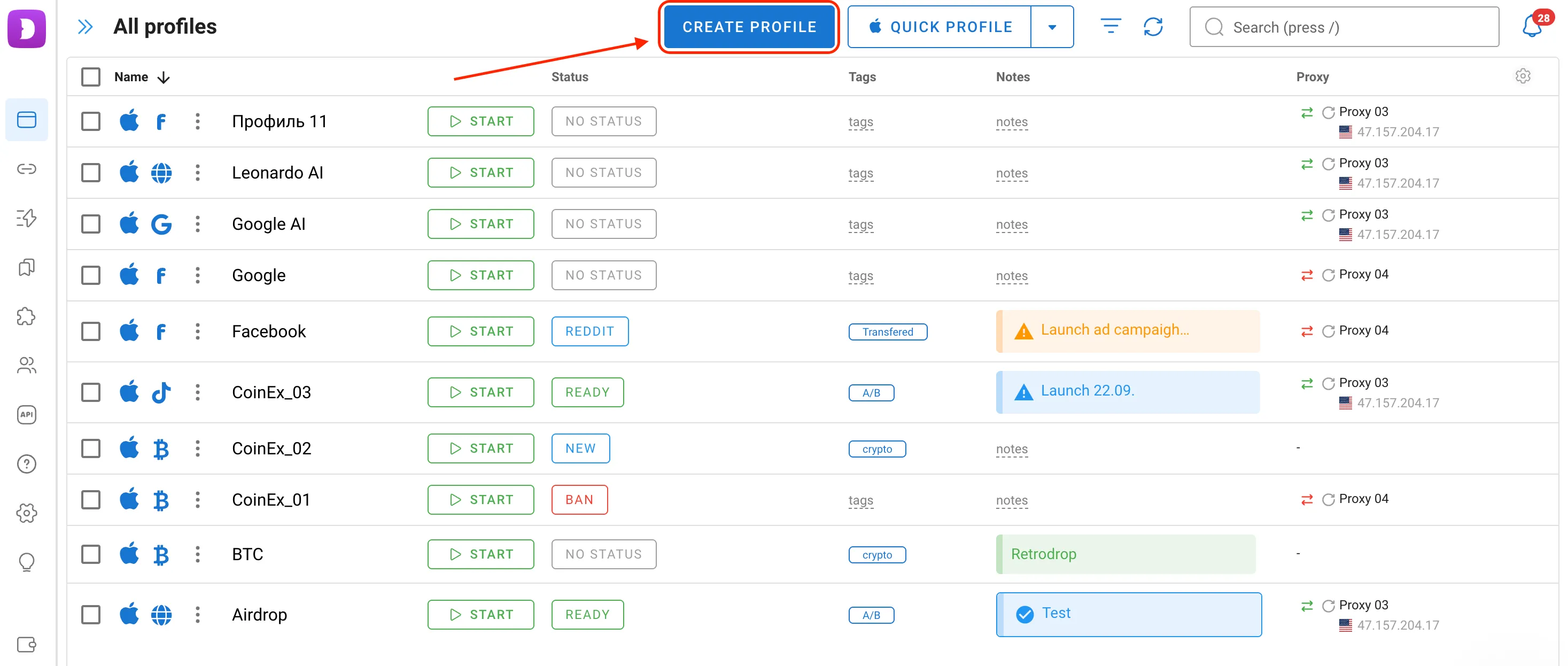
Cài đặt đầu tiên là tên hồ sơ. Tốt hơn hết là thiết lập một hệ thống đặt tên rõ ràng ngay từ đầu, ví dụ dựa trên mạng xã hội, vị trí địa lý hoặc dự án. Điều này giúp bạn dễ dàng điều hướng các hồ sơ của mình hơn nhiều khi bạn có hàng chục hoặc thậm chí hàng trăm hồ sơ.
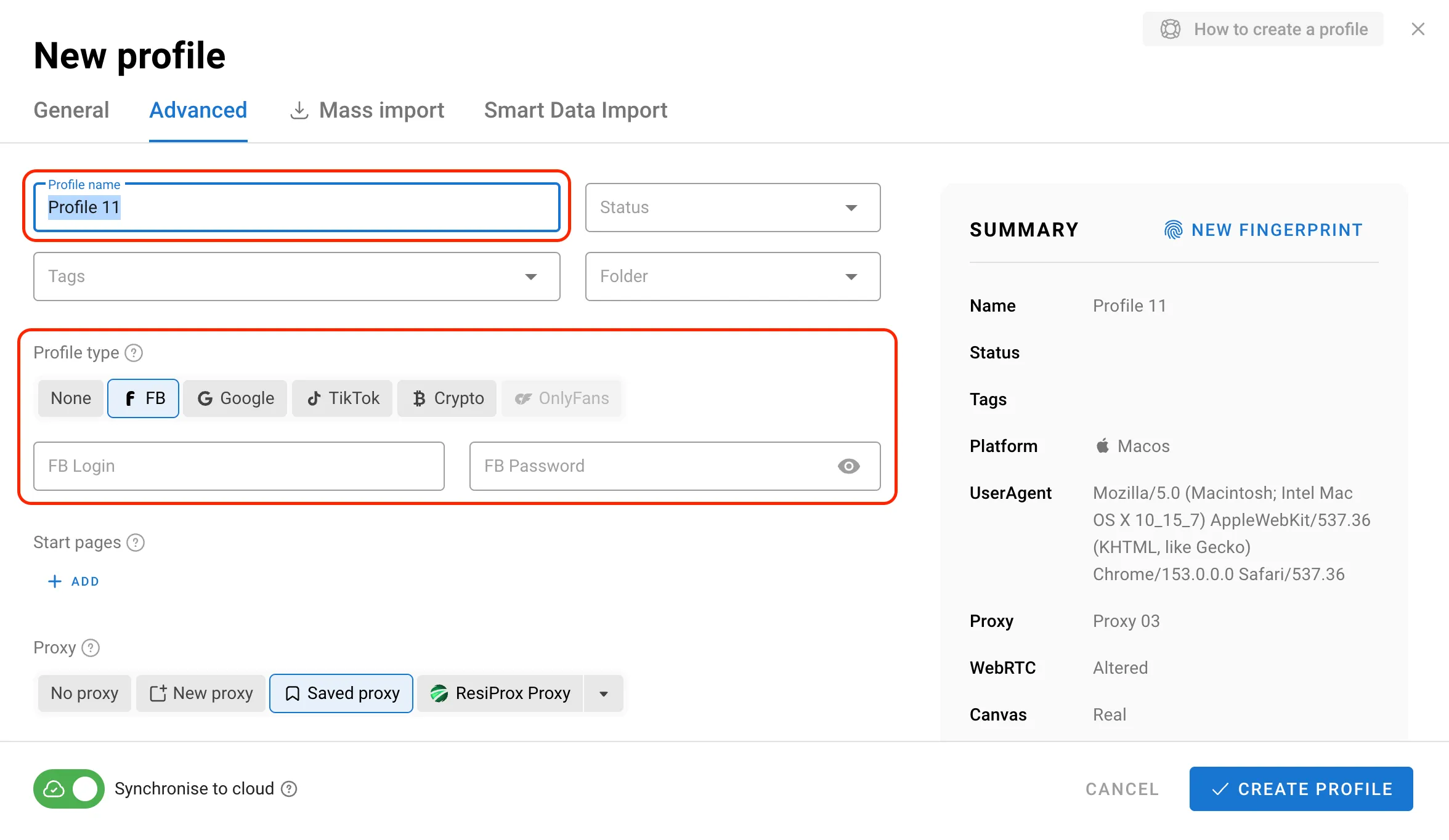
Tiếp theo, chọn Profile Type. Để làm việc với các nền tảng quảng cáo, bạn có thể chọn Facebook, Google hoặc TikTok. Dolphin Anty cũng cung cấp loại hồ sơ Crypto.
Loại hồ sơ tự nó không ảnh hưởng đến chất lượng của dấu vân tay kỹ thuật số. Nó chủ yếu được thiết kế để làm cho việc quản lý hồ sơ thuận tiện hơn.
Nếu bạn đang tạo hồ sơ cho Facebook, bạn có thể nhập tên đăng nhập và mật khẩu ở giai đoạn này. Điều này có nghĩa là bạn sẽ không phải nhập thông tin đăng nhập của mình theo cách thủ công mỗi khi khởi chạy hồ sơ, và hồ sơ sẽ sẵn sàng để sử dụng ngay từ đầu.
Tùy thuộc vào loại hồ sơ đã chọn, Dolphin Anty cũng thêm một bộ dấu trang hữu ích được xác định trước. Ví dụ, một hồ sơ Facebook bao gồm các trang thường được sử dụng khi làm việc với nền tảng. Bạn cũng có thể chỉnh sửa các dấu trang này hoặc thêm dấu trang của riêng bạn.
Điều này đặc biệt hữu ích vì một hồ sơ có thể bao gồm không chỉ bản thân mạng xã hội, mà còn các dịch vụ khác như chương trình liên kết, trình theo dõi, bảng điều khiển quảng cáo, công cụ phân tích, thẻ ảo và nhiều hơn nữa.
Nếu quy trình làm việc của bạn yêu cầu tiện ích mở rộng trình duyệt, bạn có thể thêm chúng trong một phần riêng biệt và áp dụng chúng cho tất cả các hồ sơ của một loại cụ thể. Kết quả là, mỗi hồ sơ trở thành một không gian làm việc được chuẩn bị cho một nhiệm vụ cụ thể.
Thiết lập proxy trong Dolphin Anty
Yếu tố quan trọng tiếp theo là kết nối proxy. Đối với các chiến dịch quảng cáo, vị trí địa lý đặc biệt quan trọng. Nếu một tài khoản được sử dụng cho một thị trường cụ thể, kết nối mạng của nó phải khớp với vị trí địa lý đã chọn.
Bạn có thể sử dụng proxy từ CyberYozh. Nhà cung cấp cung cấp proxy dân cư, di động và máy chủ với khả năng nhắm mục tiêu theo quốc gia, thành phố và nhà mạng. Điều này cho phép bạn chọn địa chỉ IP cho thị trường cần thiết.
Dolphin Anty cung cấp nhiều cách để gán proxy. Hãy cùng khám phá chúng.
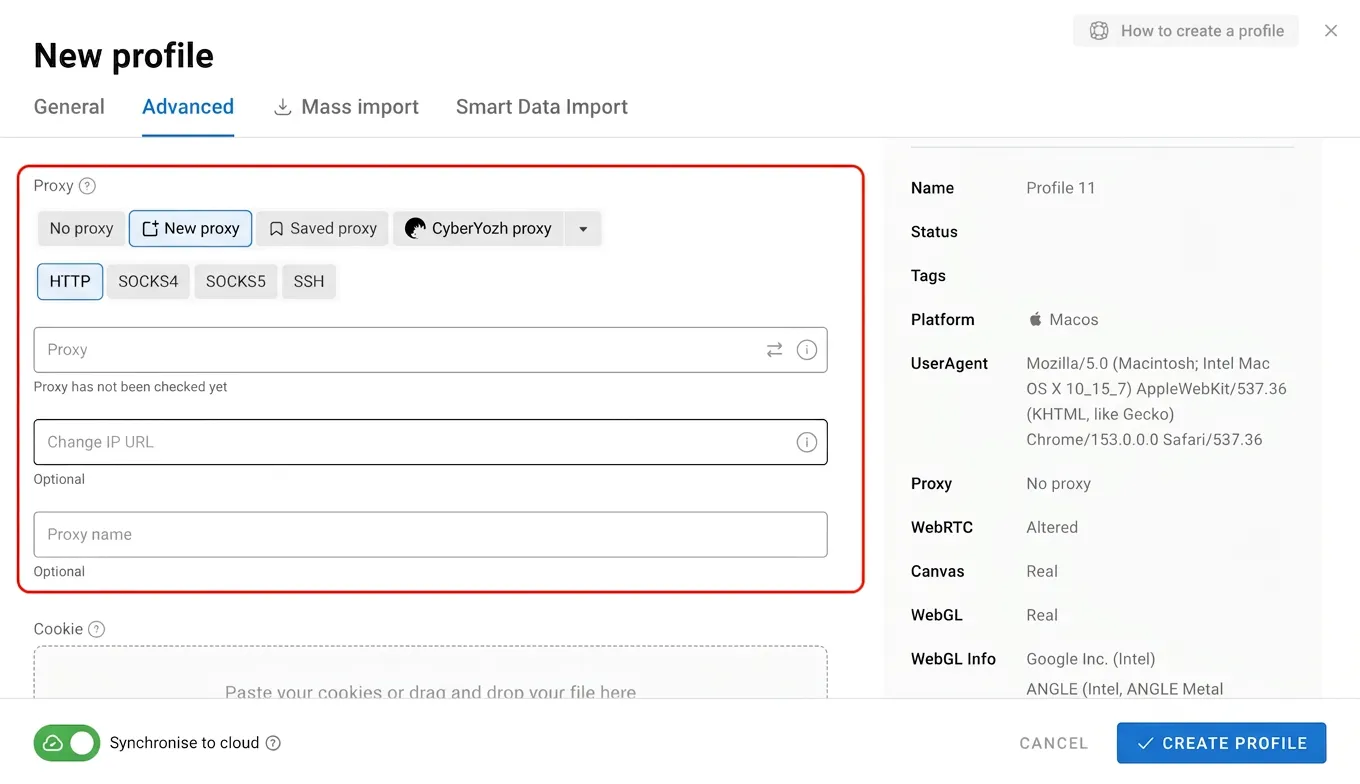
Thêm proxy khi tạo hồ sơ.
Khi thiết lập một hồ sơ mới, bạn có thể nhập trực tiếp thông tin chi tiết của proxy. Proxy sau đó sẽ được sử dụng bởi hồ sơ đó.
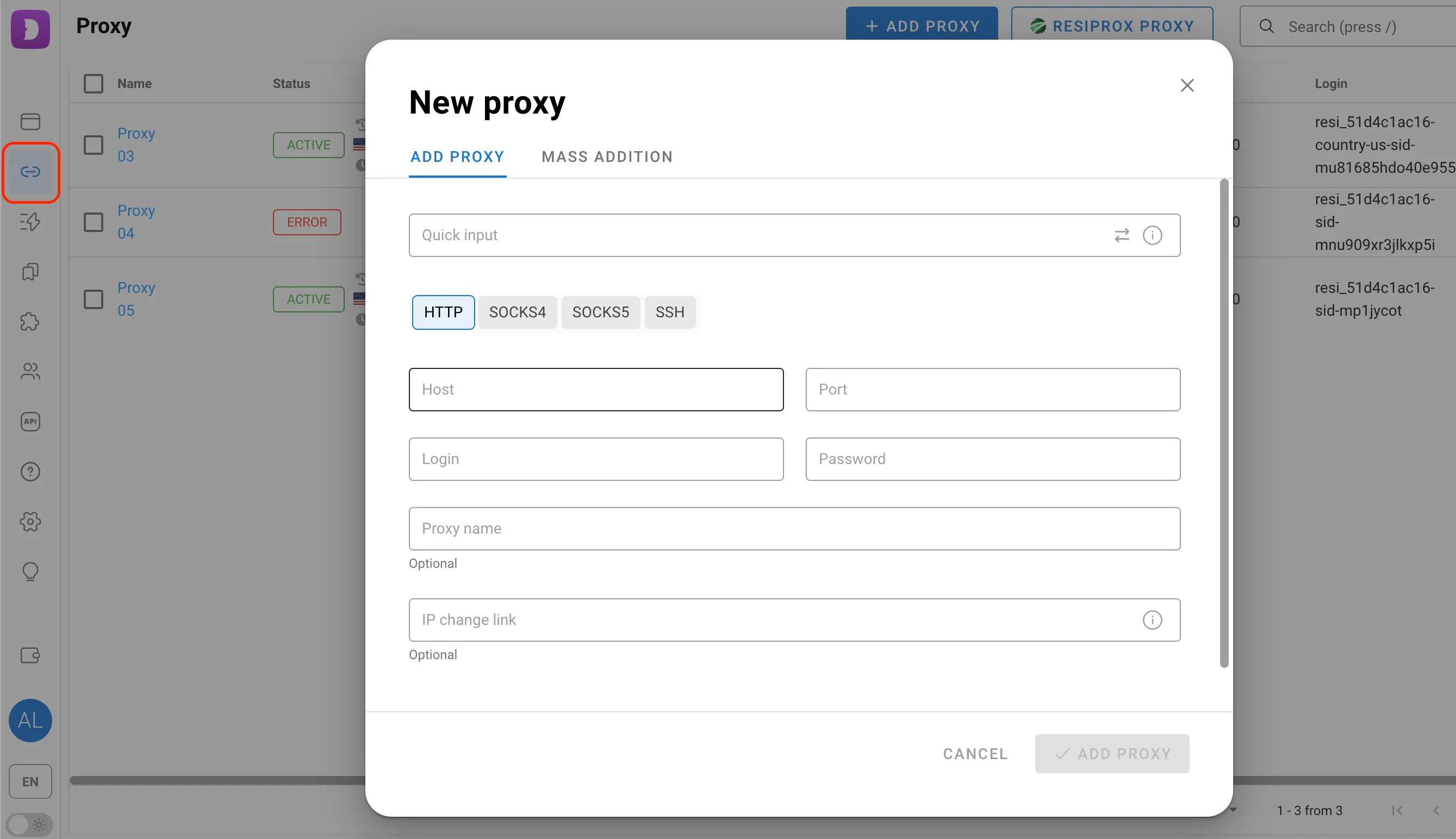
Thêm proxy thông qua phần proxy chuyên dụng.
Tùy chọn này thuận tiện khi bạn muốn chuẩn bị proxy trước. Thêm chúng trước, sau đó gán chúng cho các hồ sơ cần thiết.
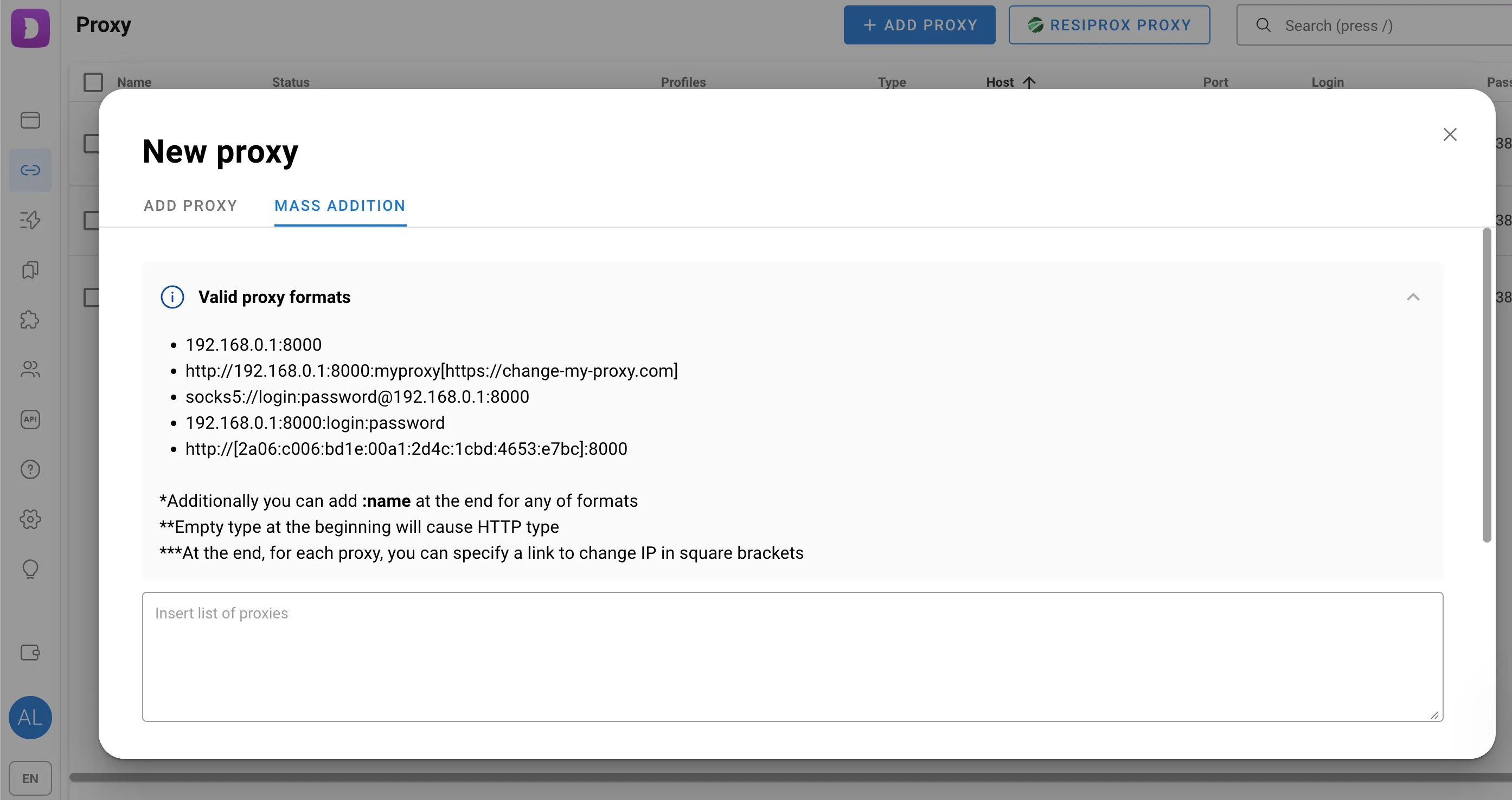
Thêm proxy thông qua tính năng thêm proxy hàng loạt.
Nếu bạn có một số lượng lớn proxy, không cần phải thêm từng cái một.
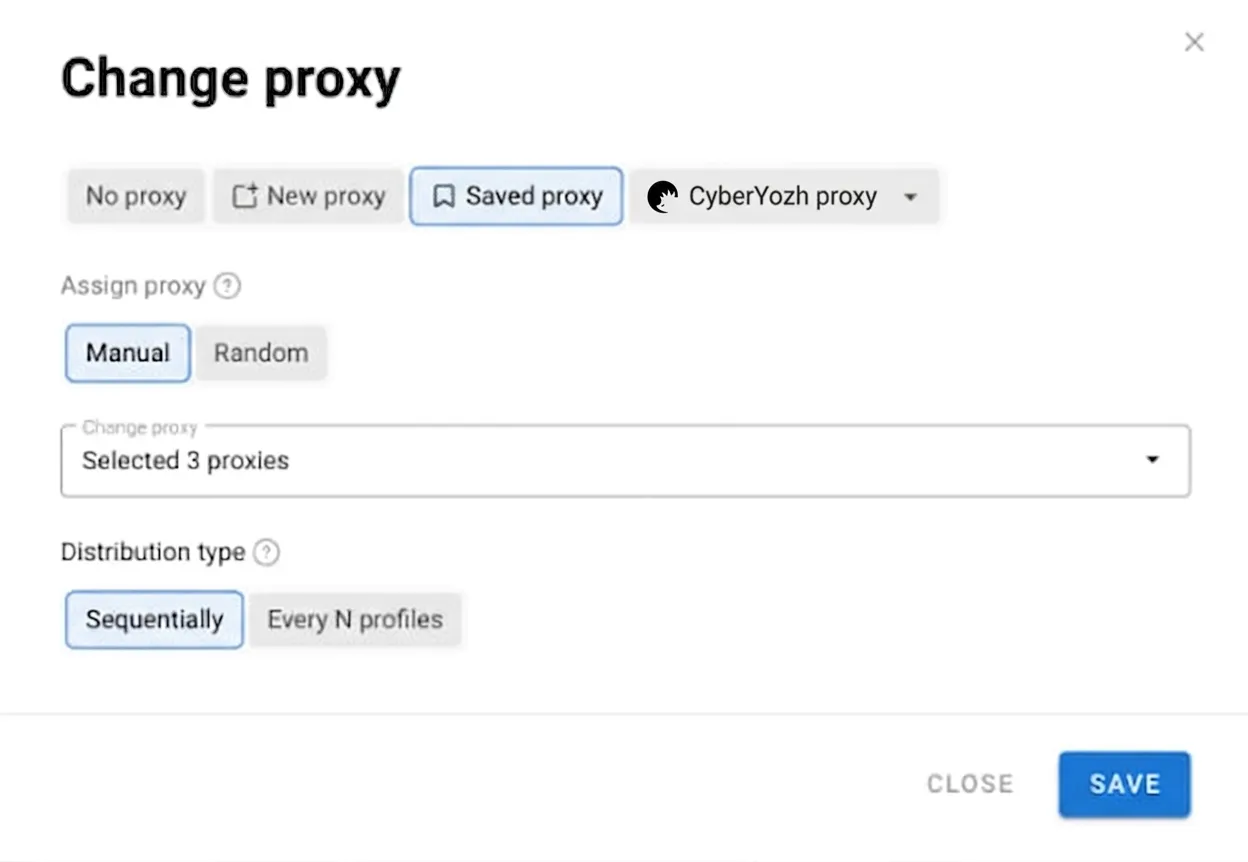
Sau đó, bạn có thể chọn nhiều hồ sơ và gán proxy cho chúng thông qua bảng điều khiển hành động hàng loạt. Proxy có thể được gán theo cách thủ công hoặc ngẫu nhiên, theo thứ tự hoặc cho mỗi hồ sơ thứ N.
Khuyến nghị chung về thiết lập proxy với Dolphin Anty
Đồng thời, chọn một proxy từ quốc gia cần thiết và đảm bảo các thông số hồ sơ khác khớp với nó.
Trong Dolphin Anty, bạn có thể cấu hình múi giờ và ngôn ngữ tự động dựa trên vị trí địa lý của proxy. Ví dụ, nếu một profile kết nối qua địa chỉ IP từ một khu vực cụ thể, các cài đặt trình duyệt tương ứng có thể được áp dụng tự động.
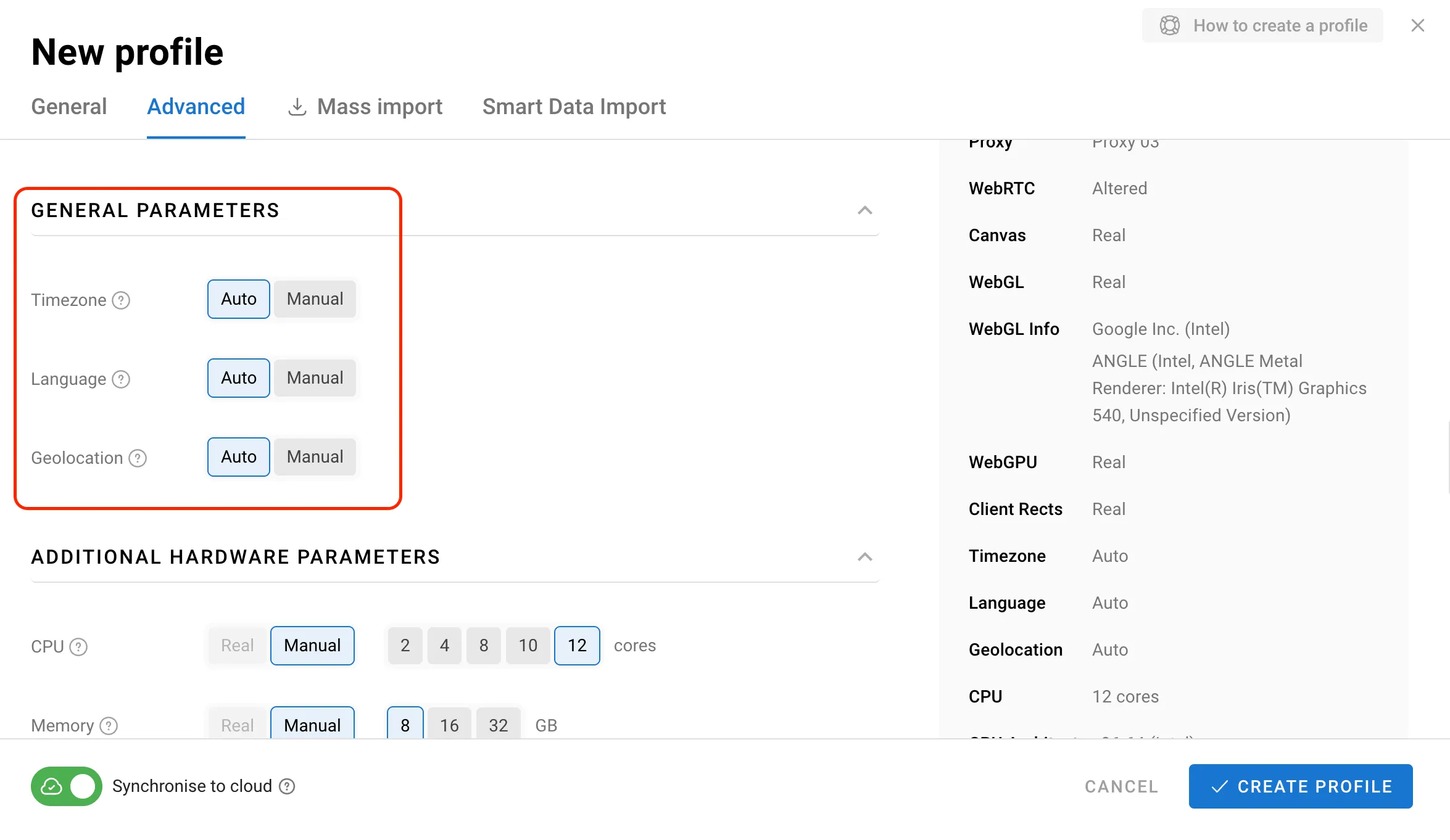
Bạn cũng có thể điều chỉnh các thông số fingerprint kỹ thuật số khác theo cách thủ công khi dự án yêu cầu. Tuy nhiên, nếu bạn không hiểu cách một thông số cụ thể hoạt động, tốt hơn là nên giữ nguyên các giá trị mặc định.
Đội ngũ Dolphin Anty đặc biệt khuyến nghị chỉ thay đổi các cài đặt này khi cần thiết và bạn biết mình đang làm gì.
Profile Dolphin Anty trông như thế nào
Sau khi hoàn tất thiết lập, mỗi tài khoản sẽ có môi trường riêng của nó:
Một profile Dolphin Anty riêng biệt;
Thông tin đăng nhập riêng;
Một bộ bookmark và extension;
Một fingerprint kỹ thuật số độc nhất và nhất quán;
Một proxy với vị trí địa lý yêu cầu;
Ngôn ngữ, múi giờ và các cài đặt khác nhất quán.
Để biết thêm thông tin, đọc bài đánh giá đầy đủ về Dolphin Anty từ CyberYozh.
Dolphin Anty giúp việc mở rộng quy mô quy trình làm việc đa tài khoản trở nên dễ dàng hơn. Nếu bạn cần làm việc với nhiều tài khoản quảng cáo Facebook, chỉ cần tạo một profile riêng cho mỗi tài khoản. Bạn có thể sử dụng cách tiếp cận tương tự cho TikTok, Google và các nền tảng khác.
Kết luận
Dolphin Anty cho phép bạn tổ chức đa tài khoản không chỉ là một tập hợp tên người dùng và mật khẩu. Mỗi tài khoản có thể có môi trường trình duyệt riêng, các dịch vụ và extension cần thiết cho quy trình làm việc, và một proxy với vị trí địa lý phù hợp.
Đối với các arbitrageur traffic, điều này đặc biệt hữu ích khi chạy các chiến dịch quảng cáo trên các GEO khác nhau. Thay vì liên tục chuyển đổi giữa các tài khoản, bạn có thể giữ mỗi tài khoản trong một profile riêng biệt và khởi chạy nó với các cài đặt được xác định trước.
Nếu một tài khoản gặp phải các hạn chế do nền tảng áp đặt, các profile khác có thể tiếp tục hoạt động độc lập. Đồng thời, điều quan trọng là phải tuân thủ các quy tắc của mỗi mạng xã hội, vì trình duyệt anti-detect không miễn trừ bạn khỏi các yêu cầu của nền tảng.