
Your IP Has Been Temporarily Blocked: Ways to Fix It
Quick answer: your IP address has been temporarily blocked when a website's security system flagged the IP you're currently using- not necessarily you personally- and restricted access for a set period, usually anywhere from a few hours to 24 hours.
Common causes include unusual request patterns, a shared IP with poor reputation, too many failed logins, or an automated bot-detection system reacting to normal but fast browsing. The safest first steps are to wait it out, check whether the block is site-specific, and avoid repeated retries.
TL;DR
What the error means: a specific website has restricted your current IP address temporarily, usually due to automated security detection, not a permanent ban
Most common causes: unusual traffic patterns, a shared or previously abused IP, repeated failed logins, or an overly aggressive bot filter
Immediate fixes for a website blocked my IP situation: stop retrying, check if it's one site or many, scan for malware, wait out the stated block window
When to contact the website: if the block persists past its stated duration or you're certain you did nothing unusual
When a proxy may be relevant: for legitimate testing, research, or separating workflows across IPs, never as a way to evade a security system
What does "your IP has been temporarily blocked" mean
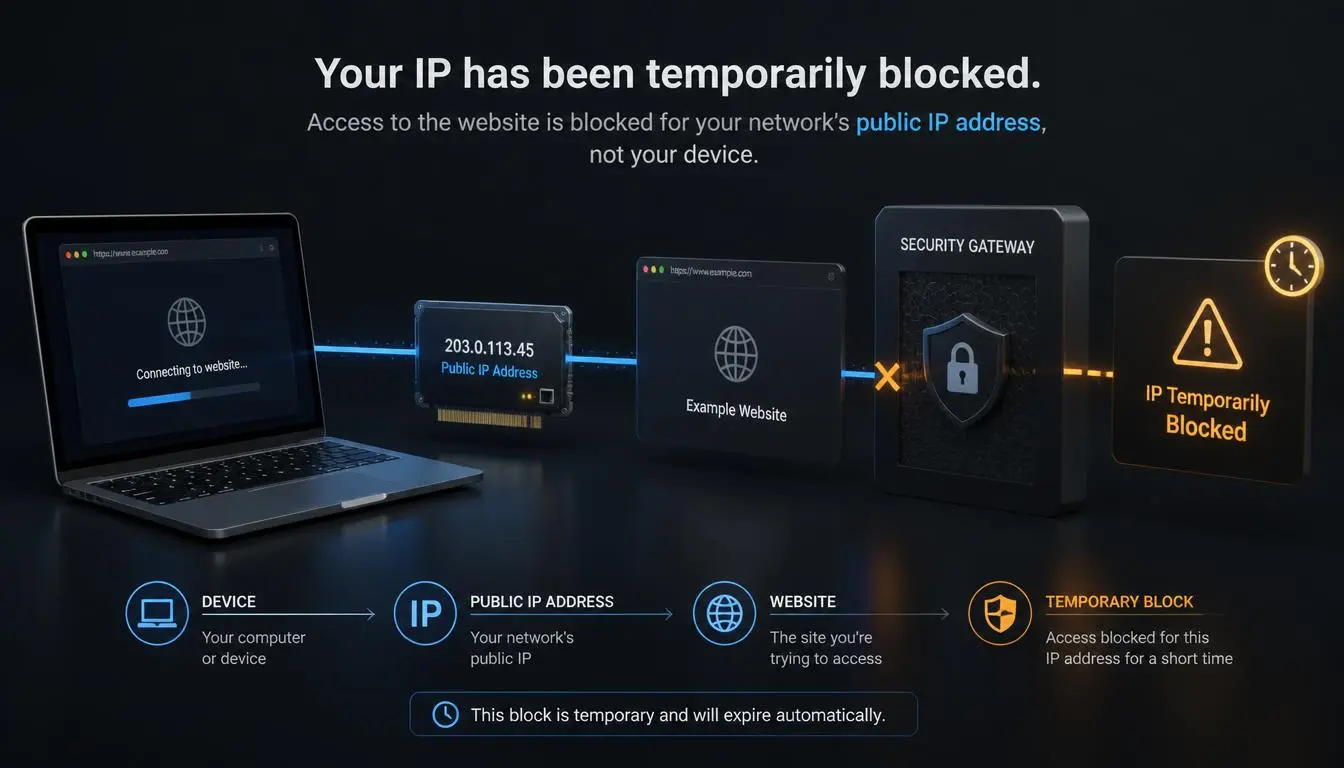
It means one website's security system, not your internet provider, not the internet generally, has decided that traffic from your current IP address looks risky enough to restrict, usually for a defined window before automatic reinstatement.
This is what a temporarily blocked IP address message actually means: it's different from a permanent ban, an account suspension, or a browser-level issue, though all four can produce similar-looking error messages.
The message itself rarely explains why; it only says the IP tripped a security threshold.
Explore CyberYozh IP reputation checker for your workflows
Common mix-up: an IP block for security reasons, an account restriction, and browser fingerprinting can all produce similar "access denied" messages, but they're solved differently. An IP block often resolves on its own or by changing networks; an account restriction won't, no matter what IP you use; fingerprinting can flag a specific device configuration regardless of IP.
Why was my IP address blocked for security reasons
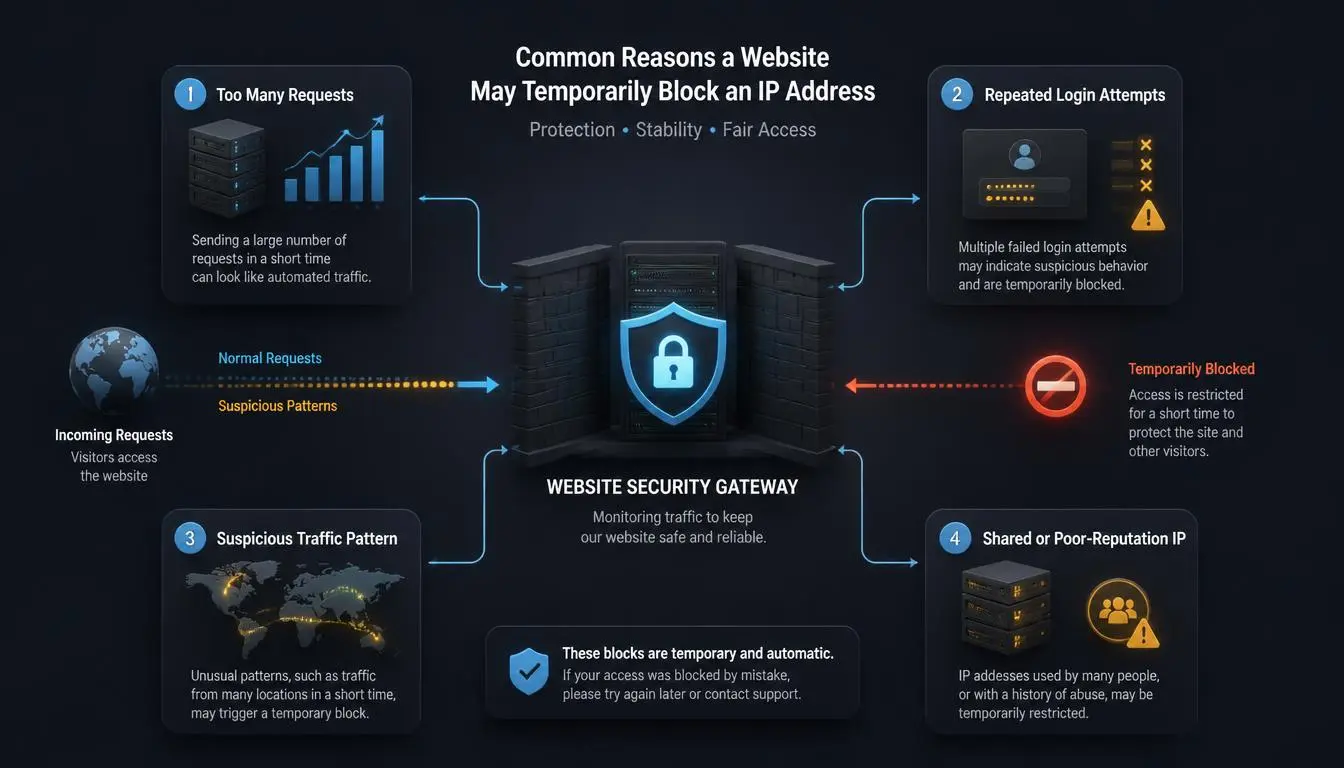
Asking why my IP address is blocked usually comes down to one of a handful of well-documented causes, roughly in order of likelihood:
Unusual or excessive traffic patterns: A burst of requests in a short window, common with browser extensions that auto-refresh or with scraping tools, reads as suspicious traffic from your IP address to most security systems, even when a real person is behind it.
Shared IP reputation: If your IP is shared with other users, common on public Wi-Fi, mobile networks, or older-style ISP setups, someone else's abusive activity on that same address can get it flagged, creating a shared IP-blocked situation where you inherit the consequences even though you did nothing.
Repeated failed logins: Multiple incorrect password attempts, including from a saved but outdated password auto-filling, frequently trigger an automatic temporary lock.
VPN or proxy reputation: Many websites maintain blocklists of IP ranges known to belong to VPN or datacenter providers, since those ranges get disproportionately abused; a proxy IP block can happen even for entirely legitimate use, simply because the range itself carries a flagged history. Some sites also trigger repeated CAPTCHA after IP block events on flagged ranges, even once the underlying block has technically lifted.
Automated bot-detection systems: Security tools sometimes misclassify fast, unusual, but entirely human browsing patterns as bot behavior, a known false-positive problem, not a rare one.
A compromised device: Malware running in the background can generate the exact kind of automated traffic that triggers these blocks, without your knowledge.
Not all of these are equally likely for a given situation; unusual traffic patterns and shared IP reputation account for most everyday cases where your IP address has been temporarily blocked; malware and account-targeted attacks are less common but worth ruling out if the block recurs.
How to fix a temporarily blocked IP address
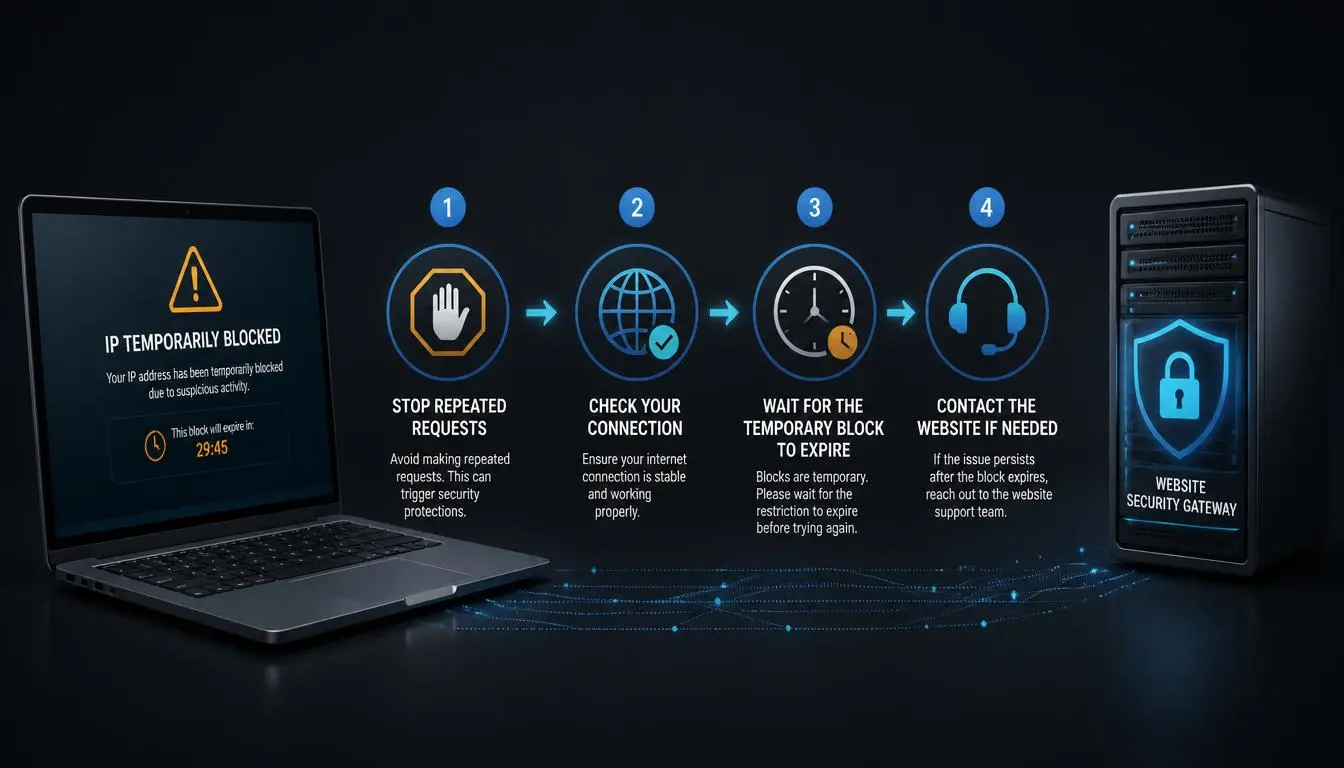
The practical question everyone actually wants answered- how to fix a blocked IP address- comes down to a safe, ordered process, rather than a random list of tips:
Stop retrying immediately: Repeated refreshes and login attempts can look like exactly the automated behavior the block was designed to catch, and can extend the block window.
Check whether it's one website or several: If every site is inaccessible, the problem is likely your network or device, not a specific site's security system. If it's just one site, the block is almost certainly specific to that site's own detection.
Disable suspicious browser extensions: Ad-injectors, auto-refreshers, and some "SEO helper" extensions generate background traffic that can trigger these blocks without your awareness.
Scan the device for malware: Especially if the block recurs across multiple sites or persists unusually long.
Check whether your network uses a shared IP: Public Wi-Fi, some mobile carriers, and certain ISP configurations share one visible IP address across many users, so the block may have nothing to do with your activity.
Restart the router only if you have a dynamic IP: This helps only if your ISP assigns a new address on reconnect; with a static IP, it changes nothing.
Wait out the stated window if one is given: Most temporary blocks are genuinely temporary, often resolving within a few hours to 24 hours.
Contact the website administrator if the block persists past its stated duration, or if you're confident the trigger was a false positive.
Before you try anything else: avoid repeatedly switching IPs specifically to get back onto a site that just blocked you. That pattern- get blocked, switch IP, get blocked again- reads to most security systems as evasion, which can escalate a temporary restriction into a longer or permanent one.
When is the problem related to IP address reputation
IP address reputation is separate from anything you personally did.
Carrier networks, especially mobile data, often route many real subscribers through shared address pools using a technique called carrier-grade NAT, meaning one person's abusive activity on a shared mobile or public IP can briefly affect everyone else using that same address.
The same happens on public Wi-Fi, where dozens of unrelated devices may share one visible IP, and on IP ranges previously used for spam, scraping, or fraud, which some security systems keep on watch lists long after the original activity stopped.
None of this means you did anything wrong; it means the address you're currently using has a shared history you don't control.
Can a proxy help if your IP is temporarily blocked
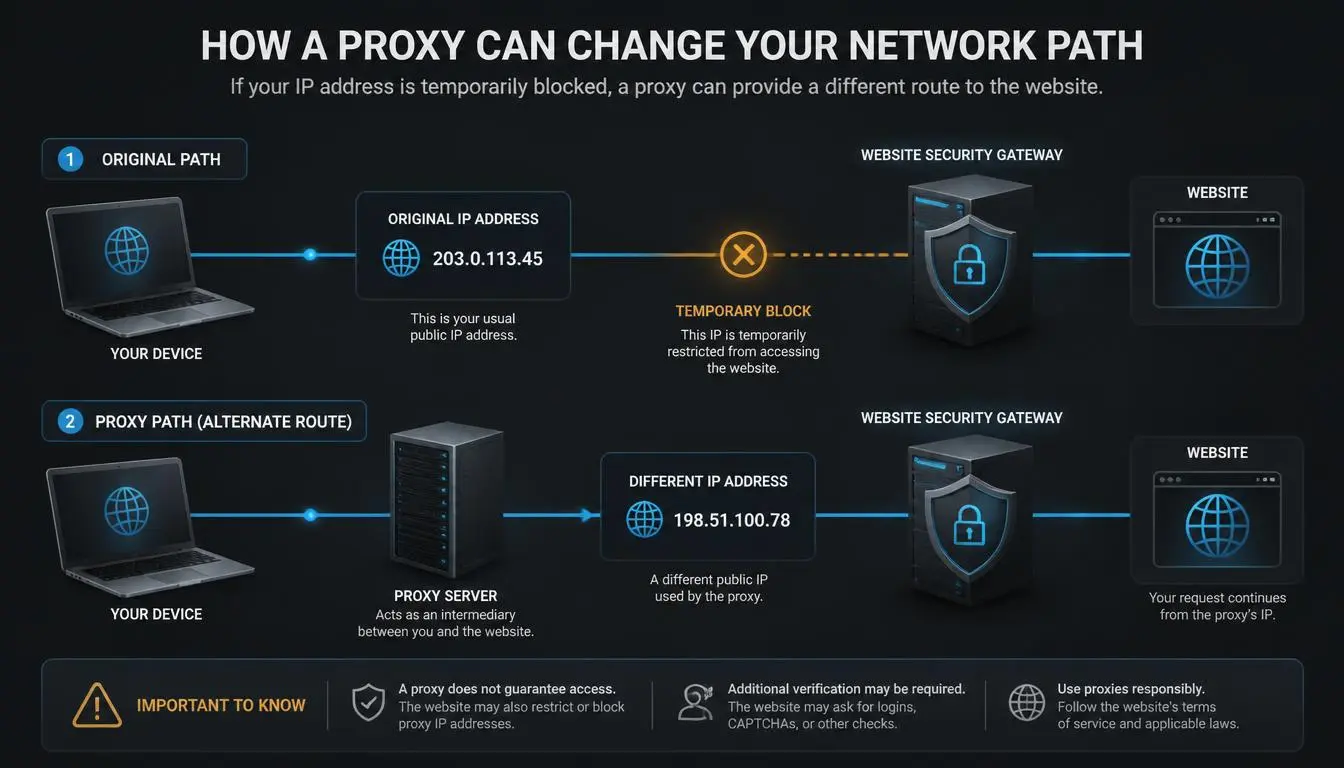
Sometimes, for specific legitimate purposes, it's worth being precise about which ones:
If your IP address has been temporarily blocked and you need a workaround for a legitimate reason, a proxy can help when the actual need is testing a website from a different location or network, running business or SEO research that needs a clean, separate IP, doing quality assurance across regions, or keeping authorized workflows separated on distinct IPs rather than one shared connection.
A proxy does not guarantee access to a site that has blocked you, does not remove an account-level restriction, does not defeat browser fingerprinting, and does not prevent future blocks if the underlying traffic pattern that triggered the first one continues.
Switching IPs to get back onto a site that just flagged you for suspicious behavior, without changing that behavior, usually just delays the same outcome, or escalates it.
CyberYozh as a practical option for legitimate proxy use
For the legitimate cases above, clean testing IPs from a 100M+ IP pool, regional research, and separated workflows, CyberYozh's current catalog lists several relevant options:
Rotating residential proxies start at $2/GB and draw from a pool spanning 195+ countries, useful for testing how a site behaves from different regions without relying on one flagged connection.
Dedicated mobile proxies (4G/LTE/5G) start from $3.5/day, with a shared tier from $1.7/day, for workflows that specifically need a genuine carrier-network IP rather than a datacenter one.
Static ISP proxies start from $5.29/month for cases that need one consistent IP over time rather than rotation.
API access supports automating permitted research tasks, and an IP reputation checker lets you verify an address's standing before relying on it for anything important.
None of this is framed as a fix for an existing account restriction or a way around a site's security rules; it's infrastructure for the testing, research, and separation use cases described above, where the underlying need is a different, cleaner IP for a legitimate task, not evasion of a block that's already in place.
Worth checking before you buy anything: if your current block is caused by a genuinely poor-reputation shared IP (public Wi-Fi, an old ISP range), a clean residential or mobile IP solves that specific problem. If the block is tied to your account or actual browsing behavior, no IP change will fix it.
Need a clean, verifiable IP for legitimate testing or research? Compare CyberYozh's current proxy options against the specific task you're trying to solve.
Conclusion
Seeing that your IP address has been temporarily blocked is a website-specific, usually short-lived restriction, not an internet-wide ban, and rarely a sign of anything you did wrong on purpose.
Ruling out the ordinary causes (retry loops, malware, a shared or flagged IP) before assuming the worst saves most people from unnecessary troubleshooting, and for the small number of legitimate cases where a clean, separate IP genuinely helps, that's a narrow and specific tool, not a workaround for an account restriction or a site's actual security rules. If your IP address is temporarily blocked again after trying the steps above, an account issue or persistent malware is more likely than bad luck.