
Đăng ký Uber đáng tin cậy: Hướng dẫn thiết lập mạng và SMS
Giả sử bạn điều hành một đội xe giao hàng địa phương và cần lập bản đồ tuyến đường trên một chiếc máy tính bảng mới. Họ mở ứng dụng. Họ nhập một số điện thoại internet thông thường để giữ đường dây chính của mình ở chế độ riêng tư. Màn hình bị đơ. Kết nối bị ngắt hoàn toàn. Máy tính bảng kết nối từ Chicago, nhưng số điện thoại đó phân giải đến một giá đỡ máy chủ ở Nevada.
Những người đi xe hàng ngày đối mặt với chính xác rào cản tương tự. Bạn hạ cánh tại một sân bay mới và cần một chiếc xe. Nhưng bạn từ chối đưa số cá nhân thật của mình cho một tài xế ngẫu nhiên. Bạn thử một ứng dụng SMS miễn phí. Việc đăng ký thất bại ngay lập tức.
Các thuật toán đánh giá dấu vết mạng của bạn trước khi giao diện thậm chí tải đầy đủ. Tín hiệu mạng không khớp kích hoạt từ chối ngay lập tức. Bảo vệ quyền riêng tư của bạn trong quá trình thiết lập Uber Eats hoặc yêu cầu chuyến đi tiêu chuẩn đòi hỏi sự cách ly mạng sâu. Bạn phải che chắn dữ liệu cá nhân của mình ở cấp độ giao thức. Bởi vì hệ thống chống gian lận quét nguồn gốc kết nối của bạn trực tiếp so với cơ sở dữ liệu nhà cung cấp viễn thông trong vài mili giây. Nếu những vị trí vật lý đó xung đột, hệ thống chấm dứt yêu cầu của bạn.
👉 Chạy thiết lập chính xác của bạn qua CyberYozh Anti-Fraud checker ngay bây giờ để xem điểm tin cậy thực của bạn.
TL;DR: Xác minh SMS đáng tin cậy cho Ứng dụng Tài xế Uber
Bạn cần một bộ kỹ thuật cụ thể để vượt qua các kiểm tra tự động này. Loại bỏ hoàn toàn các IP trung tâm dữ liệu. Thuê một số ảo cho Uber có nguồn gốc trực tiếp từ một nhà khai thác di động địa phương. Kết hợp đường dây đó với một kết nối internet dân cư thực sự. Thiết lập chính xác này căn chỉnh vị trí mạng của bạn một cách hoàn hảo. Nền tảng chỉ đơn giản thấy một người dùng tiêu chuẩn đăng nhập từ phòng khách của họ.
Ngừng sử dụng IP trung tâm dữ liệu và định tuyến lưu lượng qua mạng dân cư.
Thuê một số ảo cho Uber có nguồn gốc trực tiếp từ các nhà mạng địa phương.
Căn chỉnh thành phố IP của bạn chính xác với khu vực số điện thoại của bạn.
Chạy kiểm tra điểm gian lận trước khi yêu cầu bất kỳ mã xác minh nào.
Căn chỉnh vị trí mạng để bảo vệ quyền riêng tư trong quá trình thiết lập Uber Eats
VPN tiêu chuẩn thất bại trước các hệ thống chống gian lận hiện đại. Mạng đăng ký so sánh dấu vết kết nối của bạn trực tiếp với nguồn gốc viễn thông của bạn. Nếu bạn cố gắng thiết lập Uber Eats hoặc đăng ký hồ sơ tài xế bằng IP trung tâm dữ liệu, hệ thống gắn cờ phiên ngay lập tức. Họ từ chối yêu cầu của bạn.
Thuật toán bảo mật quét các mạng con thương mại cụ thể. Bạn phải định tuyến lưu lượng của mình độc quyền qua mạng ISP dân cư. IP dân cư tĩnh che giấu kết nối của bạn hoàn toàn vì chúng có nguồn gốc từ các nhà cung cấp internet gia đình thực sự. Nền tảng chỉ đơn giản xử lý lưu lượng của bạn như một người dùng tự nhiên, con người.
Sự không khớp địa lý giết chết điểm tin cậy của bạn. Nếu bạn mua số non-voip cho Uber trực tuyến thuộc về một nhà mạng ở Dallas, kết nối của bạn phải bắt nguồn từ một mạng con dân cư Dallas. Bạn phải khớp thành phố IP của bạn trực tiếp với khu vực số điện thoại của bạn. Nhắm mục tiêu cấp độ thành phố chi tiết ngăn chặn các bộ lọc bảo mật tự động từ việc hủy phiên của bạn. Bạn không thể chỉ lấy một số ảo cho Uber và hy vọng điều tốt nhất. Kết nối mạng cơ bản phải hoàn toàn sạch trước.
Đẩy lưu lượng của bạn qua một ISP dân cư thực sự để giữ các bộ lọc mạng con thương mại khỏi việc hủy kết nối.
Giữ thành phố proxy của bạn và khu vực số điện thoại của bạn chính xác giống nhau.
Sử dụng các hồ sơ trình duyệt cô lập để cung cấp cho ứng dụng các tín hiệu OS và thiết bị tự nhiên. Điều này ngăn chặn các lần giữ xác minh ngay lập tức.
Dựa vào các địa chỉ IP dân cư ổn định cao để duy trì kết nối trong suốt toàn bộ quá trình đăng ký.
👉 Lấy một residential proxy chuyên dụng từ bảng điều khiển CyberYozh App để bảo vệ danh tính kỹ thuật số của bạn.
Tại sao VoIP thông thường thất bại: Bạn cần số điện thoại residential thực sự cho Uber
Các trang web nhắn tin công cộng chia sẻ các đường dây tái chế cho hàng nghìn người dùng. Thuật toán đăng ký nhìn thấy dữ liệu này ngay lập tức. Chúng ping vào sổ đăng ký viễn thông ngay khi bạn yêu cầu xác minh SMS của Uber. Chúng phát hiện cờ định tuyến ảo. Hệ thống hủy yêu cầu của bạn ngay tại đó. Bạn mất thời gian và đốt cháy các proxy khi cố gắng ép một số không hợp lệ.
Các node nhà mạng thực hoạt động khác biệt. Một số ảo cao cấp cho Uber kết nối trực tiếp với các mạng tiêu dùng thực sự. Thuật toán xác minh tin tưởng tuyệt đối vào cơ sở hạ tầng di động thực. Để khóa một số riêng tư cho quyền truy cập tài xế Uber, bạn phải thuê một đường dây được gắn vật lý với nhà khai thác địa phương.
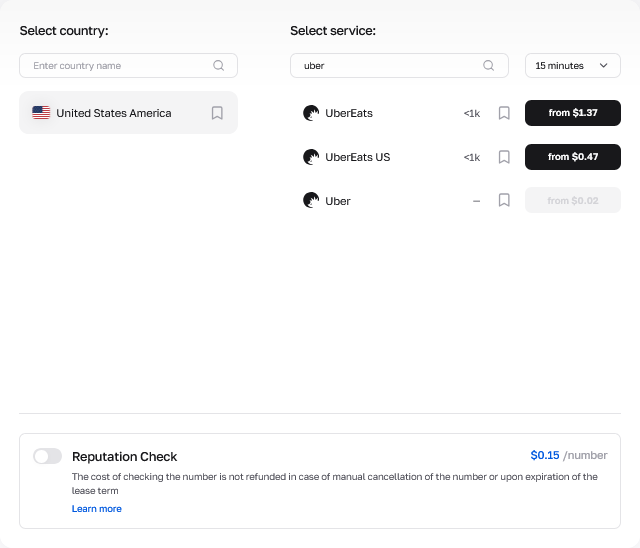
Đừng đoán xem một số có hoạt động hay không. Sử dụng công cụ kiểm tra chống gian lận để đánh giá đường dây trước khi bạn bắt đầu quy trình đăng ký. Công cụ này phân tích chính xác dữ liệu viễn thông mà tường lửa doanh nghiệp nhìn thấy. Bạn thấy chính xác những gì tường lửa thấy - lịch sử spam, danh sách DNC và rò rỉ dữ liệu. Bởi vì vượt qua các bộ lọc tự động đó đòi hỏi Tỷ lệ Tin cậy lớn ngay từ đầu. Một đăng ký Uber sạch đòi hỏi cơ sở hạ tầng chất lượng cao ở mọi bước.
Chạy kiểm tra Fraud Score trên đường dây viễn thông của bạn trước khi yêu cầu bất kỳ mã xác minh nào.
Thuê một số cho Uber được lấy trực tiếp từ các nhà khai thác di động địa phương thực tế.
Khóa một số riêng tư cho quyền truy cập tài xế Uber để ngăn chặn nhiễm chéo.
Chỉ sử dụng các đường dây nhà mạng chưa sử dụng nếu bạn muốn xác minh SMS đáng tin cậy cho Uber driver app.
👉 Truy cập nhóm số residential của CyberYozh App và bảo mật hồ sơ của bạn ngay lập tức.
Cách Lấy Số Residential cho Đăng ký Tài khoản Uber
Thiết lập mạng đã hoàn tất. Bạn đã căn chỉnh dấu vết kết nối của mình. Bạn muốn biết cách đăng ký tài khoản Uber mà không để lộ số điện thoại cá nhân. Điều này đòi hỏi khóa đường dây viễn thông thực tế. Thực hiện quy trình làm việc này chính xác như được viết.
Khởi động một profile cô lập bằng Multilogin, AdsPower, hoặc GoLogin. Đảm bảo residential proxy của bạn định tuyến lưu lượng qua chính xác thành phố bạn dự định nhắm mục tiêu. Mở bảng điều khiển CyberYozh App.
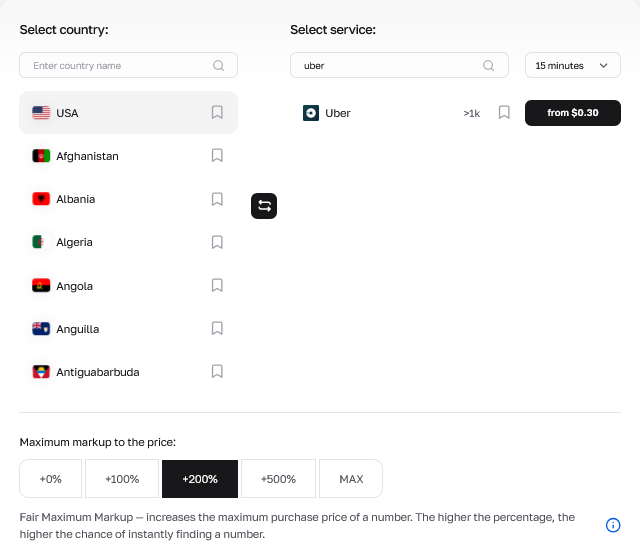
Điều hướng thẳng đến phần SMS. Nhấp vào tùy chọn mua số non-voip cho Uber trực tuyến. Các đường dây ảo tiêu chuẩn rẻ, bắt đầu chỉ từ $0.02 cho cửa sổ 15 phút. Nhưng trả thêm một chút cho số ISP residential thực $0.49 thực sự đảm bảo tin nhắn đến.
Lấy các chữ số từ bảng điều khiển. Sau đó mở ứng dụng trên điện thoại của bạn và nhập chúng vào.
Quay lại máy tính để bàn của bạn. Đợi nhận SMS Uber trực tuyến qua cổng đám mây. Đừng đóng cửa sổ. Hệ thống định tuyến tin nhắn đến trực tiếp lên màn hình của bạn trong vòng mười lăm giây.
Sao chép mật khẩu một lần (OTP) của bạn. Dán mã trực tiếp vào ứng dụng và xác thực phiên ngay lập tức.
Khởi chạy profile trình duyệt cô lập của bạn và xác nhận vị trí IP của bạn.
Chọn tùy chọn mua số non-voip cho Uber trực tuyến bên trong bảng điều khiển.
Gửi các chữ số trực tiếp trên màn hình ứng dụng.
Đợi nhận SMS Uber trực tuyến qua cổng đám mây.
Sao chép mật khẩu một lần (OTP) của bạn.
Đưa mã đó vào ứng dụng để hoàn tất đăng nhập của bạn.
API Doanh nghiệp và Định tuyến Khối lượng Lớn
Đăng ký thủ công sụp đổ ở quy mô lớn. Kiểm thử logistics và quản lý đội xe tự động đòi hỏi cơ sở hạ tầng hoàn toàn tự động. Nhấp vào các nút trong cửa sổ trình duyệt không thể hỗ trợ một pipeline đảm bảo chất lượng chạy năm trăm profile thử nghiệm đồng thời.
Bạn phải kết nối các script của mình trực tiếp vào một tích hợp APImạnh mẽ. Nền tảng CyberYozh cung cấp các REST endpoint thống nhất được xây dựng chính xác cho môi trường thông lượng cao. Bạn không còn phải quản lý từng tab trình duyệt riêng lẻ. Các script của bạn chỉ cần gửi một request đến /api/v1/numbers/, lấy số viễn thông và đưa chúng vào các form tự động của bạn.
Quản lý tải quyết định thành công hay thất bại ở đây. Gửi một nghìn request giống hệt nhau từ một IP và nền tảng sẽ chặn toàn bộ subnet của bạn. Bật tính năng IP rotation theo từng request để tránh hoàn toàn việc bị cấm subnet. Luồng traffic residential xoay vòng chỉ tốn ít nhất $0.90 mỗi gigabyte. Trình quản lý proxy xử lý việc xoay vòng kết nối một cách tự nhiên. Ứng dụng chính của bạn không bao giờ bị gián đoạn luồng xử lý.
Thực thi bảo vệ dấu vết kỹ thuật số trên các quy trình tự động hóa quy mô lớn.
Kết nối các script kiểm thử của bạn vào tích hợp API mạnh mẽ để loại bỏ việc click thủ công.
Bật tính năng IP rotation theo từng request để tránh hoàn toàn việc bị cấm subnet.
Giữ các bài kiểm tra QA của bạn chạy liên tục suốt ngày đêm với việc phân phối code hoàn toàn tự động.
Cung cấp năng lượng cho các pipeline sản xuất của bạn với cơ sở hạ tầng được xây dựng cho tải trọng nặng.
👉 Kết nối các script tự động hóa của bạn trực tiếp vào CyberYozh API và ngừng click thủ công.
Vượt xa số ảo: Bảo vệ dấu vết kỹ thuật số toàn diện
Mở rộng quy mô kiểm thử logistics của bạn đòi hỏi nhiều hơn chỉ một số ảo cho Uber. Bạn cần một cơ sở hạ tầng thống nhất. CyberYozh App cung cấp một nền tảng hoàn chỉnh cho việc cách ly danh tính kỹ thuật số.
Bạn có quyền truy cập trực tiếp vào hơn 50 triệu IP residential xoay vòng trên 195+ quốc gia. Bạn quản lý proxy di động chuyên dụng được lấy trực tiếp từ các nhà mạng LTE hoặc 5G thực, bắt đầu từ $1.70 mỗi ngày. Nền tảng tích hợp khả năng nhận SMS một cách liền mạch ngay bên cạnh các điều khiển proxy của bạn.
Bạn cũng có thể phát hành thẻ ngân hàng ảođược token hóa. Liên kết các thẻ này trực tiếp với các hồ sơ kiểm thử của bạn để đánh giá cổng thanh toán hoặc thanh toán cho các đăng ký SaaS. Chạy một kiểm tra điểm gian lận nhanh trên toàn bộ thiết lập của bạn. Những người kiểm thử nặng có thể lấy gói premium hàng tháng $19 bao gồm hàng nghìn lần kiểm tra tự động. Xác minh kết nối, đường dây viễn thông và card bin của bạn trước khi chi một đô la duy nhất cho một đăng ký thất bại.
Bảo vệ số riêng tư của bạn cho quyền truy cập Uber Driver
Dựa vào các đường dây VoIP công cộng tốn thời gian. Các tín hiệu mạng không khớp phá hủy điểm tin cậy của bạn. Bạn cần các đường dây nhà mạng sạch và địa chỉ IP nhà thực để duy trì kết nối của mình.
Bảo vệ dấu vết mạng của bạn ở cấp độ giao thức. Chạy kiểm tra gian lận trước mỗi phiên làm việc. Xây dựng các quy trình QA của bạn trên một cơ sở hạ tầng được thiết kế cho tự động hóa nặng.
👉 Lấy số của bạn cho xác minh SMS Uber và thiết lập môi trường kiểm thử của bạn ngay hôm nay.
Câu hỏi thường gặp: Sử dụng số ảo cho xác minh SMS Uber
Làm thế nào để đăng ký tài khoản Uber mà không cần điện thoại cá nhân?
Bạn cần một đường dây điện thoại residential và một địa chỉ IP khớp. Các ứng dụng SMS công cộng miễn phí sẽ không hoạt động.
Thuê một số chuyên dụng từ một nhà cung cấp viễn thông thực sự. Định tuyến kết nối của bạn qua một proxy residential nằm ở chính xác cùng thành phố. Điều này căn chỉnh vị trí mạng của bạn và đáp ứng các kiểm tra nền.
Số riêng tư cho tài khoản tài xế Uber có thực sự hoạt động không?
Có. Nhưng chỉ khi bạn đảm bảo một đường dây residential thực sự.
Hệ thống gắn cờ các số VoIP cơ bản ngay lập tức. Số của bạn phải kết nối trực tiếp với một nhà mạng di động địa phương để nền tảng đọc hồ sơ của bạn như một người đăng ký tiêu chuẩn.
Tại sao tôi thất bại trong xác minh SMS Uber khi sử dụng Google Voice?
Google Voice cung cấp các đường dây VoIP. Các thuật toán chống gian lận quét các cơ sở đăng ký viễn thông ngay khi bạn nhấn gửi.
Họ phát hiện thẻ định tuyến ảo. Họ từ chối yêu cầu ngay lập tức. Bạn phải sử dụng số điện thoại từ nhà mạng thực, không phải VoIP, để vượt qua các bộ lọc tự động này.
Tôi có thể mua số điện thoại non-voip cho Uber trực tuyến một cách an toàn ở đâu?
Sử dụng các nền tảng cơ sở hạ tầng chuyên nghiệp như CyberYozh App. Họ cung cấp số điện thoại trực tiếp từ các nhà mạng di động thực.
Luôn chạy kiểm tra điểm gian lận trên số điện thoại trước khi hoàn tất giao dịch mua. Điều này đảm bảo số điện thoại có lịch sử sạch.
Làm thế nào để bảo vệ quyền riêng tư trong quá trình thiết lập Uber Eats?
Bảo vệ dấu vết mạng của bạn trước tiên. Kết nối qua proxy residential tĩnh. Sau đó, thuê một đường dây nhà mạng tạm thời chỉ để nhận mã xác thực một lần. Bạn giữ dữ liệu cá nhân hoàn toàn ngoài máy chủ của họ trong khi vẫn duy trì hồ sơ kết nối có độ tin cậy cao.
Tại sao tôi không nhận được SMS Uber trực tuyến sau khi thanh toán?
Bạn có thể đã kích hoạt sự không khớp địa lý. Nếu địa chỉ IP của bạn hiển thị New York nhưng đường dây điện thoại của bạn xuất phát từ London, nền tảng sẽ chặn tin nhắn văn bản hoàn toàn.
Luôn khớp chính xác thành phố IP của bạn với khu vực số điện thoại của bạn. Các nhà cung cấp cao cấp tự động hoàn tiền nếu mã không đến.
Số điện thoại residential cho Uber có tốt hơn đường dây ảo tiêu chuẩn không?
Hoàn toàn đúng.
Các đường dây ảo tiêu chuẩn thuộc về các trung tâm web doanh nghiệp. Số điện thoại residential gắn vật lý với thẻ SIM người tiêu dùng thực. Thuật toán đăng ký xử lý cơ sở hạ tầng di động thực với mức độ tin cậy tối đa.
Các nhóm QA duy trì quy trình đăng ký Uber sạch ở quy mô lớn như thế nào?
Họ bỏ các tab trình duyệt thủ công. Họ kết nối các script kiểm thử trực tiếp vào REST API.
Bật luân phiên IP theo từng yêu cầu để phân phối tải máy chủ trên hàng triệu node residential. Điều này ngăn chặn việc chặn subnet và giữ cho quy trình kiểm thử chạy suốt ngày đêm.