
How to set up a proxy on Safari
Safari comes pre-installed on macOS. Users appreciate the fast page rendering and battery efficiency. But integrating a third-party IP address requires an understanding of how the operating system handles networking. The browser ignores local parameters. It strictly follows the global macOS network preferences.
You are about to reroute your entire machine. Traffic from Mail, the App Store, and background updates will flow through the new server.
This guide demonstrates the exact system configuration steps. We also examine infrastructure types to help you decide how to set up a proxy on Safari for specific workflows.
Choosing the right IP: Which proxy do you need for Safari?
Your business goal determines the required infrastructure.
1. Datacenter proxies
What they are: IP addresses housed in corporate data centers.
Purpose: Network footprint protection and stable media platform access.
Advantage: You get 99.99% uptime and unlimited traffic at a minimal price. This is the optimal choice for routing requests through a specific geographic region.
2. Residential rotating proxies
What they are: A dynamic pool of over 100 million IP addresses. It covers more than 195 countries.
Purpose: Large-scale data scraping, price aggregation, and search engine parsing.
Advantage: You pay strictly for consumed bandwidth in gigabytes. Geo-targeting comes free of charge. You control the session duration. The sticky sessions feature lets you hold a single IP address for up to 24 hours. This tool is perfect for extracting large datasets without triggering CAPTCHAs.
3. Static residential proxies (ISP)
What they are: Static addresses assigned by real consumer internet providers like Verizon or AT&T.
Purpose: Marketplace management and continuous data collection.
Advantage: Third-party algorithms see a standard household connection. You receive a clean IP with a high Trust Rate for managing e-commerce accounts.
4. Mobile proxies (4G/5G)
What they are: Private IPs from actual smartphones and tablets on cellular networks (e.g., 5G California AT&T).
Purpose: Managing dozens of social media profiles and launching advertising campaigns.
Advantage: Bandwidth is unmetered. You get a tool for manual IP rotation via a link or API, plus the ability to adapt your OS footprint (Fingerprint OS). Social platforms heavily favor mobile carrier pools. Standard plans include OpenVPN configuration. Dedicated premium servers support connections via the VLESS protocol.
Connection data preparation
Obtain your server credentials first.
👉 All proxy types at CyberYozh App.
The dashboard provides the following parameters after purchase:
IP (Host):
172.98.60.180Port:
58763Login / Password: Unique authorization credentials.
Important detail: macOS natively processes HTTP/HTTPS and SOCKS5. The servers also support UDP traffic.
Select Web Proxy (HTTP) and Secure Web Proxy (HTTPS) for standard web browsing.
Choose SOCKS Proxy for routing all types of data packets.
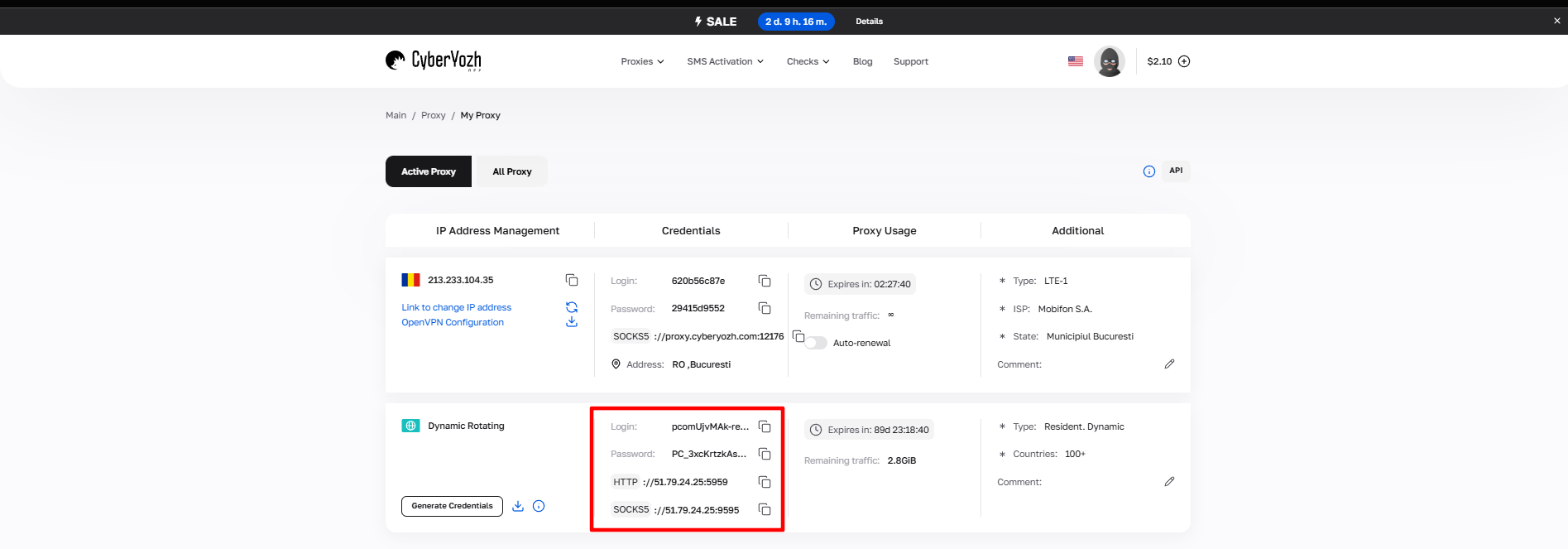
Fig. 1. CyberYozh App dashboard. The interface displays the IP address (Host), Port, Proxy Username, and Proxy Password.
How to set up a proxy on Safari: macOS system configuration
We will now alter the routing logic for the entire computer.
Step 1. Accessing network preferences
Open the browser. In the top menu bar, click Safari -> Settings...
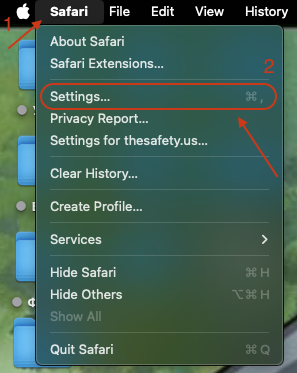
Fig. 2. Safari main menu providing access to network preferences.
Go to the Advanced tab.
Click the Change Settings... button next to the Proxies section.
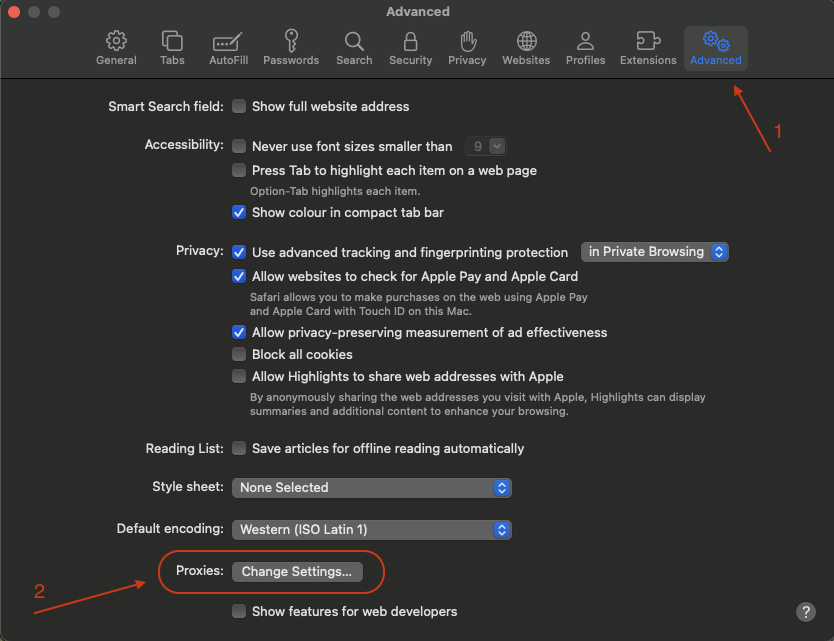
Fig. 3. The Advanced tab and configuration button.
Alternative path: Navigate to System Settings -> Network -> Select your active connection -> Details... -> Proxies tab.
Step 2. Protocol selection and data entry
The operating system configuration window will appear.
Select the protocol:
For HTTP: Check Web Proxy (HTTP) and Secure Web Proxy (HTTPS).
For SOCKS: Check only SOCKS Proxy.
Tip: Activate only the specific protocol you purchased. Checking all boxes causes connection errors.
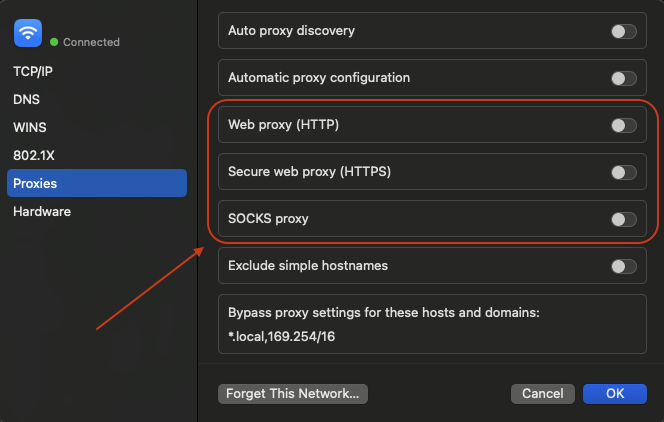
Fig. 4. macOS system dialog showing protocol options.
Enter the data:
Server: Type the IP address.
Port: Type the port number.
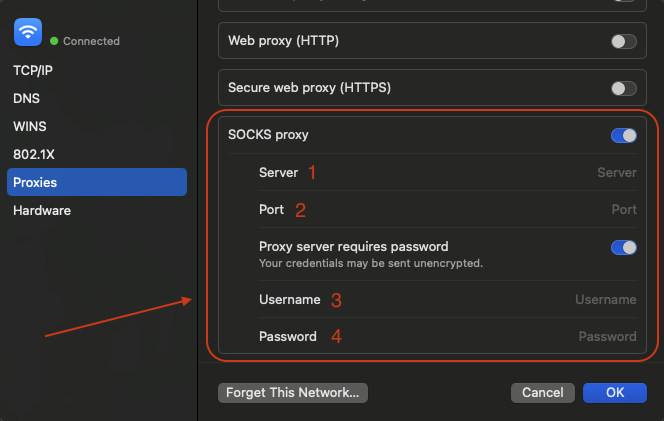
Fig. 5. IP address and port input fields.
Authorization: Check the "Proxy server requires password" box.
Enter your Username and Password.
Step 3. Applying the configuration
Click OK.
Click Apply in the main network window. The system is now routing your traffic.
Verifying your new IP address
Open whoer.net or browserleaks.com/ip. Check the metrics to confirm you applied the instructions on how to set up a proxy on Safari correctly.
What to look for:
IP Address: Matches your purchased server.
DNS: Reflects the target country.
Your network identity is successfully established.
Safari routing summary
When learning how to set up a proxy on Safari, keep the global background process routing in mind. Integrating a new IP takes about two minutes via the system menu. Your success relies on selecting the right infrastructure to avoid connection conflicts.
High-trust platforms require static residential proxies.
Large-scale data parsing runs through rotating residential proxies.
Advertising accounts operate flawlessly on mobile proxies.
Basic privacy tasks work perfectly on datacenter proxies.
Find reliable infrastructure with clean IPs in the CyberYozh App catalog.
FAQ: How to set up a proxy on Safari
Can I apply settings exclusively for the browser?
Safari operates strictly on macOS system parameters. Changing the local IP automatically affects every application on your device.
The browser keeps asking for my server password.
Save your credentials in Keychain Access. Click the save button during the initial login prompt.
Which proxy protocol should I choose?
HTTP/HTTPS manages web browsing flawlessly. SOCKS5 handles specialized software that transmits data packets without forming HTTP headers.
Why are pages failing to load after applying settings?
Check your IP and port inputs for typos. Verify that your subscription is active in the provider dashboard.
Do network extensions work in Safari?
Apple restricts third-party network plugins. Most App Store extensions simply open the macOS System Settings panel.
Can my ISP see my requests?
Your local provider only registers the connection to a remote server. The final destination URLs remain hidden from them.
How do I turn off the routing?
Open System Settings. Navigate to the Proxies menu. Uncheck the active protocols and click Apply to revert the changes.