
Proxy for Fortnite
Fortnite is a highly dynamic FPS game where the outcome is decided in milliseconds. Lag when building walls or delays in hit registration can cause your character to be killed and cost you the victory. That’s why using Fortnite proxies for playground optimization is essential for professional players.
Ping is the round-trip time (in milliseconds) between your device and the game server. Lower ping = faster reaction registration. Competitive play requires under 60 ms.
❓ How exactly does it work
Not all players have an ideal direct connection to Epic Games' servers. ISPs often route traffic through complex paths, and public networks (in universities or offices) may block game ports entirely. Dedicated local proxy servers stabilize your connection and ensure smooth data flow to the servers.
Use the best proxy for Fortnite
Let’s explore why we can improve our competitive gaming experience using fast, clean proxies with precise geotargeting. IP servers that are located closer to Epic Games’ own servers serve as intermediaries between your computer and these servers, and network signals are routed to them without congestion. As a result, they reach the destination much faster, leading to lower ping and latency.
Read more about gaming proxies to learn more about ping and why it matters most for gamers.
🎯 Why do you need a proxy server for Fortnite
A dedicated Fortnite proxy server solves multiple pain points simultaneously, from connection quality to account protection.
VPN servers are often used as secure web intermediaries, too, but they serve a different purpose. They encrypt traffic by default and secure the whole system, at the cost of larger ping and slower connection speed. Unlike proxies, they’d hardly improve your gaming experience.
Here is why competitive players rely on proxies:
Decrease ping and latency by routing traffic through optimized paths closer to Epic Games servers
Ensure account safety, as a Fortnite account proxy hides your real IP, preventing credential interception and DDoS targeting
Eliminate packet loss by switching away from congested ISP routes
Bypass local bans: Universities, offices, and restricted networks that block game ports are bypassed entirely
Participate in localized Epic Games promotions exclusive to specific regions by assigning a matching geolocation
Packet loss is when data packets fail to reach the server. Even 1–2% loss can cause rubber-banding and missed shots in Fortnite.
You have good internet and are hardwired so the only factor you could change is your distance to the server. You would literally need to move closer to the servers location.
— A player on r/FortniteCompetitive
Unless, of course, you use proxy Fortnite routing to simulate proximity virtually.
🏠 Why residential proxies must be used in Fortnite
Static residential proxies are the best proxy choice for Fortnite and for online gaming in general. They offer clean residential IPs with precise geotargeting and high speed. Because they are tied to real home ISPs, Epic Games treats them as legitimate player connections. They must use real residential IPs to gain trust from Epic Games' anti-cheat infrastructure.
Datacenter proxies are faster and can offer even lower ping, but their non-residential origin and less precise geotargeting may lead to limitations. Make sure to check them before deployment, if you decide to use them.
Also, read more about the differences between datacenter and residential proxies
Fortnite proxy settings
So, let's now configure your connection step by step.
🛜 Get CyberYozh residential proxies
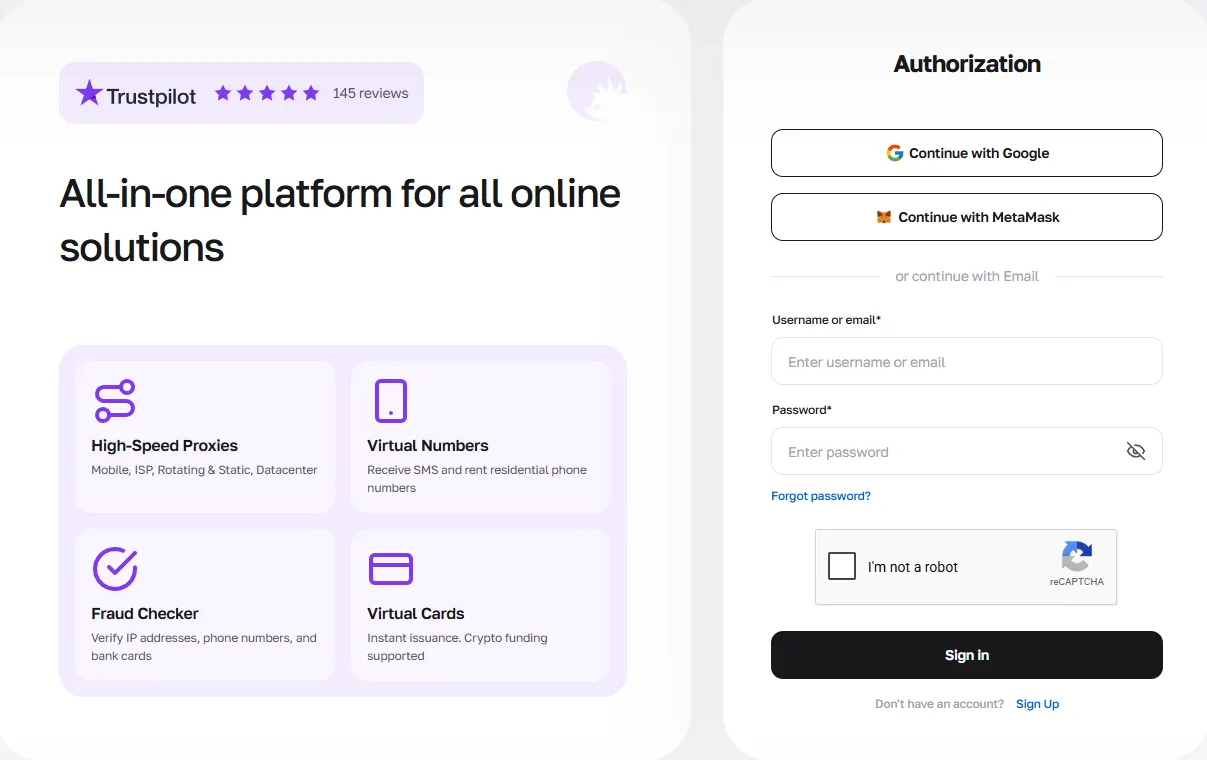
Sign up for CyberYozh and navigate to the residential proxy catalog.
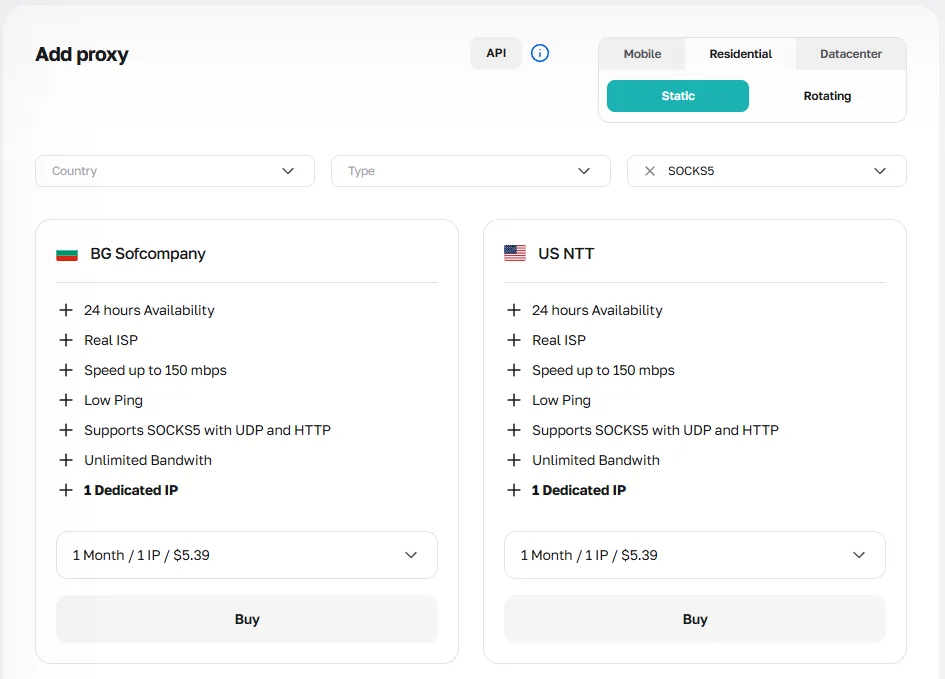
Select a static residential proxy in a country geographically close to your target Epic Games server: for example, a Frankfurt proxy for EU servers.
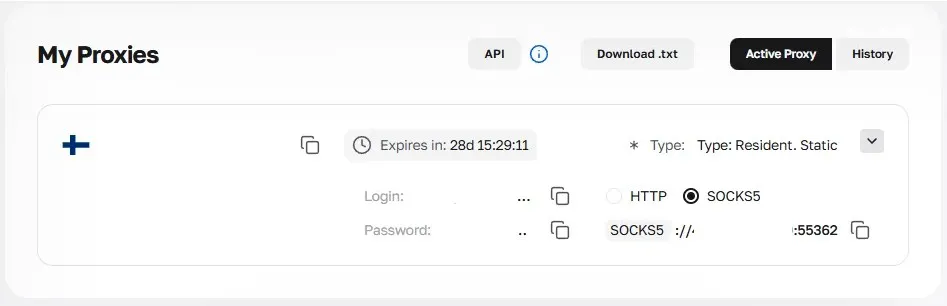
Retrieve your credentials: IP address, port, login, and password.
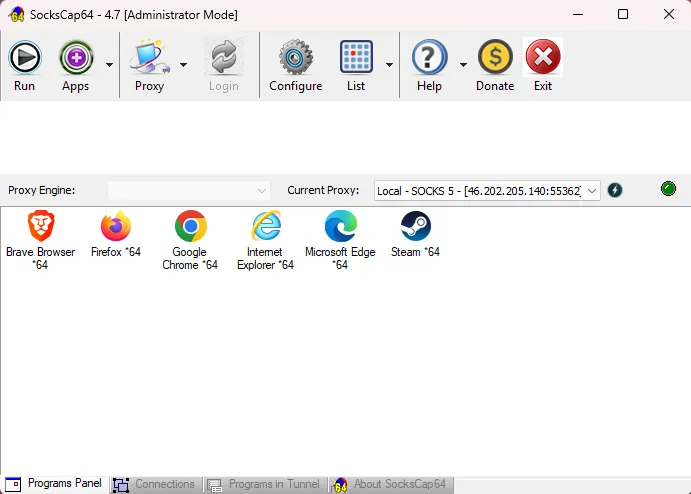
🖥️ Install a proxy client that supports UDP
Fortnite transmits live game data over UDP, which requires SOCKS5 proxy protocol, and standard HTTP proxies do not support this protocol. Install ProxyCap or SocksCap64 (free and open-source), both of which explicitly support UDP traffic.
Important: Proxifier does not support UDP and therefore cannot be used for live Fortnite sessions. Using it will result in broken game traffic.
🕹️ Add Fortnite to the proxification rules
Open your proxy client settings and add the following executables to proxification rules:
EpicGamesLauncher.exe
FortniteLauncher.exe
FortniteClient-Win64-Shipping.exe
This ensures both the launcher and the game client route all traffic through the proxy. Launch the game and verify your in-game ping.
If needed, proxy location changes are available free of charge via CyberYozh Support.
🎮 Explore other competitive gaming guides
Conclusion: Optimizing Fortnite playgrounds
The best Fortnite proxy setup via CyberYozh combines static residential IPs, SOCKS5/UDP-capable clients, and precise geotargeting, giving professional players stable, low-latency connections and the tools to compete at peak efficiency from any network.
Visit CyberYozh catalog now and optimize your Fortnite gaming experience.
FAQ about Fortnite proxies
1. What is a Fortnite proxy and how does it work?
A proxy Fortnite server acts as a relay between your device and Epic Games servers, rerouting your traffic through an optimized path to reduce ping, bypass blocks, and protect your IP address.
2. What is the best proxy for Fortnite?
Static residential (ISP) SOCKS5 proxies are the best proxy for Fortnite. They carry real home ISP IPs, are rarely flagged by Epic Games, and offer consistent speeds for live matches.
3. Do I need a special proxy client to use proxy Fortnite?
Yes. Since Fortnite uses UDP, you need a client that supports it, such as ProxyCap or SocksCap64. Standard Proxifier is not suitable as it lacks UDP support.
4. What executables should I add to my Fortnite proxy settings?
Add EpicGamesLauncher.exe, FortniteLauncher.exe, and FortniteClient-Win64-Shipping.exe to your proxification rules to route all game and launcher traffic correctly.
5. Can a proxy actually lower my ping in Fortnite?
Yes — if your ISP routes traffic inefficiently. A proxy server Fortnite placed between you and the Epic Games datacenter can bypass congested nodes and shorten the effective network path.
6. Will a Fortnite proxy chat be affected when using a proxy?
No. The Fortnite proxy chat works over the same proxified connection. As long as all game executables are added to your rules and SOCKS5 is used, text and voice chat will function normally.
7. Can I use a free proxy for Fortnite?
Free proxies are overloaded, unstable, and often already blacklisted by Epic Games. They can produce 200–500 ms ping and expose your credentials. Always use a dedicated paid proxy.
8. Should I use a datacenter or residential proxy for Fortnite?
Residential proxies are preferred for avoiding flags. Datacenter proxies offer lower raw ping but may be blocked. Test them before relying on them for competitive sessions.
9. How do I choose the right Fortnite proxy server location?
Select a proxy in the same country or region as your target Epic Games server. Mismatched geolocation (e.g., an Asian proxy for EU servers) results in dramatically higher latency.
10. Can a proxy help me access region-locked Epic Games promotions?
Yes. By assigning a proxy IP in the target region, you can participate in localized events, beta tests, and promotions that Epic Games restricts to specific countries.
11. What port should I use for CyberYozh SOCKS5 Fortnite proxies?
Always select SOCKS5, not HTTP, when configuring your proxy fortnite client. Use the port provided in the dashboard.
12. Can I manage multiple Fortnite accounts with proxies?
Yes, but each account must have a unique static IP. Sharing one IP across multiple accounts triggers Epic Games' multi-account detection and can result in mass bans.
13. How do I change my proxy location with CyberYozh?
Location changes are available free of charge. Contact CyberYozh Support and request a new IP in your desired region to re-test ping and optimize your setup.