
Антидетект-браузеры: Сценарии использования, Интеграция прокси и Лучшие примеры
Каждый раз, когда вы посещаете веб-сайт, интернет идентифицирует вашу сессию. Даже если вы не вводите имя пользователя или пароль, система анализирует устройство и браузер, которые вы используете, установленные шрифты, разрешение экрана, ваш IP-адрес и даже то, как двигается ваша мышь. Всё это называется цифровым отпечатком и может управляться. Антидетект-браузеры созданы именно для этой цели и незаменимы для таких задач, как управление несколькими аккаунтами, веб-скрейпинг и проекты с высоким уровнем конфиденциальности. Вместе с правильным проксиони обеспечивают быстрые рабочие процессы без риска блокировки.
Коротко
Антидетект-браузеры маскируют ваш реальный цифровой отпечаток, такой как GPU, IP, шрифты, часовой пояс, идентификатор браузера, и заменяют его эмулированными данными, благодаря чему каждый профиль выглядит для любого веб-сайта как совершенно другое устройство.
Подменяет более 50 параметров браузера и оборудования для каждого изолированного профиля
Предотвращает связывание аккаунтов через изоляцию сессий, cookie и кэша
Работает с прокси для согласования IP, геолокации и языка для каждого профиля
Используется для управления несколькими аккаунтами, партнёрского маркетинга, SEO, Web3 и анонимных исследований
Лучшие инструменты включают Dolphin Anty, GoLogin, AdsPower и Multilogin
Что такое антидетект-браузер и зачем он был изобретён?
Стандартные браузеры, такие как Chrome или Firefox, не обеспечивают полной изоляции данных. Напротив: они сохраняют историю сессий и передают параметры веб-сайтам. Это удобно для персонализации, но неудобно, если вы:
Управляете несколькими бизнес-аккаунтами (в LinkedIn, Facebook и других)
Запускаете рекламные кампании в разных геолокациях и аккаунтах
Отслеживаете результаты SEO и SERP из разных локаций
Тестируете приложения с разных типов устройств на GitHub и других сервисах
Собираете публичные данные для обучения ИИ и бизнес-аналитики
Хотите сохранить конфиденциальность данных и защитить их от отслеживания.
Антидетект-браузеры, облачные телефоны и прокси — это инструменты, используемые для настройки и защиты ваших цифровых отпечатков, гарантируя, что ваш трафик не будет помечен или ограничен платформами. Чтобы убедиться, что всё понятно, давайте быстро рассмотрим технические детали. Ниже приведён пример панели управления цифровыми отпечатками антидетект-браузера DICloak .
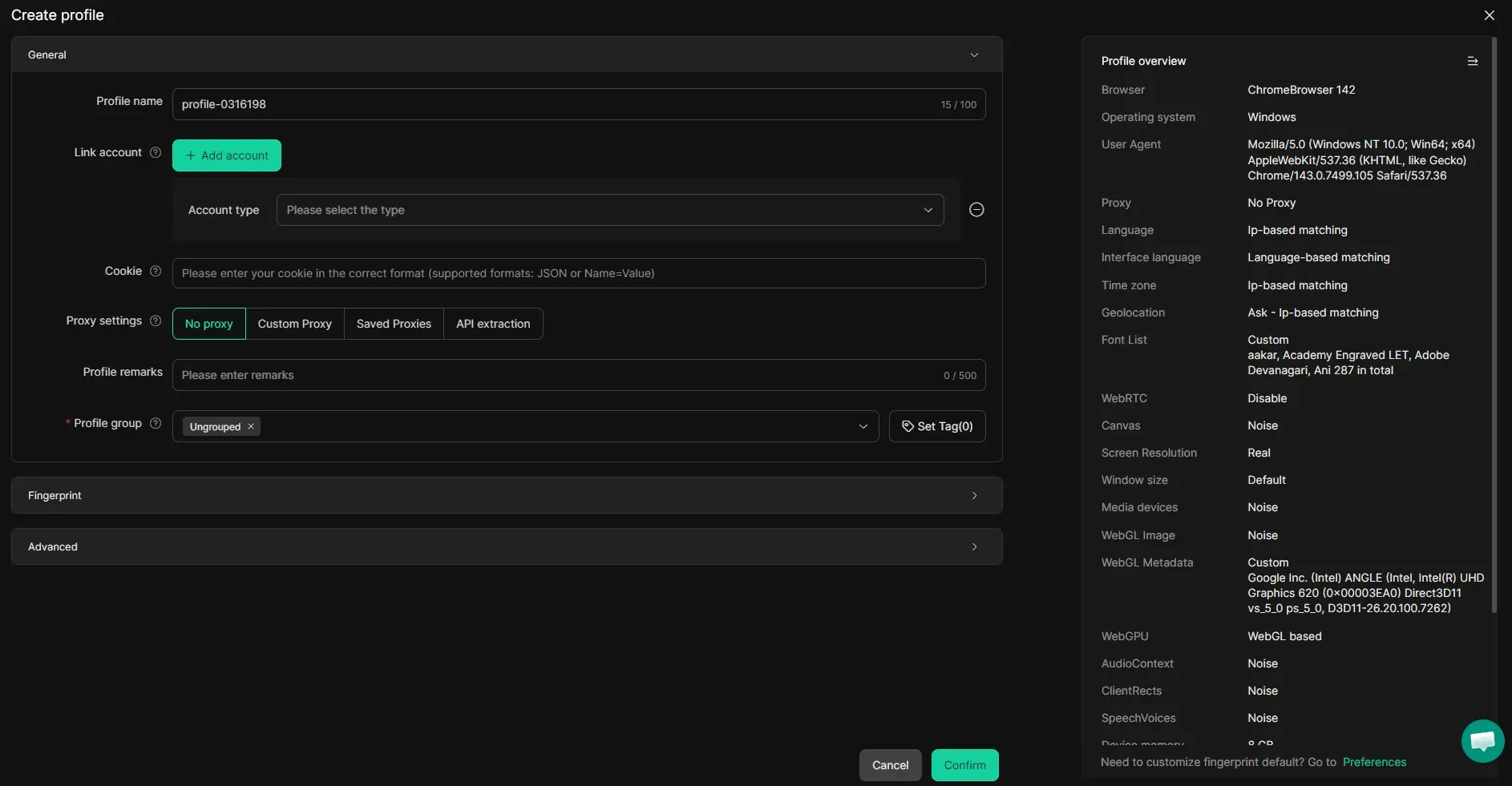
Для получения дополнительной информации изучите цифровые отпечатки прокси и узнайте, как гарантировать, что платформа не ограничит вас из-за использования прокси.
Цифровые отпечатки и их важность
Хотя прокси предоставляют вам чистый IP-адрес, ваше устройство по-прежнему идентифицируется так же, как и раньше. Поэтому, даже если вы отправляете запросы с разных IP, такие платформы, как социальные сети и сервисы электронной коммерции , могут идентифицировать ваши цифровые параметры, такие как:
Идентификатор браузера: строка User-Agent, HTTP-заголовки, свойства navigator и списки плагинов, которые идентифицируют браузер и его версию.
Графика и GPU: результаты рендеринга Canvas и WebGL, которые раскрывают уникальное оборудование GPU, драйверы и сигнатуры рендеринга.
Экран и дисплей: Разрешение экрана, глубина цвета и соотношение пикселей, которые раскрывают физические характеристики дисплея устройства.
Система и оборудование: Платформа ОС, количество ядер процессора и объем памяти устройства, которые создают отпечаток базовой машины.
Сеть и IP: Реальный IP-адрес, утечки WebRTC, паттерны TLS-рукопожатия и данные ISP/ASN, привязанные к соединению.
География и время: Часовой пояс, язык браузера и региональные настройки, которые должны соответствовать назначенному местоположению прокси.
Аудио и медиа: Вывод AudioContext, поддерживаемые кодеки и ответы медиа-API, формируемые различиями в оборудовании и ОС.
Шрифты и поведение: Установленные наборы шрифтов, флаги поддержки сенсорного ввода и поведенческие сигналы, такие как движение мыши и ритм набора текста.
Все эти параметры раскрывают важную информацию о вас и ваших действиях: откуда вы, какое устройство используете и как ведете себя при посещении сайта. Хотя ваша личная информация остается конфиденциальной, этих поведенческих метаданных достаточно, чтобы понять, что вы используете прокси/VPN, или обнаружить несоответствия в ваших действиях. Антидетект-браузеры предотвращают это.
Использование антидетект-браузеров для анонимного просмотра
Когда мне нужно выполнить рутинные задачи, я использую обычный браузер. Но когда требуется работать с конфиденциальной информацией — будь то крупные суммы денег или персональные данные пользователей — я предпочитаю использовать изолированные профили антидетект-браузеров. Они позволяют трекерам работать в обычном режиме, но передают им эмулированные данные, благодаря чему каждый профиль выглядит для любого сайта как совершенно другой легитимный пользователь. Они не связаны с вашими реальными устройствами, а в сочетании с прокси CyberYozh ваша цифровая идентичность полностью защищена. Например, ниже представлена панель создания профиля антидетект-браузера Vision .
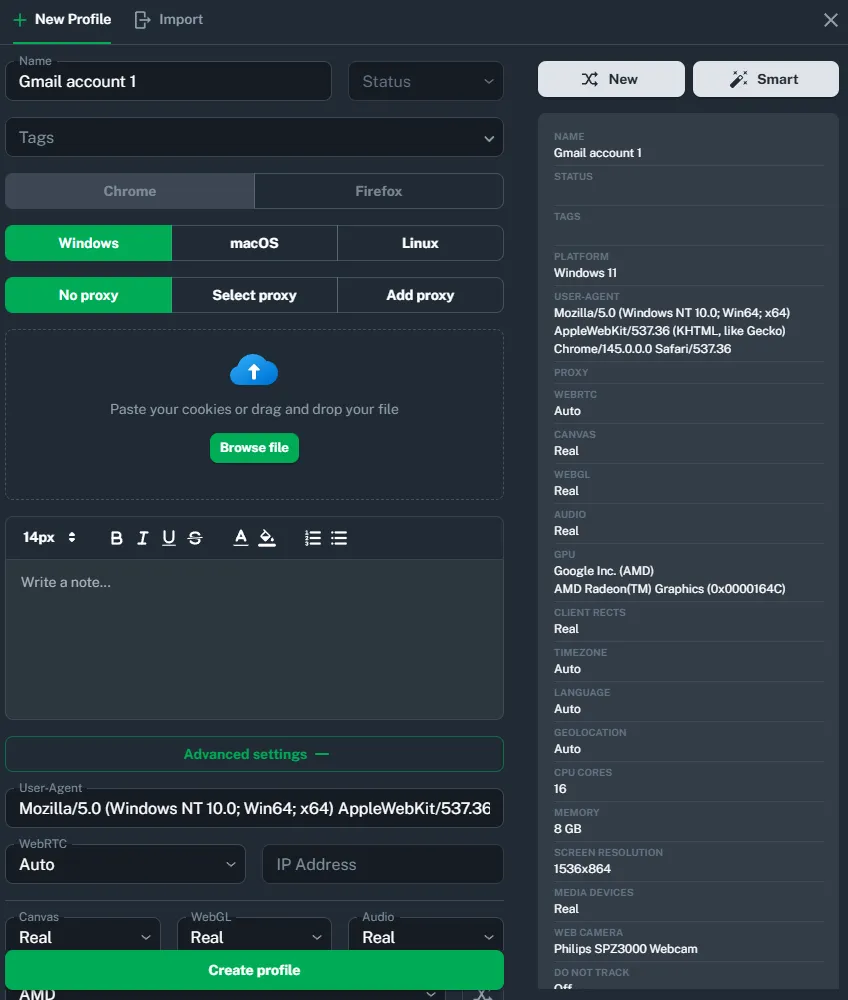
Здесь вы можете создавать отдельные профили, которые работают изолированно, без конфликтов cookie, пересечения данных или лишних проверок безопасности. Облачные телефоны работают аналогично: они создают изолированные профили, каждый из которых напоминает Android-телефон с высоко настраиваемыми отпечатками реальных Android-устройств. Они в основном используются для управления социальными сетями, особенно на мобильных платформах, таких как Instagram и TikTok. Изучите лучшие сервисы облачных Android-телефонов , чтобы узнать больше об этих антидетект-инструментах.
Легальны ли вообще антидетект-браузеры?
В целом, да. Сам по себе антидетект-браузер — это инструмент для управления данными, как VPN или прокси. Однако важно понимать, как и зачем вы их используете.
Легальные сценарии: управление рекламой, тестирование программного обеспечения и защита персональных данных. Они не нарушают никаких законов и просто используют антидетект-функции для безопасности и оптимизации бизнес-процессов.
Нелегальные сценарии: нарушение правил платформ, мошенничество, DDoS-атаки и другая вредоносная деятельность. Они либо напрямую нарушают закон, либо нарушают пользовательское соглашение, что может привести к судебным искам и штрафам.
Короче говоря, если ваши бизнес-задачи легальны, то использование инструментов для их выполнения также легально. Узнайте больше о правовых аспектах использования прокси на CyberYozh, чтобы понять эти особенности антидетект-деятельности.
Лучшие антидетект-браузеры: топ-8 сервисов
Существует множество антидетект-браузеров, и вы можете изучить гайды CyberYozh для получения дополнительной информации об их настройке. Здесь мы рассмотрим несколько наиболее популярных и надежных вариантов, основываясь на различных метриках и характеристиках:
Давайте рассмотрим каждый из этих вариантов.
Dolphin Anty
Dolphin Anty — это мощный антидетект-браузер, ориентированный на партнёрский маркетинг и созданный для масштабного управления множественными аккаунтами на рекламных платформах, таких как Facebook, TikTok и Google Ads. Он предназначен для профессиональных команд арбитражников трафика и партнёрских маркетологов, которым необходимо управлять сотнями профилей с последовательным контролем цифровых отпечатков, включая Canvas, WebGL, WebRTC и автоматическую подмену имени устройства при запуске. CyberYozh рекомендует использовать его в паре с SOCKS5-прокси со статическими IP-адресами для управления аккаунтами и ротационными резидентскими прокси для задач парсинга. Встроенный менеджер прокси, робот для работы с cookies, массовое создание профилей и инструменты для командной работы делают его хорошей платформой для безопасного масштабирования рекламных операций.
GoLogin
GoLogin — это облачный антидетект-браузер на базе собственного движка Orbita, построенного на Chromium, который управляет более чем 50 параметрами цифрового отпечатка на профиль, включая WebGL, шрифты, геолокацию и часовой пояс. Он ориентирован на SMM-агентства, продавцов в сфере электронной коммерции и криптотрейдеров, которым нужны надёжные операции с множественными аккаунтами, доступные с любого устройства, поскольку профили синхронизируются в облаке. Ключевые преимущества включают приложение для Android, двухфакторную аутентификацию и полную поддержку API для автоматизации через Selenium и Puppeteer.
AdsPower
AdsPower предлагает двухдвижковую архитектуру с SunBrowser (на базе Chromium) и FlowerBrowser (на базе Firefox). Он разработан для профессионалов в сфере электронной коммерции, менеджеров социальных сетей и маркетинговых агентств, которым необходимо управлять огромными объёмами профилей с поддержкой массового импорта до 1000 профилей за раз через Excel или TXT. Выдающимся отличием является встроенная автоматизация роботизированных процессов (RPA) без кода и синхронизатор множественных окон, которые позволяют командам одновременно дублировать действия на нескольких аккаунтах без программирования. AdsPower также имеет сертификаты безопасности SOC 2 Type II и ISO 27001.
Multilogin
Multilogin — это антидетект-браузер корпоративного уровня, предлагающий два модифицированных ядра браузеров, Mimic (Chromium) и Stealthfox (Firefox), с глубокой модификацией цифровых отпечатков на уровне ядра. Он ориентирован на крупные компании, команды разработчиков и агентства, которым требуется максимальная изоляция профилей браузера, при этом профили хранятся в зашифрованной облачной инфраструктуре AWS и автоматически синхронизируются между устройствами. Его строгая функция блокировки сессий предотвращает одновременный запуск одного и того же профиля с двух устройств — критически важная защита для безопасности аккаунтов в командных средах. Multilogin используется крупными предприятиями по всему миру, хотя его ценовая политика выше, чем у большинства конкурентов.
Incogniton
Incogniton — это универсальный антидетект-браузер, созданный для маркетинговых агентств, операторов электронной коммерции и профессионалов арбитража трафика, которым нужна как изоляция профилей, так и командная работа на единой платформе. Каждый профиль поддерживает полностью разделённые cookies, локальное хранилище и кеш, поддерживая HTTP, HTTPS, SOCKS4 и SOCKS5-прокси. Его инструмент синхронизации без кода записывает действия в браузере и автоматически воспроизводит их на нескольких профилях, в то время как продвинутые пользователи могут использовать интеграции Selenium и REST API для сложных рабочих процессов автоматизации. Incogniton предлагает щедрый бесплатный тариф, что делает его особенно привлекательным для небольших команд или частных лиц.
MoreLogin
MoreLogin — это удобный для новичков антидетект-браузер, который использует цифровые отпечатки, сгенерированные искусственным интеллектом, для создания полностью изолированных браузерных сред с минимальной ручной настройкой, поддерживая движки как Chromium, так и Firefox. Он лучше всего подходит для малых и средних команд в электронной коммерции, маркетинге в социальных сетях и криптовалютах, которые отдают приоритет простоте настройки и облачному доступу к профилям, а не детальной настройке цифровых отпечатков. Профили хранятся в облаке, обеспечивая бесшовный доступ с разных устройств и простую командную работу со встроенным управлением ролями. Его функция синхронизации позволяет пользователям дублировать действия в нескольких окнах профилей одновременно, делая повторяющиеся задачи с множественными аккаунтами эффективными без необходимости в экспертизе автоматизации.
Kameleo
Kameleo — это технически продвинутый антидетект-браузер, предлагающий непревзойдённый детальный контроль над каждым параметром цифрового отпечатка, а также нативную эмуляцию Android-устройств для аутентичного поведения мобильных профилей. Он разработан для опытных пользователей, разработчиков и инженеров масштабной автоматизации, работающих с мобильными кампаниями, фармингом airdrop или сложными операциями парсинга. Профили хранятся локально на машине пользователя, обеспечивая полный суверенитет данных без зависимости от сторонних облачных серверов. Полная совместимость API Kameleo с Selenium, Playwright и Puppeteer делает его лучшим выбором для технических команд, создающих кастомные конвейеры автоматизации, хотя его более крутая кривая обучения делает его менее доступным для нетехнических пользователей.
Hidemyacc
Hidemyacc разработан для того, чтобы помочь командам и индивидуальным операторам управлять множественными аккаунтами без риска блокировки платформами, с ценообразованием, которое остаётся доступным, в среднем ценовом диапазоне, а не в премиум-сегменте. Новички получают преимущество, поскольку бесплатные прокси включены начиная с тарифа Base, а не продаются как отдельная опция. Автоматизация осуществляется через конструктор скриптов с перетаскиванием, поэтому не требуется знание программирования, а функция синхронизации позволяет одно действие дублировать сразу на нескольких профилях. Стоит отметить один компромисс: мобильные профили Hidemyacc имитируют мобильную браузерную среду, а не полностью эмулируют физическое устройство, что делает их лёгкими, но они могут не выдержать проверок, которые исследуют более глубокие сигналы на уровне оборудования. Для больших команд Hidemyacc также предлагает встроенное управление субаккаунтами и REST API (Profile API, User API) для программного контроля профилей.
Сравнение топовых антидетект-браузеров
Вот сравнительная таблица, обобщающая топ-8 антидетект-сервисов. Вы можете обратиться к ней при выборе проекта, соответствующего вашим потребностям.
Название | Тарифы и цены | Основные функции | Лучше всего подходит для |
Dolphin Anty | Бесплатно: 5 профилей; от $10/мес за 10 профилей | 50+ отпечатков, робот для cookies, массовые профили, командные роли | Партнёрских маркетологов и команд арбитража трафика |
GoLogin | Бесплатно: 3 профиля; от $49/мес за 100 профилей | Движок Orbita, облачная синхронизация, встроенные прокси, мобильное приложение | Индивидуальных маркетологов, SMM-агентств, криптотрейдеров |
AdsPower | Бесплатно: 5 профилей; от $9/мес за 10 профилей | Двойной движок, RPA без кода, синхронизация множественных окон, массовый импорт | Команд электронной коммерции, нуждающихся в автоматизации без кода в масштабе |
Multilogin | Нет бесплатного плана; от €9/мес за 10 профилей | Движки Mimic + Stealthfox, подмена на уровне ядра, зашифрованное облако | Корпоративные команды, требующие максимальной глубины анонимности |
Incogniton | Бесплатно: 10 профилей; от $29.99/мес за 50 профилей | Изоляция профилей, синхронизатор без кода, встроенный маркетплейс прокси | Агентства и фрилансеры, управляющие клиентскими социальными аккаунтами |
MoreLogin | Бесплатно: 2 профиля; от $9/мес за 10 профилей | AI-отпечатки, облачные профили, синхронизатор, командные роли | Новички и малый бизнес в электронной коммерции и социальных сетях |
Kameleo | Нет бесплатного плана; от €59/мес с неограниченным количеством профилей | Детальный контроль отпечатков, эмуляция Android, полный API автоматизации | Разработчики и продвинутые пользователи, запускающие сложные конвейеры автоматизации |
Hidemyacc | Нет бесплатного плана, от $10/мес за 5 профилей | Изоляция отпечатков, бесплатные прокси (начиная с плана Base), автоматизация drag-and-drop, Synchronizer (зеркалирование действий между профилями), управление командой/субаккаунтами, REST API (Profile API, User API) | Команды и индивидуальные операторы, управляющие множеством аккаунтов с ограниченным бюджетом |
Настройка профиля антидетект-браузера
Вот как настроить антидетект-браузер на Windows, Linux или macOS. Многие из них поддерживают только некоторые из этих платформ, поэтому изучите это перед выбором браузера. Вот алгоритм.
Создайте профиль: Это как открытие отдельного рабочего пространства, изолированного от вашей основной системы. Это можно сделать легко, обычно просто нажав кнопку.
Назначьте прокси: Сайт видит IP-адрес, соответствующий нужной вам геолокации (например, Берлин, Лондонили Сингапур).
Настройте параметры: Обычно антидетекты поддерживают широкий спектр опций настройки отпечатков, хотя часто лучше выбрать эффективные предустановленные наборы.
Сохраните всё: Куки, логины, кэш и отпечатки хранятся строго внутри профиля, без смешивания данных между аккаунтами.
Таким образом, вы можете использовать 10 разных аккаунтов на одной платформе, и аналитические системы не свяжут их вместе. Обратитесь к гайдам CyberYozh по настройке прокси в антидетект-браузерах для таких сервисов, как Vision, Hidemium, Octo Browser, DICloak, AndBrowserи другие.
Кому может понадобиться антидетект-браузер?
Хотя я использую антидетекты для конфиденциальных личных задач и рекомендую их другим, в первую очередь это профессиональные инструменты. Давайте рассмотрим конкретные отрасли, где антидетект-браузеры зарекомендовали себя как незаменимые инструменты.
Антидетект-браузеры для специалистов по социальным сетям
Будучи SMM-менеджером, менеджером аккаунтовили оператором электронной коммерции, вы можете управлять 5, 10 или 20 клиентскими аккаунтами с одного устройства, избегая ошибок авторизации и банов, вызванных подозрительной мультиаккаунтной активностью. Каждый профиль сохраняет свои собственные изолированные куки и данные сессии. Объедините их с мобильными прокси , чтобы изолировать также их IP-адреса и сетевые характеристики.
Антидетект-браузеры для SEO и анализа выдачи
SEO-специалисты используют антидетект-браузеры для имитации поисковых запросов из разных географических локаций, с разных устройств и браузеров, чтобы получить чистые, объективные результаты выдачи, свободные от персонализации или истории просмотров. Используйте резидентские прокси , чтобы видеть то, что видит реальный локальный пользователь, и получать точное отслеживание позиций и анализ конкурентов.
Антидетект-браузеры для анонимного просмотра
Независимо от того, занимаетесь ли вы анализом бренда, проводите маркетинговые исследованияили мониторите отзывы, антидетект-браузеры обеспечивают стабильный, неотслеживаемый доступ к веб-ресурсам без оставления идентифицируемых цифровых следов. Запускайте каждую сессию внутри изолированной, эмулированной среды, предотвращая создание веб-сайтами поведенческих профилей или ограничение доступа на основе предыдущей активности.
Антидетект-браузеры для партнёрского маркетинга
При тестировании рекламных креативов и запуске кампаний через множество источников трафика чистые изолированные среды необходимы. Антидетект-браузеры предоставляют партнёрским маркетологам и арбитражным командам объективную, надёжную статистику для каждого теста, гарантируя, что никакие данные сессий, куки или поведенческие сигналы не просачиваются между профилями.
Антидетект-браузеры для Web3-активностей
Криптоэнтузиасты и Web3-разработчики используют антидетект-браузеры для управления несколькими кошельками и биржевыми аккаунтами, не позволяя платформам связывать их через общие цифровые отпечатки устройств или IP-адреса. Это минимизирует риск блокировки аккаунтов, заморозки активов и раскрытия личности, поэтому ваши действия выглядят независимыми, а реальные данные защищены. Читайте далее, чтобы изучить лучшие практики работы с криптовалютой в CyberYozh.
Что учитывать при выборе антидетект-браузера?
Ниже приведены несколько чек-листов, которые помогут убедиться, что вы выбрали правильный антидетект-браузер. Начнём с нескольких вопросов, которые критически важно задать перед выбором, и ответить на них исходя из потребностей вашего проекта.
Работает ли он с необходимыми типами подключения? Изучите различия между HTTP и SOCKS5 .
Как можно настроить параметры цифрового отпечатка?
Соответствуют ли эти параметры реальным устройствам?
Можете ли вы удобно управлять несколькими профилями?
Предусмотрено ли локальное или облачное хранилище данных?
Есть ли бесплатная версия или хороший демо-период?
Поддерживается ли интеграция API для автоматизации рутинных задач?
Какова частота обновления ядра?
Также важно помнить, что:
Антидетект требует правильно настроенного профиля для корректной работы.
Безопасность прежде всего: используйте надёжные пароли и двухфакторную аутентификацию даже в защищённом браузере.
При использовании платных прокси выбирайте проверенных провайдеров, иначе соединение может быть нестабильным.
Будьте осторожны с антидетект-браузерами с бесплатными прокси: обычно они низкого качества
Если вы только начинаете:
Начните с Dolphin Anty или Incogniton благодаря щедрым бесплатным тарифам
Изучите документацию по настройке конфигураций
Протестируйте и не используйте сразу основные бизнес-аккаунты
Чётко определите, какие задачи решают антидетект-браузеры в вашем случае.
Антидетект-браузеры с прокси: оптимизация веб-активности
Антидетект-браузеры — это профессиональное программное обеспечение для работы с информацией. Я предпочитаю использовать их, когда мне нужен доступ в интернет для профессиональной или конфиденциальной деятельности, и могу рекомендовать их всем, кто заинтересован в защите личной свободы. Это инструменты для цифровой гибкости и безопасности бизнеса. В мире, где объёмы данных растут, важно грамотно управлять своим цифровым присутствием. Изучите гайды CyberYozh , чтобы узнать больше об инструментах антидетекта, или зарегистрируйтесь прямо сейчас, чтобы выбрать прокси в дополнение к вашему браузеру.