
Antidetect browser
Octo BrowserIntegration with CyberYozh App
Fully Supported
Browser Support
Chromium
Team Collaboration
Team collaboration
Security
End-to-end encryption
Starting Price
€7/month
Built for e-commerce, social media, Web3, and more
Manage multiple social media, e-commerce, advertising, and crypto wallet accounts in MoreLogin with isolated browser profiles and dedicated IPs. CyberYozh offers a premium proxy infrastructure for every MoreLogin task.
• 5G/LTE mobile proxies with unlimited traffic • 100M+ residential proxy IPs from real ISP providers across • 195+ countries available, with city- and ZIP-level targeting • Automated rotation and sticky sessions up to 24 hours • Virtual phone numbers for account verification • API access for automation

CyberYozh proxy infrastructure with network fingerprint management ensures full MoreLogin profile isolation. Together with virtual numbers for account verification, this makes each account session appear to be from a genuine user, no matter how many you have to launch.
Clean Residential IPs
Advanced Session Control
Precise Geo Targeting
Automation Ready
High Success Rate
API Access
MoreLogin users use CyberYozh proxy infrastructure for its high speeds, stability, and additional features for account verification. As a result, all business tools can be used with ease on a single platform:
• Fast, high-quality proxies from trustworthy sources • IP Checker to ensure quality before deployment • Virtual cards for easy local payments • Phone and card checkers to verify numbers and cards before use • Open Scraper for easy scraping, free and open-source • Automation API that integrates with Scrapy, Playwright, Scrapy, Postman, Puppeteer, and more
CyberYozh proxies integrate with all major antidetect browsers. Choose the browser you trust for fingerprint management, and power it with stable residential infrastructure built for scaling.
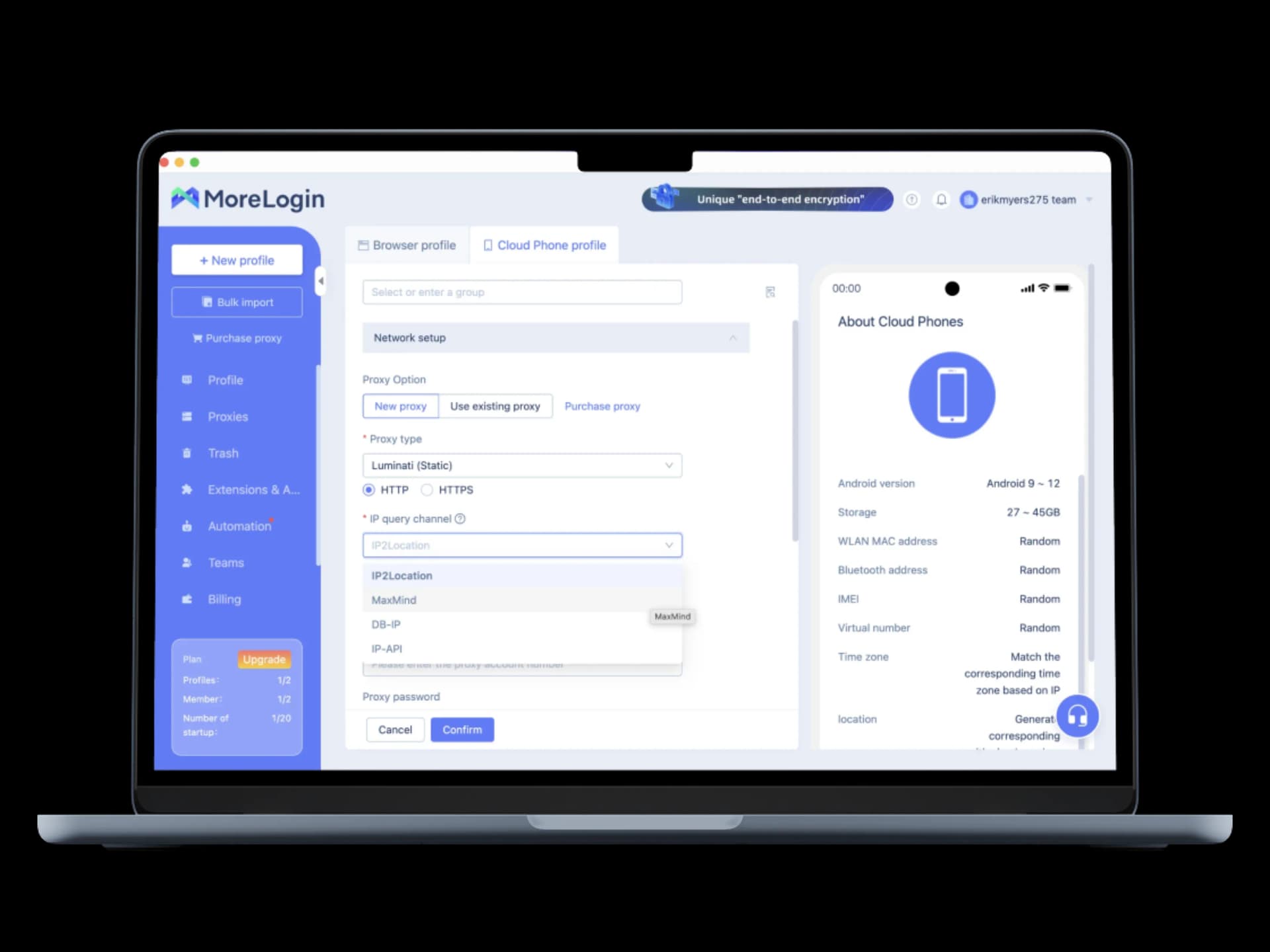
MoreLogin is an antidetect browser primarily focused on managing multiple accounts in separate browser profiles. Unlike tools focused only on browser fingerprint management, MoreLogin combines isolated browser profiles with cloud phones, which provide cloud-based Android environments for mobile app workflows. It also supports Chrome and Firefox browser engines, profile synchronization, and team management.
Did you know that antidetect browsers differ in their features and intended use cases? Read CyberYozh’s antidetect browser overview to compare your options.
MoreLogin browser supports managing accounts on Instagram, Snapchat, TikTok, e-commerce platforms, advertising accounts, and more.
CyberYozh proxies are designed to integrate with MoreLogin for:
Here's how real users use CyberYozh proxies with MoreLogin for professional workflows.
Use CyberYozh’s proxies with MoreLogin to get a 15% discount.
Promo code: CYBERYOZH
CyberYozh proxy integration with MoreLogin supports a variety of tasks, from social multi-accounting to web automation and security assurance.
Read our MoreLogin proxy setup guide to set up a CyberYozh proxy and start using it right now.
Managing dozens of accounts from one device requires separate browser profiles and consistent IP settings.
Create isolated MoreLogin profiles, each with a unique fingerprint.
Assign a dedicated CyberYozh residential or mobile proxy per profile.
Use sticky sessions to maintain consistent IP per account across logins.
Price scraping, multi-store selling, and regional marketplace research require region-specific IPs.
Use ZIP-level residential proxies to access regional marketplaces and compare local prices.
Assign static IPs per seller account to avoid cross-account linking.
Use virtual cards for local payment methods on each platform.
Interested in online trading with low latency? Read about best proxy providers for online trading and compare available options.
Repetitive multi-profile tasks in business automation need stable proxy infrastructure, ready to integrate.
Use CyberYozh's API to manage proxies and sessions programmatically.
Connect rotating residential proxies for web scraping workflows.
One of the popular use cases for CyberYozh proxies is managing multiple Web3 wallets for wallet organization and crypto-related workflows.
Ad verification and multi-geo affiliate campaign management require accurate geographic targeting.
Use country/city-level proxies to preview ads as a local user.
Run separate MoreLogin profiles per ad account across regions.
Learn how proxies and antidetect browsers work together to manage campaigns across regions.
Detecting counterfeit listings or unauthorized ads to protect your brand requires viewing platforms from multiple geo-locations.
Assign region-specific residential proxies per MoreLogin profile.
Automate monitoring scripts via the CyberYozh API with rotating IPs.
The process of protecting your brand pricing is called MAP (Minimum Advertised Price) monitoring. Learn how CyberYozh supports regional price monitoring.
Get CyberYozh proxies for MoreLogin
There are three proxy types: residential, mobile, and datacenter. See when each of them should be used with MoreLogin.
These proxies are sourced from real ISPs and are indistinguishable from ordinary home users. There are two types of them:
Static residential proxies keep the same IP across sessions. Each of them is purchased and set up separately. Use them to manage separate Amazon seller accounts, maintain Facebook business profiles, or work with long-term marketplace logins.
Rotating residential proxies provide access to 100M+ IPs that can rotate programmatically. Use them to collect product prices from eBay, track listings across regional storefronts, or scrape search results through MoreLogin profiles.
🏠 Read more about what a residential proxy is and when to select one. Spoiler: in most cases.
Mobile proxies are sourced from carrier LTE/5G network providers and are indistinguishable from real mobile IPs, making them the most trustworthy proxy type.
Use them to test Instagram and TikTok mobile experiences, manage and verify mobile-first social accounts, make online payments, or check how apps behave across mobile networks. Unlimited traffic supports workflows that require sustained mobile connectivity.
📱Learn how mobile proxies differ from residential and when it’s better to select each of them.
Datacenter proxies come from corporate data servers. They’re very fast, but their non-residential origin is obvious from their metadata, so platforms often throttle or even block them. Use them for large-scale data processing on platforms where platform trust is not critical.
💽 Learn the differences between residential and datacenter proxies to understand when each of them is helpful.
Read more about HTTP and SOCKS5 proxy protocols to understand how HTTP traffic (TCP) differs from the SOCKS5 traffic (UDP) and why you need a SOCKS5 proxy for non-browser tasks.
To set up a CyberYozh proxy in MoreLogin, take a few steps:
Get your proxy credentials.
Log into CyberYozh, go to your proxy dashboard, and copy the host, port, username, and password for your chosen proxy type (residential, mobile, or datacenter)
Create a new MoreLogin profile.
Open MoreLogin, click "New Profile," and configure the browser fingerprint (OS, browser type, resolution, etc.) or select one of the available real device presets
Enter proxy settings.
In the profile's Proxy Settings section, select the protocol (SOCKS5 is recommended for most tasks; HTTP for simple web tasks) and paste your CyberYozh credentials: host, port, username, password
Test the connection.
Use MoreLogin's built-in proxy check to verify the IP. You can also run an independent check via various services that check your IP, including CyberYozh’s IP Checker
Automate via API (optional).
Use CyberYozh API to rotate IPs, refresh sessions, or assign proxies to new profiles programmatically. The API is compatible with Playwright, Scrapy, and similar tools, enabling full headless MoreLogin automation.
Read CyberYozh API documentation and MoreLogin documentation for more information.
Open CyberYozh’s proxy catalog and select the best proxy for your MoreLogin workflows.