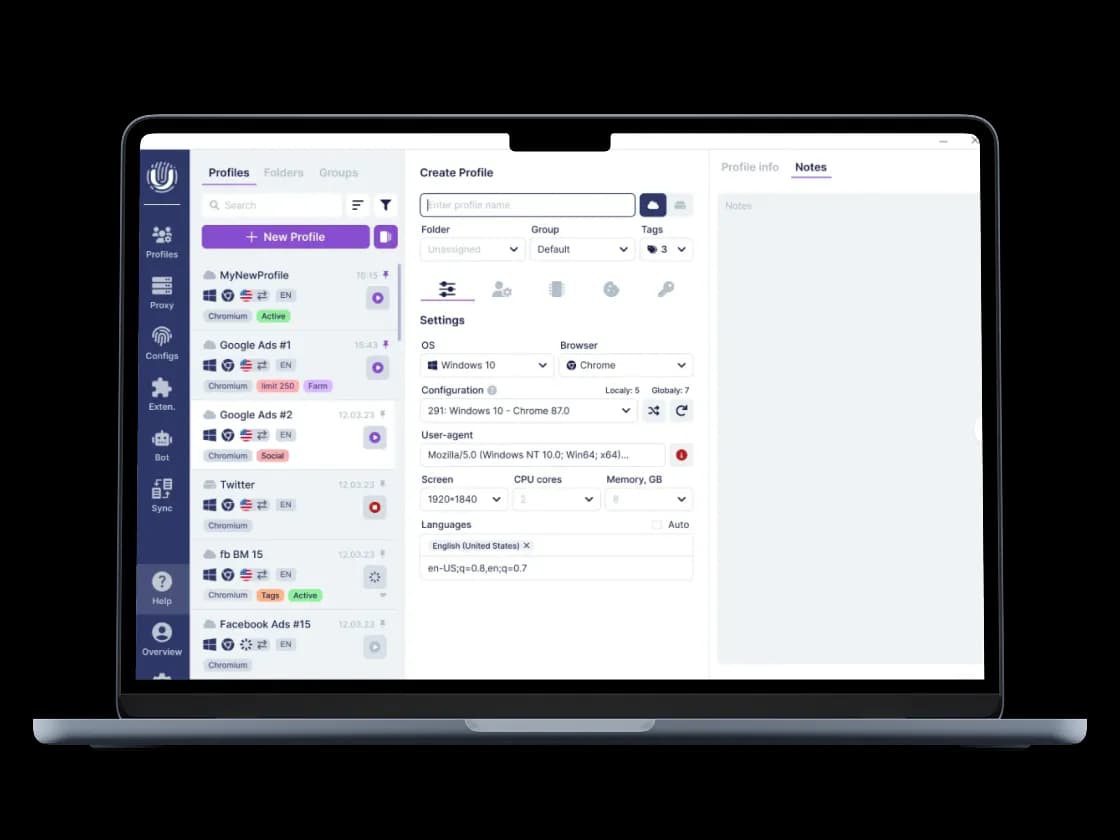
What is Undetectable anti-detect browser and where it benefits professional workflows
Undetectable's edge is depth, not breadth. Its fingerprint spoofing works at the Chromium core, which is why profiles hold up under stricter anti-fraud checks that catch shallower spoofing. On top of that engine sits unlimited local profiles, mass profile creation for thousands of accounts at once, and automation tools – API access, a synchronizer for managing multiple profiles simultaneously, and "paste like a human" input emulation built for teams running high-volume accounts.
Here’s when to use Undetectable:
You're running 100+ or 1,000+ accounts and need bulk account creation, not one-by-one setup
Your workflows involve automation or scripting against profiles, not just manual browsing
You need core-level fingerprint resistance for stricter platforms – crypto exchanges, ad networks, and anti-fraud-heavy targets.
Undetectable integrates with CyberYozh proxies in privacy-first workflows, where protecting your real IP and data comes first. To start using Undetectable with CyberYozh proxies, learn how to set up a proxy in Undetectable.
➡️
Get 20% off Undetectable
Set up your Undetectable profiles with CyberYozh proxies and get 20% off your Undetectable subscription.
Promo code: CYBERYOZH20
Download Undetectable browser
What is an Undetectable Browser proxy
A proxy for Undetectable is a dedicated network connection assigned to a single browser profile inside Undetectable, controlling that profile's exit IP and geographic location. Undetectable handles the fingerprint and browser environment; the proxy handles everything on the network side. Pairing one proxy per profile keeps browser and network layers fully separated, so profiles stay unlinked end to end.
Undetectable use cases with a proxy
Undetectable handles the fingerprint and profile environment; CyberYozh proxies handle the network layer underneath it: mobile, residential, and dedicated IPs matched to the task, so every profile stays isolated end to end.
🦔
For testing, try CyberYozh free proxies for Undetectable from our curated pool. We don't recommend free undetectable proxy lists elsewhere: poor quality and unprotected traffic often break workflows and expose data.
🔎 Market research and investigation
Local markets show different pricing, product listings, or search results based on your location, and repeated scraping from one IP quickly triggers rate limits or blocks, making it hard to gather accurate, unbiased data. Here’s how proxies help:
Assign a proxy with ZIP code geotargeting to each Undetectable profile so requests originate from the exact target area
Run market research tasks across multiple regional profiles in parallel to compare pricing and availability
Use rotating proxies for large-scale web scraping so no single IP accumulates enough requests to get flagged.
📈 Ad networks and affiliate marketing
Ad platforms increasingly detect and restrict campaigns when traffic doesn't match the declared target geography, and affiliate offers often convert only when traffic originates from the buyer's country. A mismatch here means wasted ad spend or account suspension. The fix is aligning proxy geography with campaign geography:
Launch ad campaigns from mobile or residential proxies located in the exact target country or city
Manage affiliate marketing offers using one Undetectable profile and proxy per geography to keep each campaign isolated and compliant.
🪙 Crypto and Web3
Exchanges and airdrop campaigns cluster accounts by fingerprint and IP to enforce one-account-per-user limits. Wallets, exchange accounts, or farming profiles sharing a network can get flagged and restricted even with clean browser fingerprints. With a dedicated proxy per Undetectable profile:
Run each exchange account or wallet on a separate mobile or residential proxy so no two profiles share an exit IP
Manage token sale and airdrop farming profiles in parallel, each isolated by proxy and fingerprint.
👥 Undetectable for multi-account operations
Running dozens or hundreds of accounts on one shared connection gets multi-account setups caught, no matter how clean the profiles look on the browser side. A proxy per profile actually separates the operation at the network layer:
Assign one dedicated proxy per Undetectable profile so no two accounts share an IP, ASN, or network fingerprint
Use LTE/5G mobile proxies for social and account-heavy platforms that trust carrier traffic over other IP types
Scale to bulk profile creation with the CyberYozh API to assign proxies programmatically as profile count grows.
🛡️ Cybersecurity and brand protection
Security teams and brand managers often need to inspect suspicious sites, test malware behavior, or track counterfeit listings, but doing this from a corporate IP exposes the server to blacklisting. An Undetectable proxy solves this by placing an intermediary IP between the analyst and the target site:
Route all cybersecurity work through a rotating or mobile proxy so the real server IP never touches the target
Run brand protection scans on marketplaces and social platforms from a clean, unrelated IP.
Which proxy is best for Undetectable Browser
The best proxy for Undetectable depends on the workflow, since different tasks require different levels of session stability, IP rotation, GEO coverage, and connection speed.
Use case | Recommended proxy | Why |
Instagram, TikTok & Facebook accounts | Mobile | Real carrier IPs from LTE/5G networks |
Amazon, eBay & Etsy profiles | Residential ISP | Stable IPs for long-running seller sessions |
Web scraping & data collection | Rotating residential | Large residential IP pool for distributed requests |
High-volume automation & testing | Datacenter | Fast connections at lower proxy cost |
📕
Don’t forget to choose either HTTP or SOCKS5 proxy type. HTTP proxies proceed TCP traffic easily (ordinary web traffic based on HTTP requests). SOCKS5 proxies are needed if you must work with UDP, too (video and voice streams, gaming, and other complex traffic).
How to integrate CyberYozh proxies with Undetectable
Deploying a proxy server for Undetectable takes minutes, as for most other antidetect browser setups:
1. Pick your proxy type:
mobile for social accounts and authentication
static residential for finance and e-commerce
rotating residential for scraping and automation
datacenter for loginless workflows and monitoring
2. Copy your credentials from your CyberYozh dashboard: host, port, username, password.
3. Add the proxy in Undetectable's Proxy Manager. Select SOCKS5, paste credentials, and save.
4. Attach it to a profile. Create a new profile, open the Proxy tab, and select your saved proxy (or enter it manually).
5. Verify the connection using the IP address checker to confirm GEO, DNS, and WebRTC are clean before launching.
6. For automation at scale, use the CyberYozh API to rotate or assign proxies to bulk Undetectable profiles programmatically.