
AI proxy: How proxies support AI agents
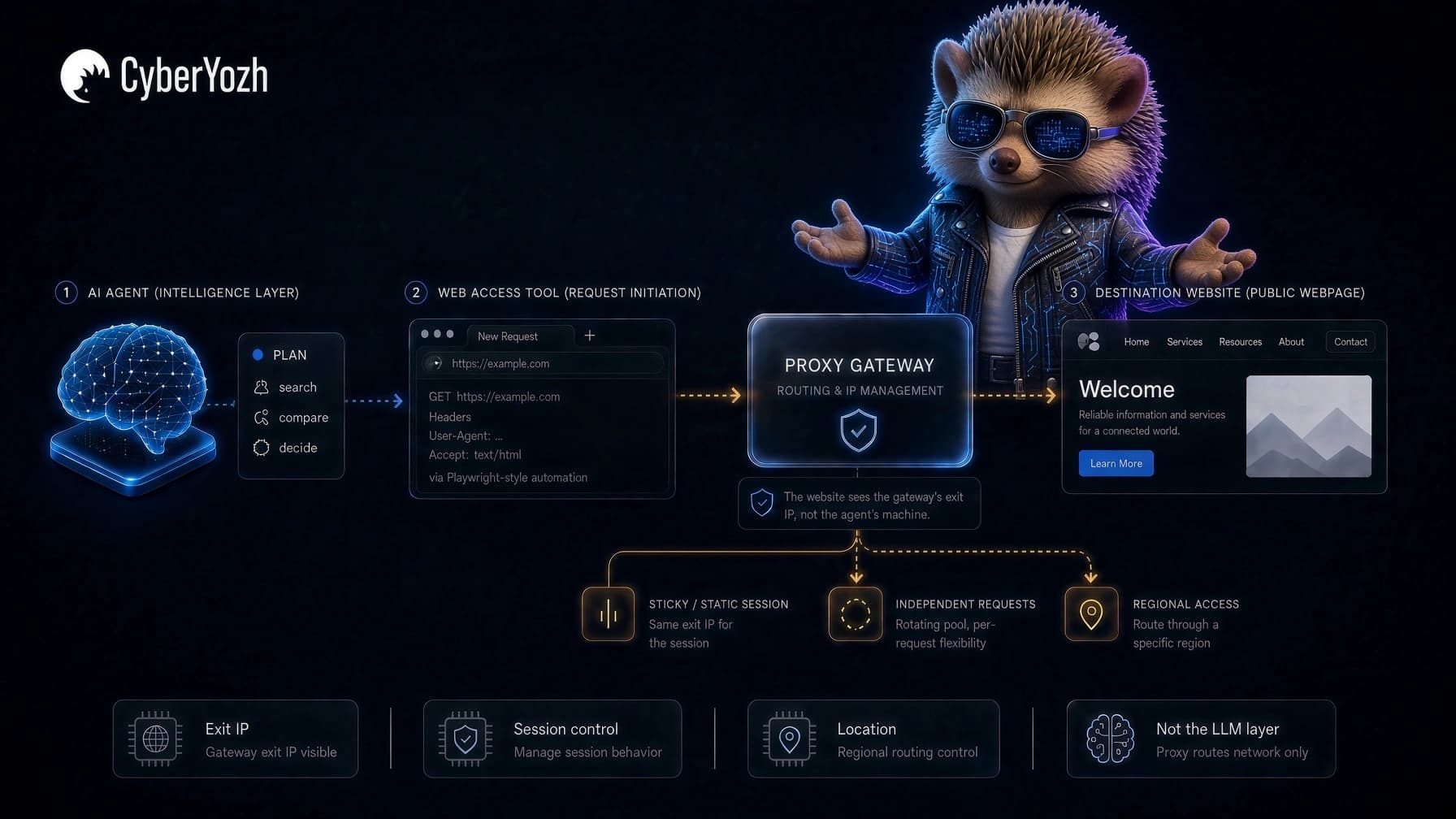
An AI agent can plan a task, choose a tool, open a browser, search a website, compare results, and decide what to do next. But the moment it reaches the web, something very ordinary happens: it makes a network request.
That request still comes from an IP address, and has a location, a network route, and a session behind it. Depending on the task, the agent may need to keep that IP for an entire browser journey, access the web from a particular location, or distribute thousands of independent requests across a rotating IP pool.
That is where an AI proxy comes in.
For browser agents, scraping agents, research tools, and other web-connected automation, an AI proxy controls the network route between the agent's web-access tool and its destination. It can determine the IP type and location, how long an IP stays with a session, and when traffic moves through a larger pool.
CyberYozh App provides that network layer through AI agent proxies, browser-agent infrastructure, residential proxies, mobile routes, datacenter IPs, and integrations with common automation tools.
The AI still does the thinking. The proxy handles how that AI reaches the web.
TL;DR
An AI proxy can mean two different things: a network proxy that controls how an AI agent reaches the web, or an AI gateway/LLM proxy that manages requests between an application and model providers.
For web-connected agents, the proxy sits between the browser or HTTP client and the destination, controlling the exit IP, location, network type, session behavior, and rotation.
AI proxies can support browser agents, AI web scraping, RAG and web retrieval, research, localization and QA, and monitoring when the network route matters to the task.
Choose the proxy around the workload: static ISP for longer stable sessions, sticky residential for temporary continuity, rotating residential for independent requests, mobile when carrier routing matters, and datacenter when simpler infrastructure is enough.
Configure the proxy in the tool that actually accesses the web, such as Playwright, Puppeteer, Selenium, Scrapy, or Postman, rather than in the language model itself.
Rotation is not automatically better. Keep the route stable when requests belong to the same session and rotate when the workload consists of independent requests.
A proxy handles the network layer only. It does not secure prompts, manage browser state, fix extraction logic, control agent permissions, or make the model's decisions safer.
With CyberYozh App, the practical setup is to choose the right location and session behavior, configure the connection in the web-access tool, verify the exit IP, and add API-based control only when the workflow needs it.
What is an AI proxy?
An AI proxy is an intermediary used within an AI workflow to route connections between different parts of the system. What it actually connects depends on which type of AI proxy you mean: a network proxy for AI agents that controls how an AI agent reaches the web, or an AI gateway or LLM proxy that manages how an application communicates with model providers.
They sit at different layers of the AI stack and solve different problems.
A network proxy for AI agents
This is what we are mainly talking about in this article.
The flow looks something like this:
AI agent → browser or HTTP client → proxy → website
The AI proxy controls the network connection between the agent's tool and the destination.
That can change:
The visible IP address
The connection's geographic location
The network type, such as residential, mobile, ISP, or datacenter
How long the same IP stays attached to a session
How requests are distributed across an IP pool
Get CyberYozh App AI agent proxy.
An AI gateway or LLM proxy
An AI gateway sits somewhere else.
Its flow looks more like:
Application → AI gateway → model provider
It can centralize model routing, logging, retries, rate controls, provider selection, and similar API-level functions. Cloudflare, for example, describes its AI Gateway as a layer for observing and controlling model requests with features including logging, caching, rate limiting, retries, and fallback. Cloudflare AI Gateway documentation
That is useful infrastructure, but it is not the same thing as giving a browser agent a residential IP.
Pro-tip: An AI gateway controls how your application reaches the model. A network AI proxy controls how the agent reaches the web. Both can exist in the same system.
Network proxy for AI agents | |
Sits between | Agent's browser/client and website |
Controls | IP, location, network type, sticky sessions, rotation |
Typical use | Browser agents, web scraping, research, regional testing |
Example flow | Agent → proxy → website |
CyberYozh App provides this? | Yes |
How does an AI proxy work?
A network AI proxy works between the tool an AI agent uses to access the web and the website or service it needs to reach. Instead of connecting directly from the machine running the agent, the request first goes through a proxy server.
The basic route looks like this:
AI agent → browser or HTTP client → proxy server → website
When the browser, scraper, or HTTP client sends a request, the proxy receives it and forwards it to the destination using an exit IP from its network. The website sees that exit IP rather than the IP of the machine running the agent. The response then travels back through the proxy to the agent's web-access tool.
What happens to the IP along the way depends on the proxy configuration. The agent might keep the same IP throughout a multi-step browser session, use a sticky IP for a set period, or draw different exit IPs from a rotating pool for independent requests. Location can also be selected when the workflow needs web access from a particular country or region.
Why AI agents use proxies when they access the web
If an AI agent stays inside your database or internal software, it may not need a proxy at all.
The proxy becomes relevant when the agent starts interacting with websites and external services.
Think about a research agent that has to open hundreds of public product pages. Or a QA agent testing a website from several countries. Or a browser agent that needs to stay inside the same session while moving through a five-step workflow.
Those jobs have very different network requirements.
AI browser agents need a consistent route
A browser agent might search, click, navigate, compare information, take screenshots, fill approved forms, or interact with web applications.
If the workflow lasts several minutes, changing the IP halfway through may be unnecessary or actively unhelpful.
For this kind of job, the network route should usually be predictable.
The browser environment is still a separate layer. Cookies, storage, headers, sessions, and browser security do not disappear simply because the IP changes.
A proxy handles the network identity. It does not replace good browser-agent design.
AI research agents may need location control
Imagine an AI agent comparing public search results, prices, availability, or localized pages in several countries.
Running every request from one cloud location can give the agent a very incomplete picture.
A proxy lets the agent make requests through a route in the region being tested.
That does not change the user's identity or eligibility for a service. It simply changes the network location used for the request.
AI scraping agents may need several IPs
Large public-data collection has a different shape.
The agent may not care about maintaining one browser identity for an hour. It may be fetching many independent pages, validating responses, extracting structured information, and moving on.
That is where AI web scraping and rotating proxy infrastructure become more useful.
The scraper still needs retry logic, parsing, deduplication, validation, and sensible request pacing. The proxy only solves the network-routing part of that system.
The proxy is infrastructure, not intelligence. It can improve how an agent reaches a resource, but it cannot fix bad extraction logic or a bad decision made by the model.
AI proxy use cases
AI proxies become useful when an AI system needs to interact with the public web and the network route matters to the task. The exact role of the proxy depends on what the agent is trying to retrieve, test, monitor, or automate.
Use case | What the AI is doing | What the proxy adds |
Browser agents | Navigating websites and completing multi-step tasks | Stable sessions and control over network location |
AI web scraping | Collecting public data from many pages | Access to rotating IP pools for independent requests |
RAG and web retrieval | Fetching current web content before passing it to an LLM | Location-aware and distributed access to source pages |
Research agents | Comparing public information across websites or markets | Regional IP routing for localized results |
Localization and QA | Testing how a site or application behaves from different regions | Access from IPs in the locations being tested |
Monitoring agents | Checking public pages repeatedly for changes | Consistent or distributed routes depending on the monitoring job |
RAG and web retrieval
Retrieval-augmented generation becomes particularly relevant when the information an AI system needs is not already available in its model or internal knowledge base.
A RAG workflow can retrieve information from databases, APIs, documents, or the web before supplying relevant material to the model. When the retrieval source is a public website, the web-access component still has to make ordinary network requests.
A proxy can control the IP and location used for those requests. This becomes useful when the retrieval system collects public information across different regions or distributes a larger retrieval workload across multiple routes.
The proxy does not perform the retrieval or improve the model's reasoning. It provides the network layer used to reach the sources from which the RAG system retrieves information.
Geo targeting and AI-powered QA
AI agents can also automate parts of regional website and application testing. An agent might check localized pages, search results, product availability, language variations, or other content that can differ depending on where a request originates.
Routing the agent through a proxy in the location being tested lets the QA workflow observe the web from that network location rather than relying entirely on the server where the automation happens to be running.
Get CyberYozh App's geotargeting proxies to appear as a genuine local user in any country, city, or carrier network.
Monitoring agents
Monitoring agents repeatedly check public resources for changes, such as product information, availability, search results, market data, or website updates.
An agent repeatedly checking the same resource may work perfectly well with a consistent route, while a larger monitoring system covering many independent sources may benefit from distributing requests across an IP pool.
As with other AI proxy use cases, the network strategy should follow the workload rather than applying rotation simply because it is available.
Which AI proxy type should you use?
There is no single best proxy for every AI agent.
The best choice depends on what the agent is doing once it leaves your infrastructure and reaches the public web.
AI workload | Proxy to consider | Why |
Multi-step browser task | Static ISP | Keeps one consistent IP |
Residential browser session | Sticky residential | Holds a residential route for the session |
Large public-data workload | Rotating residential | Distributes independent requests |
Automated rotating gateway | Backconnect proxy | Gives the client one gateway while exits rotate |
Mobile-network testing | Mobile | Uses LTE/5G infrastructure |
Straightforward automation | Datacenter | Simple and cost-efficient where residential routing is unnecessary |
Static ISP proxies for long AI agent sessions
A long-running agent often benefits from a stable route.
For example, if an agent opens a website, navigates through several pages, chooses options, and then returns a result, keeping one IP throughout the journey is easier to reason about.
CyberYozh App static ISP proxies give that workflow a persistent ISP-backed address.
This is usually more appropriate than rotating the IP simply because rotation is available.
Sticky residential proxies for temporary continuity
Sometimes you want residential routing without keeping the same IP indefinitely.
A sticky session lets several related requests share an exit for a defined period.
That can work well when the agent needs session continuity but the larger system still uses a residential pool.
Rotating residential proxies for independent requests
If the agent is collecting many unrelated public pages, rotation becomes more useful.
CyberYozh App rotating residential proxies can support workloads where different requests do not need to share one long-lived network identity.
Backconnect proxies for automated rotation
A backconnect proxy gives your automation one proxy gateway while the infrastructure manages changing exit IPs behind it.
That can simplify some agent architectures because the client does not need to maintain a huge list of individual proxy addresses.
For high-volume automation, this is often easier to manage than feeding new IPs into the application manually.
Mobile proxies for carrier-network workflows
Mobile proxies use mobile-network infrastructure.
They make sense for workflows where LTE or 5G routing is actually part of what you are testing.
That could include mobile QA, regional mobile experiences, or an agent whose task specifically depends on a carrier-network route.
Do not choose mobile automatically because it sounds more advanced. If the task does not need a mobile network, another proxy type may be simpler.
Datacenter proxies for simpler AI automation
Many automation tasks do not need residential or mobile characteristics at all.
A datacenter proxy can be a straightforward choice for technical checks, development, monitoring, open-data work, and other jobs where a normal infrastructure IP is enough.
The right proxy is the least complicated network that meets the task.
How to set up an AI proxy with CyberYozh App
Once you know what network route your AI agent needs, the setup comes down to configuring the tool it uses to reach the web. You have already chosen the appropriate proxy type; now you need to decide how the connection should behave and connect it to the agent's web-access layer.
Step 1. Choose the location
If geography matters to the task, select the country, region, or other available targeting option the agent needs.
This can matter for AI research, localized web retrieval, regional QA, monitoring, and other workflows where the content returned by a website may vary depending on the request's location.
If geography does not matter, there is no reason to add a location requirement simply because the option exists.
Step 2. Decide how the IP should behave
Next, decide whether the agent should keep its IP or change it.
A multi-step browser journey generally benefits from continuity. For large sets of independent requests, rotation may be more appropriate. A sticky session sits somewhere between the two, keeping the same exit IP for a defined period.
The important part is to make IP behavior follow the agent's task rather than an arbitrary timer. Our proxy rotation guide explains the different approaches in more detail.
Step 3. Choose the protocol your client supports
The protocol needs to be supported by the browser, automation framework, scraper, or HTTP client making the request.
Choose according to what the client and workflow actually require rather than treating one protocol as universally better. If you need help deciding between common options.
See our SOCKS5 vs HTTPS proxy comparison.
Step 4. Get your proxy credentials
Once the network configuration is ready, use the connection details provided in your CyberYozh App dashboard. A typical proxy connection includes:
Host
Port
Username
Password
Protocol
The exact configuration can vary depending on the proxy product and the location, session, or IP settings you have selected.
Keep these credentials in the execution environment rather than exposing them to the language model itself.
Step 5. Connect the proxy to the tool making the request
Configure the proxy where the agent actually reaches the web.
For example:
LLM → agent logic → Playwright → CyberYozh App proxy → website
If Playwright controls the browser, configure the proxy in Playwright. The same principle applies to Puppeteer, Selenium, Scrapy, Postman, an HTTP client, or another automation environment.
The CyberYozh App Playwright setup guide shows one practical connection example.
Setup rule: Follow the request. The component that sends it to the web is usually where the proxy belongs.
Step 6. Verify the connection before running the agent
Do not assume the proxy is working just because the credentials have been added successfully.
Use the CyberYozh App IP checker to confirm the exit IP and expected location. For a static or sticky workflow, check that the route remains consistent as expected. If rotation is part of the setup, verify that the IP behavior matches your configuration.
Only then hand the workflow over to the agent.
Step 7. Add API control when the workflow needs it
For larger AI workflows, proxy management may eventually need to become part of the automation itself rather than something configured manually before each run.
Where supported by the proxy product, API-based controls can be incorporated into the wider automation pipeline. For a simpler agent, however, there is no reason to add another layer of logic if a standard proxy connection already does the job.
Ready to connect your AI workflow? Choose a CyberYozh App proxy based on the location, session behavior, protocol, and network requirements of your agent.
AI proxies for web scraping and data collection
AI has made scraping workflows more flexible, but it has not removed the normal engineering problems around data collection.
The agent still has to fetch the page before an LLM can classify, extract, summarize, or reason about its contents.
That network step matters.
A web scraping proxy can help distribute public-data requests and separate the scraping infrastructure from the machine running the agent.
But the proxy should sit inside a wider system that handles:
Request pacing
Retries
Validation
Duplicate detection
Parser failures
Session management
Error handling
Compliance with applicable rules and permissions
The proxy does not replace those pieces.
For larger workflows, the CyberYozh App web scraping stack provides the network layer alongside existing scraping and automation integrations.
Common AI proxy mistakes
Most bad AI proxy setups are surprisingly ordinary. They are usually architecture or configuration mistakes rather than some mysterious AI problem.
Rotating every request
Rotation is not automatically better.
If an agent is making thousands of independent requests, rotation may fit the workload. If it needs continuity across a multi-step browser journey, changing the IP halfway through can make the session harder to maintain.
Match rotation to the structure of the task rather than enabling it by default.
Using residential proxies for everything
Residential routing is useful when the workload actually needs it.
Some development jobs, monitoring tasks, technical checks, and automation workflows work perfectly well through datacenter infrastructure. Likewise, mobile proxies only make sense when a carrier-network route is relevant.
The fact that a workflow uses AI does not automatically mean it needs the most complex proxy type available.
Giving the model proxy credentials
The model usually does not need to see your proxy username, password, or API credentials.
Keep secrets in the execution environment and let Playwright, Puppeteer, Selenium, Scrapy, or Postman use the configured proxy connection. The model can direct the workflow without having access to the credentials behind it.
Configuring the proxy in the wrong place
A proxy needs to be configured on the component actually making the outbound web request.
If Playwright controls the browser, for example, adding proxy information somewhere in the LLM configuration does not automatically route Playwright traffic through it.
Follow the request through the architecture and configure the proxy where that request leaves the system.
Forgetting to verify the exit IP
A proxy configuration that exists in your code is not necessarily a proxy configuration that works.
Check the exit IP and expected location before the task starts. Otherwise, you may end up debugging prompts, agent logic, or browser behavior when the problem is simply a misconfigured connection.
Retrying failed actions blindly
A failed network request should not automatically cause an autonomous agent to repeat every action.
First identify whether the failure came from authentication, the proxy route, the destination, the session, or the tool. CyberYozh App's proxy errors reference can help distinguish common network and proxy failures.
For long-running systems, it also makes more sense to think about the full proxy lifecycle rather than replacing IPs randomly whenever something fails.