
Cloud proxy: What it is, how it works, and when to use one in 2026

Cloud proxy: What it is, how it works, and when to use one in 2026
If someone tells you they use a cloud proxy, you still do not know what kind of IP they are using. That is the confusing part of this term.
A cloud proxy is proxy infrastructure hosted and managed remotely rather than on your own device or self-managed server. The Cloud proxy server sits between your application and the destination, routing outbound traffic through an IP address provided by the proxy network. Depending on the service, that exit IP can be datacenter, residential, ISP or mobile.
TL;DR
A cloud proxy is remotely managed proxy infrastructure that routes your traffic through another IP before it reaches the destination.
“Cloud” describes how the proxy is hosted and managed, not the type of exit IP. A cloud proxy can use datacenter, static ISP, rotating residential or mobile IPs.
Using one usually means choosing the right IP type and location, adding the proxy credentials to your browser, application or script, configuring the session, and checking the visible IP before starting.
Static or sticky connections suit workflows that need a consistent network identity, while rotating proxies make more sense for independent requests that can use different IPs.
Building a proxy on AWS, Google Cloud or another VPS gives you control over the server, but its public IP still belongs to hosting infrastructure. Managed services become more useful when you need multiple locations, IP classes, sessions or rotation.
Cloud proxies are commonly used for permitted web scraping, price monitoring, ad verification, localisation testing, browser workflows, automation, API traffic and distributed QA.
Before choosing a cloud proxy service, check the IP type, location targeting, session controls, protocols, authentication, pricing model, IP availability, automation options and reliability.
CyberYozh App provides managed mobile LTE/5G, static ISP residential, rotating residential and datacenter proxy options, allowing the exit network and session behaviour to be matched to the workload.
Quick take: Do not buy a "cloud proxy" based on the name alone. Ask what network the traffic actually exits through and how much control you have over that IP.
What a cloud proxy actually does
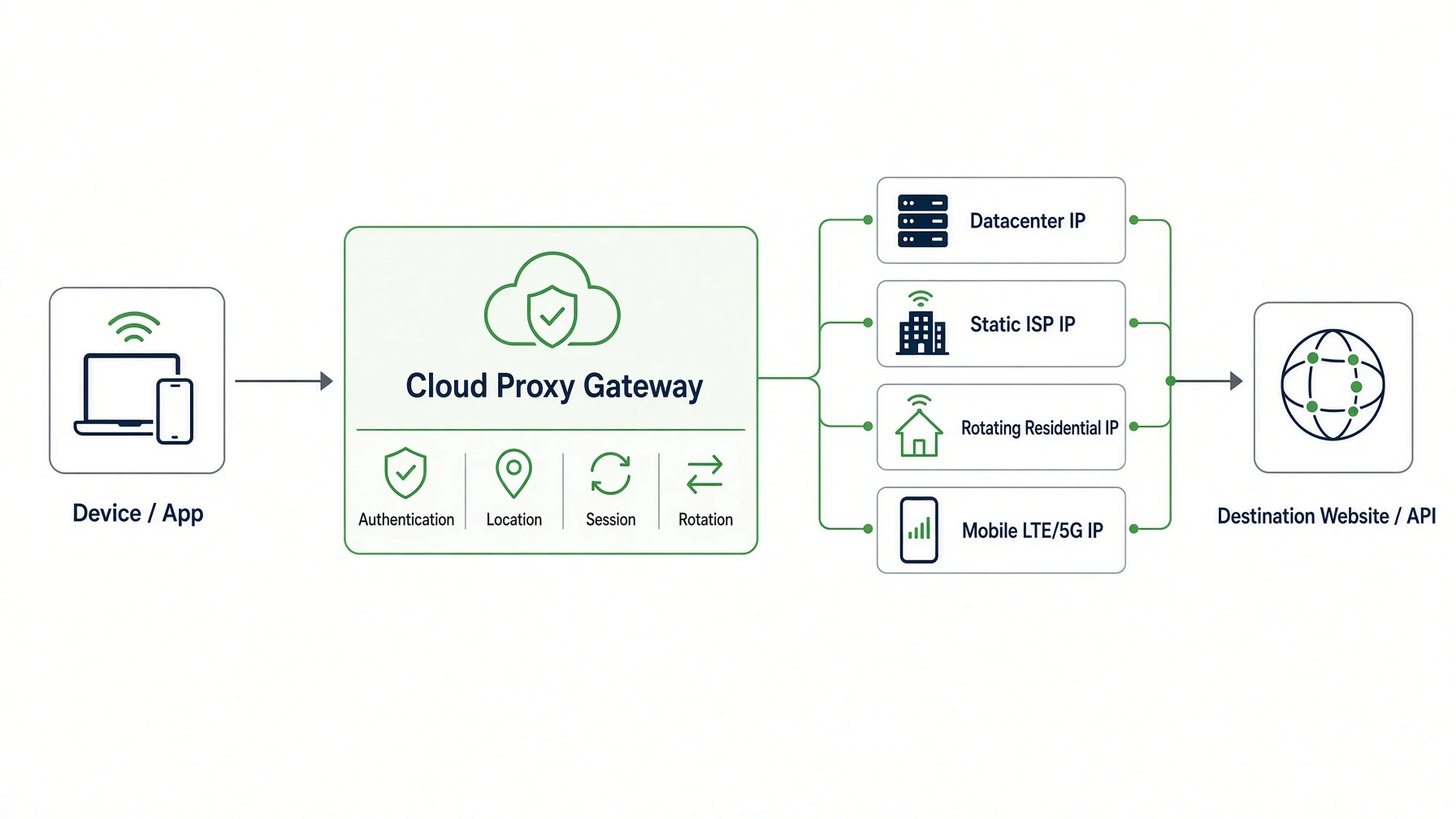
A proxy is a message-forwarding intermediary chosen by the client. RFC 9110 formally defines that role and separates a proxy from a gateway, which is the technical category more commonly associated with a reverse proxy.
For an ordinary forward connection, the path is straightforward:
Your device or application → Cloud proxy → destination
The destination receives the request from the proxy's public connection rather than from the direct route your device would normally use. If you are using a forward proxy, this is the side of the proxy model you care about.
The interesting part happens behind that gateway. A managed cloud proxy can authenticate you, read the requested location or session rules, select an available exit address and then send the request onward.
That is why one gateway can support very different workloads. The same service may keep one user on a fixed ISP address while another user rotates residential IPs between independent requests.
Pro-tip: One gateway does not mean one IP
With managed proxy infrastructure, the hostname you connect to can stay the same while the actual egress IP changes according to location, session and rotation rules.
The two meanings of cloud proxy
Most confusion around cloud proxies comes from two different products sharing the same name. They both involve proxy infrastructure in the cloud, but the reason you would buy them is completely different.
Enterprise cloud security proxy
An enterprise cloud proxy is usually part of a security stack. Employee or application web traffic is sent through a centralized service so the organization can apply authentication, access rules and security policies before allowing traffic to continue.
This fits naturally into cloud-native and zero-trust architectures. NIST SP 800-207A discusses API gateways, sidecar proxies and other policy-enforcement components that can work across cloud and on-premises environments.
If your problem is controlling which employees or internal services can access something, this is probably the type of cloud proxy you mean.
Managed outbound cloud proxy
The second meaning is more relevant when you need control over where your own requests leave the internet. Here, you connect to a proxy provider and select the kind of egress that makes sense for the task.
That might mean one stable ISP address for an account session, a broader residential pool for public research or a mobile carrier route for mobile-network testing. The proxy is still managed in the cloud, but the final IP does not have to belong to a cloud host.
Cloud proxy does not mean datacenter proxy
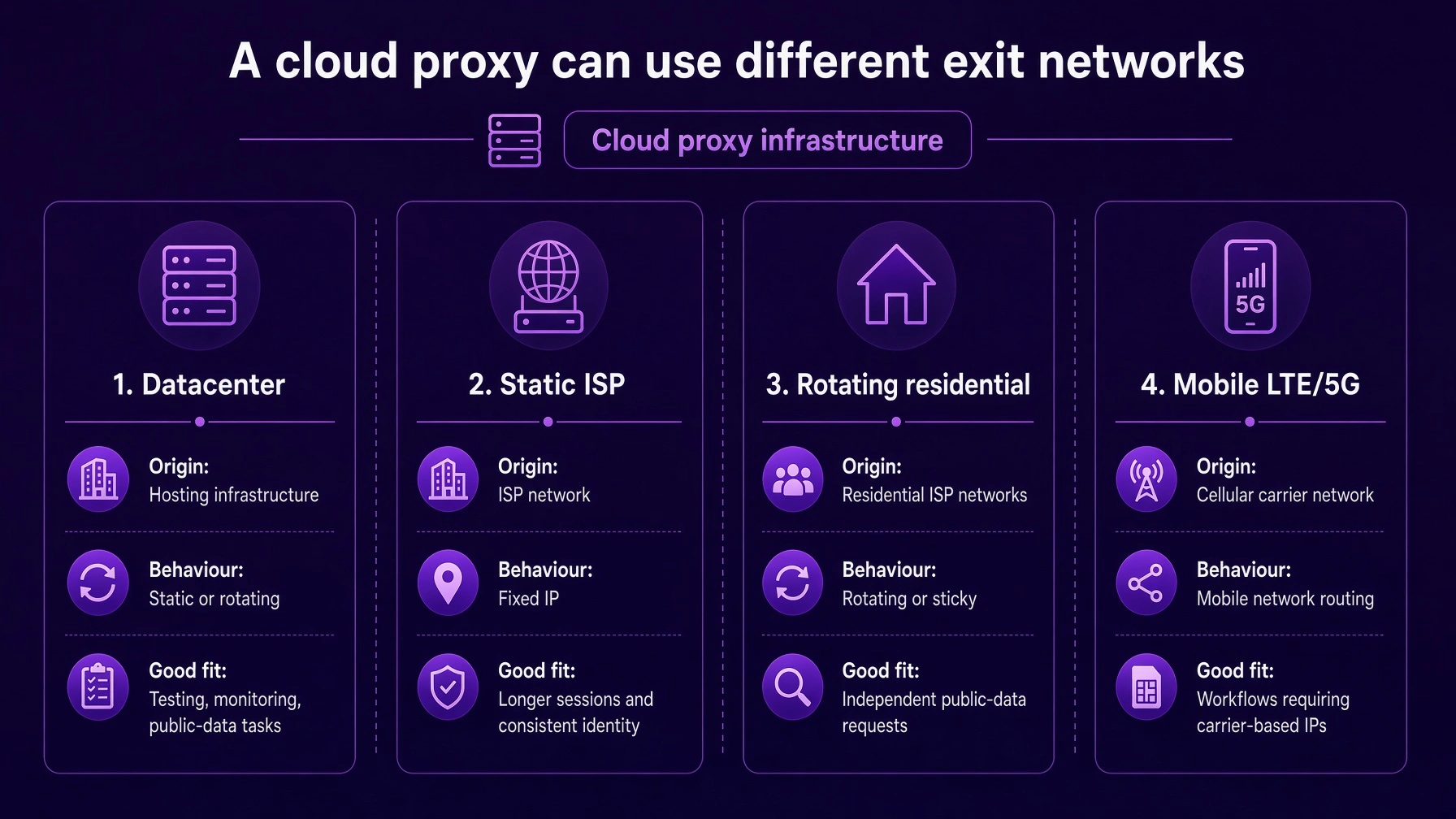
This distinction sounds small, but it changes how you buy proxy infrastructure. A cloud provider can manage the gateway while the actual exit IP comes from a completely different network.
A datacenter proxy uses an IP associated with hosting infrastructure. It is usually a sensible option for testing, monitoring and public-data jobs where a consumer ISP or carrier connection is unnecessary.
A residential proxy uses an address associated with an internet service provider. Static residential connections are especially useful when you want the IP to stay put instead of changing between requests.
Then there are rotating residential proxies, which give you access to a broader pool and let you decide how the session behaves. These are usually a better fit for permitted public-data workloads than for a login session that expects the same IP to remain in place.
Finally, mobile proxies route through cellular carrier infrastructure. They make sense when that network type is genuinely part of the requirement, rather than simply because mobile sounds more advanced.
Pro-tip: Buy the exit network, not the buzzword
If your task needs one fixed ISP address, buy that. If it needs a rotating residential pool, buy that. "Cloud" should describe the delivery model, not make the decision for you.
How to use a cloud proxy
Using a cloud proxy is usually less about setting up infrastructure and more about choosing the right connection. The provider manages the network behind the scenes, while you configure your browser, application or script to send traffic through the proxy endpoint.
Start by choosing the IP type and location your task actually needs. That could be a datacenter IP for straightforward testing, a static ISP address for a longer session, a rotating residential pool for independent requests or a mobile connection when carrier routing matters.
Once the proxy is created, the provider gives you the connection details, typically a hostname or IP address, port and authentication credentials. Add these to the proxy settings in your browser, application, automation tool or code. Depending on the service, authentication may use a username and password or an IP whitelist.
Next, configure how the session should behave. If continuity matters, keep the same IP for the required period. If requests are independent, you can use rotation instead. Location, session duration and rotation rules may be controlled through the credentials, dashboard or API depending on the provider.
Finally, check the visible IP and location before starting the actual workload. A successful connection does not necessarily mean the route, country or IP type is the one you intended to use.
Static or rotating cloud proxy
This is usually the next decision once you know which IP class you need. Should the IP remain the same, or should the service assign different addresses over time?
A static connection is easier to reason about when a session has continuity. If a browser is logged into an authorized business account for an hour, there may be no useful reason for its network location to change halfway through that work.
Rotation is better when requests are independent. Public market research, monitoring, price collection and similar workflows can benefit from distributing requests across a controlled pool because one request does not necessarily need to inherit the previous request's network identity.
The mistake is treating rotation like a quality setting. Faster rotation is not automatically safer or better, and a sticky session can be the more appropriate configuration when continuity matters.
If your task needs... | Usually choose |
One consistent IP for a logged-in session | Static or sticky |
A longer browser or application session | Static or sticky |
Repeated requests that need the same network identity | Static or sticky |
Independent public-data requests | Rotating |
Requests distributed across a larger IP pool | Rotating |
Control over exactly when the IP changes | Sticky sessions or controlled rotation |
Need a rotating pool rather than one fixed IP?
CyberYozh rotating residential proxies support both rotating and sticky session behaviour, so you can match the connection to the workload instead of rotating by default.
Cloud proxy vs VPN
A cloud proxy and a VPN can both change the route traffic takes, but they normally operate at different scopes. A proxy is often configured for a specific browser, application or protocol, while a VPN usually creates a broader tunnel for device traffic.
That makes proxies useful when you want more granular control. You may want one application going through a US proxy while another continues using the normal connection.
A VPN is often simpler when the requirement is device-wide routing and encryption. The detailed proxy vs VPN decision really comes down to scope rather than which technology is "better."
Cloud proxy vs reverse proxy
A forward cloud proxy sits on the client side of the relationship. You choose it because you want to control how your own outbound requests reach another service.
A reverse proxy sits in front of a server or application that you operate. It receives incoming traffic and can handle tasks such as load balancing, caching and routing requests to backend services.
So if you are trying to change the IP used by a browser or scraper, you want forward proxy infrastructure. If you are trying to protect or distribute traffic coming into your website, you are solving a reverse-proxy problem.
Managed cloud proxy vs building your own
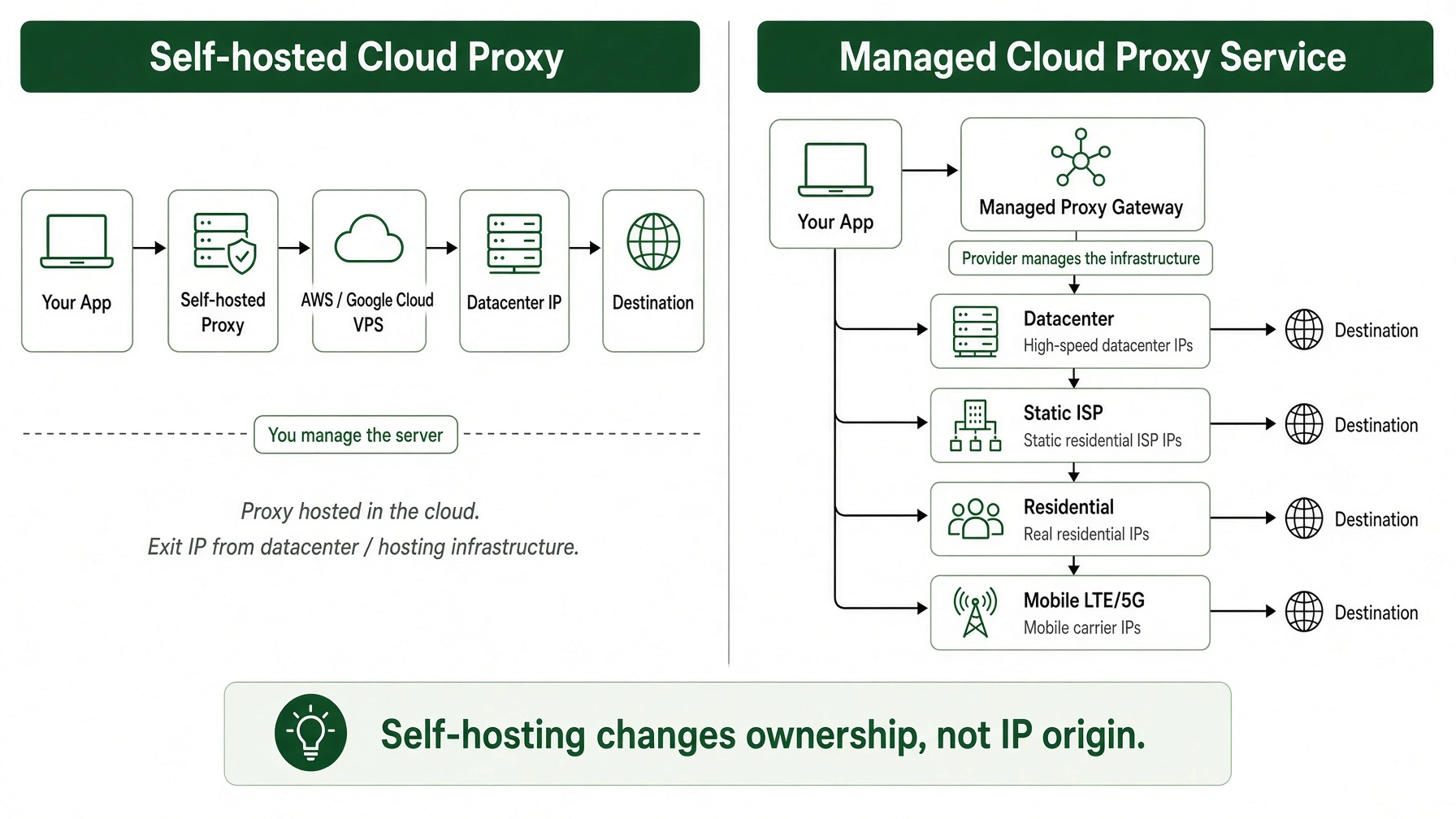
You can absolutely build your own cloud proxy. Rent a VPS, install proxy software, configure authentication and firewall rules, then point your client at the resulting host and port.
For one or two predictable server IPs, that can be perfectly reasonable. You control the machine, decide who can connect and handle the logging yourself.
What you do not get simply by installing proxy software is a different IP class. If the VPS sits on Google Cloud, AWS or another hosting provider, its public address still belongs to hosting infrastructure.
This is where managed proxy infrastructure starts to earn its keep. Once you need several countries, residential IPs, mobile carriers, controlled rotation or many different sessions, building the underlying network yourself becomes a much larger job.
Self-hosted cloud proxy | Managed cloud proxy service | |
Infrastructure | You deploy and maintain the proxy server | Provider manages the proxy infrastructure |
Typical IP type | Datacenter IP from the hosting provider | Can include datacenter, ISP, residential or mobile IPs |
Locations | Requires servers in each required location | Location options depend on the provider's network |
IP rotation | You need to build or manage it yourself | Can be handled through session or rotation controls |
Scaling | More servers and network management as requirements grow | Designed to support multiple connections, locations and sessions |
Best fit | A few predictable server IPs | Workloads needing broader IP, location or session control |
Pro-tip: Self-hosting changes ownership, not origin
Running your own proxy gives you control over the server. It does not turn a cloud-hosting IP into a residential or mobile address.
Choosing HTTP or SOCKS5 for a cloud proxy
Protocol choice is much less exciting than location or IP type, but it is one of the easiest ways to break a perfectly good setup. Your client and the proxy endpoint need to speak the same protocol.
HTTP works naturally for browsers, APIs and normal web requests. SOCKS5 is more flexible when software needs broader TCP support or UDP where the client and server support it.
The practical protocol differences matter more than picking the protocol with the more technical name. Check the software first, then choose the endpoint.
When a cloud proxy makes sense
Cloud proxies are useful when the operational problem is bigger than "I need one other IP." They become attractive when several applications, people or automated processes need controlled outbound routing without each team member maintaining their own server.
Good examples include localization testing, public web research, permitted scraping, price monitoring, ad verification, browser automation, API traffic and distributed software QA.
A managed proxy is particularly useful when those jobs need different locations or session behaviours. Instead of spinning up a new machine every time the requirement changes, you change the proxy configuration.
When a cloud proxy makes sense
A cloud proxy starts to make sense when the problem is bigger than “I need one other IP.” It becomes more useful when several applications, people or automated processes need controlled outbound routing, especially when the required location, IP type or session behaviour changes from one task to another.
Web scraping and public data collection
For web scraping, market research and other public-data workloads, managed proxy infrastructure makes it easier to distribute independent requests across different IPs and locations without building and maintaining the underlying proxy pool yourself. Rotation can be useful here, while sticky sessions remain available when several requests need to keep the same identity.
Get CyberYozh App for 24-hour sticky sessions
Price monitoring and e-commerce research
Prices, availability and other website content can vary by market. A cloud proxy lets a monitoring system send requests through the required locations while keeping proxy management separate from the data-collection application itself.
Read more about CyberYozh App’s practical cases: E-commerce
Ad verification and localisation testing
When you need to check how a website, search result, advertisement or other location-dependent content appears from a particular market, the exit location matters. Managed proxy networks let teams change that location without deploying and maintaining a separate server for every market they need to test.
Browser and account workflows
Some authorised browser sessions need a consistent network identity rather than a constantly changing IP. In those cases, a static address or controlled sticky session can be more useful than automatic rotation. The advantage of managed infrastructure is that different sessions can use different network configurations without each one requiring its own manually maintained proxy server.
Cloud phones are another example of where managed proxy infrastructure can become part of a larger remote setup. A cloud phone provides the remotely hosted mobile device environment, while the proxy controls the network route and exit IP used by that environment. When multiple cloud phone instances are being used for authorised testing or account workflows, each instance can be paired with the appropriate mobile, residential or static ISP connection rather than sending every device through the same network identity.
Click to see how to set up CyberYozh App on multiple browsers
Automation, APIs and AI agents
Automated workflows may need to create many connections, select locations programmatically or control when sessions change. API access and centralised proxy management become useful when those decisions need to happen inside the workflow rather than being configured manually every time.
Read more about AI infrastructure for agents & automation
Software testing and distributed QA
Developers and QA teams can use proxies to check how applications behave from different network locations or under different connection configurations. Instead of deploying testing infrastructure in every required region, the outbound route can be changed through the proxy configuration.
The common thread is control. If the workload needs several locations, different IP classes, multiple simultaneous sessions or programmable rotation, a managed cloud proxy can remove much of the network infrastructure you would otherwise have to build and maintain yourself.
Test website QA (quality assurance): display, speed, availability, and user experience
When a cloud proxy is probably overkill
If you need one fixed server IP and you are happy managing the VPS yourself, a managed network may solve a problem you do not actually have. In that case, the simpler option may be all you need.
Likewise, do not add a proxy because the real issue is an account, browser or application configuration problem. If a connection suddenly stops working, start with a proxy troubleshooting process before buying a different IP type.
What to check before buying a cloud proxy
Start with the network rather than the provider's marketing language. Two services can both call themselves cloud proxies while giving you very different IPs, session controls and location options. Before choosing one, check the following:
IP type. Find out whether the service provides datacenter, ISP, residential, rotating residential or mobile IPs. The right choice depends on the network identity your workload actually needs.
Location targeting. Check how precisely you can choose where traffic exits. Country-level targeting may be enough for some tasks, while others need state, city or carrier-level control.
Session and rotation control. Look at whether IPs are fixed, automatically rotated or available through sticky sessions. More importantly, check whether you can control when an IP changes rather than assuming faster rotation is better.
Protocols and authentication. Make sure the proxy supports the protocol your software expects, such as HTTP, HTTPS or SOCKS5, and check whether authentication uses credentials, IP whitelisting or both.
Traffic and pricing model. Some proxies are rented by IP or time period with unlimited traffic, while large rotating pools are commonly billed by data usage. Compare the model against your expected workload rather than comparing headline prices alone.
Location and IP availability. A large advertised network is less useful if the IP type or location you actually need is rarely available. Check the coverage that matters to your task rather than relying only on the total pool size.
API and automation controls. If proxies will be part of an automated workflow, check whether the provider lets you manage sessions, locations or connections programmatically.
Reliability and IP quality. Uptime matters, but so does the quality of the actual exit IPs. Look at connection stability, IP reputation and whether the provider gives you a way to verify or replace unsuitable addresses.
Support. Proxy problems are often configuration-specific. Responsive technical support becomes more important when you are managing several locations, applications or session types.
Pro-tip: If you are still unsure which class fits the job, the proxy selection flow is a useful way to work backward from the actual task.
How CyberYozh App fits into cloud proxy infrastructure
CyberYozh App works as the managed outbound side of the cloud proxy model we have described throughout this guide. Instead of deploying and maintaining separate proxy servers for every network or location, you can choose the type of exit connection that fits the task from one platform.
The available options include dedicated and shared mobile LTE/5G proxies, static ISP residential proxies, rotating residential proxies and datacenter IPv4 proxies. That means the “cloud” part stays in the management layer while the traffic can leave through very different networks depending on what the workflow actually requires.
For a session that needs a consistent ISP identity, you can use a static residential connection. For independent requests across a larger pool, rotating residential proxies provide access to 100M+ residential IPs across 195+ countries, with configurable rotation and sticky sessions of up to 24 hours. Mobile proxies are available when LTE/5G carrier routing is part of the requirement, while datacenter proxies cover workloads where a hosting-network IP is sufficient.
The practical advantage is that you can change the network, location and session behaviour without building the underlying proxy infrastructure yourself.The practical advantage is that you can change the network, location and session behaviour without building the underlying proxy infrastructure yourself. CyberYozh App also supports HTTP, HTTPS and SOCKS5 connections, API-based management and location targeting, with integration support for Scrapy, Selenium, Playwright, Puppeteer and Postman. That makes it easier to plug proxy management into existing scraping, testing and automation workflows rather than building the network layer around each tool separately.
Go to CyberYozh App for more information