
How to Buy Proxies Programmatically: Proxy Shop API Guide for Infrastructure Scaling
Scaling your data operations works perfectly right until your address pool burns out in the middle of the night. Your scraper hits a wall of errors. The entire pipeline stops. Someone has to wake up, log into the dashboard, and manually click through menus to rent new ports. Manual infrastructure management breaks under heavy load.
You need code to solve this. You need the proxy shop API.
Tl;DR: programmatic proxy purchasing
Scale your network resources instantly without logging into a web interface.
The proxy shop API lets your scripts buy and renew IPs automatically.
Integrate JSON payloads directly into your deployment pipelines.
Prepare your autonomous AI agents for the x402 payment protocol.
The bottleneck of manual infrastructure
Managing thousands of requests requires a continuous flow of high-trust addresses. Manually buying dozens of mobile or residential ports wastes valuable working hours. It causes random system errors. It also makes it impossible to react instantly when a target site filters your connection.
When an address drops, the whole process waits for a human. But your code does not sleep.
👉 Buy dedicated mobile proxies (4G / 5G / LTE)
Infrastructure as a code with proxy shop API
Treat your network layer as programmable resources. Using the proxy shop API turns CyberYozh into an automated proxy infrastructure platform. Engineers embed the proxy provisioning API straight into their CI/CD pipelines, Node.js scripts, or Python automation.
To scale proxy infrastructure programmatically, your code simply buys gigabytes of residential traffic or rents new private LTE/5G ports exactly when the target site flags your current IP.
👉 Choose static residential IPs (ISP)
Authentication and core endpoints
REST API proxy purchasing demands a secure connection. Proper API key management starts with generating a key inside your CyberYozh panel.
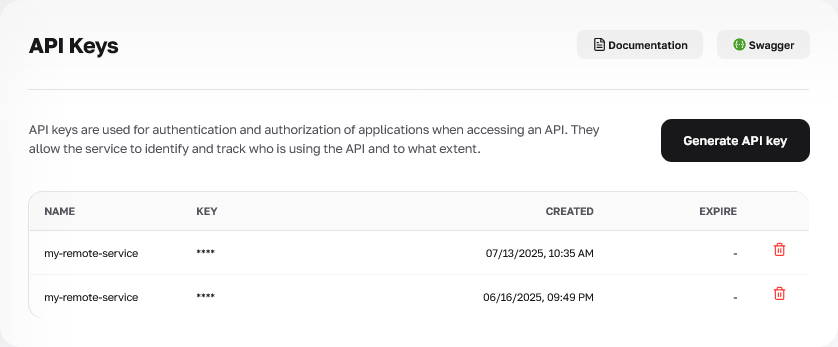
Bearer token proxy authentication is the industry standard that prevents sending credentials in clear text, keeping your infrastructure safe. Pass this token in the headers of every single cURL request or HTTP POST endpoint call.
curl -X 'GET' \

  'https://app.cyberyozh.com/api/v1/proxies/shop/?country=us&proxy_category=datacenter' \

  -H 'accept: application/json' \

  -H 'X-Api-Key: your_api_key_here'
The server processes requests through these specific endpoints to provide a complete proxy provisioning API:
/v2/users/balance/ (GET). Checks your current account balance before initiating an order to ensure sufficient funds.
/proxies/shop/ (GET). Fetches a dynamic list of available geographic locations, ASN, and product categories.
/proxies/shop/buy_proxies/ (POST). Accepts your JSON payload for immediate infrastructure rental.
👉 Rent fast datacenter proxies
How to buy proxies using REST API and find the correct parameters
Programmatic proxy provisioning starts with sending an array of items. Building a JSON payload proxy order lets you configure each port independently.
The id holds the specific UUID of the product. You grab this identifier by sending an initial GET request to /proxies/shop/.
Do not pull the entire catalog. Filter the output directly via query parameters. Restrict the location using country. Define the network type with proxy_category (datacenter, lte, residential_rotating, residential_static). Select the port privacy level via access_type (shared or private). Exclude sold-out items by setting stock_status=in_stock.
curl -X 'GET' \

  'https://app.cyberyozh.com/api/v1/proxies/shop/?country=us&proxy_category=datacenter&access_type=private&stock_status=in_stock' \

  -H 'accept: application/json' \

  -H 'X-Api-Key: your_api_key_here'
Once you copy the correct id from the server response, you define the port count with quantity and the rental time with period_months.
The promo_code field applies your discount.
Setting the auto_renew flag to true triggers the automated proxy renewal API.
This essentially gives you a full proxy subscription management API to retain high-trust addresses without manual tracking. A complete breakdown of all supported variables and server response formats is available in the technical reference.
👉 Read the Proxy Shop API docs
[
  {
    "id": "f3e3ec3b-e6eb-40a7-b2d2-9125acb3093c",
    "auto_renew": false,
    "quantity": 2,
    "period_months": 3
  }
]
The server calculates the price instantly. It deducts the funds from your balance. If your funds are too low, the order gets a canceled status immediately.
Monitoring IP reputation and automatic replacement
Picture a massive operation handling isolated digital profiles. A script periodically checks the fraud score of its current static address using the internal checker API. During heavy loads, the server might return a status code 429 too many requests. Your code handles this rate limit using exponential backoff to retry the call later. Once the IP hits a blacklist, the error handler drops it and triggers the shop API to buy a clean static residential address.
import requests

# 1. Check current static IP reputation

check_response = requests.post(
    'https://app.cyberyozh.com/api/v1/checkers/socks/',
    headers={'X-Api-Key': 'your_api_key'},
    json={"ips": ["198.51.100.14"]}
)

# 2. If the IP is compromised, buy a new static proxy immediately

order_response = requests.post(
    'https://app.cyberyozh.com/api/v1/proxies/shop/buy_proxies/',
    headers={'X-Api-Key': 'your_api_key'},
    json=[{
        "id": "f3e3ec3b-e6eb-40a7-b2d2-9125acb3093c",
        "quantity": 1,
        "period_months": 1
    }]
)
The server returns the new credentials in seconds. The system resumes work without human intervention.
Important architectural note:
This purchase flow applies strictly to static residential or datacenter proxies. If you rely on rotating residential proxies, you never need to buy a new product when facing restrictions. The network pool already contains 100 million IPs across 195 countries. You just send a POST request to the /proxies/rotating-credentials/ endpoint with your target country_code and session_type to get a fresh connection string instantly.
👉 Access global rotating residential proxies
Autonomous agents and the x402 protocol
Standard billing creates a major roadblock for autonomous AI agents. They generate unpredictable traffic volumes. Bots cannot pass a manual CAPTCHA verification on a login screen to top up a fiat balance.
Integrating the proxy shop API preps your stack for machine commerce. When an agent hits an empty balance, the server throws an HTTP 402 Payment Required status.
Your code must successfully handle HTTP 402 errors to unlock x402 autonomous payments. The agent reads the exact cost from the header, signs a cryptocurrency transaction, and sends the cryptographic proof back. The server verifies it and instantly returns fresh connection credentials for a dedicated IP. This autonomous proxy billing setup handles your infrastructure billing on the fly, completely removing the need for manual fiat top-ups.
FAQs about the proxy shop API
How many proxies you can buy in one request?
You can order up to 50 items per API call. This keeps server response times incredibly fast.
How the proxy shop API handles insufficient funds?
The server returns a canceled status with an insufficient_funds code. Your script should catch this error and trigger an internal balance alert.
Can the proxy shop API enable auto renewal?
Yes. You just set the auto_renew parameter to true for supported products inside your JSON.
What happens if one item in a bulk order fails?
The endpoint processes every position in the array completely independently. Valid items are paid for successfully.
How to filter proxies by country?
Add the country parameter to your GET request. Use the standard ISO 3166-1 alpha-2 format.
Does the API support HTTP and SOCKS5 filtering?
Yes. Pass the connection_port_http or connection_port_socks5 boolean parameters to narrow your search results.
How to handle large catalog responses?
Control the data output using the page and page_size pagination parameters.
Where to find the complete parameter list?
Read the official CyberYozh API documentation for full parameter specifications, limits, and advanced routing logic.