
Cách sử dụng Claude AI miễn phí năm 2026: Giới hạn hiện tại và khi nào proxy có thể giúp

Câu trả lời nhanh: Có, Claude AI miễn phí là có thật và vĩnh viễn - không có thời gian dùng thử, không cần thẻ tín dụng, không có ngày hết hạn. Bạn đăng ký tại claude.ai, nhận Claude Sonnet 5 theo mặc định và có thể trò chuyện, tải lên tệp cũng như sử dụng Projects. Điều cần lưu ý là mức sử dụng: «ngân sách» gói miễn phí của bạn được đặt lại sau mỗi năm giờ và Anthropic không công bố số lượng tin nhắn cố định vì nó phụ thuộc vào lượng dữ liệu bạn yêu cầu Claude xử lý.
TL;DR
Claude AI miễn phí có giá $0 mãi mãi; đây là gói vĩnh viễn, không phải bản dùng thử
Mức sử dụng được đặt lại theo cửa sổ trượt 5 giờ; không có số lượng tin nhắn chính thức, chỉ có ngân sách dựa trên token
Tính năng tải lên tệp cũng hoạt động trên gói Free: tối đa 20 tệp mỗi cuộc trò chuyện, mỗi tệp 30MB
Gói Free chỉ khả dụng ở các quốc gia được Anthropic hỗ trợ, cùng danh sách với các gói trả phí
Proxy có thể giúp giải quyết các vấn đề về truy cập mạng hoặc vị trí địa lý và xây dựng cơ sở hạ tầng đáng tin cậy xung quanh Claude. Nó không thể tăng mức sử dụng, tín dụng hoặc gói không giới hạn ẩn
Claude AI có miễn phí vào năm 2026 không

Anthropic xác nhận trực tiếp: có, vẫn còn phiên bản miễn phí của Claude, gắn với cùng loại tài khoản bạn sẽ dùng cho gói trả phí; bạn chỉ không phải trả tiền. Gói Free cho bạn Claude trên web, iOS, Android và desktop, không cần cam kết trả trước.
Điều thay đổi vào năm 2026 là mô hình bên dưới: Kể từ ngày 30 tháng 6, Claude Sonnet 5 trở thành mô hình mặc định trên cả Free và Pro, vì vậy người dùng miễn phí không bị mắc kẹt với trợ lý bị cắt giảm tính năng; họ đang sử dụng mô hình thực sự hiện tại, chỉ với hạn mức sử dụng nhỏ hơn và không có quyền truy cập vào mô hình cao cấp nhất dành riêng cho các gói trả phí.
Ba bậc dành cho người tiêu dùng tính đến thời điểm viết bài:
Free $0
Pro: $20/tháng hoặc $17/tháng khi thanh toán hàng năm.
Hai bậc Max ($100 và $200/tháng).
Mọi gói, bao gồm cả Free, đều sử dụng cùng hệ thống giới hạn sử dụng trượt; các gói trả phí chỉ đơn giản là nhận được nhiều hơn.
Cách sử dụng Claude AI miễn phí
Kiểm tra tính khả dụng. Gói Free chỉ được cung cấp ở các quốc gia được Anthropic hỗ trợ, cùng danh sách áp dụng cho mọi gói trả phí.
Tạo tài khoản. Truy cập claude.ai và đăng ký bằng địa chỉ email, tài khoản Google hoặc Apple ID. Không cần thẻ.
Đăng nhập và bắt đầu cuộc trò chuyện. Bạn sẽ vào thẳng giao diện trò chuyện với Sonnet 5 làm mô hình mặc định.
Sử dụng Claude một cách chiến lược. Kết hợp các câu hỏi liên quan vào một tin nhắn thay vì gửi từng câu một; xem các mẹo bên dưới.
Theo dõi mức sử dụng của bạn. Settings → Usage cho biết bạn đang ở đâu trong cửa sổ hiện tại trước khi bạn chạm giới hạn.
Bạn có thể làm gì với gói Claude AI Free
Chat, tạo code và hỏi đáp chung với Sonnet 5
Tải file lên: PDF, DOCX, CSV, TXT, HTML, ODT, RTF, EPUB và JSON nguyên bản; XLSX khi bạn bật công cụ phân tích
Projects, để tổ chức các cuộc trò chuyện liên quan và tài liệu tham khảo
Tìm kiếm web và sử dụng công cụ cơ bản trong chat
Free không bao gồm: model cao cấp nhất, quyền truy cập ưu tiên trong giờ cao điểm và ngưỡng hàng tuần cao hơn mà các gói trả phí thêm vào bên trên khung 5 giờ.
Giới hạn của gói Claude AI free là gì

Không có số lượng tin nhắn miễn phí cố định. Tài liệu sử dụng chính thức của Anthropic nói rõ: giới hạn của bạn là "ngân sách hội thoại" được đo bằng token, không phải tin nhắn; nó phụ thuộc vào độ dài và độ phức tạp của cuộc trò chuyện, các tính năng bạn sử dụng và nhu cầu hiện tại.
Quan trọng: Bất kỳ bài viết nào nói với bạn "bạn nhận chính xác 40 tin nhắn mỗi ngày" đều đang suy đoán, không trích dẫn con số chính thức. Anthropic chưa bao giờ công bố, vì một tin nhắn dài kèm file đính kèm có thể tiêu tốn ngân sách của bạn nhiều hơn mười tin nhắn ngắn.
Điều Anthropic thực sự nói chính xác: Mức sử dụng gói Free được đặt lại theo khung phiên 5 giờ luân phiên, và Pro cung cấp ít nhất gấp 5 lần mức sử dụng của Free mỗi phiên. Con số tương đối đó là mốc đáng tin cậy nhất hiện có; bất cứ điều gì cụ thể hơn đều là ước tính của bên thứ ba.
Đọc thêm về cách nhận ChatGPT miễn phí
Bạn có thể sử dụng Claude AI free bao nhiêu
Các tracker độc lập thường báo cáo người dùng miễn phí rơi vào khoảng 15–40 tin nhắn mỗi khung 5 giờ cho các trao đổi ngắn, đơn giản, khoảng 30–100 trong cả ngày nếu sử dụng phân tán. Coi đó là ước lượng, không phải đảm bảo. Hai người hỏi "giải thích khái niệm này" mười lần mỗi người có thể chạm giới hạn ở các điểm rất khác nhau, vì:
Lịch sử hội thoại dài được xử lý lại mỗi lượt, nên tin nhắn 15 tốn nhiều hơn tin nhắn 1
Tải lên hoặc tham chiếu file sẽ tăng tải cho lượt đó
Nhu cầu server thay đổi ngưỡng hiệu quả; free được phục vụ ở mức ưu tiên thấp hơn các gói trả phí trong giờ cao điểm
Claude free có tải lên không giới hạn không
Không, nhưng giới hạn của gói miễn phí không chặt chẽ như mọi người nghĩ. Trong bất kỳ chat nào, Claude chấp nhận tối đa 20 file, mỗi file giới hạn 30MB; điều này áp dụng cho tất cả các gói, không chỉ gói trả phí. Bên trong một Project (cũng có trên Free), không có số lượng file cố định, nhưng mọi thứ vẫn phải vừa trong context window của model.
PDF nhận phân tích trực quan (biểu đồ, hình ảnh, bố cục) nếu dưới 100 trang; PDF dài hơn sẽ chuyển về trích xuất chỉ văn bản. Định dạng được hỗ trợ: PDF, DOCX, CSV, TXT, HTML, ODT, RTF, EPUB, JSON và XLSX (khi bật công cụ phân tích).
Cách tận dụng nhiều hơn từ Claude free
Gộp các câu hỏi liên quan vào một tin nhắn thay vì gửi riêng lẻ; Claude xử lý lại toàn bộ cuộc trò chuyện mỗi lượt, nên ít tin nhắn dày đặc hơn sẽ kéo dài ngân sách của bạn xa hơn
Bắt đầu chat mới cho chủ đề mới thay vì tiếp tục một chuỗi dài vô thời hạn
Tránh tải lại cùng một file; Claude giữ nó trong cuộc trò chuyện đó
Đưa ngữ cảnh lên đầu, đưa hướng dẫn đầy đủ trong tin nhắn đầu tiên thay vì điều chỉnh qua nhiều lần theo sau
Chỉnh sửa thay vì gửi lại khi Claude hiểu sai prompt, thay vì thêm một lời sửa lên trên
Không điều nào trong số này nâng ngưỡng của bạn. Nó chỉ có nghĩa là bạn tiêu ít hơn vào việc lặp lại.
Điều gì xảy ra khi bạn chạm giới hạn Claude free
Bạn sẽ thấy thông báo rằng bạn đã đạt giới hạn và cần đợi. Các cuộc trò chuyện hiện có vẫn đọc được; bạn có thể cuộn và sao chép, nhưng không thể gửi gì mới cho đến khi khung 5 giờ được đặt lại. Free không có ghi đè thủ công; usage credits (nạp trả theo mức sử dụng vượt quá hạn mức gói của bạn) là tính năng của gói trả phí, không phải thứ tài khoản Free có thể bật.
Lúc đó bạn có các lựa chọn: chờ đợi đến khi giới hạn được đặt lại, hoặc nâng cấp lên gói trả phí để có thêm dung lượng sử dụng.
Proxy có thể giúp bạn sử dụng Claude AI không
Đây là sự phân biệt mà hầu hết nội dung về «cách sử dụng Claude miễn phí» bỏ qua hoàn toàn, và đây chính là điều thực sự quan trọng. Có hai vấn đề hoàn toàn khác nhau mà mọi người thường gặp phải:
Vấn đề về giới hạn sử dụng: Bạn đã đăng nhập, Claude hoạt động tốt, nhưng bạn đã dùng hết hạn mức năm giờ của mình. Điều này hoàn toàn nằm trên máy chủ của Anthropic và gắn liền với tài khoản của bạn.
Vấn đề về truy cập hoặc hạ tầng: Claude không tải được một cách ổn định, hoặc quy trình làm việc rộng hơn của bạn với Claude cần tính nhất quán về mạng, một quốc gia không được hỗ trợ, mạng nơi làm việc chặn các công cụ AI, hoặc một quy trình tự động cần IP ổn định, không chia sẻ để chạy không bị gián đoạn.
Proxy chỉ giải quyết được loại vấn đề thứ hai. Nhưng loại thứ hai này lớn hơn nhiều so với chỉ đơn thuần «Tôi đang đi du lịch và Claude không tải được»; hãy xem phần bên dưới về việc xây dựng với Claude, không chỉ trò chuyện với nó.
Khám phá proxy residential tĩnh để truy cập ở cấp độ mạng
Kết luận: Giải quyết vấn đề thực tế trước tiên. Nếu Claude tải tốt và bạn chỉ hết hạn mức sử dụng, không có proxy nào thay đổi được điều đó; bộ đếm gắn với tài khoản của bạn, không phải địa chỉ IP của bạn.
Proxy có thể xóa giới hạn sử dụng của Claude không
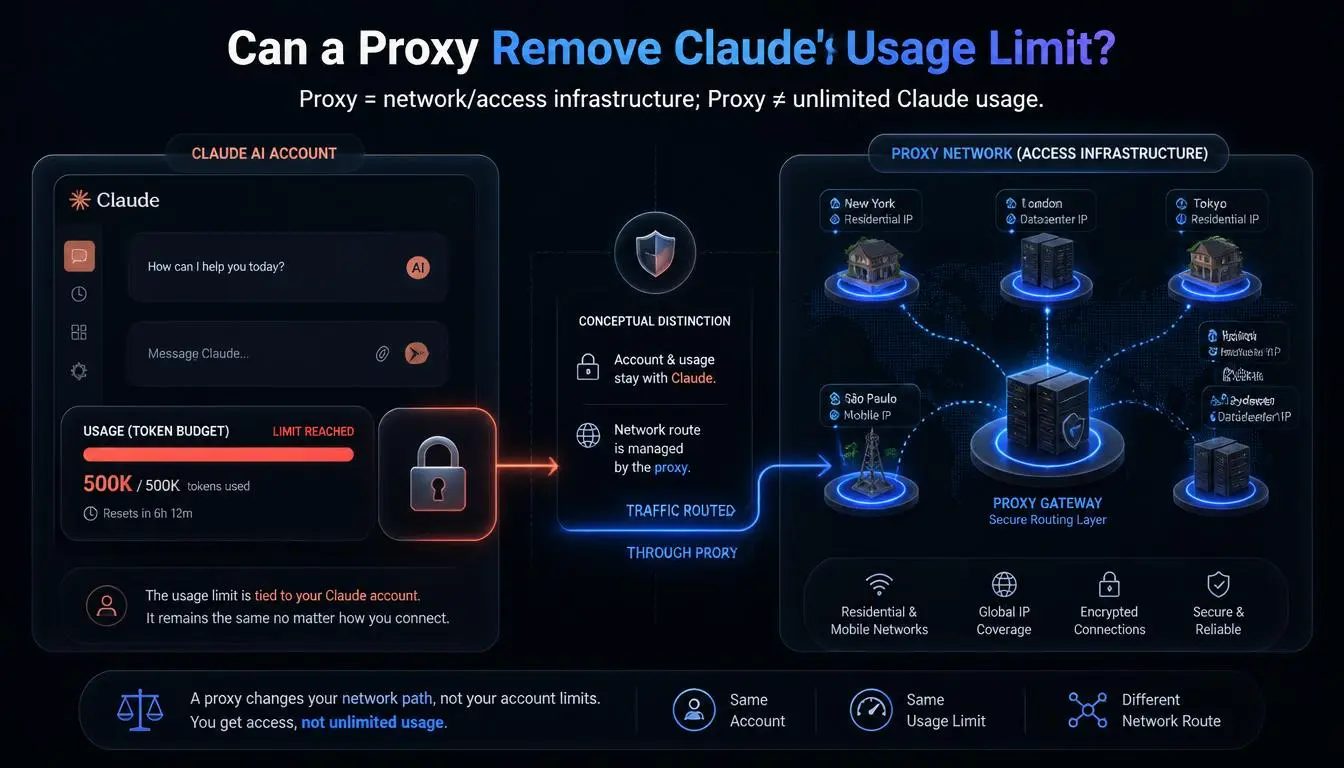
Không. Anthropic đếm mức sử dụng dựa trên tài khoản của bạn, dựa trên số token đã xử lý, không phải dựa trên địa chỉ IP. Việc chuyển đổi mạng không ảnh hưởng đến bộ đếm đó.
Cũng đáng chú ý đến một cách giải quyết mà bạn sẽ thấy được khuyến nghị ở nơi khác: phân tán mức sử dụng trên nhiều tài khoản Claude, mỗi tài khoản gắn với hồ sơ trình duyệt và IP riêng, đặc biệt để vượt qua giới hạn. Chúng tôi sẽ không hướng dẫn bạn cách làm điều đó ở đây.
Điều khoản tiêu dùng của Anthropic cấm chia sẻ hoặc gộp chung thông tin đăng nhập tài khoản, và chính sách sử dụng của họ cho việc sử dụng tác nhân rõ ràng gắn cờ «tạo hoặc quản lý nhiều tài khoản để trốn tránh phát hiện hoặc vượt qua các biện pháp bảo vệ nền tảng»; việc chạy thiết lập đó theo cách thủ công đủ gần với ranh giới đó nên chúng tôi không khuyến nghị.
Nếu bạn đang xây dựng với Claude, không chỉ trò chuyện với nó
Mọi thứ ở trên đều nói về giao diện trò chuyện miễn phí. Nhưng một phần ngày càng lớn trong việc sử dụng Claude không phải là một người đang gõ câu hỏi; đó là một tác nhân trình duyệt, một script tự động hóa, hoặc một pipeline QA gọi Claude theo chương trình, thường thông qua các công cụ như Selenium, Playwright, hoặc quy trình kết nối MCP. Đó là một tình huống thực sự khác biệt, và proxy quan trọng đối với nó vì những lý do không liên quan gì đến giới hạn tin nhắn:
IP đầu ra nhất quán: cho các phiên tự động bị gián đoạn hoặc bị gắn cờ khi chúng chuyển mạng giữa chừng tác vụ
Kiểm thử theo khu vực: kiểm tra cách một sản phẩm hoặc nội dung được hỗ trợ bởi AIhoạt động hoặc hiển thị cho người dùng ở một quốc gia cụ thể, mà không cần ở đó thực tế
Cô lập hạ tầng theo từng môi trường: giữ pipeline tự động hóa dev, staging và production trên các định danh mạng riêng biệt, ổn định thay vì một kết nối chia sẻ
Đây là trường hợp sử dụng mà hạ tầng của CyberYozhthực sự được xây dựng xung quanh, và đó là một lý do hợp lệ, riêng biệt để quan tâm đến chất lượng proxy mà không liên quan gì đến việc vắt kiệt thêm từ gói trò chuyện miễn phí.
Xem cách cơ sở hạ tầng proxy của CyberYozh hỗ trợ AI agent và quy trình tự động hóa
Các loại proxy được sử dụng cho quy trình làm việc với Claude AI
Loại proxy | Phù hợp nhất cho | Mức độ liên quan đến Claude |
Residential | Truy cập mạng/vị trí chung, độ ổn định hàng ngày | Cao |
Mobile | Kiểm thử mạng nhà mạng, quy trình làm việc ưu tiên mobile | Tùy tình huống |
ISP / static | Phiên dài hoặc tự động hóa gắn với một danh tính nhất quán | Cao cho mục đích phát triển/kiểm thử |
Datacenter | Định tuyến kỹ thuật hoặc QA tiết kiệm chi phí | Tùy tình huống — một số hệ thống rủi ro gắn cờ nhanh hơn |
Không có giải pháp «tốt nhất» phổ quát ở đây; nó phụ thuộc vào vấn đề bạn thực sự đang cố gắng giải quyết. Đọc thêm về 10 static residential proxy tốt nhất và 12 rotating residential proxy tốt nhất
So sánh các tùy chọn residential, ISP và datacenter trong danh mục proxy đầy đủ →
CyberYozh có thể hỗ trợ truy cập mạng liên quan đến Claude như thế nào
Nếu vấn đề của bạn thực sự là truy cập mạng, vị trí hoặc tính ổn định của cơ sở hạ tầng, không phải mức sử dụng, thiết lập của CyberYozh bao gồm các danh mục trên:
Hơn 100 triệu IP residential và mobile được lấy từ nhóm quản lý lớn trên hơn 195 quốc gia,
Static ISP proxy từ $5.29/tháng cho các phiên cần duy trì nhất quán,
Rotating residential proxy từ $2/GB
Proxy di động LTE/5G từ $1.70/ngày cho công việc mạng nhà mạng.
Proxy datacenter từ $1.77/tháng.
Quyền truy cập API đầy đủ và kiểm soát phiên làm việc có sẵn cho bất kỳ ai xây dựng điều này thành quy trình làm việc có thể lặp lại, không phải giải pháp một lần.
CyberYozh có xếp hạng 4.7+ «Xuất sắc» trên Trustpilot.
Không có bản dùng thử giảm giá; giá cả minh bạch theo GB, theo ngày hoặc theo tháng ngay từ đầu, nhưng tài khoản mới nhận được tiền thưởng nạp đầu tiên, và điều khoản khuyến mãi hiện tại luôn được liệt kê tại đây.
Nếu bạn thiết lập lần đầu tiên, hướng dẫn từng bước để chọn và mua proxy sẽ hướng dẫn bạn khớp loại proxy với nhiệm vụ trước khi bạn chi tiêu bất cứ thứ gì.
Claude Free so với Pro so với Max
Gói | Giá | Thay đổi gì |
Free | $0 | Sonnet 5, giới hạn luân chuyển 5 giờ, tải tệp tiêu chuẩn |
Pro | 20$/tháng (17$/tháng thanh toán hàng năm) | Ít nhất gấp 5 lần mức sử dụng của Free, Claude Code, Projects không giới hạn, quyền truy cập ưu tiên |
Max 5x | $100/tháng | Gấp 5 lần mức sử dụng của Pro mỗi phiên |
Max 20x | $200/tháng | Gấp 20 lần mức sử dụng của Pro mỗi phiên |
Claude Pro có đáng trả tiền không
Phụ thuộc hoàn toàn vào tần suất bạn thực sự chạm giới hạn.
Nếu bạn sử dụng Claude thỉnh thoảng, vài câu hỏi mỗi ngày, soạn thảo nhẹ nhàng, Free thực sự đáp ứng được, và trả $20/tháng mua cho bạn không gian dư thừa mà bạn sẽ không dùng đến.
Nếu bạn chạm giới hạn năm giờ nhiều lần mỗi tuần, mất đà giữa chừng nhiệm vụ liên tục, hoặc cần Claude Code hoặc cửa sổ ngữ cảnh lớn hơn cho công việc dự án thực tế, Pro tự hoàn vốn qua thời gian tiết kiệm được.
Theo dõi mức sử dụng thực tế của bạn trong Settings → Usage trong một hoặc hai tuần trước khi quyết định thay vì nâng cấp vội vàng.
Vấn đề thường gặp với Claude Free
«Tôi chạm giới hạn sau một hoặc hai tin nhắn.» Thường có nghĩa là cuộc hội thoại đã mang theo ngữ cảnh nặng, một chuỗi dài, một tệp lớn hoặc một tác vụ phức tạp tiêu thụ ngân sách nhanh hơn so với số lượng tin nhắn gợi ý.
Không có cảnh báo trước khi bị cắt. Free không đánh dấu đáng tin cậy trước khi bạn đạt giới hạn, không giống Pro cảnh báo khi còn một tin nhắn.
Mất ngữ cảnh giữa chừng tác vụ. Khiếu nại phổ biến nhất là đang ở sâu trong phiên gỡ lỗi hoặc viết khi giới hạn xuất hiện. Bắt đầu các cuộc trò chuyện mới cho các tác vụ riêng biệt, thay vì một chuỗi dài lan man, giảm tần suất điều này xảy ra.
Nhầm lẫn về thời gian đặt lại. Đó là năm giờ kể từ tin nhắn đầu tiên của bạn trong cửa sổ hiện tại, không phải đồng hồ hàng ngày cố định như nửa đêm.
Kết luận cuối cùng
Claude AI Free là một lựa chọn thực sự, bền vững, không phải bản demo bị cắt giảm, không phải dùng thử có thời hạn. Nó có giới hạn thực sự, và Anthropic cố ý mơ hồ về con số chính xác vì ràng buộc thực sự là độ phức tạp, không phải bộ đếm tin nhắn. Nếu bạn là người dùng thỉnh thoảng, Free đáp ứng được.
Nếu bạn liên tục chạm giới hạn, Pro hoặc Max là giải pháp trung thực, không phải cách thức vòng vo. Nếu trở ngại của bạn là truy cập mạng, hoặc bạn đang xây dựng automation hoặc agent trên Claude thay vì trò chuyện với nó, đó là một vấn đề hợp lệ khác, và cơ sở hạ tầng proxy là công cụ phù hợp.
Khám phá kiểm tra danh tiếng IP của CyberYozh cho truy cập cấp mạng →