
Instagram profile viewer: research with proxies and cloud phones

Once you’re working across several client accounts, reviewing creators for a campaign turns into a bit of a faff. Searching for an Instagram profile viewer can mean browsing public content, finding out who visited your account, or saving a profile picture, but these are different tasks.
This guide explains what Instagram makes visible and which actions can identify your account, then shows how proxies and cloud phones help organize recurring research through separate network connections and Android environments.
TL;DR
An Instagram profile viewer can help inspect available profile information, but it does not unlock private posts or reveal a list of profile visitors.
Opening a profile differs from viewing a Story or interacting. Story views, likes, follows, and messages can identify your account, even through a proxy.
Proxies control the routed connection, including its IP location and rotation.
Cloud phones keep client apps, data, and sessions organized in separate environments.
Mobile and static ISP proxies offer unlimited traffic. Rotating residential proxies use per-GB billing and offer sticky sessions up to 24 hours.
A browser is usually enough for a one-time check. For recurring client research, test one setup before expanding and budget separately for profiles, runtime, and proxies.
What is an Instagram profile viewer?
An Instagram profile viewer is a tool or interface for viewing an account’s profile information, such as its bio, profile picture, and available posts. People use the term for three different tasks:
Reviewing information visible on another account’s profile.
Checking visits and engagement on an account they manage.
Opening or saving a profile picture.
Pro tip: A service advertised as an IG profile viewer or Insta profile viewer may support only some of these tasks. What it displays depends on its data source and access method, and claims of anonymous viewing or unrestricted access need verification. For recurring research, each tool has a separate role: Instagram displays the content, a proxy provides the network connection for routed traffic, and a cloud phone supplies an Android environment with its own apps and sessions. These tools do not grant additional account permissions.
Does Instagram have profile views?
Instagram records profile activity and may show aggregated counts in Instagram Insights, but it does not provide a named list of profile visitors. Instagram profile views describe activity totals where available; they do not tell you which individuals opened your profile.
If you’re asking “can you see who views your profile on Instagram,” it helps to separate these activities:
Activity or metric | What the account owner can see |
Opening a profile | No named visitor notification simply because someone opened the profile. |
Profile activity in Insights | Activity counts, without a list identifying individual profile visitors. |
Viewing a Story | Story viewer information can include usernames, under separate visibility rules. |
Liking, commenting, or following | These actions can identify the account involved. |
Insights concerns accounts you own or have the required permissions to manage. It does not let you access another business’s private analytics simply by entering its username.
The answer to “does Instagram show who viewed your profile” does not change when you use a proxy or cloud phone. Those tools support network connections and separate Android environments; they do not unlock hidden visitor information.
Can people see when you view their profile on Instagram?
If you’re asking “can people see if you view their profile on Instagram,” simply opening the profile does not send a notification identifying your account. Your actions afterward matter: viewing a Story can reveal your username, while following, liking a post, or sending a message can identify the account you’re using.
When researching creators for a client, an accidental tap on Follow or Like can expose the work account even if you only intended to browse. Check which account is active before interacting.
A proxy gives you control over your connection’s IP location and rotation, while a separate cloud phone helps keep client accounts, apps, and sessions organized. Neither removes the identity of an account signed into Instagram or changes Instagram’s visibility rules.
Viewing Instagram profiles with and without logging in
If you searched for “view Instagram profile without logging in,” start by opening the account’s direct profile URL in a logged-out browser. Instagram may display some public information, but the content available can vary.
Choose your access method around the research task:
Access method | Appropriate use |
Logged-out browser | Checking public information Instagram makes available without a signed-in session. |
Logged-in browser | Reviewing accessible profiles through an account you own or are authorized to use. |
Instagram app on cloud phones | Conducting app-based research within separate environments assigned to clients or projects. |
A public account can still trigger a login prompt, so public visibility does not guarantee unrestricted browsing. Changing your IP address does not guarantee that the prompt disappears or that additional content becomes available.
Cloud phones become useful when you need Instagram’s mobile app, persistent app data, or deliberately separated client environments. They help you return to an assigned workspace with its apps and stored sessions, although Instagram may still request another login. For a single public-profile check, a browser is usually sufficient.
Pro tip: To manage multiple Instagram accounts with cloud phones, keep a simple register with each client’s account, assigned cloud phone, and responsible teammate. Check that register before starting a research session to avoid working through the wrong account.
When proxies help with Instagram profile research
Recurring research becomes harder to organize when client accounts, connection settings, and sessions get mixed together. Beyond a one-off Instagram profile viewer search, proxies can help you assign a consistent connection to a client workflow, select an exit location for regional testing, and control IP rotation during repeated browsing.
IP location is only one signal. Account history, app settings, and other factors also affect recommendations, language, and available content.
Mobile proxies for repeated app-based research
Mobile LTE/4G/5G proxies offer unlimited traffic, making data costs easier to plan during repeated Instagram app use. Test the selected plan with your actual research task before expanding.
Shared channels may have preset rotation schedules, while dedicated channels can offer more control over IP changes. Check the plan’s settings before purchasing. A dedicated mobile channel does not necessarily provide an exclusive public IP: carrier-grade NAT (CGNAT) can place multiple subscribers behind one address.
Static ISP proxies for a consistent IP
Static ISP proxies keep the same IP for the rental period and include unlimited traffic. They can suit recurring work with the same client account when frequent network changes are unnecessary.
A fixed IP does not preserve the Instagram login itself. Stored app sessions and Instagram’s security checks still determine whether you need to sign in again.
Rotating residential proxies for selected locations
Rotating residential proxies offer location targeting, per-GB billing, traffic rollover, and sticky sessions up to 24 hours. Choose session behavior around the task, keeping the connection consistent during multistep browsing instead of rotating throughout an active login. Account for image and video traffic when estimating costs.
When you proxy plans, check:
Location: Required country and available targeting.
Compatibility: Supported protocol and authentication method.
Sessions: Required duration and rotation controls.
Traffic: Allowance and billing model.
Entry cost: Minimum purchase and rental period.
An IP Fraud Score check adds information about IP reputation. It cannot predict whether Instagram will accept a particular session.
Pro tip: Before adding automation to recurring research, document the task, authorized account, and connection it will use. The guide to Instagram automation for multiple client accounts explains how to organize device environments, sessions, and network connections as client work grows.
How to organize Instagram research on cloud phones
Imagine an agency researching creators for three clients. Each client’s authorized Instagram account stays in its assigned cloud phone, giving the team separate apps, stored data, and sessions. An Instagram profile viewer may help inspect available content, while the cloud phone organizes the working environment and its assigned proxy controls routed traffic.
Create a cloud phone for the project
In CyberYozh App, purchase a profile slot and add runtime minutes as needed. Name the phone after the client or project, select supported device and system settings, and add a group or note so colleagues can identify its purpose.
The server region determines where the phone is hosted. The proxy’s exit location concerns its outgoing IP address; choosing a hosting region alone does not establish that location.
Follow the detailed instructions on how to set up a cloud phone before configuring additional client environments.
Assign a compatible proxy
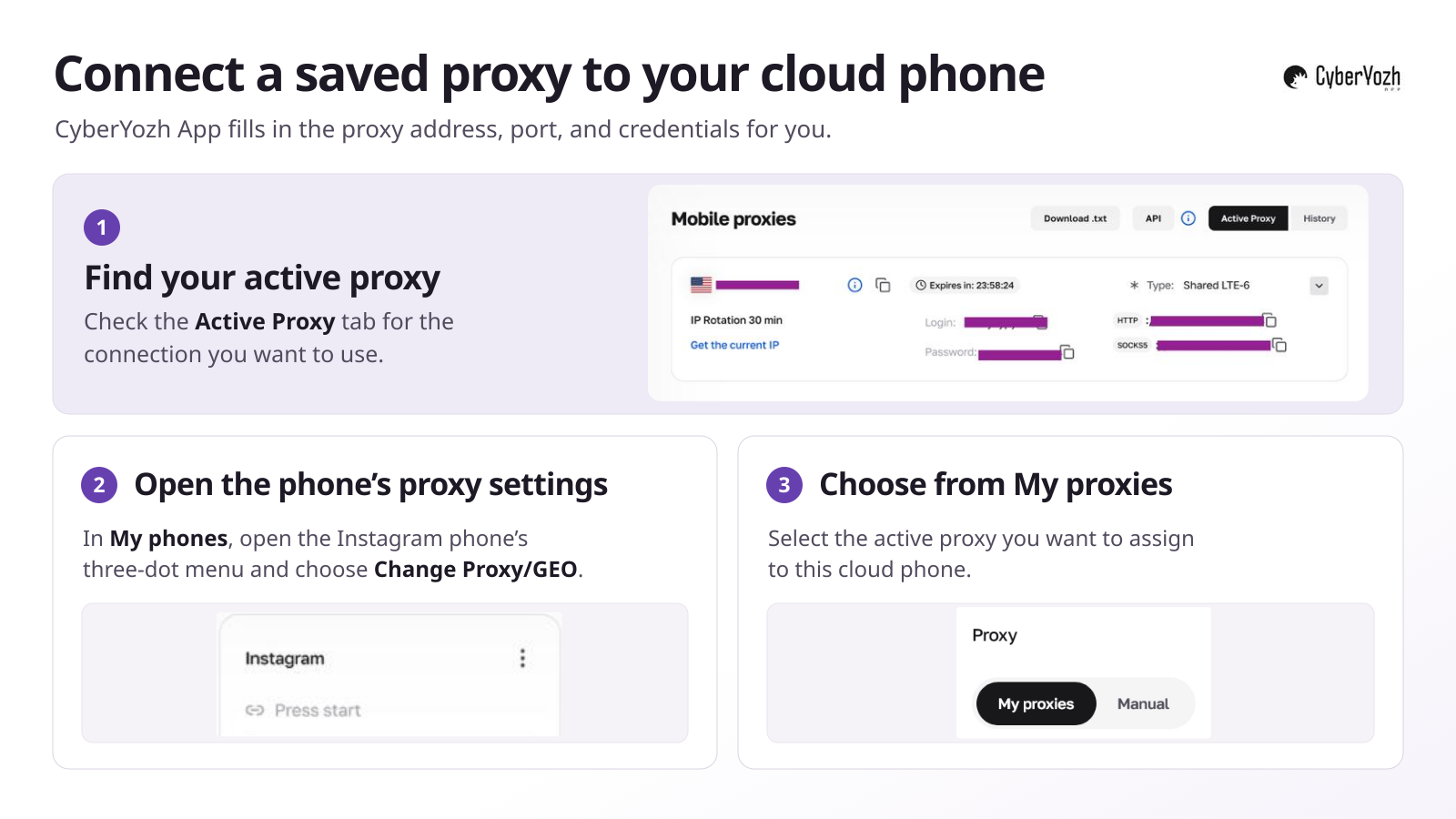
Select an active connection under My proxies, or use Manual to enter a supported SOCKS5 connection with username and password authentication.
Choose session settings that cover the research task, checking any automatic rotation schedule before starting. Configure language and geolocation for the intended regional test.
Pro tip: When you connect CyberYozh App proxies to its cloud phones, no manual proxy setup is needed. Select an active proxy under My proxies, and its connection details are applied automatically, without copying addresses, ports, or credentials.
Verify the connection and test Instagram
Before beginning client research:
Run Check IP in the proxy configuration panel.
Check the exit IP from inside the running cloud phone.
Distinguish this exit IP from the gateway address entered during setup. The gateway is the connection endpoint; the exit IP is what the destination sees.
Open Instagram and test a representative task, such as reviewing an accessible creator profile.
Repeat relevant checks after changing the proxy or routing settings.
A browser IP check confirms that browser’s connection. It does not independently prove that every app follows the same route.
Keep research organized between sessions
Keep phones assigned to projects and record profile URLs, observations, and review dates. If an IG profile viewer supplies information, note the tool used so colleagues understand the source.
An active profile subscription retains the phone’s stored apps and data, while runtime minutes cover its running time. Saved sessions support returning to work, but Instagram can still request another login or verification.
Pro tip: Turn useful research findings into an approved content brief before opening an Instagram post scheduler. Record the destination account, asset, caption, publishing time, and time zone so the publishing team can check the plan against the correct client’s calendar.
Instagram profile picture viewers and downloaders
An Instagram profile picture viewer can help you check whether a client’s avatar is consistent across its official accounts. Compare the logo, crop, and colors with the approved brand asset before requesting changes.
Viewing an image is different from saving a file. An Instagram profile picture downloader should provide an actual export, rather than just a larger preview. If you search for “download IG profile pic,” check the output’s file format and pixel dimensions, along with whether it matches the current profile.
The quality of an Instagram profile photo download depends on the source asset and retrieval method. A proxy does not increase resolution or restore detail missing from a small image.
For client-owned assets, use the original brand file whenever available. Assess third-party tools by the files they actually produce, without relying on promises of private-profile access. Cloud phones run the app or browser used for this task; they do not automatically add an Instagram download feature.
What an Instagram profile downloader can save
An Instagram profile downloader may produce different outputs, so check what its export actually includes:
Profile picture: One avatar image at the resolution available to the tool.
Selected media: Individual posts, photos, or videos the application can access and save.
Account information: An export obtained through the appropriate account feature for an account you manage.
An Instagram profile download is not automatically a complete account archive. A profile URL alone does not grant access to every associated item.
A proxy supports the connection used by a compatible application. Extracting content and creating downloadable files remain separate functions that the application or account feature must provide.
Why an Instagram profile may be unavailable
A search for “how to view a blocked Instagram profile” can point to several unrelated problems. Identify the cause before changing your connection.
What you see | What to check |
Profile missing or URL unavailable | Verify the current username and profile URL. |
Login prompt | Sign in through Instagram with an authorized account. |
Private-account notice | Check whether your account has approved follower access. |
Profile unavailable to your account | Consider an account-level block, but this symptom alone does not confirm one. |
Proxy error or failed connection | Check credentials, protocol support, and routing settings. |
For a proxy failure, verify the exit IP from the intended browser or cloud phone and test a representative task. Account restrictions require a separate review of account status and permissions.
Changing proxies does not remove a block from the same signed-in account or grant permission to view private posts.
Pro tip: If you’ve had an Instagram story banned, save the exact notice and review the reason given before changing your connection. Investigate a content restriction separately from a proxy connection failure; changing the IP does not resolve the reason a Story was removed.
Build a setup around your Instagram research
Define the information you need from an Instagram profile viewer, choose browser or app access, and identify projects that need separate environments.
Choose a suitable proxy connection from the catalog or configure your first cloud phone, then test the complete setup with a representative research task before expanding.