
WhatsApp SMS Activation Guide: Buying Virtual Numbers & Fixing Errors
Setting up a simple chat for family? Skip the technical deep dive. A standard virtual line handles everyday tasks perfectly. You just rent the digits and receive your text.
But building a proper marketing infrastructure changes the equation. Meta filters corporate traffic relentlessly. We wrote this guide for B2B teams and users focused on strict digital privacy. Scaling your outreach demands true network isolation. Read the technical chapters carefully to overcome regional limits and keep your workflows active.
TL;DR: Fast WhatsApp SMS activation setup
Match your tool to the task. Use cheap virtual digits for standard web registrations. Switch to true residential lines for high-security platforms like WhatsApp.
Align your locations. Your proxy IP must match the exact country of your phone line.
Wipe your device data. Clear old app cache to stop algorithms from linking your sessions.
Run a risk scan. Check your telecom trust score before requesting any OTP.
WhatsApp SMS verification architecture: Why algorithms reject virtual numbers
Cloud-generated digits work flawlessly across most of the internet. But WhatsApp evaluates telecom trust differently. Algorithms use Line Type Intelligence. This categorizes your digits into Fixed VoIP, Non-Fixed VoIP, or Mobile. The system runs an HLR/HSS database lookup to check if the number links to an active physical subscriber. Understanding this specific background check helps you overcome regional limits and restore stable access to your communications.
WhatsApp account identity and authorization tokens
People constantly search how to register WhatsApp without phone number entirely. You simply cannot. The platform needs a baseline identifier to generate encryption keys. But you absolutely do not need a physical SIM card inside your phone. The app operates heavily on the Identity Layer. The digits act as a cryptographic authorization token. They tie your active session to a specific telecom node.
SMS delivery sequence and telecom filters for WhatsApp
The OTP (one-time password) delivery sequence depends on the E.164 formatting protocol. This is the international standard defining your country code and number structure. When you hit submit, the system pings global carrier databases. It analyzes the communication infrastructure hosting those digits. A non-fixed VoIP designation forces the WhatsApp algorithm to drop the request instantly. This causes the exact non fixed VoIP WhatsApp registration error that ruins marketing setups.
Line Type Intelligence flags cloud-generated digits automatically on Meta platforms.
HLR/HSS lookups verify physical carrier presence.
A high SMS pumping risk score forces a silent shadowban.
You wait for a code. The timer counts down. Nothing happens. Because the gateway already discarded the packet. You must use digits that algorithms read as real mobile lines for this specific messenger.
Virtual vs. residential numbers: Passing WhatsApp SMS trust filters
You need the right tool for the specific job. Standard cloud communication infrastructure provides cheap disposable digits. These work perfectly for standard forums and local sites. They protect your personal mobile number from spam databases. You also gain massive flexibility for international operations without extra costs. But WhatsApp demands high-trust mobile lines.
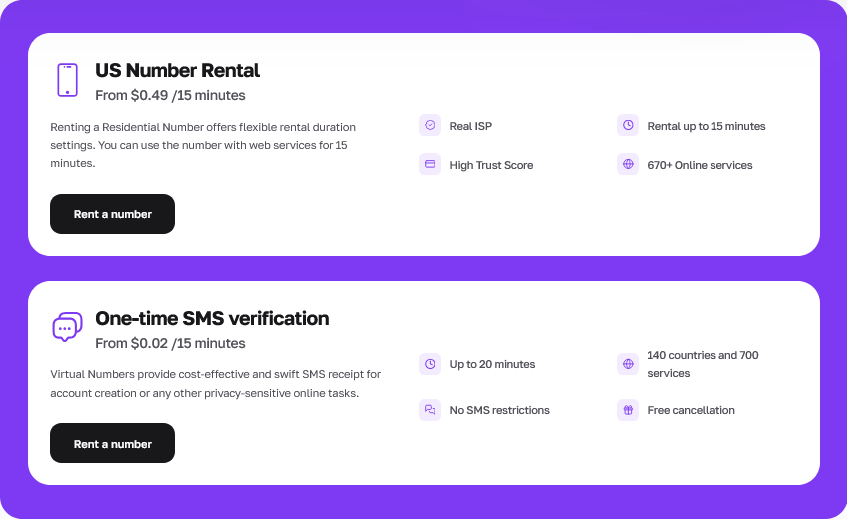
Buying a residential virtual phone number for WhatsApp verification isolates your digital identity properly. The system simply sees a Real ISP. This means the provider is an officially licensed telecommunications operator. The algorithms recognize these digits as completely legitimate.
Line Type | Trust Level | Average Cost | Best Use Case |
Non-Fixed VoIP | Low | $0.02 / 15 min | Local forums, low-tier platforms |
True Residential | Maximum | $0.49 / 15 min | WhatsApp, financial tools, enterprise operations |
Match your digit selection to your actual goal. A $0.02 VoIP line works flawlessly for random web forums. But risk assessment algorithms destroy those same cheap lines during a whatsapp sms activation. Setting up a temporary phone number whatsapp business profile requires the $0.49 residential tier to survive strict algorithmic scans. The system treats these specific virtual lines as physical smartphones sitting in real neighborhoods.
How to buy a virtual number for WhatsApp SMS activation
Here is exactly how you buy a virtual number for whatsapp using the CyberYozh App dashboard. The key is selecting the residential premium tier.
Open the dashboard and select the exact country matching your current proxy IP.
Choose the True Residential tier for Meta platforms.
Initiate the temporal SMS reception session.
Copy the digits into the app and wait for the code to appear on your screen.
These are disposable numbers. The session lasts exactly 15 minutes. This gives you plenty of time to receive the code and lock the authorization token to your device. It also prevents unwanted calls and promotional messages after you complete the initial task. And if the telecom gateway drops the message, the system triggers an automatic refund instantly. You never pay for undelivered codes.
Session isolation before WhatsApp SMS activation: Network setup
Start with a clean slate. WhatsApp leaves hidden session files deep inside your physical device storage or emulator data. These cryptographic authorization tokens persist even after you log out. If you register a new line over an old installation, the anti-fraud algorithm cross-links them instantly. Erase the application cache completely. Better yet, spin up a fresh device profile.
You do not strictly need a proxy for a standard activation. But geographic discrepancies raise red flags immediately. Registering an Indonesian virtual number while sitting on a European Wi-Fi network triggers identity spoofing prevention filters. The system sees the location mismatch and drops the OTP request.
To prevent this, match your network location to your phone line using a Carrier-Grade Mobile Proxy. The exact country code must align with your IP address.
Clear the operating system's background telecom data to wipe your previous device fingerprint.
Align your proxy IP geo-data directly with the country code of the rented phone line.
Use an Antidetect browser to isolate your digital footprint if you manage business profiles via web interfaces after the initial mobile setup.
Strict fingerprint isolation keeps your network footprint clean. The algorithm simply sees a standard user on a local connection.
Troubleshooting: WhatsApp verification code not received virtual number solution
Sometimes the OTP delivery sequence fails. The app simulates sending a text. The timer counts down on your screen. But the gateway drops the packet completely. This exact non fixed VoIP WhatsApp registration error means your assigned digits hit a spam trap.
Meta employs strict shadowbanning mechanics here. The interface accepts the number visually to confuse automated scraping bots. But the backend algorithm blocks the SMS at the telecom gateway level. A virtual number banned on WhatsApp immediately behaves exactly like this. You just sit there waiting for a message that will never arrive.
Geographic mismatches and WhatsApp voice call verification errors
Why does the system drop the code? Geographic mismatch often triggers this silent filter. The algorithm cross-references your digital footprint. Requesting a UK code while connected through a raw datacenter IP in another continent raises immediate red flags. You do not strictly need a proxy to register an account. Many users activate profiles perfectly fine on a standard home Wi-Fi connection. But matching your IP location directly to your phone number's country code minimizes these verification filters heavily. A precise location match prevents the algorithm from detecting network anomalies.
Forget the old voice call loopholes. Users used to click the 'Call Me' button on the registration screen to receive the 6-digit OTP via an automated phone call. This allowed them to register with cheap virtual landlines. Not anymore. The system filters cloud-based PBX numbers out of the voice dictation queue entirely.
Do not wait hours for a dropped text. Take action immediately. If you hit a session timeout, kill the process. Cancel the temporal SMS reception inside your CyberYozh App dashboard. The platform processes an automatic refund straight to your balance. You never pay for undelivered codes.
Understanding this shadowban logic shows you exactly how to overcome WhatsApp VoIP number block filters. You just need to change your line type.
Preventive analytics: Evaluating numbers before WhatsApp SMS activation
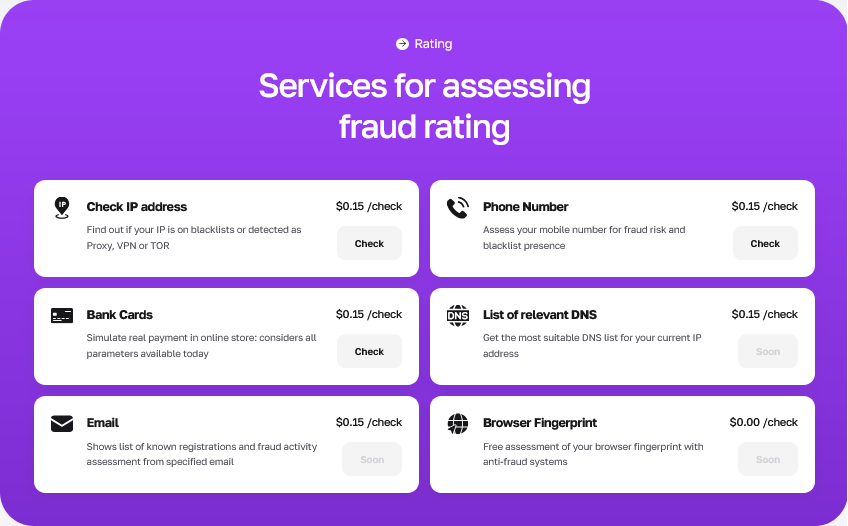
Stop guessing. Throwing random numbers at the registration portal burns time and flags your IP. Run a precise Fraud score check before you execute the registration. Evaluating the IP quality score and line status upfront saves your budget and protects your existing sessions.
Anti-fraud evaluation matrix tools expose exactly how Meta algorithms see your setup. You see the data through the eyes of the corporate filters. This allows you to adjust your parameters proactively.
Here is how you validate your setup using the CyberYozh App ecosystem:
Run the Risk Assessment: Use the anti-fraud checker ($0.15 per scan) to run risk assessment algorithms prior to renting a number. The tool pulls data from IPQualityScore and ThreatMetrix to give you a clear 0-100 rating.
Evaluate Line Status: The system determines the line type (Wireless, Landline, VoIP) and checks global DNC (Do Not Call) databases. You ensure the digits hold a clean history and are not linked to spam operations.
Verify Network Trust: Confirm your residential or mobile proxy networks match the required trust thresholds. The scan highlights anomalies like raw datacenter routing or known bot subnets.
You need to know your setup is ready for high-volume business operations before you start creating profiles. Preventive analytics remove the blind spots. You see the SIM swapping vulnerability risks and Line Type classifications instantly.
FAQs about WhatsApp SMS activation
Why is my virtual number banned on WhatsApp immediately?
Meta algorithms scan telecom databases the moment you hit submit. They flag and drop non-fixed VoIP lines instantly. You must switch to a true residential line to pass this initial carrier check.
Can I register WhatsApp without a phone number?
No. The platform requires a telecom identifier to generate your specific encryption keys. But you do not need a physical SIM card inside your device. A rented digital line handles the cryptographic authorization perfectly.
Can I use a temporary phone number for a WhatsApp Business profile?
Yes. You only need the line for the initial OTP delivery sequence. The app ties the authorization token directly to your hardware. Once verified, the session stays active. Just make sure you do not log out or clear the app cache. A 15-minute rental provides plenty of time to lock in your profile.
What happens if the OTP delivery sequence fails?
Do not wait for a message that will never arrive. The telecom gateway likely dropped your packet due to a high risk score. Cancel the number inside your CyberYozh App dashboard within 15 minutes. The system processes an automatic refund to your balance.
Does my proxy location actually matter for SMS delivery?
Yes. Geographic mismatches trigger strict fraud filters. Requesting an Asian phone code while routing your connection through a European proxy raises your risk score. Always align your proxy location with your phone line's country code.