Python syntax checker: How to check Python code syntax before running scripts
A Python syntax checker compares your source file against Python's grammar rules and catches SyntaxError, IndentationError, and TabError before a single line executes.
Python compiles each module only when it is imported or run. A missing parenthesis in a rarely used helper or a nightly script can sit in your repo for weeks and break only in production. Built-in tools (py_compile, compileall, ast, compile()) and fast linters like Ruff catch these bugs in milliseconds without running code, touching a database, or sending network requests.
How to pick a Python syntax checker for your task
Goal | Command or tool | Runs code? | Writes .pyc? | Checks scope rules? |
Check one .py file | python3 -m py_compile script.py | No | Yes (in __pycache__/) | Yes |
Check an entire project folder | python3 -m compileall -q src/ | No | Yes (in __pycache__/) | Yes |
Check without writing cache files | python3 -c "import pathlib, sys; compile(pathlib.Path(sys.argv[1]).read_bytes(), sys.argv[1], 'exec')" script.py | No | No | Yes |
Test compatibility with older Python | python3 -m ast --feature-version 3.10 script.py > /dev/null (3.14+) or ast.parse() | No | No | No (AST only) |
Check syntax and style in CI | ruff check . | No | No | Yes |
Check a short snippet in a browser | Client-side WebAssembly validator (Pyodide) | No (static mode) | No | Depends on tool |
How Python checks syntax before execution
Knowing where the parser stops explains why a clean-looking file can still fail at runtime. Before executing the first line, CPython passes your source code through three steps:
Tokenization (tokenize): CPython reads the file bytes and splits them into keywords, identifiers, strings, operators, and indentation shifts. Unclosed multiline quotes and hidden characters pasted from web pages fail at this stage.
AST parsing (ast.parse()): The PEG parser turns those tokens into an Abstract Syntax Tree (AST). Missing colons, malformed def or if headers, broken f-strings, and unclosed brackets raise SyntaxError immediately.
Bytecode compilation (compile() / py_compile): Python translates the AST into bytecode and verifies scope rules. Custom validators built only on ast often miss this step: ast.parse("return 42\n") passes because return 42 is a valid AST node, yet compile("return 42\n", "<check>", "exec") stops with SyntaxError: 'return' outside function. The same check catches break and continue outside loops.
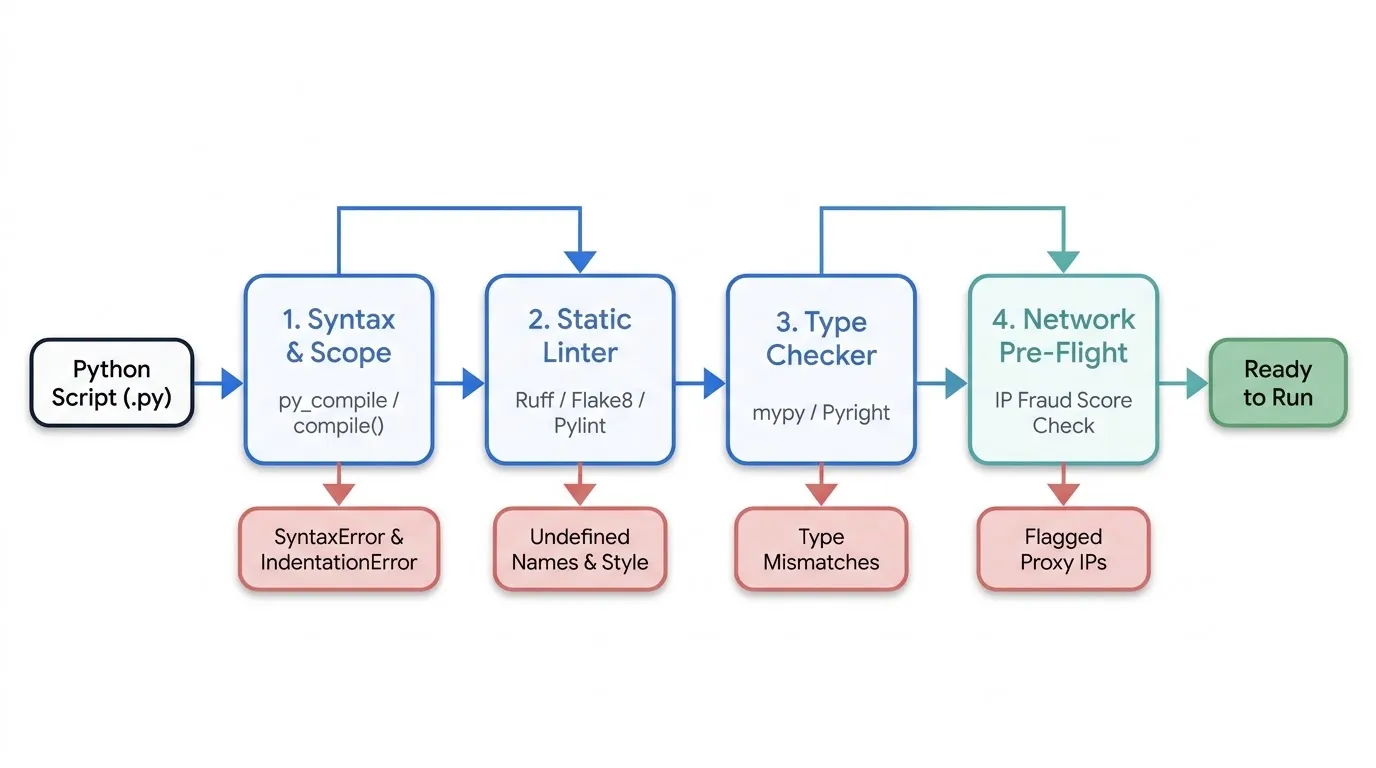
A standalone Python syntax checker stops right after bytecode compilation. It will not spot a typo in a variable name (NameError), warn about a missing library (ModuleNotFoundError), or handle network drops covered by your Python Requests retry logic. Catching those issues takes a linter, a type checker, and tests.
Check Python syntax in the terminal with zero extra packages
Every Python 3 installation ships with a built-in command-line Python syntax checker that needs no third-party dependencies. Each command exits with a non-zero status on errors, so you can plug them directly into shell scripts and deploy steps.
1. Check individual files with py_compile
To check one or several scripts quickly, pass their paths to py_compile:
python3 -m py_compile scraper.py helpers/parser.pyWhen a file compiles cleanly, the command prints nothing, returns exit code 0, and saves bytecode inside __pycache__/. On failure, it prints the file path, line number, caret pointer, and SyntaxError message to stderr and exits with a non-zero code.
Note: running python3 -m py_compile with no arguments does not scan your current folder - it exits immediately with status 2. To pipe modified Git files over stdin, pass a trailing hyphen - and filter out deleted paths with --diff-filter=ACMR.
git diff --name-only --diff-filter=ACMR -- '*.py' | python3 -m py_compile -Add -q (--quiet, available since Python 3.10) when your script only checks the exit code and does not need console output.
2. Scan an entire directory with compileall
When you want to validate syntax across a whole package or folder at once, run compileall:
python3 -m compileall -q -j 0 src/Useful flags for this command:
-q - hides passed files and prints errors only;
-j 0 - compiles files in parallel across all CPU cores;
-l - checks only the top-level directory without walking subfolders.
3. Validate files in memory with compile() (no __pycache__)
Read-only Docker containers and strict CI runners often reject leftover __pycache__/ directories. Calling compile() directly validates files in memory without writing anything to disk, while still catching scope bugs like a top-level return. Reading bytes with read_bytes() instead of read_text(encoding="utf-8") matches CPython's loader: it handles UTF-8 BOM headers and PEP 263 encoding comments cleanly, yet still raises SyntaxError on broken UTF-8 bytes.
import pathlib
import sys


def check_files(paths: list[str]) -> int:
    if not paths:
        print("Usage: check_syntax.py <file.py> [...]", file=sys.stderr)
        return 2

    errors = 0
    for raw_path in paths:
        path = pathlib.Path(raw_path)
        try:
            compile(path.read_bytes(), str(path), "exec")
        except SyntaxError as exc:
            print(f"[SYNTAX ERROR] {path}: {exc}", file=sys.stderr)
            errors += 1
        except OSError as exc:
            print(f"[READ ERROR] {path}: {exc}", file=sys.stderr)
            errors += 1

    return 1 if errors else 0


if __name__ == "__main__":
    raise SystemExit(check_files(sys.argv[1:]))
Run the script with python3 check_syntax.py src/worker.py. Exit code 0 means every file compiled cleanly, 1 signals a syntax or read error, and 2 appears if no file paths were passed.
4. Check older Python versions with ast and tokenize
Developer laptops often run Python 3.14 or 3.15 while servers stay on Python 3.10 or 3.12. To catch newer syntax before deployment, pass feature_version to the ast module (supporting versions from (3, 7) up to your active interpreter). Starting in Python 3.14, you can run this check straight from the terminal:
# Python 3.14+ CLI check against Python 3.10 grammar
python3 -m ast --feature-version 3.10 scraper.py > /dev/null
On earlier Python releases, call ast.parse() inside a short script:
import ast
import pathlib

path = pathlib.Path("scraper.py")
ast.parse(path.read_bytes(), filename=str(path), feature_version=(3, 10), type_comments=True)
Keep two limits of ast.parse() in mind: feature_version performs an approximate grammar pass, and AST parsing skips scope rules. In CI, pair it with compile() or a linter pinned to your target release. When a long file fails on an unclosed quote and the opening line is hard to spot, python3 -m tokenize scraper.py prints (row, col) coordinates for every token and points straight to the break.
Python syntax checker vs. linters and type checkers
Basic syntax checks only prove that CPython can parse a file. A typo inside an except block (loger.error(...) instead of logger.error(...)) passes py_compile without complaint, then crashes your scraper hours into a live run. Most teams stack a linter and a type checker on top of compilation.
Category | Primary tools | What they check beyond syntax | Trade-offs |
Fast Rust linter and formatter | Ruff (0.16.x-0.17.x) | 900+ rules (Pyflakes F, pycodestyle E/W, isort I, pyupgrade UP, bugbear B) plus ruff format; reports syntax errors unconditionally since 0.8.0 | No third-party plugin API; no deep cross-expression type inference |
Plugin-based linter | Flake8 (7.3.x) | Pyflakes, pycodestyle, McCabe complexity, and custom plugins | No native pyproject.toml support; tied to whichever Python version invokes it |
Semantic analyzer | Pylint | Full AST with type inference (calls on None, wrong argument counts, duplicate blocks) | Slow on large codebases (30-60s per 50,000 lines), usually kept in CI only |
Type checkers | mypy, Pyright, ty, Pyrefly | Type mismatches (string instead of int for a port) and unhandled None values | Require type annotations; newer Rust checkers (ty, Pyrefly) are still in active development |
Ruff has become the default Python syntax checker and linter for many teams because it runs fast enough to check files as you type. In a November 2026 Proglib benchmark on Django 6.1.3 (2,923 .py files, 525,000 lines on Python 3.12.15), an uncached ruff check (v0.17.5) finished in a median of 0.10s across five runs, compared to 4.95s for 22-worker Flake8 7.3.0 (49.5x faster). An uncached ruff format --check took 0.13s against 25.44s for 8-worker Black 26.1.0 (195.7x faster).
That benchmark also highlighted two practical differences for syntax and version checks:
Syntax errors cannot be silenced by comments: Ruff stopped on a broken file (tests_syntax_error.py) even with # noqa on the same line, while Flake8 skipped it.
Explicit target version: under Python 3.12 rules, both tools flagged Python 3.15's built-in frozendict as F821 (undefined name). Flake8 follows whichever interpreter runs it, while Ruff reads your configured target-version.
Five common syntax traps in Python 3.12-3.15
A traceback does not always point directly to the root cause. Five recurring situations eat up most debugging time:
The real bug sits one line higher: when CPython points to line 18 and line 18 looks clean, inspect line 17 for a missing closing parenthesis, bracket, or comma.
Hidden non-breaking spaces (U+00A0): copying code from docs or chat threads often slips \xa0 into indentation. It looks identical to a regular space, yet CPython rejects it with SyntaxError: invalid non-printable character U+00A0. Turn on whitespace rendering in your editor or run ruff format to restore standard 4-space ASCII indentation.
Mixed tabs and spaces (TabError): Python 3 forbids mixing tabs and spaces in the same block. Set your editor to insert 4 spaces per tab, and run python3 -m tabnanny src/ to audit older files.
Version drift between laptop and server (3.12-3.15): Python 3.14 allowed unparenthesized except ValueError, TypeError: (PEP 758) and added template strings (PEP 750). Python 3.15 added unpacking inside comprehensions ([*row for row in matrix] and {**d for d in dicts}, PEP 798) plus module-level lazy imports (lazy import json, PEP 810 - valid only at the top level of a module, not inside functions, classes, try/except/finally blocks, or alongside import * and __future__). Pin target-version in pyproject.toml to your oldest production server.
Helpful hints in CPython 3.13-3.15: read the full traceback before jumping into the file. Python 3.13 enabled colorized tracebacks by default and warns when a script name shadows an installed module (like random.py or numpy.py). Python 3.14 suggests misspelled keywords (whille True: -> Did you mean 'while'?), spots elif after else, and flags incompatible string prefixes like ub'abc'.
HTTP scripts building JSON payloads run into extra friction from stray commas, unescaped quotes, and invalid backslash escapes (a SyntaxWarning since Python 3.12 and slated to become SyntaxError, so always write regex patterns as raw strings like r"\d+"). Once your file parses cleanly, see our Python json.dumps() proxy guide for clean request serialization.
Local CLI vs. online Python syntax checker: protecting credentials
Browser-based validators work in two ways. Server-side tools POST your code over HTTPS to an external Linux server running Python or a linter. Client-side WebAssembly tools built on Pyodide run CPython, Pyflakes, and pycodestyle directly inside your browser tab so source text stays in local memory.
Web forms work fine for learning exercises or short 10-line snippets with dummy data. Never paste production scraping or API scripts into an online Python syntax checker if they contain proxy URLs (http://user:pass@host:port), API keys, cookies, or private endpoints. Keep secrets in a git-ignored .env file, read them via os.environ, and run syntax checks locally in your terminal.
Automating Python syntax checks in your editor and CI
During an urgent production fix, nobody remembers to run py_compile by hand. Set up automatic checks in your editor, Git hooks, and CI once so broken code stops before release.
VS Code and PyCharm
In VS Code, install Microsoft's official Python extension (which includes Pylance) and Astral's Ruff extension (charliermarsh.ruff). Disable older Flake8 or Pylint extensions unless you rely on custom plugins, then add this block to .vscode/settings.json:
{
  "python.languageServer": "Pylance",
  "python.analysis.typeCheckingMode": "basic",
  "ruff.lint.run": "onType",
  "[python]": {
    "editor.defaultFormatter": "charliermarsh.ruff",
    "editor.formatOnSave": true,
    "editor.codeActionsOnSave": {
      "source.fixAll.ruff": "explicit",
      "source.organizeImports.ruff": "explicit"
    }
  }
}
PyCharm flags syntax and indentation mistakes live as you type. PyCharm 2026.3 also understands Python 3.15 lazy imports and applies Ruff auto-fixes to a single file or the entire repository. Point your project interpreter to the .venv matching your server's Python version.
pyproject.toml, pre-commit, and GitHub Actions
If installing ruff or pre-commit on Linux or macOS triggers a PEP 668 error, create an isolated .venv first using our externally-managed-environment pip fix. Next, set your target Python version and lint rules in pyproject.toml:
[tool.ruff]
target-version = "py312"
line-length = 88

[tool.ruff.lint]
select = ["E", "F", "I", "UP", "B"]
To catch broken files before they ever reach a commit, configure .pre-commit-config.yaml:
repos:
  - repo: https://github.com/pre-commit/pre-commit-hooks
    rev: v6.0.0
    hooks:
      - id: check-merge-conflict
  - repo: https://github.com/astral-sh/ruff-pre-commit
    rev: v0.17.6
    hooks:
      - id: ruff-check
        args: [--fix]
- id: ruff-formatTip: skip the standard check-ast hook here. The ruff-check hook already validates syntax strictly against your pinned target-version, whereas check-ast parses with whichever Python runs pre-commit and can conflict with newer Python 3.14 or 3.15 syntax.
Mirror those checks on the repository side in .github/workflows/syntax-check.yml using the same Ruff version:
name: Python syntax and lint check
on: [push, pull_request]

jobs:
  validate:
    runs-on: ubuntu-latest
    steps:
      - uses: actions/checkout@v4
      - uses: actions/setup-python@v5
        with:
          python-version: "3.12"
      - name: Compile all Python files without executing
        run: python -m compileall -q src/
      - name: Run Ruff static analysis
        run: |
          pip install ruff==0.17.6
          ruff check .
Connecting syntax checks to proxy workflows
A local Python syntax checker protects your code layer, yet Scrapy crawlers and Playwright browser tests will still stall if requests leave through flagged IPs or the wrong network type. Before sending live traffic, check your outbound IP in the IP Fraud Score checker and move credentials into environment variables using our Python proxy setup guide.
Match the proxy type to your workload in the CyberYozh App proxy catalog:
Rotating residential proxies: 100M+ IPs across 195+ countries, pay-as-you-go GB billing with automatic traffic rollover and sticky sessions up to 24 hours - built for distributed public data collection.
Static residential ISP proxies: unlimited traffic and 99.9% uptime - well suited for long-running sessions that need one fixed IP.
Mobile LTE/5G proxies: unlimited traffic on real carrier networks - suited for targets with strict trust checks and multi-threaded Google scraping.