
How to Set Up Residential Proxies for Selenium
You write a script and need a reliable Selenium proxy. It executes perfectly on your local machine. You push the code to your production environment. Target platforms immediately reject the connection.
This breaks your entire workflow. Most operators route automated browsers through standard datacenter hosting. Security algorithms scan incoming traffic and spot these sterile network signatures instantly. They drop the connection. Your automation stalls before it even extracts a single data point.
But you can fix this at the network layer. You must protect your network footprint by integrating a high-trust residential IP infrastructure. Route your webdrivers through authentic internet service providers (ISPs) using a robust Selenium proxy network. This forces target servers to treat your scripts like real human visitors. Your traffic blends in.
This guide details exactly how to structure your Selenium residential proxies code for web scraping. We will implement enterprise-grade performance for production pipelines. You will learn to align your network location and overcome regional limits. This approach helps maintain stable proxy success rates without triggering automated security filters.
TL;DR: Securing Selenium proxy pipelines at scale
Your scraping operations stall because your current webdriver setup leaks your real intent. Here is how you solve it with ready-to-use code parameters:
The datacenter problem: Algorithms watch your traffic speed and network type all the time. They immediately reject requests coming from standard server hosting. Pushing headless Chrome through cheap datacenter nodes leads to immediate script failure.
The network solution: Protect your footprint. Transition your infrastructure to a 100M+ residential IP pool so destination platforms treat your automated requests exactly like real human visitors.
Fingerprint isolation: Changing your IP address only solves half the equation. You must strip the default Selenium automation flags. Then sync your internal browser coordinates to match your network's physical locations to maintain stable session connectivity.
Pre-flight auditing: Never launch your webdriver blindly. Test your network credentials via a simple terminal cURL command and evaluate your risk with a Fraud Score checker before executing an expensive browser instance.
Building stable Selenium proxy automation pipelines
Stop treating proxies as a mere afterthought. Your codebase requires a fortified infrastructure. When you scale from ten requests a minute to ten thousand, basic proxy setups collapse. Connection drops multiply. Data streams corrupt. You need a Selenium proxy architecture that handles heavy load natively.
Stable pipelines require predictable network behavior. Target servers constantly watch your request velocity. If a single IP address sends too many packets, the platform severs the connection. But you can distribute that exact load. Routing traffic through thousands of distinct nodes disperses your footprint. This prevents rate-limit flags entirely. The system self-heals under pressure. If one network node drops, the infrastructure instantly routes your request through a fresh, active connection.
Handle millions of concurrent sessions without choking your target application.
Keep data extraction streams alive without sudden connection drops using API controls.
Run heavy workloads without manual restarts. The proxy pool automatically replaces dead nodes to keep your sessions active.
Maintain SLA-backed uptime for your production environment.
Infrastructure selection: Matching Selenium proxies to your task
Different tasks require different Selenium proxies. You will waste your budget if you buy dedicated mobile IPs for simple, unprotected sites. Conversely, cheap routing fails instantly on strict platforms. Match your network infrastructure directly to your project parameters to ensure stable data delivery.
Proxy type | Core advantage | Best used for | Billing structure |
Rotating residential | Automatic per-request IP rotation | High-volume web crawling | Pay-as-you-go ($4/GB) |
Static ISP | Consistently stable long-lived sessions | Professional profile management | Fixed monthly (from $5.29) |
Shared Mobile LTE/4G/5G | High-trust CGNAT with automatic rotation | Cost-effective testing and stable surfing | Daily or monthly (from $1.7/day) |
Dedicated Mobile LTE/4G/5G | Private modems with API rotation and OS fingerprinting | Strict anti-fraud and account farming | Daily or monthly (from $3.5/day) |
Datacenter | Private dedicated IPs with ultra-low latency | High-speed scraping on low-security targets | Fixed monthly (from $1.77) |
The Google SERP exception: Why you need mobile proxies
Do not use rotating residential proxies to scrape Google Search Results (SERP). The data volume will destroy your budget. Google's anti-bot systems flag repeated requests from standard IP rotations instantly.
You must deploy mobile LTE/5G proxies for continuous, multi-threaded Google scraping. Mobile carriers run on CGNAT technology. This masks thousands of real smartphone users behind one IP address. Google cannot block these addresses without disconnecting real people. Our mobile infrastructure gives you unlimited traffic. You scale your SERP extraction infinitely without paying for every single gigabyte.
Protocol disparities: IPv4 vs IPv6 for Selenium proxy routing
You deploy a scraper. The target server drops your IPv4 connection instantly. You swap the proxy, but the new IPv4 node fails too. Then you route that identical Selenium script through an IPv6 address. The page loads perfectly.
This protocol disparity breaks rigid automation pipelines. Legacy anti-bot databases map and categorize the older IPv4 space aggressively. They monitor the ranges. They filter them heavily. But the IPv6 address space remains expansive and fragmented. Many corporate security algorithms apply entirely different, often looser, filter parameters to IPv6 traffic.
Your infrastructure must support flexible routing to survive these mismatches. Relying on a static configuration inevitably leads to downtime. Platforms often ban whole IPv4 subnets. But they leave their IPv6 endpoints completely open. Build your architecture to handle this discrepancy natively. If an IPv4 node fails, your script needs to swap to an IPv6 address immediately.
Configure dual-stack routing to satisfy different protocol rules.
Route your traffic through the massive IPv6 address space to stay off old legacy databases.
Maintain stable success rates using automatic protocol failovers.
Selenium proxy session control and rotation logic
Selenium needs strict session rules. You log in, click around, and scrape data. A sudden IP change during this process triggers an immediate red flag. The destination server cuts your access right there. Because of this, your rotation setup has to match your specific scraping job.
Define your connection parameters inside your proxy constructor before launching the webdriver. CyberYozh App structures connections using the universal IP:PORT:LOGIN:PASS format. You route requests via port 5959 for HTTP or port 9595 for SOCKS5.
Residential proxy routing parameters
Your routing parameters depend entirely on whether you deploy dynamic pools or static ISP nodes.
Dynamic IP address proxy pools allow you to control network identity stability through specific credential generation. You do not have to construct complex targeting strings manually. The CyberYozh App dashboard features a visual Credentials Generator.
👉 Get Rotating Residential Proxies
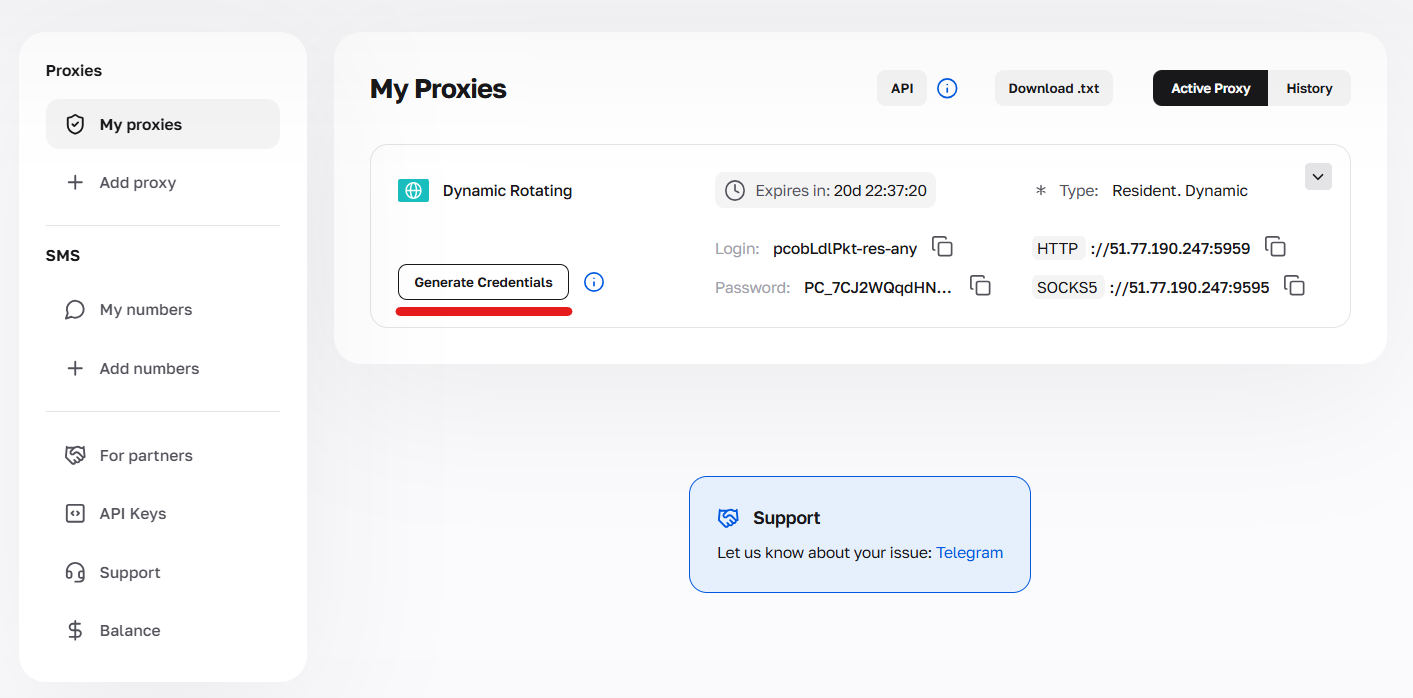
You select your required session type, and the system outputs the exact formatted string for your webdriver. The text string in your username tells our server what to do with your connection.
Random IP: You get a new network node on every single request. Our tool adds the -res-any tag to your login. Run this when you just need raw volume without keeping cookies alive.
Short session: The system locks a single IP address for up to sixty seconds. This configuration allows hyper-precise location selection down to country, state, and city levels.
Long session (Sticky Sessions): The connection remains sticky for up to 24 hours. You do not need to manually catch session tokens. The generator simply adds a unique -resfix- token to your login string. This configuration provides the sustained stability needed to handle accounts, complete multi-page checkouts, and fill long forms.
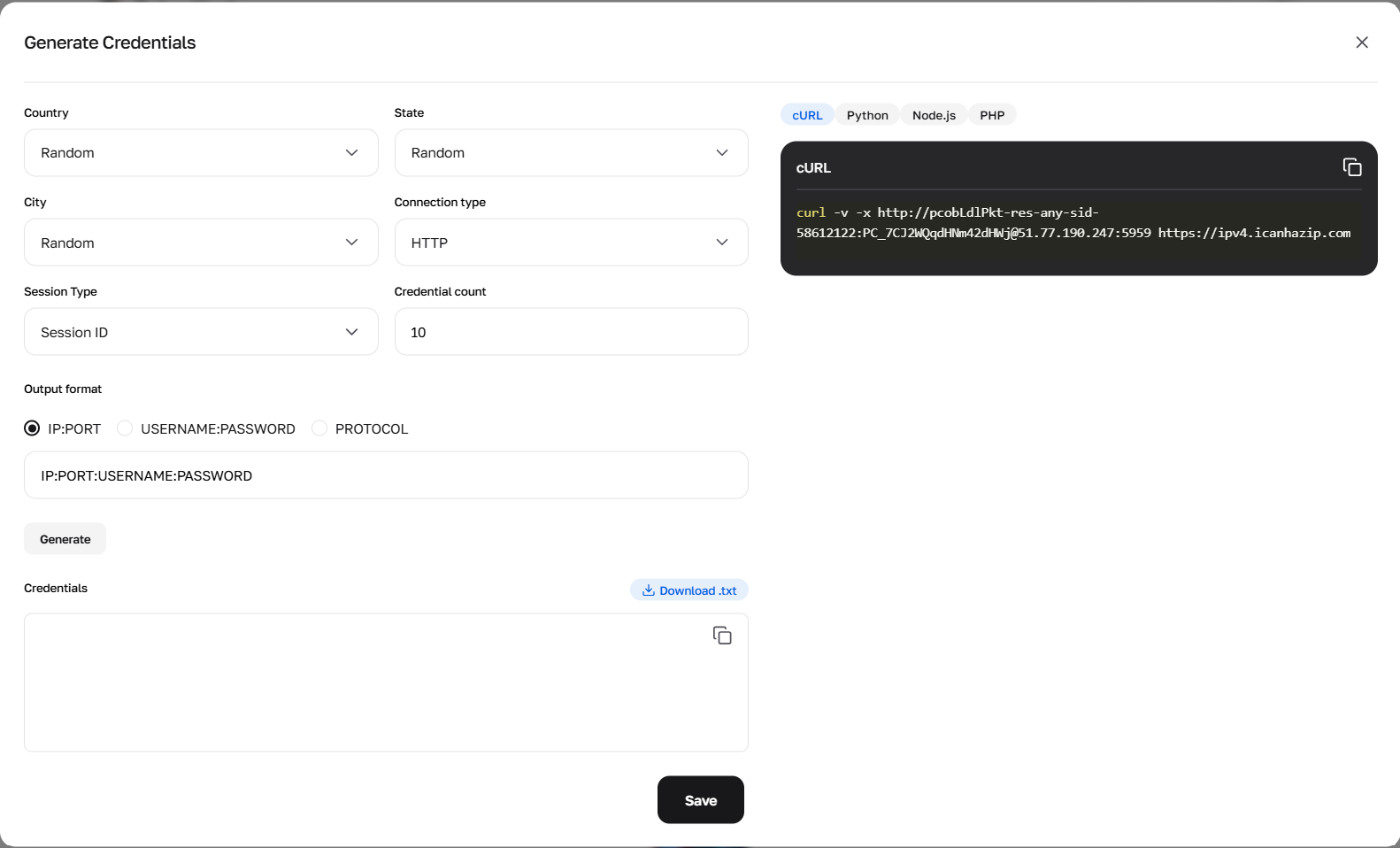
A static IP address architecture operates differently. You receive one dedicated home IP address assigned exclusively to you for the entire rental period. The network binds this IP directly to a real internet service provider. You do not generate rotation tokens or manage session prefixes. You simply plug the static IP and credentials into your webdriver. Use this architecture for professional profile management and managing strict e-commerce profiles where maintaining a permanent digital address is mandatory.
👉 Read the complete guide about residential proxies to see the exact dashboard workflow.
Mobile proxy rotation mechanics
Cellular networks run on CGNAT technology. This means thousands of regular people share one single operator IP address simultaneously. That massive overlap makes mobile nodes look incredibly authentic to security filters. We divide this infrastructure into two distinct setups. And you do not need to generate complex usernames for either of them. Just connect directly using the static credentials we provide.
An automated internal timer controls shared mobile proxy ports. The system rotates the IP automatically every 5 to 30 minutes. You cannot force a manual change on a shared plan. You need to code your script to handle sudden connection drops when the shared IP rotates.
But private dedicated mobile proxy ports work differently. You get exclusive access to a real LTE/4G/5G modem. We give you a specific API link in your dashboard. You just configure your Python or Node.js code to hit that URL. This triggers a physical hardware reboot. It resets your network fingerprint completely on demand.
👉 Deploy Dedicated Mobile Proxies
Dedicated ports also grant access to advanced network tools. You can activate passive OS fingerprint matching (TCP/IP). If your Selenium script runs on a Windows server but emulates an iOS device, this feature aligns the network signature to match the emulated hardware perfectly.
Call the IP Address Change Link via your script to control rotation intervals.
Put that same link into the "IP Change URL" field of your anti-detect browser for automatic resets.
Write a 15-second pause into your code to wait for the physical modem to restart.
Use our VLESS-Reality (Xray) links to keep traffic stable across strict firewalls.
👉 Check the CyberYozh API documentation to handle rate limits and manage your node history.
Masking Selenium webdrivers and browser fingerprinting
Routing traffic through a residential connection only solves half the equation. Target platforms do not just verify your IP address. They execute aggressive JavaScript challenges to interrogate your browser's internal hardware profile. If your Selenium proxy registers in London, but your Selenium webdriver broadcasts a system timezone in Tokyo, the algorithm catches the mismatch instantly. The platform terminates your session.
Standard automation tools leave glaring technical traces. Out of the box, Chrome broadcasts a navigator.webdriver = true signal. Security filters read this and block your access before the page even renders. You must strip these default automation markers completely.
Running Chrome on a server means running it in headless mode. You do not have a graphical interface. But the legacy headless architecture broadcasts a massive red flag. It writes "HeadlessChrome" straight into your user-agent string. Anti-fraud systems block this instantly, even if your residential proxy is perfect.
Google released a new headless mode to fix this. You have to force Selenium to use it. Add --headless=new to your options. Then explicitly overwrite the user-agent string to look like a standard desktop browser. Additionally, you can disable images and CSS to drastically reduce bandwidth consumption.
options = Options()

# Force the new headless architecture
options.add_argument("--headless=new")

# Overwrite the default headless user-agent
options.add_argument("user-agent=Mozilla/5.0 (Windows NT 10.0; Win64; x64) AppleWebKit/537.36 (KHTML, like Gecko) Chrome/120.0.0.0 Safari/537.36")

# Save bandwidth by blocking images and CSS
prefs = {"profile.managed_default_content_settings.images": 2, "profile.managed_default_content_settings.stylesheet": 2}
options.add_experimental_option("prefs", prefs)
But removing the webdriver flag is just the baseline. You must sync your browser's coordinate data and language parameters directly with the physical location of your proxy node. Here is how you execute basic identity masking and timezone synchronization using Chrome DevTools Protocol (CDP) within a Python Selenium script:
from selenium import webdriver
from selenium.webdriver.chrome.options import Options

options = Options()

# Strip the default automation markers
options.add_argument("--disable-blink-features=AutomationControlled")
options.add_experimental_option("excludeSwitches", ["enable-automation"])
options.add_experimental_option('useAutomationExtension', False)

driver = webdriver.Chrome(options=options)

# Override the webdriver property via CDP
driver.execute_cdp_cmd("Page.addScriptToEvaluateOnNewDocument", {
    "source": "Object.defineProperty(navigator, 'webdriver', {get: () => undefined})"
})

# Force the timezone to match a specific proxy IP (e.g., London)
driver.execute_cdp_cmd("Emulation.setTimezoneOverride", {
    "timezoneId": "Europe/London"
})

# Mask WebRTC to prevent local IP leaks
driver.execute_cdp_cmd("Emulation.setWebRTCIPHandlingPolicy", {
    "policy": "disable_non_proxied_udp"
})
Pre-flight network auditing for Selenium scripts
Never send automated traffic through an untested node. Blindly trusting your proxy pool leads to burned accounts. You must audit your network parameters before your script executes its first action. Incorporate real-time verification directly into your deployment sequence. This step allows you to view your connection exactly how target platforms see it.
A proper audit covers three steps. You test reachability, check your authentication, and evaluate the risk score.
Testing network reachability
Do not start your scraping script yet. First, see if your node can even reach the destination URL. You can run the open-source ipregion.sh script to check this. It runs a fast, lightweight network pulse-check. The script verifies routing paths and determines if specific platforms allow guest or regional access from your current IPv4 or IPv6 address.
bash <(wget -qO- https://ipregion.vrnt.xyz)Validating Selenium proxy credentials via cURL
You must verify your Selenium proxy gateway accepts your credentials before launching Chrome. A simple command-line check saves hours of debugging blind browser timeouts. You test your exact routing string using a basic cURL authentication command.
curl -v -x http://LOGIN-resfix-us-nnid-TOKEN:PASSWORD@IP:5959 https://ipv4.icanhazip.comIf the proxy layer rejects your access, the terminal returns an HTTP 407 Proxy Authentication Required error. If it returns a clean IP address, you are ready to integrate those credentials into your Selenium code.
Evaluating risk levels
Physical connectivity does not ensure account longevity. Platforms track automated activity continuously. Plug the CyberYozh App Checker API into your startup sequence to check your IP against major databases in real time. Score your connections on a 0 to 100 scale. Pause your script the second a node hits 75 or higher.
Configuring Selenium proxy authentication
Integrating secure proxies into your webdriver requires specific credential handling. Native Selenium ChromeOptions struggles with proxy authentication strings. It only accepts raw host and port data. If you pass a username and password directly into the standard proxy arguments, the browser ignores them.
The Python integration (Chrome DevTools Protocol)
Historically, Python developers relied on `selenium-wire` to inject proxy credentials. However, `selenium-wire` is now an archived project and triggers critical import errors (such as ImportError: cannot import name 'WeakNamespace' from 'blinker') on modern Python environments. Furthermore, injecting a local man-in-the-middle server adds a 10% to 15% performance overhead.
The cleanest and fastest method in 2026 is to use the native Chrome DevTools Protocol (CDP) via the Fetch.continueWithAuth event. This method seamlessly passes your CyberYozh App proxy credentials without installing any third-party interceptors.
Here is the architectural implementation for an authenticated Selenium proxy connection:
from selenium import webdriver
from selenium.webdriver.chrome.options import Options
import threading
import json

class ChromeWithAuthProxy:
    """Selenium 4 Chrome driver that handles authenticated HTTP proxies via CDP."""
    def __init__(self, proxy_host, proxy_port, proxy_user, proxy_pass):
        self.proxy_host = proxy_host
        self.proxy_port = proxy_port
        self.proxy_user = proxy_user
        self.proxy_pass = proxy_pass
        self._cmd_id = 0
        self._lock = threading.Lock()

    def _cdp_send(self, method, params=None):
        with self._lock:
            self._cmd_id += 1
            msg = {"id": self._cmd_id, "method": method}
            if params:
                msg["params"] = params
            # Note: A full implementation requires establishing a WebSocket connection
            # to the CDP debugger URL (page_target["webSocketDebuggerUrl"])
            # and sending the JSON message.
            # Example logic for handling auth:
            # self._cdp_send("Fetch.continueWithAuth", {
            #     "requestId": requestId,
            #     "authChallengeResponse": {
            #         "response": "ProvideCredentials",
            #         "username": self.proxy_user,
            #         "password": self.proxy_pass
            #     }
            # })

# Usage setup
options = Options()
options.add_argument("--proxy-server=http://IP:5959")
# Initialize WebDriver and attach CDP listeners...
driver = webdriver.Chrome(options=options)
driver.get("https://ipv4.icanhazip.com")
print(driver.page_source)
driver.quit()
This CDP-based approach aligns Selenium closer to Puppeteer's architecture, providing robust and blazingly fast authenticated requests.
The Node.js and Java integration (Local Forwarding)
Modern Node.js pipelines rely on local proxy forwarding using libraries like proxy-chain. Your script generates a local, unauthenticated proxy server that silently forwards traffic to your secure CyberYozh App proxies. You pass this local URL directly into the standard ChromeDriver options.
Grab this Node.js setup for your production environment:
const { Builder } = require('selenium-webdriver');
const chrome = require('selenium-webdriver/chrome');
const proxyChain = require('proxy-chain'); // npm install proxy-chain

// CyberYozh App Credentials
const proxyUrl = 'http://LOGIN-resfix-us-nnid-TOKEN:PASSWORD@IP:5959';

(async function run() {
    // Generate a local unauthenticated endpoint mapping to your secure proxy
    const localProxyUrl = await proxyChain.anonymizeProxy(proxyUrl);
    const options = new chrome.Options();
    options.addArguments(`--proxy-server=${localProxyUrl}`);
    options.addArguments('--ignore-certificate-errors');

    let driver = await new Builder().forBrowser('chrome').setChromeOptions(options).build();

    try {
        await driver.get('https://ipv4.icanhazip.com');
        let body = await driver.findElement({tagName: 'body'}).getText();
        console.log("Active IP:", body);
    } finally {
        await driver.quit();
        // Close the local forwarding server to free up system ports
        await proxyChain.closeAnonymizedProxy(localProxyUrl, true);
    }
})();
Adapting for Java: Deploy a local routing daemon like BrowserMob Proxy or LittleProxy within your Java application. You configure the daemon with your CyberYozh App credentials. Then you instruct your Selenium ChromeOptions to route traffic through localhost:YOUR_PORT.
Both methods ensure your traffic routes cleanly through your designated protocol without triggering authentication pop-ups or security alerts.
Platform tooling for professional profile management and automation
Your infrastructure must connect cleanly with your existing codebase. You need an all-in-one ecosystem for account stability and data extraction. CyberYozh App delivers a single unified endpoint architecture. We consolidate your network layer, communication channels, and payment gateways into one secure environment.
Scraping scripts run into phone verifications all the time. Our platform solves this friction natively. You deploy the CyberYozh App SMS reception API to browse available countries, order phone numbers, and fetch SMS verification codes directly within your code.
Launch faster with our ready-to-go SERP and scraping API templates.
Pass phone checks using real residential numbers from actual ISPs.
Create virtual bank cards that match your proxy location perfectly.
Scale your heavy automation. The system monitors HTTP 429 rate limits for you.
Scaling Selenium residential proxies pipelines and managing costs
Heavy automation eats bandwidth fast. We built this network specifically to handle massive scalability for heavy automation. It balances raw data throughput with strict financial controls.
Control your costs with $4/GB pricing.
Roll over your unused data. Traffic automatically carries over to the next billing month.
Pay as you go. Test your pipelines with a 3 GB minimum package.
Demand 99.9%+ uptime SLAs for your custom setups.
Securing your Selenium scraping infrastructure
Running Selenium through standard data center servers results in predictable failure. Target platforms flag the sterile traffic instantly.
You need a professional network layer to scale your operations safely. Routing your automated webdrivers through an ethically sourced residential IP infrastructure entirely eliminates this technical friction. It protects your network footprint at the hardware level.
👉 Check your IP Fraud Score - See your connection exactly the way destination servers see it.
👉 Explore Proxy Catalog - Deploy high-trust mobile and Selenium residential proxies to secure your data extraction.