
Конфигурация SOCKS5: Настройка и маршрутизация трафика
Протокол пятой версии работает иначе. Он функционирует на сеансовом уровне. В отличие от HTTP-решений, он не читает ваши заголовки. Протокол передаёт сырые байты к целевому серверу. Вы получаете минимальную задержку. Скорость сети остаётся максимальной.
Конфигуратор SOCKS5 берет на себя всю рутину инкапсуляции. Выборочная проксификация позволяет разделить сетевые потоки. Правильная настройка SOCKS5 обеспечивает надежную приватность. Программа перехватывает системные вызовы и упаковывает их в нужный формат, описанный стандартом RFC 1928. Вам не нужно прописывать настройки в каждом отдельном приложении. Вы управляете маршрутизацией через единый интерфейс.
TL;DR: Краткая сводка по маршрутизации
Используйте префикс socks5h:// для устранения утечек DNS через локального провайдера.
Браузерные плагины типа TxThinking не поддерживают авторизацию по логину и паролю.
Для сложных задач и парсинга (TCP-трафик) внедряйте системную утилиту Proxifier. Для работы с UDP-пакетами (игры, стриминг) используйте ProxyCap или настраивайте маршрутизацию на уровне сервера (Dante).
Отличия протоколов сеансового уровня
Чтобы выстроить отказоустойчивую сеть, важно понимать разницу инкапсуляции. Ниже приведено техническое сравнение работы популярных стандартов.
Характеристика | HTTP Proxy (Уровень 7) | SOCKS5 Proxy (Уровень 5) |
Инкапсуляция трафика | Только HTTP/HTTPS запросы | Любые TCP и UDP пакеты |
Анализ содержимого | Полный доступ к заголовкам | Отсутствует, ретрансляция сырых байтов |
Модификация данных | Добавление специфичных заголовков | Строго запрещена спецификацией |
Удалённый резолвинг | Зависит от реализации | Встроенная поддержка (ATYP 0x03) |
Выбор конфигуратора SOCKS5: браузер или система
Выбор инструмента зависит от ваших задач. Пользователи часто ищут расширения для браузера. Это быстро. Но есть технические нюансы.
_e6qxQwC.webp "Расширение SOCKS5 Configurator в магазине приложений Google Chrome")
Популярное расширение Socks5 Configurator от разработчика TxThinking имеет более 70 000 пользователей. Исходный код открыт.
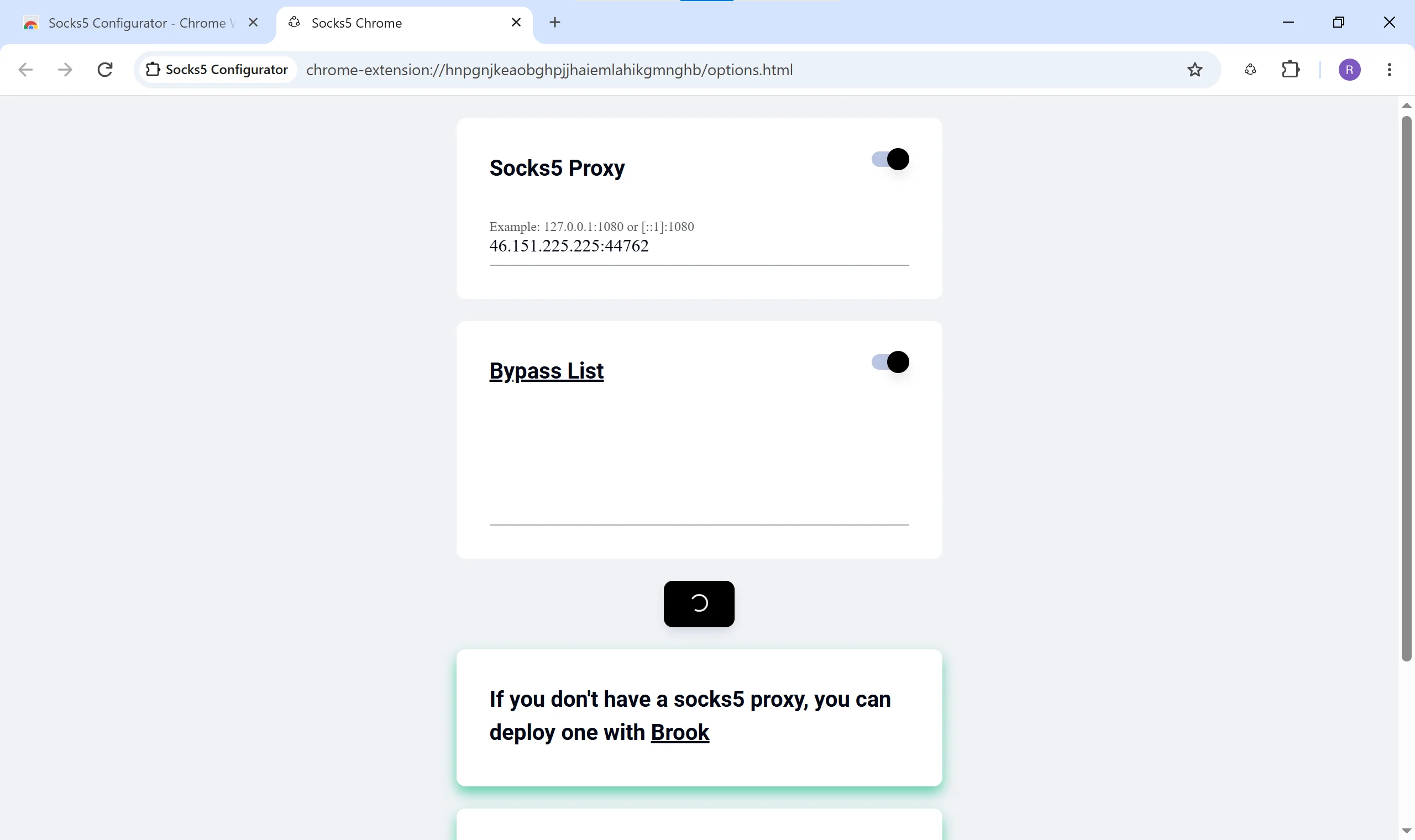
Интерфейс минималистичен. Вы настраиваете правила за пару кликов. Но здесь кроется фундаментальная проблема. Текущая версия плагина не поддерживает передачу параметров авторизации. Расширение не умеет работать по стандарту RFC 1929. Вы не сможете ввести логин и пароль. Этот инструмент подходит исключительно для работы через локальные туннели или прокси с авторизацией по белому списку IP.
Для работы с профессиональной инфраструктурой CyberYozh App требуются другие решения. Наши резидентские прокси обеспечивают максимальный Trust Rate. Они требуют надёжной авторизации для защиты вашего канала. Используйте проверенные конфигураторы:
FoxyProxy: Устанавливается прямо в браузер. Поддерживает авторизацию по паролю. Позволяет настроить гибкие правила для отдельных URL-адресов.
Proxifier: Работает на уровне ядра операционной системы. Перехватывает вызовы Windows Sockets. Направляет трафик абсолютно любого приложения через удаленный сервер. Поддерживает автоматическое переключение профилей.
ProxyCap: Обеспечивает сложную маршрутизацию для Windows и macOS. Интегрирует современные протоколы авторизации.
👉 Резидентские прокси ISP: Статичные адреса реальных домашних интернет-провайдеров дают аптайм 99.9%. Вы получаете естественные паттерны трафика для длительных задач и безопасного парсинга.
Настройка сервера Dante и ProxyChains в Linux
Инженерам часто требуется глубокая SOCKS5 конфигурация для развёртывания собственных узлов агрегации. В среде Linux эта техническая задача чётко делится на серверную хостинг-часть и локальную клиентскую маршрутизацию.
Серверный демон Dante: Базовый сценарий для системных администраторов строится вокруг запроса socks 5 configuration danted.conf linux. Вы устанавливаете Dante сервер на дистрибутив Ubuntu или Debian. Этот программный демон потребляет всего около 1 килобайта памяти на одно соединение и строго следует стандартам авторизации. Вы редактируете файл маршрутизации, блокируете открытые ретрансляторы и настраиваете нужные привилегии доступа.
Клиентская утилита ProxyChains: На стороне локальной машины роль системного инструмента выполняет ProxyChains. Она перехватывает сетевые вызовы от консольных программ через системную переменную окружения LD_PRELOAD. Файл конфигурации /etc/proxychains.conf требует предельно точного синтаксиса для корректного перенаправления пакетов.
Хотите пустить трафик любых Linux-утилит через прокси? Читайте наш подробный мануал: Настройка прокси в ProxyChains.
👉 Серверные прокси (Датацентр): Выделенные серверы обеспечивают минимальный пинг. Безлимитный трафик гарантирует стабильную инфраструктуру для высоких нагрузок и автоматизации.
Как предотвратить утечку DNS
Базовая настройка часто выдаёт ваш реальный цифровой отпечаток. Локальный резолвинг отправляет запросы вашему провайдеру. Провайдер видит все ваши целевые адреса. Пакет инициализации уходит с параметром ATYP 0x01.
Правильная настройка SOCKS 5 configuration требует удалённого разрешения имён. Используйте префикс socks5h://. Буква "h" принудительно отправляет текстовое доменное имя на прокси-сервер. Параметр меняется на ATYP 0x03. Ваш локальный провайдер видит только зашифрованный поток данных. Вы надёжно защищаете свой сетевой след. В настройках FoxyProxy обязательно отмечайте чекбокс "Proxy DNS when using SOCKS v5".
👉 Резидентские ротационные прокси: Пул из 100М+ IP-адресов из 195+ стран скрывает реальное сетевое расположение. Оплата осуществляется только за потреблённый трафик (GB) с бесплатным гео-таргетингом.
Поддержка UDP трафика для игр и стриминга
Сложные веб-приложения требуют протокол UDP. Онлайн-игры и сервисы потокового вещания игнорируют обычный TCP-трафик. Ваш конфигуратор обязан обрабатывать команду UDP ASSOCIATE.
Клиент запрашивает открытие отдельного порта для приёма датаграмм. Сервер возвращает параметры точки подключения. Продвинутые конфигураторы упаковывают каждую датаграмму в специальный заголовок. Инфраструктура CyberYozh App аппаратно поддерживает эти процессы. Наши мобильные прокси идеально передают UDP-пакеты. Вы преодолеваете региональные лимиты и сохраняете стабильный доступ к медиаконтенту.
Играете в динамичные шутеры? Загляните в наш специальный игровой раздел. Мы подготовили точные инструкции по маршрутизации трафика для популярных тайтлов. Узнайте, как правильно интегрировать конфигуратор и настроить прокси для Free Fire, чтобы стабилизировать соединение в матче и защитить аккаунт.
👉 Мобильные прокси (LTE/5G): Приватные IP-адреса с реальных смартфонов. Максимальный уровень доверия платформ и нативная поддержка любых сетевых протоколов.
Безопасность: могут ли украсть данные через SOCKS5
Этот вопрос волнует каждого инженера. Протокол SOCKS5 выступает прозрачным ретранслятором. Он не шифрует саму полезную нагрузку.
Если вы открываете сайт по протоколу HTTP, данные идут открытым текстом. Транзитный узел технически может прочитать этот поток. Использование HTTPS полностью закрывает эту уязвимость. Трафик шифруется сквозным методом от вашего браузера до конечного сервера. Прокси видит только объём передаваемых данных, но не их содержимое. Узнайте больше о механизмах сетевой безопасности в нашем подробном руководстве: Могут ли через прокси украсть данные.
Политика CyberYozh App гарантирует полное отсутствие логов (no-logs). Мы обеспечиваем приватную маршрутизацию без сбора пользовательской информации.
👉 Антифрод-чекер: Убедитесь в качестве ваших IP-адресов перед началом работы. Проверьте Fraud Score своей сети глазами крупных корпораций и выявите скрытые метки ботов, чтобы полностью исключить риск блокировок.
Готовы к работе? Подключите инфраструктуру CyberYozh App
Мы закрыли все технические вопросы по маршрутизации. Вы точно знаете механику работы протокола. Понимаете разницу инкапсуляции. Знаете, как избежать утечек данных. Дело за малым: выбрать качественные IP-адреса.
Загляните в наш каталог. Выберите нужный тип прокси под ваши задачи. Интегрируйте их в свой конфигуратор уже сегодня и начните работу без лимитов.
👉 Перейти в каталог прокси CyberYozh App
Часто задаваемые вопросы (FAQ)
Как безопасно скачать конфигуратор socks5?
Загружайте софт только с официальных сайтов разработчиков или проверенных репозиториев. Избегайте сомнительных форумов. Проект TxThinking, например, имеет открытый код на GitHub.
Чем socks5 конфигурация технически отличается от HTTP?
Пятая версия работает на сеансовом уровне. Она просто ретранслирует сырые байты без анализа. HTTP-решения работают на прикладном уровне и вмешиваются в заголовки пакетов.
Почему расширение SOCKS5 configurator не принимает мой пароль?
Простые браузерные плагины часто не поддерживают стандарт RFC 1929. Они не умеют передавать логин и пароль. Для работы с приватными сетями используйте продвинутые инструменты вроде FoxyProxy.
Поможет ли настройка socks5 снизить пинг в онлайн-играх?
Физику маршрутизации не обмануть. Пинг всегда складывается из задержки от вашего устройства до прокси-сервера и уже от него до игрового хоста. Однако использование выделенных датацентровых прокси позволяет выстроить более прямой магистральный маршрут, что стабилизирует соединение и минимизирует задержку пакетов.
Что такое утечка DNS, когда настроена полная проксификация?
Это критическая ошибка базовой настройки. Ваш браузер отправляет запросы к сайтам через локального провайдера. Решение: использовать префикс socks5h:// для удалённого резолвинга.
Возможна ли socks 5 конфигурация danted.conf linux без прав суперпользователя?
Нет. Для открытия нужных портов и биндинга сетевых интерфейсов демону Dante требуются root-права на старте системы. Позже процесс сбросит привилегии для безопасности.
Поддерживает ли Proxifier передачу UDP трафика?
Нет. Эта утилита перехватывает исключительно TCP-соединения на уровне Windows Sockets. Для работы с датаграммами UDP используйте ProxyCap или настраивайте туннели.