
Throne Proxy Client: Setup, TUN Mode Routing, and DNS Leak Prevention
Managing complex routing rules is a daily reality for modern network engineers. The Throne proxy client handles this by providing a clean graphical user interface built on the Qt framework. The utility leverages the powerful Sing-box core. You get a robust tool for managing modern network protocols. It serves as a direct continuation and deep refactoring of the archived Nekoray project. The updated application delivers optimized code and exceptional stability.
Configuring your workspace properly protects your network footprint. The Throne proxy engine generates dynamic JSON configurations for every outbound connection. The software consumes minimal RAM due to efficient garbage collection within the Go programming language.
TL;DR: Client setup summary
Download the portable archive or installation package from GitHub.
Configure SOCKS5 or HTTP proxies manually via the profile menu, or import ready nodes directly from your clipboard.
Activate TUN mode to capture traffic directly at the OS kernel level.
Configure FakeIP to stop local network providers from logging your DNS queries.
Validate your endpoint reputation using the Anti-Fraud Checker before launching automation scripts.
Real user-case: Scaling e-commerce data extraction
We recently tested aggressive data extraction workflows. The goal was massive. We needed to pull pricing data for 50,000 items in under an hour. Standard Python scripts failed within ten minutes. The target server simply dropped our connections. We brought the Throne proxy client into our automated stack. We routed our traffic through CyberYozh rotating residential pools. We configured the TUN interface carefully. The results were immediate. The Sing-box core managed the raw TCP packets flawlessly. We hit zero rate limits. We extracted everything seamlessly. Because the software excels at masking automation metrics from strict enterprise firewalls.
Installation and core interface
Your installation process adapts to your operating system. The Throne proxy client is available for Windows, macOS, and Linux. Apple policies force macOS users to remove the quarantine attribute using the terminal xattr utility before the first launch. You must move the application to the Applications directory to allow proper privilege escalation.
Windows users frequently encounter a fix Throne proxy antivirus false positive scenario. Windows Defender classifies the core binaries as malicious. The utility intercepts system traffic and rewrites global routing tables. Heuristic algorithms aggressively flag this behavior. You resolve this by adding the installation directory to your antivirus exclusions list after verifying the file hashes against the official GitHub release.
The application interface remains remarkably clean. The Throne proxy client avoids unnecessary visual clutter. The main window directly displays your active routing profiles.
Follow these steps to configure a mobile SOCKS5 proxy manually:
Click Program -> New profile in the top left corner.
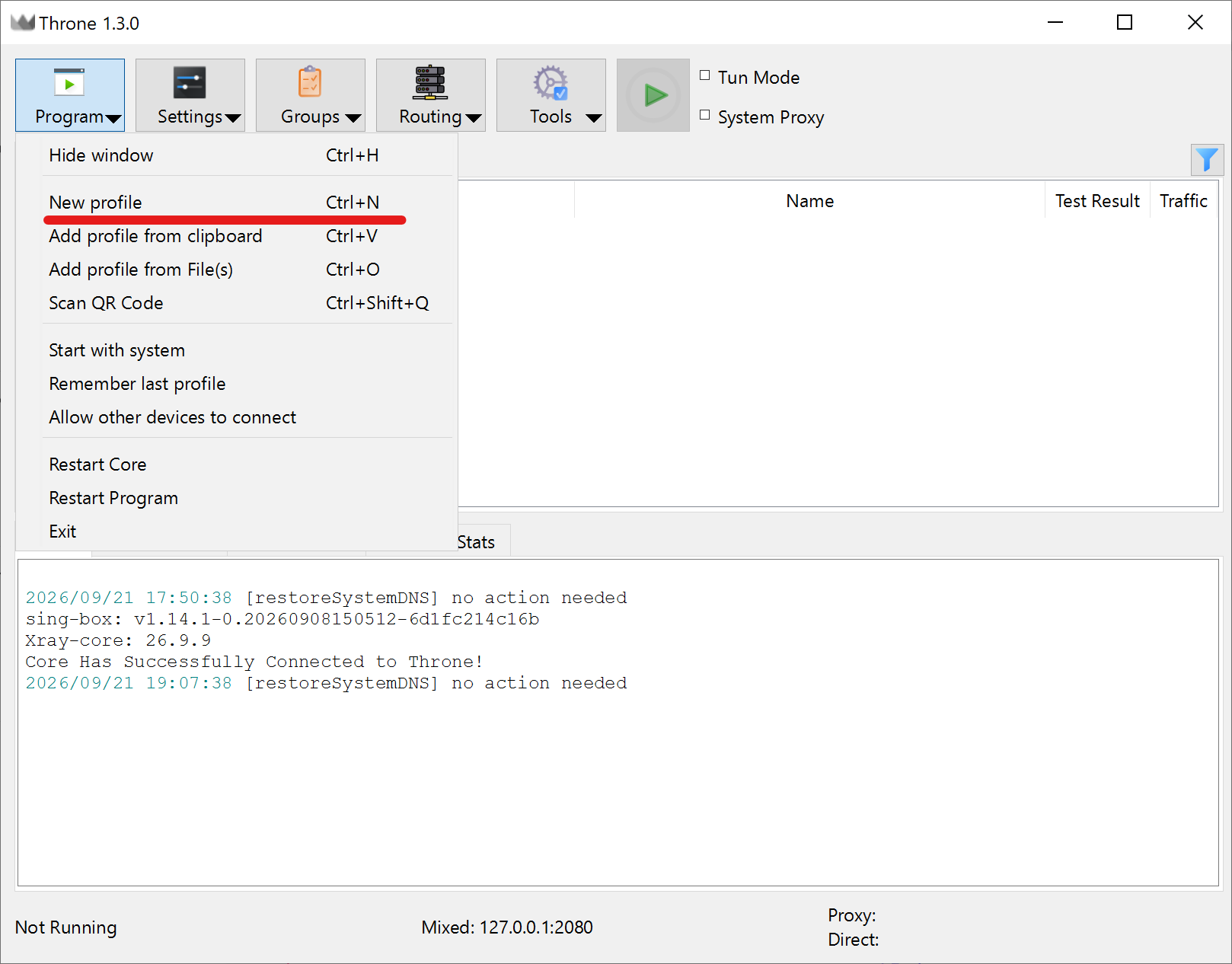
Open "Program" dropdown menu in the top left corner. Open the Type dropdown menu. The Throne proxy application suggests Auto Selector by default, but you must select the Socks protocol.
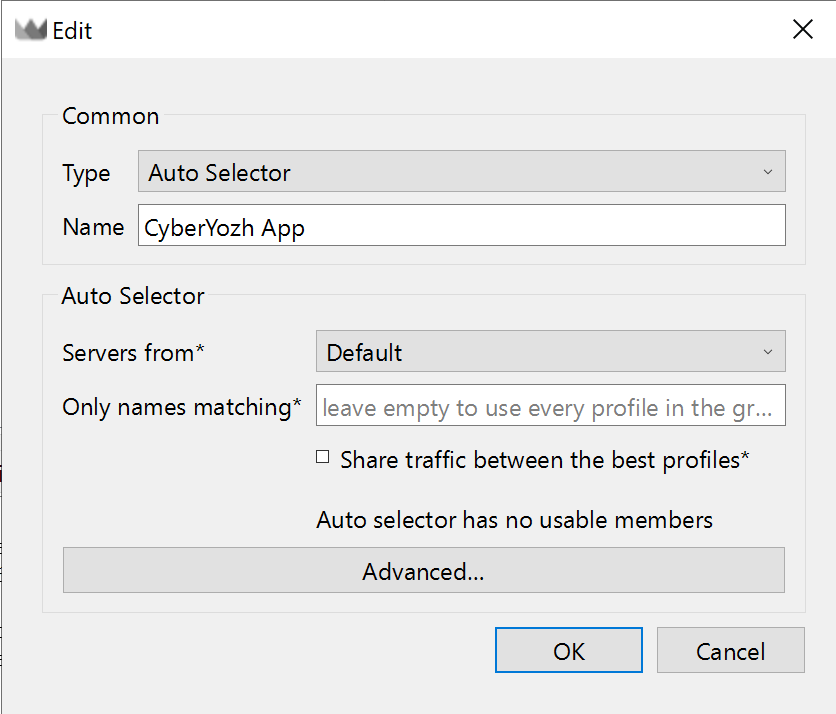
The Edit dialog window. 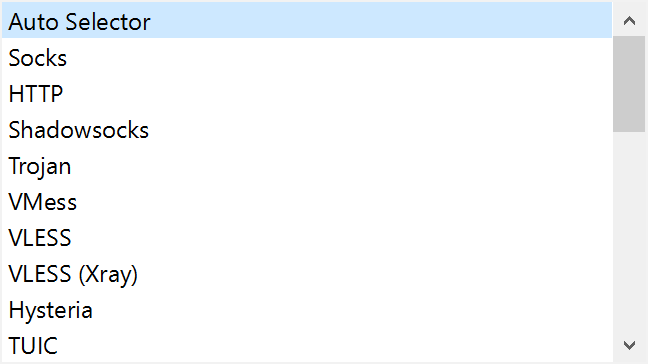
Clicking the Type dropdown reveals protocols: Socks, HTTP, Shadowsocks, VLESS, etc. Input your CyberYozh App node credentials. Define the IP address, port, username, and password accurately.
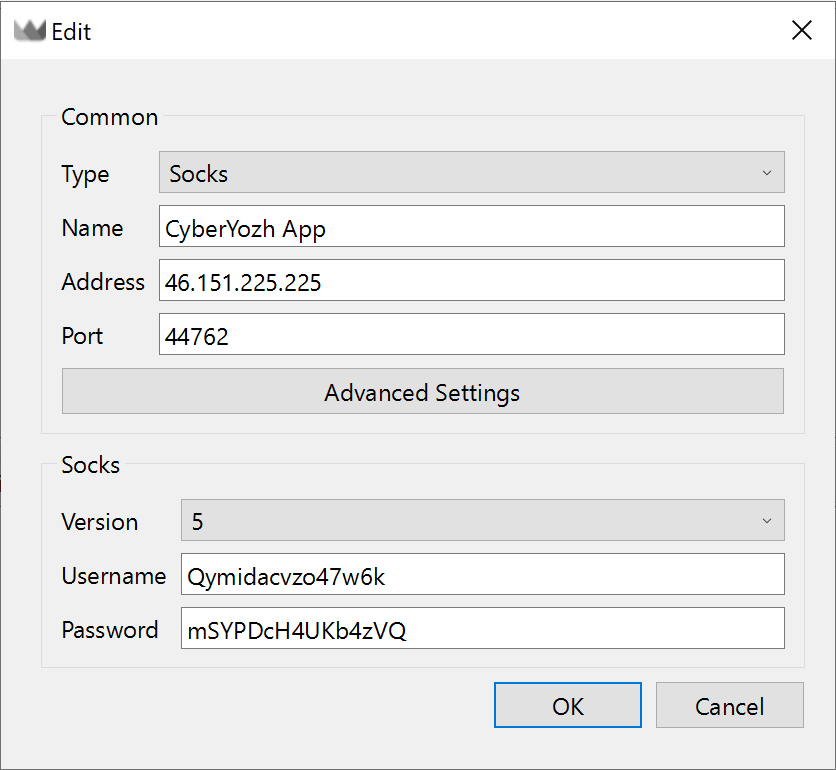
Edit window with Type set to Socks. Click Advanced Settings to access network stack options. You can force a specific Bind Interface or enable TCP Fast Open here. The standard settings work perfectly for regular operations.
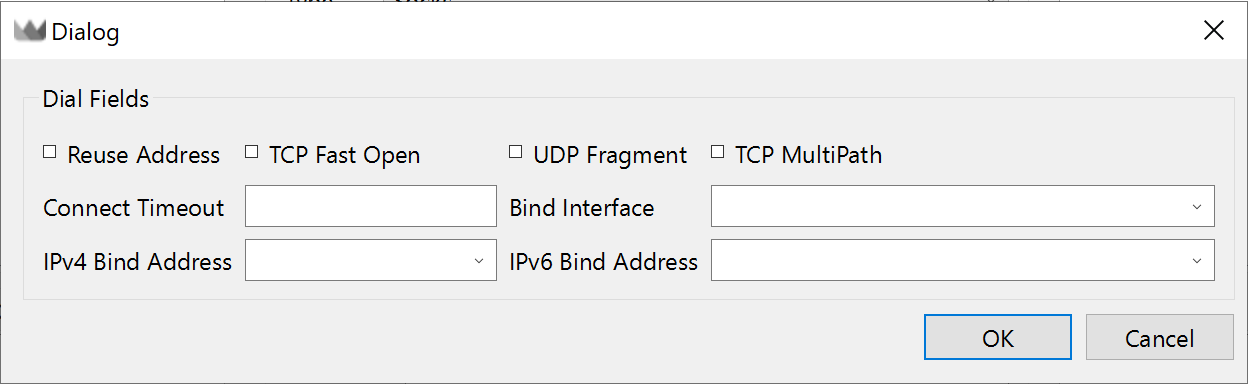
Dialog window showing Dial Fields: Reuse Address, TCP Fast Open, UDP Fragment checkboxes. Click OK to save. The node appears immediately in your main window list.
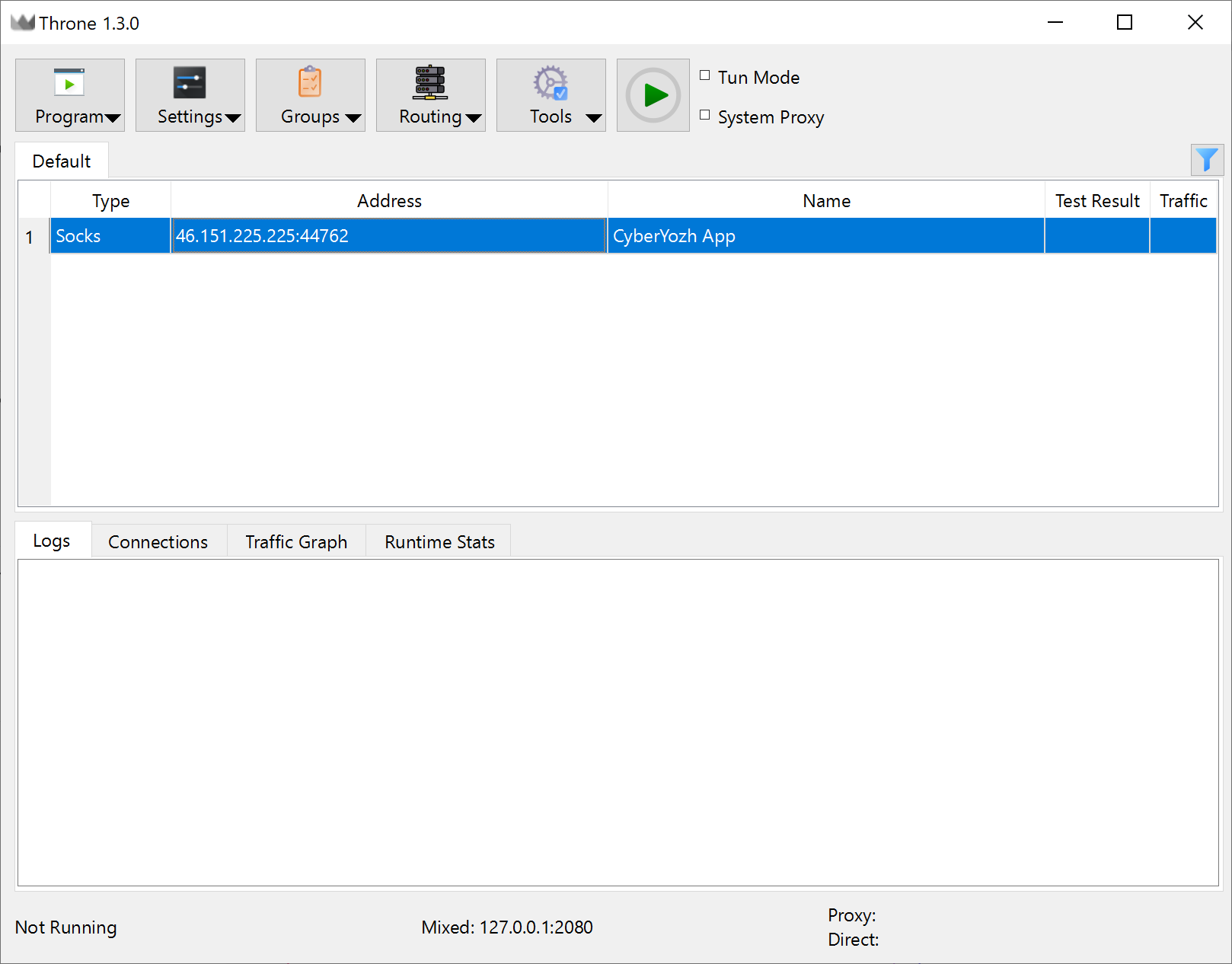
Main client window showing the new Socks CyberYozh App profile saved in the list
Adding an HTTP proxy follows the exact same process. You simply select HTTP from the initial dropdown menu instead of Socks.
Your connection quality relies entirely on your chosen infrastructure. CyberYozh App provides highly scalable networks for any technical requirement. You get high speed and a clean IP address every time.
👉 Mobile LTE and 5G Proxies: Real mobile network operators, unlimited traffic.
Route traffic through real smartphones. Get maximum trust for social media automation and mobile content access.
👉 ISP Proxies: Static residential IP, high trust.
Operate through genuine home internet providers. Maintain 99.9% uptime for stable e-commerce and long sessions.
Throne TUN mode setup and execution
A standard system proxy operates at the application layer. It relies entirely on HTTP proxy support from the operating system. A proper Throne TUN mode setup captures traffic at the network layer. This intercepts every single packet. You control ICMP pings and traffic from software lacking internal proxy settings.
The Sing-box core offers three distinct TCP/IP stack options.
Stack Parameter | Internal Mechanism | Latency & Throughput | Usage Recommendation |
System | Uses the native OS kernel stack. | Maximum speed. Minimal CPU load. | Ideal for high-load data extraction and heavy file transfers. |
Operates entirely in userspace. | Lower throughput. High CPU usage. | Resolves driver compatibility issues in restrictive environments. | |
Mixed | Hybrid architecture. Kernel handles TCP, gVisor handles UDP. | Optimal performance for standard usage. | Default setting. Recommended for daily operations. |
Learning how to configure Throne proxy TUN mode windows properly requires administrative privileges. The system stack delivers unparalleled throughput. You can define your active stack and security parameters before launching by navigating to Settings -> Tun Settings.
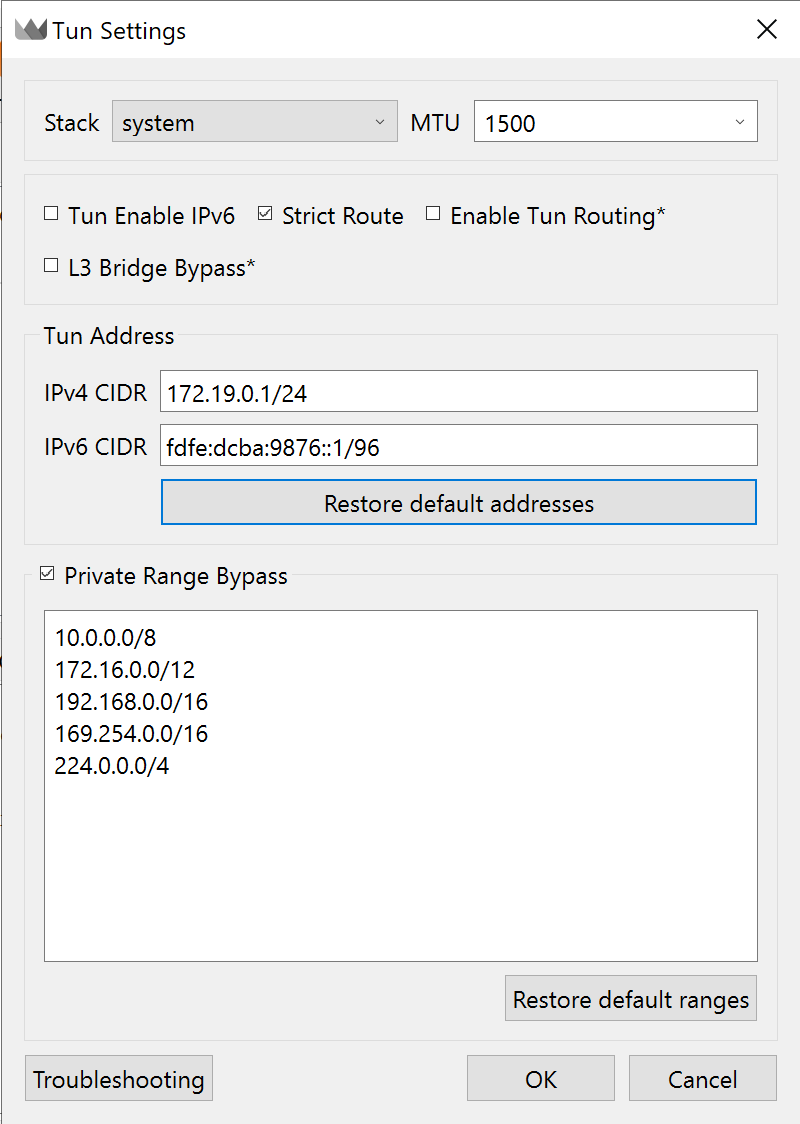
This specific menu houses the critical Strict Route parameter. It actively drops packets sent directly to your physical network interfaces. The system functions as a robust kill switch. Your true origin address never leaks if the connection drops. Pairing this deep configuration with CyberYozh datacenter networks unlocks incredible operational speed.
Activating the kernel-level routing requires just a few clicks:
Check the Tun Mode box located on the top panel.
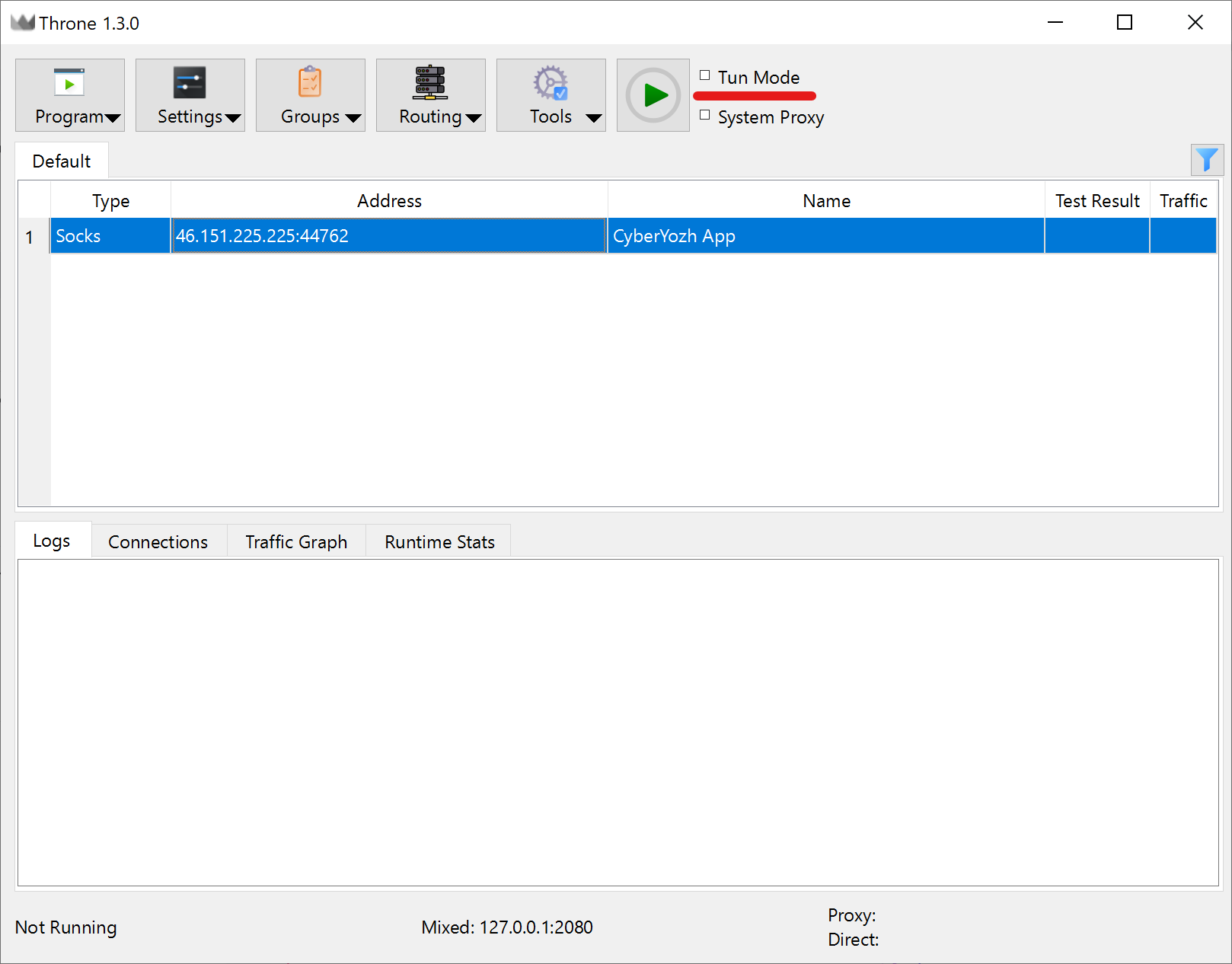
TUN Mode Acknowledge the system warning. The Throne proxy client triggers this prompt because generating a virtual network adapter requires administrative privileges.
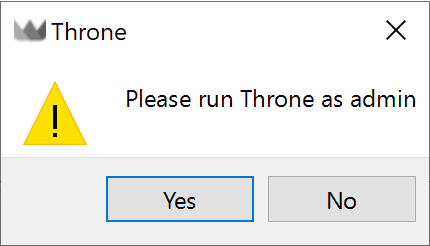
System warning popup Restart the application as an administrator.
Check the Tun Mode box again and click the green Play button.
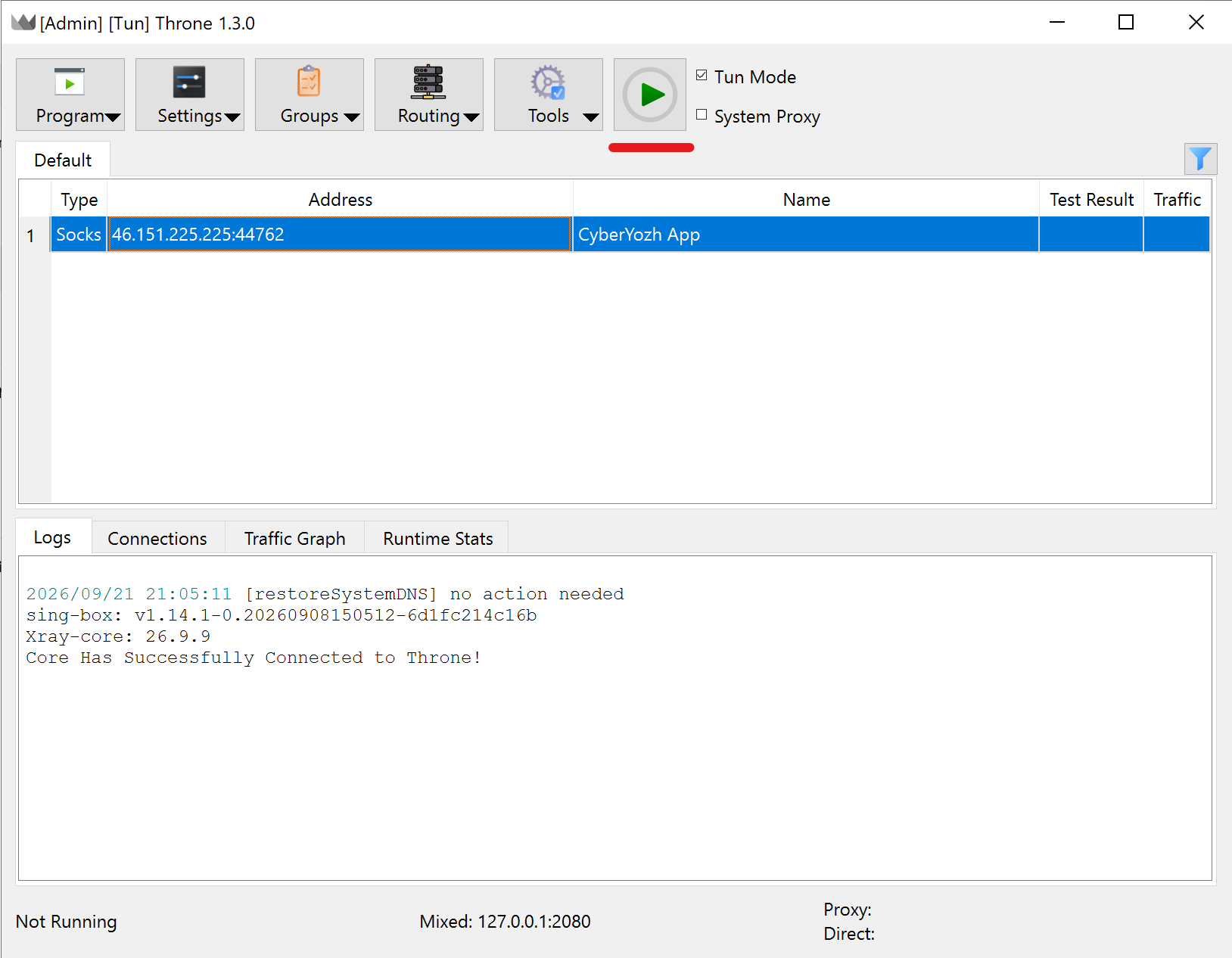
Starting the proxy Verify your encapsulation. The live logs window immediately displays your local processes. The engine intercepts packets from chrome.exe and pushes them directly into the secure tunnel.
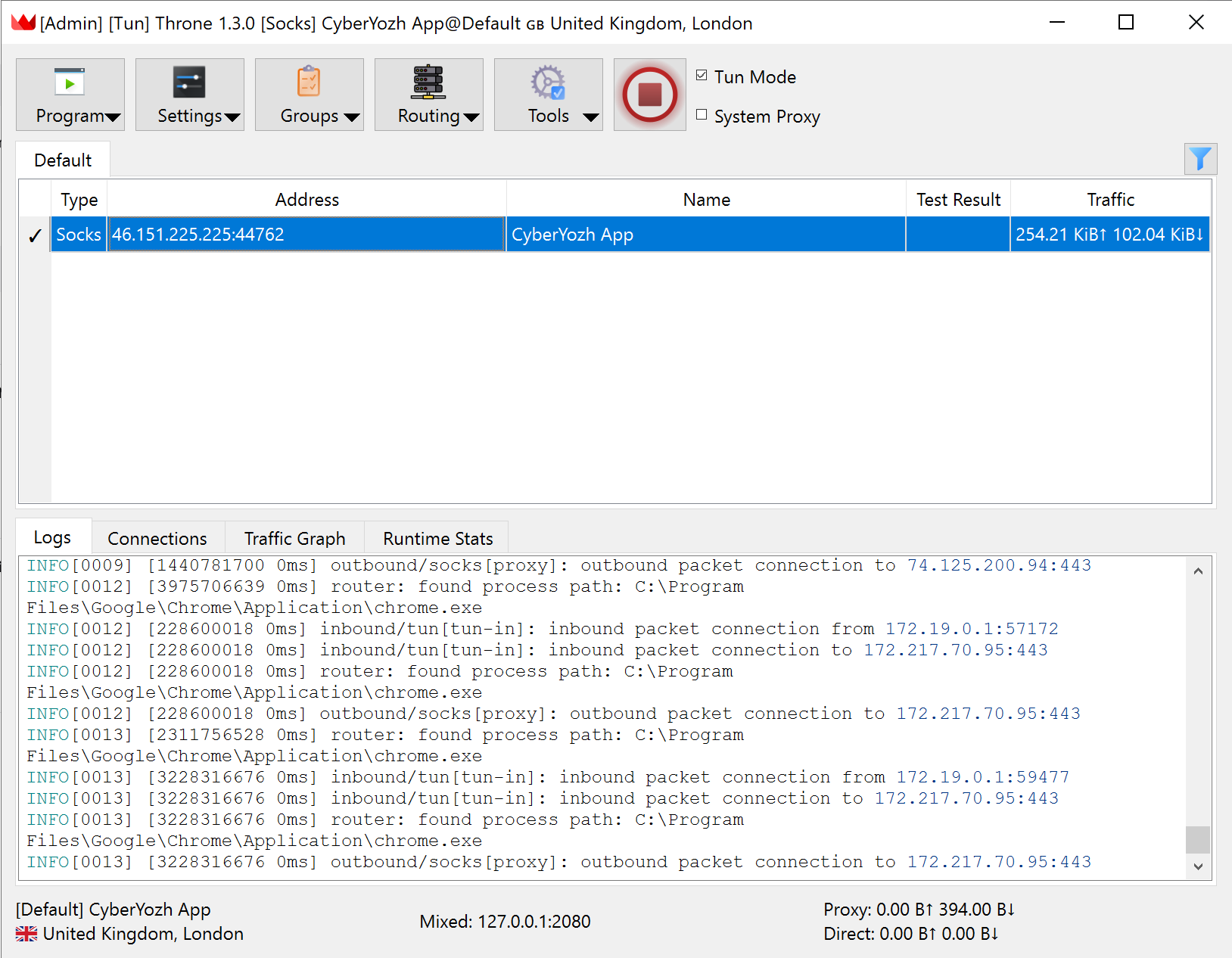
Active connection state
👉 Datacenter Proxies: Premium servers, low latency and full UDP support.
Utilize dedicated ports with 99.99% uptime. The perfect choice for terminal automation and crypto APIs.
Activating this feature generates automatic routing directives. The strict_route parameter drops packets sent to physical network interfaces. The system functions as a robust kill switch. Your true origin address never leaks if the tunnel drops.
Throne FakeIP DNS leak prevention
Leaking your browsing targets through local resolvers destroys your privacy. The Throne proxy client deploys a hijack-dns mechanism to intercept these queries. This works alongside the powerful FakeIP technology.
The operational logic is highly efficient. A local application requests a domain name. The Throne proxy utility instantly returns a dummy IP address from a reserved range. The local machine initiates a TCP handshake with this dummy address. The Sing-box core intercepts the payload and forwards the original domain string to the remote node. The actual DNS resolution happens safely overseas. You get rapid response times while keeping your local provider completely blind.
Engineers on Windows systems occasionally experience severe routing loops. The core process begins intercepting its own queries. CPU usage spikes to 100 percent instantly. This anomaly closely mirrors the classic Exit Code 5 issue in terminal utilities.
Fixing this loop requires strict configuration adjustments:
Click Routing -> Routing Settings on the top toolbar.
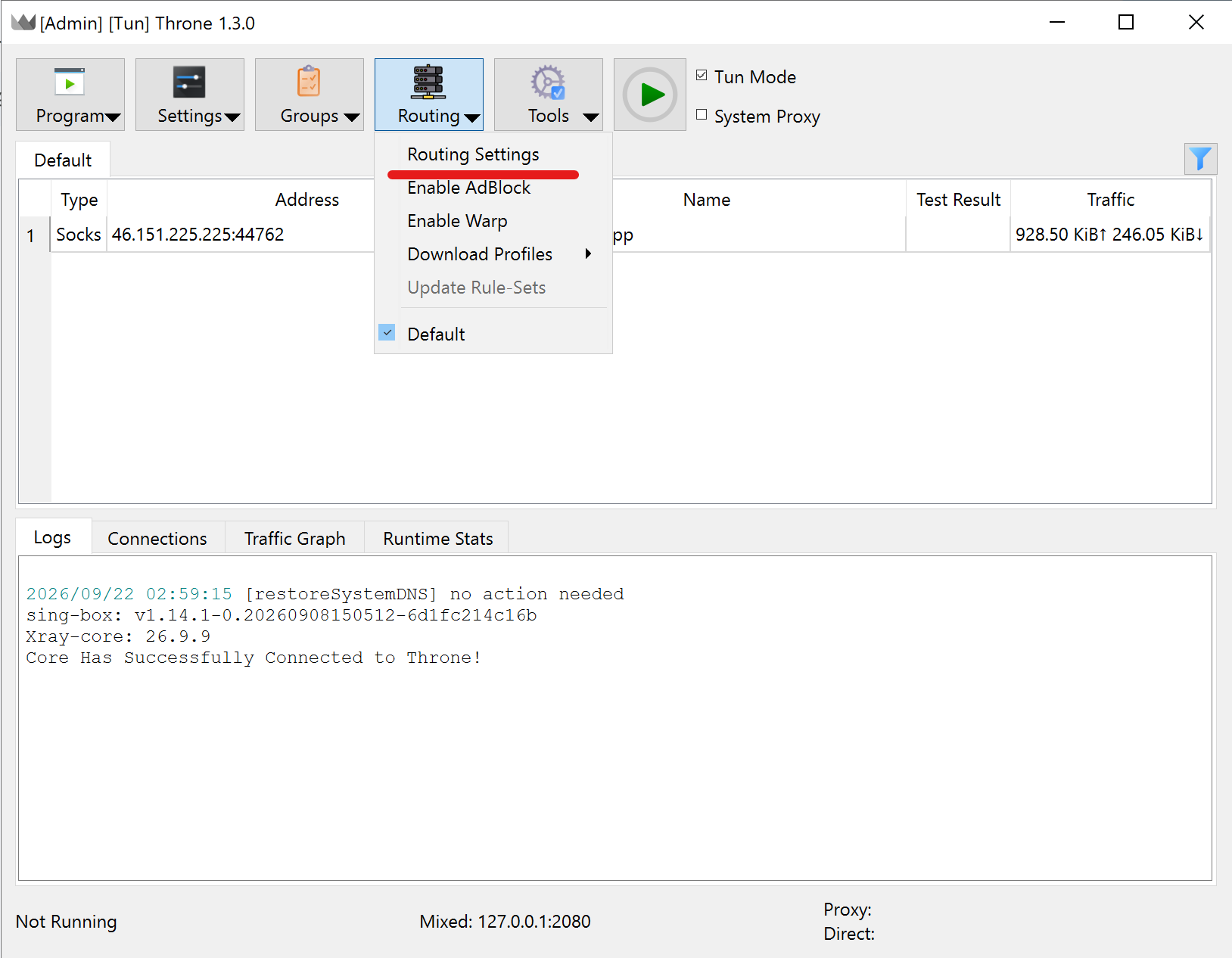
Open "Routing" dropdown menu in the main window of the Throne client Navigate to the DNS tab inside the new routing window.
Locate the Default DNS server dropdown and change it to remote.
Check the Enable FakeIP box. Because this immediately reduces the parasitic load on your remote resolver.
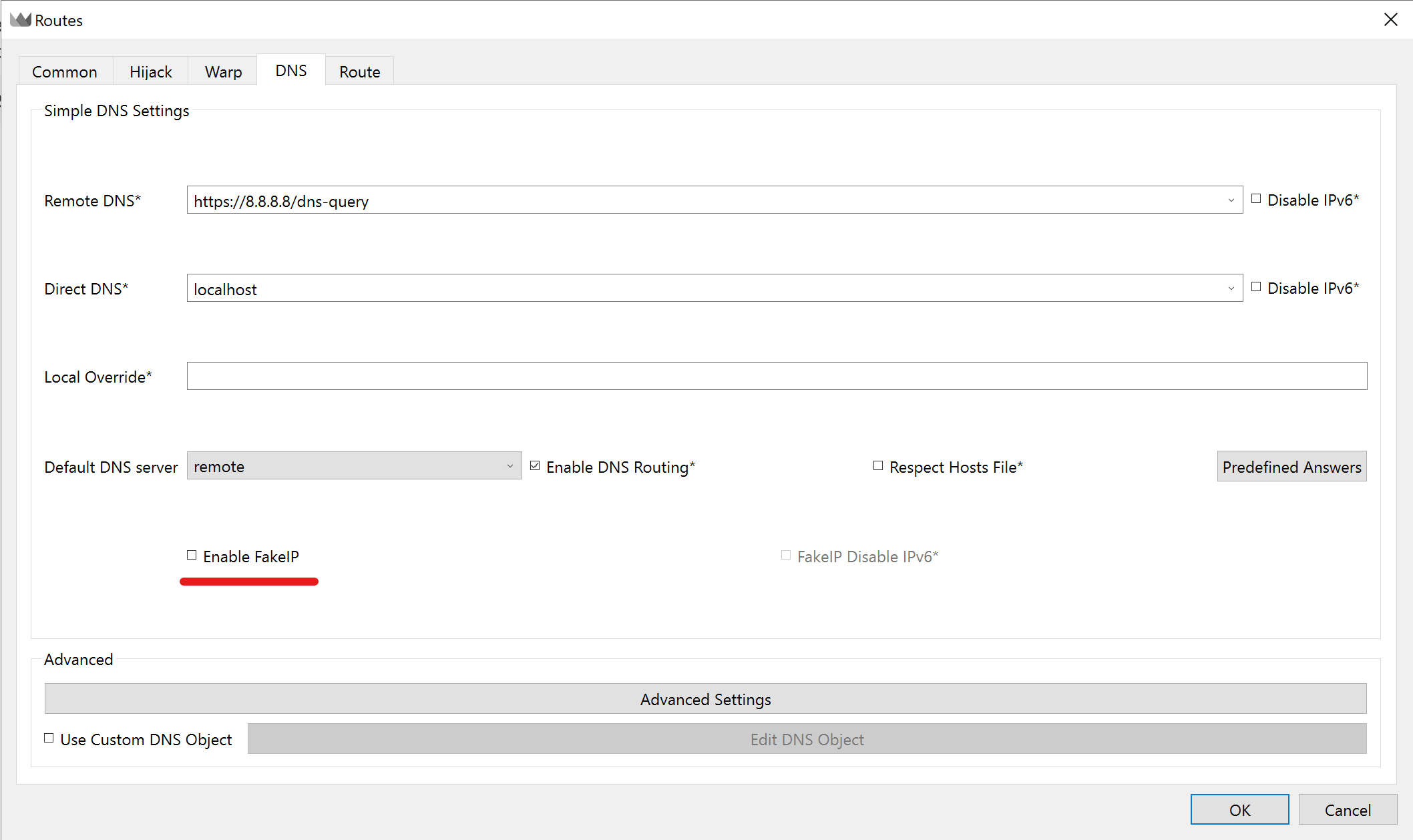
Routes window, DNS tab Switch your TUN Stack to gvisor in the core settings if the issue persists on Windows 11 builds.
👉 Rotating residential proxies: Massive IP pools globally.
Scale data collection across 100 million addresses. Pay only for consumed bandwidth with precise geographic targeting.
VLESS Reality Throne client integration
Basic protocols fail heavily against deep packet inspection. Because enterprise firewalls easily identify standard network signatures. But the VLESS protocol changes the rules completely. It delegates cryptographic encryption directly to standard TLS 1.3 transport. Computational overhead practically vanishes.
Implementing a VLESS reality Throne client profile masks your connection completely. The technology borrows cryptographic certificates from high-trust domains. A firewall sees an ordinary connection to Apple or Microsoft servers. Combining this with XTLS-Vision neutralizes packet length analysis. Your traffic blends perfectly with normal web browsing.
Profile integration demands exact precision. The public key, session ID, and browser fingerprint must match the remote server configuration. CyberYozh App generates complete connection strings automatically. You copy the string to your clipboard. The Throne proxy application imports the format instantly.
👉 Premium mobile proxies: Pre-configured stable VLESS connections.
Advanced ecosystem and business automation
Large-scale data analysis usually requires additional tools beyond just a quality routing node. Engineers constantly need ways to evaluate risk scores and bypass SMS verifications. CyberYozh App provides a unified infrastructure to handle these exact challenges.
You should visit CyberYozh Data for more scraping and automation tools from CyberYozh. The Throne proxy client pairs perfectly with these platforms. You get a complete toolkit for managing complex data extraction pipelines natively. And it saves you hours of manual setup.
Anti-Fraud checker API
Enterprise systems analyze every incoming packet at the kernel level. The unique CyberYozh Anti-Fraud Checker lets you view your network footprint through the eyes of corporate firewalls. The system queries IPQualityScore and ThreatMetrix databases. It actively scans your passive p0f fingerprint. This instantly exposes any structural mismatches between the TCP/IP stack of your node and your browser profile. You see your exact abuse velocity and source type. Basic checks cost just $0.15. Premium subscriptions offer thousands of monthly checks. You discard burned nodes before launching aggressive scripts.
👉 Anti-Fraud Checker: Exact network footprint analysis.
Virtual banking cards
Funding ad campaigns requires localized payment methods. The platform issues virtual tokenized cards instantly. You create a specific card for exact geographic parameters. Functionality includes spending limits and instant freezing. The cards integrate flawlessly with Apple Pay and Google Pay. They work perfectly for Facebook Ads and TikTok campaigns. Direct payments for gambling or cloud hosting violate platform policies.
👉 Virtual Banking Cards: Secure localized payment methods.
Phone number rental service
Account creation demands phone verification. You rent virtual numbers to interact with over 700 websites. Quick message reception starts at $0.02 per 15 minutes. You can also rent residential numbers from real local operators. This approach drastically improves your success rate during difficult account verifications. The platform automatically refunds your balance if the message fails to arrive.
👉 Phone numbers: Safe trusted account registration.
Frequently Asked Questions
Does the Throne proxy sing-box integration support the new SRS formats?
Yes. Transitioning to the Sing-box engine enables modular .srs binary files. The application loads only the necessary rule categories. This drastically reduces memory consumption.
Why does my Discord voice traffic fail while connected?
Desktop applications built on Electron frequently ignore standard routing settings for UDP traffic. Activate your Throne TUN mode setup first. Then create a specific routing rule targeting the Discord.exe process. Keep in mind that your actual node must support this protocol for voice calls and WebRTC to work. All CyberYozh proxy pools natively handle UDP connections.
How does traffic rollover work with CyberYozh?
The service automatically transfers your unused data volume to the next billing cycle. You never lose your purchased bandwidth. The platform also accepts diverse payment methods, including crypto.
How do I fix virtual machine conflicts?
Guest operating systems running in Bridged mode bypass the host network adapter. Switch your virtual machine network settings to NAT mode. The traffic undergoes address translation and successfully routes into the Throne proxy engine.
How do mobile proxies differ from residential ISP nodes?
Mobile nodes use real smartphone IP addresses operating on cellular networks. ISP proxies rely on static addresses provided by home internet companies. Both solutions deliver an incredibly High Trust Rate for complex verifications.
Do mobile proxies support VLESS connections?
Yes. Our premium mobile proxy plans already include complete VLESS connection details.