
How to Set Up a Proxy for Google Ads
In 2026, managing campaigns in Google Ads requires consistent account access, stable connections, and accurate location-based testing. Google Ads can flag unexpected changes in IP address or device environment, triggering additional security checks, temporary campaign restrictions, or account suspensions.
For marketing agencies and media buyers, operational stability is essential when managing advertising campaigns. Tens of thousands of dollars can be at stake. Reliable infrastructure allows teams to conduct regional tests, manage campaigns, and verify ads from different locations while maintaining consistent connection environments.
In this guide, we will cover:
What a proxy for Google Ads is and how proxies support campaign management
How to choose the best proxy type for Google Ads, including where residential and mobile proxies fit best
How to set up a proxy for Google Ads to reduce the risk of account problems.
What affects Google Ads account stability
Google invests millions of dollars in data and user protection systems. Algorithms analyze numerous connection parameters to verify account activity, including IP addresses, routing, device environments, and payment data.
If an IP address is unstable or switches between London and Lisbon multiple times in an hour, security systems may flag the activity, leading to additional checks or restrictions. Here’s what can affect account stability:
Unstable IP address: public or low-quality IPs can trigger additional security checks.
Abrupt changes in geography: incorrect routing when managing regional campaigns, such as accessing a US campaign through the Bangladesh IP.
Lack of isolated work environments: managing multiple client accounts from the same laptop and home office Wi-Fi make account environments harder to separate.
Scaling too quickly: launching campaigns without a gradual increase in activity can trigger unusual activity flags.
A proxy for Google Ads helps agencies and media buyers maintain a stable connection environment when managing accounts, testing campaigns, and working across different locations.
What is a proxy for Google Ads
A proxy for Google Ads routes your connection through another IP address, allowing you to access Google Ads from a specific location or network.
When you connect through a proxy, Google Ads sees the proxy’s IP address (for example, France or United States IP) instead of your real IP address. This makes proxies useful for advertisers who need to manage accounts, test campaigns, or verify ads from different locations.
A proxy changes the IP address and apparent network location of your connection. It does not change your Google Ads account, billing information, campaign settings, or advertiser verification status.
When you need a proxy for Google Ads
A proxy for Google Ads gives advertisers control over the IP address and location used to access their accounts and test campaigns.
Manage Google Ads accounts from consistent IPs
Assign a dedicated proxy IP to each Google Ads account and keep the same IP for routine logins and campaign management. This is especially useful for agencies where several employees or media buyers need to access different client accounts from different locations.
Verify Google Ads in different locations
Use a proxy from the target market to check how your ads appear in Google Search from that location. This allows media buyers to verify ad delivery, creatives, extensions, landing pages, and location-specific offers without relying on searches from their own location.
Check Google Ads from different cities
For campaigns with local targeting, a country-level IP may not be enough. Use proxies with city-level targeting when running campaigns in specific cities, such as Los Angeles or Washington DC rather than an entire country. Compare search results and ad delivery from different city IPs to see how campaigns appear locally.
Research competitor ads by location
Proxies support localized competitor research by showing search results from different target markets. Use proxies to view Google Search results and compare competitor ads across locations. This helps media buyers check differences in competitor messaging, offers, and landing pages by GEO.
Which proxy type is best for Google Ads
The best proxy for Google Ads depends on whether you are managing accounts, testing ads, or collecting location-specific search data.
Proxy type | Google Ads use case | Why |
Account management, mobile ad testing, trust-sensitive environments | Real carrier LTE/5G IPs, lowest ban risk | |
Residential ISP proxies | Stable account access, long sessions, regional management | Real ISP-assigned IPs, stable sessions, low ban risk |
Rotating residential proxies | SERP research, ad monitoring, large-scale geo testing | Large IP pool, rotates automatically or per request |
API-based workflows, automation, speed-focused tasks | Fast, high throughput, low cost – not for accounts |
Takeaway
Use residential ISP proxies to keep an account on the same regional IP over time;
Mobile proxies to test how Google Ads behaves from a mobile carrier connection;
Rotating residential proxies to reproduce searches across multiple locations;
Datacenter proxies for automated or API-based checks.
Mobile vs residential proxies for Google Ads
Mobile and residential ISP proxies are both suitable for Google Ads workflows. However, they differ in IP origin and trust level, which can affect your operations. Here’s when each proxy type fits best.
When to use mobile proxies
Use mobile proxies when your Google Ads workflow requires a cellular carrier network and controlled IP changes. They fit Google Ads account creation, managing important accounts, high-volume testing, and trust-sensitive workflows where dynamic rotation helps maintain connection continuity.
CyberYozh mobile proxies use LTE/5G carrier networks, with unlimited traffic, dedicated channels, and manual or API-based IP switching for account operations and dynamic testing.
When to use residential ISP proxies
Use residential ISP proxies when stable routing and a consistent regional IP are more important than dynamic rotation. They fit persistent account sessions, long-running Google Ads management, and QA/testing where keeping the same login environment helps avoid unnecessary location changes and connection issues.
How to set up a proxy for Google Ads
1. Get your proxy credentials
Sign up for CyberYozh and buy a proxy. Copy the proxy IP, port, username, and password, or use the API endpoint if you manage credentials programmatically.
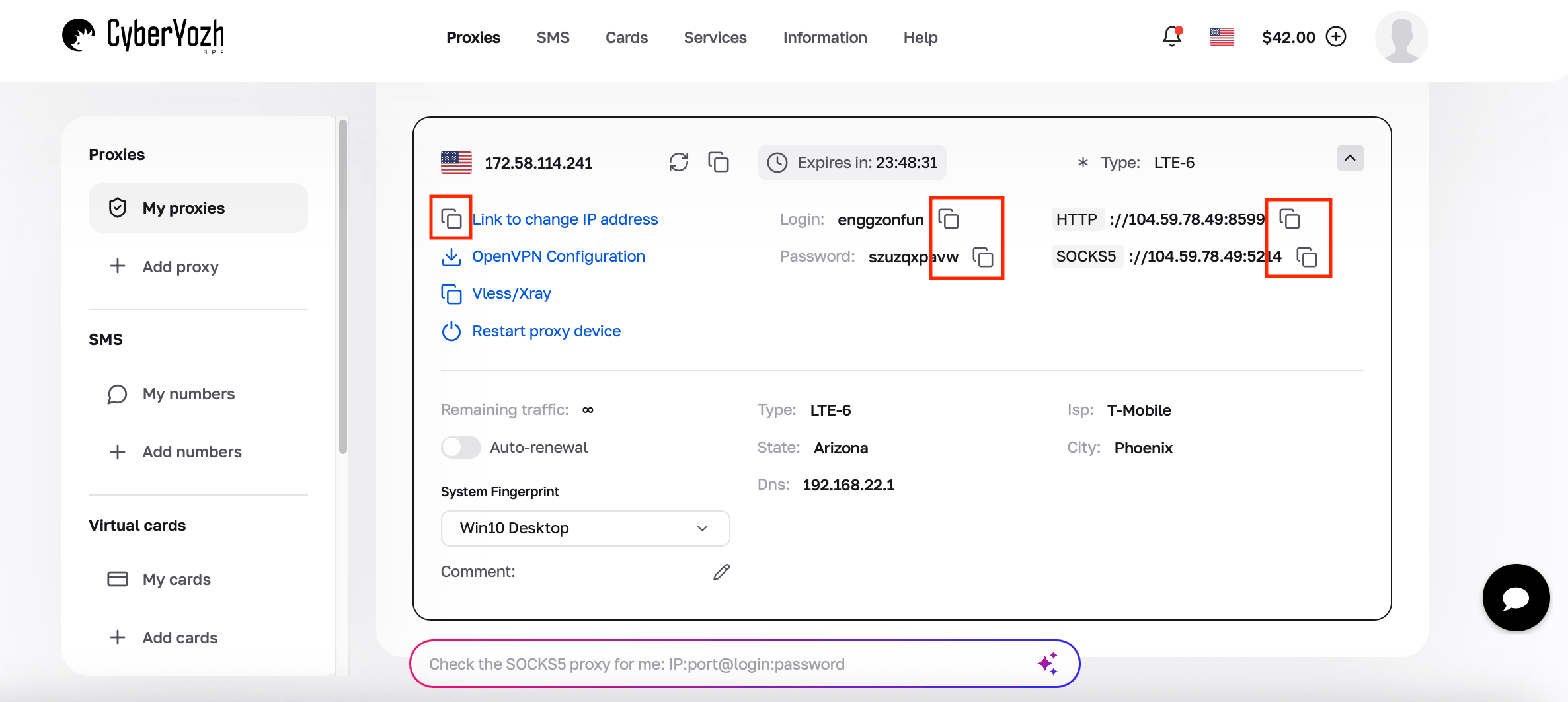
2. Configure the proxy
In a browser: Open Settings → Network/System → Proxy settings, enter the proxy IP and port, then add your username and password. See our setup guides for every browser
In an anti-detect browser: Create or edit a profile, open the Proxy section, select the protocol, and enter the IP, port, username, and password. Learn how to set up proxies in every anti-detect browser
In a cloud phone: Open the cloud phone's Network/Proxy settings. Enter the proxy host, port, username, and password, then save the connection.
In an automation tool: Add the proxy credentials to the tool's proxy configuration (most accept ip:port:username:password). Playwright, Puppeteer, Selenium, Scrapy, and Postman support proxy-based workflows.
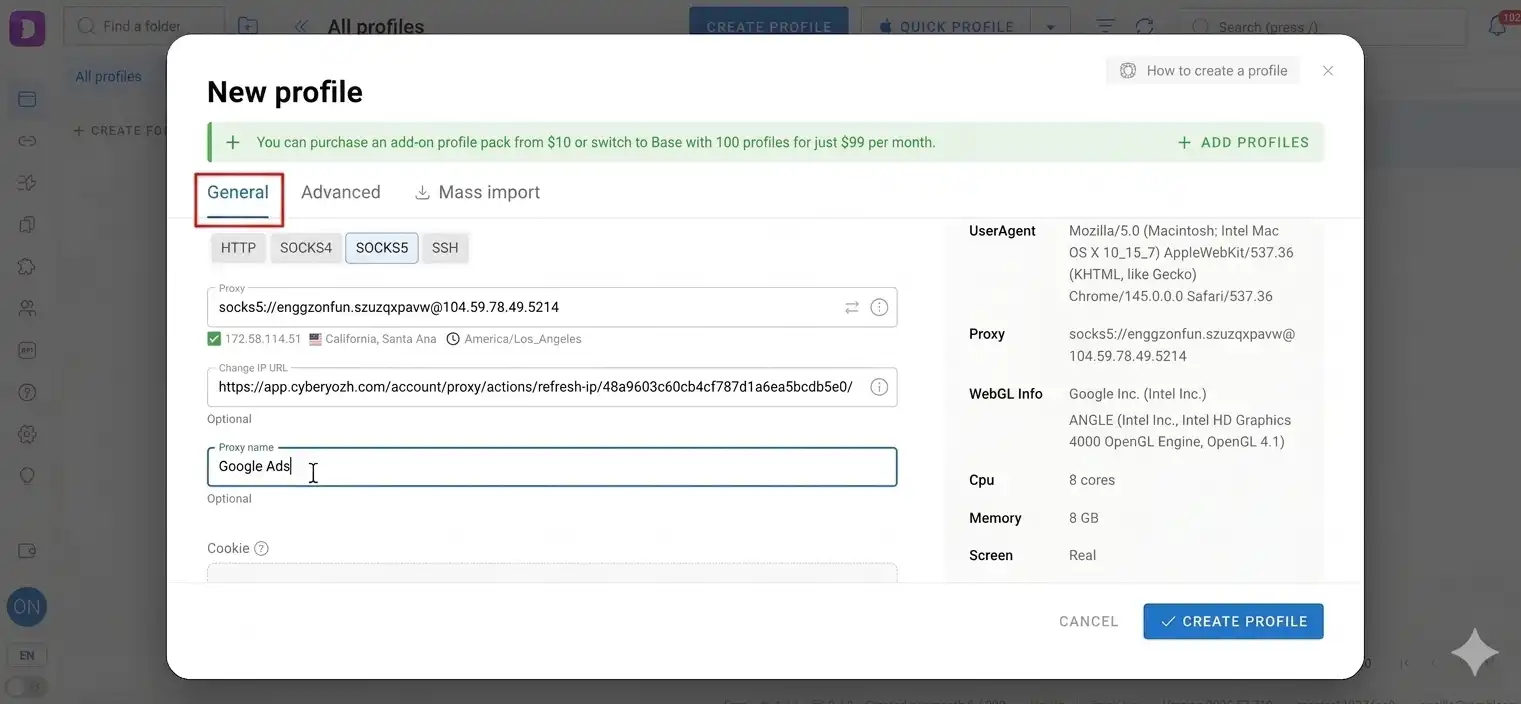
3. Set the protocol
HTTP, HTTPS, or SOCKS5, matching what your provider issued. If the protocol doesn't match, the proxy won't connect.
4. Test the connection
Open an IP-checking service such as Whoer.net through the configured browser or profile. Confirm that the displayed IP matches the intended location before accessing Google Ads.
5. Log into the Google Ads account through that same browser/profile
Use the same profile/proxy pairing for each account going forward.
How to use proxies for Google Ads without getting banned
A proxy changes what network signal an account connects from. It doesn't override Google's policy enforcement, and it won't protect an account that's violating Google Ads policy. Consistent infrastructure can minimize connection-related issues and unnecessary security checks. Here’s how to minimize your ban risks while using proxies:
Keep the account's network environment consistent. The same account should connect from the same IP and location every time.
Avoid unnecessary IP switching. Rotate only when there's a reason to (a new account, a genuine location change), not on a schedule.
Match proxy location to the account workflow. The proxy's country/city should reflect where the account or campaign is meant to operate from.
Check IP reputation before use. An IP with a history of spam, fraud, or heavy prior use carries that history with it regardless of who's using it now.
Check your IP for fraud score across 50 databases
Keep browser and session environments consistent. Cookies, fingerprint, and a login device should stay stable alongside the IP. If you manage multiple Google Ads accounts, an anti-detect browser can help achieve that, keeping your accounts safe.
Learn how to set up CyberYozh proxies in every anti-detect browser
Follow Google Ads policies. No proxy setup compensates for content, billing, or landing-page issues that violate policy on their own.
Why IP quality matters for Google Ads operations
IP quality directly affects the stability of Google Ads account operations. Using cheap public proxies carries risks, as these addresses have poor reputation, unreliable routing, or a history of activity from unrelated users. This may cause account-review issues and blocks.
A telling case occurred with an SMM studio from Kazakhstan that tried to optimize infrastructure costs while working with foreign clients in Google Ads. Using cheap IPs led to regular system warnings and campaign suspensions. The situation stabilized after switching to high-quality residential IPs from CyberYozh App. Thanks to reliable routing, work interruptions ceased, allowing the studio to manage client budgets without any issues.
Before assigning a proxy for Google Ads to an important account, check its reputation and connection quality. Reliable IPs provide a more consistent network environment for account management, campaign testing, and ongoing operations.
Why choose CyberYozh for Google Ads
CyberYozh provides regularly updated IP pools with dedicated and stable communication channels for advertising workflows. Agencies can choose residential and mobile infrastructure by GEO and network type, monitor connection quality, and replace IPs when routing or reputation issues arise.
For Google Ads operations, this means you can build the infrastructure around the workflow: stable residential IPs for persistent account management, mobile proxies for carrier-network workflows, and controlled IP rotation for testing and distributed operations. CyberYozh also provides 24/7 support for choosing the appropriate GEO and proxy type, with tools for session monitoring and IP management.
For agencies managing multiple accounts, pair each proxy-account setup with a dedicated virtual number for that account's phone verification — so 2FA and recovery aren't tied to a shared team number.