
Banned Snaps: How to Get Unbanned from Snapchat in 2026
Snapchat doesn't warn you. One day you're sending snaps to your friends. Next, you're staring at an SS06 error, a locked account message, or, worse yet, a device ban that blocks every new account you create.
However, you need to know the difference between the Snapchat bans. Some account locks can be appealed and reversed. Others involve device or network-level restrictions that will keep affecting new accounts.
Many guides focus on basic troubleshooting steps. But recovering access often starts with identifying whether you're dealing with an account ban, an IP restriction, or a device ban. If you’re wondering “Can Snapchat IP ban you?” or “How do I get unbanned from snap?”, keep reading.
In this 2026 guide, you'll learn:
The difference between Snapchat account bans, IP bans, and device bans
How to get unbanned from Snapchat and when appeals, IP changes, or a Snapchat proxy can help
Why accounts get banned again and how to reduce the risk of future bans.
Why Snapchat bans you
Snapchat bans happen when the platform detects automated, abusive, or high-risk behavior. In most cases, it’s not a single action, but a combination of signals from your device, network, and activity patterns:
Third-party apps – modified Snapchat clients or automation tools
Multiple accounts on one device without isolation – repeated account linking from the same device
Buying a used phone – inheriting a previously flagged or Snapchat-banned device
Spam-like behavior – rapid friend requests, mass messaging, or aggressive activity
VPNs or datacenter IPs – low-reputation or shared infrastructure IPs
Coordinated multi-account behavior – patterns that resemble automation or policy evasion.
Snapchat doesn’t just react to one trigger. It evaluates behavioral patterns across accounts, devices, and networks to determine whether activity appears legitimate or risky.
The 3 types of Snapchat bans (Account, IP, and device)
Snapchat doesn't just ban accounts. It has an aggressive anti-bot protection system that restricts you at three levels: account, IP/network, and device.The severity depends on the violation: using a third-party app can result in a soft lock, whereas running multiple accounts without a proper setup can get your device banned for good.
Here's how each one works.
1. Account ban (The easiest one)
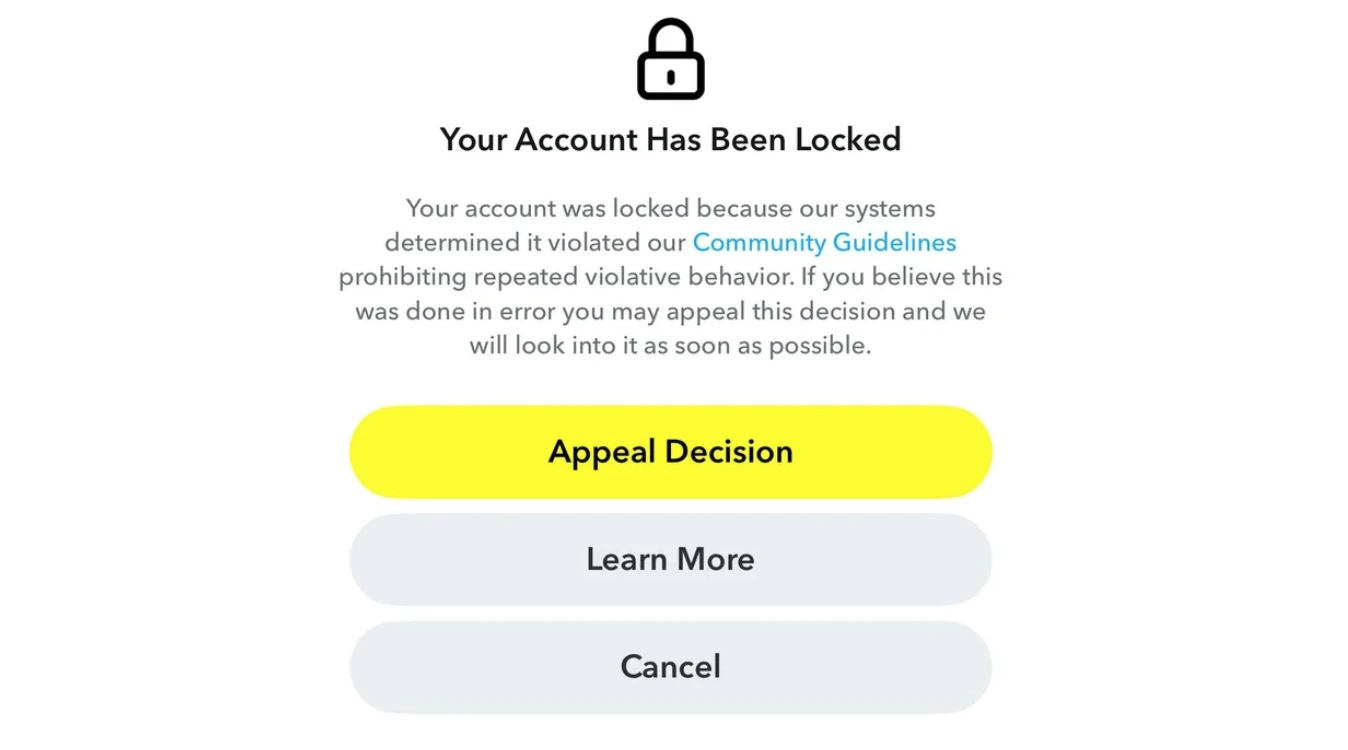
An account ban targets your specific Snapchat username and profile. Your login credentials are blocked, but your device and network remain untouched.
How to recognize it:
You see a message saying your account is "locked" or "permanently locked" for violating Community Guidelines or Terms of Service.
You cannot log in with your username and password.
In theory, it’s possible to create a new account on the same phone.
What causes it: violating Snapchat's guidelines, third-party apps, or spam-like behavior.
2. IP ban/network block (The middle tier)
A Snap IP ban blocks your internet connection, not your account. If your roommate or coworker uses the same WiFi network, they may also be blocked.
How to recognize it:
You see a message "Your network is blocked".
You can log in on mobile data but not on your home WiFi.
Other people on the same network get blocked too.
What causes it: sending spam from that IP address, using a VPN or flagged IPs, or repeated violations from the same network.
3. Device ban (The most serious)
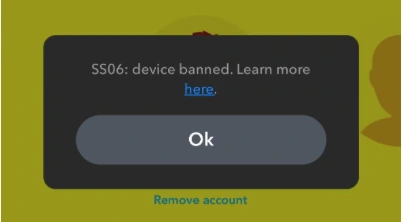
This is the big one. A Snapchat device ban means Snapchat has blacklisted your physical phone or tablet using unique hardware identifiers (IMEI, device ID, advertising ID). Even with a brand new account, a new IP address, and a different SIM card, you cannot use Snapchat on that device.
What are SS06 vs SS07 vs SS18 bans
SS06 / SS18 - Device banned due to abuse or repeated violations. Permanent. Almost zero chance of appeal.
SS07 - Too many accounts associated with your device. Permanent by default, but higher chance of successful appeal than SS06.
How to recognize it:
You see error codes SS06, SS18, or SS07.
You cannot log in to any account on that phone—new or old.
What causes it: Severe Terms of Service violations, running multiple accounts on the same device, using third-party tools or buying a used phone that was previously banned.
Still unsure which ban hit you? Here's a quick cheat sheet:
Quick reference: Which ban do you have?
Ban Type | Error / Message | Can You Create a New Account? | Can You Log In Elsewhere? |
|---|---|---|---|
Account Ban | "Account locked" / "Permanently locked" | Yes, on same device | No (account is dead) |
"Your network is blocked" | Yes, but banned again quickly | Yes, on different network | |
Device Ban | SS06, SS18, SS07 | No—new accounts get banned instantly | Yes, on a different device |
How Snapchat detects and bans you
Snapchat's ban system isn't random. It's a multi-layered enforcement machine that combines hardware data, network signals, and behavioral patterns, not just your IP:
Device fingerprinting: The core of Snapchat's detection
Snapchat doesn't just look at your IP or username. It builds a detailed device fingerprint—a unique digital ID constructed from dozens of data points from your phone.
What's in your device fingerprint:
Device model and hardware characteristics
Operating system version and configuration
App installation and reinstallation patterns.
You can change your IP using a VPN and get a new SIM card. Yet, it might not be enough to reset your device-level signals. And Snapchat knows it.
Network signals (IP and connection reputation)
Your internet connection is also part of the risk picture. Free VPNs can increase the risk. Snapchat looks at:
IP address reputation
Network type (mobile data, home WiFi, public WiFi)
Repeated use of the same network for flagged activity.
IP alone is not a strong identifier, but it becomes meaningful when combined with device and account behavior.
Behavioral patterns
Snapchat monitors how accounts behave over time:
Creating multiple accounts quickly
High-volume messaging or adding
Repeated patterns of similar activity across accounts
These are risky patterns even if you don’t violate anything.
How long Snapchat bans last
Minor blocks lift after 1-2 days, whereas permanent restrictions in some cases cannot be undone.
Knowing your ban type and duration matters because many users waste time waiting for a ban to expire when in reality it may never be lifted without action.
Snapchat account ban duration
Temporary locks last for 24–48 hours, then lift automatically.
Permanent locks can be appealed. If there's no "Appeal Decision" button, the account is gone for good.
How long does an IP ban last on Snapchat
Network blocks are temporary - they last until the suspicious activity stops. Snapchat's official help documentation suggests waiting for 48 hours before logging in.
You can change your IP address: use mobile data or a secure mobile/residential proxy network with high-quality IPs not flagged by Snapchat
Repeated violations can cause a permanent IP ban.
How long does a device ban last on snapchat
SS06/SS07/SS18 device bans are permanent. Reinstalling the app does not solve the issue. Snapchat’s Support cannot unban a device in most cases.
The only official path is an in-app appeal, but unblocking a device on Snapchat is very rare.
How to get unbanned from Snapchat (By ban type)
Here's how to recover access depending on which ban hit you.
Account ban: The appeal route
Temporary locks are the easiest - you need to wait for 24-48 hours until they expire. You can also go to accounts.snapchat.com in a browser—if your account is temporarily locked, you'll see an explicit "Unlock" option that often resolves it immediately.
Permanent locks require an appeal:
Open the Snapchat app
Try to log in
Tap "Appeal Decision" on the pop-up notification.
Reviews can take up to 30 days. If denied, the account is gone for good. If there's no "Appeal Decision" button, your account lock isn't eligible for appeal.
IP Ban / Network Block: IP change route
Network blocks last until suspicious activity stops. Snapchat's official documentation suggests waiting 48 hours before logging in again. Faster solutions:
Switch to mobile data or a different Wi-Fi network
Restart your router to get a new IP address
Disable a VPN or free proxy — they can actually trigger network blocks
Use a high-trust mobile or residential proxy.
Repeated violations can escalate a Snap IP ban into a permanent one, and eventually trigger a device ban. If you're using a VPN or proxy, ensure it uses residential or mobile IPs, not datacenter IPs which Snapchat flags instantly.
How to get unbanned from Snapchat with a proxy:
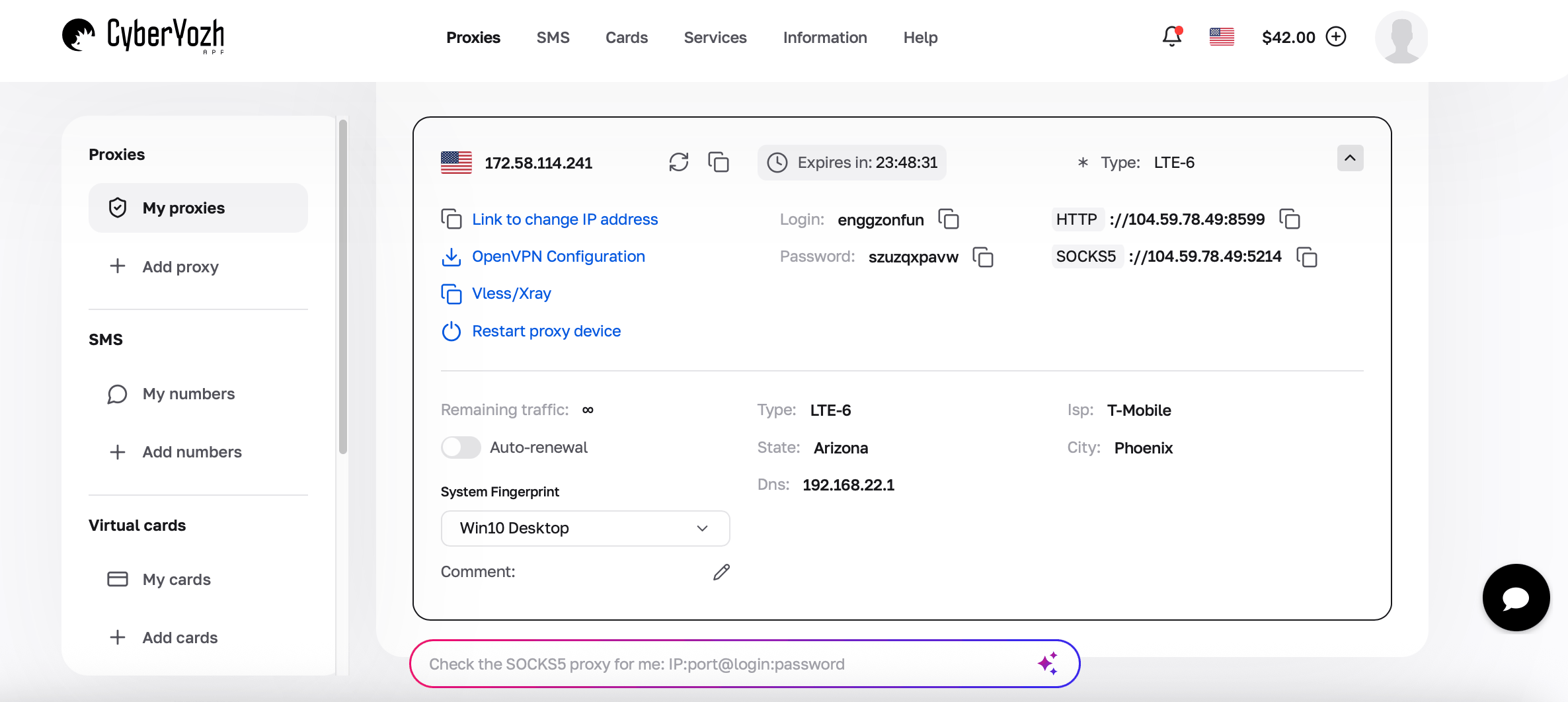
Get residential or mobile Snapchat proxies – datacenter IPs get flagged instantly
Use an app that routes all phone traffic through the proxy and add your proxy configuration.
If you’re running multiple Snapchat accounts, use an anti-detect browser or cloud phone – this changes your device fingerprint, not just your IP.
Reinstall the app and open the app and log in to your account
Ensure the proxy location matches your account's registered country.
Device Ban (SS06 / SS07 / SS18): The hard truth
The “Snapchat device ban” error has no easy fix.
SS06 or SS18 means a permanent device ban due to abuse or repeated violations. Snapchat Support generally cannot unban your device.
SS07 is a device ban because of having too many accounts. This has a slightly higher chance of successful appeal than SS06, but it's still permanent by default.Your realistic options:
Submit an in-app appeal—open the app, try to log in, and tap "Appeal Decision" if available. But keep in mind that success is rare.
Use a different device. A new phone with a clean hardware fingerprint, combined with a fresh IP and new account details, gives you a clean start.
Wait it out. Some users report long cooldown periods (a few months), but Snapchat does not confirm any timeframe.
What makes CyberYozh a top proxy choice for Snapchat
Snapchat is sensitive to unstable IPs, shared network reputation, and inconsistent session behavior, which is why infrastructure quality matters more than simple IP rotation. CyberYozh is built as full operational infrastructure for stable, real-network connections across mobile and residential environments, with controlled distribution and consistent session performance designed for account-based workflows.
Real mobile LTE/5G proxy and residential ISP networks provide high-trust IPs that behave like real users on Snapchat
100M+ IPs across 100+ countries reduce reuse conflicts and help maintain clean network reputation
Dedicated sessions allow stable, consistent connections
Fraud-score and IP reputation checks help filter risky or previously abused IPs before use in Snapchat workflows
API integration with Scrapy, Playwright, Selenium, Postman, and Puppetee supports scalable Snapchat operations.
How to manage multiple Snapchat accounts without bans
Running multiple Snapchat accounts from the same device and IP is a guaranteed way to trigger a ban. To manage multiple accounts safely, you need complete isolation: each account must have its own unique device fingerprint and IP address.
Here’s how to set it up.
Method 1: Anti-detect browsers (For Snapchat web)
An anti-detect browser (like Multilogin, Octo Browser, or AdsPower) lets you create isolated browser profiles. Each profile acts like a completely different computer with its own browser fingerprint and cookies:
Create a new browser profile for each Snapchat account.
Assign a unique residential or mobile proxy to each profile.
Launch the profile and log in to your Snapchat account to run multiple profiles in separate windows without cross-contamination.
Method 2: Cloud Phones (For the Snapchat App)
If you prefer using the actual Snapchat mobile app, cloud phones are the answer. Each cloud phone is a completely separate Android device with its own unique hardware identifiers.
Create one cloud phone per Snapchat account.
Add a dedicated residential proxy or mobile proxy to each phone.
Open the Snapchat app on each cloud phone and log in.
Manage all your accounts from a single desktop dashboard.
The golden rules
One account, one proxy: Never use the same IP address for two different Snapchat accounts. If one account gets banned, the other will be at risk. Get a high-trust proxy from a reliable residential proxy provider.
One account, one fingerprint: Each account needs its own unique device fingerprint and cookies.
Match your proxy’s location to your account’s region.
Warm up new accounts for 7–14 days with natural activity before heavy posting and scaling.
Use a unique phone number and email for each account to avoid direct account linking.
How to avoid Snapchat bans
Most Snapchat bans happen because accounts, devices, or networks show repetitive or automated-like patterns over time. Prevention is about keeping your activity consistent, low-risk, and aligned with normal user behavior.
Avoid third-party or modified Snapchat apps, as they are heavily flagged
Keep account activity natural (no spam messaging, mass adds, or rapid actions)
Avoid creating multiple accounts too quickly from the same device or network - or use a proxy assigning a separate IP to each one
Maintain consistent login patterns instead of frequently switching locations or IPs
Don’t use low-quality VPNs or shared IPs that may already have a bad reputation
Limit repetitive or identical actions across multiple accounts.
The key is consistency: Snapchat is less likely to flag accounts that behave like normal users rather than automated or coordinated systems.