
How to Set Up Proxies in Scrapebox
You launch a massive URL harvest. The software spins up. Threads fire off into the search engine. And then everything stops. Target servers return an HTTP 429 (Too Many Requests) or a 503 (Service Unavailable) error. Your local IP burns instantly.
Search engines track request velocity continuously. They watch exactly how many inbound queries originate from a single network node within milliseconds. Sending thousands of queries directly from your home router guarantees an immediate filter flag. The algorithms spot the automated machine signature immediately. They sever the connection long before you extract a single usable link.
You must protect your network footprint.
Running raw connections exposes your underlying hardware identity. But you can fix this at the network layer. Integrate a massive global residential IP pool into your setup. This infrastructure routes your traffic through actual internet service providers. It replaces your single point of failure with millions of distributed exit nodes. Target servers process your automated queries exactly like real human visitors. Your ScrapeBox instances blend in. The data extraction continues without interruptions.
TL;DR: Scaling ScrapeBox operations safely
Your harvesting campaigns stall because your raw network configuration leaks your actual intent. Let's fix the infrastructure.
The server farm trap: Anti-bot filters track request velocity and network Autonomous System Numbers (ASNs) every millisecond. They immediately drop traffic coming from cheap commercial hosting blocks. Pushing aggressive search loops through generic datacenter blocks guarantees immediate software failure.
The residential solution: Secure your network footprint. Transition your scraping infrastructure to a massive global residential IP pool or high-trust LTE/5G mobile networks. Destination platforms process your ScrapeBox queries exactly like authentic mobile or home broadband users.
Footprint alignment: IP rotation is only half the architecture. You must actively randomize delay intervals inside the software menus to overcome HTTP 429 rate limits. Rotate your User-Agent headers in sync with your network nodes to maintain a consistent browser profile.
Pre-flight auditing: Never launch a harvest blindly. Audit static connection credentials and evaluate network risk with a Fraud Score checker before executing expensive scraping tasks to filter out high-risk nodes instantly.
The backconnect testing trap: Never use the built-in ScrapeBox Proxy Tester to validate rotating backconnect proxies. The internal tester expects a static IP response. It returns false negatives when analyzing dynamic gateway routing.
Do you need proxies for ScrapeBox?
Yes. Think of ScrapeBox as a high-speed automated headless browser. It executes hundreds of concurrent TCP connections simultaneously. Running it raw exposes your direct local connection. You broadcast your exact origin network parameters right to the target server.
Search engines look for this exact behavior. They identify this massive concurrency signature instantly. And they drop the connection. Using a proxy for ScrapeBox secures your digital footprint. It places a highly trusted external network node directly between your software and the search engine. This physical separation restores stable access to search endpoints. Your traffic merges entirely with standard user requests.
Which is the best proxy for ScrapeBox?
Different ScrapeBox modules require entirely different network architectures. You waste your budget if you buy premium mobile IPs for loose, low-security targets. Conversely, cheap routing fails instantly on strict search platforms. Match your network infrastructure directly to your specific software task.
Infrastructure selection: Matching proxies to ScrapeBox modules
Proxy Type | Core ScrapeBox Advantage | Best Used For | Pricing Structure |
Rotating Residential | Automatic per-request IP rotation to manage rate limits | High-volume URL harvesting and keyword discovery | Pay-as-you-go (from $0.9/1GB) |
Static ISP | Consistently stable long-lived home sessions | Web 2.0 account creation and long-term blog commenting | Fixed monthly (from $5.29) |
Dedicated Mobile (LTE/5G) | High-trust CGNAT footprint with API rotation | Hyper-strict targets and localized ad-network footprints | Daily or monthly (from $1.7/day) |
Datacenter | Private dedicated IPs with ultra-low latency | Rapid internal link validation and low-security platform crawling | Fixed monthly (from $1.9) |
Datacenter proxies: Fast but fragile
These nodes run out of commercial server farms. They deliver exceptional raw connection speeds and low latency response times. But they offer minimal protection against advanced filters. Security algorithms map commercial hosting Autonomous System Numbers (ASNs) aggressively. They flag these server blocks instantly. Use datacenter proxies strictly for fast crawling on low-security target sites or internal link checking where you do not face enterprise firewalls.
Static residential (ISP) proxies: The best private proxies for ScrapeBox
These are static IP addresses assigned directly by authentic home internet providers. They offer the baseline standard for multi-accounting and long-term blog commenting. Because they provide consistently stable long-lived sessions, target sites view them as real residential visitors. Your connection maintains a permanent digital address. This prevents sudden session drops while you manage Web 2.0 properties.
Rotating residential proxies: Built for mass harvesting
This is the absolute best proxy for ScrapeBox keyword harvesting. When you need to scrape millions of search results, static IPs become an immediate bottleneck. Rotating residential networks execute automatic per-request IP rotation. You tap into a massive global residential IP pool. This architecture handles millions of concurrent sessions by dispersing your network footprint across thousands of distinct home connections. If a target server blocks one node, the system routes your very next thread through a fresh address instantly.
Dedicated mobile proxies: The highest trust tier
These connections route your automation traffic through real cellular networks. They deliver the highest trust scores on anti-fraud systems. Mobile operators rely on Carrier-Grade NAT (CGNAT) architecture. They share individual external IPs among thousands of real smartphone users simultaneously. Platforms cannot block these addresses without causing massive collateral damage to legitimate users. Deploy dedicated mobile LTE/5G ports for your most aggressive, hyper-strict targets.
How many proxies for ScrapeBox do you actually need?
More active threads require more individual endpoints. The math is strict. Pushing 100 concurrent connections through 10 static IPs burns those nodes immediately. The target server sees the abnormal volume from a single address. It issues an HTTP 429 response and drops the connection.
Keep a tight 1:1 or 1:2 ratio between active processing threads and available dedicated proxies for ScrapeBox. Run fifty threads? You need at least fifty clean IPs.
Using a massive global residential IP pool with automatic rotation changes the calculations entirely. Here, your thread count dictates your bandwidth consumption heavily rather than port availability. Every active thread pulls fresh IP addresses and downloads raw HTML continuously. Watch your data limits carefully.
Technical Insight: Windows TCP/IP Socket Limits
If you push ScrapeBox beyond 3,500 active threads and experience software crashes, the bottleneck is not your proxy provider. The issue lies deep within your operating system. Windows client SKUs impose a hard limit on ephemeral TCP/IP ports. They cap at roughly 3,976 active connections system-wide. To scale massive data operations and fully utilize a large proxy pool, you must modify the MaxUserPort registry key in Windows to allow up to 65,534 TCP/IP connections.
How to get proxies for ScrapeBox (and audit them)
Buying a clean list is only step one. Never load a fresh static IP list blindly into your software. Premium networks occasionally cycle a node with recent negative history. You must evaluate your risk profile before hitting the start button. Search engine firewalls scan your incoming network signature using advanced corporate engines.
Extract your new network endpoints from your dashboard. Run them through the CyberYozh App Fraud Score checker first. This utility exposes your digital footprint exactly how major networks analyze it. The system queries data from IPQualityScore, ThreatMetrix, and PerimeterX in real time.
Check the core Fraud Score on a 0 to 100 scale.
Drop any node scoring over 75 risk points instantly.
Isolate and eliminate nodes flagged with high abuse velocity.
Make sure the checker flags your nodes as real residential or mobile carrier connections.
Filtering your list preserves your automation budget. Clean infrastructure ensures continuous automated operations.
👉 Check your IP Fraud Score now - Inspect your connection footprint before launching a harvest.
Step-by-step: Proxy setup in ScrapeBox
Before touching the software, prepare your connection list. Format your credential list properly using a standard text editor. Use the exact IP:PORT:USERNAME:PASSWORD structure. If you deploy our rotating residential proxies, do not write the login strings manually. Use the visual Credentials Generator inside the CyberYozh App dashboard. It formats your session durations and geographic targeting tokens instantly. This prevents syntax errors.
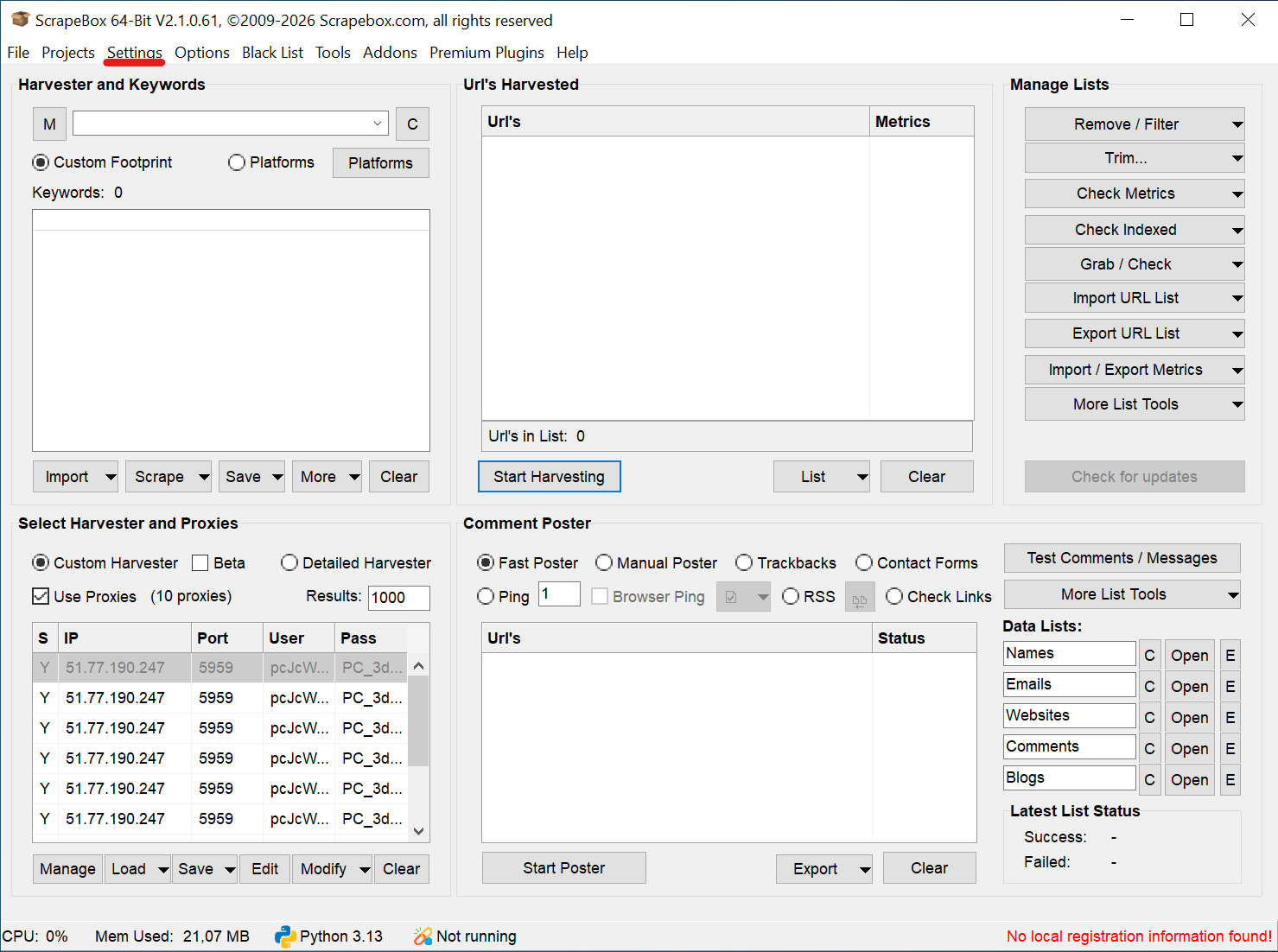
Once your text file is ready, open the main ScrapeBox interface. Locate the Select Harvester and Proxies panel on the bottom left corner of your screen.
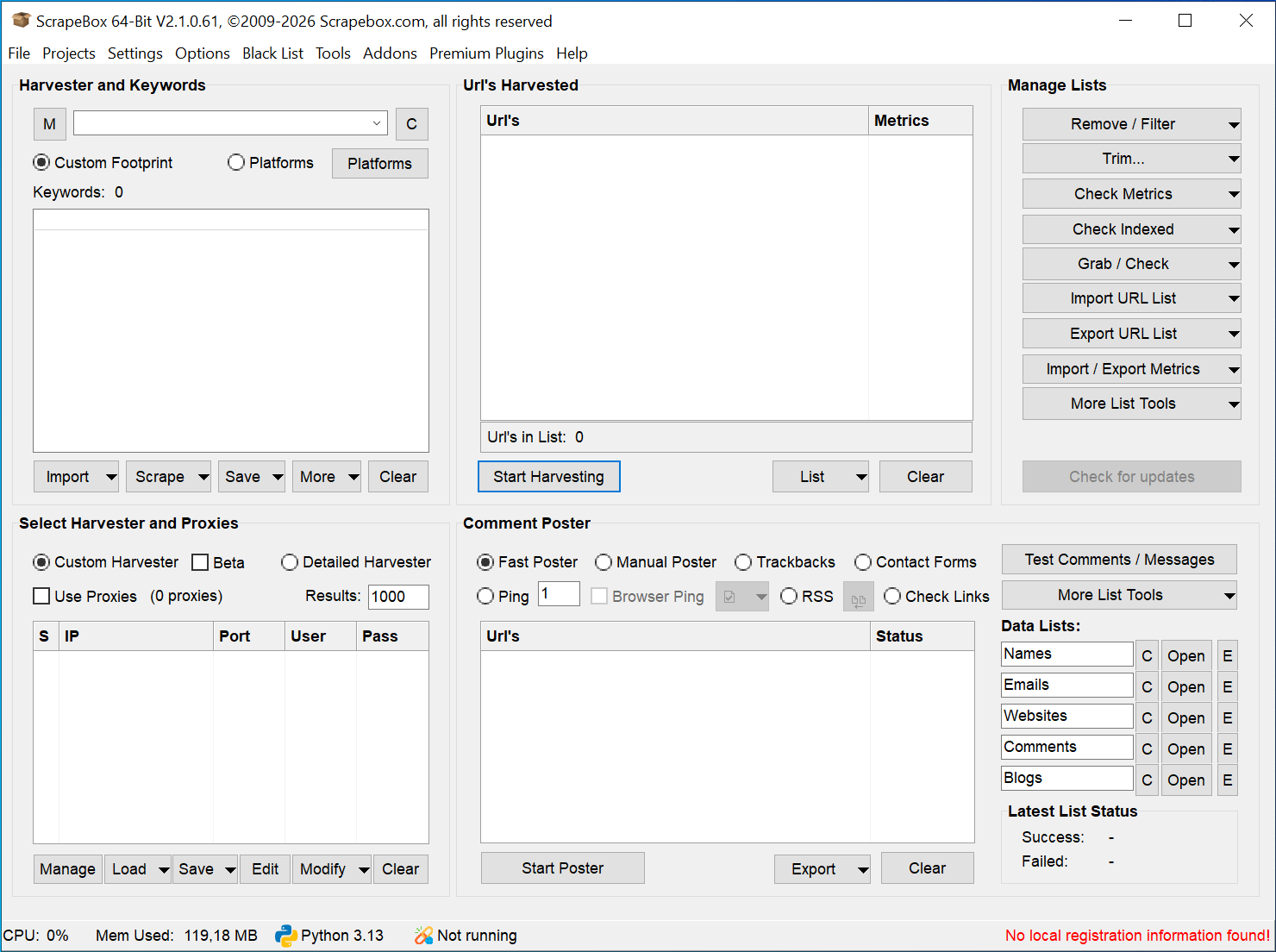
Click the Load button to open the import menu.
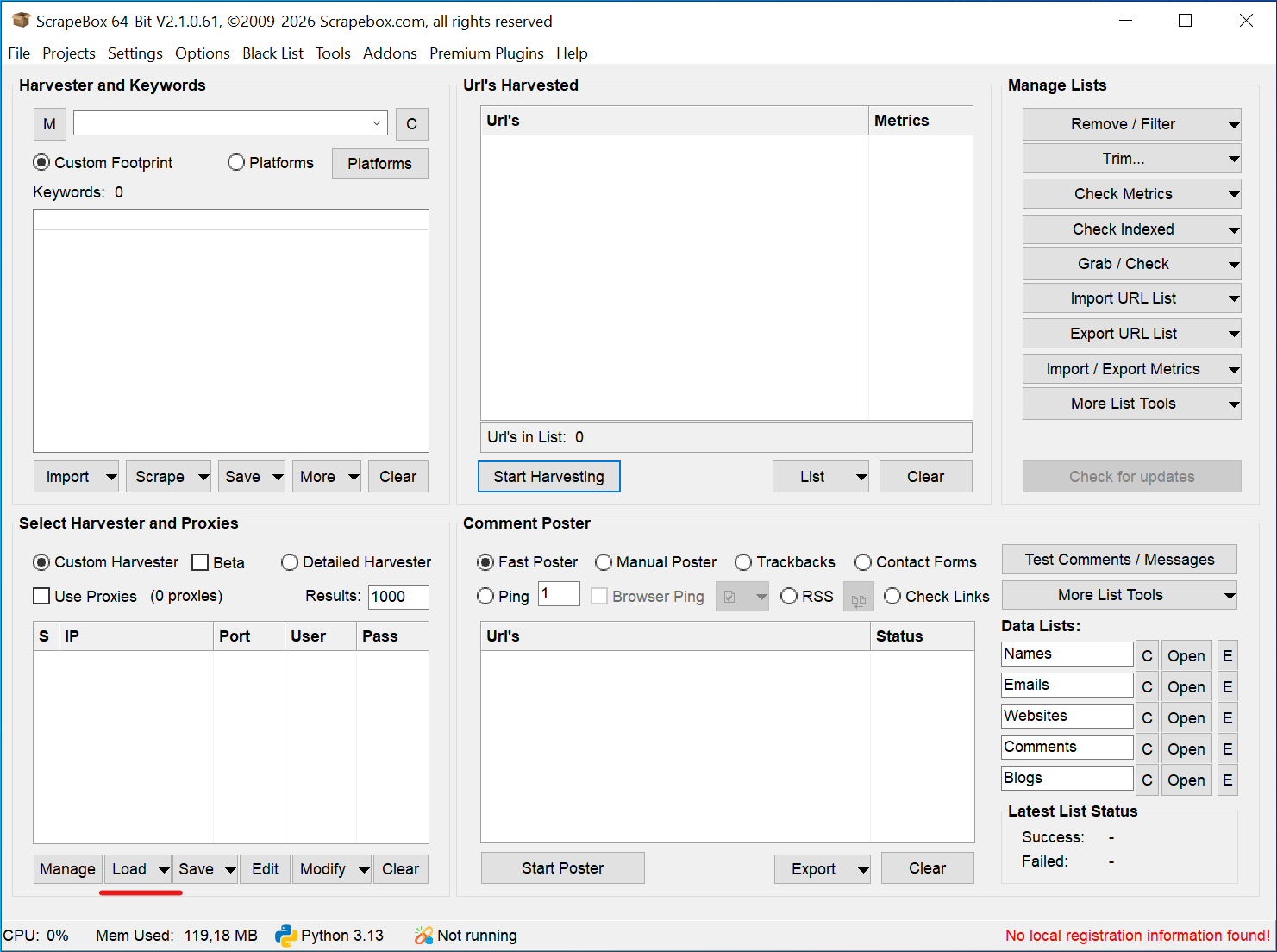
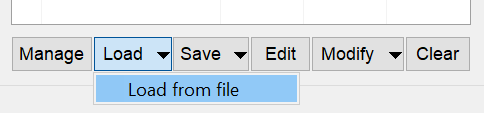
Select Load from file to import your text file directly from your local drive.
The grid immediately populates. You will see your loaded IP addresses, ports, and authentication details separated into neat columns.
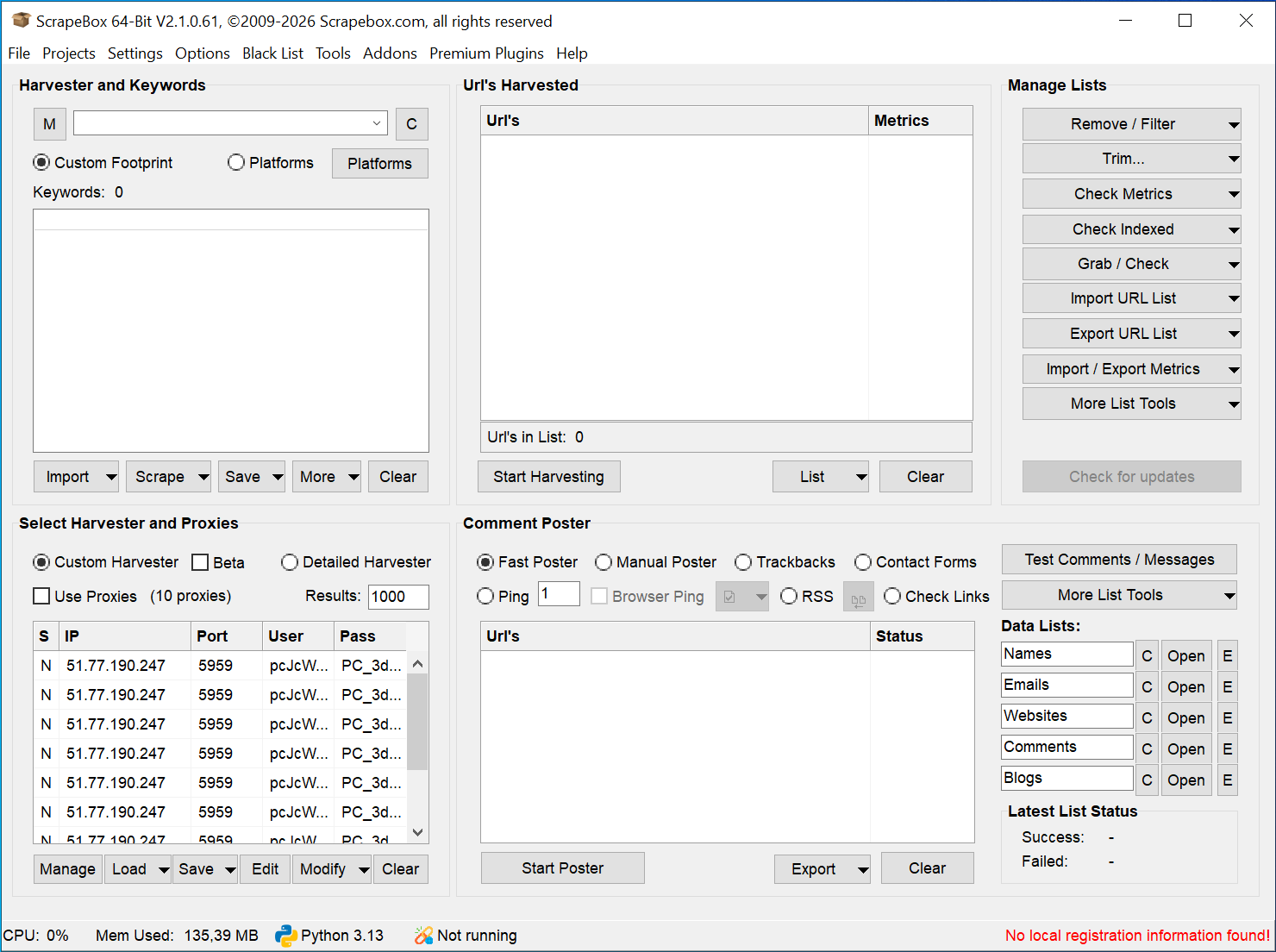
Now, activate the routing layer. Check the Use Proxies box located right above the grid. Missing this specific click is the most common setup failure. If you leave this box unchecked, ScrapeBox ignores your imported list and routes all heavy traffic directly through your exposed local IP.
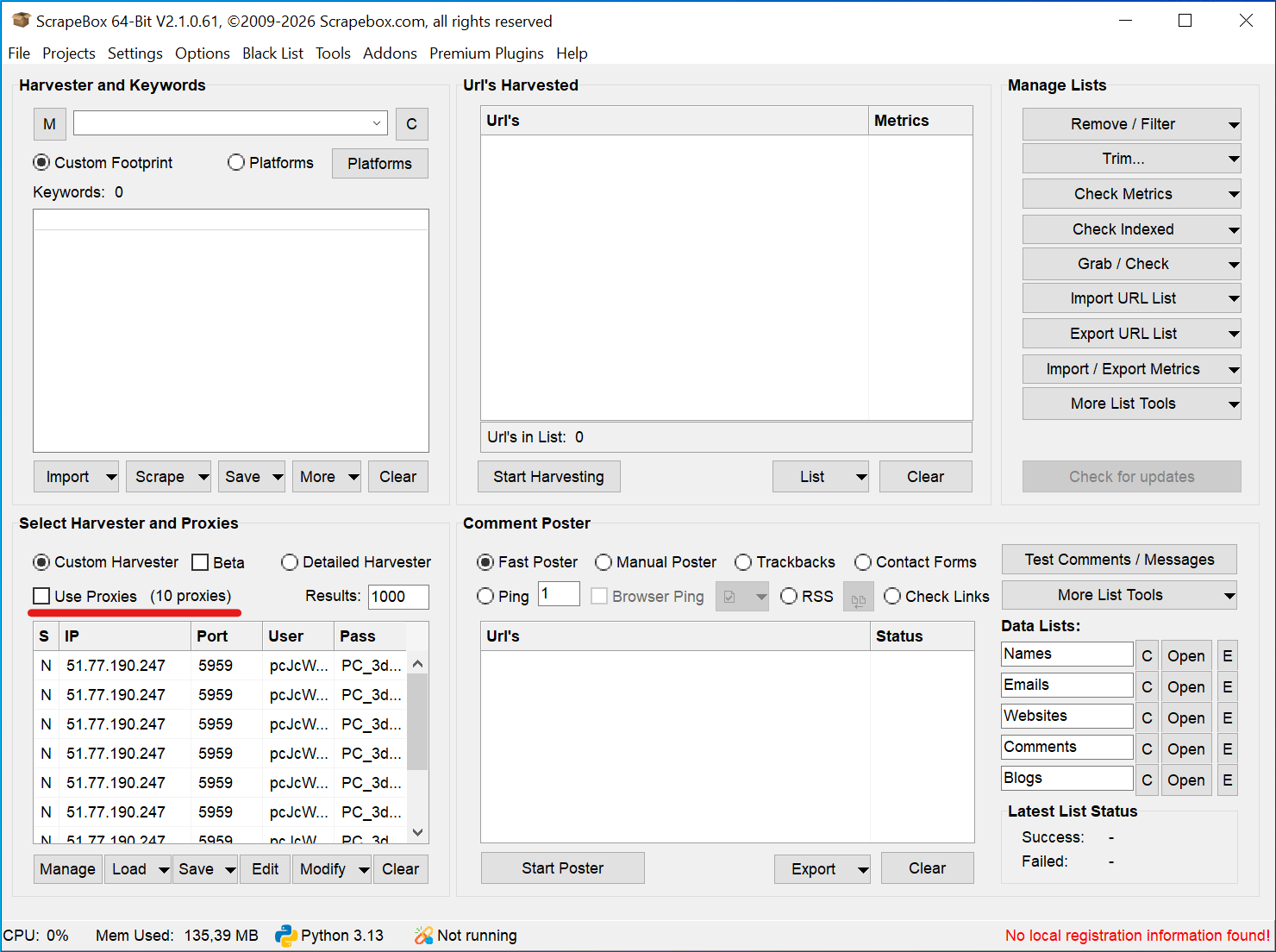
Next, ScrapeBox needs to know your exact connection protocol. The software assumes you use HTTP nodes by default. You can verify this by looking at the 'S' (Socks) column. It marks your current nodes with an 'N' (No).
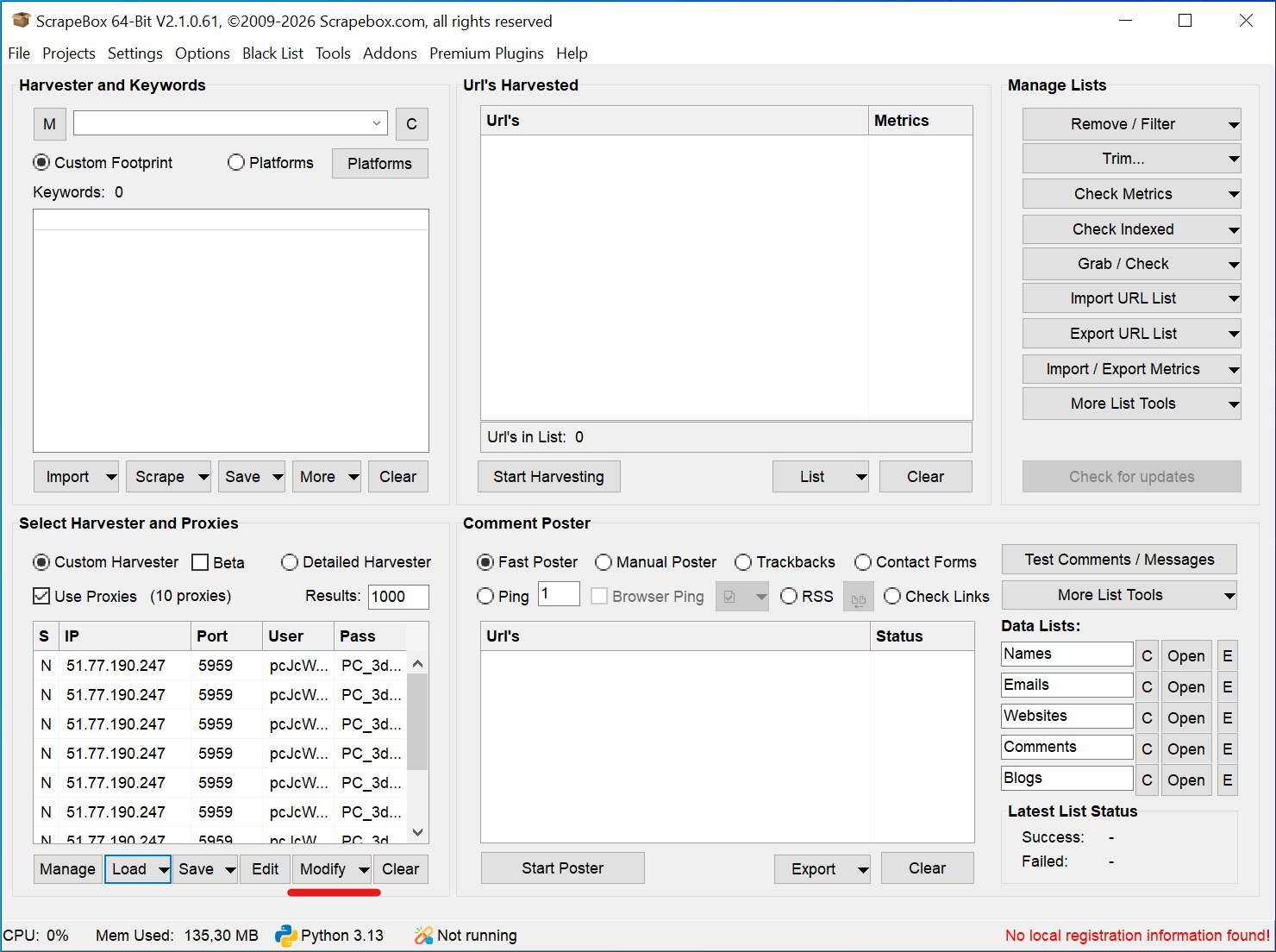
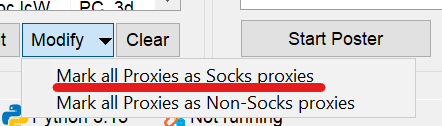
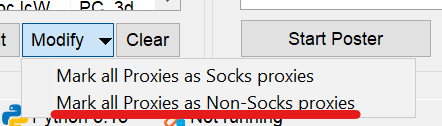
Bought CyberYozh App SOCKS5 proxies? Change this routing parameter inside ScrapeBox immediately. Click the Modify button below the grid. Select Mark all Proxies as Socks proxies.
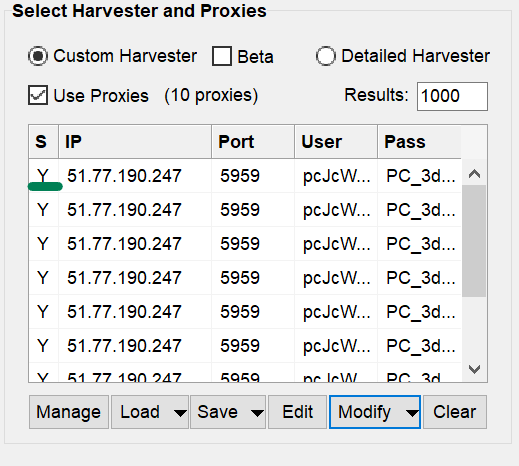
The 'S' column instantly changes to 'Y'. Your SOCKS routing is now fully active.
If you make a mistake or switch back to HTTP nodes, just click Modify again. Select Mark all Proxies as Non-Socks proxies to revert the list back to its default state.
The Backconnect Proxy Testing Trap: Do not test rotating backconnect proxies using the built-in ScrapeBox "Test Proxies" function. The internal tester is designed specifically for static IPs. It expects a consistent TCP handshake response. Because rotating proxies change IPs dynamically at the gateway level, ScrapeBox receives changing parameters and incorrectly flags them as "Failed" or "Dead". To verify rotating networks, simply ensure the Harvester Status reads "Proxies Enabled" and execute a live test scrape to observe the data flow.
Advanced network layer protocols for ScrapeBox
Heavy crawling demands robust network encapsulation. Basic software setups fail because standard connections drop frames under high load. The CyberYozh App architecture provides deep compatibility across multiple transfer layers. You can configure your data pipelines using traditional HTTP or SOCKS5 structures.
For maximum resilience across restrictive corporate firewalls, route your scraping tools through our advanced VLESS (Xray-core) or OpenVPN tunnels. This setup stabilizes the data pipeline entirely. Sockets stay open during heavy keyword harvests. Your software streams data smoothly without hitting unexpected server timeouts.
👉 Secure your network layer - Read more about high-throughput VLESS proxies from CyberYozh App.
Beyond harvesting: Automated account creation and SMS verification
ScrapeBox operates as more than just a harvester. Professional SEO teams use the software to automate profile setups, verify Web 2.0 properties, and run bulk link indexers. These advanced automation tasks run into strict account verification loops immediately. Search engines and blogging platforms demand valid mobile numbers to authorize new accounts.
You can manage this friction natively inside your deployment flow. The CyberYozh App ecosystem features an integrated virtual-number service alongside its proxy network. When ScrapeBox hits a phone verification wall, call our SMS reception API to request an isolated verification code.
Access clean numbers across 140 countries.
Verify profiles on 700+ global platforms including Google and Microsoft.
Utilize real ISP-linked residential numbers for high trust verification rates.
Cancel requests instantly for a full balance refund if an SMS is not delivered.
Automating verification requires secure financial infrastructure. Premium indexing tools, captchas solvers, and platform accounts require separate payment methods. Using a single credit card for fifty distinct accounts flags the financial footprint instantly.
Resolve this risk by generating isolated virtual bank cards directly within your dashboard. These tokenized commercial cards link seamlessly with Apple Pay and anti-detect environments. You allocate specific budgets per task, set strict card limits, and match your payment billing address to your proxy node location perfectly. One profile gets one card. Your automated accounting operations remain safe, discrete, and completely isolated.
👉 Rent virtual phone numbers. Create clean profiles without exposing your personal phone line.
👉 Issue tokenized virtual cards instantly - Automate your platform expenses safely.
Managing CAPTCHA triggers and performance tuning
Even exceptionally clean IPs encounter challenges. Search engines push CAPTCHA walls the moment your request patterns look too uniform or mechanical. Hitting a server exactly every 1.00 seconds is an obvious automation trigger. It leads directly to HTTP 429 errors.
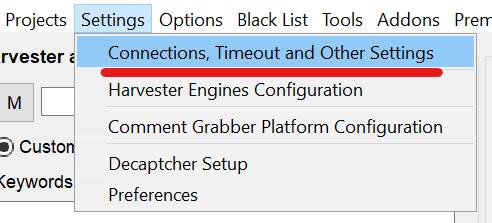
You must mimic natural human browsing behavior accurately. You control this directly inside the ScrapeBox configuration menus. Click Settings on the top navigation bar. Select Connections, Timeout and Other Settings from the dropdown menu. This opens your core performance control panel.
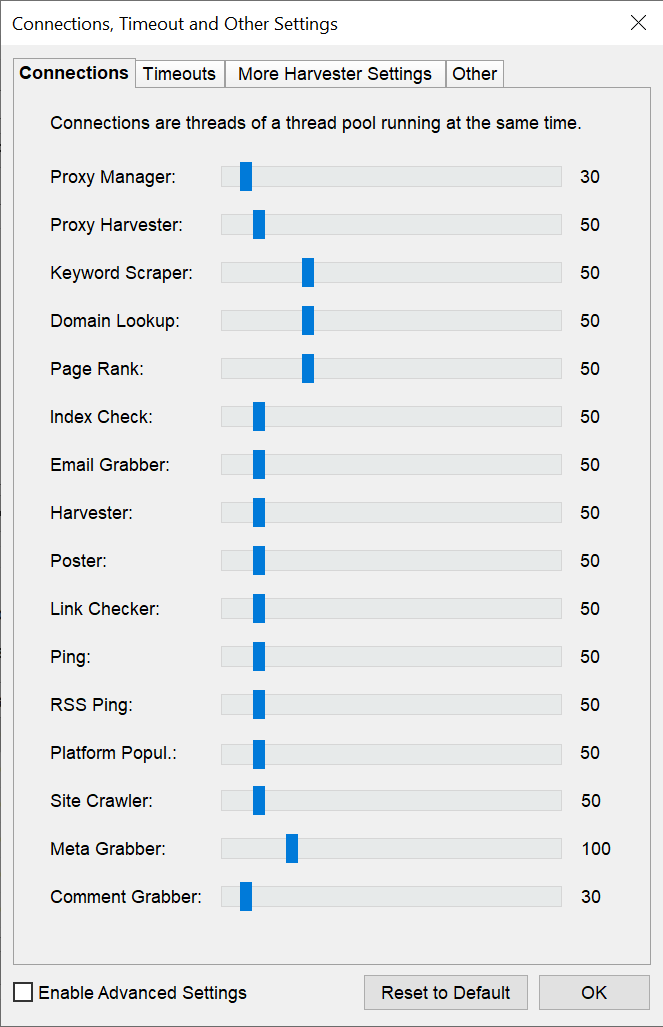
First, look at the Connections tab. This controls your active thread pool running simultaneously. Running 200 concurrent harvester threads through 10 proxies guarantees a block. Lower your Proxy Harvester and Keyword Scraper sliders here to match your available infrastructure. Keep your thread count strictly aligned with your proxy pool size to maintain high trust scores.
Next, switch to the Timeouts tab. A timeout triggers when the software receives no data within your specified seconds. Global proxy networks introduce natural latency due to physical routing distances. If your timeouts are too short, ScrapeBox drops perfectly good connections prematurely. Adjust the Harvester and Proxy Harvester sliders to give remote nodes enough time to respond. You implement exponential backoff principles here to manage network friction efficiently.
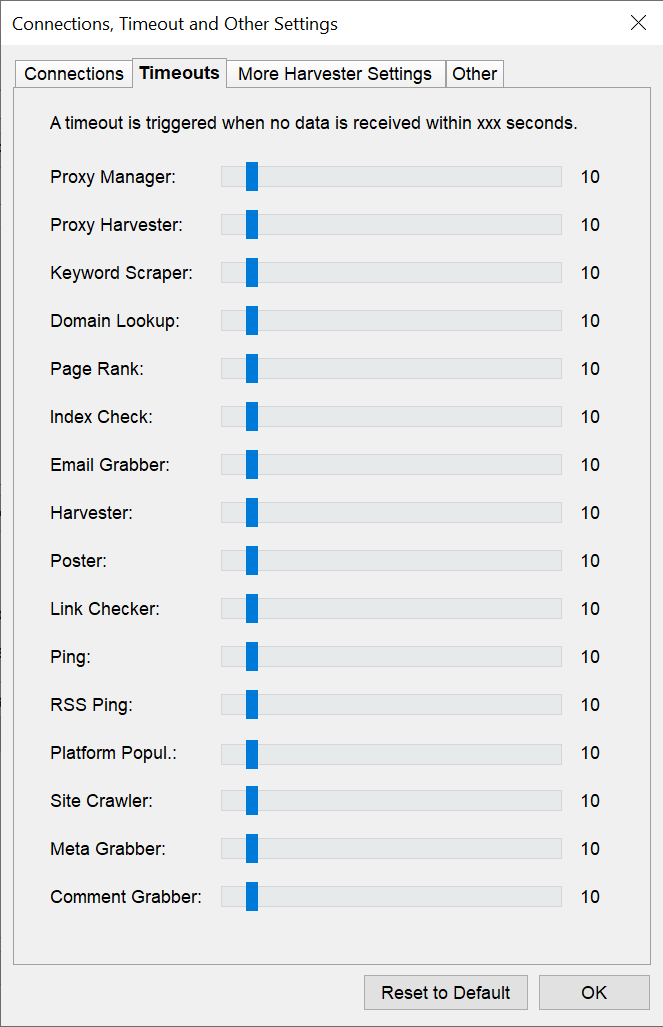
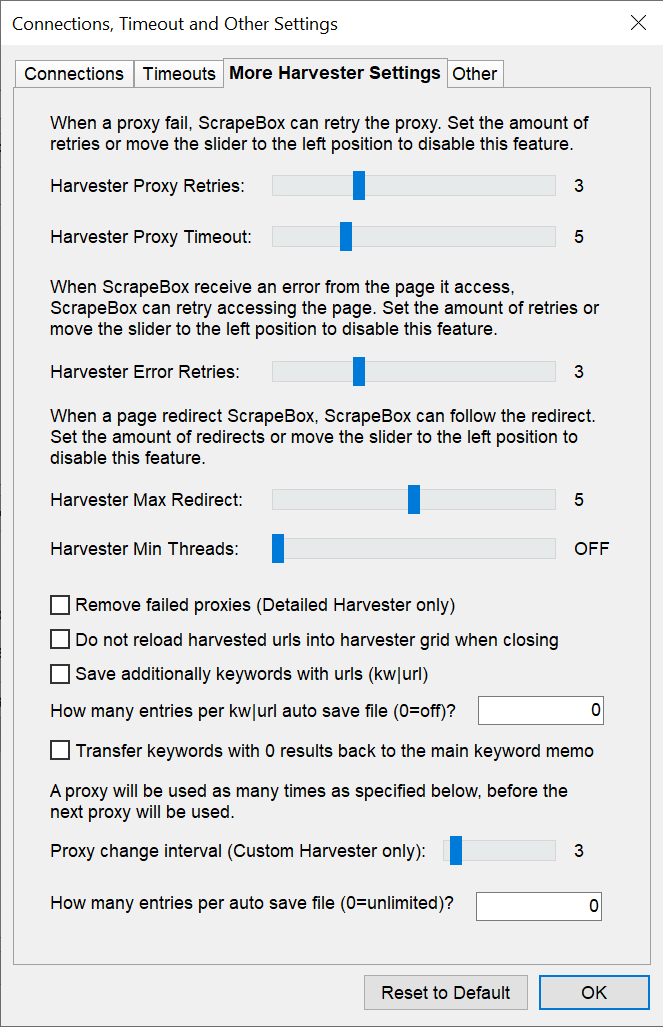
You also need to handle inevitable connection drops gracefully. Open the More Harvester Settings tab. Set your Harvester Proxy Retries to a low number. If an IP fails, ScrapeBox will retry it a few times before discarding it entirely. This tab also houses the crucial Proxy change interval setting. However, if you use rotating backconnect proxies, you must disable the "Remove failed proxies" option. A single dropped packet during a provider gateway IP rotation does not render the entire network invalid.
Look at the bottom of the Other tab. You will see the Enable IPV6 support checkbox. Should you use it? Yes, but conditionally. Legacy security databases map the older IPv4 space aggressively. They filter known ranges heavily. The IPv6 address space remains massive and highly fragmented.
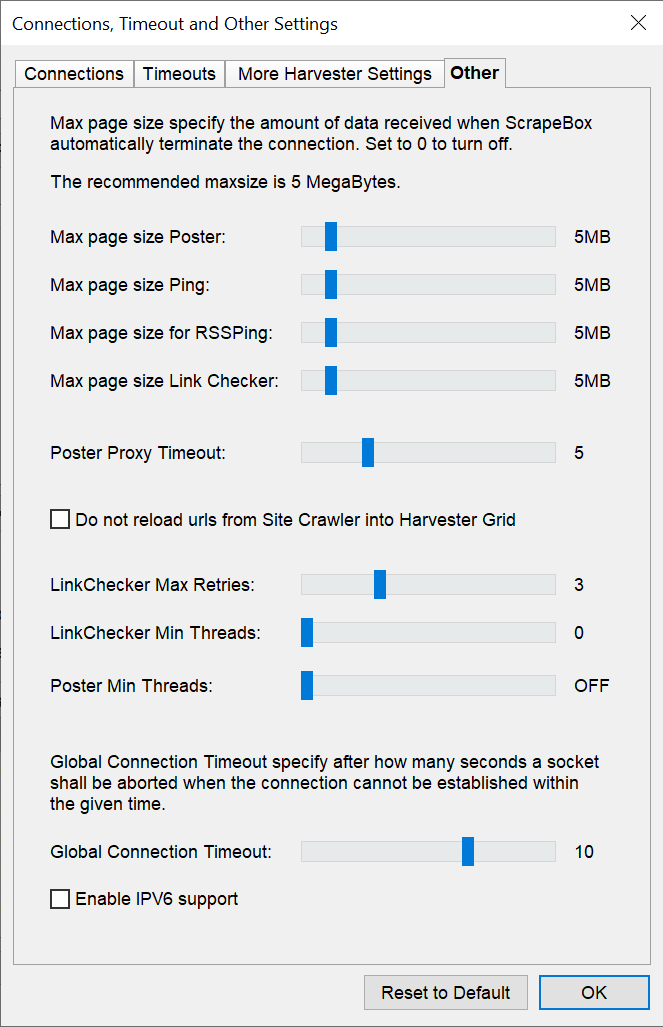
Activating this checkbox allows ScrapeBox to route queries through these newer addresses. This helps you navigate past legacy filters. But your infrastructure must align. If your target platform or your specific proxy nodes do not support IPv6 natively, your requests fail. Turn it on only if your network provider explicitly supports dual-stack routing. Otherwise, leave it unchecked.
Protocol disparities: IPv4 vs IPv6 proxies for ScrapeBox harvesting
You start a harvest. Google drops your IPv4 connection instantly. You swap the proxy list. The new IPv4 blocks fail too. Then you route that identical query stack through an IPv6 configuration. The results populate instantly.
Legacy anti-bot databases map the older IPv4 space aggressively. They monitor the ranges constantly. They filter them heavily. But the IPv6 address space remains massive. Many corporate security algorithms apply loose filter parameters to IPv6 traffic because blocking a single IPv6 node can accidentally disconnect vast blocks of legitimate mobile users.
Your software setup must support flexible routing to survive these mismatches. Relying on a strict static configuration guarantees downtime. Search platforms often ban whole commercial IPv4 subnets while leaving their IPv6 endpoints completely open. Build your operational blueprint to handle this network discrepancy natively.
Configure dual-stack routing to satisfy different platform filtering rules.
Route your heavy automation loops through the massive IPv6 address space to stay off old legacy blacklists.
Maintain exceptionally high proxy success rates using automatic protocol failovers when IPv4 nodes trigger blocks.
Mismatched locations also trigger filters. If you harvest local business listings in Chicago, do not route your traffic through a server in Tokyo. Utilize granular city and ZIP-code targeting. Align your network location directly with your localized search footprints. This prevents regional blocks.
Sometimes platforms force a verification check regardless of your pristine footprint. Do not let this stall your extraction. Connect a third-party CAPTCHA solving API directly inside the ScrapeBox settings menu. The software automatically detects the image challenge, sends it to the remote solver, inputs the correct token, and resumes harvesting without manual intervention.
And if search filters remain highly aggressive, your session length is likely the problem. A single IP downloading thousands of pages looks suspicious. Switch your CyberYozh App rotation rules. Move from sticky sessions to automatic IP changes on every single request. Ensure you rotate your User-Agent headers simultaneously to complete the browser impersonation. This distributes the heavy load completely and prevents any single node from accumulating a high risk score.
Scale your SEO automation with the CyberYozh App ecosystem
An automated scraper remains only as effective as its underlying network layer. CyberYozh App provides a comprehensive web automation ecosystem to fuel your entire search engine optimization workflow. You pair your ScrapeBox instances directly with an enterprise-grade, privacy-first infrastructure.
Scalable proxies: Route heavy automation traffic through static ISP nodes, dynamic rotating residential pools, dedicated LTE/4G/5G mobile proxies, or low-latency datacenter hosting.
Identity protection: Maintain absolute operational confidentiality with a strict, certified no-logs traffic policy.
Localized scraping: Access regional markets using city and ZIP-code routing across 100+ countries.
24/7 technical help: Chat with real support agents instantly to optimize your scraping parameters.
Stop letting platform filters destroy your crawling efficiency. Transition your setup to a high-trust, cost-effective infrastructure built natively for production pipelines.
👉 Connect CyberYozh App. Get high-trust proxies and run your scraper safely.
FAQs about ScrapeBox proxies and web scraping
Do I need proxies for ScrapeBox for small harvests?
Yes. Search engines track network behavior constantly. They identify sterile automation signatures instantly. Even a small ten-thread harvest burns your local IP within minutes. Using a proxy for ScrapeBox secures your underlying hardware identity. It places a physical network node directly between your software and the target server. This ensures your data keeps flowing without sudden 503 blocks.
Exactly how many proxies for ScrapeBox do I need?
The math is strict for static IPs. Keep a 1:1 ratio between your active harvester threads and your dedicated proxies for ScrapeBox. Running 50 simultaneous connections requires 50 clean IPs. Pushing heavy traffic through a tiny list guarantees a 429 block. If you deploy a rotating residential network, the massive IP pool handles concurrency automatically on the gateway level. You just need to monitor your bandwidth limits.
Which is the best proxy for ScrapeBox keyword scraping?
Rotating residential networks deliver the highest success rates for heavy harvesting operations. They change your IP automatically on every single request. This prevents rate-limit flags entirely. Datacenter nodes fail instantly on strict search engines because security algorithms spot their commercial hosting ASNs immediately. Match your network infrastructure directly to your volume.
Are rotating IPs the best private proxies for ScrapeBox account creation?
No. Profile creation requires absolute session consistency. If your IP address mutates midway through a registration form, the platform flags the network anomaly. It drops your session immediately. Deploy static ISP nodes instead. They provide the permanent digital address you need to register and manage Web 2.0 properties safely over long periods.
How does protocol choice affect proxy setup in ScrapeBox?
SOCKS5 handles heavy data transfer much better than HTTP. It operates at a lower network layer. It drops fewer packets under heavy load. Your active connections stay alive longer. ScrapeBox supports both protocols natively. If your provider supports it, always select the "Mark all Proxies as Socks proxies" option in your dashboard.
How to get proxies for ScrapeBox that avoid immediate search engine filters?
Never load a raw static IP list blindly into your software. Even premium network pools occasionally cycle flagged nodes. Buy proxies for ScrapeBox from a provider that allows deep pre-flight auditing. Run your endpoints through the CyberYozh App Fraud Score checker before you launch the harvester. Drop any node scoring above 75 risk points to protect your automated campaigns.
How do I verify accounts when using a proxy for ScrapeBox?
Search engines demand valid phone numbers to authorize new profiles. You manage this natively using the CyberYozh App ecosystem. Call our programmatic SMS reception API directly. You rent real ISP-linked residential numbers to verify accounts across 700+ platforms without compromising your personal phone line.
What is the most cost-effective way to buy proxies for ScrapeBox?
Avoid unlimited fixed-price datacenter plans for harvesting. They suffer from massive abuse and drop connections constantly. Instead, deploy a pay-as-you-go rotating residential pool. CyberYozh App starts at $0.9 per gigabyte. There are no monthly minimums. You pay only for the data your scraper actually pulls. This keeps your network highly stable without draining your budget.